For College and Graduate Students
The AI study assistant
that does the work.
Zentor is the AI agent built for students drowning in syllabi, papers, group projects, and internship apps. Describe what you need in plain English. We execute it end to end. No setup, no scripting, no steep learning curve.

The problem
Sound like your semester?
Coursework piles up faster than you can plan
Weekly readings, problem sets, quizzes, and projects stack on top of each other. You spend more time tracking what's due than actually understanding the material.
Writing eats your week
Research papers, literature reviews, and personal statements stall on structure, citation formatting, and revision loops. The actual thinking gets squeezed into the last 12 hours.
Group projects collapse on coordination
Vague responsibilities, missed updates, and last-minute scrambling. The group chat becomes a graveyard of unread messages by week two.
Internship prep feels like a guessing game
You rewrite your resume for every application and walk into interviews unsure what employers actually want to see on the page.
Your tools don't talk to each other
Calendar in Google, classes in Canvas, notes in Notion, deadlines on a sticky note. Simple planning becomes a 30-minute scavenger hunt.
You don't need another study app. You need an agent that finishes the work.
Get started Sign in or create an account to get started.Why Zentor
Made for student workflows
An agent, not a chatbot.
Zentor is built to carry academic tasks forward from start to finish: organizing deadlines, summarizing readings, improving drafts, coordinating shared work, and supporting job prep. Not just answering questions.
Fast to start, no setup wall.
No automations to configure. No Python to write. No technical systems to learn. Open the app, type what you need, and you're shipping useful output in your first session.
Privacy by design.
Zentor follows a local-first approach. Your class materials, application drafts, and personal planning data stay under your control instead of being treated like platform inventory.
Friendly to student budgets.
$20/month, less than one tutoring session, with 1,000 credits each billing period.
By the numbers
"I uploaded all five of my syllabi and Zentor added every deadline to my calendar with the right weights and reminders. It would have taken me two hours to do by hand.
"My group project chat used to die in 48 hours. Now Zentor nudges anyone who's been silent and posts a Sunday summary. We landed our last project two days early.
"I tailor each application in 10 minutes instead of 90. The diff view shows exactly what changed and why, so I'm learning how to write better bullets.
"Every morning at 7 I get one message: today's classes, this week's deadlines, three things to do. I stopped checking Canvas at 11 PM in panic.
Not just suggestions
We execute,
not just suggest.
Most AI tools give you a draft and call it done. Zentor runs the full workflow: from reading your syllabi to filing actions on your calendar to coordinating your group chat. Less repetitive admin so you can focus on learning, decision-making, and results that matter.
Adapts to your study style.
Some days you need a quick reminder. Other days you need help untangling a brutal week. Zentor adapts instead of forcing you into a rigid workflow. Review drafts before anything is sent, then graduate to autopilot for the routines you trust.
Real examples
Real prompts. Real results.
Here are practical workflows students run with Zentor every week. Browse more on our use cases page.
Daily Academic Briefing
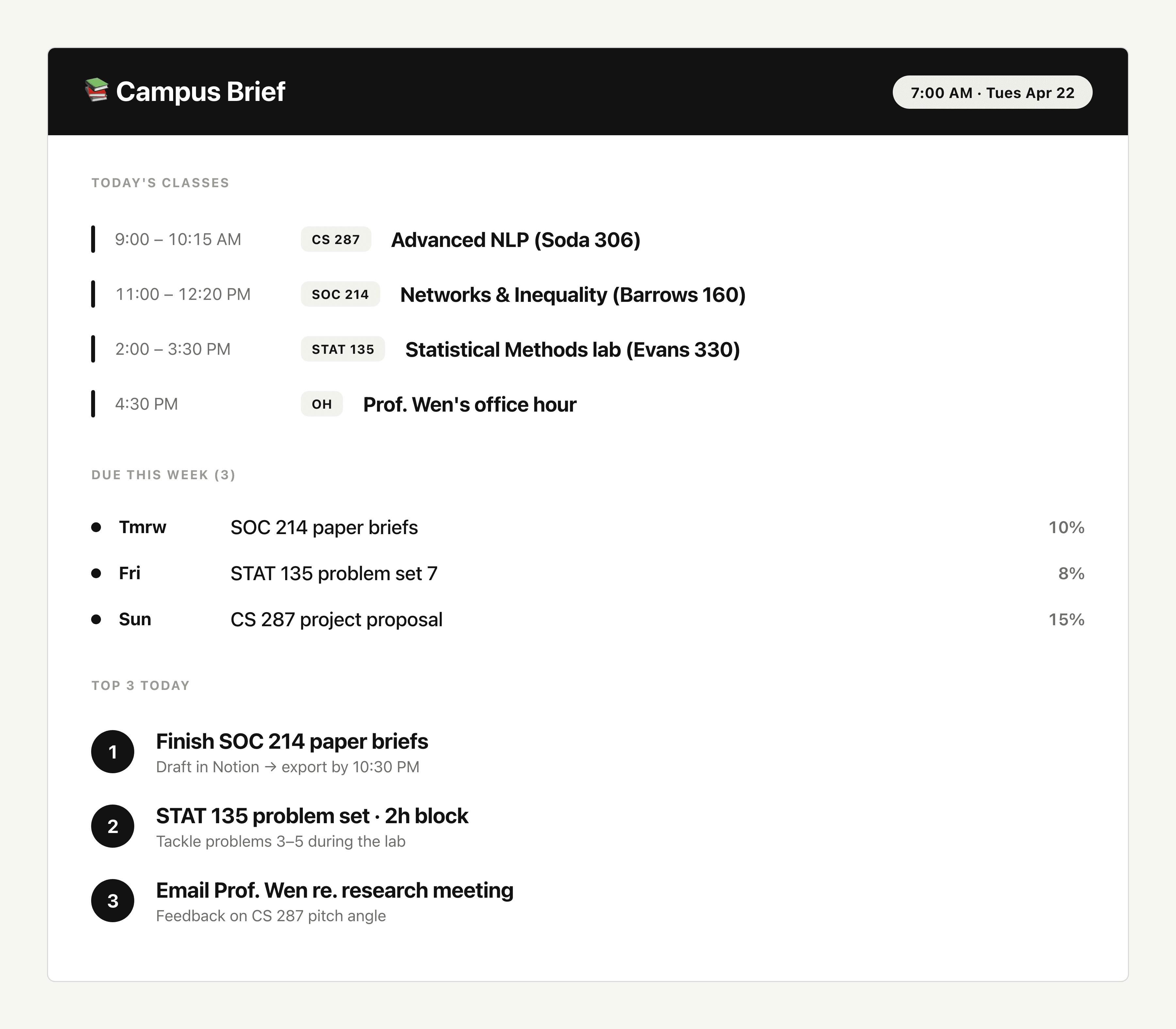
"Tell Zentor: "Every weekday at 7 AM, scan my Google Calendar, Canvas, and email. Send me today's classes, deadlines for the next 7 days, and the top 3 things I need to do today.""
A clean morning brief lands by 7 AM: today's class schedule with locations, assignments due in the next 7 days ranked by deadline, unread Canvas announcements summarized, and a 3-item action list. You start the day knowing exactly what matters.
Syllabus Deadline Extraction
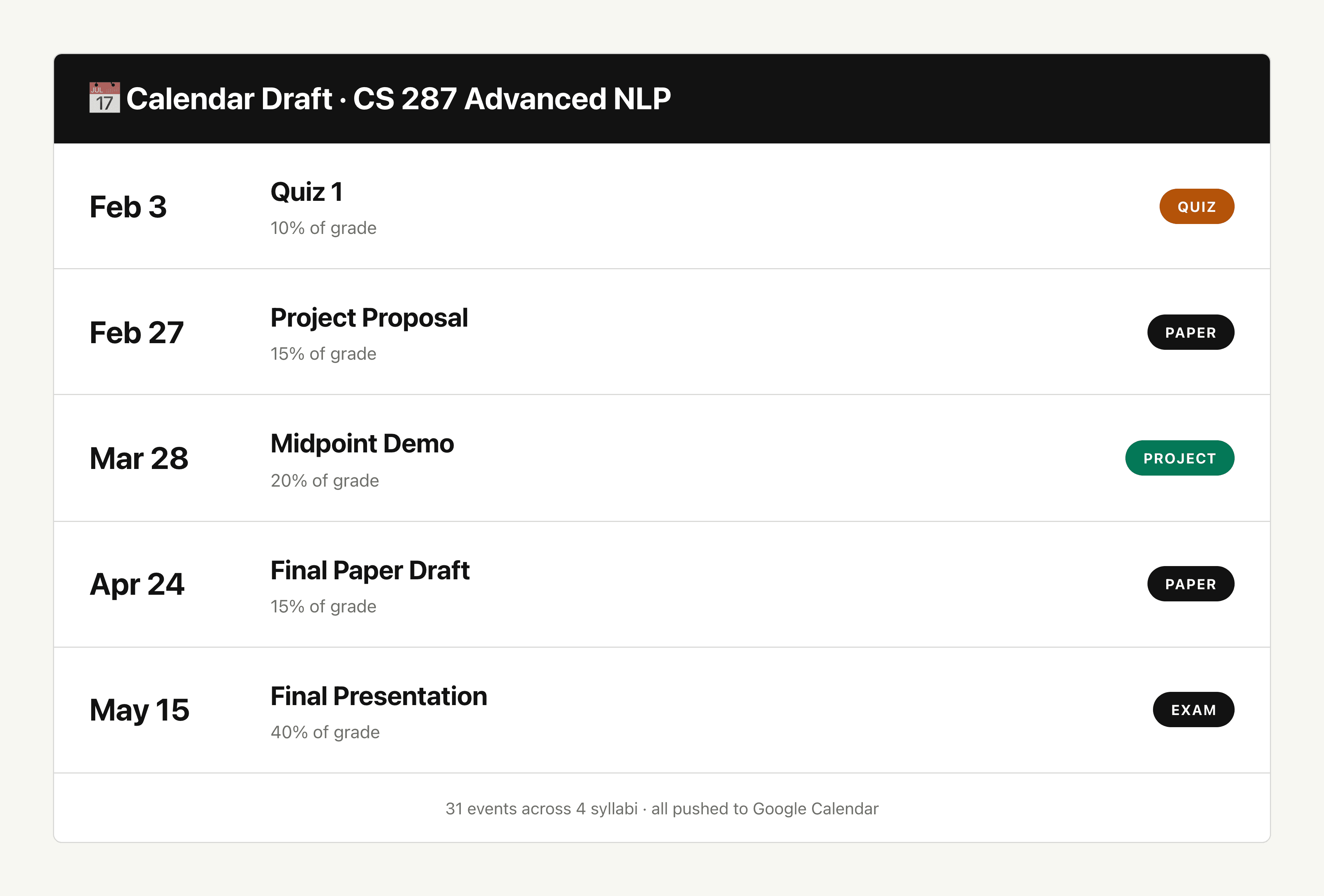
"Tell Zentor: "Read these four PDF syllabi I just uploaded. Pull every quiz, exam, paper, and project deadline with their grade weights. Add them all to my Google Calendar with reminders one week and one day before.""
Zentor parses each syllabus, extracts every graded item with its due date and weight, dedupes overlapping dates, and creates a calendar event for each one with the right reminder cadence. Your full semester appears in your calendar in under two minutes.
Research Paper Summaries
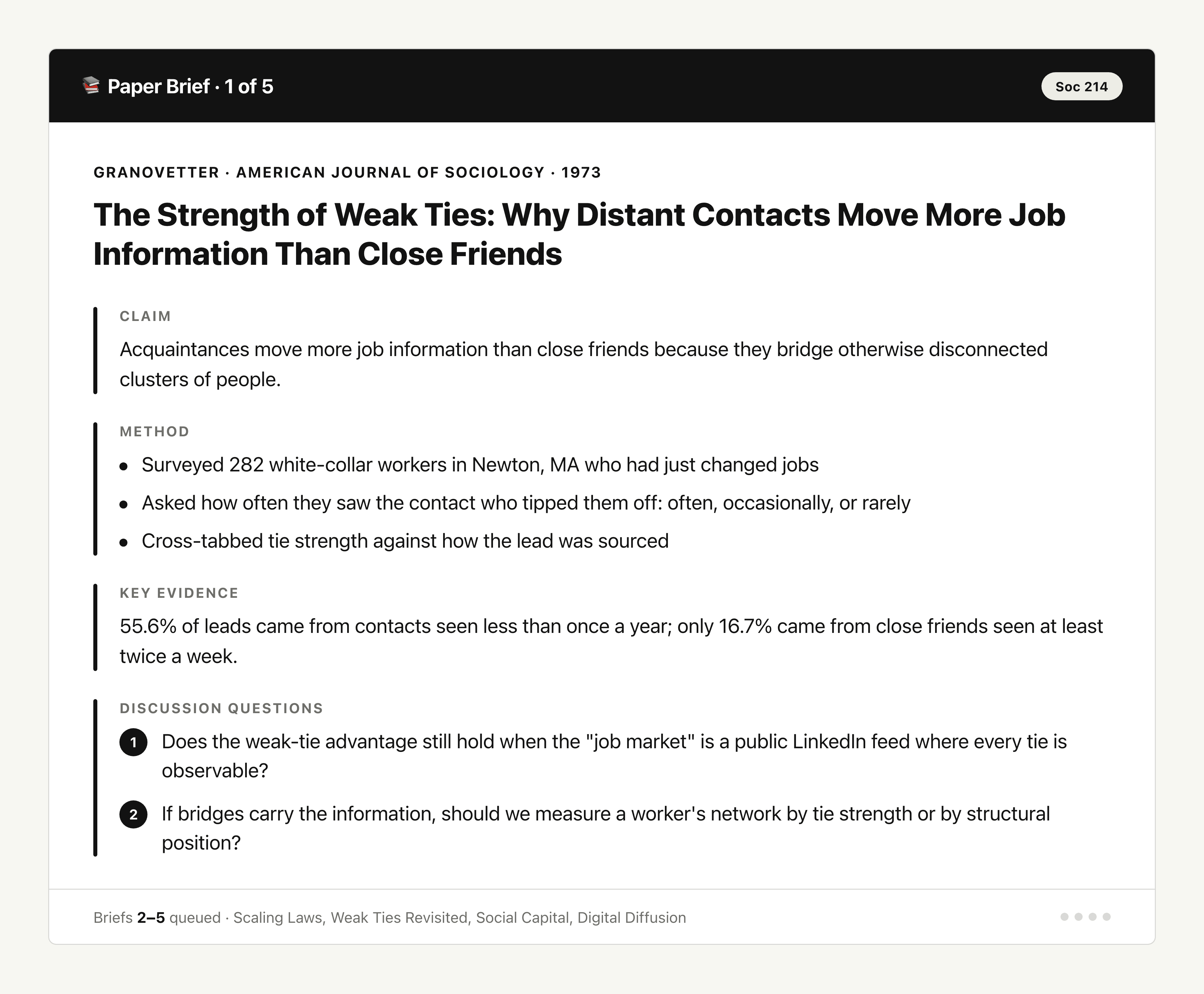
"Tell Zentor: "Here are five PDFs I need to read for tomorrow's seminar. For each one, give me the main claim, the method, the key evidence, and two discussion questions I can bring to class.""
Zentor reads each PDF and returns a structured brief per paper: thesis in one sentence, methodology in three bullets, the strongest evidence cited, and two original discussion prompts. You walk into seminar ready to contribute, not just nod.
Group Project Coordinator
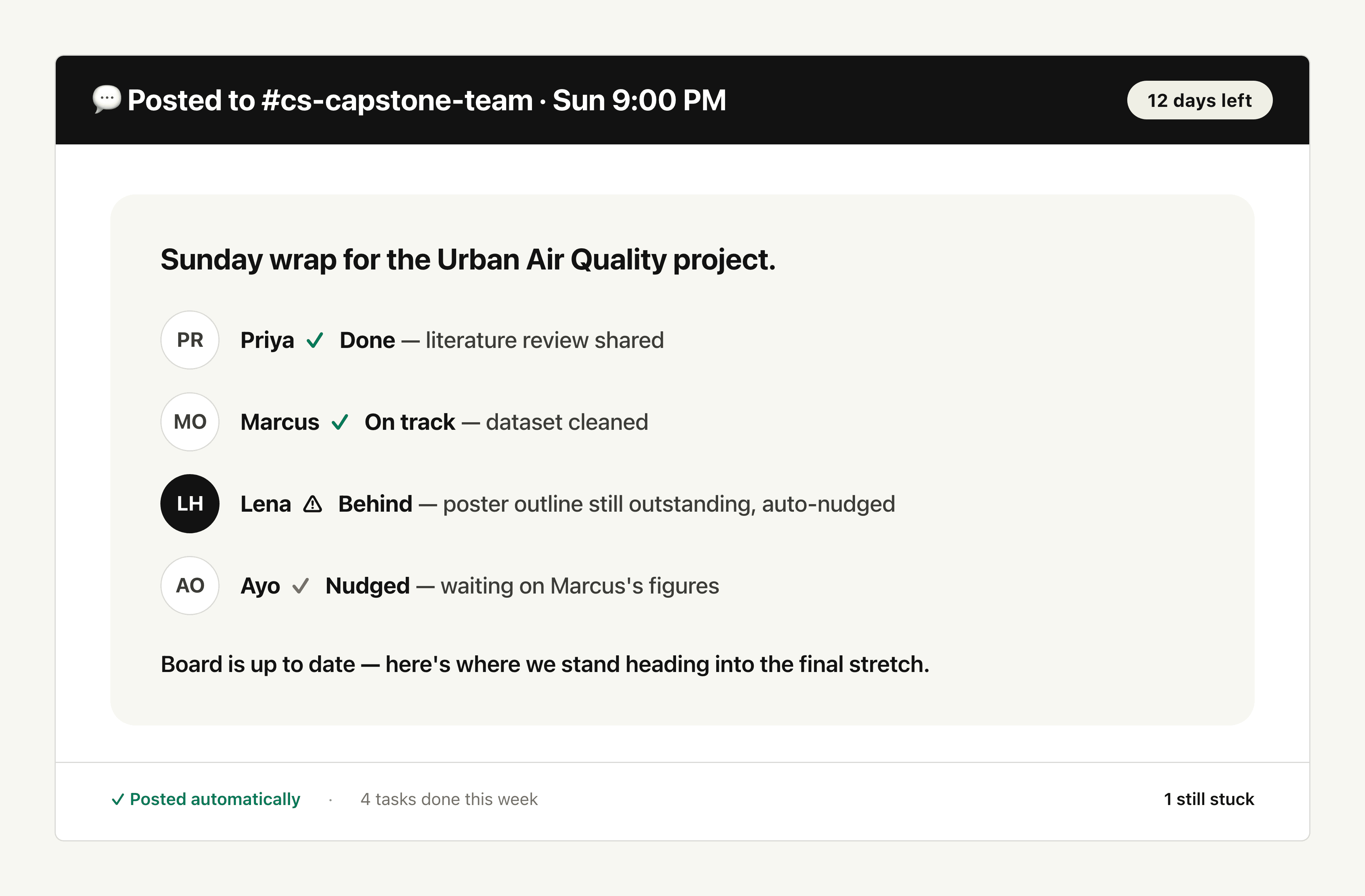
"Tell Zentor: "We have four people on this project due in 12 days. Track who owns what, ping anyone who misses an update for two days, and post a Sunday night progress summary in our group chat.""
Zentor maintains a shared task board, sends individual nudges when someone goes silent, and posts a Sunday digest showing what's done, what's blocked, and who's behind. Group projects start landing on time without you becoming the de facto manager.
Internship-Ready Resume Polish
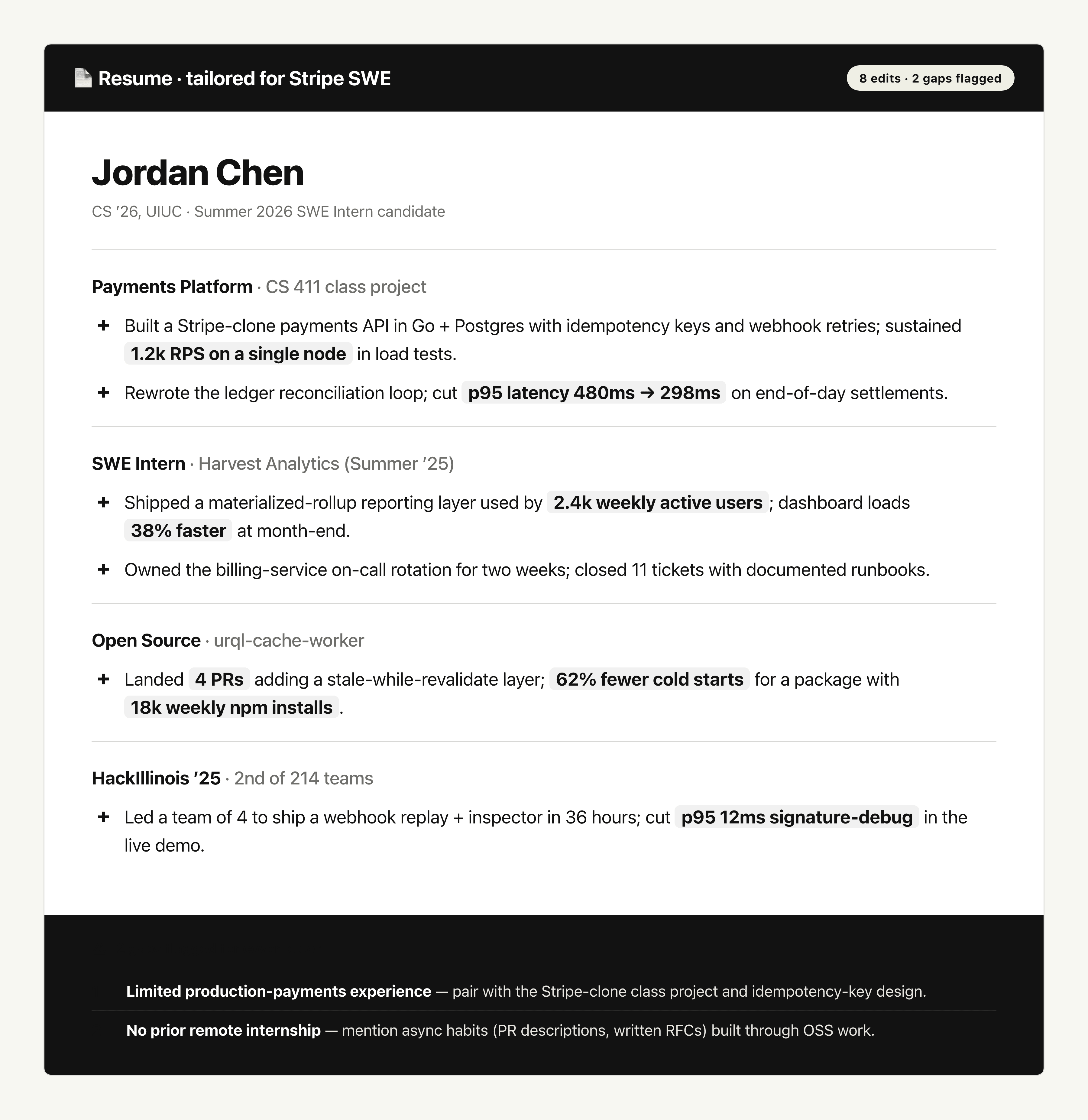
"Tell Zentor: "Here's my resume and a job description for a summer SWE internship at Stripe. Rewrite my bullets to match the role, quantify everything I can quantify, and flag any experience gaps I should explain in a cover letter.""
Zentor returns a tailored resume with quantified bullets aligned to the job description, a side-by-side diff showing every change, and a short list of gaps with suggested talking points for your cover letter and interview. Each application becomes a 10-minute job, not 90.
Use cases
AI agent use cases for students
Step-by-step use cases you can start from, each with a live example.
Syllabus Organizer
Upload Your Syllabus to Google Calendar
SEO Action Plan Generator
Turn a site URL or crawl notes into a prioritized 30/60/90 SEO action plan — not another score dashboard.
PowerPoint Translator
Translate an entire PowerPoint and keep the layout — then download the deck you can actually present.
SEO Audit Presentation
Data In, Client-Ready Deck Out
AI Marketing Strategy Generator
Turn a product, audience, and goal into a marketing strategy doc you can edit and share.
Word to PowerPoint with AI
Create One Clear Deck
Integrations
Best AI agent integrations for students
These integrations connect Zentor to the tools this audience already uses for daily work.
Deep Research
Synthesize multiple sources into one answer
Provides a core capability behind this workflow
Google Workspace
Read and write spreadsheets
Pull context from this system
Claude
Handles reasoning and drafting
Handles reasoning and drafting for this workflow
Claude Fable 5
Handles reasoning and drafting
Handles reasoning and drafting for this workflow
FAQ
Common questions
How is Zentor different from ChatGPT or Notion AI?
ChatGPT answers questions. Notion AI organizes pages. Zentor is built around student workflows: it reads your syllabi, files actions to your calendar, coordinates group chats, and follows multi-step tasks to completion. Instead of giving you another draft to manage, it executes the work end to end.
Is my school data and personal information safe?
Yes. Zentor runs in an isolated workspace under your control. Class materials, application drafts, and personal planning data are never pooled with other users or used to train third-party models. You retain ownership of every file you upload.
Do I need any coding or setup skills?
No. If you can write a class email, you can use Zentor. There's no flow chart to draw and no script to write. Just describe the goal in plain language, give it the right access, and it gets started.
Can I review what Zentor does before it acts?
Yes. By default Zentor saves drafts and proposed actions for your approval before sending emails or updating files. Once you trust a workflow, you can switch it to autopilot for the tasks you want hands-off.
Which tools does Zentor connect with for school work?
Google Workspace (Gmail, Calendar, Docs, Drive), Notion, Slack, Telegram, Obsidian, and PDF and Word file imports. Canvas and Blackboard support is on the roadmap based on student demand.
How much does Zentor cost for students?
$20/month, with 1,000 credits each billing period. See our pricing page for the full breakdown.
More room for learning,
less time on admin.
Join the students who reclaimed their semester. No setup, no learning curve, no expensive tutoring. Just a study assistant that does the work.
Get startedSign in or create an account to get started.