For Busy Professionals
The AI productivity agent
for work you can't keep up with.
Zentor is the AI productivity agent built for professionals drowning in email triage, meeting follow-up, and cross-team coordination. You describe the goal in plain English. We execute the work, end to end. No flow charts, no scripting, no per-task fees.

The problem
Where your week actually goes
Your inbox is a part-time job
You spend 2 to 3 hours a day sorting, prioritizing, and replying to email. The queue never shrinks. Important threads get buried while you answer the same shipping question for the third time.
Meetings create more work than they resolve
Every call produces decisions, action items, and loose commitments. Follow-up depends on someone manually writing summaries, chasing owners, and pinging Slack until things move.
Context lives in too many tools
Important details split across Gmail, Slack, Calendar, Notion, Sheets, and Drive. Even a simple task starts with ten minutes of hunting before you can begin.
Recurring work still runs by hand
Weekly status updates, customer follow-ups, document filing, and handoffs repeat with small variations. Rule-based automation can't handle the exceptions, so you handle them yourself.
Tools are overbuilt for what you actually need
Zapier punishes you with per-task fees as you scale. Make wants you to become a workflow architect. You just want the work done, not another tool to learn.
You don't need another dashboard. You need an AI that finishes the work.
Get started Sign in or create an account to get started.Why Zentor
Built for real operational work
Execution, not workflow design.
You don't have time to map a hundred-step flowchart. Describe the outcome in plain English. Zentor figures out the steps, runs the task, and reports back when it's done.
Flexible enough for ambiguous work.
Real work doesn't start with a clean trigger and a fixed rule. Zentor handles requests that vary, language that's inconsistent, and exceptions that are normal in operational work. A client asks for a status update over email, a Slack DM, and in the weekly call — Zentor treats all three as the same request instead of needing three separate automations.
Local-first privacy by default.
Your sensitive emails, documents, and internal data stay in an isolated workspace. Never pooled, never used for third-party model training, never shared. You own every artifact.
Pricing that doesn't punish growth.
$20/month, with 1,000 credits each billing period. Add more credits when you need them.
By the numbers
"Zentor cut my Monday triage from 90 minutes to 8. It pre-categorizes my inbox, drafts replies for routine asks, and flags only the threads that actually need me.
"I run a daily 8 AM briefing pulling Gmail, Calendar, Slack, and Linear. I used to skim five tabs every morning. Now I read one message and know my day.
"Every meeting now ends with action items in our tracker automatically. We stopped losing commitments in week-old meeting notes.
"The Friday status tracker alone saves me 3 hours every week. I used to chase 14 people on Slack. Zentor does it and updates the sheet for me.
A better fit than rule-only automation
We execute,
not just plan.
Traditional automation works when every trigger and output is predictable. Real work is rarely that tidy. Zentor runs the entire workflow for you, from parsing email to drafting replies to filing the result, in tasks where language matters, priorities shift, and exceptions are normal.
Adoption without friction.
No code. No flow diagrams. No new operating model to learn. An individual operator, founder, manager, recruiter, or consultant can get value in the first session and refine usage over time. Control stays with you with review-first mode, then graduate to autopilot when ready.
Real examples
Real prompts. Real results.
Here are practical workflows professionals run with Zentor every day. Browse more on our use cases page.
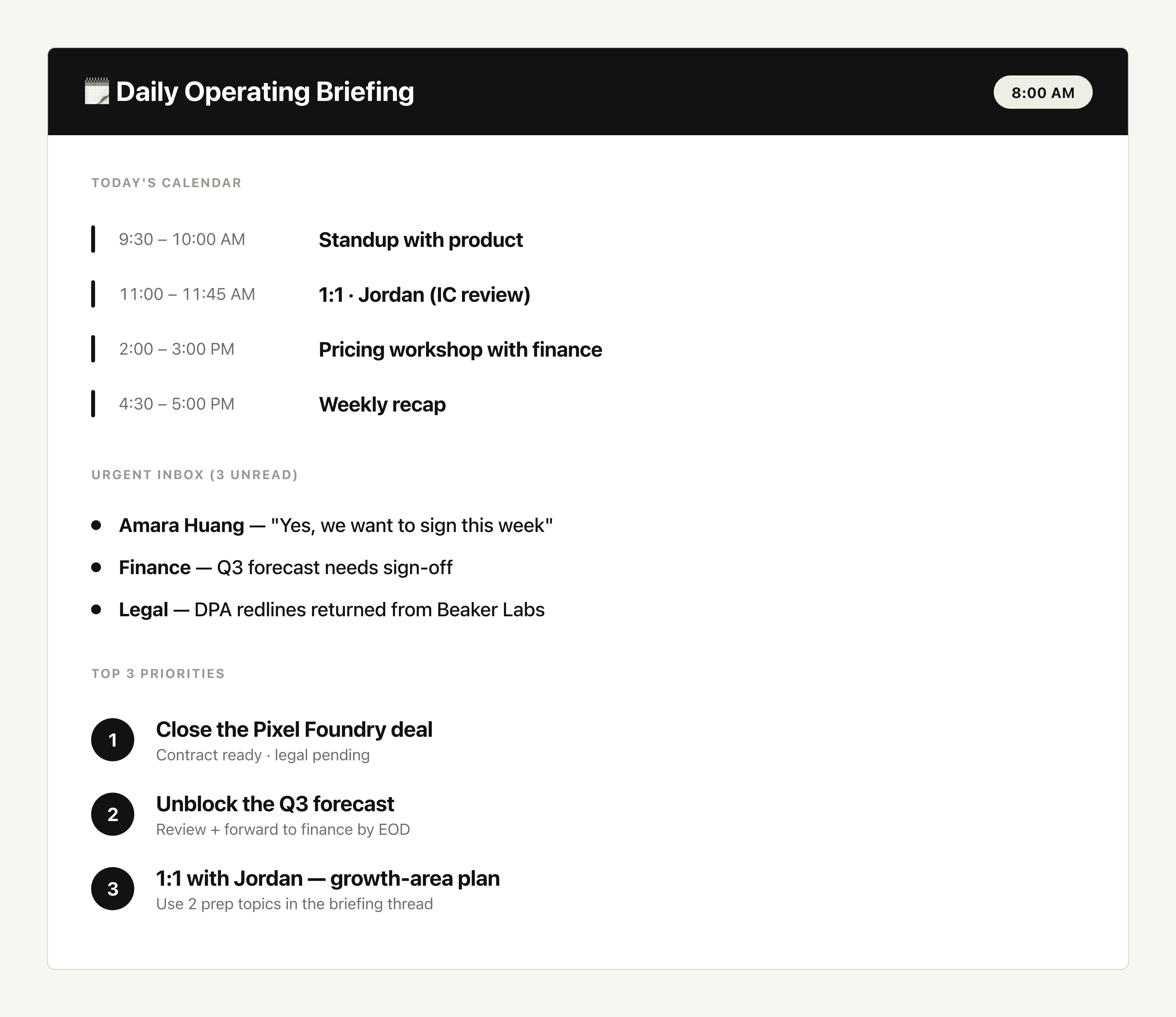
Daily Operating Briefing
"Tell Zentor: "Scan my Calendar, Inbox, Slack, and task list every weekday at 8 AM. Send me a one-screen summary of urgent items, today's meetings, and the top 3 priorities.""
Every morning at 8 AM you get a structured digest: today's meetings with prep notes, top 5 unread emails ranked by importance, open Slack threads waiting on you, and a ranked list of priorities. One message, zero tab-switching.
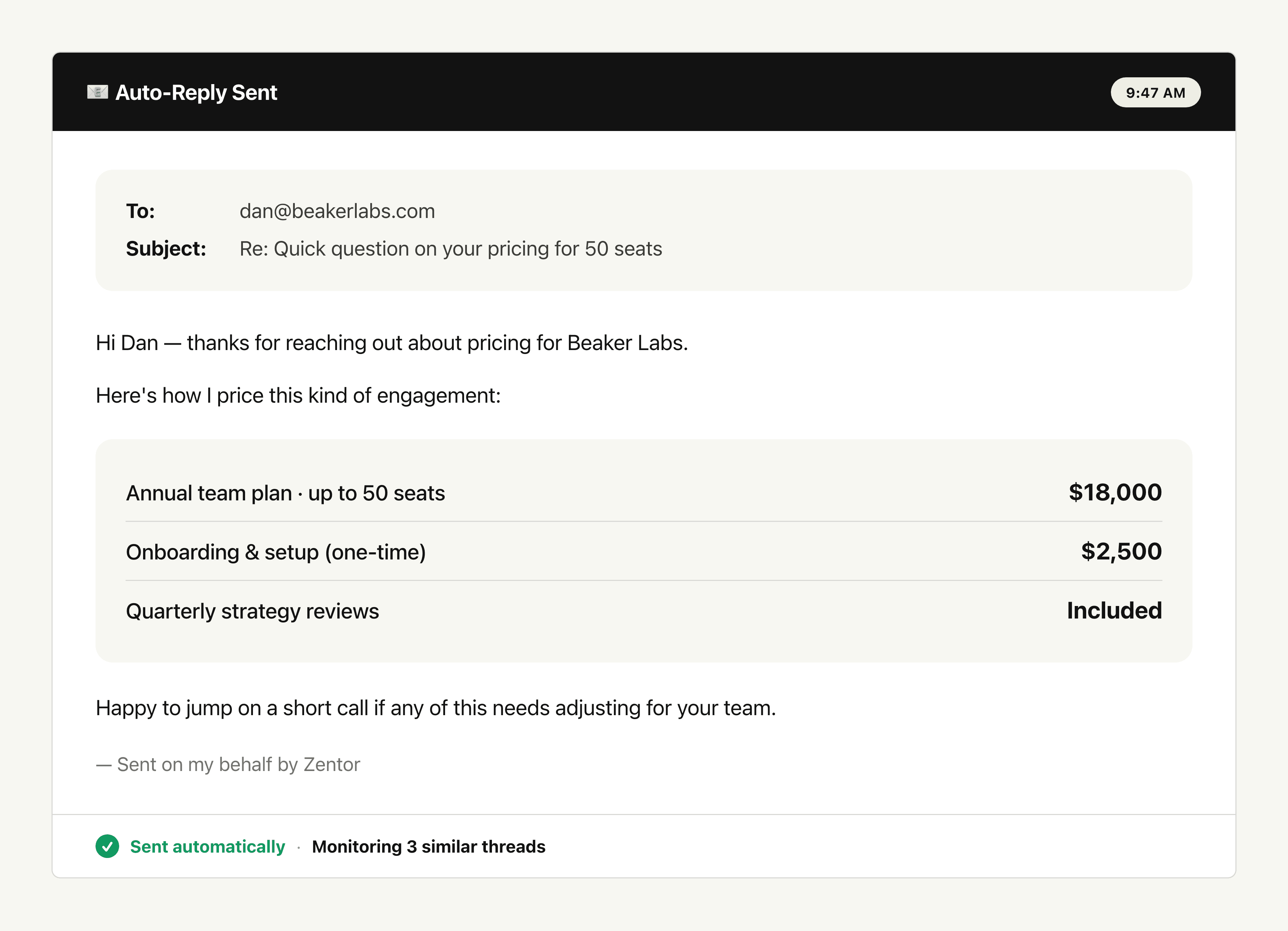
Smart Inbox Triage and Auto-Reply
"Tell Zentor: "Watch my Gmail for cooperation and quotation requests. Reply with my standard pricing automatically, and ping me only when someone agrees or asks a follow-up question.""
Zentor scans Gmail every two hours, classifies cooperation and quote intent, sends a personalized reply using your pricing template, and pings you the moment someone responds with intent to buy. It tracks all replies to avoid duplicates and only handles new unread inquiries.
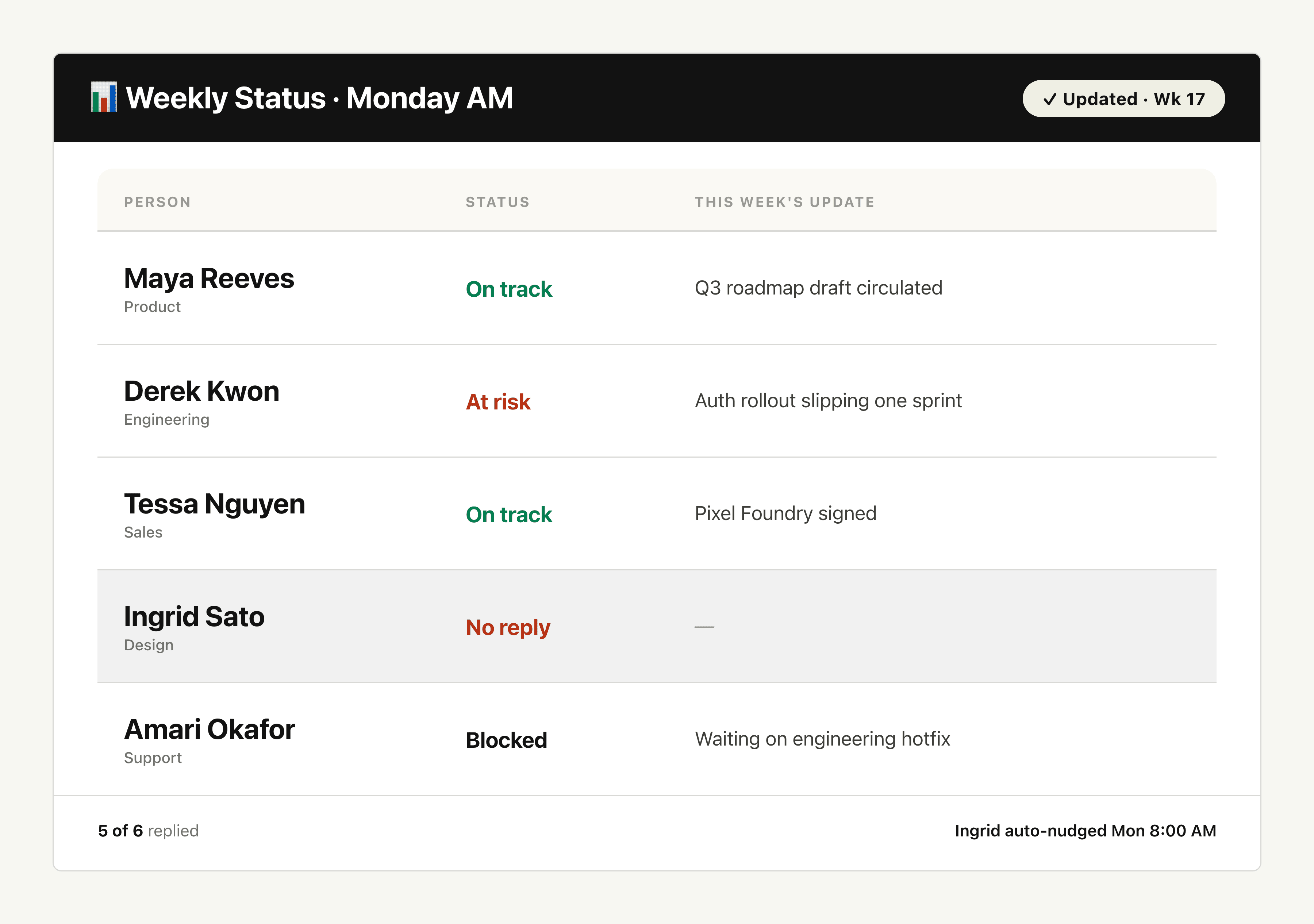
Recurring Team Status Tracker
"Tell Zentor: "Every Friday at 4 PM, ping the team in Slack for their weekly status, collect the responses, and update our shared Google Sheet. Flag anyone who hasn't replied by Monday morning.""
Zentor runs the Friday ping, collects threaded replies, updates your weekly status sheet with each person's progress and blockers, and posts a Monday summary listing who's still pending. No more manual chasing or copy-pasting from DMs into spreadsheets.
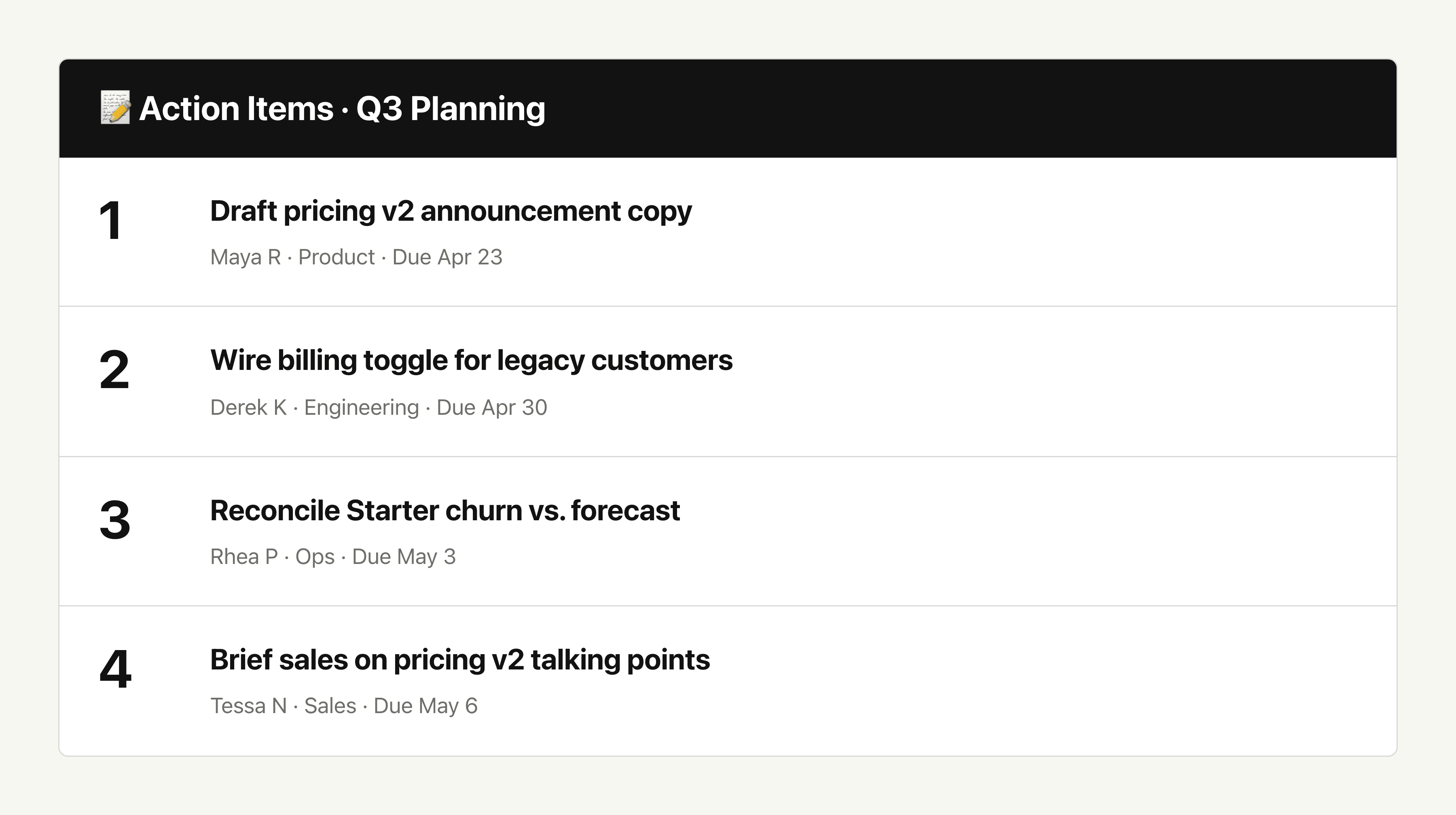
Meeting Notes to Action Items
"Tell Zentor: "Take this meeting transcript. Pull out decisions, owners, and deadlines. Send the summary to all attendees and create the action items as tasks in Asana.""
Within seconds of the meeting ending, Zentor posts a structured summary (decisions, action items with owners, open questions) to the meeting thread, emails attendees, and creates each action item as an Asana task assigned to the right owner. No more commitments lost in week-old meeting notes.
Industry News Daily Digest
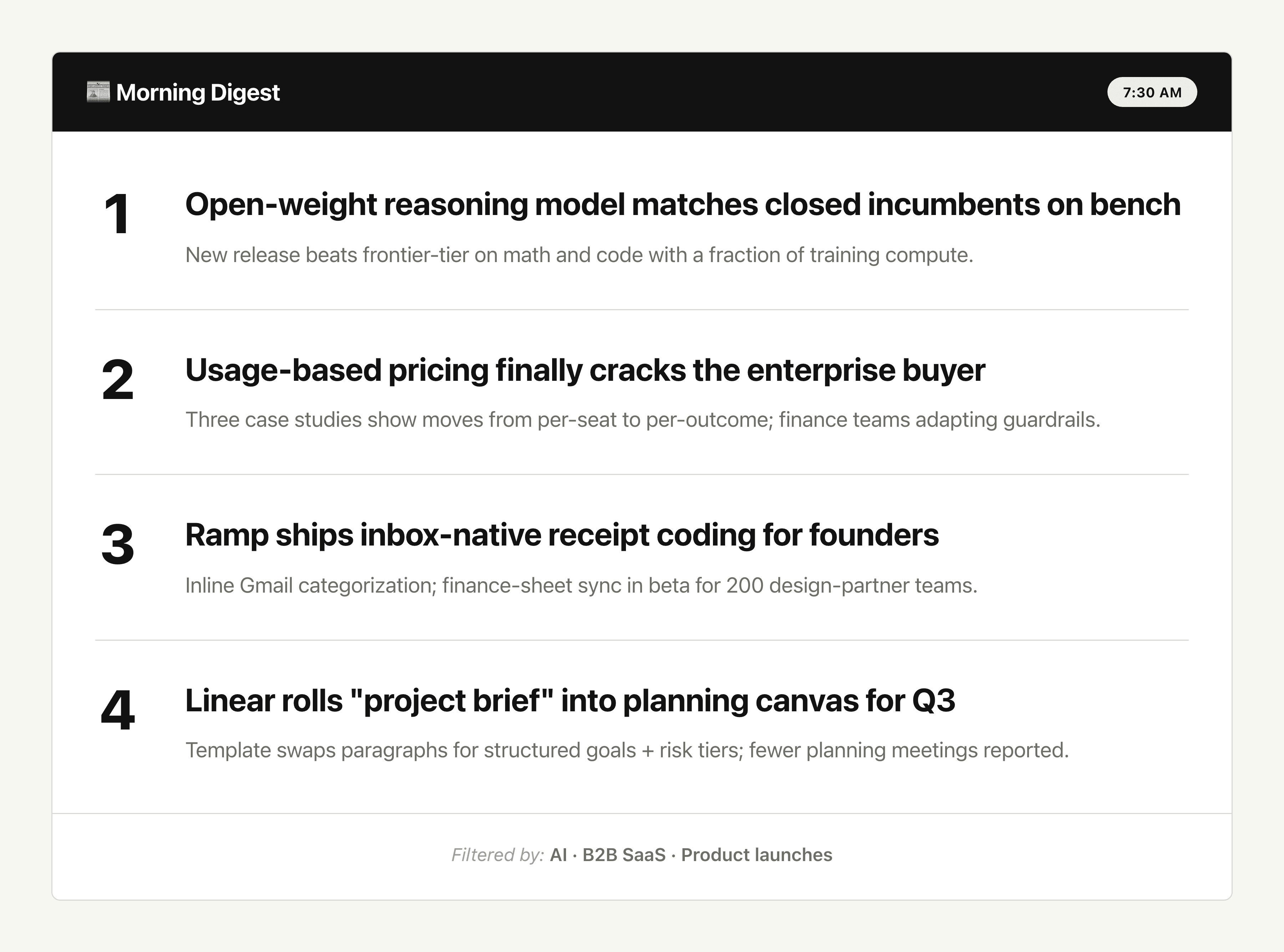
"Tell Zentor: "Every weekday morning, summarize the top 10 stories from Hacker News, TechCrunch, and my Twitter list. Focus on AI, B2B SaaS, and product launches. Email it to me by 7:30 AM.""
A curated digest lands in your inbox every morning at 7:30: the top stories filtered by your interests, with one-paragraph summaries and direct links. No noise, no doomscrolling, just the signal you need to stay sharp.
Use cases
AI agent use cases for professionals
Step-by-step use cases you can start from, each with a live example.
Gmail Follow Up Reminder for Emails Nobody Answered
Every morning Zentor checks what you sent, finds the threads still waiting on a reply, and leaves a short follow-up draft in Gmail for you to send.
AI Sales Email Generator
Turn a prospect + offer into a first-touch sales email — then a second variant in the same thread.
Email Auto-Reply for Business Inquiries
Monitor your inbox for cooperation and quotation requests, auto-reply with your pricing, and get notified when someone accepts.
LinkedIn Post Generator
Turn a topic or link into a LinkedIn post you can edit, shorten, or schedule-ready in the same thread.
Value Proposition Generator
Turn a product brief into a clear value proposition — then test variants in the same thread.
Sales Pitch Generator
Turn a product brief into a structured sales pitch — talk track, not a slide deck.
Integrations
Best AI agent integrations for professionals
These integrations connect Zentor to the tools this audience already uses for daily work.
Google Workspace
Read and write spreadsheets
Pull context from this system
Deep Research
Synthesize multiple sources into one answer
Provides a core capability behind this workflow
Bash and Code
Build and run code in a workspace
Provides a core capability behind this workflow
Browser Control
Operate web pages in a real browser
Provides a core capability behind this workflow
From the blog
Further reading
Best AI Executive Assistants for 2026
Compare the best AI executive assistant options for inbox, calendar, and client handoffs, with clear limits for solo operators in 2026.
PILOT AI Chief of Staff vs Always-On Agent
PILOT AI chief of staff compared with an always-on assistant for one founder follow-up workflow, including context, execution, and oversight.
Notion AI Meeting Notes Now Costs Credits
Notion AI Meeting Notes starts using Standard credits on December 1, 2026, about 10 per meeting hour. How far 1,500 credits go and what to do when they run out.
FAQ
Common questions
How is Zentor different from Zapier or Make?
Zapier is built around rigid trigger-action rules, and per-task pricing makes it expensive at scale. Make wants you to become a workflow architect before you see any value. Zentor is intent-based: describe the outcome in plain English and it executes. No flow design, no per-task fees, and operating costs run roughly 70% lower for high-volume work.
Is my company data safe?
Yes. Zentor runs every task inside your own private workspace. Emails, documents, and internal data are never stored on shared servers or used to train third-party models. You retain 100% ownership and control of every artifact.
Do I need any technical or coding skills?
No. If you can write a clear email, you can use Zentor. We built it for managers, recruiters, coordinators, and operations leads who want results without learning a new system. No scripts, no flow charts, just conversation.
What if Zentor makes a mistake?
Control stays with you. You can enable Human-in-the-Loop mode where Zentor saves drafts for your approval before anything is sent or filed. As the agent learns your tone and judgment, you can opt into Full Autopilot for the workflows you trust.
Which tools does Zentor integrate with?
We currently support deep integrations with Google Workspace (Gmail, Sheets, Calendar, Drive), Slack, Telegram, Notion, Asana, and Linear. We ship new integrations every few weeks based on user demand. See our use cases for live examples.
How much does it cost?
$20/month, with 1,000 credits each billing period. See our pricing page for the full breakdown.
Less manual coordination,
more strategic work.
Join the professionals who reclaimed their attention. No technical skills, no flow design, no per-task fees. Just results.
Get startedSign in or create an account to get started.