Bring Your Own Agent: The Governance Gap
Bring your own agent at work? Learn who controls access, client data, approvals and offboarding, with a policy for small teams and solo businesses.
Bring your own agent (BYOA) means using a personal AI assistant for work, sometimes with access to company or client accounts. The governance gap is straightforward: the person who connected it may leave, but its access, saved context and actions can outlast the job. In a May 2026 Deloitte TrustID study, 49% of surveyed workers who used AI at work reported using unapproved AI solutions. That finding concerns AI tools broadly, not a measured share of employees running personal agents.
Mateo· built by the Zentor team
Keep personal errands in a personal lane
Mateo checks your inbox and calendar, finds the trial, the refund and the form you forgot, and handles them. Works in any browser, anywhere.
Ask Mateo →
Free in early access
Key Takeaways:
- Treat a personal agent as another party with access to work, not as an extension of your own judgment.
- Write down which account it uses, what it can read or change, who approves its actions and who pays.
- Start with low-risk, read-only tasks; require a person to approve sending, publishing, paying or deleting.
- Disconnect accounts, review retained copies and hand over work materials when a person or client relationship ends.
What bring your own agent means at work
Picture a solo consultant who has trained an assistant on her preferred proposal format. She wants to use it on a new client's brief. If she pastes public requirements into a draft, the risk may be manageable. If she connects the same assistant to the client's shared Drive and email, the question changes: whose authorization covers the connection, and what happens when the project ends?
A chatbot that answers a question from text you deliberately paste can still expose sensitive information. An agent adds ongoing access and the ability to act across connected services. Deloitte's October 12, 2026 discussion of personal agents draws a useful distinction between tools built inside an approved work environment and an external agent someone brings in. It says organizations may not face BYOA at scale yet; that is a reason to set boundaries early, not a claim that every workplace already runs such agents.
A personal agent can be useful without inheriting every account its owner can open. Begin with the task, then decide whether the agent needs any account connection at all. For a primer on the concept rather than the access decision, see personal AI agents explained.
Shadow AI is a warning, not an agent headcount
Deloitte's TrustID workforce dashboard labels its 49% cross-industry figure “shadow AI usage” for the February–April 2026 snapshot. The accompanying Deloitte article specifies the relevant denominator: respondents using AI at work who reported using unapproved AI solutions. Neither source says 49% of workers use autonomous agents, or that 49% of companies have lost control of accounts. Those would be different measurements.
The distinction matters to a small business owner. You do not need an enterprise security department to notice a shadow connection. Ask collaborators what assistant they use for shared work, whether they granted it direct account access, and whether they pasted client material into a personal workspace. Make it easy to declare a useful tool before someone feels forced to hide it; keep an approved alternative for tasks that involve client records.
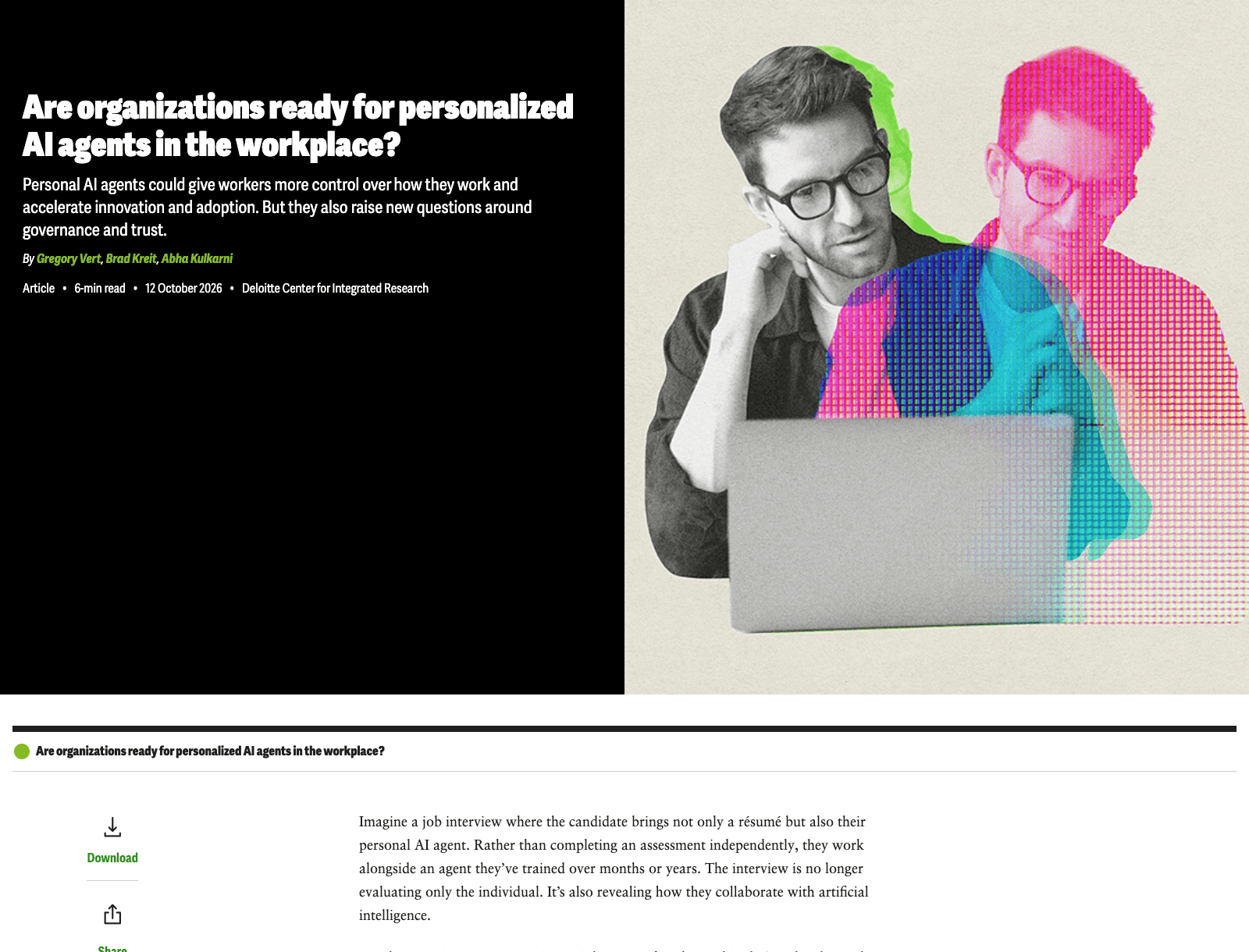
A policy that simply says “no AI” tells you little about the work already happening. A short list of approved tasks and prohibited data types gives collaborators something they can follow.
Draw an access boundary around each task
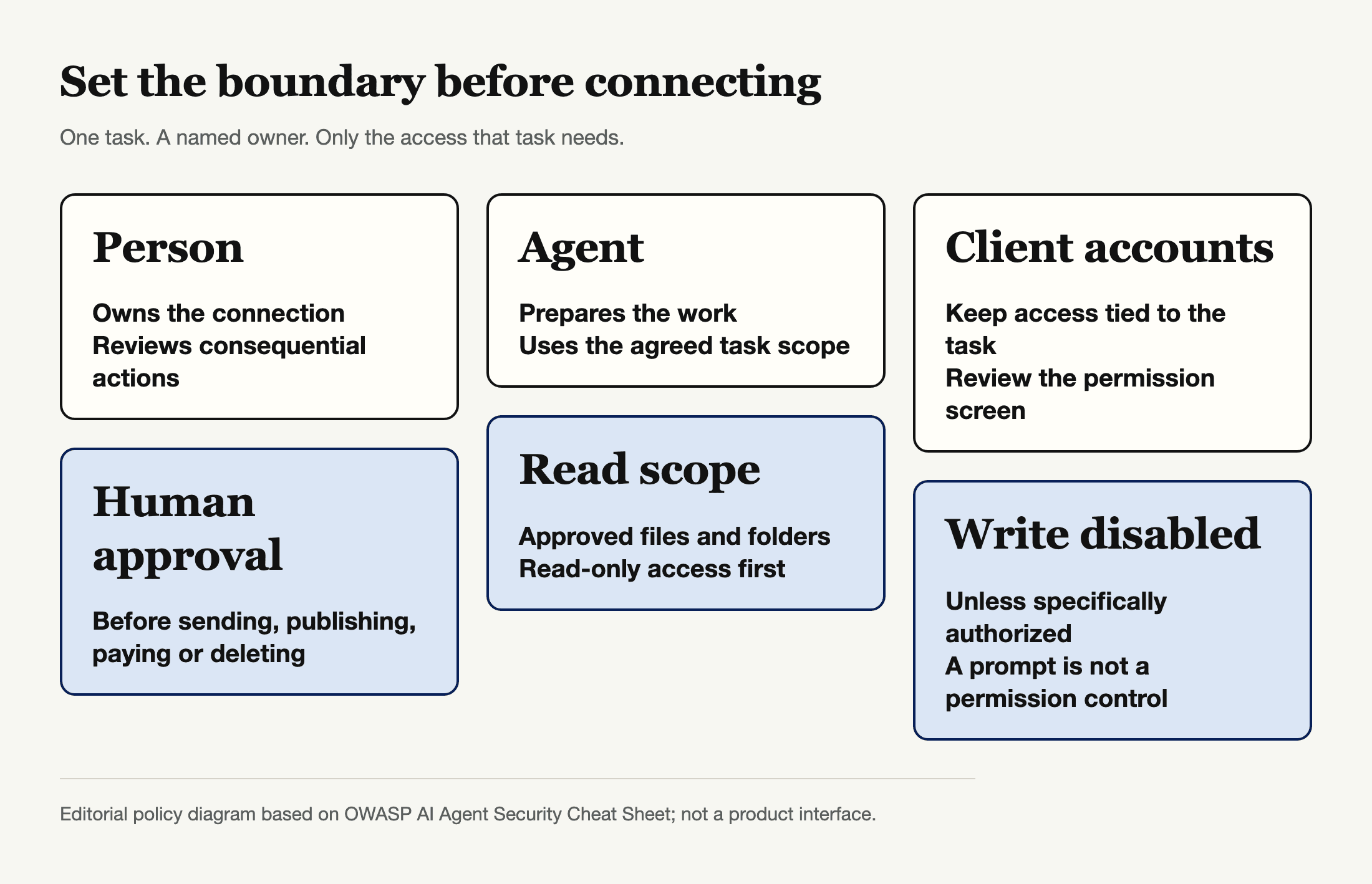
The hard question is not “Which agent?” but “Which account, which files, and which actions?” A writer drafting a public social caption does not need to read the sales inbox. A contractor checking a project calendar does not need permission to edit the entire client Drive. If the service asks for more access than the job requires, use a narrower connection or do that step yourself.
OWASP's AI Agent Security Cheat Sheet recommends minimum tools, read-only permissions where possible and explicit authorization for sensitive operations. That advice is practical even without technical staff: review the permission screen before connecting, share one project folder rather than an entire account where the service permits it, and keep the ability to send messages or change records off until there is a genuine need. A prompt saying “do not send” is no substitute for removing send permission.
Microsoft's Copilot Studio agent identity documentation shows how an enterprise product can expose an agent's connector permissions and lifecycle to administrators. That is a useful example of a managed system, not a feature every personal assistant or Zentor automatically has. Even Microsoft notes limits on where agent-identity policies currently enforce at runtime; visibility and enforcement are not synonyms.
Decide where client data and agent memory belong
Before adding a client document, ask what the agreement allows: may a third-party AI service process this material, and may it retain the result? “I have access to the folder” does not answer either question. Mark client-private material, payment data and personal details as off-limits unless the client has approved the specific use and you have reviewed the service's retention terms. If the answer is uncertain, work from a redacted brief instead.
NIST's generative AI risk profile calls for inventorying systems, assigning human oversight and addressing third-party data and intellectual-property risks. In plain terms, keep a simple record: tool and account, purpose, data it may touch, human owner, review date and where generated files live. A spreadsheet will do. Do not record passwords there.
Ownership includes the material a contractor takes away. If a client project lives only inside one person's private chat history, the team cannot readily inspect, transfer or remove it. Zentor's distinct proposition is user-owned workspace memory that can connect to different AI tools through Zentor MCP; portability helps avoid tying your own working context to a single assistant. It does not settle who owns client files, grant permission to import them, or replace the client's access policy. Put approved deliverables in the agreed shared workspace, not solely in any assistant's memory.
Put approvals at the moment of action
Let an agent prepare a proposal, then have a person check the recipient, attachment and price before it goes out. Let it suggest an invoice correction, but keep the authority to send the invoice with the business owner. For a small team, that separation is easier to explain than an abstract ban on autonomy: drafts may be automatic; commitments are human decisions.
OWASP advises explicit approval for high-impact or irreversible actions and a preview before execution. The approval should identify the exact action, not a blanket “yes” to whatever the assistant decides next. Publishing a post, emailing a client, moving money and deleting files all cross a boundary. You can make a narrow exception for a routine low-risk task after a trial, but write down who owns the exception and when it expires.
This is also where personal errands and client work diverge. A missed subscription cancellation in your own inbox is a personal job; that is a sensible place to consider Mateo, the personal agent built by the Zentor team to work on inbox and calendar loose ends. It is not a client approval system, and connecting a work mailbox would still require the right permission. Keep it on the personal side unless your workplace has specifically authorized more.
Make bring your own agent offboarding real
The cleanest test of a BYOA policy is a departing collaborator. Suppose the person who prepared your weekly campaign notes leaves. Who can retrieve the final assets? Who disconnects the assistant's access to the campaign folder? Who checks whether a draft remains in the person's private account? If no one can answer, the arrangement was never properly owned.
Use a handover record with the named human owner and a second person authorized to close access. Review connected accounts in both the agent service and the original account provider. Google's account guidance explains how to review and remove third-party access; it also warns that stopping a sign-in link does not delete data stored by the other app. OpenAI's connection guidance likewise says disconnecting an account stops future access through that connection but does not automatically delete existing conversations, saved files or memories. Those are examples of separate controls, not instructions that every agent has the same settings.
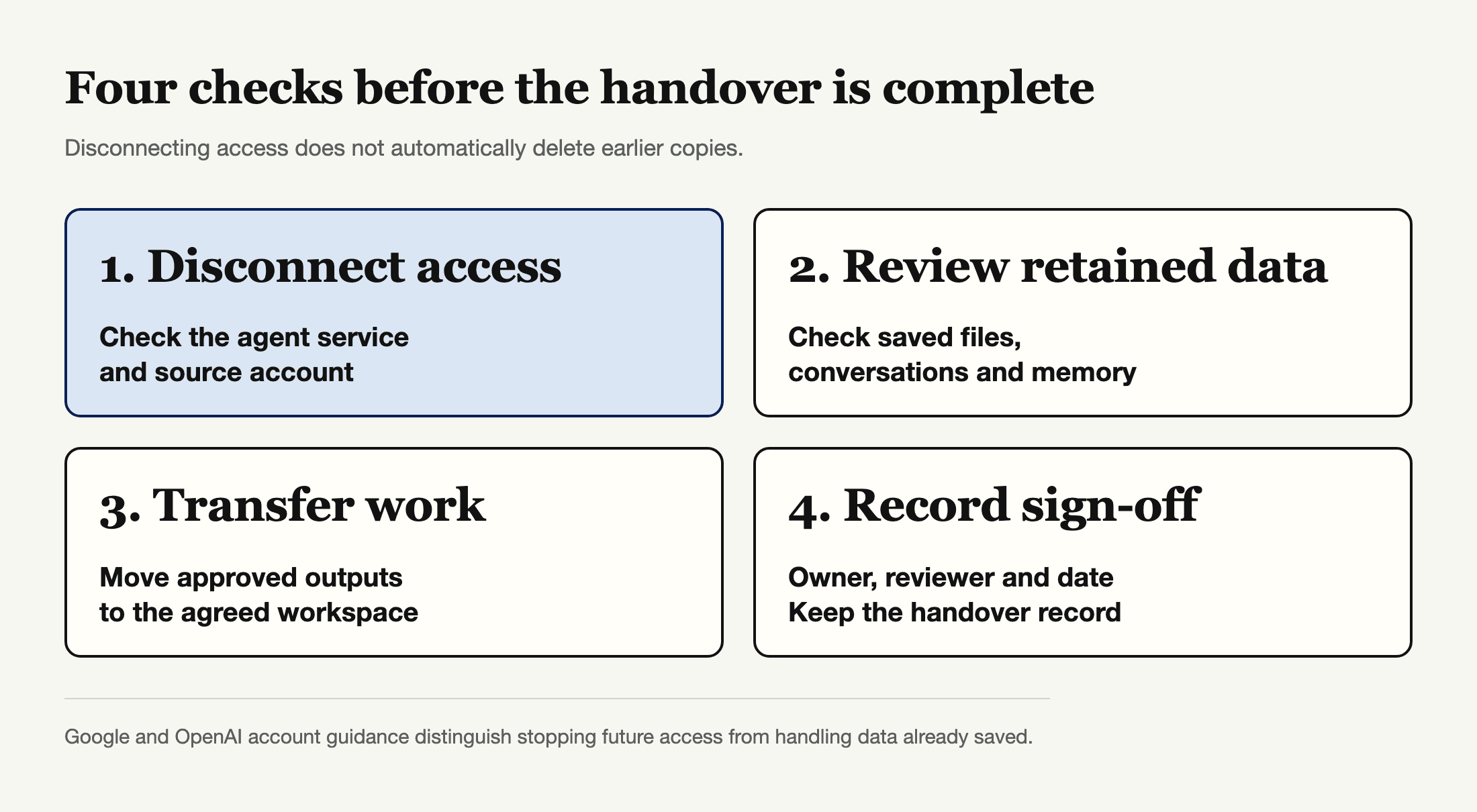
Disconnecting is a beginning, not proof that earlier copies disappeared. Ask the provider for deletion where the agreement requires it; retain a record of the request and a copy of the approved deliverables. For a broader security framing, see the AI agent security framework and a third-party agent skills permissions review.
A small-team BYOA policy you can use
Write the rule on one page. List allowed jobs, such as drafting from public information, and jobs that need specific client or manager approval. Give each permitted connection a human owner; record its account, data scope and review date. Require read-only access first. Set approval before sending, publishing, paying, deleting or changing shared records. Keep work outputs in the client's agreed location, and schedule the offboarding check before the project ends.
If a vendor cannot tell you what it can access, how to disconnect it or how to handle retained data, don't connect client accounts yet. You can still use an assistant on public information and manually move a reviewed draft into the project. That is slower than blanket access and considerably easier to undo.
Zentor can keep a user's working context usable across AI tools rather than trapping it in one interface. Its always-on workspace is useful for ongoing personal work, but continuous availability raises the stakes of a bad connection; the owner still needs explicit boundaries and a review date. It is a workspace memory hub, not a substitute for enterprise identity governance.
Keep your workspace context portable
Zentor keeps workspace memory yours and makes it available to different AI tools through Zentor MCP. Decide access to client systems separately.
Get early access →
FAQ
What is BYOA in the workplace?
Bring your own agent means a person uses an AI assistant they chose or configured for work. The meaningful distinction is whether it only helps with information the person supplies for a single task or has persistent access to work systems and permission to act.
Is a personal AI agent safe for client work?
It depends on the data and permissions, not the label “personal.” Start with public or client-approved material, limit account access, review retention terms and ask a person to approve consequential actions. If a client prohibits third-party processing, do not upload its data.
Who should own an agent used by a contractor?
Name a human responsible for the connection and a client-side contact who can revoke work access. Agree where final files go, who pays for the tool and whether any client material can remain in a private account after the assignment.
Does disconnecting an agent remove its saved data?
Not necessarily. Revoking access generally stops new retrieval through that connection; past conversations, exports, saved files or memory may need separate review or deletion. Check both the agent provider and the original account provider.
The access rule to set before the next connection
Bring your own agent should not mean bring every permission you possess. Ask what work the assistant must do, who can authorize its data access, which actions need a human and how to end that access. If you can answer those questions before connecting an account, a personal assistant can stay useful without turning a client's shared workspace into an unowned experiment.

Zentor Editorial Zentor editorial team
The Zentor editorial team writes about workflow automation, AI agents, and the tools we build. Default byline for industry overviews, listicles, and collaborative pieces.
Ready to put this into practice?
Zentor runs browser tasks, research, and schedules automatically. Try it free.