Superhuman Alternatives for 2027: Inbox Workflows

Compare Superhuman alternatives by inbox workflow, collaboration, and switching effort before choosing an email setup for 2027.
Superhuman alternatives are email clients that can replace your reading, replying, and follow-up routine without losing client commitments. The real question: will an unanswered proposal, a colleague's reply, and a postponed message still be visible when they matter?
Key Takeaways:
- Shortwave is worth considering when your working mailbox is Gmail or Google Workspace and keyboard-led triage matters.
- Spark is the broader mailbox fit if you juggle Gmail, Outlook, iCloud, or other supported accounts across devices.
- Missive deserves the closest look when a client conversation needs an owner, internal discussion, and a shared reply history.
- Pilot one workweek first. Mail sync and reminder sync are not the same thing.
Disclosure: Zentor produced this comparison using vendors' public information checked October 12, 2026. I did not run three paid inboxes or measure reply speed. The one-week scenario is a test script, not observed results. "2027" is the planning horizon.
For the one-week test script, picture a Tuesday proposal revision, a Thursday reply deadline, and a teammate using the shared address. A faster keyboard cannot tell me who owns the second thread after I switch apps. That handoff is where promises disappear.
Why switch from Superhuman?
Superhuman is a premium, speed-oriented email client. Among email apps like Superhuman, switching makes sense when mailbox compatibility, cost, device coverage, or coordinated replies matter more. A Gmail-only consultant faces a different choice from a studio sharing hello@ alongside Outlook.
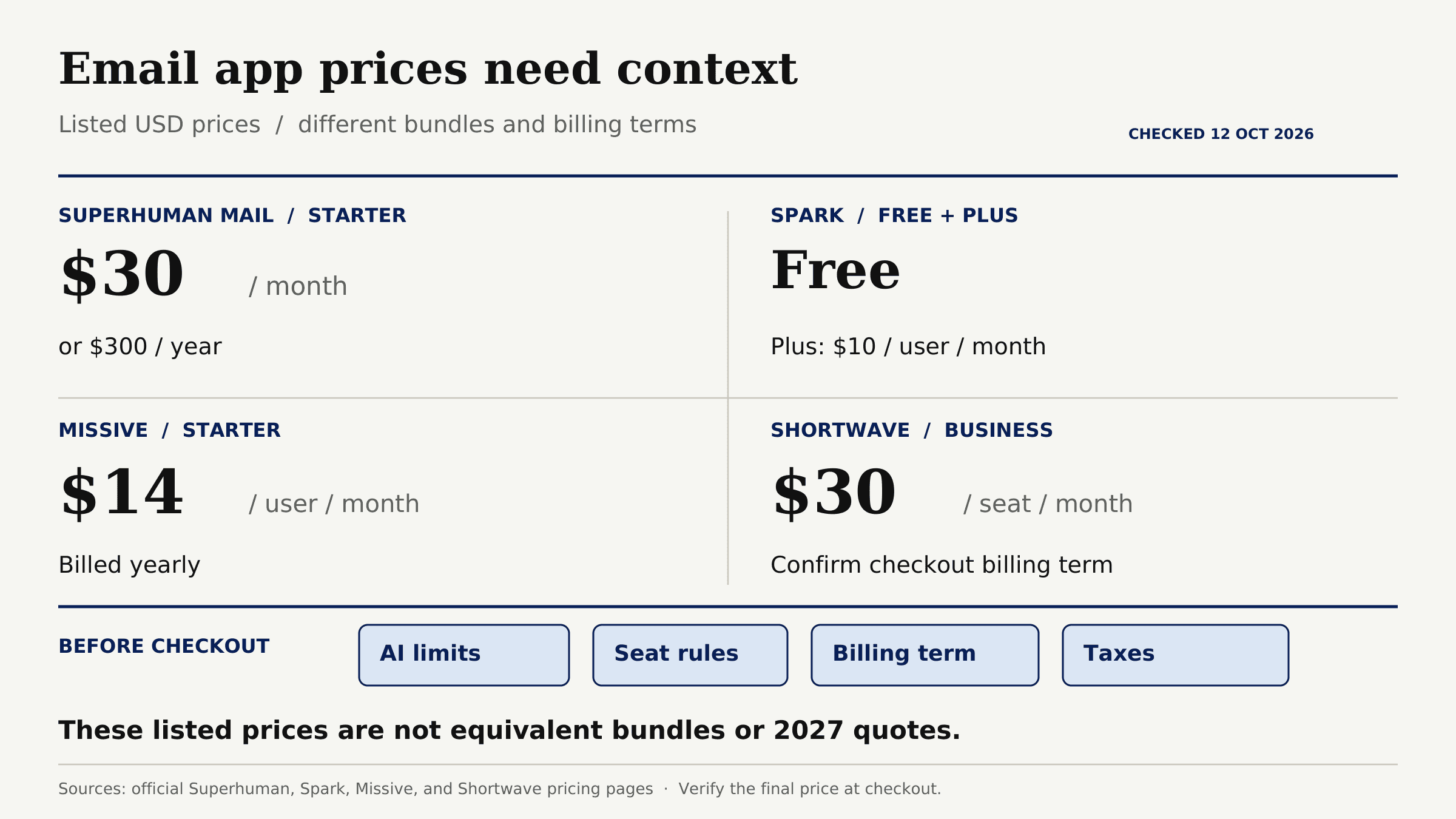
Cost needs context. Superhuman Mail Starter is listed at $30 monthly or $300 yearly. As checked, Spark offers Free and $10-per-user monthly Plus; Missive Starter is $14 per user monthly when billed yearly; Shortwave Business is $30 per seat monthly. These are not equivalent bundles or 2027 quotes. Check AI limits, seat rules, billing term, and taxes at checkout.
Some Superhuman competitors are actually AI assistants layered over another inbox. If drafts, calendar work, and client handoffs are the pain, compare that category separately in Zentor's executive-assistant guide. Here the question is which email client you open each morning.
Keep client context beyond your inbox
An email client manages mail. Zentor keeps workspace memory available across the AI tools you use; it does not replace your inbox.
Get early access →
Which inbox features matter before switching?
When comparing superhuman alternatives, start with mailbox access. Is Gmail, Microsoft 365, or your IMAP provider connected directly? Can you reply from the right address, not just receive forwarded mail? Then inspect snoozes, reminders, signatures, drafts, and assignments. Fast email workflow tools are useful only if that working state survives the move; message history alone is insufficient.
Use one test case: 15 client threads, three awaiting replies, one delegated, and one draft containing a promised date. These are illustrative inputs, not measured traffic. Pass only if each waiting thread has an owner and review date, nobody sends a duplicate reply, and the promised date remains findable.
| Need to preserve | Shortwave | Spark | Missive |
|---|---|---|---|
| Primary mailbox fit | Gmail or Google Workspace | Multiple supported providers | Personal and shared accounts |
| Follow-up state to inspect | Snoozes, reminders, and assignees | Snoozes and Spark-specific reminders | Assignments, snoozes, and team queue |
| Best comparison question | Is Gmail the source of truth? | Do settings and reminders follow my devices? | Who owns the next reply? |
Address support may still require forwarding or a paid collaboration tier.
Price matters when comparing superhuman alternatives, but not as a standalone winner column. A cheaper solo plan can become more expensive once a second person needs access to shared threads. Conversely, paying for team routing you will never use adds friction, not capacity. Compare the actual configuration you need, then check the current checkout before committing.
Shortwave - AI-supported Gmail workflows
Among superhuman alternatives, Shortwave suits a Gmail mailbox whose interface needs changing. It offers keyboard navigation, AI search and summaries, reminders, and shared threads. Its Gmail migration behavior matters: labels sync, but Shortwave snoozes appear temporarily archived in Gmail, scheduled messages do not appear as scheduled there, and drafts do not sync between the apps. Inspect the follow-up list during a trial.
For the Tuesday proposal, I need to find the thread, set Thursday's action, and verify the promised date against the original message.
Shortwave's inbox fit and limits
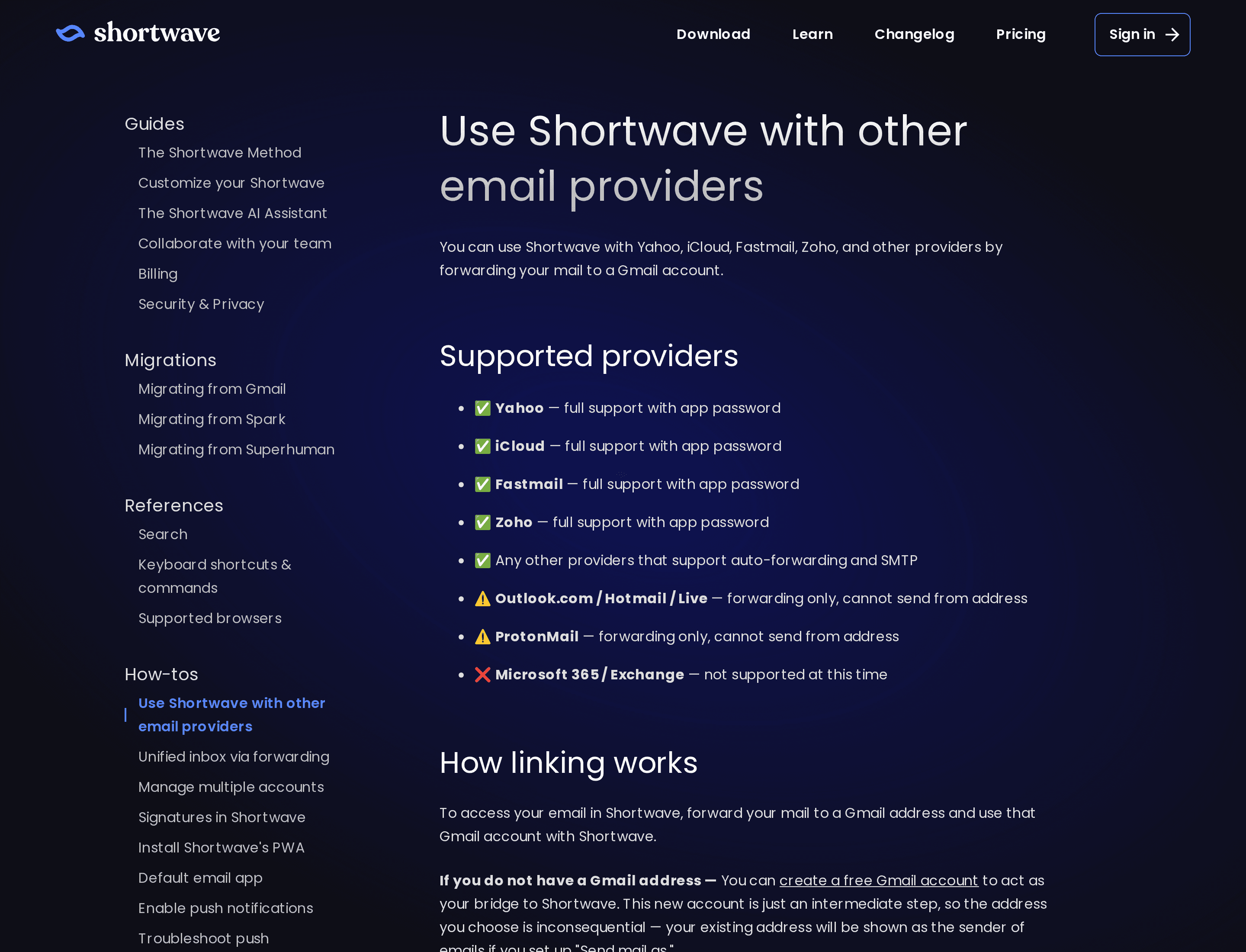
Gmail and Google Workspace sign in directly. Shortwave's provider support details describe forwarding through Gmail and an SMTP sending alias for providers such as Yahoo, iCloud, Fastmail, and Zoho. Outlook.com, Hotmail, Live, and Proton Mail are forwarding-only: this setup cannot send from their original addresses. Microsoft 365 and Exchange are unsupported. Check both incoming delivery and sending identity before choosing this workaround.
Historical search also deserves a check. Shortwave says its initial Gmail import covers the last 90 days; full-history import requires an account upgrade. A consultant who often searches a two-year-old proposal should verify that the needed history is searchable on the chosen plan before declaring the move complete.
Shortwave also supports team assignees, visible done statuses, and shared labels. AI filters can distribute shared-label messages to teammates' inboxes when "Notify teammates" is enabled. Test how new mail reaches the team and how unassigned work is found before comparing this setup with Missive's team inbox.
Spark - cross-platform personal email
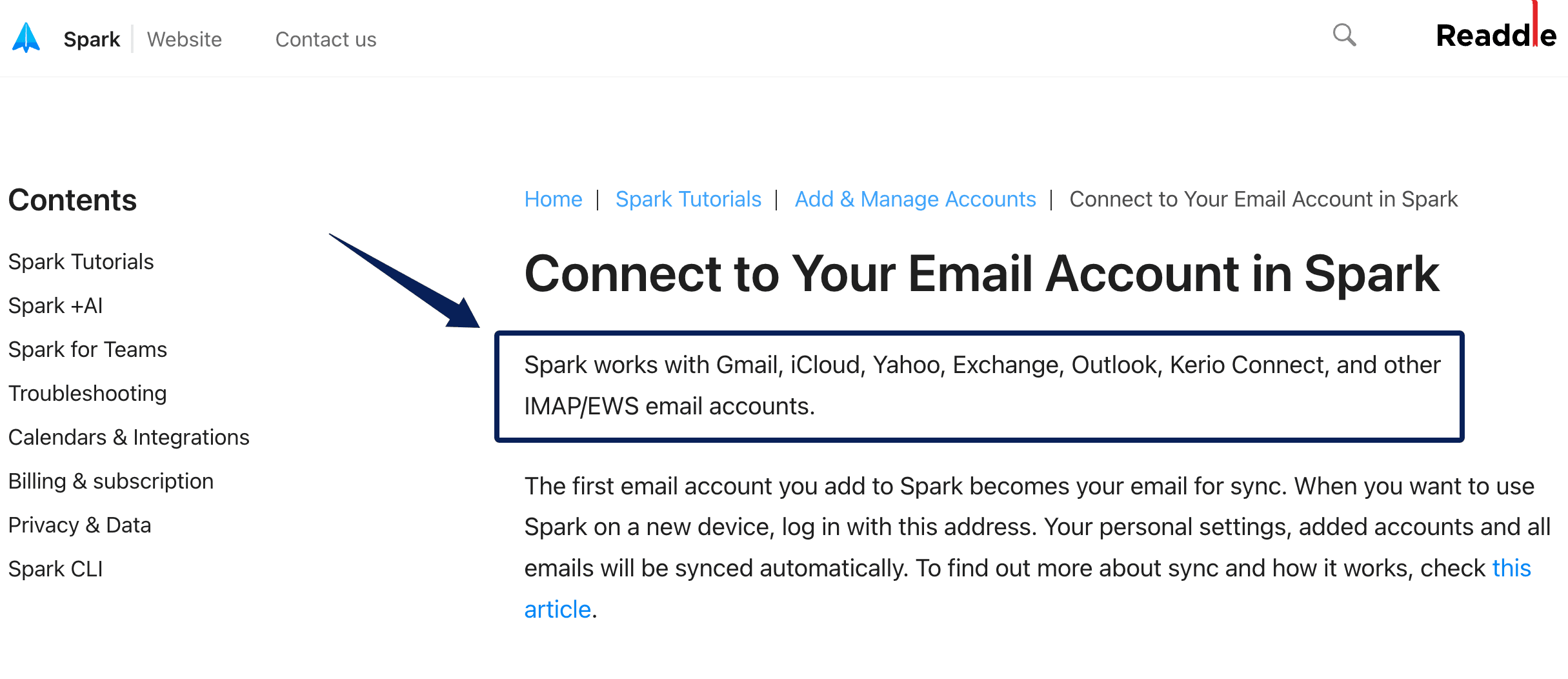
Spark fits one person who needs a unified inbox across providers and devices. It connects Gmail, iCloud, Yahoo, Exchange, Outlook, and IMAP/EWS accounts, subject to authentication. It also offers snoozes, follow-up reminders, scheduled send, keyboard controls, and paid team features.
My question: after deferring a client thread on my laptop, does the obligation appear on my phone? A returning email and an expected push alert are different tests.
Spark's inbox fit and limits
Spark's cross-device sync list includes snoozes, reminders, signatures, and accounts. Its follow-up reminder is a Spark workflow, however, not a provider feature visible in another mail app. Preserve a separate waiting-on-client list if you leave.
This is a useful example of why "my email is still in Outlook" does not settle a migration. The message can remain intact while the reminder exists only in Spark. On a trial, set one reminder for a harmless test message, check it on a second device, then view the provider's inbox. Record each result rather than relying on a feature label.
Spark offers team options, but check assignment and collaborator limits before treating it as your shared queue.
Missive - shared client conversations
Among superhuman alternatives, Missive starts with ownership. Its team inbox workflow holds unassigned conversations in a shared queue, lets teammates claim them, and closes completed work. A client reply can reopen a conversation for the assignee. That beats everyone watching the same mailbox and guessing who answered.
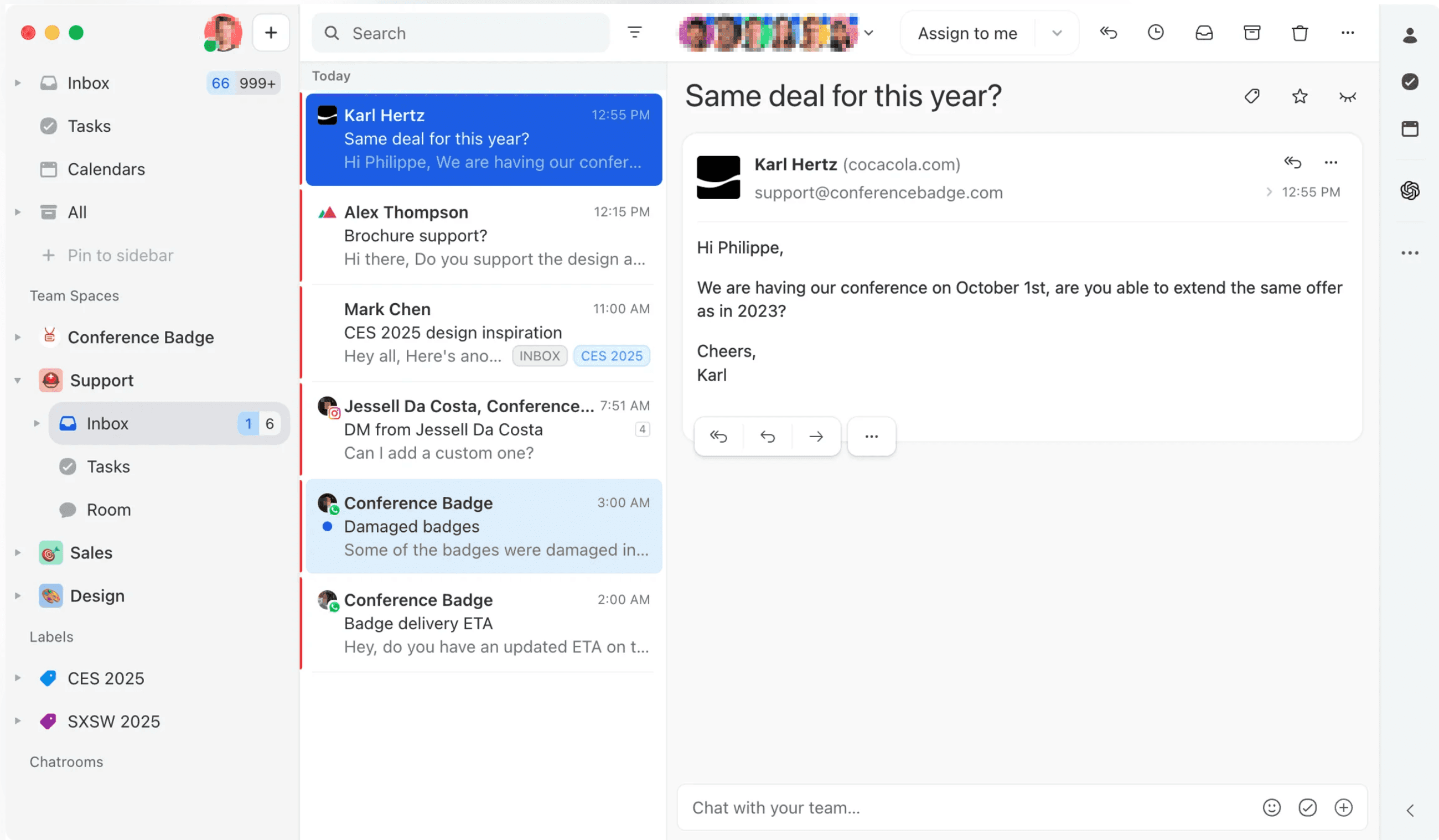
If Tuesday's proposal reaches hello@ while the lead is out, a teammate can discuss it within the conversation and own the reply. The advantage is a visible link between message, decision, and owner.
Missive's team fit and limits
Missive is not automatically the best solo speed upgrade. Rules, reporting, and integrations may require higher plans than a basic team inbox. Check the needed controls against the plan and seat count you would buy.
A queue works only if people claim, close, and revisit work. For one person with two private accounts, that ceremony may be too much. Judge shared inbox alternatives by missed handoffs.
Missive's more structured approach also changes what "done" means. Sending a reply and closing a conversation can be one step; a later client response can reopen it for the assignee. That is valuable for a small agency, but only if everyone agrees who checks reopened work during holidays and handoffs. Otherwise, the queue is tidy while the promise is still overdue.
How do you test a new inbox without losing follow-ups?
Run old and new clients side by side for one workweek. First record active promises outside both apps: client, thread link, owner, next action, deadline, and sending address. The provider keeps mail, not necessarily app-specific reminders or drafts. Leave historical mail untouched.
Inspect five thread types: inquiry, unanswered proposal, snoozed request, deadline-bearing draft, and shared-address message. This is a proposed test, not an observed pass rate. Midweek, check desktop and phone. On Friday, reconcile every waiting thread against the old client. Treat a missing owner or reminder as a failed move.
Do not judge the pilot by how quickly you reach inbox zero. Count open commitments at the start and end, note any duplicate replies, and ask whether each deadline is visible without searching the entire mailbox. If the new app saves clicks but the Thursday follow-up vanishes, the switching cost is already larger than the interface improvement.
Email is only part of a client promise; the brief and task board may hold the rest. Zentor's AI workspace model becomes relevant if that cross-tool context must persist into later work. It is not an inbox replacement. Keep sending under human control. Its user-owned workspace memory can travel through Zentor MCP, whereas app-specific mail reminders still need an explicit handoff.
FAQ
What happens if a client replies before a Shortwave reminder is due?
The thread returns to your inbox when the reply arrives. Shortwave's follow-up reminders bring a thread back when a response arrives or the reminder time is reached, whichever comes first. Pending reminders appear in Snoozed. A returning thread still needs review to determine whether the client commitment is resolved.
Should teammates use a shared address as Spark's Email for Sync?
No. Spark recommends using an Email for Sync that only you can access, because it restores your connected accounts and personal settings on other devices. Each teammate should use their own sync identity, then configure access to the shared mailbox separately.
Can Missive show who last replied to a shared client thread?
You can inspect the last outgoing message and the current assignee in the shared conversation, but the cited documentation does not establish that a message sent from a shared address identifies which teammate clicked Send. Check that in your own workspace; do not confuse the visible sender address with the current assignee.
Which option can keep separate personal and client signatures?
Spark and Missive support distinct signatures across accounts or aliases. Shortwave follows Gmail's default signature settings, so check the behavior of each account and sending alias rather than assuming automatic per-alias switching. Send a test message from each identity.
Can Superhuman keyboard shortcuts be recreated in another inbox?
Some can. Spark Desktop has a Superhuman preset and custom shortcuts; Missive supports custom bindings; Shortwave has its own shortcuts. Rehearse your five most-used actions.
Which Superhuman Alternative Fits Your Inbox in 2027?
Choose among superhuman alternatives around the point where work slips: Gmail triage favors a Shortwave trial; mixed accounts favor Spark; shared ownership favors Missive. Keep Superhuman if its current routine protects commitments better. The outcome that matters is a Friday without a client waiting on a reply nobody knew they owned.

Zentor Editorial Zentor editorial team
The Zentor editorial team writes about workflow automation, AI agents, and the tools we build. Default byline for industry overviews, listicles, and collaborative pieces.
Choosing between tools? Let Zentor run the work.
Always-on AI assistant on its own cloud computer. No switching required, no setup.