Claude Siri: What claude-siri-ai Actually Does

claude-siri-ai routes macOS Spotlight requests to Claude Code. What works, what the author says is unverified, and the SIP requirement behind it.
There's a four-day-old repository called claude-siri-ai picking up stars fast, and the one-line description undersells the catch by quite a lot. If you're searching for Claude Siri because you want Anthropic's model answering when you hit ⌘Space, this project does get you there. It also asks you to turn off two of macOS's core security protections first, and that requirement is doing more work than anything else in the README.
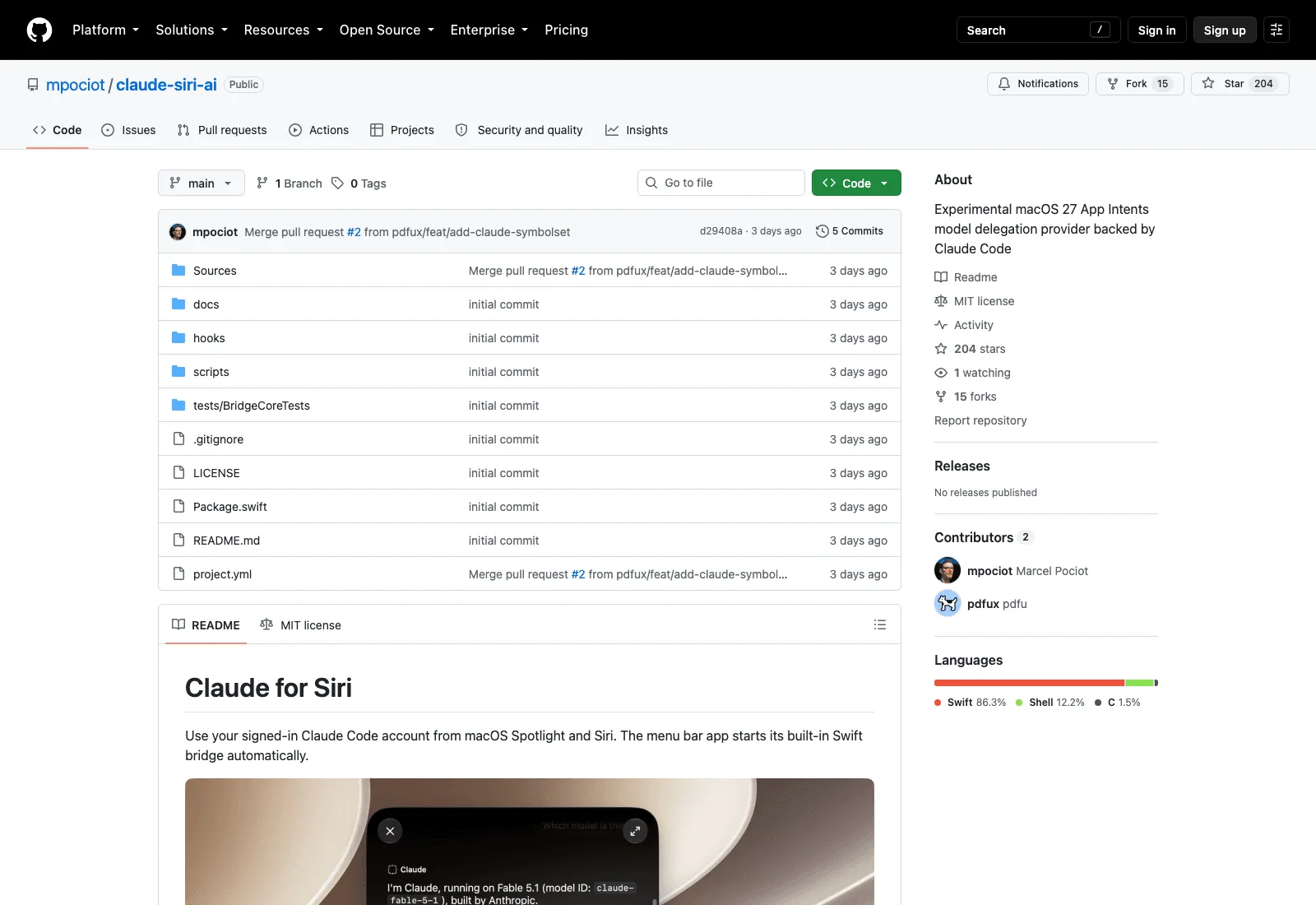
Worth knowing what you're looking at before you clone it. Marcel Pociot published it on 14 September 2026; by the 18th it had 204 stars, MIT licensed, written in Swift, with no tagged releases.
What a Claude Siri setup actually is
The Claude Siri pairing people are imagining is a menu bar app that registers itself with macOS as a model provider, so that Spotlight and Siri can route a request to your signed-in Claude Code account. The app runs a small Swift bridge, starts it automatically, and the bridge is what talks to the Claude CLI on your machine.
The README is precise about its own status in a way that's rare: "This is an independent example, not an official Apple or Anthropic integration." Nobody at Apple or Anthropic shipped this. It's two contributors and five commits poking at an API surface that appeared in macOS 27.
The working flow is Spotlight, not voice. Press ⌘Space, right-click the input, pick Ask… then Claude, send a prompt, and the response streams back in Apple's native UI. Every request starts a fresh conversation, so there's no thread and nothing carries over.
The requirement everyone skips past: SIP and AMFI off
Here it is, verbatim from the README: "Experimental: requires macOS 27 with SIP and AMFI disabled. This lowers macOS security protections and uses private, beta-specific APIs. Use a development Mac."
System Integrity Protection is the thing that stops processes, including ones running as root, from modifying protected system files and injecting into Apple's own binaries. AMFI validates code signatures at load time. Both off means your Mac will run unsigned code in places it was specifically designed to refuse, and every other piece of software on that machine inherits the weaker posture, not just this app.
The author handles this correctly. The install script does not disable either protection for you, the README tells you to use a development machine, and there's no attempt to frame the requirement as a formality. That's the right way to ship something like this, and it's also a clear signal about who it's for.
Read the entitlements and the reason becomes obvious. Both the host app and its extension carry a private com.apple.developer.model-delegation entitlement and are ad-hoc signed, and the README states plainly that no distributable Apple entitlement is granted by the setup. The integration point exists in the OS; Apple hasn't opened it to third parties. Disabling SIP and AMFI is how you use a door that isn't unlocked yet.
So the practical answer for most people asking about Claude Siri is: not on your daily-driver Mac, and not this month.
If what you wanted was Claude doing something useful without a project setup, Zentor runs the job and delivers the result into Notion, Airtable, Slack or your inbox. No entitlements, no SIP, nothing to disable.
See the Claude integration →
How a Claude Siri request is routed
App Intents is Apple's framework for exposing app functionality to the system, and macOS 27 added a path where a third-party app can register as somewhere Siri and Spotlight send a question. claude-siri-ai implements that path and points the far end at Claude Code.
The chain runs: Spotlight or Siri takes your prompt, macOS hands it to the registered provider, the extension passes it to the bundled Swift bridge, the bridge calls the Claude CLI using the account you signed in with, and the answer streams back into Apple's response UI.
One consequence of using your Claude Code login rather than an API key: there's no separate billing, and there's also no separate key to revoke if something goes wrong. The bridge authenticates with a random bearer token generated once into an ignored .local/bridge.json and compiled into both targets, which is why the README warns against distributing a built bundle containing your local token. Rebuilds preserve it.
Getting there requires Xcode 27 with its license accepted and first-launch components installed, XcodeGen via Homebrew, Claude Code installed and signed in through claude auth login, then a clone and ./scripts/install.sh. Installation lands at ~/Applications/Claude.app and stops if something already occupies that path. Anthropic's own /Applications/Claude.app is a different thing and stays where it is.
After that, "Enable in Spotlight…" needs an administrator dialog and temporarily restarts Siri and Spotlight with expanded provider discovery. You'll run it again after a reboot or any Siri service restart.
What works, and what the author says is unverified
This is the section that changed my read of the project, and I'd rather quote it than summarise it.
Confirmed working, per the README: provider discovery, consent and invocation have been demonstrated in Spotlight; the Swift bridge has passed a live request using an authenticated Claude Code account; macOS reports Claude as installed and available; responses stream into Apple's native response UI.
Explicitly not confirmed: "A full native Spotlight conversation with the current app build still needs a separate manual check." Writing Tools support is implemented for selected text "but has not been verified in its native UI." And the line that matters most given the project's name: "Voice routing to this example remains unverified."
So Claude Siri is, at time of writing, Claude in Spotlight's Ask menu, with the voice path untested. Not a criticism of the work; the author documented the boundary rather than blurring it, which is more than most repositories at 200 stars manage. But if you came here expecting to talk to Claude out loud, that specific thing hasn't been shown to work.
Capabilities are text only. No image generation, no attachments, no device actions, no access to Siri's mail, contacts, messages, or semantic index. The README adds a detail I appreciated: Apple's generic onboarding sheet can advertise image generation and show a placeholder icon, and none of that describes what this provider can do. Tested on macOS 27 build 26A428 with Xcode 27 27A266a.
Can Claude be your default Ask provider? No, and the honesty here is the point
Short answer from the README: "There is no verified system-wide default setting for this custom extension on the tested build." Explicitly choosing Ask… → Claude is the route that works.
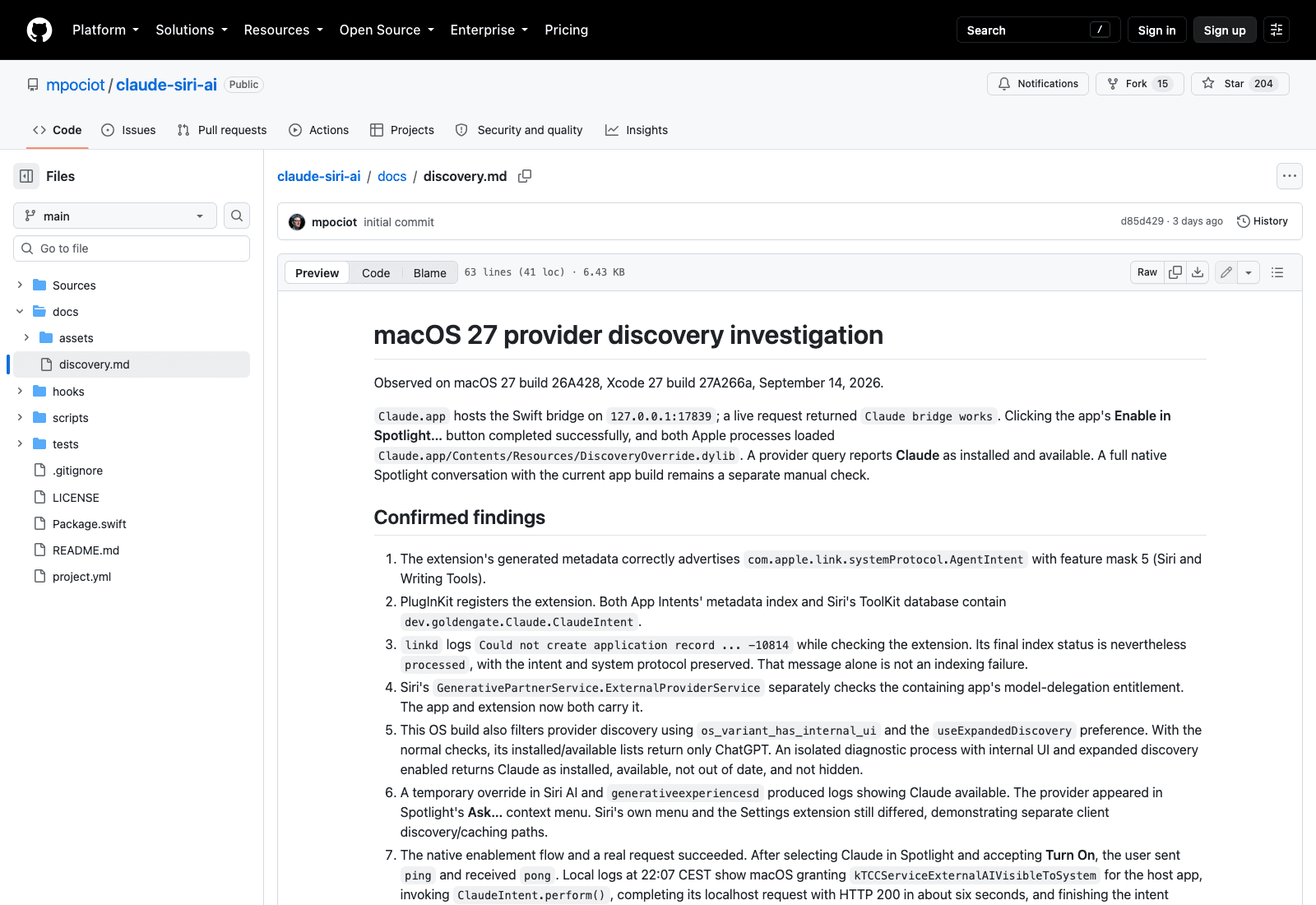
The investigation behind that conclusion is worth reading. The local framework contains private selectedLLMId, defaultLLM and intendedDefaultLLM APIs, and on the tested build both the selected and default identifiers resolve to com.apple.openai.chatgpt. Those belong to Apple's partner-model settings path. The author could not establish that writing to them would make a third-party intent the default destination, and so the app "deliberately does not expose an unverified 'Make default' toggle."
That decision is the most impressive thing in the repository. The toggle would have been easy to add, it would have looked great in a screenshot, and it would have been a lie by implication. Leaving it out costs stars.
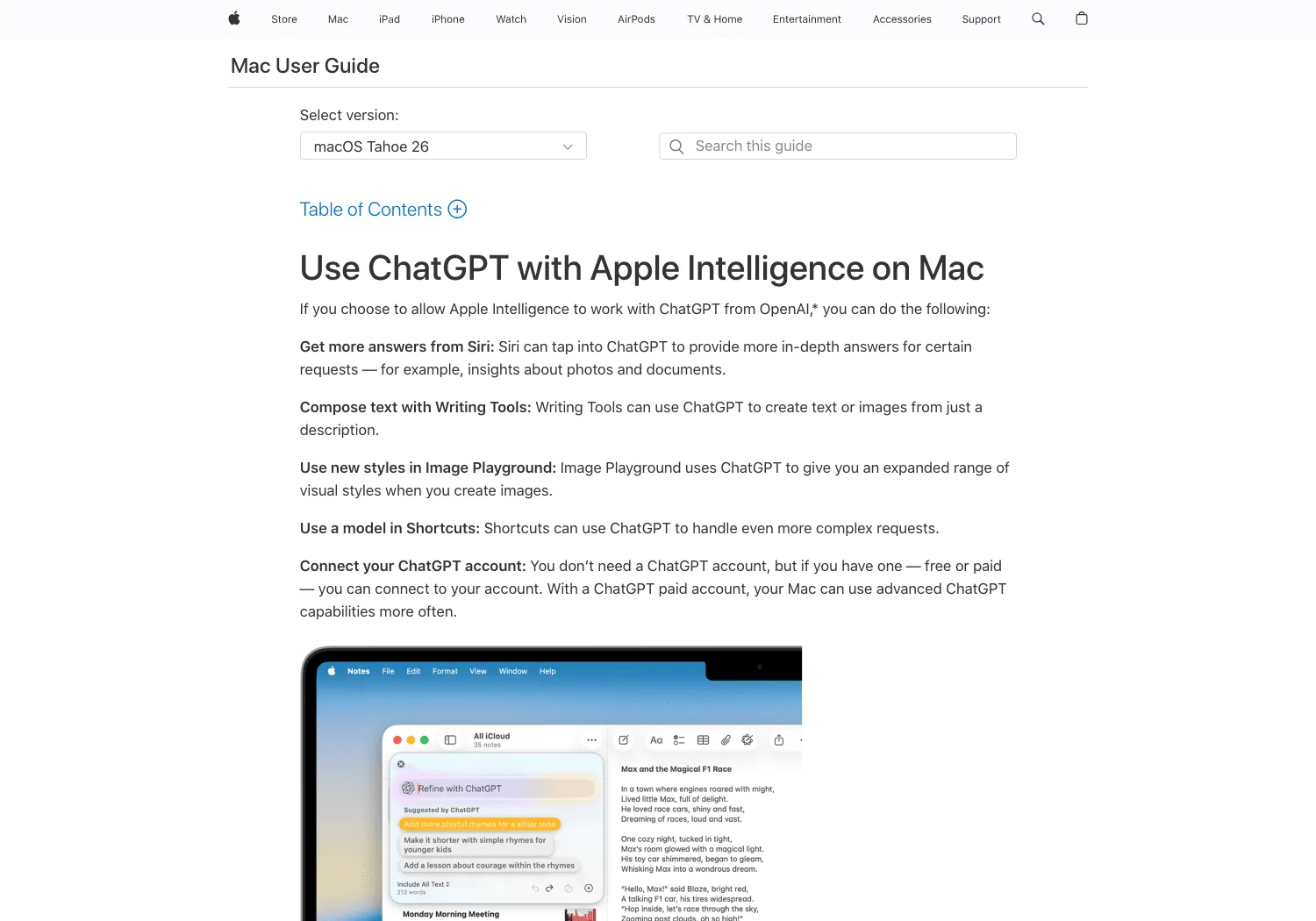
Apple's documented ChatGPT integration works differently, with explicit "Ask ChatGPT" routing and confirmation controls, and the README correctly separates two things people conflate: turning off the confirmation prompt is not the same as replacing Siri's default provider.
The contrast is easy to see in Apple's own documentation. The Mac User Guide has a page for using ChatGPT with Apple Intelligence, covering Siri answers, Writing Tools, Image Playground and Shortcuts, with instructions for connecting your account. There is no equivalent page for any other model, and claude-siri-ai's own discovery notes report that under the normal system checks, the installed and available provider lists return only ChatGPT.
Who this is actually for
Not consumers, despite how the idea sounds. Three filters knock nearly everyone out before the first build: macOS 27, a machine you're willing to run with SIP and AMFI off, and Xcode.
What's left is a small group, and for them it's genuinely interesting. If you're building anything that wants to register as a model provider on macOS, this is a worked example of the entitlement, the discovery behaviour, and the failure modes, written by someone who tested claims instead of assuming them. The docs/discovery.md notes on Spotlight, the Ask menu and System Settings each showing different provider lists will save someone a day.
For everyone else, the useful takeaway is negative and still worth having: Apple has not opened this integration point, ChatGPT currently holds the partner slot at the system level, and no amount of clever engineering changes that from outside. If you want Claude in your workflow this week, the practical routes stay what they were — the CLI, the desktop app, or something that runs the work for you and puts the result back in the tool you were already using. Zentor takes the last of those: the finished thing lands in Notion, Airtable, Slack or your inbox, and none of it depends on which assistant Apple decides to bless.
There's a related point about memory. Every request through claude-siri-ai starts a fresh conversation, by design, because that's what the Spotlight surface is. For one-shot questions that's correct. For work that continues across days, something has to hold what was decided, and in Zentor that history stays with your account and can be exported, so it isn't stranded in whichever assistant slot happens to be available. If you're mapping the Claude ecosystem more broadly, our writeups on Claude's skills system and the skills worth installing cover the parts that don't need a kernel-level compromise.
The routes that do work today
Since the honest verdict on this one is "not yet, and not on your main machine," here's what's left if the underlying want is Claude closer to hand on a Mac.
Claude Code in a terminal is the route this project itself depends on, and it's already installed for anyone who'd be tempted by a Claude Siri build. Anthropic's desktop app covers the conversational case without touching entitlements. A keyboard launcher like Raycast or Alfred gets you most of the ⌘Space ergonomics through ordinary, supported extension APIs, which is the comparison that makes the SIP requirement look expensive rather than daring.
What none of those give you is the thing the Spotlight surface promised: a system-level entry point that any app can reach. That's the actual prize, and it's held by Apple.
The ecosystem reaction is the interesting signal. Two hundred stars in four days for something almost nobody can run means people aren't starring a tool, they're starring a demonstration that the door exists. claude-siri-ai functions as a bug report addressed to Cupertino, filed in Swift.
What I'd watch next
Three things would change the calculus, and none of them involve this repository.
If Apple documents the model-delegation entitlement and starts granting it, a Claude Siri integration becomes a normal app you download, and this project becomes the reference implementation that got there first. If Anthropic ships its own provider, the same thing happens faster and with support. And if macOS 27 reaches general release with the private APIs still resolving to a single partner identifier, that tells you the slot is a commercial arrangement rather than a platform feature, which is worth knowing regardless of which assistant you prefer.
The repository has no releases and four days of history, so treat everything in it as a snapshot of one build on one machine. The author says as much.
FAQ
Is there an official Claude Siri integration?
No. Apple has not shipped a Claude Siri integration. The documented third-party path is ChatGPT, and on the build this project was tested against, the system's default model identifier resolves to com.apple.openai.chatgpt. claude-siri-ai is an independent community project.
Is claude-siri-ai safe to install?
The code is MIT and public, so you can read it. The requirement is the problem: it needs macOS 27 with SIP and AMFI disabled, which lowers protections for everything on that machine, not only for this app. The README says use a development Mac, and that's the right advice. Don't do it on a laptop holding work data.
Does it work with voice?
Unverified. The README states voice routing to this example remains unverified. The demonstrated path is Spotlight's Ask… menu.
Do I need a Claude API key?
No. It uses your signed-in Claude Code account through the local CLI, so Claude Code has to stay installed and authenticated.
Does it remember previous questions?
No. Each request starts a fresh conversation.
Where this leaves things
The interesting fact isn't that someone connected Claude to Spotlight. It's that macOS 27 shipped a model-delegation entitlement that third parties can technically reach and practically can't use without breaking their own machine.
What this repository proves is narrower and more useful than an argument about whether Apple should open it up: the plumbing exists, a couple of developers found it in four days, and the only thing between it and a normal install is a decision nobody has made yet. Watch the entitlement, not the app.

Zentor Editorial Zentor editorial team
The Zentor editorial team writes about workflow automation, AI agents, and the tools we build. Default byline for industry overviews, listicles, and collaborative pieces.
Turn insights into action.
Zentor automates the recurring work your analysis points to. No engineering required.
References https://github.com/mpociot/claude-siri-ai · https://github.com/mpociot/claude-siri-ai/blob/main/docs/discovery.md · https://support.apple.com/guide/mac-help/use-chatgpt-with-apple-intelligence-mchlfc5cf131/mac