Codex vs Zentor: Features, Pricing, and Who Each Fits

Codex vs Zentor compared: what each AI agent does, Codex plans from $0 to $500 vs Zentor at $20/month, where results land, and which one fits your work.
Codex vs Zentor comes down to where your work lives. Codex is OpenAI's coding agent, included in ChatGPT plans from Free to Enterprise, and it's built to read, write and review code in a repo; Zentor is a $20-a-month assistant for non-developers that runs recurring business tasks and delivers the results into Notion, Airtable and Slack, even when your computer is off.
If you're actually trying to choose between ChatGPT Work and Codex (two OpenAI products that now share an app), that's a different question, and our ChatGPT Work vs Codex comparison answers it. This page only compares Codex with Zentor.
Key Takeaways:
- Codex is a coding agent first. It runs in the ChatGPT desktop app, a CLI, an IDE extension, the web and the cloud, and plugs into GitHub, Slack and Linear.
- Codex comes with ChatGPT plans: $0 Free, $8 Go, $20 Plus, Pro from $100 up to $500, and Business at $20 per user per month billed annually.
- Zentor is one plan: $20 a month for 1,000 credits, with built-in models and no API key.
- Both can run scheduled tasks. Codex desktop tasks that touch local files need your computer on; Zentor doesn't depend on your machine.
- If you write software, pick Codex. If you sell, freelance, study or run a one-person business and want chores done in the tools you already use, Zentor is closer to the job.
I'm Vera, and I write for Zentor, so read this with that in mind. I'm not a developer. I run a one-person research and operations practice, and most of my friction isn't hard work, it's the in-between motion: the tab I open every morning, the figures I copy from one place to another. I kept seeing both tools pitched for the same job, so I worked out which question each one actually answers. I use Zentor most days for recurring research and monitoring. I haven't run Codex through real coding workflows, because that isn't my world, so for Codex I'm leaning on OpenAI's own documentation and pricing pages, and for Zentor on my own use.
Codex vs Zentor at a Glance
| Codex | Zentor | |
|---|---|---|
| Made by | OpenAI | Zentor |
| Built for | Developers shipping software | Students, sellers, freelancers, creators |
| Where you use it | ChatGPT desktop app, Codex CLI, IDE extension, web, cloud, mobile | Web, plus delivery into Notion, Airtable, Slack, Google Workspace, Discord |
| Core job | Write, run, test and review code | Recurring research, monitoring, reports, follow-ups |
| Price | $0 to $500/month per person depending on plan | $20/month, 1,000 credits |
| Models | OpenAI models only (GPT-6.1 Sol, GPT-6 Luna and others, by plan) | Built in; routes each task to a suitable model |
| Memory | Memories feature in Codex | One memory that belongs to you and can plug into other AI tools |
| Scheduled tasks | Yes; local-file tasks need the computer on and the app running | Yes; runs without your machine |
| Computer use | Yes, on macOS and Windows, in supported regions | Not the focus; works through connected apps |
| Needs coding knowledge | Helps a lot | No |
What Codex Is Now
Codex started as OpenAI's coding agent, and that's still its center of gravity. You point it at a codebase and ask it to fix a bug, add a feature, write tests or review a pull request; it reads the files, runs commands and proposes changes. According to OpenAI's Codex documentation, it's available in the ChatGPT desktop app (macOS, Windows and Linux), the ChatGPT mobile app, ChatGPT on the web, the Codex CLI, an IDE extension and Codex Cloud. It connects to GitHub for code review, Slack, Linear and GitLab (in beta).
It's grown well past pure coding. OpenAI's April 2026 update, "Codex for (almost) everything," added background computer use, an in-app browser, plugins and memory. Today computer use lets it "see and operate graphical user interfaces on macOS or Windows," and scheduled tasks let it repeat a job on a timer.
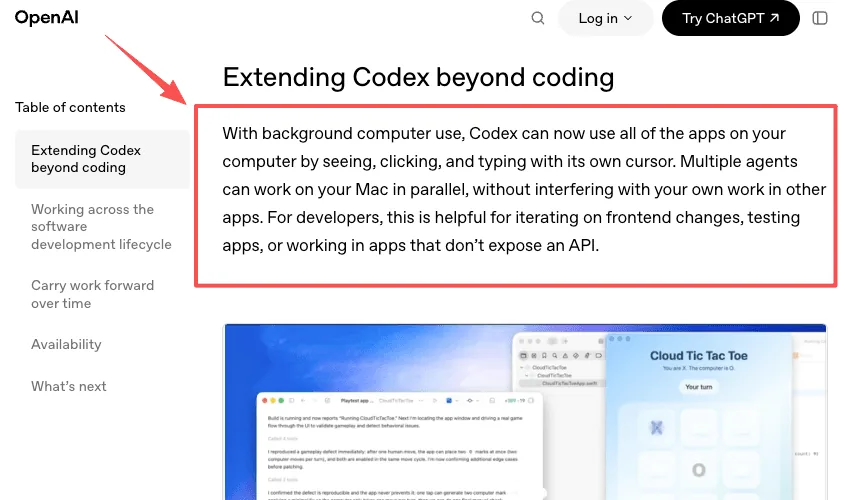
So "Codex is only for code" is out of date. But look at what the product points you toward: repos, pull requests, terminals, code review bots. The defaults assume you think in software.
I want to be precise about what I did and didn't do here. I read the release announcement, the current documentation and the pricing page. That's not a substitute for using it, and I'm not pretending otherwise. What documentation does tell you is the intended audience, and the marquee examples are reviewing pull requests and iterating on code. What I can't tell you is how computer use feels in practice for a non-developer, or where the rough edges are in daily use. Those gaps are real. My read is a documentation-level read, and only that. The ChatGPT app now also has a separate Work mode aimed at non-coding tasks, which is exactly why people now compare ChatGPT Work with Codex (see the link at the top of this page).
A detail that matters if you're not technical: scheduled tasks that use local files run only while "the computer [is] on and the app running." Web tasks run without the app but "can't work directly in a folder on your computer."
What Codex Costs
Codex has no separate price; it comes with your ChatGPT plan. Here's what OpenAI's Codex pricing page lists as of October 28, 2026:
| Plan | Price | What you get for Codex |
|---|---|---|
| Free | $0 | Quick coding tasks in the desktop app (GPT-6 Luna, subject to rollout) |
| Go | $8/month | Lightweight coding tasks in the desktop app |
| Plus | $20/month | Web, CLI, IDE extension and iOS; GPT-6.1 Sol and GPT-6 Luna; a few focused sessions a week; top up with credits |
| Pro | $100, $200 or $500/month | Much higher usage; no five-hour limit currently; ultrafast mode on the $500 plan |
| Business | $20/user/month billed annually ($25 monthly) | Plus-level usage per seat, workspace credits |
| Enterprise / Edu | Contact sales | Flexible, credit-based usage |
Plus usage is metered in five-hour windows. OpenAI estimates, for example, 15 to 160 local messages per five hours on GPT-6.1 Sol and 350 to 3,000 on GPT-6 Luna, depending on task size. When you hit the limit you either wait or spend ChatGPT credits.
You can also run the CLI, SDK or IDE extension with an API key instead of a plan. That bills at standard API rates and drops the cloud features, such as GitHub code review and Slack.
What Zentor Is
Zentor comes from the other direction. It's built for people who don't write code and still spend hours on digital chores: a seller checking stock and restock levels, a freelancer chasing unpaid invoices, a student pulling deadlines out of a syllabus, a creator tracking brand deals in a spreadsheet.
You describe the job in plain English. Zentor does it and delivers the result into the tools you already use, like Notion, Airtable, Slack, Google Workspace and Discord, rather than leaving it in a chat window. Four things shape how it works:
- It learns your way of working. Your formats, your tone, the tasks you repeat. The more you use it, the less you explain.
- The memory is yours. What it learns sits in one memory that belongs to you and can connect to other AI tools through Zentor MCP, so you're not locked in.
- It picks the model per task. Routing chooses a strong, fast or cheap model depending on the job, so a simple lookup doesn't burn the same credits as a long research run.
- It runs without your computer. Scheduled work happens whether or not your laptop is open.
Here's what that looks like in my week. The piece that actually changed it was scheduling. I set a task once on a recurring run, and it goes whether I'm awake or not. What I saved wasn't really time. It was the number of times a day I thought "Oh, I still need to check that." For the tasks I handed off, that count went to zero. The morning report is just there.
The other bucket is research and documents, which is most of my actual job. Every project used to start the same way: search, open tabs, read, copy into notes. Now the collection and a first pass of organizing run on their own, so my work starts where the judgment begins instead of where the gathering does. Same with a stack of PDFs when I need one figure out of each. It pulls them into one place. I still read the ones that matter. I just don't read all of them.
If you want to see the shape of typical jobs, the workflow automation use cases and the page for solo founders are good places to start.
Where it's weaker: Zentor isn't a coding tool. It won't review your pull requests or refactor a codebase, and if that's your day, Codex (or a similar coding agent) is the right pick. It also can't promise every run finishes cleanly; sites change and connected apps fail sometimes, so check outputs for anything that matters before you trust it unattended. I've had runs fail when a site changed its layout or put up bot protection, and outputs come back half-formatted. I keep the riskier tasks read-only and check them. When one proves stable over enough runs, I stop watching it.
What Zentor Costs
One plan. Zentor Pro is $20 a month and includes 1,000 credits per billing period; unused credits don't roll over. If you run out, optional credit packs go from $10 to $200 (100 credits = $1) and last 365 days. New accounts get a 3-day trial with 1,000 credits and no credit card. Models are built in, so there's no API key to set up or pay for separately.
Credits track usage, so more work costs more. And as the pricing page says, usage already incurred may consume credits even if a task is interrupted or doesn't finish.
At the $20 level, then, the comparison is roughly ChatGPT Plus (which includes Codex) versus Zentor Pro. One buys you a strong coding agent plus ChatGPT; the other buys you an assistant that does business chores and files the results where you work.
Where Codex and Zentor Overlap, and Where They Split
On a feature list they now look similar. Both run scheduled tasks. Both remember things about you. Both can act, not only answer. That's why "Codex vs Zentor" gets searched at all.
They split on three things that a feature list hides.
What a "task" means. For Codex, a task usually means a change to code: a diff, a test run, a pull request. For Zentor, it's an outcome in a business tool: a filled-in Airtable base, a Notion page with this week's numbers, a Slack message with the overdue invoices.
Where it runs. Codex's richest features live on your machine: the desktop app, the CLI, computer use operating your own screen. That's ideal when the work is files on your computer. It's a problem when the work should happen at 6am while your laptop is in your bag. Zentor runs on its own, so the always-on part isn't something you arrange.
Who it assumes you are. Codex assumes you can read a diff, judge whether a test result makes sense and recover when something breaks. Zentor assumes you can describe the job in a sentence and recognise a good result.
So here's the question I'd ask instead of comparing checklists: when you picture handing work to an agent, what does that work look like in your head? If it looks like a repo, a pull request, a build, a frontend you're iterating on, you're Codex's default user, and that's where it will feel native. If it looks like a tab you open every morning, a report you assemble by hand, a form you refill every week, you're the person Zentor was built for.
Codex vs Zentor by Situation
You write software for a living or a side project. Codex. It reads the repo, runs the tests, reviews pull requests and lives in your editor and terminal. Zentor won't compete there.
You run a small online shop. Zentor. Restock checks, competitor price notes, weekly sales summaries into a sheet or a Notion page are its kind of job, and you don't want them to depend on your laptop being awake.
You freelance or sell a service. Zentor, for follow-ups, invoice tracking and client research landing in the tools you already use.
You're a student. If you're studying computer science and writing code, Codex inside ChatGPT is useful. For deadlines, reading lists and research notes organised into Notion, Zentor fits better; see Zentor for students.
You run a one-person research or consulting practice. This is me, so here's my own split. ChatGPT helps me think; Zentor does the things I'd otherwise do by hand. Codex sits in a third place I rarely stand in, because I don't live in code.
You're a developer who also has business chores. Plenty of people use both: Codex for the code, something like Zentor for the operational work around it. They don't conflict.
FAQ
Is Codex free?
There's a Free ChatGPT plan that includes Codex for quick coding tasks in the desktop app, subject to rollout. Web, CLI, IDE and iOS access start with Plus at $20 a month.
Can Codex do non-coding work?
Some. Computer use, a browser, plugins, memory and scheduled tasks mean it can handle general computer work. But its defaults and integrations still point at software development. For non-coding work inside ChatGPT, OpenAI's own answer is ChatGPT Work, which the comparison linked at the top of this page covers.
Does Zentor write or review code?
That's not what it's for. Zentor is built for business tasks and delivers into apps like Notion, Airtable and Slack. Use a coding agent such as Codex for code.
Do I need an API key for either?
Not for Zentor; models are built in. Codex works with a ChatGPT plan sign-in, or you can use an OpenAI API key with the CLI, SDK or IDE extension, billed at API rates and without cloud features.
Do scheduled tasks keep running when my computer is off?
With Zentor, yes. With Codex, it depends: tasks that use local files need the computer on and the desktop app running; web tasks don't, but can't touch folders on your computer.
Which is cheaper?
Both have a $20 entry point for individuals: ChatGPT Plus (with Codex) and Zentor Pro. Codex goes down to $0 with limited use and up to $500 for heavy use. Zentor is one plan plus optional credit packs.
Codex for Code, Zentor for the Work Around It
If your workday happens in a repo, Codex is the tool to pick, and with a ChatGPT plan you may already have it. If your workday happens in Notion, Airtable, Slack and a dozen browser tabs, and the goal is to stop doing the same chores by hand, Zentor is built for that. It's $20 a month, there's a 3-day trial, and the first useful test is simple: hand it the one recurring task you're most tired of doing yourself. Pick by where you spend your day, not by whose feature list is longer.
Vera runs a one-person research and operations practice and writes for Zentor about handing recurring work off, one task at a time.

Zentor Editorial Zentor editorial team
The Zentor editorial team writes about workflow automation, AI agents, and the tools we build. Default byline for industry overviews, listicles, and collaborative pieces.
Choosing between tools? Let Zentor run the work.
An always-on AI assistant that does the work. No switching required, no setup.
References Gartner: 40%+ of agentic AI projects canceled by 2027 (15% autonomous decisions by 2028) · OpenAI: Codex for (almost) everything (April 2026 update) · OpenAI: Codex platform documentation