Gemini 3.8 Live Pricing: Two Models, One Price

Gemini 3.8 Live pricing, read off Google's own page: both GA audio models bill at $0.005/min in and $0.018/min out, and thinking tokens hide in the gap.
Google moved two audio-to-audio models to GA on 15 September 2026, and the first question anybody building a voice agent asked was what the bill looks like. Gemini 3.8 Live pricing looks simple: both new models share one row of Google's price sheet, at identical numbers, alongside a third model that was already there. Then you work out what the per-minute column is actually measuring.
Key Takeaways:
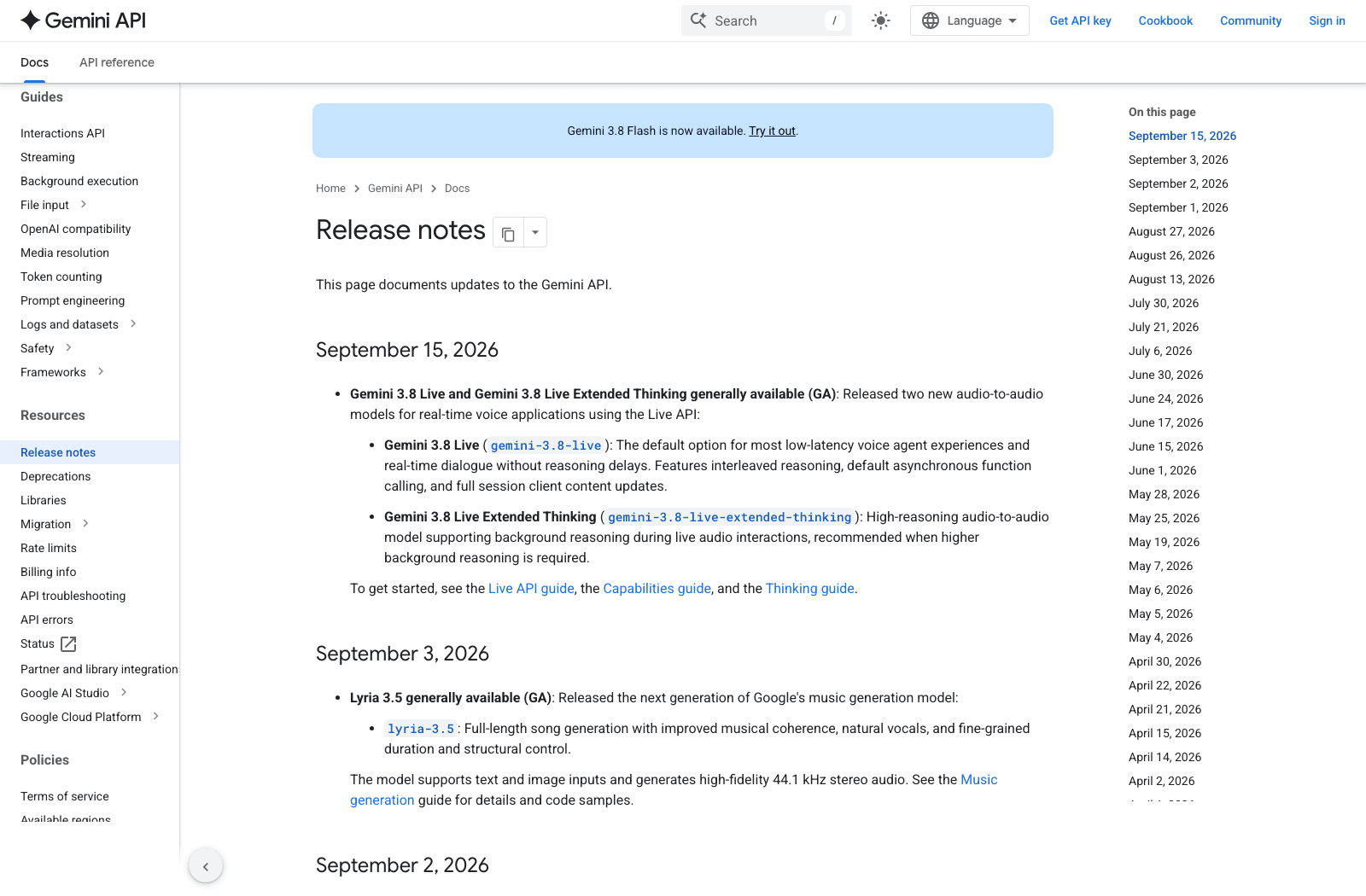
gemini-3.8-liveandgemini-3.8-live-extended-thinkingwent generally available on 15 September 2026, both audio-to-audio, both for the Live API- Google's pricing page lists them on one shared row together with
gemini-3.1-flash-live-preview, so the two new models bill identically - Paid audio rates are $3.00 per 1M input tokens or $0.005/min, and $12.00 per 1M output tokens or $0.018/min, with output explicitly including thinking tokens (as of 2026-09-16)
- Billing is per token; the per-minute figures reconcile exactly at 25 audio tokens per second, so silent background reasoning costs real money that the per-minute column hides
- Text on the same models runs $0.75 in and $4.50 out per 1M; image and video input is $1.00 per 1M or $0.002/min
- There is a free tier on both, and Google Search grounding gives 5,000 free requests a month shared across every Gemini 3.x model before it charges $14 per 1,000
- The Live API is a stateful WebSocket connection, not a REST call, which is the part that actually changes your architecture
What Google shipped on 15 September
The Gemini API changelog entry runs four lines. gemini-3.8-live is the default option for most low-latency voice agent experiences and real-time dialogue without reasoning delays, with interleaved reasoning, asynchronous function calling on by default, and full session client content updates. gemini-3.8-live-extended-thinking is the high-reasoning sibling, supporting background reasoning during a live audio interaction, recommended only when you need that.
Both are audio-to-audio: speech in, speech out, no transcription hop in the middle that you own. That is the point of the Live API, and why the cost model looks unlike every other Gemini endpoint you have billed against.
The transcript is not the deliverable.
A voice agent that finishes a call and hands you a JSON blob has done half the job. Zentor takes the outcome of the conversation and writes it where the work lives: the CRM row, the Notion page, the Slack thread your team already reads.
Try Zentor →
Both models bill at exactly the same rate
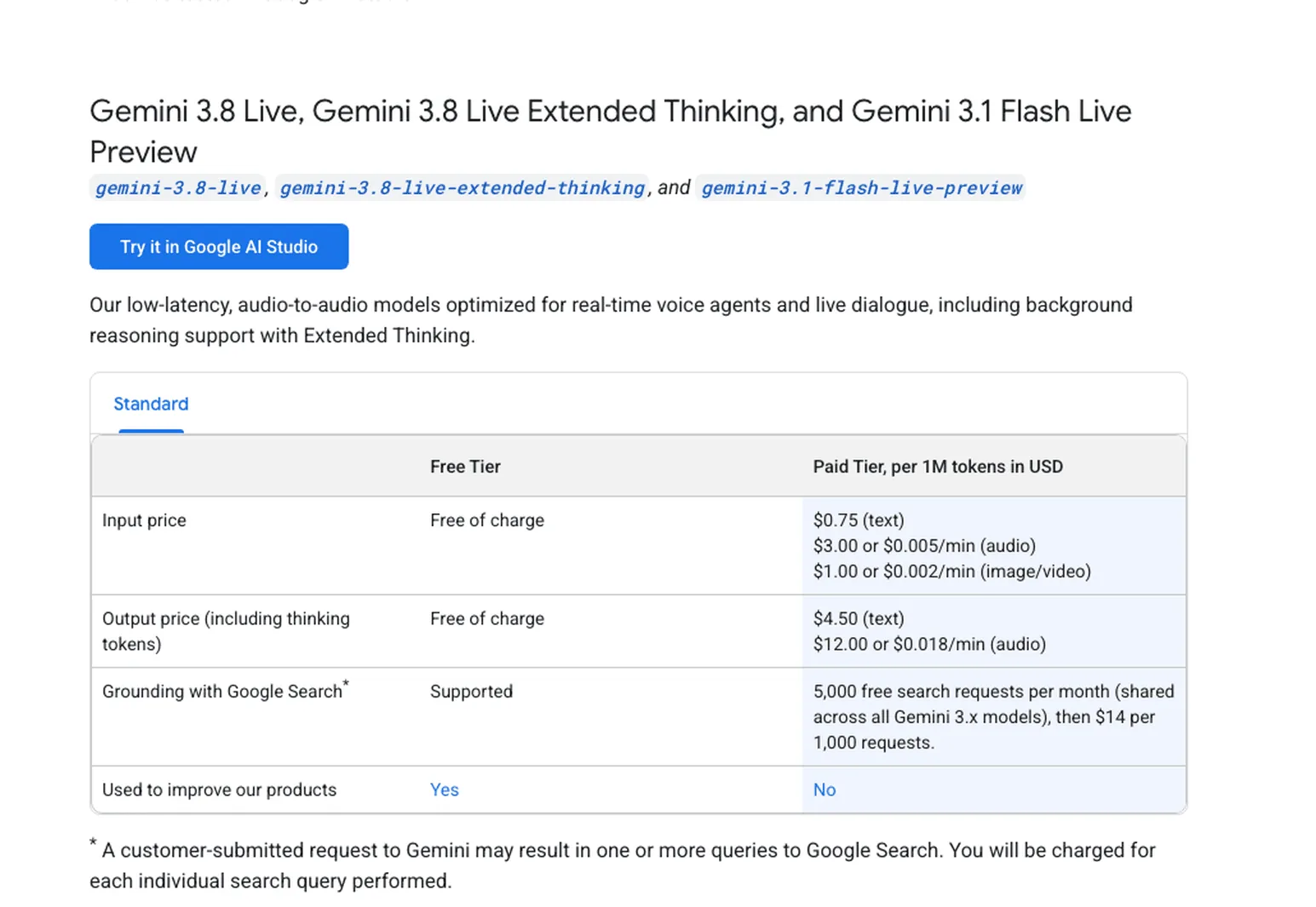
Open Google's pricing page and look for the row headed "Gemini 3.8 Live, Gemini 3.8 Live Extended Thinking, and Gemini 3.1 Flash Live Preview". Three model IDs, one price table. Checked 16 September 2026:
| Free tier | Paid, per 1M tokens | |
|---|---|---|
| Input (text) | Free of charge | $0.75 |
| Input (audio) | Free of charge | $3.00, or $0.005/min |
| Input (image/video) | Free of charge | $1.00, or $0.002/min |
| Output, thinking tokens included (text) | Free of charge | $4.50 |
| Output, thinking tokens included (audio) | Free of charge | $12.00, or $0.018/min |
Read the output row twice, because it carries the load. Google labels it "Output price (including thinking tokens)", which means the Extended Thinking variant does not charge a premium rate for the reasoning it does mid-conversation. It charges the ordinary rate for a larger number of tokens.
Which raises the obvious question: is that per-minute column a separate meter or a convenience conversion? The arithmetic settles it. Audio input at $3.00 per million tokens comes to $0.005 a minute only if a minute of audio is 1,500 tokens, which is 25 tokens a second. Output at $12.00 per million lands on $0.018 a minute on the identical assumption. Google states that 25-tokens-per-second figure outright in footnotes on the neighbouring rows for Gemini 3.5 Live Translate and Gemini 3.5 Transcribe, where it calls the per-minute number an effective price; it simply doesn't repeat the footnote on the 3.8 Live row.
You are billed per token, then, and the per-minute column assumes the model is doing nothing but talking. That is precisely where Extended Thinking reaches you. Thinking tokens are output tokens at $12.00 per million, the row label says as much, and they produce no audio, so they appear nowhere in the $0.018 a minute you budgeted from. Two models on one price row, and the costlier one is costlier in a column the table doesn't have.
What a call actually costs
Per-minute numbers are easier to reason about than per-million-token ones, so read Gemini 3.8 Live pricing that way and work in minutes. Talking flat out in both directions, a minute of conversation is $0.005 in and $0.018 out, which is $0.023.
Real calls are not flat out. Take a ten-minute support call where each side holds the floor about half the time: five minutes inbound at $0.005 is $0.025, five outbound at $0.018 is $0.09, so roughly $0.115 a call, or $115 across a thousand of them. That is the base model. On Extended Thinking the floor holds and reasoning tokens stack on top, invisible to the per-minute view. Add Google Search grounding and the arithmetic shifts: 5,000 grounded requests a month are free and shared across every Gemini 3.x model on your key, then it is $14 per 1,000 requests, which at one grounded lookup per call overtakes your audio spend somewhere past the five-thousandth call.
That shared pool is the line item people miss, because it is not per model. Anyone who has audited where their token spend actually goes will recognise the shape of the surprise. If a Gemini 3.8 Flash job on the same project is already eating grounded search requests, your voice agent inherits the remainder.
Live or Extended Thinking
Since price is off the table, the choice comes down to what silence costs you.
Take the base gemini-3.8-live for anything where a pause reads as a broken connection: ordering, booking, triage, the front half of a support call. That is the same latency-first calculus we worked through when comparing voice agents built for actual work. Google's own framing is "without reasoning delays", and in voice a delay is not a slow response, it is the user talking over the model.
Reach for gemini-3.8-live-extended-thinking when the model has to work something out while the conversation keeps going: diagnostics, eligibility checks, anything where the right answer is worth two seconds of the model staying politely quiet.
The thing neither variant fixes is what happens after the call ends. A voice agent returns audio and a transcript; the work the call was about lives somewhere else entirely, in a ticket or a booking system or a spreadsheet. That gap is what Zentor is for: it takes the outcome of a run and writes it into the tool the work already lives in, so the call ends with the CRM updated rather than with a file you still have to process.
The WebSocket is the real integration cost
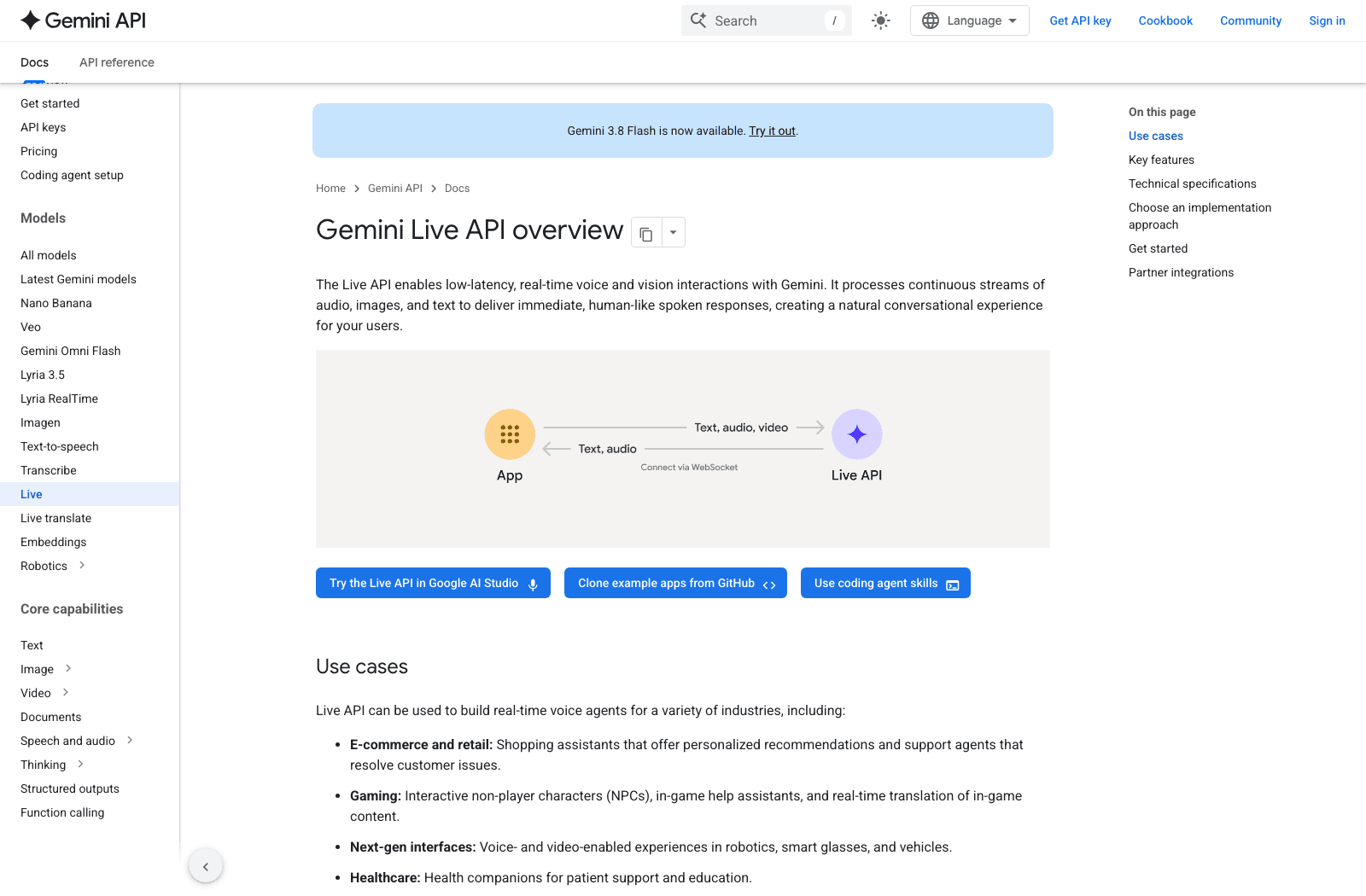
Pricing is the question people ask first and the one that matters least here. The Live API is a stateful WebSocket connection over WSS, not a request-response endpoint, and everything awkward about shipping it follows from that.
Input is raw 16-bit PCM audio at 16kHz little-endian, plus JPEG frames at up to 1 frame per second and text; output is raw 16-bit PCM at 24kHz. Note the mismatch. You resample both ways, and neither direction is MP3 or Opus, so whatever your browser or phone client produces needs converting first.
Then you pick a topology. Server-to-server puts your backend between client and Google, costing a hop of latency and buying control. Client-to-server connects the browser straight to the Live API, which Google says performs better for streaming and is easier to stand up, with one condition: use ephemeral tokens rather than standard API keys in production, because a long-lived key in frontend JavaScript is a long-lived key on the internet.
Session state is the part that bites later. A WebSocket conversation holds context for as long as it stays open and loses it the moment it does not, so anything the model learned on Tuesday's call is gone by Wednesday's unless you carry it yourself. Zentor takes the other approach: what it learns about a task persists across runs, and that memory belongs to you rather than to a session ID, exportable if you move to a different assistant later.
What you get besides the two models
Most of the Live API's feature list predates 15 September:
- 70 supported languages for conversation, with automatic language detection on Live Transcription and custom vocabulary support
- Barge-in, so a user can cut the model off mid-sentence without the session falling over
- Function calling and Google Search as in-conversation tools, async by default on 3.8 Live
- Affective dialog, adapting tone to how the user sounds, and proactive audio, controlling when the model volunteers a response
One discrepancy worth flagging: several launch-day posts quoted 97 languages, while Google's Live API documentation says 70. The documented figure is the one used throughout here. If you need a specific language guaranteed, check the list rather than a launch thread.
To skip building the transport, Google names LiveKit, Pipecat, Fishjam, Vision Agents, Voximplant and Agora as partners that already speak Live API over WebRTC or WebSockets. None of that touches deployment, though: something has to hold the WebSocket open and then report out. Zentor covers the reporting half, delivering the result into Slack or your inbox as the conversation resolves rather than leaving it in a log for someone to go find. Google's consumer-side Gemini work has been moving the same direction, which we picked apart in the Gemini Spark review.
FAQ
What is Gemini 3.8 Live pricing per minute?
$0.005 per minute of audio input and $0.018 per minute of audio output on the paid tier, checked against Google's pricing page on 16 September 2026. Image and video input is $0.002 per minute. There is also a free tier at zero cost for all of these.
Does Gemini 3.8 Live Extended Thinking cost more?
Not per token: both models plus Gemini 3.1 Flash Live Preview sit on one shared pricing row. In practice it should still cost more, because the output price explicitly includes thinking tokens at $12.00 per million and Extended Thinking produces more of them. Budgeting from the $0.018-per-minute figure will understate it, since that figure only counts tokens that turn into speech.
Is Gemini 3.8 Live audio-to-audio or text?
Audio-to-audio. It accepts raw 16-bit PCM audio at 16kHz along with JPEG images and text, and returns raw 16-bit PCM audio at 24kHz. Text in and text out is priced separately on the same row.
What is the difference between Gemini 3.8 Live and Extended Thinking?
Base 3.8 Live is built for low latency and dialogue without reasoning delays. Extended Thinking supports background reasoning while the audio session continues, which Google recommends only when you need the extra reasoning.
How many languages does Gemini 3.8 Live support?
Google's Live API documentation lists 70 supported languages for conversation and 70+ for Live Translation, with automatic language detection available on Live Transcription.
Where this leaves a build decision
Two GA models on one price row is an unusual thing for Google to ship, and the shared rate card makes the choice look simpler than it is. Gemini 3.8 Live pricing is identical per token either way; the bill is not, because Extended Thinking spends tokens you never hear. Run both against your own calls, pick on how they sound, and then check the token counts rather than the minutes.
Spend the time you save on the hard parts: resampling, session lifetime, token rotation, and where the result of a conversation actually ends up, which is not a Live API problem and never will be. A voice agent that resolves a ticket and leaves the resolution inside its own transcript has not finished the job. Zentor closes that last step, putting the finished work into the tool your team already opens and keeping what it learned for the next call.

Zentor Editorial Zentor editorial team
The Zentor editorial team writes about workflow automation, AI agents, and the tools we build. Default byline for industry overviews, listicles, and collaborative pieces.
Ready to put this into practice?
Zentor runs browser tasks, research, and schedules automatically. Try it free.
References https://ai.google.dev/gemini-api/docs/changelog · https://ai.google.dev/gemini-api/docs/pricing · https://ai.google.dev/gemini-api/docs/live