SuperGrok Heavy: Do You Need It for Grok Bot?
SuperGrok Heavy is $300 a month on x.ai/bot as of August 2026. It unlocks free Cursor Ultra for Grok Bot. Who needs it, and who should skip it.
Grok Bot is not a product you can buy on its own. As of August 20, 2026, x.ai/bot lists three paid doors: Cursor Ultra at $200 a month, SuperGrok Heavy at $300 a month, and Cursor Premium Teams at $120 a seat a month.
That published $300 figure is why this page needed a refresh. The live article still treated SuperGrok Heavy's price as unpublished rumor. Cursor's first-party help page, Get access with SuperGrok Heavy, says linking an active Heavy subscription unlocks free Cursor Ultra created at $0 for as long as Heavy stays active. SuperGrok at $30 and SuperGrok Plus at $100 still do not include the Bot app. An in-app prompt to "upgrade" to $100 is Plus, which is still the wrong door. Cursor's plans page says Pro and Pro+ do not include Bot, and that there is no separate Grok Bot SKU.
Key Takeaways:
- Grok Bot requires SuperGrok Heavy, Cursor Ultra, or Cursor Teams Premium. SuperGrok ($30) and SuperGrok Plus ($100) do not include it. Cursor Pro and Pro+ do not either.
- SuperGrok Heavy is $300 a month on x.ai/bot as of August 20, 2026. Linking it grants Cursor Ultra at $0 while Heavy stays active. Linking onto Ultra you already pay for does not stack usage.
- Claiming that grant cancels a Stripe-billed Cursor Pro or Pro+ plan, and the old plan does not return automatically. Team accounts are ineligible. Already-on-Ultra gets nothing extra.
- The free trial is a usage credit plus a 7-day window, not a set number of days. One long run can burn it. Weekly Bot usage is a separate bucket from Cursor credits.
- The desktop app is macOS and Windows. iPhone needs iOS 18+. Linux desktop is not supported at launch. The Bot's cloud computer is a managed Linux VM.
What SuperGrok Heavy Actually Includes in August 2026
SuperGrok Heavy sits at the top of xAI's consumer ladder. xAI introduced it alongside Grok 4 as Grok 4 Heavy plus the highest usage limits. Since then the tier has collected Grok Build, higher Imagine ceilings, and as of August 11, the Bot app.
What it is not is an enterprise plan. There is no SSO or seat management on Heavy itself. Those live on Cursor Premium Teams at $120 a seat a month on x.ai/bot, and in Business and Enterprise paths that still go through sales. Heavy is a single-person account that now also functions as a key: pay $300, link the Grok account, and Cursor provisions Ultra at $0 so the Bot app will let you in.
Compare what you are actually paying for before you upgrade
Zentor completes agent tasks and writes the result into Notion, Slack, or the inbox, so you can weigh an upgrade against what you actually need.
Get started →
Which Plans Unlock Grok Bot, and Which Don't
Access map as of August 20, 2026, from x.ai/bot, Cursor's plans page, and the Grok Bot FAQ.
| Plan | Grok Bot included | Published price | Notes |
|---|---|---|---|
| Free | No | $0 | Chat and limited search |
| SuperGrok | No | $30/mo | Not a Bot door |
| SuperGrok Plus | No | $100/mo | Still not a Bot door |
| SuperGrok Heavy | Yes | $300/mo on x.ai/bot | Link the Grok account for Cursor Ultra at $0 |
| Cursor Ultra | Yes | $200/mo on x.ai/bot | Sign in with that same Cursor account |
| Cursor Premium Teams | Yes | $120/seat/mo on x.ai/bot | Premium seat. Standard is not enough |
| Cursor Pro / Pro+ | No | not a Bot door | Cursor help: these plans do not include Bot |
| Business / Enterprise | Rolling out | contact sales | Launch post still points to a waitlist |
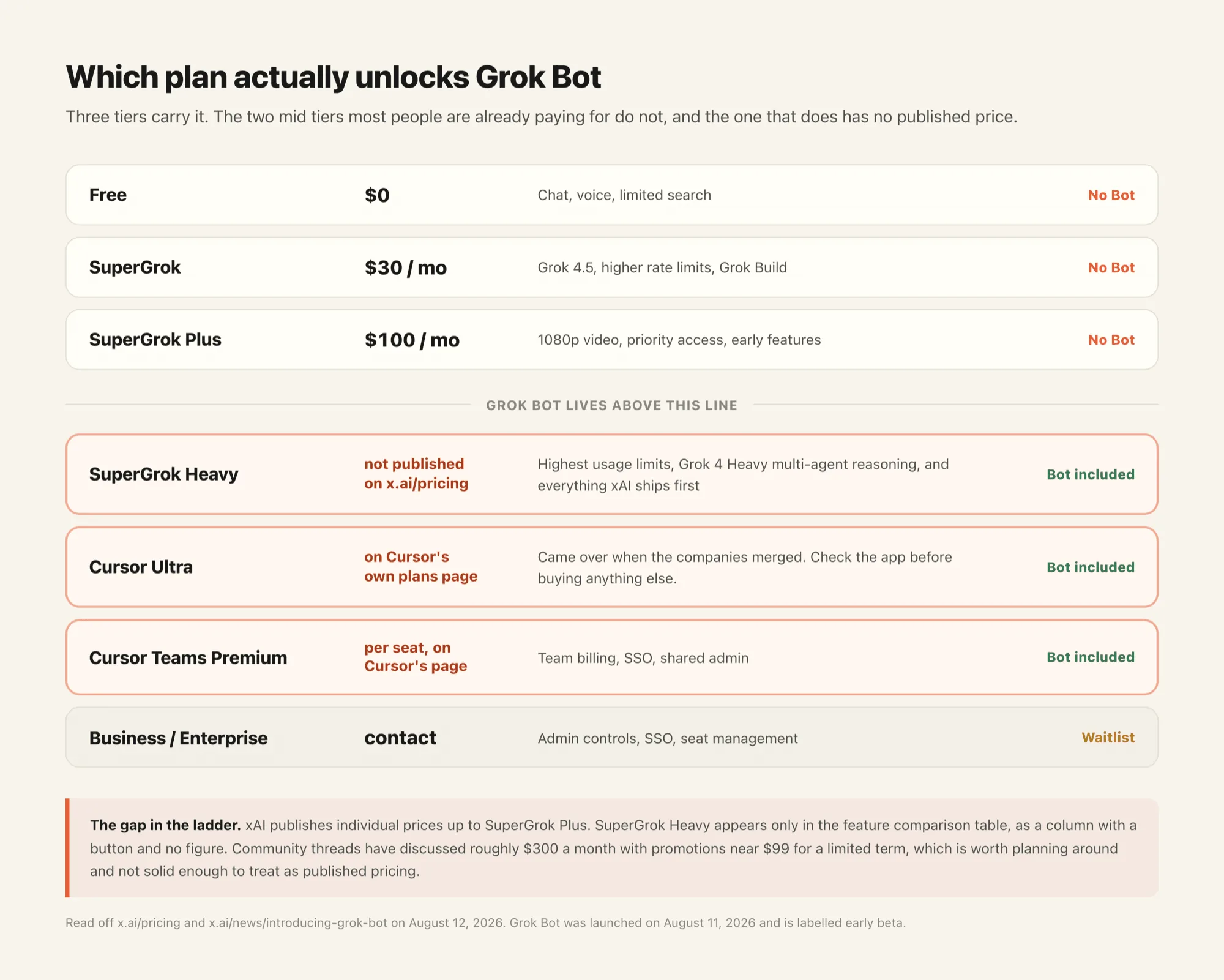
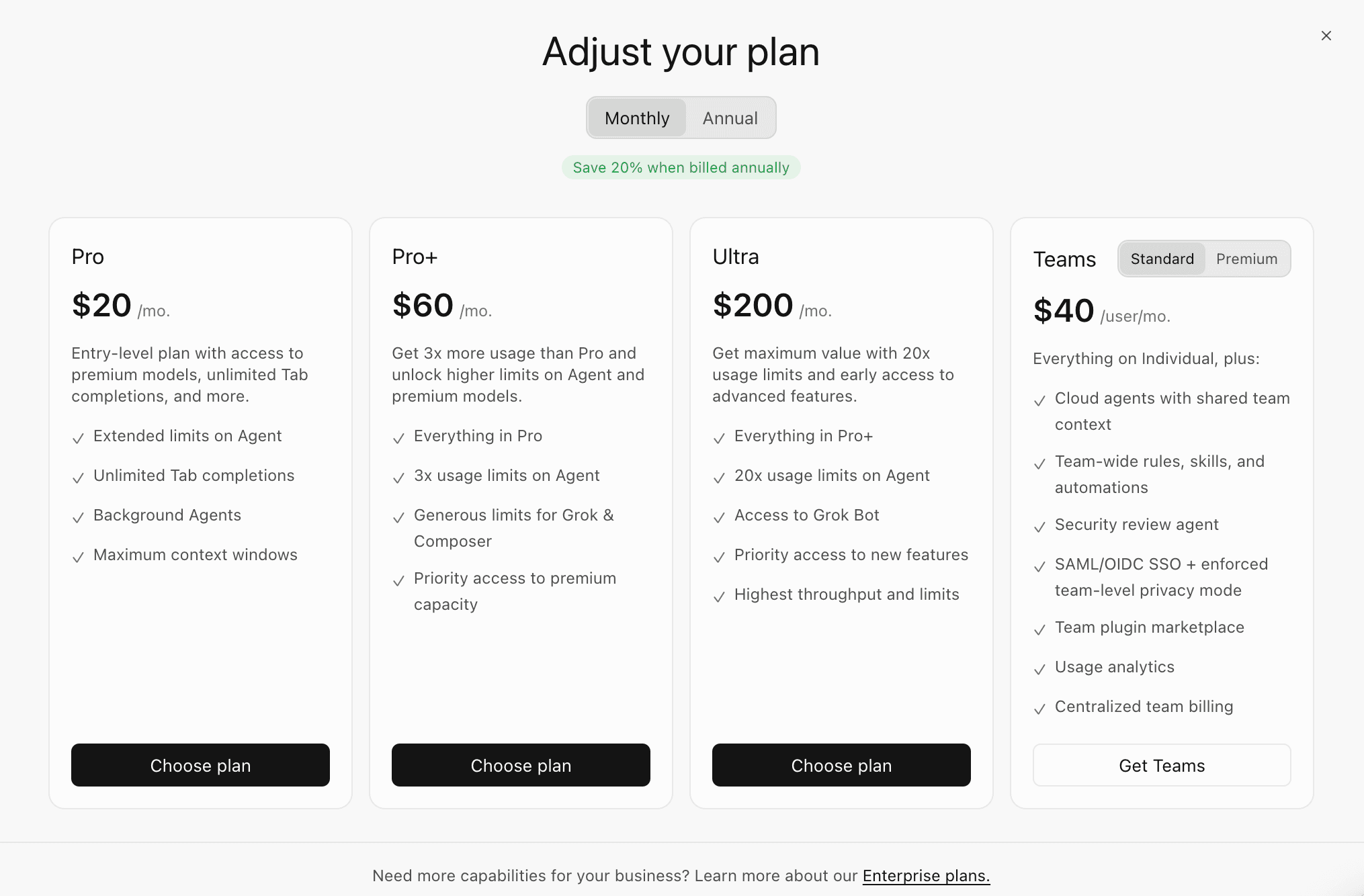
Cursor Ultra you already pay for already includes Grok Bot. Plans and billing says to sign in with that same account. No second subscription, and no Grok account link, is required. If you are on SuperGrok at $30 or Plus at $100, grok bot requirements still point at Heavy, Ultra, or a Premium team seat. Plus is a Grok chat upgrade, not a Bot upgrade.
What SuperGrok Heavy Costs, and How Linking It Unlocks Cursor Ultra
The ranking version of this article said xAI would not print SuperGrok Heavy's price. That stopped being true. On August 20, 2026, x.ai/bot prints Cursor Ultra at $200 a month, SuperGrok Heavy at $300 a month, and Cursor Premium Teams at $120 a seat a month, each billed monthly. Community threads still talk about intro rates near $99 for a few months. That figure is not on x.ai/bot or Cursor's Heavy help page, so treat $300 as the published list price.
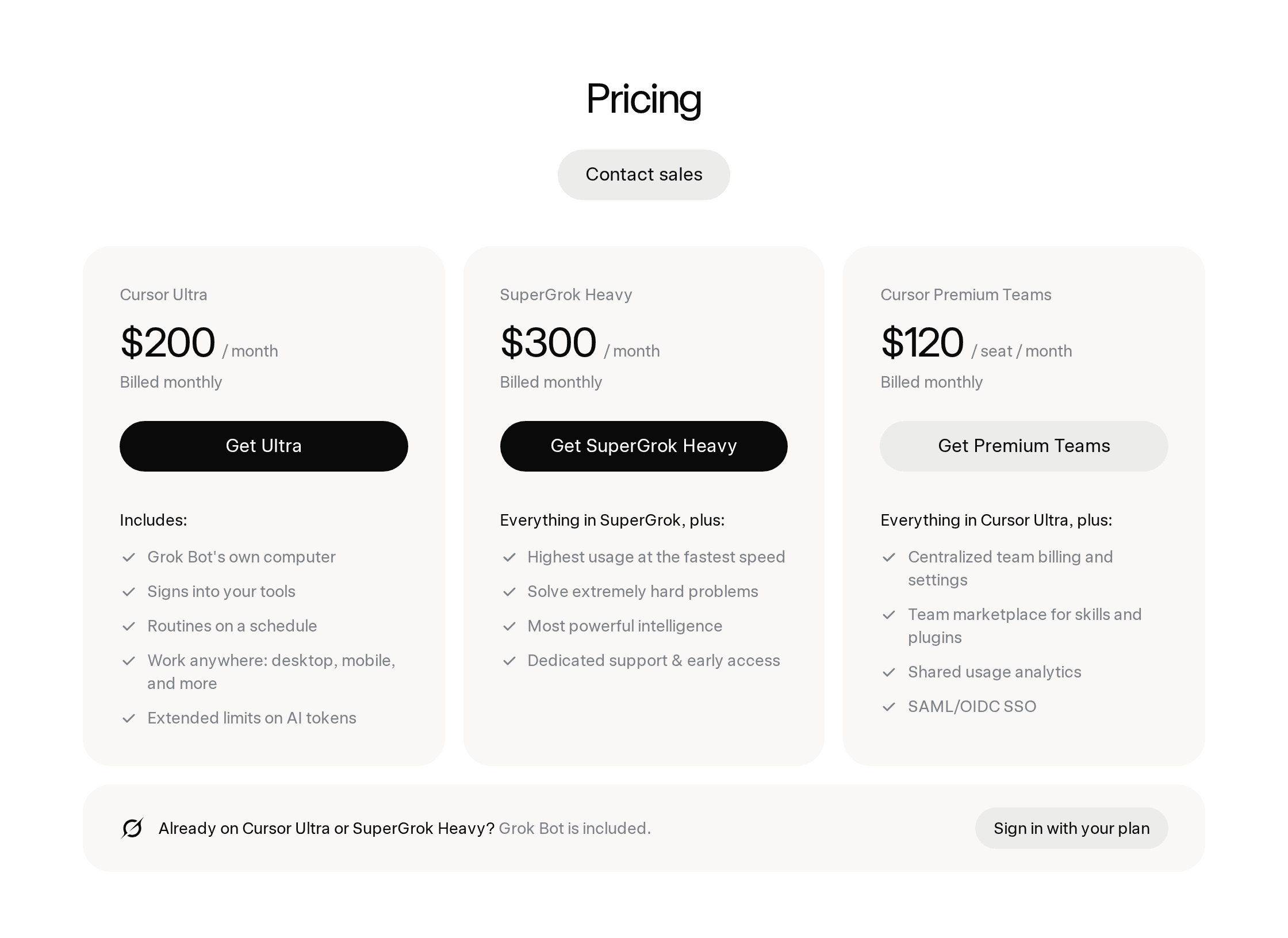
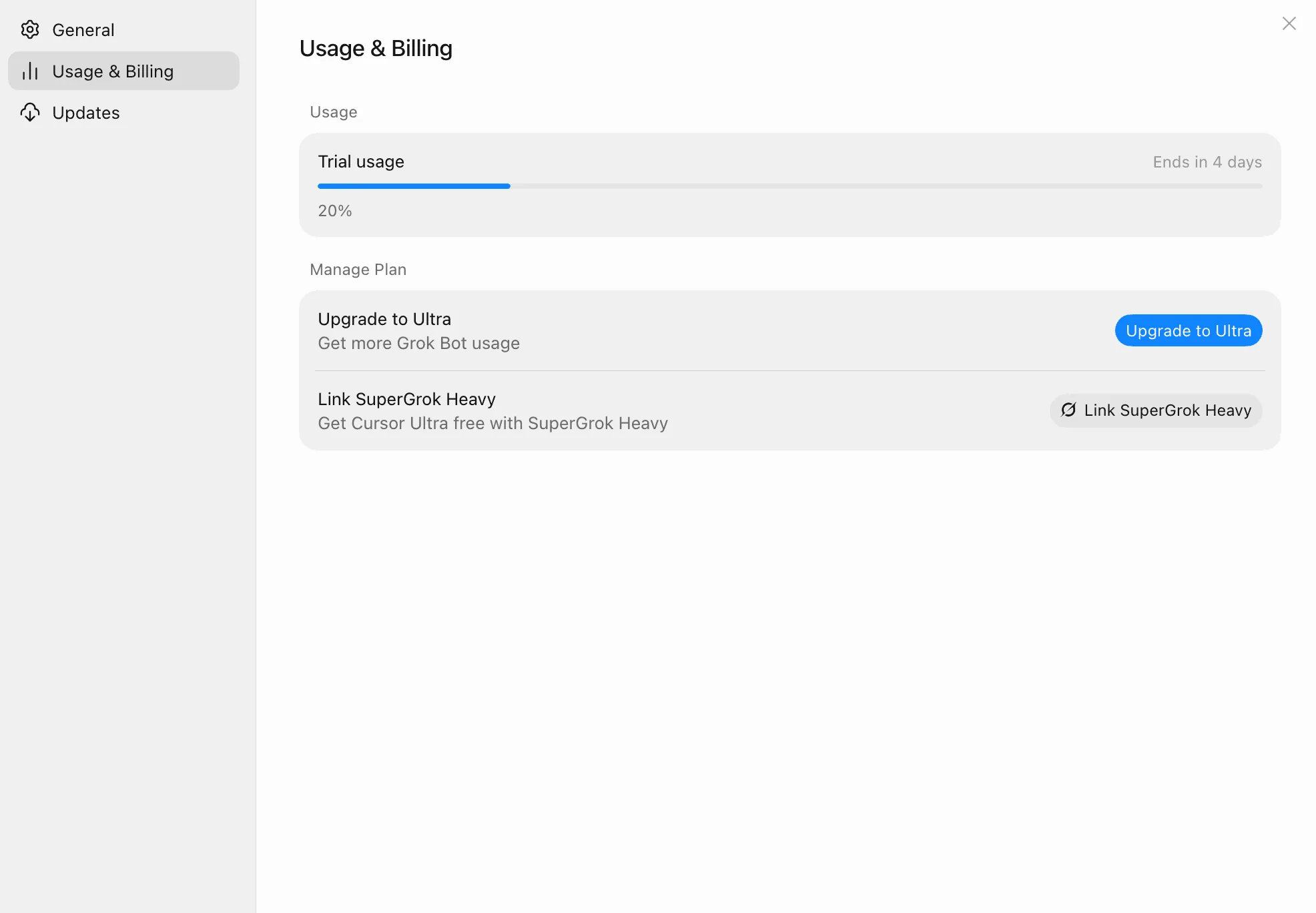
The $300 is not a Bot-only fee. You are buying the top consumer Grok tier. Grok Bot rides along once you complete the Cursor link titled Get access with SuperGrok Heavy. Qualifying customers receive free Cursor Ultra created at $0, active at no Cursor charge so long as Heavy stays active on renewal. No Cursor payment card is required for that grant.
Read this before you click Link Grok Account if you currently pay Cursor. If you have a Stripe-billed Cursor Pro or Pro+ subscription and claim free Ultra through SuperGrok Heavy, Cursor cancels your current Pro or Pro+ plan and replaces it with free Ultra. If the free Ultra later ends, the old Pro or Pro+ plan does not return automatically. Apple-billed Pro or Pro+ cannot be transitioned automatically, so the promotion may be declined rather than stacking Ultra on top.
Already on Ultra: linking SuperGrok Heavy does not add extra Ultra. The Cursor forum thread on whether Heavy is now the better Ultra deal repeats the docs: existing Ultra does not stack. Team accounts cannot use the individual SuperGrok promotion. One Grok account maps to one Cursor account.
If you already prepaid Cursor Ultra, especially annually, the Heavy link will not refund that Ultra bill or stack a second grant. If you prepaid a year of Ultra and then watched Heavy start handing the same Ultra out at $0, you are not imagining the gap. That is a reason to pick Heavy first if you do not already have Ultra, not a knock on people who bought Ultra to get in. Cursor staff on that thread said Ultra is still the direct way to buy Ultra on its own.
Grok Bot's Real Constraints: Beta, Platforms, and Weekly Usage
It is early beta, labelled as such at the top of the launch post. Reliability claims in that post are all internal.
Re-fetched August 20, 2026, the Grok Bot FAQ still lists macOS (Apple silicon and Intel), Windows (x64 and Arm64), and iPhone on iOS 18 or later. Linux desktop, Android, and iPad are not supported at initial launch. Get started repeats that Grok Bot is not currently available as a Linux desktop app. The Bot's computer is different: teams and enterprises says each member gets a managed Linux virtual machine, and answers "Is there a Linux desktop app?" with no. Computers run Linux. The desktop app ships for macOS and Windows. Closing a supported laptop does not stop a background turn, because the work is on that VM.
Enterprise access is still rolling out. The launch post sent enterprise buyers to a waitlist with no published date.
Plans and billing says paid Grok Bot access includes usage that resets weekly. When that weekly included usage runs out, extra Grok Bot usage can continue on the account's shared on-demand spend if on-demand is enabled. That weekly Bot bar is a separate bucket from Cursor coding credits, which is why Ultra-for-Bot can still feel like a thin plan: the IDE credits you already paid for do not refill the Bot meter. A Show HN post this week described burning almost 50% of usage in three hours. Treat that as a reader situation, not a published allowance size. This page is not the token-burn explainer.
The free trial is a usage credit rather than a set number of days, though a 7-day window also applies. A large or long-running agent task can use most or all of it at once. Used trial credit is not restored.
The Cheaper Doors Into the Same Job
The job is not "use Grok Bot." It is "hand off a multi-step task to something that keeps working when I close the laptop." Grok Bot is one way to buy that job. It is not sold in isolation. If you already have access, the next question is Grok Bot for daily work.
If you only want the Bot app as an individual, Cursor Ultra at $200 a month is the cheaper published door on x.ai/bot. SuperGrok Heavy at $300 is the right buy when you also want the top Grok consumer tier, or Ultra at $0 through the Heavy link. If you are already on a Cursor team, a Premium seat at $120 is the published team door. A Standard seat is not.
Cursor's help page answers "Do I need a separate Grok Bot subscription?" with no. The complaint on X, that you are looking at $200 or more a month for something you cannot try in isolation, is describing that packaging.
Zentor runs the same shape of work on a hosted cloud computer for $20 a month with 1,000 credits, plus a three day trial. Compared with Grok Bot the trade is honest: no bot-to-bot group chat, and no $300 consumer tier as the ticket in. Our always-on AI agent guide covers what production actually demands. MCP plus a scheduler on a small VPS is the right answer when one workflow matters and nothing else does.
How to Decide Before You Pay for a Year
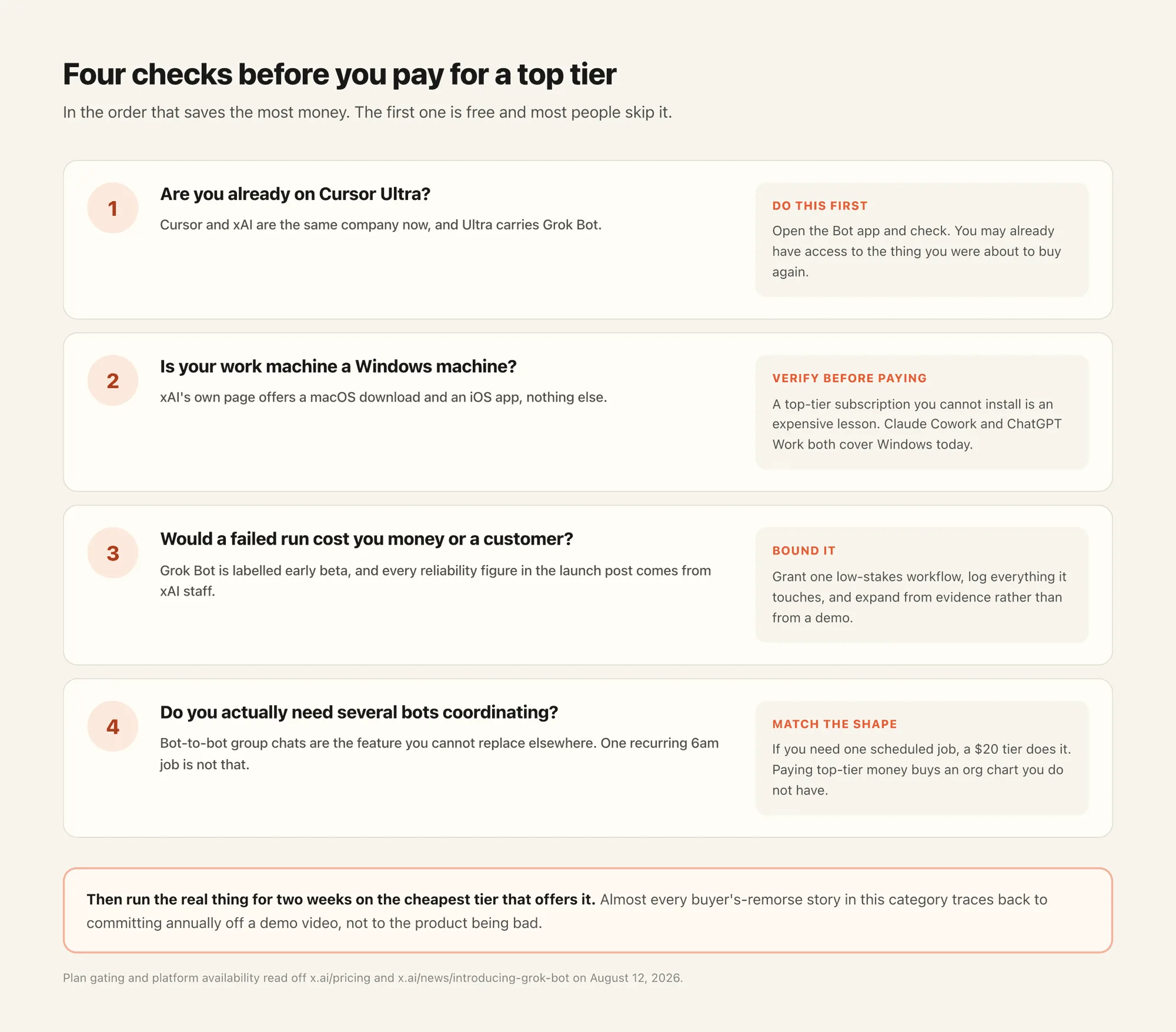
Already on Cursor Ultra? You already have Grok Bot. Linking SuperGrok Heavy will not stack usage.
On Stripe-billed Cursor Pro or Pro+ and thinking about the Heavy link? Claiming free Ultra replaces that plan, and it does not auto-return if the grant later ends.
On SuperGrok at $30 or Plus at $100? Those plans still do not include Bot. The documented doors are Heavy, Ultra, or a Premium team seat, not Plus.
On Linux desktop, Android, or iPad? The desktop app is not there at launch. The cloud computer is Linux. That does not give you a Linux client.
Would a failed run cost you money or a customer? Early beta plus unverified autonomy is the wrong combination this month. Start the trial on a small task. A single long run can spend the credit.
Do you actually need multiple bots coordinating? Grok Bot's group chat is its most distinctive feature. If your real need is one recurring job at 6am, you are paying top-tier money for an org chart you do not have.
Try Zentor in chat if you want to test a real workflow on a cheap tier before paying for a top one.
FAQ
Do you need SuperGrok Heavy for Grok Bot?
You need SuperGrok Heavy, Cursor Ultra, or Cursor Teams Premium. Free, SuperGrok at $30, SuperGrok Plus at $100, and Cursor Pro / Pro+ do not include Grok Bot as of August 20, 2026. There is no separate Grok Bot SKU.
How much does SuperGrok Heavy cost?
$300 a month on x.ai/bot as of August 20, 2026, billed monthly. Linking an active Heavy subscription unlocks Cursor Ultra at $0 while Heavy stays active. Community promo rates are not the published list price.
Does claiming SuperGrok Heavy cancel my Cursor Pro plan?
If it is Stripe-billed, yes: Cursor cancels Pro or Pro+ and replaces it with free Ultra. The old plan does not return automatically. Apple-billed plans may be declined. Team accounts are ineligible. Already-on-Ultra gets nothing extra, and usage does not stack.
Is Grok Bot available on Windows? What about Linux?
Yes on Windows (x64 and Arm64) and macOS (Apple silicon and Intel). iPhone requires iOS 18 or later. Linux desktop, Android, and iPad are not supported at initial launch, per the FAQ and get started. The Bot's cloud computer is a managed Linux VM. That is not a Linux desktop app.
What's the cheapest way to try an always-on AI agent?
Inside the Grok Bot gate, Cursor Ultra at $200 a month is the cheaper published individual door. The trial is a usage credit plus a 7-day window. Outside that gate, Zentor is $20 a month with a three day trial.
Does Grok Bot need API access or MCP to use my tools?
No. xAI says bots sign in and operate apps and websites directly, including ones with no clean API or MCP server.
Can Grok Bot remember how I like work done?
xAI says bots pick up preferences and can save a routine after watching you once. None of that has been independently tested yet. See agent memory versus chat history.
Buying Autonomy Without Buying the Top Tier
xAI attached an always-on teammate product to Cursor Ultra, SuperGrok Heavy, and Premium team seats instead of selling a Bot SKU. The price of Heavy is now printed. You still cannot buy Grok Bot in isolation, the $30 and $100 Grok plans still do not include it, and the trial is a credit that a single long run can spend. Test the job on a cheap tier first. The gate will move.
Fact-check, August 20, 2026: $200 / $300 / $120 from x.ai/bot. Heavy to $0 Ultra, Stripe cancel, no auto-return, teams ineligible, already-on-Ultra and no stack from cursor.com/help/grok-bot/supergrok-heavy.md and forum thread 168558. No Bot SKU, Pro/Pro+ exclusion, weekly usage then on-demand, trial credit plus 7-day window from plans.md. Platforms from the FAQ. Linux desktop vs managed Linux VM from get-started and teams-and-enterprises. $99 intro rates are community-reported. HN 50% in three hours is one user report.

Zentor Editorial Zentor editorial team
The Zentor editorial team writes about workflow automation, AI agents, and the tools we build. Default byline for industry overviews, listicles, and collaborative pieces.
Ready to put this into practice?
Zentor runs browser tasks, research, and schedules automatically. Try it free.
References Grok Bot access and plan cards (xAI) · Get access with SuperGrok Heavy (Cursor) · Grok Bot plans and billing (Cursor) · Grok Bot FAQ, including supported platforms (xAI) · Get started: Linux desktop app not currently available (xAI) · Teams and enterprises: managed Linux VM, no Linux desktop app (xAI) · Introducing Grok Bot (xAI) · Grok 4 launch, introducing the SuperGrok Heavy tier · Is SuperGrok Heavy now the better Cursor Ultra deal? (Cursor forum) · Show HN: Open-source Grok Bot alternative (usage report) · Model Context Protocol