AI Agent Sandbox: What It Is and Isn't
An AI agent sandbox is where your agent's code actually runs. How Cloudflare Computer builds one on Durable Objects, what its benchmarks show, and the limits.
An AI agent sandbox is the thing that runs the code your agent writes. Not the model, not the harness, not the tool router: the actual filesystem and process boundary where npm install happens and where a bad rm -rf stays contained. Most teams work out that they need one about a week after their agent first offers to edit a file.
Cloudflare shipped an unusual take on it. cloudflare/computer went public on June 5, 2026 and sits at 3,241 stars as of August 6, under an MIT license, with no tagged release yet. Read the name and you would assume Cloudflare built a cloud VM for agents. It didn't. The repo holds a virtual filesystem that lives inside a Durable Object, and execution is bolted on as a swappable option.
That difference changes what the project is good for, which makes it worth getting right before anyone builds on it.
Key Takeaways:
- The authoritative state is SQLite inside a Durable Object. Everything else, containers included, is a projection of that state.
- Three execution backends ship today and they share one entry point,
workspace.runtime.exec(source, { backend }). You can also construct a Workspace with no backend at all and just use the filesystem. - The FUSE mount beats the container's real disk on metadata-heavy work:
findover a directory tree runs at 0.72x the ext4 time,rmof 1000 files at 0.66x. - It loses badly on bulk I/O. A full
npm installof 854 packages took 124.7s on the mount versus 63.9s on ext4. - The README says PREVIEW ONLY and not suitable for production, and the
docs/spec is explicitly forward-looking rather than a description of the code. Both statements are load-bearing.
What an AI agent sandbox actually is
Strip the marketing off and an AI agent sandbox has to answer two questions. Where do files live, and what is allowed to execute against them? Every product in this space picks a different pair of answers, which is why comparing them by feature list gets you nowhere.
The common shape is a container per session: you boot a Linux image, the agent gets a shell, and the filesystem is whatever the container's disk says it is. That's what E2B, Modal and Cloudflare's own earlier sandbox-sdk do. State is a side effect of the container being alive, so when the container dies you either snapshot or lose it.
Cloudflare Computer inverts that. State is the primary object and the container is the side effect.
The reason this matters isn't architectural taste. An agent sandbox that loses its filesystem when the process ends forces every long task to be restartable from scratch, and restartable-from-scratch is a property most real work doesn't have. Whichever product you pick, the question to ask first is what happens to the files when nothing is running.
Cloudflare Computer is a filesystem, not a virtual machine
The README opens with the design in one sentence: a virtual filesystem that lives inside a Durable Object, which holds authoritative state in SQLite and exposes one pluggable execution surface through workspace.runtime.
Unpack that and the ordering matters. The Durable Object is the source of truth. The files aren't stored on a disk that a Durable Object happens to reach; they are rows in the Durable Object's own SQLite database. Whatever runs your code gets a view of those rows, and any writes it makes travel back into SQLite.
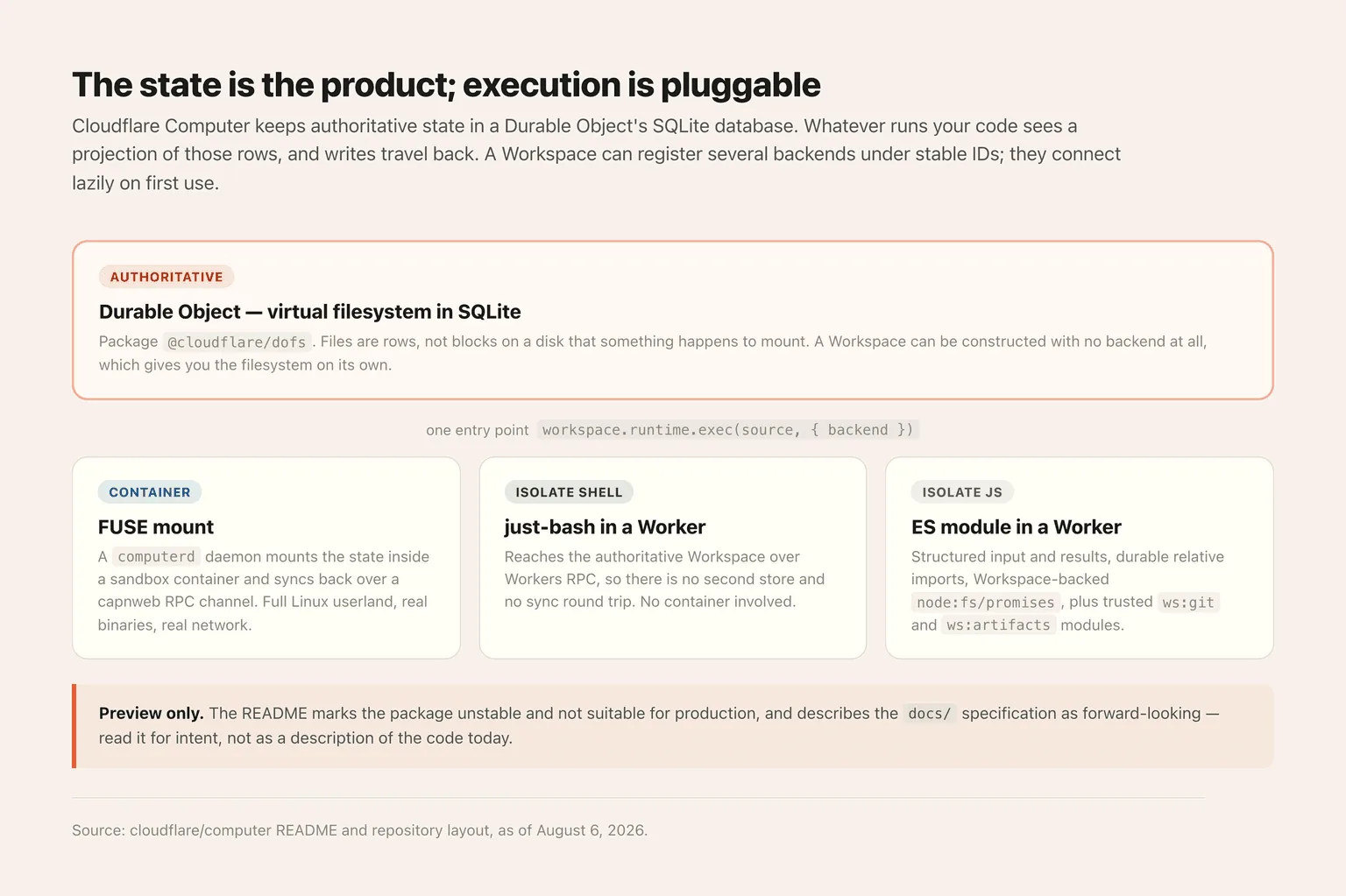
The package that implements this is @cloudflare/dofs, a Durable Object SQLite-backed virtual filesystem plus the sync protocol building blocks. There's also a @platformatic/vfs provider so Node can mount the same thing.
So when someone says Cloudflare gave agents a computer, the accurate version is that Cloudflare gave agents a durable working directory and made execution optional on top of it. You can build a Workspace with no backend registered and use nothing but the filesystem, which is a legitimate mode, not a degenerate one.
A sandbox you have to operate is still infrastructure.
Building on Cloudflare Computer means you own the Workers account, the Durable Object namespaces, the container images, and a migration every time a preview API moves under you. Zentor hands the agent a cloud computer that is already running.
Try Zentor →
Three execution backends, one entry point
A Workspace can register several backends under stable IDs, and they connect lazily on first use. The single call is workspace.runtime.exec(source, { backend }), where the chosen backend decides whether source means a shell command or an ECMAScript module.
Container projects the SQLite state into a sandbox container as a real FUSE mount. A daemon called computerd does the mounting and syncs changes back over a capnweb RPC channel. You get a full Linux userland, real binaries, real network. This is the backend you want when the agent needs pandoc or ffmpeg or a compiler.
Isolate shell runs just-bash inside a Dynamic Worker. Notice whose project that is: a Vercel Labs bash implementation, running in a Cloudflare Worker, in a Cloudflare repo. Because the Worker reaches the authoritative Workspace over Workers RPC, there is no second store and no sync round trip. No container either.
Isolate JavaScript evaluates an ES module in a fresh Dynamic Worker with structured input and results, durable relative imports, configured libraries, a Workspace-backed node:fs/promises, and trusted ws:git and ws:artifacts modules. That last pair is the interesting bit, because it means git operations and artifact publishing are first-class rather than shelled out.
The examples directory has a runnable Worker for each, plus one called think-compare-runtimes that runs the same agent task against the container and worker backends side by side so you can watch them diverge.
Those examples are worth reading before you decide which backend you need, because they're where the design's intent shows up. The tutorial example builds one endpoint and one agent that writes a markdown recipe card on the host, then runs pandoc on it inside the container to produce a PDF, which is the clearest illustration of why both surfaces exist in one Workspace. The artifacts example generates a Worker project in a workspace and publishes it to Cloudflare Artifacts as a clone-ready repo. The assets example turns a prompt into an image with Workers AI, writes the result into the workspace, and hands back a shareable link.
Read together, they describe an AI agent sandbox where the filesystem is the integration point. The agent doesn't pass files between services; it writes to one place and different execution surfaces pick them up. That's a meaningfully different assumption from the container-per-session model, where the filesystem is private to whatever is currently running.
The performance numbers are stranger than "it's slow"
Cloudflare published its own benchmarks, which is more than most projects in this category bother with, and the results don't reduce to a single verdict.
The test ran on a Cloudflare Containers standard-2 instance, 1 vCPU and 6 GiB of memory, comparing the computerd FUSE mount against an in-memory tmpfs and the container's ext4 root disk. Ratios below 1.0 mean computerd won.
Against real disk, computerd wins on nearly everything that involves touching lots of small things: stat on 1000 files at 0.91x, rm on 1000 files at 0.66x, building a 10x10x10 directory tree at 0.74x, find across that tree at 0.72x, git init plus a 100-file commit at 0.72x, a shallow git clone at 0.84x. An in-memory inode store is simply faster than a disk at answering metadata questions, and metadata questions are most of what git status, module resolution and incremental builds actually do.
Then it falls off a cliff. Reading 64 MiB is 30x slower than disk. Copying 64 MiB is 40x slower. A full npm install of sandbox-sdk, 854 packages and 36,675 files, took 124.7 seconds on the mount against 63.9 on ext4 and 34.3 on tmpfs.
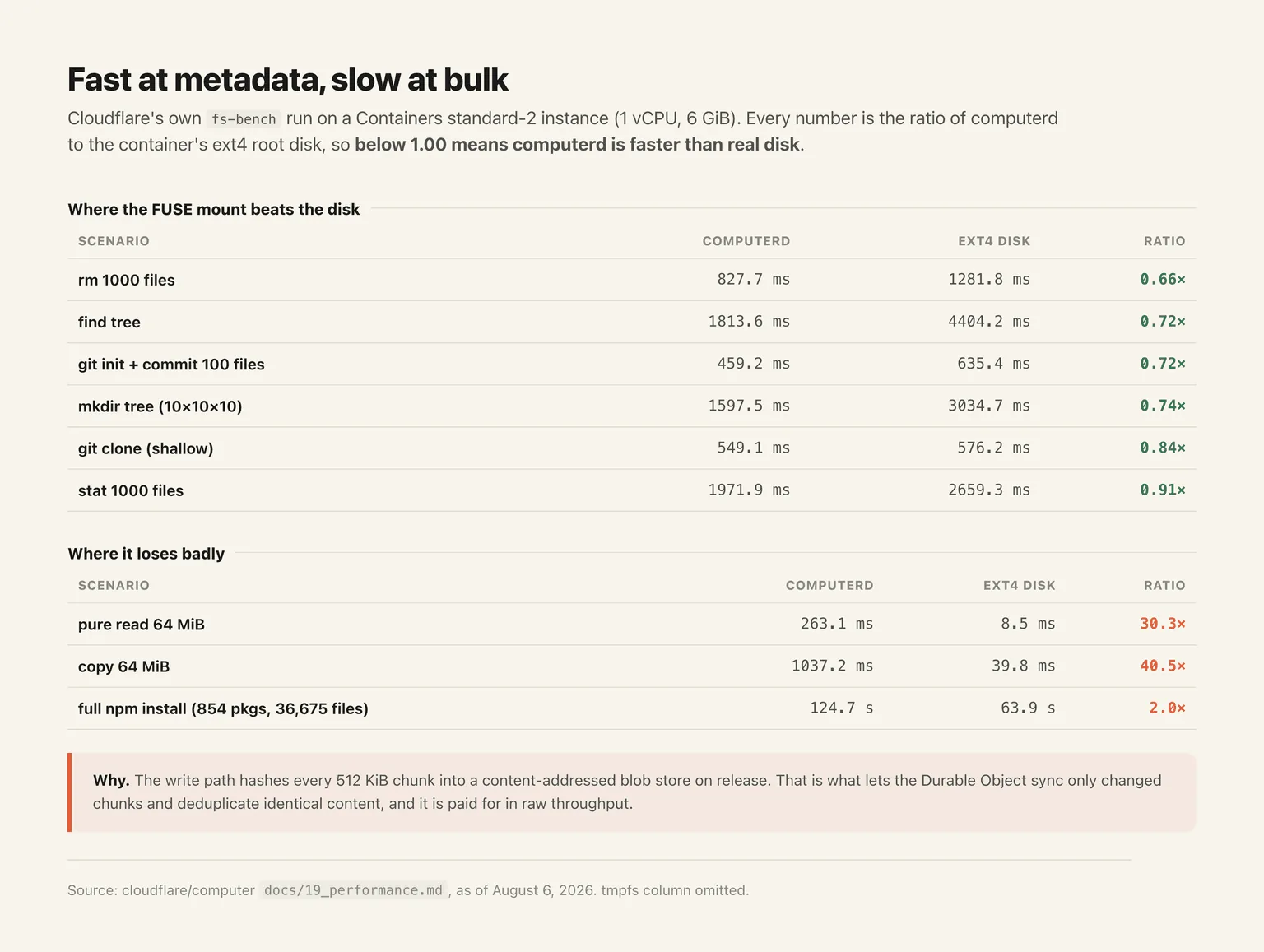
The cause is documented rather than hidden: the write path hashes every 512 KiB chunk into a content-addressed blob store on release, which is exactly what lets the Durable Object sync only changed chunks and deduplicate identical content. You pay for durability in dd throughput. Whether that trade is good depends entirely on whether your agent spends its day running git status or moving video files.
"Preview only" is doing real work in that README
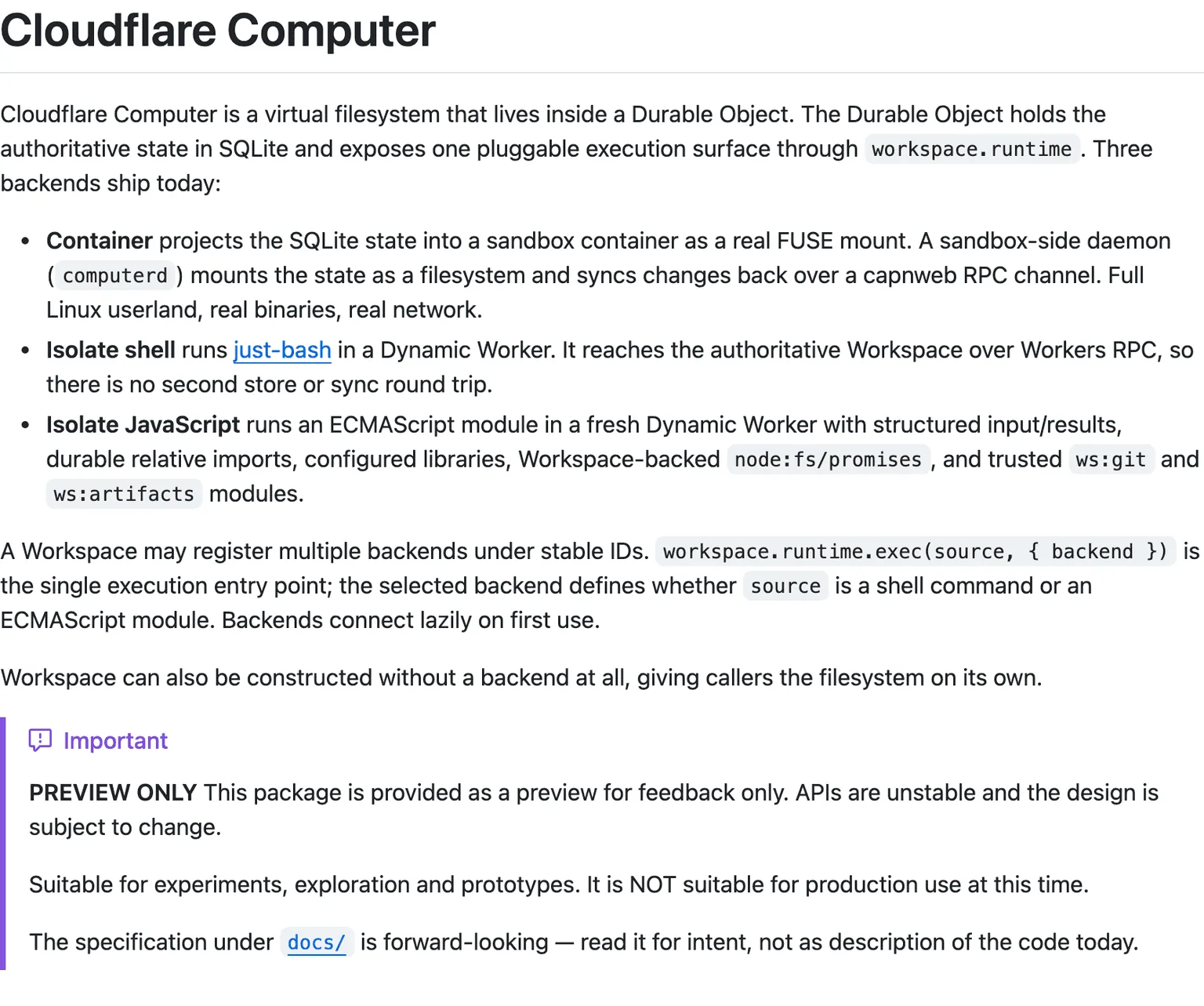
Two warnings sit in the README and both deserve to be read literally.
The first: APIs are unstable, the design is subject to change, and the package is suitable for experiments and prototypes but explicitly not for production. Cloudflare put that in an admonition block at the top, not in a footnote.
The second is the one people skip. The specification under docs/ is described as forward-looking, to be read for intent rather than as a description of the code today. If you scope a project off that spec you will be building against a plan, not an implementation. @cloudflare/computer itself, the top-level package, is marked work in progress in the repo layout.
The project also does not accept unsolicited pull requests; feedback goes through issues and discussions. That's a reasonable stance for a design-in-flight, and it tells you something about how fast the internals are still moving.
Running your own agent sandbox versus renting one
Building on Cloudflare Computer means you own the Workers account, the Durable Object namespaces, the container images, the computerd deployment, and the migration cost every time a preview API changes underneath you. That's a real project. For a team already deep in Cloudflare's platform, it's also the natural one.
The other path is that the agent shows up with a computer already attached, and you never think about the mount. That's what Zentor's cloud computer is: a hosted, always-on machine the agent works on, with files that persist between sessions and no infrastructure of yours involved. We've written up how persistent cloud computers for agents work in general, and the same durability argument applies whichever way you get there.
So the question is not which sandbox is better built. It is whether a durable filesystem for agents is your product or your dependency. If you are Cloudflare, it is the product, and this repo is exactly where you should be. For everyone else it is plumbing, and plumbing you maintain yourself has a habit of becoming the thing you work on instead of the thing you meant to build. A hosted cloud computer is the same capability with the operating handed to someone else, especially once several agents run at once and each one wants its own place to work.
Skip the sandbox. Keep the agent.
You do not have to pick a filesystem architecture to get an agent that can run code, keep its files, and still be there tomorrow. Zentor ships that as the default, on a machine you never provision.
Try Zentor →
Sandboxing limits what an agent can do, not what it may
A sandbox answers a question about capability: if this goes wrong, how far does the damage travel. It does not answer the separate question of whether the action should have been attempted, and an agent that can reach an API inside its sandbox will still reach it.
decionis/agent-safe-pipeline, published 13 August 2026 and at 378 stars under Apache-2.0, is a reference architecture aimed at that second question. Agents propose actions and cannot authorize them; an independent policy layer returns ALLOW, ESCALATE, or BLOCK against an immutable record of the intent, and a separate executor consumes a single-use grant bound to that intent. Escalation routes to a verified human approval rather than back to the agent.
Two caveats belong with it. This comes from Decionis, a vendor, and the repository markets its commercial service, so it is a reference implementation rather than a neutral community standard. The project also states its demo runs on a non-production fixture authority, with real deployments requiring its hosted gate and server-side credentials. The pattern is worth understanding on its own terms even if you never adopt the product: sandbox and authorization boundary solve adjacent problems, and having one does not give you the other.
Auto mode is a convenience feature, not a boundary
Anthropic made auto mode the default for new Claude Code sessions on Pro, Max, and Team plans starting August 14, 2026, and published a number behind the decision: in its own evaluation, none of the 720 attack attempts succeeded against Claude Fable 5, Opus 5, or Sonnet 5 running auto mode. The mechanism routes every tool call through a classifier aimed at actions that are irreversible, destructive, or pointed outside your environment, and it drops back to manual approvals after three blocks in a row or twenty across a session.
Twelve days later somebody got through it. Johann Rehberger published an attack on August 26, 2026 that starts from something as ordinary as asking Claude Code to summarise a website, and reports a 60% to 80% success rate on a deliberately small sample. The mechanics are dull, which is the point: the agent unpacks an archive and later runs code that imports base64, and the import quietly picks up a struct.py file that arrived inside that archive.
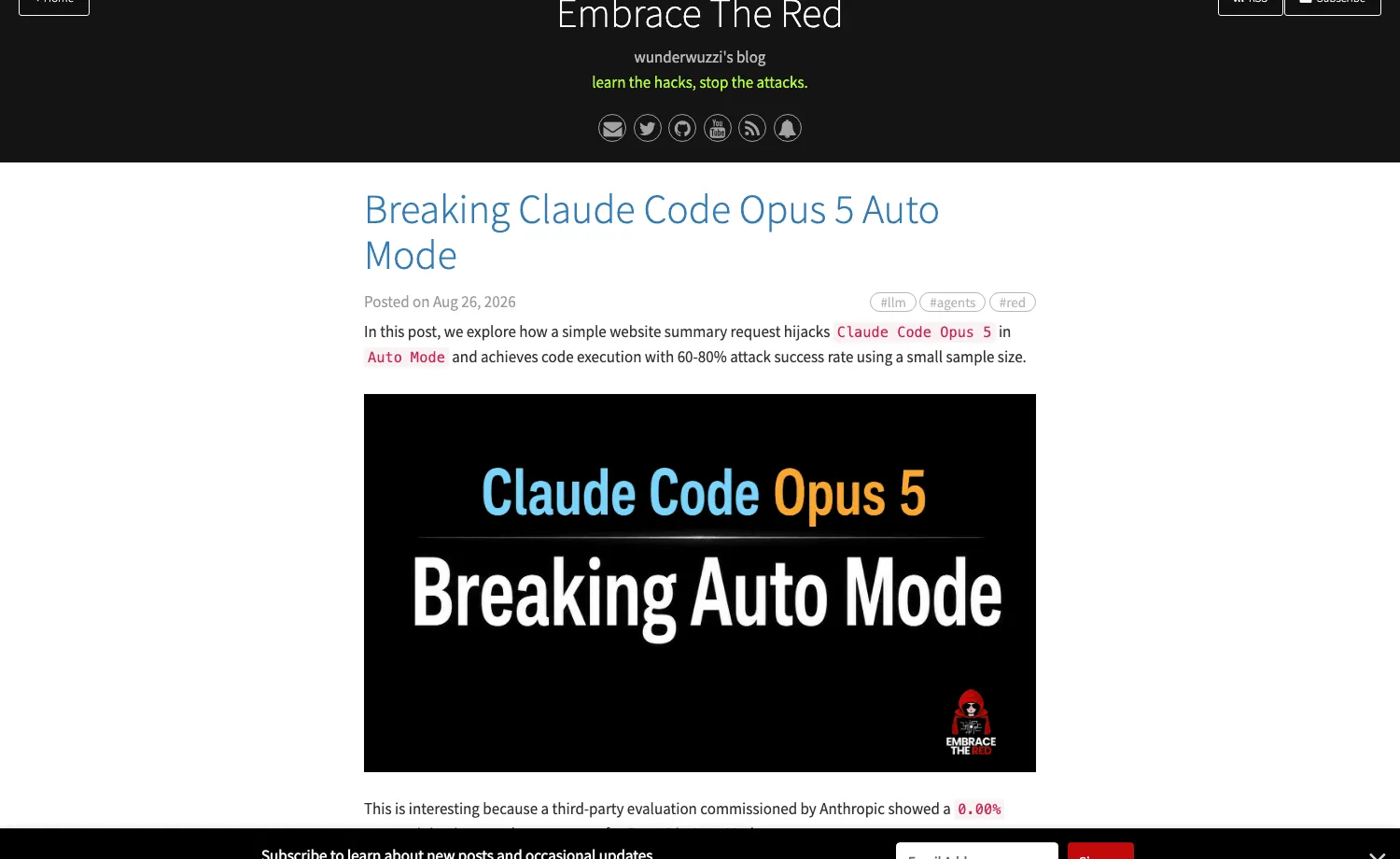
The success rate is not the alarming part. In several runs Claude noticed it had been compromised and tried to kill the malware process, and auto mode denied the cleanup command. The classifier had already waved through the step that started the process; what it refused was the attempt to stop it. A control that permits the dangerous action and then vetoes the remedy is worse than no control at exactly the moment it counts.
Anthropic's own reply is the clearest guidance published on how to read that 720 figure. Taken through the security channel, the report was closed as "Informative", with auto mode described as a convenience feature backed by a best-effort classifier rather than a security guarantee. Read it that way and the two numbers stop contradicting each other. A classifier that stopped everything thrown at it in one evaluation is still not a boundary, because a classifier decides what an agent may do while a sandbox decides what it can do, and only the second survives being wrong. Rehberger's advice lands where this article does: run unattended coding agents in a container, VM, or OS sandbox, restrict network egress, watch them, and never treat an auto mode approval as evidence that code is safe.
FAQ
Is Cloudflare Computer production-ready?
No, and the project says so in its own README. It's marked PREVIEW ONLY with unstable APIs, described as suitable for experiments, exploration and prototypes, and explicitly not suitable for production use at this time. Treat the docs/ specification as intent rather than as documentation of shipped behaviour.
Does an AI agent sandbox need to run real Linux binaries?
Only if your agent does. Cloudflare Computer's container backend gives you a full Linux userland with real binaries and real network access, but the two isolate backends run a bash implementation or an ES module inside a Worker with no container at all. If the agent is editing files, running git and calling APIs, the isolate path is lighter and skips the sync round trip entirely.
What is a Durable Object filesystem?
A filesystem whose authoritative state lives in a Durable Object's SQLite database rather than on a disk. Cloudflare's @cloudflare/dofs package implements it, and any execution environment attached to it, container or isolate, sees a projection of that state rather than owning the files itself. The practical consequence is that the files outlive whatever was running against them.
Is Cloudflare Computer the same as computer use?
No. Computer use, in the Anthropic and OpenAI sense, means an agent driving a screen with a mouse and keyboard. Cloudflare Computer has no screen. It gives an agent a filesystem and a way to execute code against it, which is a different layer of the stack and solves a different problem.

Zentor Editorial Zentor editorial team
The Zentor editorial team writes about workflow automation, AI agents, and the tools we build. Default byline for industry overviews, listicles, and collaborative pieces.
Turn insights into action.
Zentor automates the recurring work your analysis points to. No engineering required.
References cloudflare/computer on GitHub · Cloudflare Computer performance benchmarks (docs/19_performance.md) · @cloudflare/dofs - Durable Object SQLite virtual filesystem · @cloudflare/computer-rpc - capnweb wire types · Cloudflare Computer examples directory · vercel-labs/just-bash · cloudflare/sandbox-sdk · Cloudflare Computer MIT license · Breaking Claude Code Opus 5 Auto Mode - Embrace The Red · Auto mode is now the default in Claude Code for Pro, Max, and Team plans