AI vs. Automation in Your Workflows: When to Use Which in 2026

Choose rule-based automation or AI for each workflow step. Use a decision matrix to weigh judgment, consistency, auditability, and human approval in 2026.
Use rule-based automation when the next action can be specified and checked; use AI when the step requires interpreting messy input or proposing a variable answer. For workflow automation that touches money, customers, or records, put rules and human approval around the AI step rather than handing the whole process to an agent. Impact's workflow guide makes the contrast blunt: automation produces the same result under the same rules, while AI can produce a different result each time. Its sharper warning is that AI can speed up a broken process too.
By late October 2026, monday.com's project-agent guide, an updated Techreviewer tools directory, and Coursera's workflow course all approached the choice from different angles. Their publication dates differ; their shared practical question is the one you face when a recurring task starts taking over your week: which part should a machine actually do?
Key Takeaways:
- Use rules for predictable transfers, checks, deadlines, and repeatable approvals.
- Use AI for a bounded judgment step, such as classifying a vague request or drafting a reply; don't equate a plausible draft with permission to send it.
- Make a person the decision owner wherever an error could charge, promise, expose, or delete something.
- Before adding either tool, remove steps that shouldn't exist and write down what a correct outcome looks like.
AI vs. automation: the difference is output variability
Traditional automation follows a condition and an action: when a form arrives with a valid email address, add a row to a tracking sheet. A rerun with identical inputs should follow the same route. IBM's introduction to workflow automation describes this kind of process as rules that move work between people and systems. That doesn't make it primitive. A good rule can prevent a bad invoice from going out at midnight.
An AI agent can interpret an unclear message, decide which details matter, and draft a response. That flexibility is precisely why you shouldn't ask it to be the sole authority on a fixed policy. The practical version of Impact's distinction is predictable action versus variable proposal, not “old technology versus new technology.” Even rules can fail when their inputs are wrong; AI adds another source of variation.
Suppose you sell a service alone and inquiries arrive through a form. Sending an acknowledgment is a rule. Deciding whether “Could you do something like last month's campaign?” asks for a quote, a portfolio, or a scheduling link takes interpretation. Promising a price requires you to inspect the proposal before it leaves your inbox. Those are separate steps, despite arriving in one message.
Give the judgment step a clear boundary
Explore Zentor for work that needs context across your tools. Keep consequential actions on your own approval path.
Get early access →
A decision matrix for each workflow step
Don't choose a tool for the whole workflow in one meeting. Draw its individual actions, then ask two questions of each: Does it require judgment or variation? What happens if its output varies? The consequence of variation matters as much as the need for intelligence.
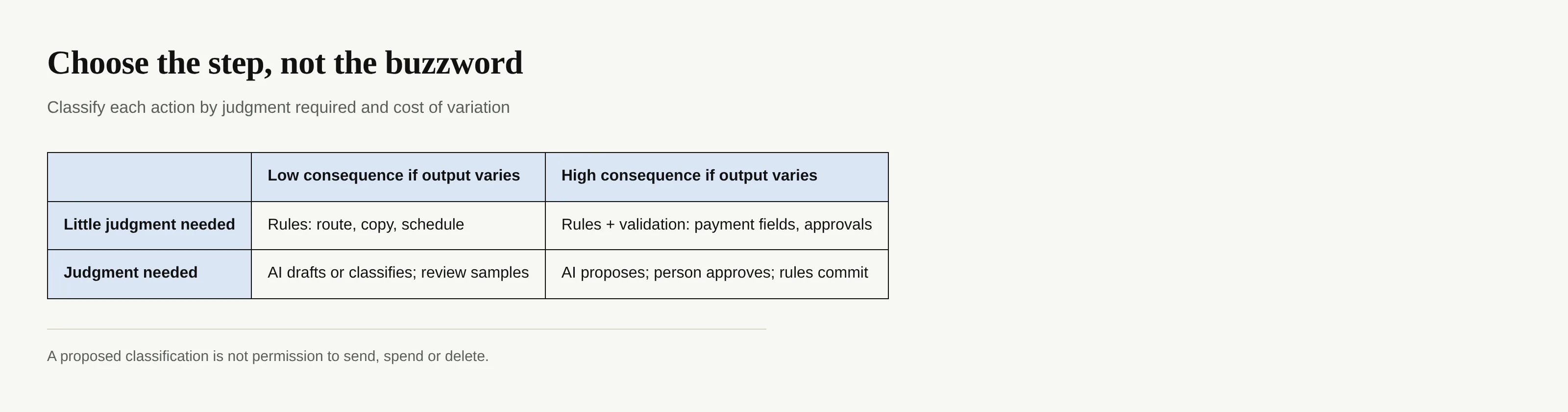
A high-stakes step isn't automatically an AI step. If a published policy completely determines an answer, a rule may be easier to audit. Conversely, variability alone doesn't justify an agent if no one knows what counts as a correct answer. Write down the escalation condition before you launch: missing price, missing consent, conflicting records, or an unfamiliar case should stop the run.
Zentor's workspace memory is relevant when a judgment step depends on context across tools; memory can reach different AI systems through Zentor MCP and remains the user's. That doesn't turn a memory hub into a compliance engine. Define the policy and the person who can approve an exception separately.
Build AI workflow automation with rules and a human stop
The tool directory at Techreviewer describes MindPal as a no-code way to build AI agents and multi-agent workflows for business tasks. The directory describes a market, not a guarantee that any listed tool enforces your approval policy. In its project management guide, monday.com discusses agents acting within team rules and connecting actions across project work. “Agent” names a way to pursue a goal; it doesn't assign legal or business responsibility for the outcome.
For an incoming inquiry, a safer arrangement has a rule record the original message and source. An AI step interprets intent and drafts a reply, perhaps asking a separate research agent for relevant background. A person checks recipient, price, and promise. Only then does a rule send the approved text and retain a record of what was sent. The approval should contain the actual outgoing message, not merely a green check beside an earlier draft that the system can still alter. Save the final sent version beside the approval so you can compare both later.
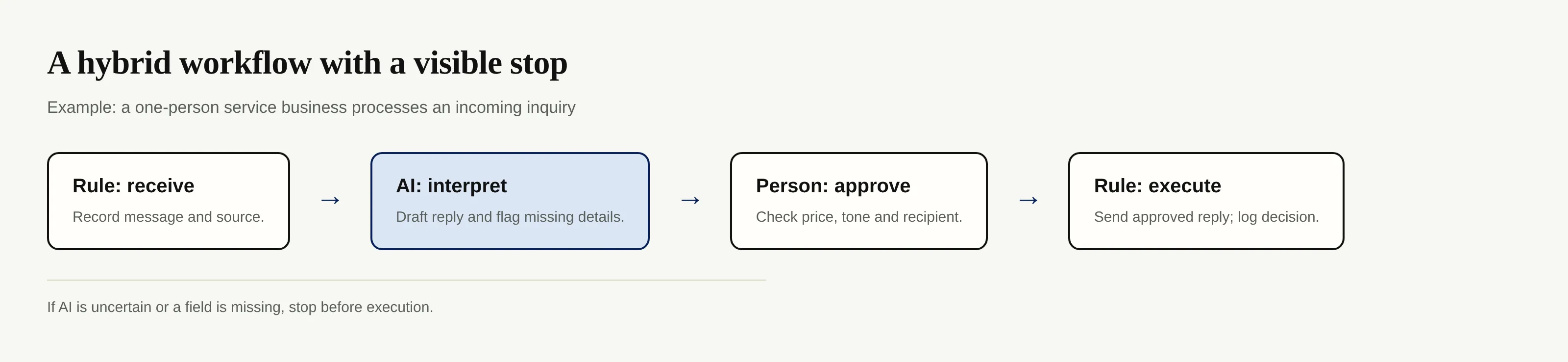
For a solo operator, An AI workflow automation use-case page offers a starting point for the context-heavy portion. The decision to send, spend, or amend a record still belongs in a clearly controlled step. More agents won't compensate for a missing stop.
Score the work before buying another tool
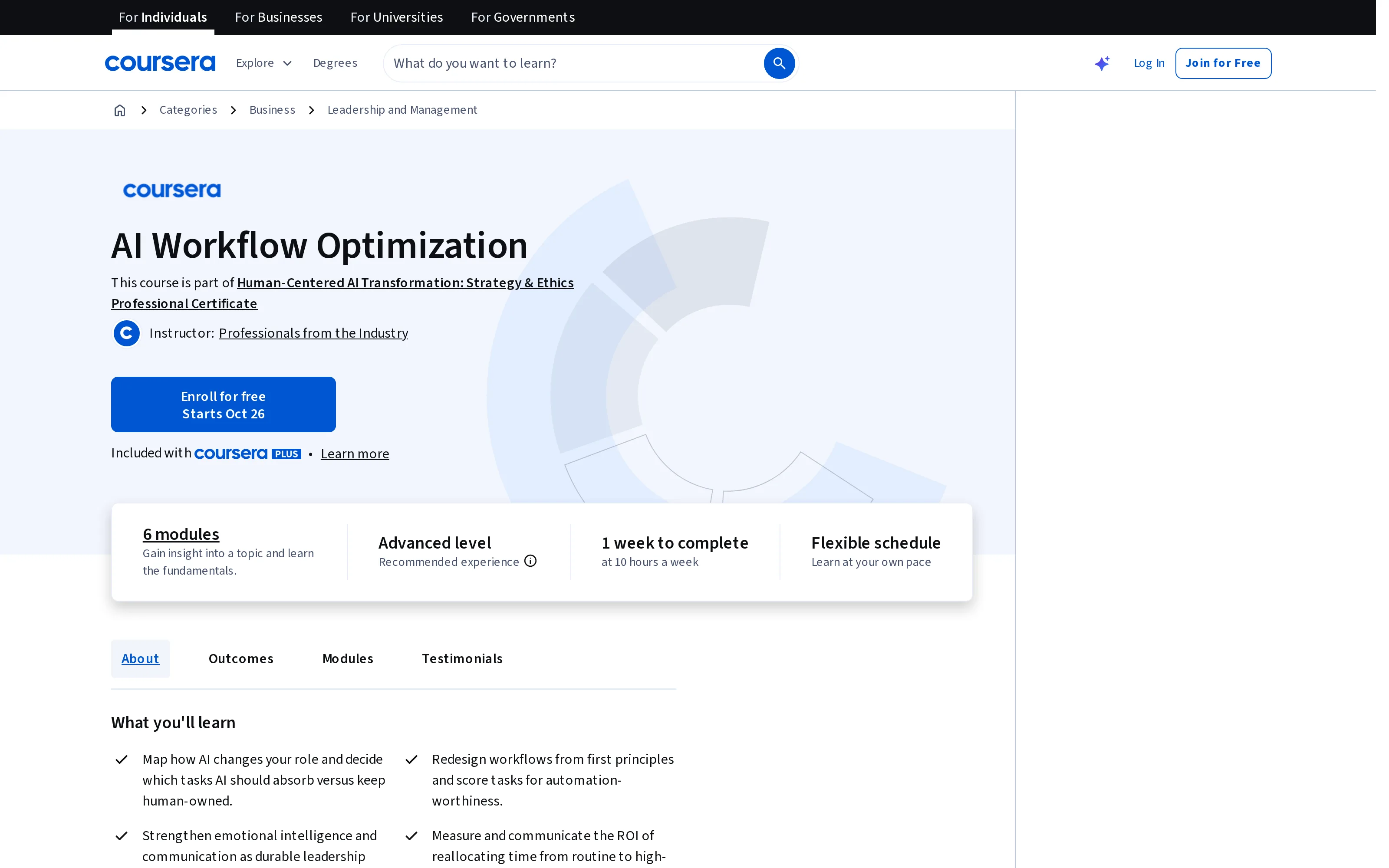
Coursera's AI Workflow Optimization course asks learners to redesign workflows from first principles and score tasks for automation-worthiness. It does not prescribe the following scoring scheme; this is a worksheet you can adapt, not a measured benchmark.
Take one real task that recurs. Note its trigger, inputs, decision, output, owner, and exception. Mark each dimension low, medium, or high: how often it repeats; how standardized the inputs are; how much interpretation it needs; how costly a wrong result would be; and whether you can inspect a log and undo the action. Don't add those labels into a fake precision score. Use them to expose different problems.
A frequent, standardized, reversible action is a strong candidate for rules. An interpretive task whose output is easy to review may suit AI drafting. If the wrong output is hard to reverse or difficult to detect, preserve human control even when AI prepares it. A task with inconsistent inputs and no agreed correct result needs process repair first, not a more persuasive model.
Redesign the workflow, then decide what to automate
The temptation is to draw boxes around everything you already do and label them “automated.” Resist it. Ask why the task exists, who needs the result, and which evidence they need to trust it. If two approval emails merely repeat the same check, remove the duplicate rather than asking AI to write it faster. This is the practical force of Impact's warning about accelerating a broken process.
Zentor's self-learning skills and self-adaptive workspace can help a recurring context task fit how you work; its always-on design means the workspace doesn't rely on your laptop staying awake. Neither quality substitutes for a documented handoff. If you can't tell who approved a change, your workflow isn't ready to make that change automatically.
FAQ: choosing AI or rules for a real workflow
Is AI the same as workflow automation?
No. Workflow automation covers the sequence of actions; rules can drive it without AI. AI becomes useful for a bounded step whose input needs interpretation or whose output is a draft. The sequence still needs clear triggers and permissions.
When should I keep a human in the loop?
Keep an explicit approval before consequential messages, charges, disclosures, deletions, and policy exceptions. Show the reviewer the precise proposed action and record their decision. A human name on a diagram doesn't count if the process sends before that person can intervene.
Can multiple AI agents replace approval rules?
They can divide research and drafting, but adding another agent doesn't establish authority to send or spend. Put the execution behind a rule or a human checkpoint appropriate to the risk, and test what happens when an agent fails.
Choose a workflow automation boundary you can explain
Start with the step you can describe and check. If you can write its condition, action, and exception clearly, use a rule. If you need a reasoned proposal from incomplete context, let AI prepare one within defined limits. When that proposal could commit you to something, approve the final version before a deterministic action runs.
The point isn't to choose a winner between AI and automation. It's to stop confusing flexible judgment with reliable execution. The Notion integration shows where connected workspace context can help inform a task; your own rules and review process determine what happens after the AI has read it. Sketch one workflow this week, cross out the unnecessary steps, and mark the exact point where you would refuse to let it continue without you.

Zentor Editorial Zentor editorial team
The Zentor editorial team writes about workflow automation, AI agents, and the tools we build. Default byline for industry overviews, listicles, and collaborative pieces.
Choosing between tools? Let Zentor run the work.
Always-on AI assistant on its own cloud computer. No switching required, no setup.