Claude Cowork Plugins: What Anthropic Shipped

Anthropic open-sourced 11 knowledge-work plugins for Claude Cowork. What each one does, how they install, and where they stop short (as of Sept 2026).
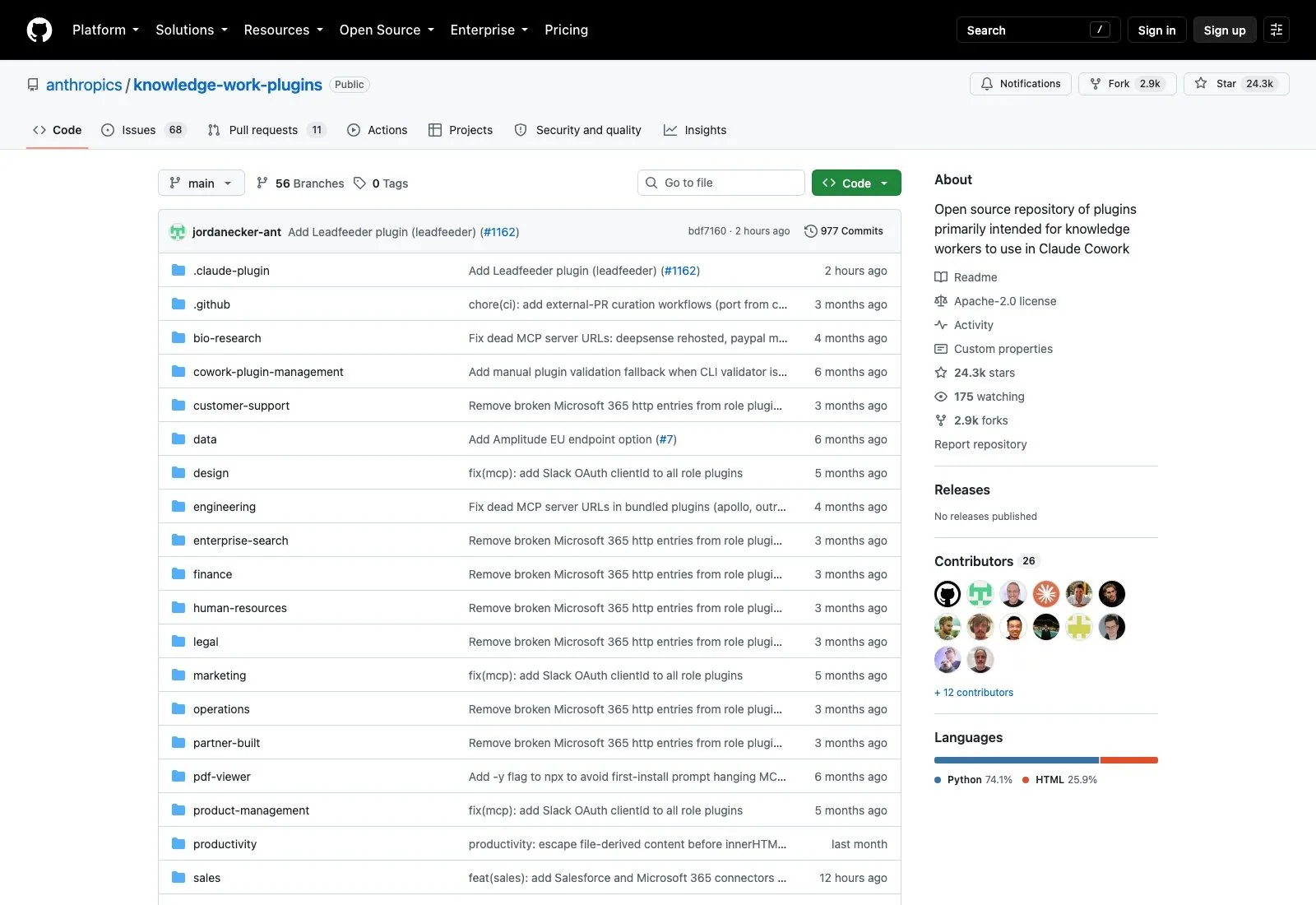
Anthropic has been shipping plugin infrastructure for most of this year, and on the knowledge-work side it finally has an official reference set. The claude cowork plugins collection went up as an open-source repo, anthropics/knowledge-work-plugins, and it now sits at 24,316 stars (verified against the GitHub API on 17 September 2026). Eleven plugins, one per job function, Apache-2.0, and not a line of application code in any of them.
That last part is the interesting bit, and it's the part that gets lost when people file this under "developer tooling."
What Claude Cowork plugins actually are
A plugin here is a folder of markdown and JSON. That's the whole format. Anthropic's README is blunt about it: every component is file-based, with "no code, no infrastructure, no build steps." Inside each plugin you get a manifest at .claude-plugin/plugin.json, a .mcp.json that declares which external tools Claude may reach for, a commands/ directory of slash commands you fire deliberately, and a skills/ directory holding the domain knowledge Claude pulls in on its own when the conversation drifts into that territory.
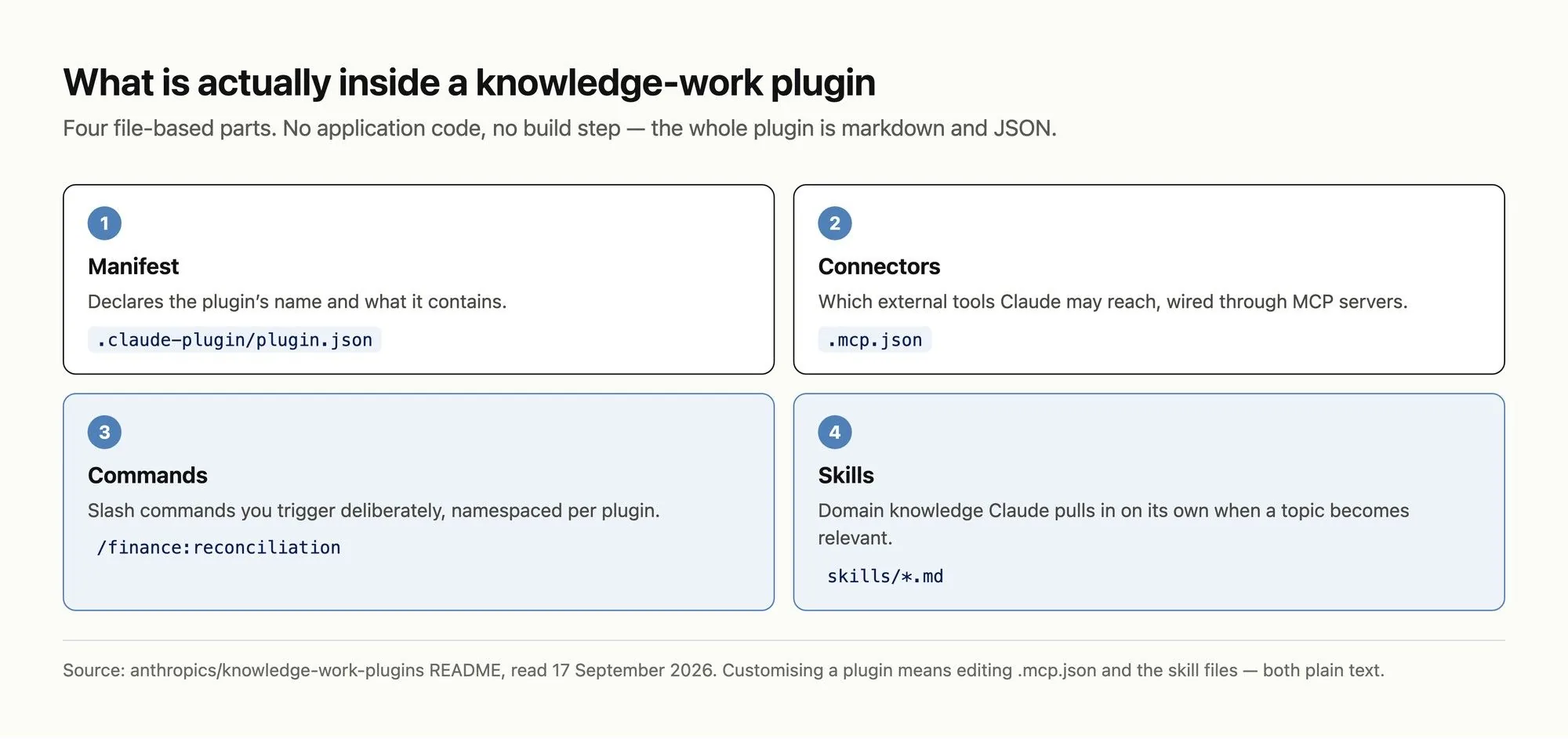
The split between those last two matters more than it looks. Commands are explicit: you type /finance:reconciliation and something happens. Skills are ambient, firing when Claude decides they're relevant, which means a well-written skill changes the quality of answers you never thought to ask for specially.
Plugins tell Claude how you work. Zentor finishes the work where it lives.
A plugin is context plus connectors. The finished deliverable still has to land somewhere you'll actually find it.
See Zentor with Claude →
The eleven plugins, and who each one is for
Anthropic describes these as "built and inspired by our own work," which reads as: these are roughly what Anthropic's own teams use. The eleven Claude Cowork plugins split along job-function lines rather than along capability lines, which is why the connector lists differ so sharply between them.
The general-purpose one is productivity, covering tasks, calendars and personal context, wired to Slack, Notion, Asana, Linear, Jira, Monday, ClickUp and Microsoft 365. Then the go-to-market pair: sales (prospect research, call prep, pipeline review, battlecards, with HubSpot, Close, Clay, ZoomInfo and Fireflies among its connectors) and marketing (content drafting, campaign planning, brand voice enforcement, hooked to Canva, Figma, HubSpot, Amplitude, Ahrefs, SimilarWeb and Klaviyo).
customer-support triages tickets and turns resolved ones into knowledge base articles through Intercom and Guru. product-management writes specs and synthesizes research, and carries the longest connector list of the set: Linear, Asana, Monday, ClickUp, Jira, Notion, Figma, Amplitude, Pendo, Intercom, Fireflies and Slack.
Two are more regulated in flavour. legal reviews contracts and triages NDAs via Box and Egnyte; finance preps journal entries and runs close, and points at Snowflake, Databricks and BigQuery rather than at a SaaS app. data shares that warehouse trio and adds Definite and Hex for SQL, statistical analysis and dashboards.
enterprise-search is the simplest idea in the repo: one query across email, chat, docs and wikis. bio-research is the outlier, connecting PubMed, bioRxiv, ClinicalTrials.gov, ChEMBL, Benchling, Open Targets and others for preclinical work, and it's the clearest signal that Anthropic expects these to be forked rather than used as shipped. Finally cowork-plugin-management exists to build more plugins, which is either elegant or slightly recursive depending on your mood.
Installing Claude Cowork plugins
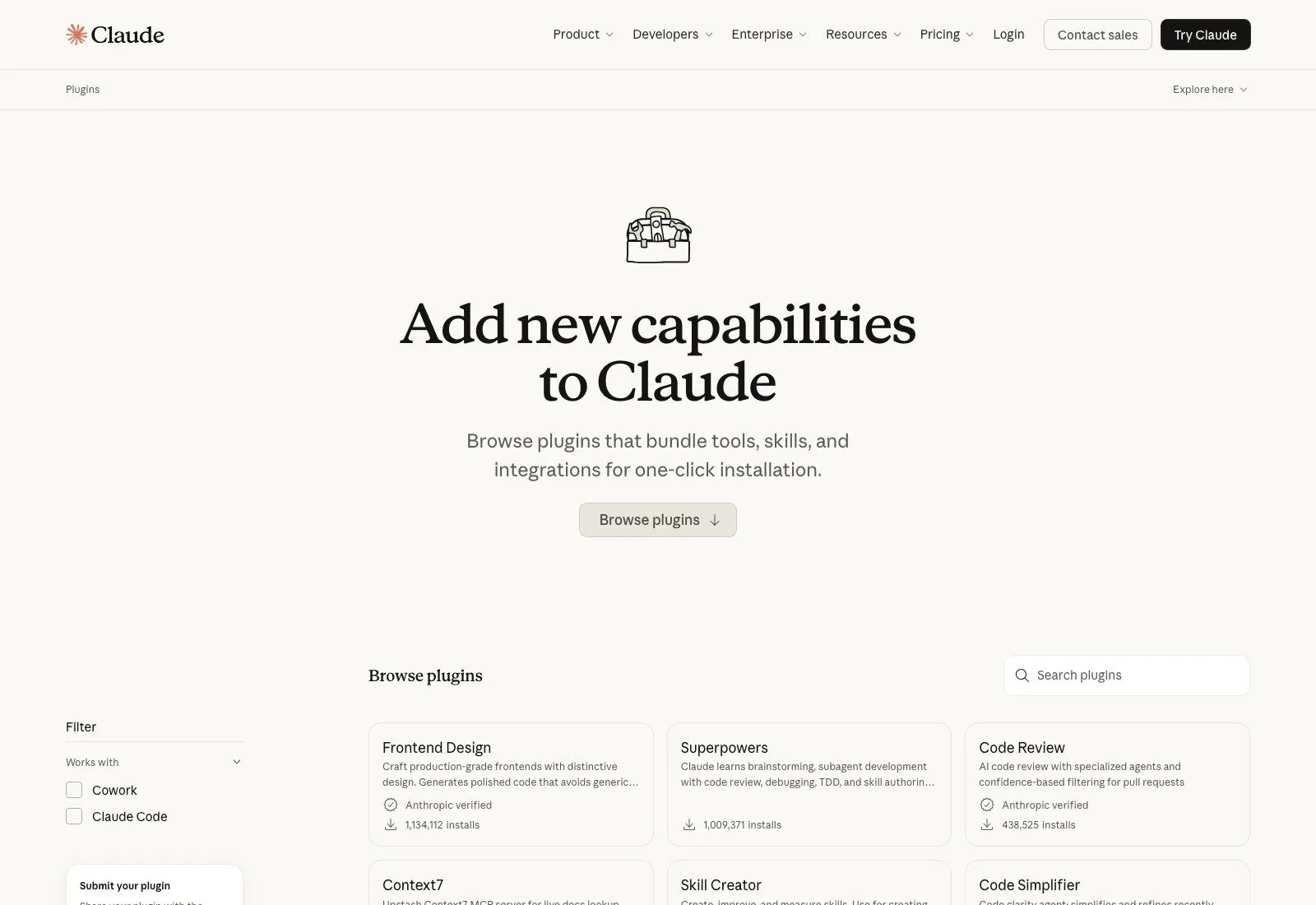
In Cowork you browse claude.com/plugins and install. The directory carries both Cowork and Claude Code plugins with a filter to separate them, and it shows install counts per entry, so you can see what people actually keep. Those counts are the most honest ranking signal available right now, since nobody has had long enough with Claude Cowork plugins to write a credible review of them.
Claude Code takes two commands:
claude plugin marketplace add anthropics/knowledge-work-plugins
claude plugin install sales@knowledge-work-plugins
After that they activate by themselves; skills fire when relevant and the slash commands show up in your session. The repo lists /sales:call-prep, /data:write-query, /product-management:write-spec and /finance:reconciliation as examples of the naming convention, which is plugin:command throughout.
Worth knowing before you start: the repo has no releases and no version tags. It updates by rolling commits to main, so "which version am I on" isn't a question with an answer here. You're tracking a branch.
Where the generic version runs out
Anthropic says it plainly, and I'd underline it: "These plugins are generic starting points." Claude Cowork plugins arrive knowing the shape of a job, not the shape of your job. The suggested customizations are swapping connectors in .mcp.json to match your actual stack, dropping company terminology and org structure into the skill files, and rewriting workflow instructions to match how your team really operates rather than how a textbook says it should.
So the honest framing is that you're being handed a well-structured draft, not a finished product. A sales plugin that knows about HubSpot but nothing about your deal stages, your pricing rules or the three objections your reps hear every week is a decent scaffold and not much more. The work of making it good is the work of writing down how your company operates, which most companies have never done in a form any system can read.
That's not a criticism of the design. It might be the point. But it does mean the install is the cheap part.
The second limit is about where output lands. Connectors let Claude read from Notion, query Snowflake, pull a Jira ticket. The finished thing, though, comes back into the session as a block of text you then copy somewhere. For a one-off question that's fine. For the recurring work these plugins target, reconciliations, weekly pipeline reviews, ticket-to-article conversions, it means every run ends with a small manual step that nobody counts but everybody does. Zentor is built around closing exactly that last hop: the finished brief goes back into Notion, the updated row into Airtable, the draft into the inbox, so the deliverable arrives where the rest of that work already lives instead of in a transcript you have to mine.
The third is memory. A plugin's skill files are static context, identical on every run, which is what makes them predictable. What they can't hold is what happened last Tuesday, that this vendor already got an exception, or that you rejected this phrasing twice. Anthropic's design puts durable knowledge in files a human edits; anything learned during a session stays in that session. This is where agent memory and chat history genuinely diverge, and it's the gap Zentor fills from the other side: memory accumulates across tasks rather than within one, it belongs to you, and you can export it and take it to a different AI if you'd rather.
Plugins, skills, and MCP: which is which
These three names get used interchangeably and they shouldn't be.
A skill is a markdown file of domain expertise that Claude reads when relevant. An MCP server is a connection to an external tool, standardized through the Model Context Protocol, and it's the transport layer. A plugin is the box: it bundles skills, connectors, slash commands and sub-agents for one job function so you install one thing instead of six.
If you've already read about Claude's skills system or the broader plugin marketplace, the mental model transfers cleanly. The knowledge-work set is the same machinery aimed at people who don't open a terminal.
Should you install them?
If you use Cowork and your role appears on the list, yes, because the cost is a click and the floor is higher than starting cold. The plugins encode a reasonable default for each function, and a reasonable default beats whatever ad-hoc prompt you were going to write.
Treat the first week as evaluation rather than deployment. Install one, not five; use it for the work you'd have done anyway; note where it guesses wrong about your company. Those notes are your customization list, and they're worth more than any generic advice about prompt engineering.
The failure mode I'd watch for is installing several at once. Skills fire on relevance, so three overlapping plugins active in the same session means three sets of ambient instructions competing to shape one answer, and when the output comes back slightly off you'll have no clean way to tell which one did it. Add the second only once you can predict what the first will do.
Where I'd temper expectations is anything with an audit trail attached. Finance and legal in particular assume a reviewer, and the plugins are explicit that they support close and compliance work rather than owning it. Read them as a fast first pass with a human signing the result. The needs review step isn't a limitation of this particular release; it's what the whole category currently is.
For recurring rather than one-off work, the thing to decide separately is what happens after Claude produces the output. A plugin makes the answer better. It doesn't put the answer anywhere. Running the job on a schedule and delivering the result into the tool your team already opens is a different problem, and it's the one Zentor solves; the plugin improves the thinking, Zentor handles the delivery, and they're not competing for the same slot.
FAQ
Are the Claude Cowork plugins free and official?
Yes on both. The repo lives under the anthropics GitHub org and carries an Apache-2.0 license, so you can fork, modify and redistribute commercially. You still need a Claude plan that includes Cowork or Claude Code; the plugins don't change what your subscription covers.
Do I need Claude Code to use them?
No. They're built for Claude Cowork first and install from claude.com/plugins with no terminal involved. Claude Code compatibility is a bonus for people who want the same context available while they're writing code.
Plugins or skills, which do I need?
Not a real either-or. Plugins contain skills. Install a plugin when you want a whole function covered with its connectors and commands attached; write a standalone skill when you want to teach Claude one specific thing, like your brand voice rules or a checklist your team follows.
Can I build my own?
Yes, and the repo ships a plugin for doing it. cowork-plugin-management walks you through creating new plugins or adapting existing ones, and since everything is markdown and JSON the barrier is closer to writing documentation than to writing software. Anthropic takes pull requests.
Do they work with tools that aren't on the connector list?
If there's an MCP server for the tool, yes; edit .mcp.json to point at it. The connector lists in the README are what each plugin ships with by default, not a boundary.
Where this leaves things
Anthropic just published its own opinion about what good knowledge work looks like when an AI does it, in a format anyone can read and change. Eleven functions, no code, and a clear invitation to fork. As of September 2026 that's a more useful artifact than most of what gets announced in this space, and its value scales with how much of your own operating knowledge you're willing to write down.
Install one for your function. Keep a list of everything it gets wrong about your company. That list is the actual project.

Zentor Editorial Zentor editorial team
The Zentor editorial team writes about workflow automation, AI agents, and the tools we build. Default byline for industry overviews, listicles, and collaborative pieces.
Ready to put this into practice?
Zentor runs browser tasks, research, and schedules automatically. Try it free.
References https://github.com/anthropics/knowledge-work-plugins · https://claude.com/plugins/ · https://modelcontextprotocol.io/