Nico: Local AI Agent for Mac in 2026

Nico runs tasks on your own Mac instead of a cloud computer. Compare local files, logins, approval controls, AI accounts and 2026 pricing before you install.
Nico is a local AI agent for Mac that handles files, browser sessions and desktop apps on your own computer rather than on a rented cloud computer. For a solo seller or student whose working documents and accounts already sit on a Mac, that changes the amount of uploading and signing in needed before a task starts. Nico's November 4, 2026 account of its design describes two agents: one talks with you; the other carries out the work.
Key Takeaways:
- Nico's Worker uses local files and a browser on your Mac; a cloud-computer workflow often needs uploaded copies and a separate browser login.
- The Worker uses an AI provider account you connect. Local execution does not mean the model itself runs offline.
- Sending, submitting, permanent deletion, sharing and privacy changes carry a high-risk approval floor in Nico's published design.
- Nico needs an Apple silicon Mac with macOS 15.4 or later; its published Free and Plus options differ in voice features.
What Nico actually does on your Mac
Hold the right Command key, speak, and release it. Nico's product page says it can read a dropped document, work with Mail and Calendar, inspect the current window, and return a file. The front agent stays available for conversation while a background Worker plans the job, uses tools and checks its result. The vendor says that Worker runs in a sandbox on your machine. None of that proves every task will work in your particular app; permissions, web pages and model quality still matter.
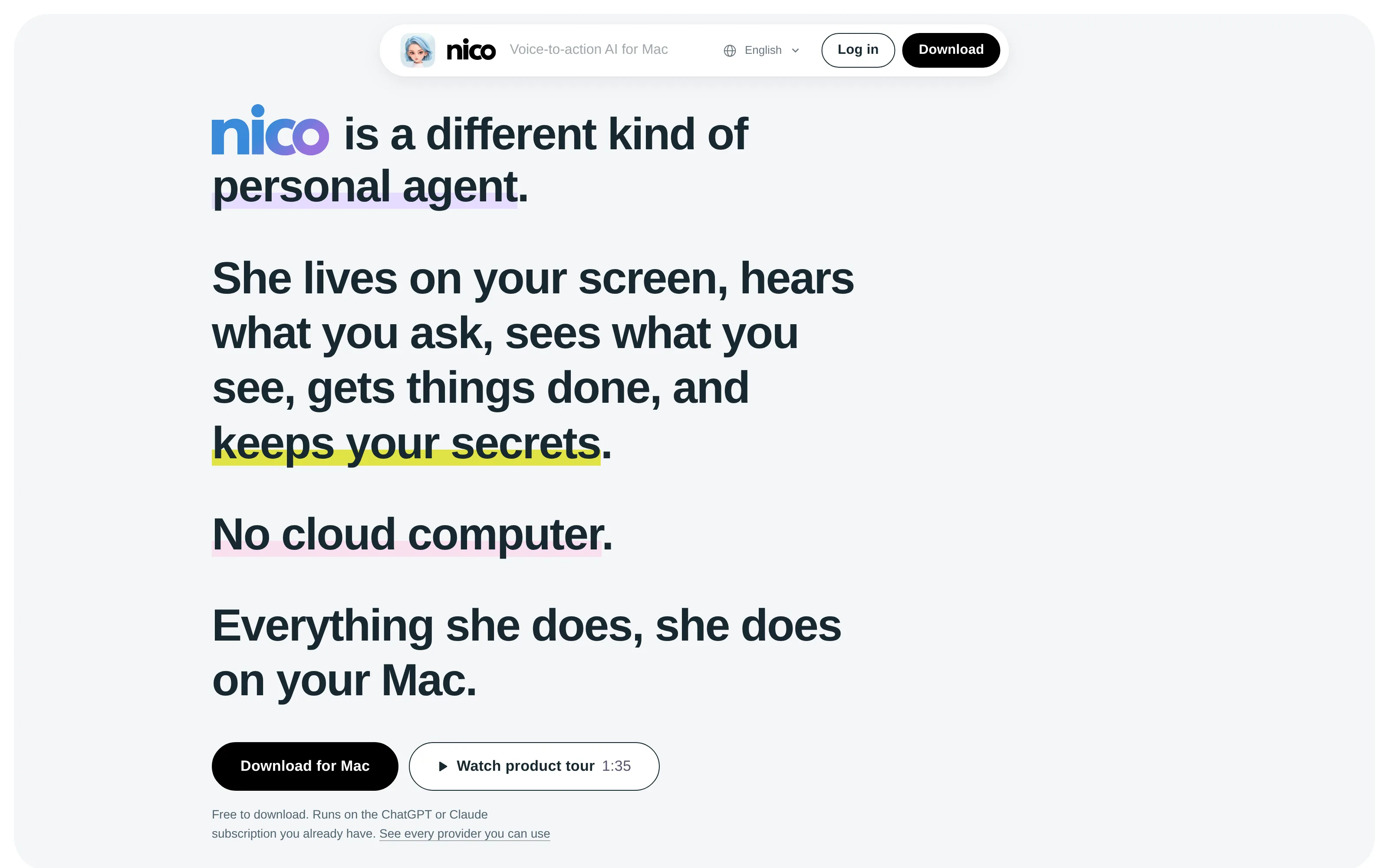
This public homepage isn't a screenshot of a completed task. We haven't tested Nico with an inbox or supplier account. The vendor's developer post says the Worker can queue and resume jobs after an app restart while the front agent answers.
Need work delivered beyond one Mac session?
Zentor keeps workspace memory available through its MCP and can deliver results into Notion or Airtable. Choose the destination you actually use.
Get started →
Local AI agent for Mac versus a cloud computer
Suppose you sell handmade goods and the supplier's invoice is on your Desktop while its order portal is already open in Chrome. A remote agent may require a file upload, another portal login on its virtual computer and a download when it finishes. Nico says its Worker reads the file locally and can use your existing Chrome session through its extension, or its own browser on the Mac. An existing Chrome login is not automatically available in the separate browser; that route may require its own sign-in. Compare the locations of the file, session and finished output, not a vague claim that one agent is more private than another.
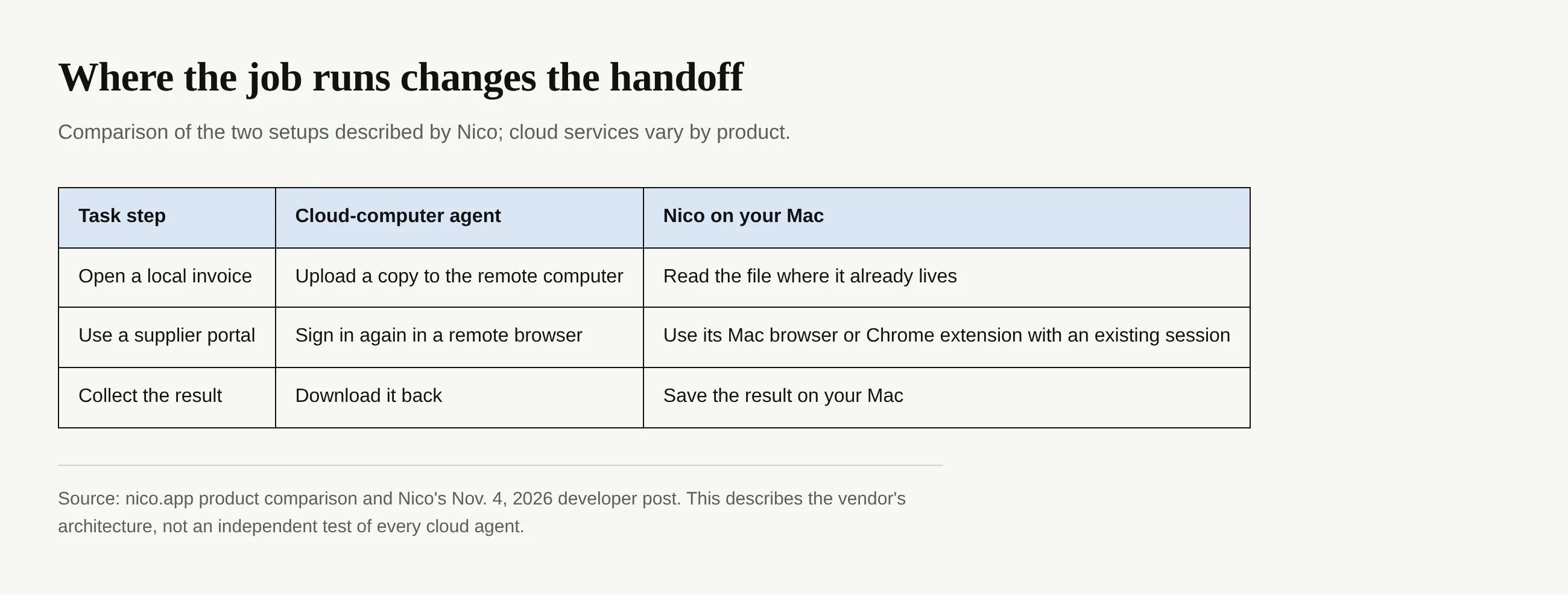
The Nico comparison presents the cloud setup as a general pattern; different cloud products have different file handling and permissions. Local also doesn't mean isolated. Nico's Worker sends model requests directly from the Mac to the AI provider selected by the user, according to the vendor. Read that provider's privacy terms before sending a sensitive contract. The front conversation uses Nico's own service, as its site explains. “Files stay on your Mac” should not be mistaken for “no information ever leaves your Mac.”
Zentor's workspace memory can reach other AI through its MCP, while always-on work doesn't depend on your laptop staying awake. For a creator collecting recurring public links into a research handoff, that may be the right setup; for a desktop invoice, the local route has a shorter handoff.
Which AI account powers Nico's Worker?
Nico doesn't supply the Worker's model as an all-inclusive local model. Its provider list names ChatGPT, Claude, Gemini, GitHub Copilot, DeepSeek, Qwen, Kimi, Mistral and OpenRouter, among others, plus OpenAI- or Anthropic-compatible endpoints. You sign in with a supported account or use a compatible credential; the exact billing and model availability follow the provider and the account you choose. Nico says credentials go into macOS Keychain, which Apple describes as its credential-management facility. That's storage on the Mac, not a promise that the provider will process your request offline.
Nico says the open-source pi project supplies the Worker's agent loop and provider connections. Nico builds the tools, checks, sandbox and confirmation cards; its official forum post says the Nico app is not open source. An open-source component doesn't make the full app inspectable.
What Nico asks you to approve
The most revealing example isn't a tidy Desktop; it's an email that can reach a real customer. Nico's published action policy says a Mail send shows the account, recipients, subject, complete message and attachments on a confirmation card. The message waits for your click. Passwords, verification codes, payments and account authorizations go back to the human as well. The company says sending, submitting, permanent deletion, sharing and privacy changes are always high risk, even if an automatic review would otherwise allow a step.
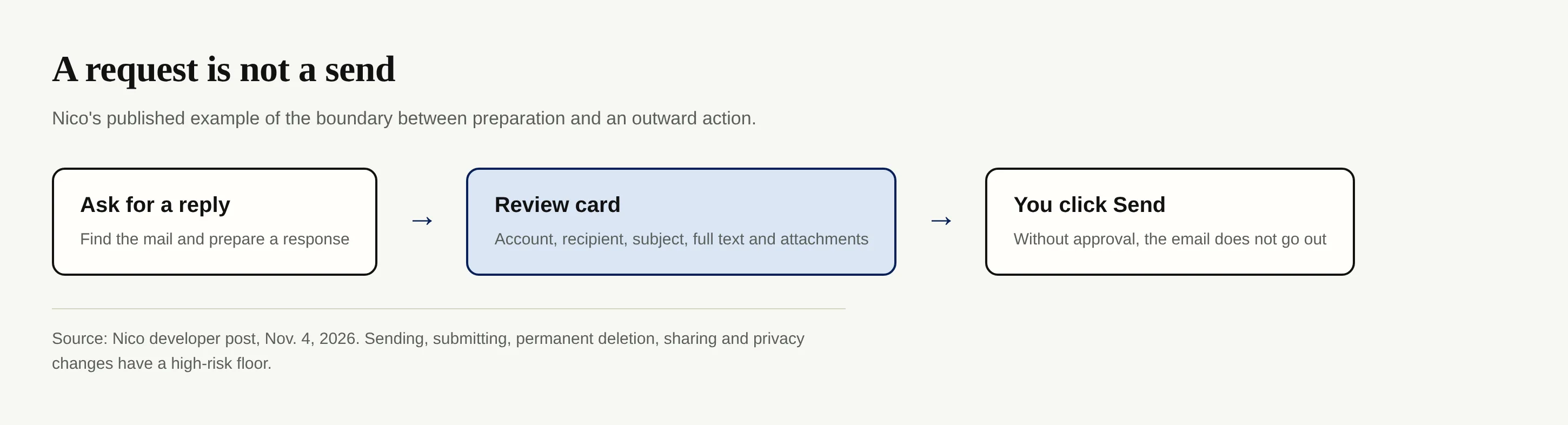
If the app quits during an outward action, the developer post says it checks the existing state read-only before retrying; its example looks in Sent rather than firing a second message blindly. That is a vendor description of behavior, not an independent safety audit. A service seller should still read the recipient line and attachments before clicking Send. Similarly, the site says its microphone listens only while you hold the right Command key, and screen captures for its visual glance remain in memory rather than being written to disk. Those are specific claims worth checking against your comfort with granting desktop permissions.
Price and Mac requirements as of November 4, 2026
The official MacRumors thread posted by Nico's team says the app requires Apple silicon and macOS 15.4 or later, as well as a Nico account. The app is free to download, but you connect your own model account to run Worker tasks. Free includes on-device speech recognition and text replies. Plus costs $15 per month or $144 per year and adds spoken replies and improved speech recognition. New accounts get a seven-day Plus trial without a credit card. Check the vendor again before purchasing because terms can change.
Check whether your provider account works with Nico; support for a provider isn't a guarantee for every plan. An Intel Mac is out under the stated requirements. No release note establishes success on your particular supplier portal, so start with a reversible task.
Who should try a local agent first?
A solo services business can ask Nico to locate a client quote in Mail and draft a response, then inspect the approval card instead of giving an agent blanket permission to contact clients. A solo goods seller might compare an invoice against a browser order; don't give it payment approval. If you make videos, gathering notes already scattered across desktop documents is a reasonable first test, but review any final copy before publishing. For a heavy-use student, turning lecture notes into a document can show whether file access and output formatting actually help without risking an external action. These are suggested tests, not claims that we've run or benchmarked them.
Zentor serves a different need when those people want a result deposited into a shared working destination. You can direct its work into Notion or Airtable rather than leave the final answer in a chat bubble, and its self-learning skills and adaptive workspace are designed for repeat work. This doesn't make it a drop-in replacement for Nico's Mac screen control. Decide where the finished result should live, which account must be used, and whether you need the task to continue when the laptop closes.
FAQ: choosing a local AI agent for Mac
Does Nico run an AI model entirely on my Mac?
No such offline-model claim follows from the published design. The Worker executes tasks locally but sends model requests from your Mac to the provider you connect. Check that provider's rules for confidential inputs.
Can Nico use an existing Chrome login?
Nico says yes through its Chrome extension. Its separate browser runs on your Mac but isn't the same as an existing Chrome session. Confirm the login and permissions you intend to use before handing it an account task.
Is Nico open source because it uses pi?
No. Pi is open source; Nico's own tools, checks and app are distinct. The company's official forum post says Nico isn't open source.
Should I choose Nico or Zentor for recurring work?
Choose by where the task has to run and where the output has to land. Nico targets work on a compatible Mac with local files and desktop apps. The latter is built for always-on work and portable workspace memory, including delivery to Notion and Airtable. Neither architecture excuses skipping the human review of an important outward action.

Zentor Editorial Zentor editorial team
The Zentor editorial team writes about workflow automation, AI agents, and the tools we build. Default byline for industry overviews, listicles, and collaborative pieces.
Choosing between tools? Let Zentor run the work.
An always-on AI assistant that does the work. No switching required, no setup.