Zapier vs Make: Choose the Right Automation Builder

Compare Zapier and Make by workflow design, maintainability, app coverage, controls, and cost for the automation you actually need.
Choose Zapier when a straightforward sequence is easier for the next owner to maintain; choose Make when branches and data transformations are easier to inspect on a canvas. Both are no-code automation tools that move work between apps when a trigger fires. The Zapier vs Make choice gets harder when a client request lands in Airtable, the Slack alert fails, and nobody can tell whether an email draft already exists.
Key takeaways:
- Choose by the actions and data your workflow needs, not the app-directory headline.
- Compare billable steps, including polling and repeated processing, rather than subscription prices alone.
- Test partial failure before trusting either builder with client-facing work.
Picture a client asking to move a deadline. Someone must record the request, tell the owner, and prepare a reply without treating the new date as approved. That handoff is the worked example here.
The vendor captured pricing and help material on October 15, 2026; I checked public help pages again on October 16. The workflow below is a model, not a paid-account test.
Zapier vs Make at a Glance
One change request has to reach Airtable, Slack, and an unsent Gmail draft. Either builder can do that. The differences show up when it branches, fails, or changes owners.
| Decision | Zapier | Make |
|---|---|---|
| Building and maintenance | Trigger-and-action steps, with conditional Paths | Visual scenarios with connected modules and routes |
| Connections and data | Broad app coverage; check each action's available fields | Inspect bundle movement and transformations between modules |
| Cost and run controls | Tasks for successful billable actions; replay behavior matters | Credits tied to module activity; polling and bundle counts matter |
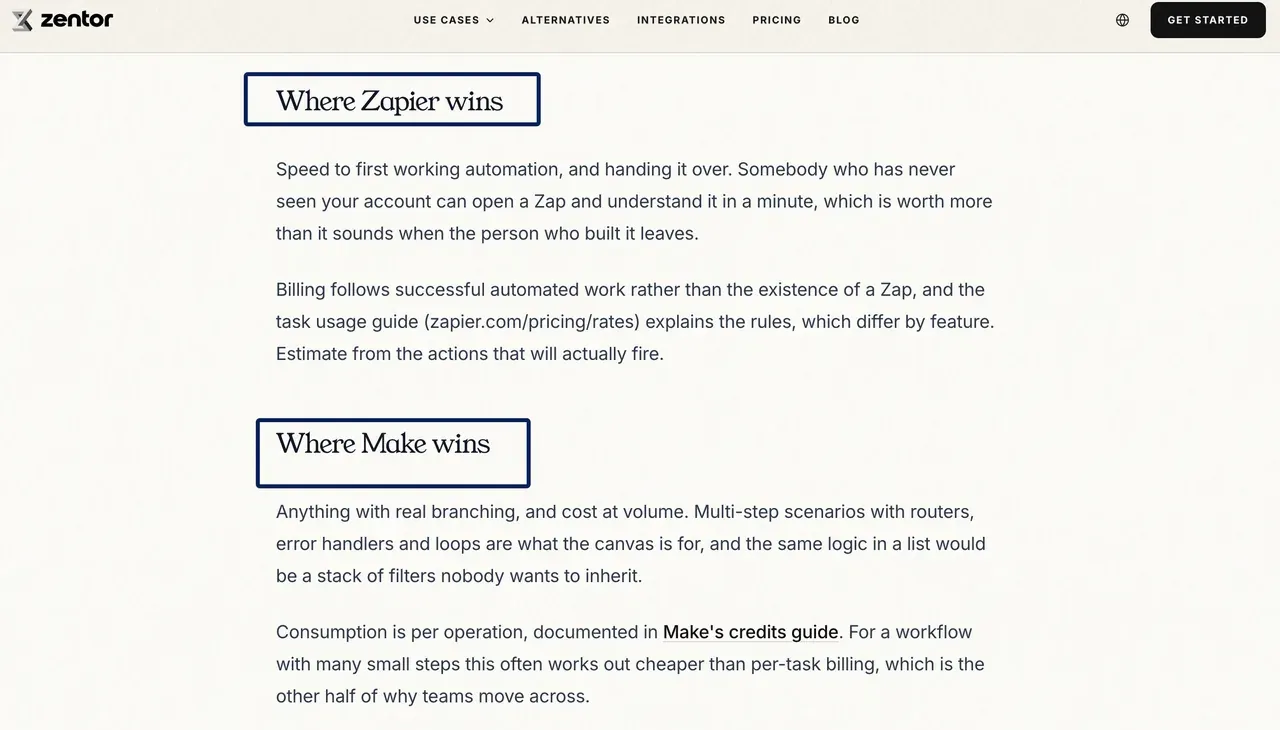
If the owner rarely builds automations, I would start in Zapier. If requests split into several approval routes, Make's canvas may be easier to inspect. Zentor's list-versus-diagram comparison covers that choice. Here, the test is cost and recovery without repeated work.
Keep the client context alongside the workflow
Use the builder for repeatable steps. Zentor keeps workspace memory available to the AI tools you choose, while the approval stays with you.
Get early access →
Compare How Each Builder Represents a Workflow
For a fair workflow builder comparison, I kept the client-change request identical on both sides. A form submits a project's record ID and change request through a webhook. The automation retrieves the Airtable record, marks it for review, alerts its owner in Slack, and creates a Gmail draft. A person checks the date and sends the reply.
Zapier presents this as a trigger followed by actions. Conditions can stop unsuitable records or send them through Paths. Make displays modules on a canvas, with routes and filters showing where data should travel.
Here is the rule I would want the next owner to find: a requested date is not an approved date. "Review needed" should leave the committed deadline untouched. A step named "Flag scope change" beats an unlabeled date-field update. Zentor's workspace memory can keep the request's context available across AI tools through MCP, but Airtable remains the source of the approved date.
Compare App Coverage and Data Handling
An Airtable logo in an app integrations directory tells you little about the requested-date field. Inspect the action itself.
Inspect the record lookup, update fields, Slack destination, and Gmail draft action. A missing project ID should stop the run, not create an unrelated record. Restrict access to the intended base, channel, and mailbox.
Make processes data in bundles, which can multiply downstream module executions. Replace an ID lookup with a search that returns five similarly named records and the later modules may process five bundles, not one. I would keep the record ID in the form rather than ask an automation to guess which client project was meant.
Zapier's directory helps when an unusual app is essential. Check whether its event is instant or polling-based and whether the action needs a paid plan. Custom API requests add maintenance for authentication and field mappings.
The Slack message needs only the request ID, owner, review deadline, and source link. That is enough to send the reviewer back to the record. The Airtable-to-Slack ownership example goes deeper on alerts that prompt a decision without copying the client brief into chat.
Compare Testing, Error Recovery, and Maintenance
Test a valid request, a missing email address, and a duplicate submission. Interrupt the notification step in a test copy. Inspect the destination apps as well as run history.
Zapier distinguishes replaying failed steps from replaying an entire run. A full replay can repeat successful actions and consume more tasks. Failed-step replay from Zap history does not re-evaluate Filters or Paths, so changed conditions deserve another check before recovery.
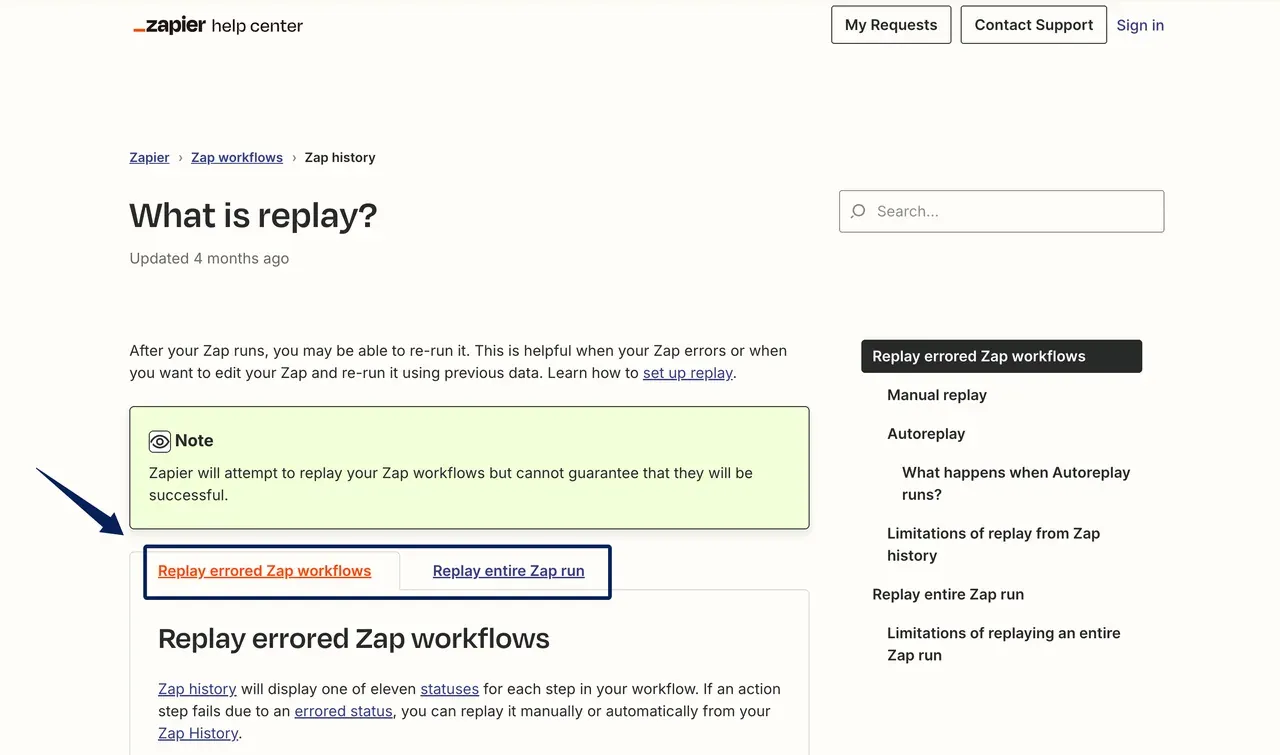
Make's incomplete-execution recovery can resume at the failed module when storage is enabled; it is off by default. A retry retains the configuration from the original failure; editing the current scenario does not automatically repair that saved execution. Configuration mistakes may need manual resolution rather than another retry.
Preventing a duplicate database row is only half the job. A repeated run could still create another Slack alert or Gmail draft. Stage checkpoints or destination IDs distinguish "record saved" from "notification delivered." These controls can add billable work.
If the connection expired, another retry only repeats the failure. If the recipient field is wrong, a successful retry may deliver the draft to the wrong place. Those are different repairs, and the run history needs to make the difference visible.
Compare Zapier vs Make Pricing Against One Real Workflow
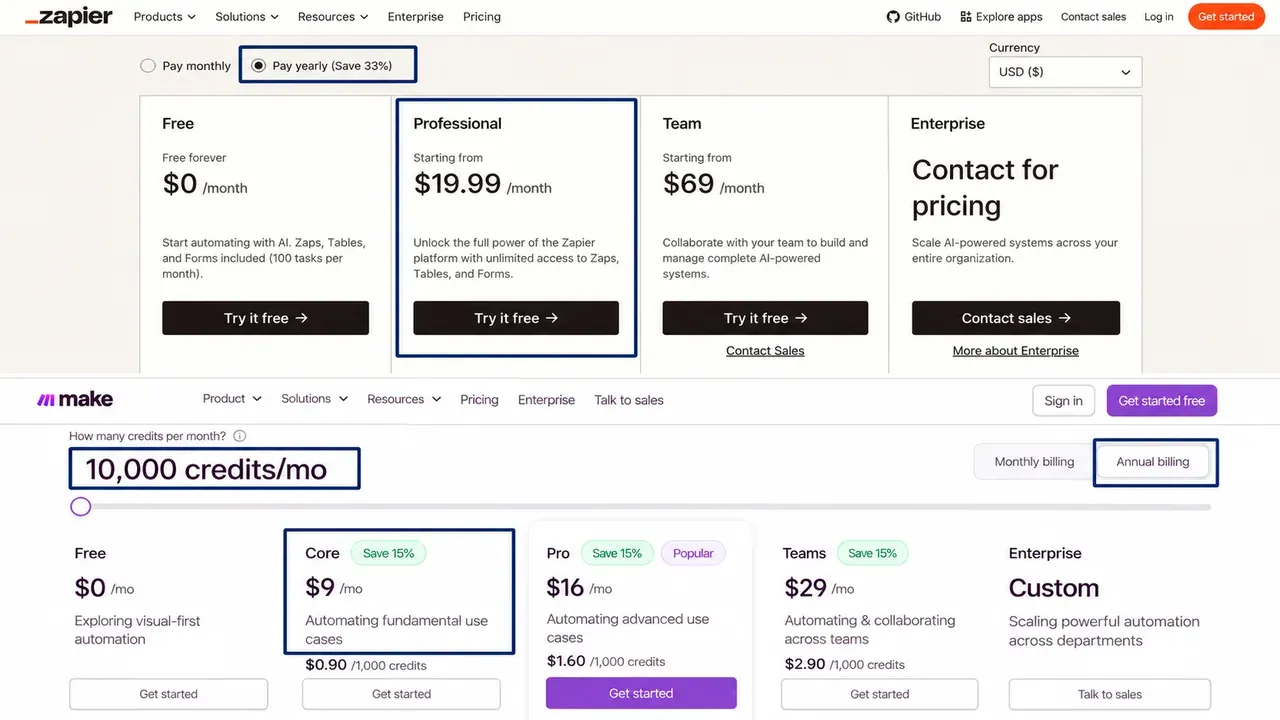
The two pricing selectors captured by the vendor on October 15 show different starting rates, but a starting price is not an allowance for this workflow. For automation pricing, I used 150 monthly requests and the same four-action handoff in each builder. This is a calculation, not a production result; each request has one record ID and no AI or attachment loop.
The baseline counts four external actions: retrieve the record, update it, send the internal notification, and create the draft. It excludes setup tests, retries, exception branches, and additional checkpoint writes.
| Monthly baseline | Zapier | Make |
|---|---|---|
| Successful requests | 150 | 150 |
| Billable units per request | 4 tasks | 5 credits, including the webhook module |
| Estimated usage | 600 tasks | 750 credits |
| Paid plan to check before purchase | Professional; confirm the selected task allowance | Core; confirm the selected credit allowance |
These modeled counts use Zapier's task-usage rule and Make's standard-operation credit rule. The vendor-supplied pricing images, accompanying its October 15 check, show advertised annual-billing starting rates, not a verified price-and-allowance pairing for the chosen plan. Check the live selectors and checkout before comparing subscription amounts; taxes and connected-app subscriptions are outside this estimate.
The counting rules matter. Zapier's task rules exclude triggers and polling checks from tasks. Make's standard non-AI modules generally consume one credit per operation. Replace the instant webhook with a polling trigger running every 15 minutes, all day, for 30 days: that creates 2,880 checks. Add 600 downstream operations, and the Make estimate becomes 3,480 credits.
The free tiers change the decision too. Make includes 1,000 monthly credits on Free, so this 750-credit baseline could fit with 250 credits left if it is the only workflow and nothing fails. Zapier Free allows 100 tasks and two-step Zaps, so it cannot run this four-action version. Check the other limits and permissions before treating either free plan as production capacity.
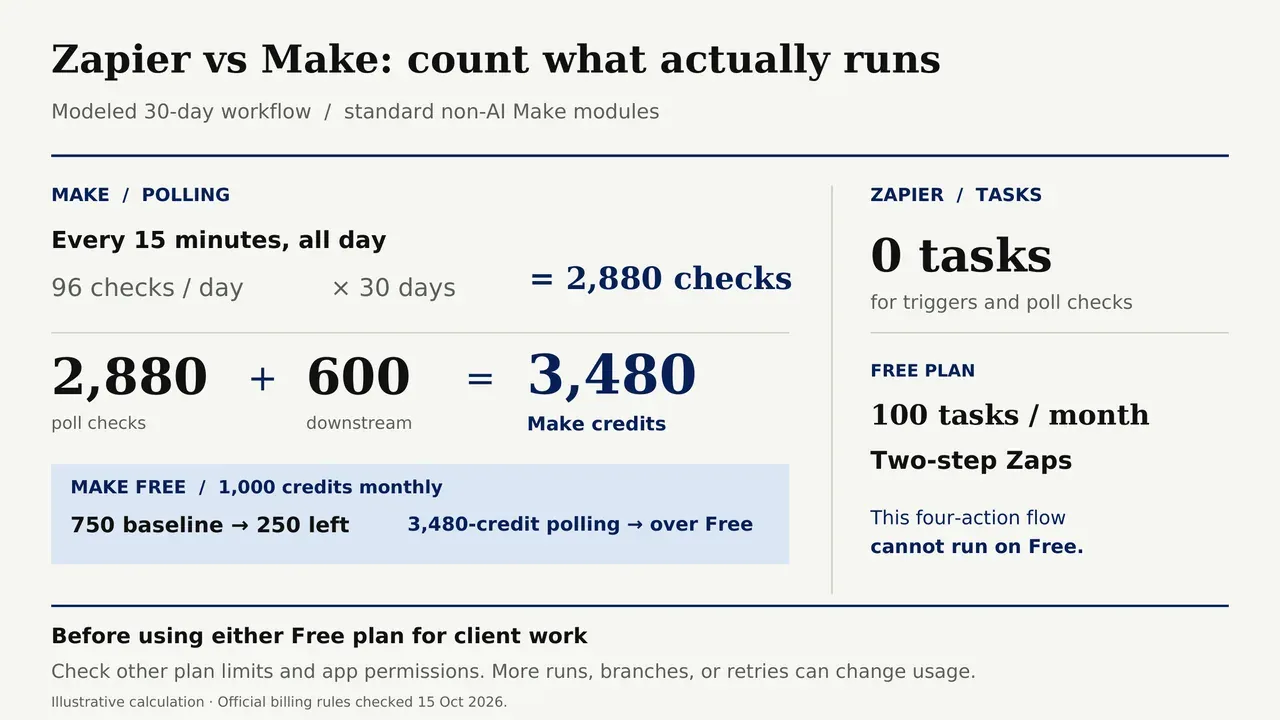
The polling version exceeds Make Free's stated allowance; confirm the selected paid-plan credit limit before assuming it fits. Extra branches, arrays, retries, and other workflows share capacity. Verify the counter during a pilot, especially if you add AI or code steps with different rates.
Choose Based on Complexity and Ownership
Choose Zapier when your required actions exist and a straightforward step sequence makes maintenance easier for the person responsible. Choose Make when seeing data branches and transformations together helps you understand and repair the workflow.
For this small baseline, Make has room for a free-plan pilot, assuming no other credit consumption. That does not settle it. If the person on call cannot tell whether the Gmail draft already exists, the cheaper bill is a poor reason to turn the workflow loose. The reverse is true too: familiarity with Zapier is not a reason to pay for actions the team stopped using.
Zentor's user-owned workspace memory can help a new owner bring context to their choice of AI tool through MCP; it cannot tell a builder that an earlier Slack alert was delivered. Check the run history and destination before replaying.
In a Make vs Zapier pilot, ask a colleague to trace one request to the unsent draft. If they cannot tell what would repeat after an error, simplify it.
FAQ
What happens if the person who built the automation leaves?
Check both the workflow and the accounts it uses. On Zapier Team and Enterprise plans, Zaps and app connections can be transferred during offboarding. A transferred Catch Hook can receive a new webhook URL, so update the app sending requests to it. In Make, confirm who can manage the scenario and replace any connection that depends on the departing person's app account.
Can a Zap be imported directly into Make, or vice versa?
Not through their native export formats. Zapier's JSON exports are for Zaps, while Make blueprints describe Make scenarios. Use the old workflow as a reference, then rebuild its trigger, field mappings, filters, and connections. Watch the first live request from start to finish.
How can I test without touching live client records?
Use test Airtable records, a test Slack channel, and an internal mailbox with no client recipients. Check the destination apps after each run: a copied workflow can still make real changes through its connected accounts. Switch to approved production connections only after the test produces the expected record, alert, and draft.
Can two clients' app connections stay separate?
Yes, if you set up the account boundaries deliberately. Where available, Zapier Workspaces isolate connections and workflows. In Make, scenarios and connections belong to teams; plans below Teams allow only one team, though you can create separate app connections within it. Check the access boundary before connecting a second client's data.
What should I check before downgrading a plan?
Look for paid-only steps, shared connections, and anyone who would lose access. On Zapier, multi-step Zaps turn off on Free when the downgrade takes effect at the end of the billing cycle, and a move from a team plan to an individual plan disconnects shared connections. Save the workflow configuration and identify who can reconnect each app before the plan changes.
Choose the Workflow You Can Repair
Break the Slack step in a test copy, then give the failed run to the person who will own it next month. Can they see that Airtable changed, avoid a second Gmail draft, and finish the alert? That answer tells me more than a Zapier vs Make feature list or the first month's bill.

Zentor Editorial Zentor editorial team
The Zentor editorial team writes about workflow automation, AI agents, and the tools we build. Default byline for industry overviews, listicles, and collaborative pieces.
Choosing between tools? Let Zentor run the work.
Always-on AI assistant on its own cloud computer. No switching required, no setup.