Notion AI Credits Ran Out? What to Do Next

Notion AI credits end unlimited AI on Business and Enterprise from Nov 2. What 1,500 Standard and 500 Select credits cover, and what to do when they run out.
When your Notion AI credits run out on a Business or Enterprise plan, the AI features that draw on that balance pause until your monthly reset, and you cannot buy more yourself unless a workspace admin has switched on overflow billing. Your options are to move work to the cheaper Auto model, ask an admin to enable Notion credits, or do the AI work outside Notion and write the results back.
Notion announced the change on October 19, 2026: every Business and Enterprise member now gets 1,500 Standard credits and 500 Select credits a month, replacing the old unlimited AI. New workspaces are on the system already. Existing workspaces move on November 2, 2026, according to Notion's credit help page (both pages checked October 20, 2026).
Key Takeaways:
- Standard credits (1,500/month) cover Auto work where Notion picks the model. Select credits (500/month) cover work where you pick the model, plus personal Custom Agents.
- The two balances are separate, per member, do not pool, and do not roll over.
- Choosing a frontier model is expensive: Notion estimates a simple task at about 50 credits on Opus 5.5 versus about 5 on Auto, so 500 Select credits is roughly 10 simple tasks.
- AI Meeting Notes start drawing on Standard credits on December 1, 2026, at about 10 credits per one-hour meeting.
- Notion says everyday connected apps and the Notion API do not use your credits, which is why working on Notion pages from an outside tool keeps going after Notion AI pauses.
Disclosure: This guide is written by the Zentor team, and Zentor is one of the outside tools it mentions. Every Notion number below comes from Notion's own pages, linked inline, and was checked on October 20, 2026. We have not tested Notion's internal metering ourselves.
How Notion AI Credits Work After the November 2 Change
There are now two buckets per person, and which one a task drains depends on who picks the model.
| Standard credits | Select credits | |
|---|---|---|
| Monthly allowance per member | 1,500 | 500 |
| Who picks the model | Notion (Auto) | You, or a personal Custom Agent |
| Typical uses | Writing, translation, Q&A, summaries, Meeting Notes from Dec 1 | Picking Opus 5.5 or another named model, personal Custom Agents |
| Rolls over? | No | No |
| Shared with teammates? | No | No |
Source: Manage your AI credits, Notion Help Center.
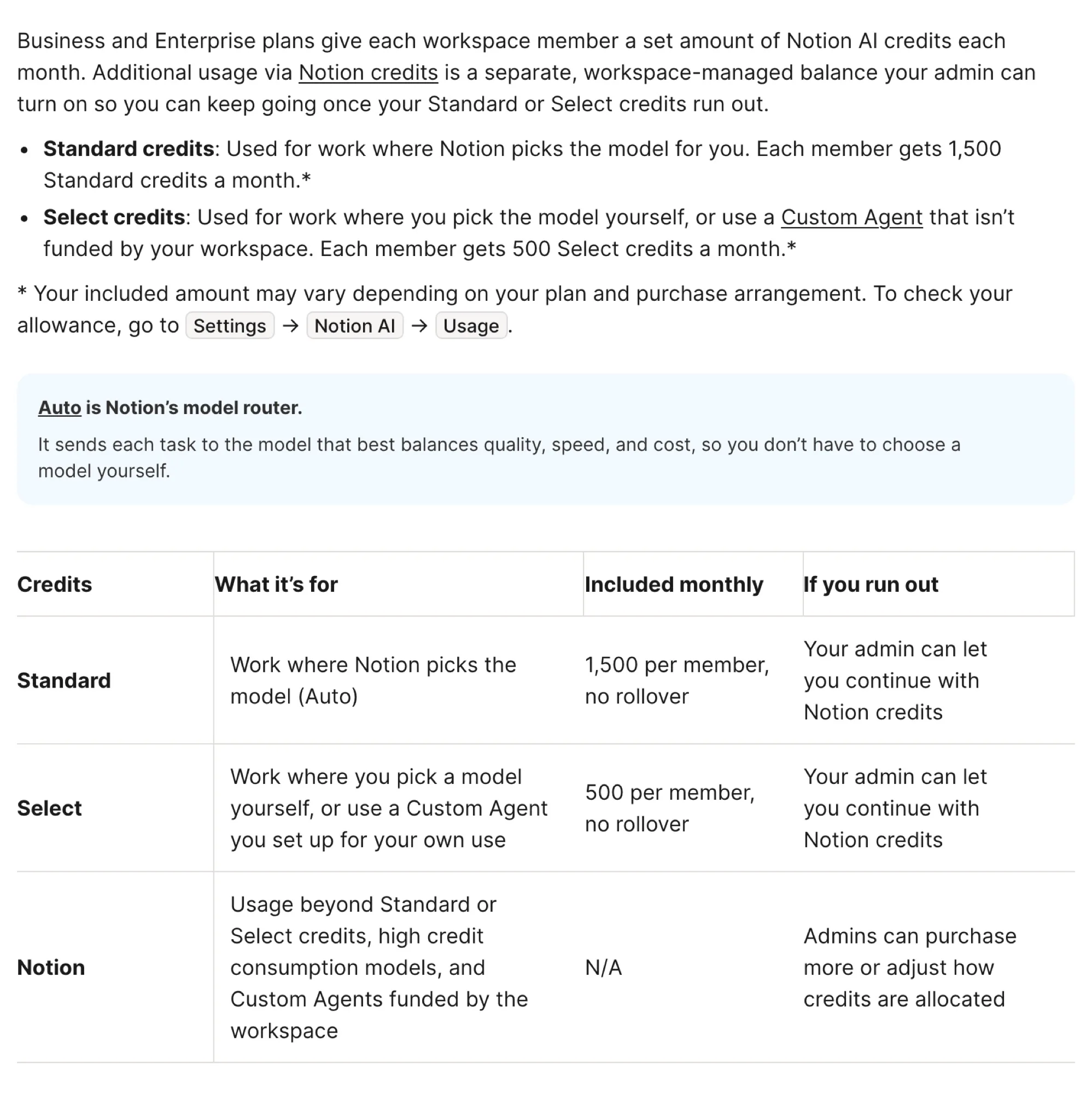
A third balance sits above both. Notion credits are a workspace-level pool that admins buy, and they cover workspace-funded Custom Agents, high-consumption models such as Fable and Astra, and usage after a member hits their limit. The setting that lets members keep going on that pool is called "Allow workspace to use Notion credits after AI limit is reached," and Notion's help page says plainly: "This is off by default."

That last detail is the one most people will meet the hard way. On the old plan nobody had a meter. From November 2, a member who runs out does not see a "buy more" button of their own. The work pauses.
Keep working on your Notion pages when Notion AI pauses
Zentor connects through Notion’s hosted MCP server, reads the page or database you point it at, and writes the result back.
Connect Notion →
How Far 1,500 Standard and 500 Select Credits Actually Go
Notion publishes rough per-task estimates on the same help page. Dividing the monthly allowance by them gives a useful ceiling.
| Task size | Auto (Standard) | Opus 5.5 (Select) | Tasks per month on Auto | Tasks per month on Opus 5.5 |
|---|---|---|---|---|
| Simple | ~5 credits | ~50 credits | ~300 | ~10 |
| Medium | ~10 credits | ~85 credits | ~150 | ~5 |
| Complex | ~25 credits | ~150 credits | ~60 | ~3 |
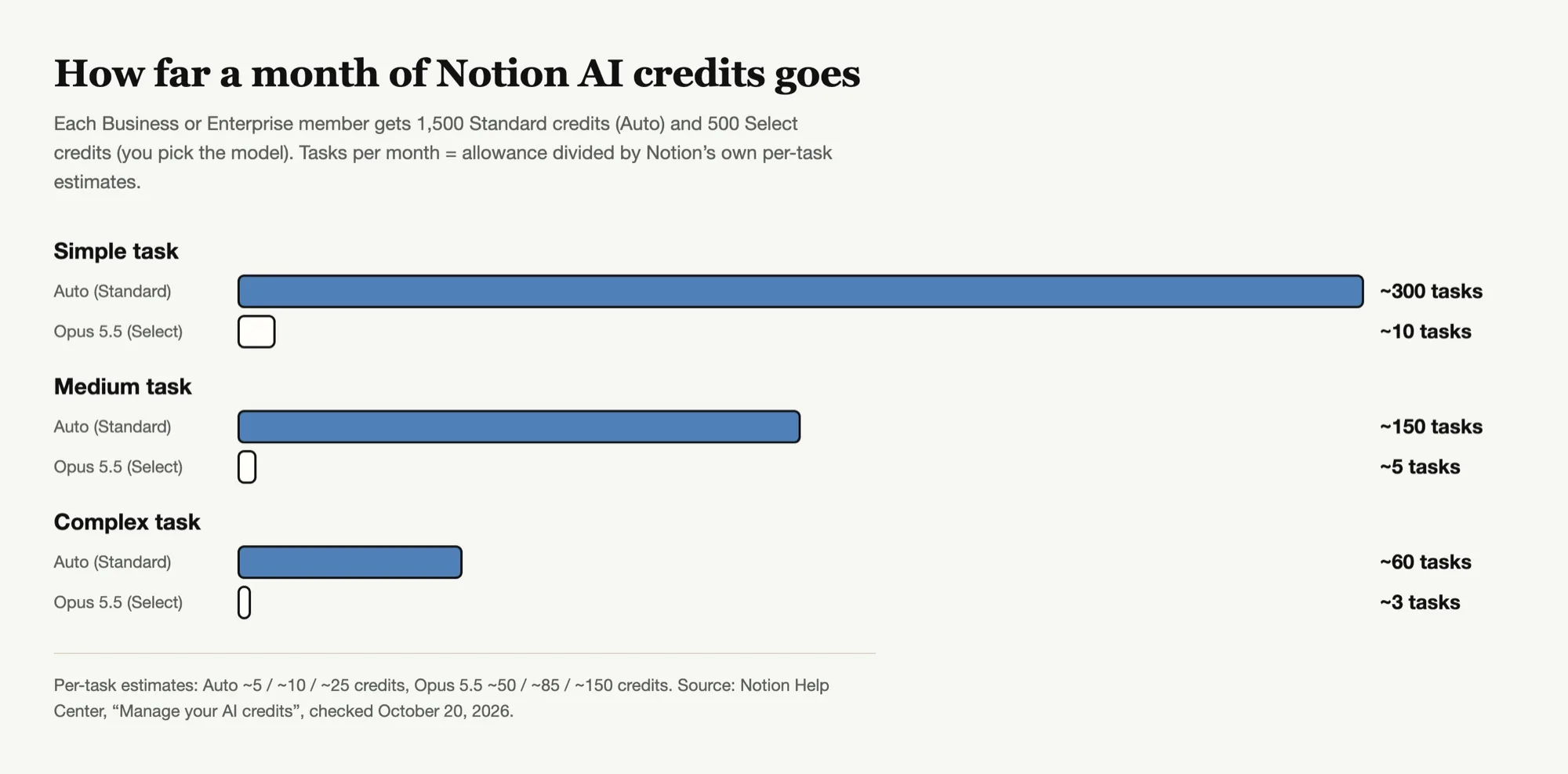
The asymmetry is the whole story. On Auto, a month of ordinary drafting and Q&A is hard to exhaust, and Notion itself says "the vast majority of users are unlikely to run out of monthly credits." If you have been in the habit of switching the model picker to Opus 5.5 for anything that matters, though, you are working against a budget of about ten simple tasks or three complex ones a month.
Picture the usual end-of-quarter week: you pick the strongest model to rewrite a strategy doc, then a launch brief, then the board summary. By Wednesday the Select balance is gone, and the rest of the month is Auto or nothing.
Notion's argument for Auto is that its router gave "similar results to Opus 5.5 and Astra across 20+ use cases" at about 90% lower average cost, according to the launch post. That is Notion's own benchmark and the use cases are not published, so treat it as a claim worth testing on your own documents rather than a settled fact.
Notion AI Meeting Notes Start Using Credits on December 1
The second deadline is easier to miss. AI Meeting Notes run on Auto and begin drawing on the Standard allowance on December 1, 2026, at roughly 10 credits for a one-hour meeting.
For most people that is modest. Ten hour-long meetings a week works out to roughly 43 meetings and about 430 credits a month, a little under 30% of the Standard allowance. It becomes a real constraint for people who live in calls, such as sales, recruiting and customer success, because the meeting notes and the follow-up drafting now come out of the same 1,500.
If your team leans on Meeting Notes, check the Usage view in November, before transcription starts counting, so you have a baseline.
What Happens When Notion AI Credits Run Out
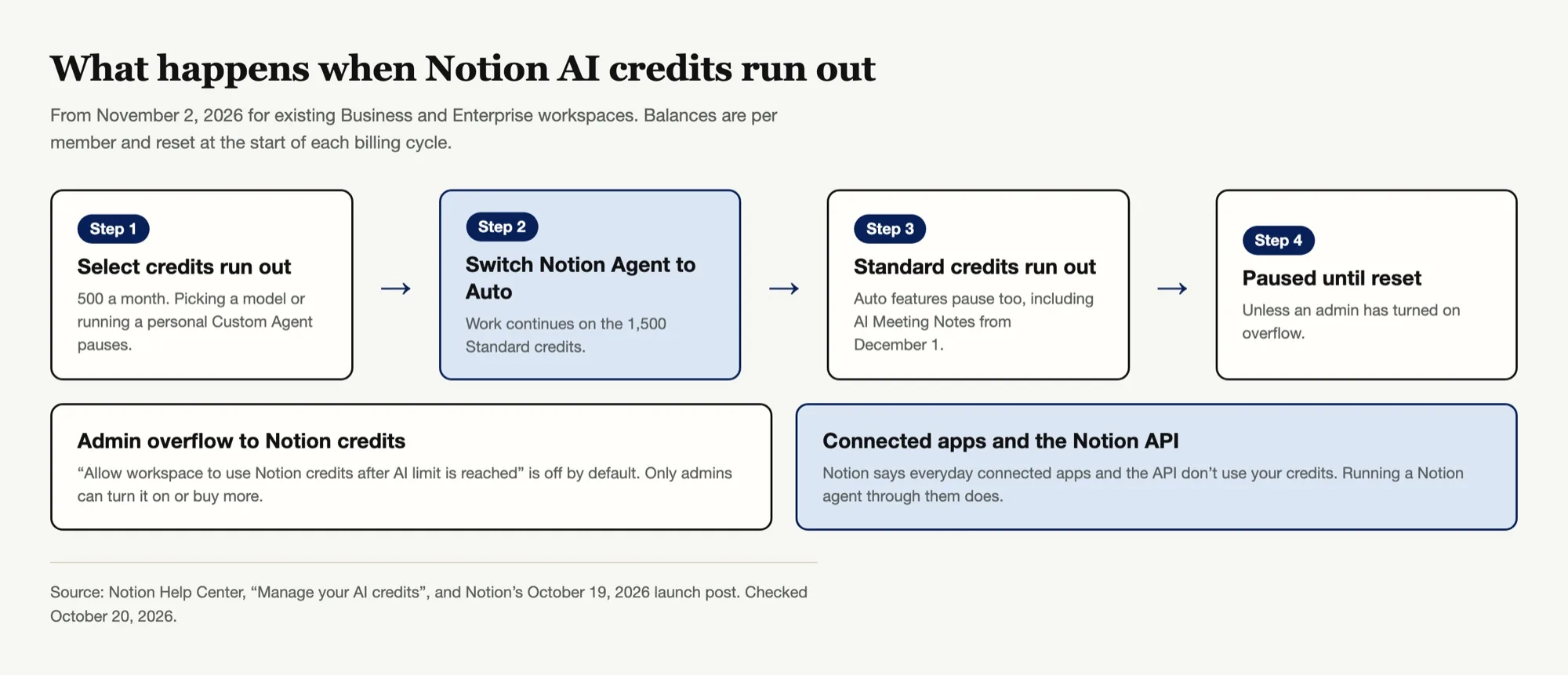
Here is the sequence Notion describes, in plain terms:
- Select runs out first, for most heavy users. Features that need Select pause. Notion's suggested fix is to switch Notion Agent to Auto, which keeps working as long as Standard credits remain.
- Standard runs out. Auto features pause too, including Meeting Notes after December 1.
- Nothing resets until the start of your next billing cycle, unless an admin has turned on overflow to Notion credits.
You can see where you stand in Settings → Notion AI → Usage. Admins get a per-member view under Settings → Access & billing → Notion credits, and the launch post says a fuller AI Command Center with alerts and spending limits is "coming soon."
Notion does not publish the price of extra Notion credits on either page we checked. Admins are told to purchase more from the billing settings, so the cost of turning on overflow depends on your contract.
How to Stretch Your Notion AI Limit Without a Budget
None of these require a budget conversation.
Default to Auto. The table above makes the case. Save named models for the few tasks where you have actually seen a quality difference on your own content.
Batch your asks. If five related pages need summarizing, ask once for all five. Every separate request is a separate task on the meter, and the per-task estimates above are the floor for each one.
Move personal Custom Agents to a schedule you need. Personal Custom Agents draw on Select. An agent that runs hourly when a daily run would do is spending the scarcest balance you have.
Do not rerun for wording. Regenerating a draft three times to get a better opening line costs three tasks. Edit the sentence yourself.
Check usage mid-month. Credits do not roll over, so the useful time to look is around day 15, when you can still change habits.
How to Ask Your Admin for More Notion Credits
If your work genuinely needs more, the request goes to a workspace admin, and it helps to make it concrete. A short note that works:
- Which balance you exhaust (Standard or Select) and on what day of the cycle
- What kind of work it was, for example "client proposals with Opus 5.5"
- Whether Auto produced acceptable output for that work when you tried it
- How many members are in the same situation, if you know
Admins have two levers: enabling the overflow setting so members draw on purchased Notion credits, and adjusting how credits are allocated. Both are in the admin billing settings. On Enterprise, admins can also restrict which models members may choose, which is worth knowing before you build a workflow around one.
Working on Notion Pages Outside Notion AI
The help page has one sentence that matters a lot after November 2: "Everyday connected apps and the Notion API don't use your credits, though normal rate limits still apply." The exception it lists is running a Notion agent through a connected app or the API, which does use credits.

In practice that means an outside assistant that reads your pages through the API and writes results back is not spending your Notion AI balance. Notion has leaned into this route itself. Its hosted MCP server lets tools like Claude and ChatGPT read from and write to pages, and the launch post says Notion MCP was overhauled alongside the credit change. One caveat: neither the credit page nor the Notion MCP help page names MCP explicitly in the credit rules, so if this matters to your budget, confirm it in your own Usage view after a few runs.
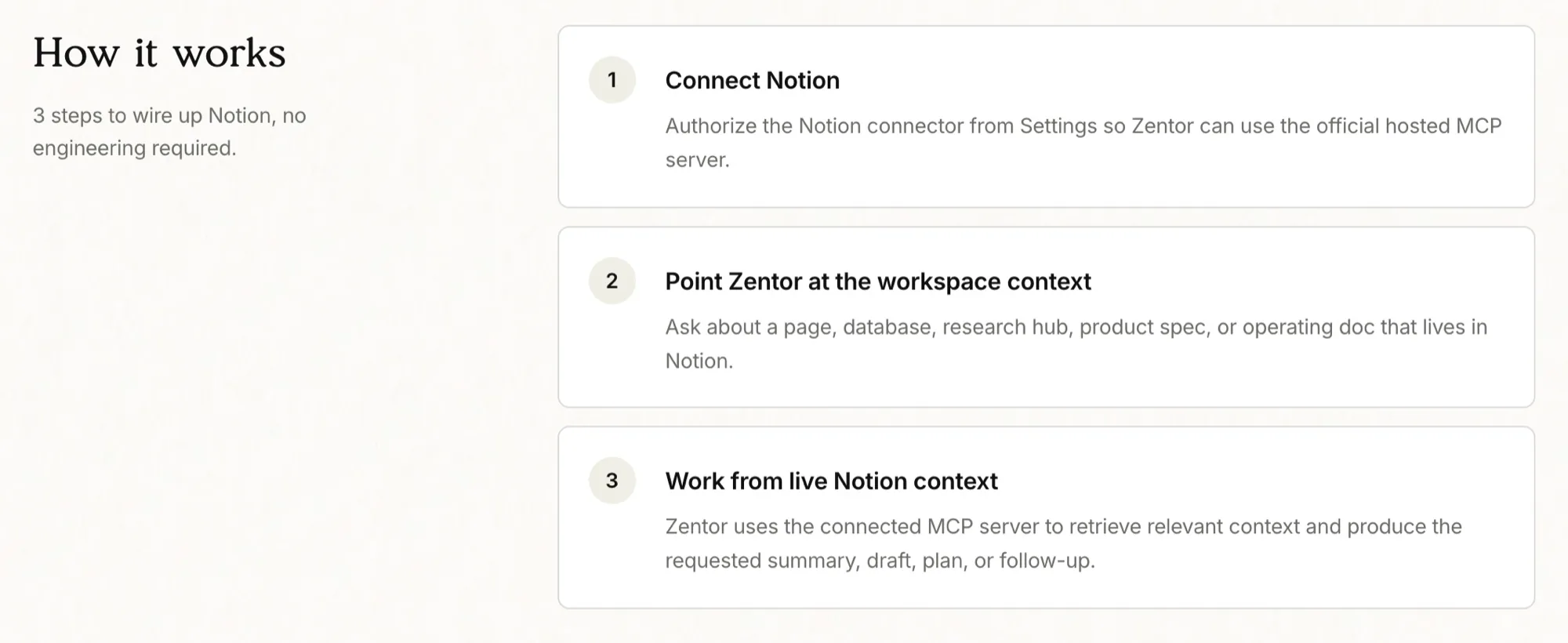
This is the gap Zentor's Notion integration is built for. You authorize the connector once, point Zentor at a page or database, and it does the drafting, summarizing or restructuring and writes the result back into Notion. Two honest limits:
- It is not free. Zentor bills its own credits: $20 a month for 1,000 credits, with a 3-day trial. You are moving the work to a different meter, not escaping meters.
- Your admin can block it. On Enterprise, the MCP help page says admins can restrict members to an approved list of AI apps or disconnect every external AI tool at once.
Where it earns its place is work that crosses tools. Notion AI works inside Notion. Zentor keeps a workspace memory that travels across Notion, Airtable, Slack and Google Workspace, so a task like "turn this Notion spec and last week's Slack thread into a launch checklist" is one request. If you are weighing a fuller switch, our Notion AI alternative comparison goes through the trade-offs, and MCP tools explained covers how these connections work.
FAQ
How many Notion AI credits do I get per month?
On Business and Enterprise plans, each member gets 1,500 Standard credits and 500 Select credits a month. Notion notes allowances can vary by contract, so check Settings → Notion AI → Usage for your exact numbers.
What is the difference between Standard and Select credits in Notion?
Standard credits pay for work where Notion's Auto router picks the model. Select credits pay for work where you pick the model yourself, and for personal Custom Agents. They are separate balances and cannot be combined.
Can I buy more Notion AI credits myself?
Not as a member. Admins buy Notion credits for the workspace, and members can only use them after the limit if an admin turns on "Allow workspace to use Notion credits after AI limit is reached," which is off by default.
Do Notion AI credits roll over?
No. Unused Standard and Select credits reset at the start of each billing cycle.
When does the Notion AI credit change start?
New Business and Enterprise workspaces have been on credits since October 19, 2026. Existing workspaces switch on November 2, 2026. AI Meeting Notes start using Standard credits on December 1, 2026.
Does Notion MCP use my Notion AI credits?
Notion's help page says everyday connected apps and the Notion API do not use credits, while running a Notion agent through a connected app or the API does. MCP is not named explicitly, so verify in your Usage view.
Plan Your Notion AI Credits Before November 2
The change is less dramatic than "unlimited AI is over" makes it sound. On Auto, most members will not hit the ceiling. The people who will are the ones who habitually pick a frontier model, run personal Custom Agents, or spend their days in recorded meetings, and for them the pause arrives with no self-serve fix.
So the useful moves happen before the meter starts. Look at which model you actually use, set Auto as your default for routine work, and if you are an admin, decide now whether overflow is on or off rather than discovering it through a stream of messages on November 15. For the work that does not fit inside the allowance, an outside assistant that reads and writes your pages through the API keeps you moving, on its own bill.

Zentor Editorial Zentor editorial team
The Zentor editorial team writes about workflow automation, AI agents, and the tools we build. Default byline for industry overviews, listicles, and collaborative pieces.
Ready to put this into practice?
Zentor runs browser tasks, research, and schedules automatically. Try it free.
References https://www.notion.com/help/manage-your-ai-credits · https://www.notion.com/blog/notion-ai-more-for-less · https://www.notion.com/help/ai-meeting-notes · https://www.notion.com/help/notion-mcp · https://developers.notion.com/docs/mcp