Zapier AI Agents: How They Work and Where They Stop

How Zapier AI agents work in 2026: instructions, tools, activities and the move to AI by Zapier steps billed in tasks, plus an OpenClaw vs Zapier comparison.
Zapier AI agents are AI assistants you set up inside Zapier with plain-English instructions, a trigger, and a set of app actions they're allowed to use; when the trigger fires, the agent decides which of those actions to run. As of October 2026, Zapier is moving them out of the standalone Agents product and into AI by Zapier, where each agent becomes a single AI step inside a normal Zap and is billed in tasks.
That move changes how you build, test and pay for them, and most explanations online still describe the old version. This guide covers both, then shows where Zapier agents run out of road and how they compare with OpenClaw, the open-source assistant people often weigh against them.
Key Takeaways:
- A Zapier agent is instructions plus a trigger plus tools (app actions) plus optional knowledge sources. You test it, then publish it.
- In the original Agents product, every trigger, action, web search or knowledge lookup counts as one "activity": 400 a month on Free, 1,500 on Pro, with a cap of 10 or 40 per run.
- Since the switch to AI by Zapier, an agent run costs tasks: (1 + number of tool calls) × the model tier's rate of 1x, 3x or 5x. A Premium step with two tool calls costs 15 tasks.
- Zapier hasn't set a date to turn off the old Agents product, and some knowledge sources (HubSpot, Asana, Zendesk, Zoom, Jira) aren't supported in the new version yet.
- OpenClaw runs on your own machine and talks to you through chat apps; Zapier runs in its cloud and plugs into 9,000+ apps. They suit different people more than they compete.
What Zapier AI agents are
Zapier's help center defines them simply: "Agents are AI-powered assistants that do work on your behalf." They can run on their own when something happens, or when you ask them to.
The difference from a regular Zap is who decides the steps. In a Zap, you fix the sequence in advance: when a form comes in, add a row, then send a Slack message. With an agent, you give it a goal and a toolbox ("when a new lead fills in the form, look up their company, score the lead, and post qualified ones to #sales") and the model picks which tools to call and in what order.
Zapier launched Agents as the successor to Zapier Central; its launch post says "Today, Zapier Central becomes Zapier Agents." The product page now pitches templates such as Lead Enrichment, Support Email, Meeting Prep and an IT Helpdesk Slack Responder, which gives you a fair idea of the intended jobs: short, repeatable office tasks that need a bit of reading and judgment.
How a Zapier agent works, step by step
Building one in the original Agents product goes like this:
- Write instructions. You describe the trigger, the task and the apps to use in a text box. Zapier tidies the formatting after you create the agent.
- Connect your apps. Each app the agent touches needs a connection, new or existing.
- Set a trigger. This controls when the agent runs: an app event, a schedule, or a message from you.
- Add actions as tools. Each action (create a HubSpot contact, send a Gmail draft, update a Sheet) becomes a tool the agent may choose to call.
- Add knowledge sources. Docs, FAQs or links the agent can look things up in. Zapier suggests this over stuffing long reference material into the instructions.
- Test, then publish. Zapier Copilot can help edit the agent or investigate errors along the way.
Each of those runs is metered in activities. Per Zapier's usage article, one activity is any of: using a trigger, answering from a knowledge source, running an action, browsing or scraping a web page, running a web search, or sending a message through the Chrome extension.
| Plan | Activities per month | Activities per run |
|---|---|---|
| Free | 400 | 10 |
| Pro | 1,500 | 40 |
| Enterprise | Custom | 40 |
Activities don't touch your Zap task allowance, according to Zapier's pricing page. When a run hits the per-run cap with work left, the agent stops and asks you before continuing. When the monthly allowance runs out, agents stop running entirely, though you can still chat with them. Testing is free on paid plans and counts against your quota on the free plan.
Since May 2025, agents can also be grouped into pods, and an All activity screen shows every run along with the ones waiting on your input.
The October 2026 change: Zapier Agents become AI by Zapier
Zapier is folding Agents into the Zap editor. Its post Zapier Agents is now AI by Zapier and the migration guide (updated October 1, 2026) map each old feature to its new home:
| Old Zapier Agents feature | Where it lives in AI by Zapier |
|---|---|
| Agent instructions | The prompt field on the AI step |
| Tools | The tools picker in the AI step |
| Schedule or webhook trigger | The Zap trigger, with every Zapier app available |
| Chat or on-demand agent | A webhook trigger |
| One agent calling another | A Sub-Zap trigger on the child Zap |
| Human approval | "Require approval before running," set per tool |
| Model choice | Standard, Advanced or Premium tier, or a named model |
| Run history | Zap History |
| Cost | Tasks instead of activities |
The practical effects: a converted agent becomes a Zap with a trigger and one AI step that keeps your original prompt and tool calls. Approval moves from all-or-nothing to per tool, so an agent can read data freely but stop before sending an email. You also get filters, paths and Zap History around the agent, which the standalone product never had.
Some things aren't there yet. Zapier says knowledge sources from HubSpot, Asana, Zendesk, Zoom and Jira are planned for Q4 2026, sources with 1,000 or more pages or files may fail to add, and admin-level bring-your-own-model is "coming in a future release." Chat-style agents have no direct equivalent; the workaround is a webhook trigger.
If you migrate, turn off the original agent after publishing the new Zap. Zapier warns that otherwise "both your Zap and agent can run at the same time, which may cause duplicate actions." There's no shutdown date for agents.zapier.com yet, and Zapier says it will email users before any change.
What a Zapier AI agent run costs
AI by Zapier steps are priced by model tier. Zapier's model tier pricing article (updated October 1, 2026) gives the formula:
Tasks per run = (1 × model rate) + (number of tool calls × model rate)
| Tier | Rate | Example run | Tasks |
|---|---|---|---|
| Standard | 1x | No tools available on this tier | 1 |
| Advanced | 3x | 1 tool call | 6 |
| Premium | 5x | 2 tool calls | 15 |
| Your own AI account | 1x | 4 tool calls (Advanced or Premium models only) | 5 |
That article says new steps on paid plans default to Premium; an earlier pricing notice said Advanced. Check the dropdown on your own step, because the default decides whether a two-tool run costs 9 tasks or 15.
To put that against a plan: Zapier Pro starts at 750 tasks a month for $19.99 billed annually. An agent that runs 50 times a month on Premium with two tool calls each would use the whole allowance on its own. Runs that pass 75 tasks pause for review by default, and you can raise that limit to 500. Full-Zap tests also consume tasks right now.
Where Zapier AI agents stop
Zapier agents are good at the job they're shown doing: read something, decide, call one or two apps. They get awkward in a few predictable places.
Cost climbs with every decision. Because each tool call multiplies by the tier rate, an agent that has to look things up before acting gets expensive fast. A deterministic Zap for the same job costs one task per step, with no multiplier.
Run caps cut long jobs short. Forty activities in the old product, 75 tasks by default in the new one. Multi-step research or anything that needs to loop through a long list will hit the cap and wait for you.
What the agent knows is what you attached. Zapier documents instructions, tools and knowledge sources as the agent's inputs. It doesn't describe a memory that builds up from your past runs, so if the right answer depends on last week's conversation with a customer, you need to put that context somewhere the agent can look it up.
Knowledge sources have gaps during the migration. If your agent leans on Zendesk or Jira content, it can't move to AI by Zapier until Zapier adds those sources.
Chat is now a workaround. On-demand agents become webhook-triggered Zaps, which is fine for automations and clumsy for back-and-forth work.
None of these are reasons to avoid Zapier agents for the right task. They're reasons to price a run before you build ten of them.
OpenClaw vs Zapier: how they compare
OpenClaw is an open-source, MIT-licensed AI assistant that runs on your own computer and that you talk to through chat apps. People compare it with Zapier because both can take actions in other apps on a schedule. They come at it from opposite ends.
| OpenClaw | Zapier AI agents | |
|---|---|---|
| What it is | Personal AI assistant you install and run | Hosted automation platform with AI steps |
| Where it runs | Your machine; the site says "State lives on your machine, not a vendor cloud" | Zapier's cloud |
| How you talk to it | WhatsApp, Telegram, Discord, Slack, Signal, iMessage and more (29 channels, per its site) | Zap editor, agent dashboard, or a webhook trigger |
| Scheduled work | Built-in scheduler (openclaw cron) |
Zap triggers: schedules, app events, webhooks |
| App connections | Community skills, tools and plugins | 9,000+ apps |
| Models | Hosted, subscription-backed, gateway or local models | Standard, Advanced or Premium tier, or a named model |
| Cost | No subscription; you pay your model provider and run the hardware | Tasks (AI steps at 1x/3x/5x) or Agents activities |
| Setup | Install script or npm (Node 24+ per the GitHub repo), or desktop apps | Sign in to a browser app |
| Guardrails | Depends on how you configure your install | Per-tool approval, run caps, Zap History |
Choose OpenClaw if you're comfortable installing and maintaining software and want an assistant that lives in your messaging apps and keeps its state on your hardware. Choose Zapier if your work already runs through Zapier, you want approvals and run history, and you don't want to look after a machine. For more on how OpenClaw works under the hood, see OpenClaw explained and our OpenClaw alternatives page.
How we got here: from Zaps to agents
Automation tools went through roughly three shapes, and Zapier has now lived through all of them. I've built things in each of them, so part of this history is my own.
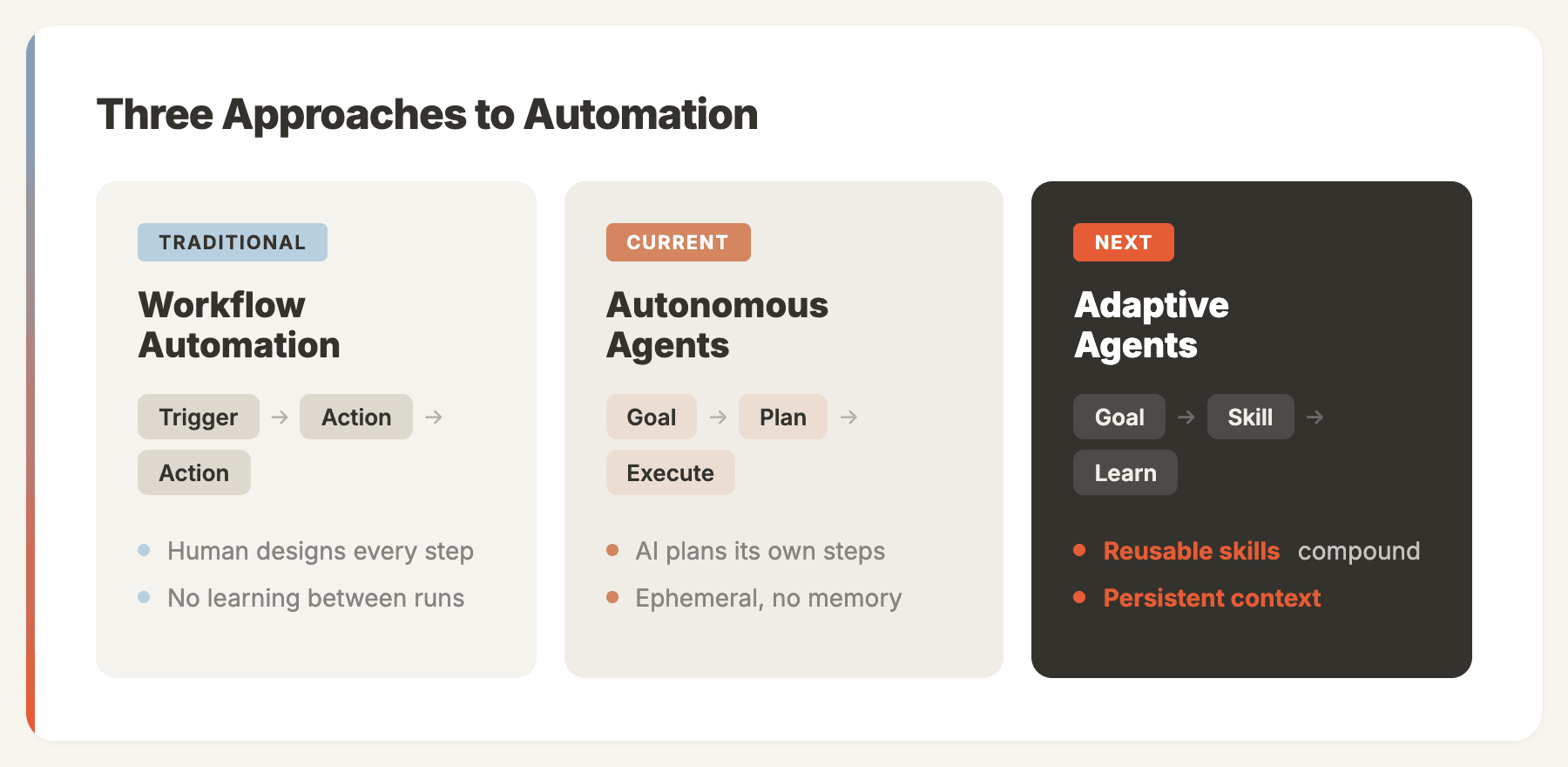
The first was the fixed workflow. Zapier and Make let people without code connect apps with a trigger and a chain of actions. When I first used Zapier after years of building enterprise CRM customizations at Microsoft, I couldn't believe how fast it was. I set up a workflow that pulled new HubSpot leads into a Google Sheet, sent a Slack notification to sales, and scheduled a follow-up email, all in about 20 minutes. The same integration at Microsoft would have gone through weeks of requirements and development. Later I switched to Make when I needed to process webhook payloads with conditional routing, something Zapier couldn't do cleanly at the time, and for my volume it cost roughly half as much.
Large companies got fixed workflows through Power Automate and UiPath, with deeper system integrations and a much heavier delivery model. At Microsoft Redmond, I spent two years building Power Automate solutions for clients like HP and Coca-Cola. One project that sticks with me: we automated HP's partner onboarding flow, connecting Dynamics 365, SharePoint document libraries and an approval chain. What used to take a partner manager 4 hours of manual data entry now happened in minutes. Getting there took 11 weeks of requirements, development, testing and training, and roughly $180K in consulting fees. For a single process.
n8n added a self-hosted, open-source option, and after ChatGPT arrived these tools started bolting LLM steps into the chain. I built one of my favorite workflows in that period: an n8n pipeline that took a published blog post, fed it to GPT-4 to generate 5 LinkedIn posts and 3 tweet threads, then queued them in Buffer. It ran every time we published, our social engagement tripled in two months, and the whole thing took an afternoon to build. But someone still had to design every step and fix the logic when an edge case broke it. The AI was a smarter node; I was still the architect.
The second shape was the goal-driven agent. Tools like Manus (which joined Meta in December 2025) and Genspark took a goal, planned their own steps and ran them in a cloud browser. I used Manus heavily for about three months. The first time I asked it to "research the top 15 AI agent frameworks, compare their architecture, and produce a report with tables," it blew my mind: it opened a browser, visited each project's GitHub and docs, pulled out the right information, and delivered a well-structured report in about 8 minutes. No workflow design, just a goal. After three months of daily use across Manus and Genspark, though, I kept hitting the same walls. Every task started from zero. Running the same competitive analysis ten times cost the same and took the same time. And neither tool watched my inbox or CRM; they only worked when I opened them and asked.
The third, still forming, adds reusable skills and context that carries between runs. OpenClaw's skill system is one version of it. Zapier's path cut across all three: Zaps first, then Zapier Central, then Zapier Agents, and now agents as AI steps inside Zaps again, which says something about where Zapier thinks agents are most useful: inside a workflow with guardrails, not floating free.
When a Zapier agent is the right tool
Use a Zapier agent when the job is short, the apps are already in Zapier, and one or two decisions sit in the middle of an otherwise fixed workflow: classify a ticket, enrich a lead, draft a reply for approval. Use a plain Zap when there's no decision to make, because it's cheaper and easier to audit. If you're questioning Zapier altogether, our comparison of Zapier alternatives covers Make, n8n, Activepieces and the rest with current prices.
The jobs that fit Zapier agents worst are the ones where the right answer depends on history: what you promised this customer, how you usually phrase things, what you decided last time. That's the problem Zentor is built around. It keeps a workspace memory that belongs to you and reaches the AI tools you already use through Zentor MCP, and it delivers finished work into tools like Notion and Airtable. The Zentor vs Zapier page explains where each fits.
Disclosure: Zentor publishes this blog. Zapier and OpenClaw details come from their own documentation as of October 28, 2026.
FAQ
How do Zapier AI agents work?
You give the agent instructions, a trigger, app actions it may use, and optional knowledge sources. When the trigger fires, the AI model reads the input, decides which actions to call, and runs them. In AI by Zapier, that whole agent is one AI step inside a Zap.
Are Zapier agents free?
Zapier's free plan includes 400 agent activities a month with a 10-activity cap per run. Pro includes 1,500 a month. Agents migrated to AI by Zapier use your plan's tasks instead, at 1x, 3x or 5x depending on the model tier.
What counts as an activity in Zapier Agents?
Using a trigger, answering from a knowledge source, running an action, browsing or scraping a page, running a web search, or sending a message through the Chrome extension each count as one activity.
Is Zapier Agents being shut down?
Zapier is migrating Agents to AI by Zapier but, as of its October 1, 2026 help article, hasn't set a date to turn the old product off. It says it will email users before any change.
What's the difference between Zapier Agents and a Zap?
A Zap follows steps you fixed in advance. An agent gets a goal and a set of tools and chooses the steps itself. Since the AI by Zapier change, an agent is built as an AI step inside a Zap, so you can mix fixed steps and agent steps in one workflow.
Is OpenClaw a replacement for Zapier?
For some personal automations, yes. OpenClaw runs scheduled jobs and acts through skills and chat apps on your own machine. It doesn't match Zapier's 9,000+ app catalog or hosted run history, and you have to install and maintain it yourself.

Zentor Editorial Zentor editorial team
The Zentor editorial team writes about workflow automation, AI agents, and the tools we build. Default byline for industry overviews, listicles, and collaborative pieces.
Ready to put this into practice?
Zentor runs browser tasks, research, and schedules automatically. Try it free.
References PwC AI Agent Survey · Gartner AI Agents Prediction · n8n Architecture Deep-Dive · Manus AI (DataCamp) · Manus Pricing Analysis (Lindy)