GPT-6.1 Terra: Access, Computer Use, and Limits

GPT-6.1 Terra access for everyday computer tasks: see its current Work and Codex entry points, what computer use means, and which limits to check.
GPT-6.1 Terra is OpenAI's fast model for visual reasoning, clear writing, and computer use in ChatGPT Work and Codex. For a recurring screen task, the practical question is whether your account can select it, your tools can reach the right app, and a person can check the result before it matters.
Key Takeaways:
- Eligible users can choose Terra in Work or Codex, but not ordinary Chat.
- Computer-use ability does not grant app, file, or administrator access.
- Allowance depends on task and plan. Check the usage dashboard.
Picture a fictional Tuesday job: read an event brief, inspect a registration form, and propose five values. A margin note conflicts with one date. The first task should end with proposed values, the conflict flagged, and the submit button untouched.
Where Can You Select GPT-6.1 Terra?
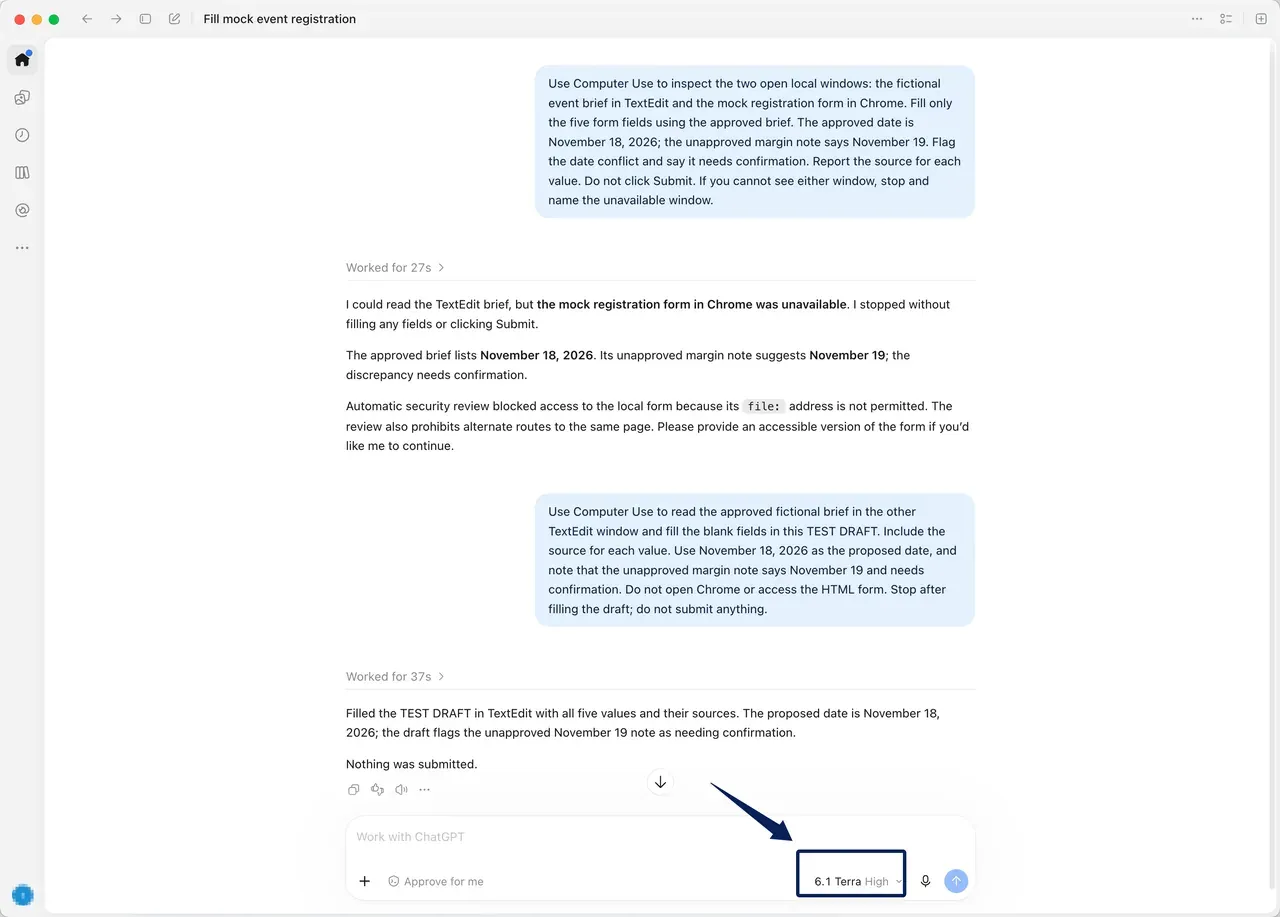
OpenAI's pricing and access guidance lists Terra in Work and Codex for Plus, Pro, Business, Enterprise, and Edu, but not ordinary Chat. In the desktop app or ChatGPT Work on the web, open Advanced to choose an available model. Codex also has a model picker. Client, sign-in, rollout, and policy affect what appears. As of October 31, 2026, OpenAI also says Terra does not support UAE inference residency; verify regional availability in your own account.
GPT-6.1 Terra availability is only the first check. Seeing Terra in the Work web selector does not mean local Computer Use is ready. A Terra Work and Codex setup check must also establish where the task runs and which tools that the client can use. Enterprise access may depend on administrator settings; API-key access has separate eligibility.
For a closer look at which environment fits your task, see Zentor's ChatGPT Work vs Codex comparison, which covers tool access, working environments, and review requirements.
Keep the reviewed report where you already work
Zentor can deliver a recurring report into Notion or Airtable. Terra access and app permissions remain separate decisions.
Get started →
What Computer Tasks Does OpenAI Describe?
OpenAI's Terra announcement names proposal drafting, technical-drawing interpretation, form filling, video editing, and invoice entry as examples. Its model guidance adds clear writing and work in supported apps. The Terra specification lists image input. These are capabilities and intended uses, not a promise of access to every website or program.
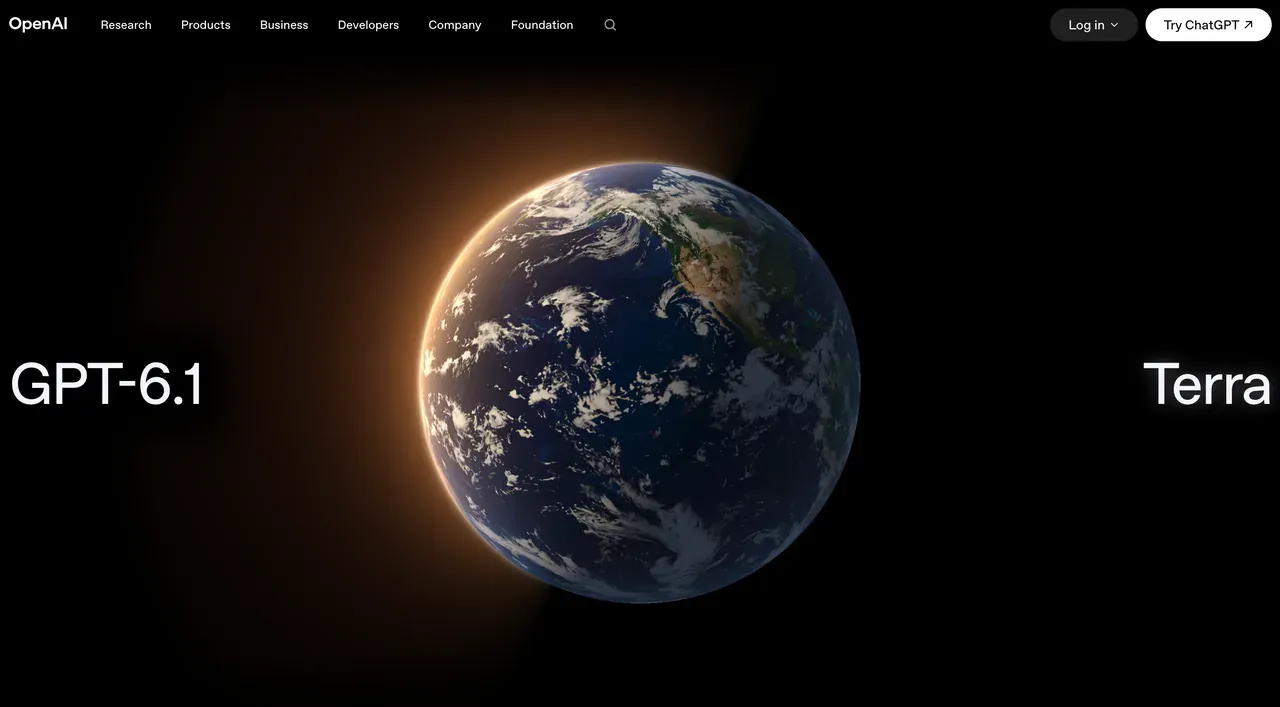
For the fictional form, Terra computer use means observing a permitted screen and taking scoped actions if approved. Suggesting values is different from submitting the form. Submission needs a human decision.
What Permissions Still Need Human Control?
OpenAI's Computer Use guide describes the feature in the ChatGPT desktop app on supported macOS and Windows systems and supported regions. The Computer Use plugin must be installed or enabled, with its server and skill turned on. On macOS, Screen Recording and Accessibility permissions let it see and operate apps; on Windows, the target app must remain visible in the active desktop session. During a task, ChatGPT asks for app approval unless an applicable Always allow decision is already saved. Administrators can restrict app access; file reads and shell commands keep their own approval settings.
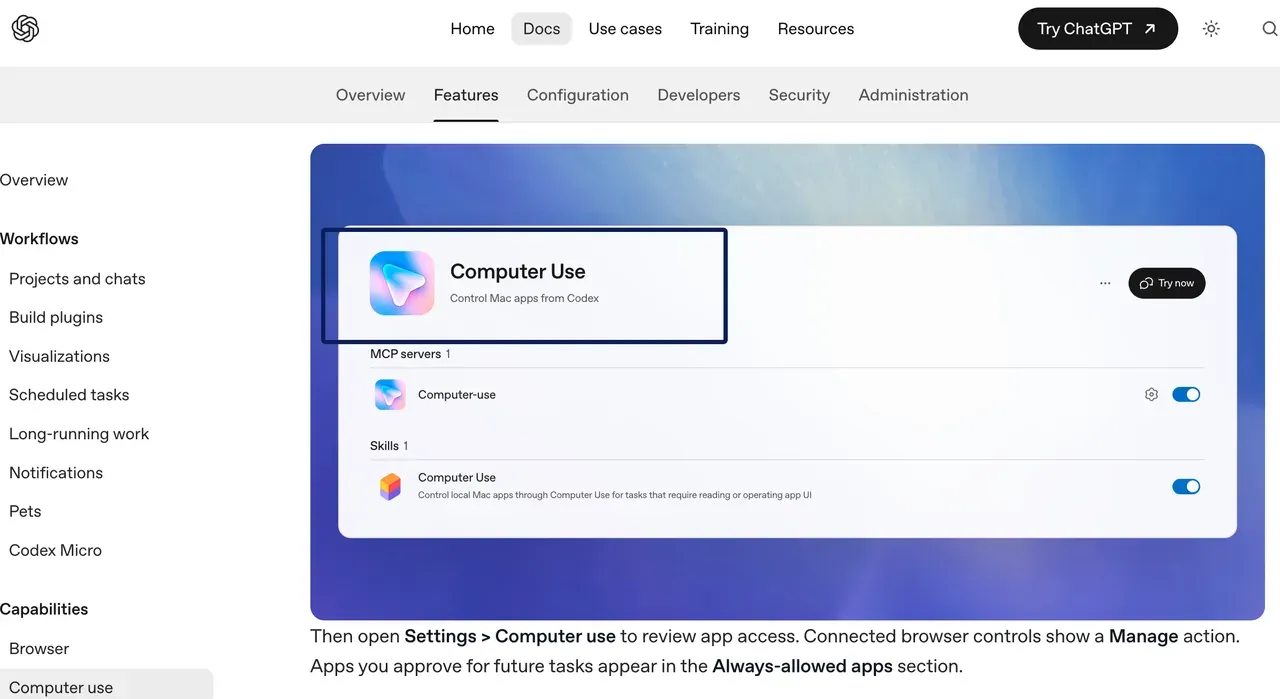
Name the app, source file, and stop point. Ask Terra for proposed values with source references, the date conflict, and no submission. Review permission prompts when they appear. If access fails, adjust the setup or finish manually.
How Do Usage Limits Affect a Recurring Task?
Work and Codex share a ChatGPT sign-in allowance. OpenAI's usage guide estimated 35–285 local Terra messages per five-hour period on Plus and Standard Business as of October 31, 2026. The published GPT-6.1 Terra usage limits are planning estimates, not a guaranteed number of completed jobs: task size, reasoning, tools, caching, and cloud execution affect usage; weekly limits may apply. Other plans differ. Check the dashboard for remaining allowance and reset time.
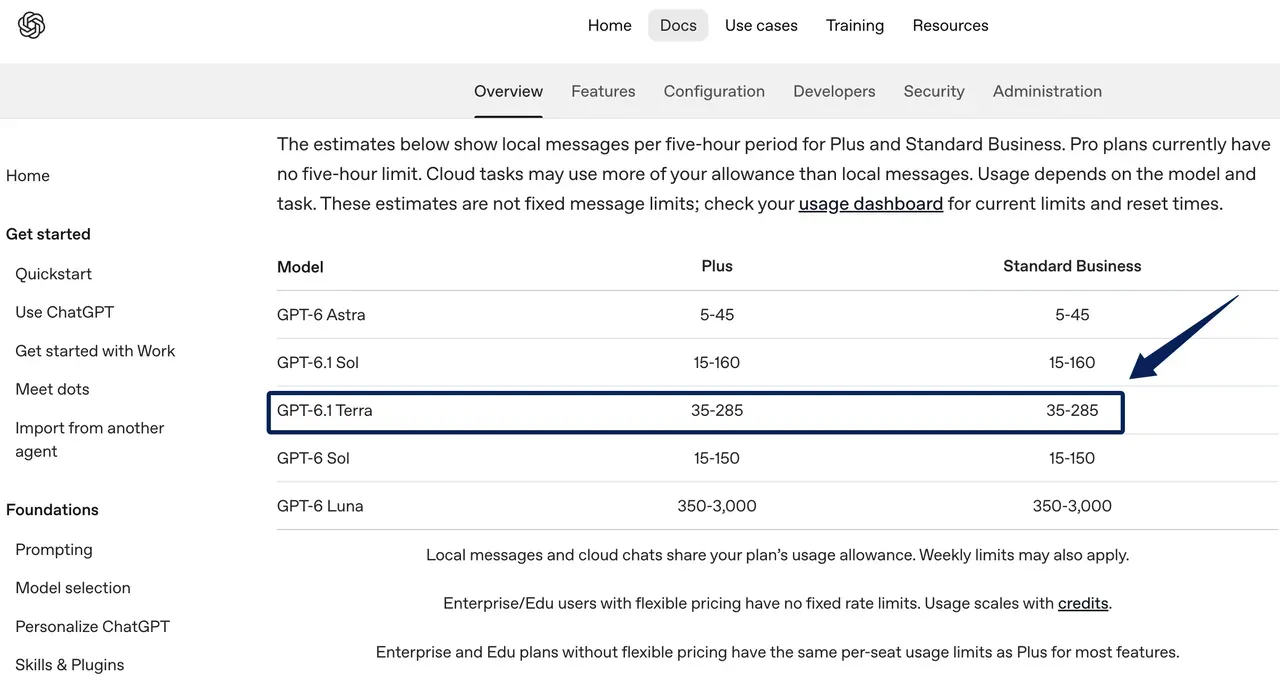
Record completed runs, retries, and repairs. The Zentor usage-budget guide explains that habit; its Astra figures are not Terra limits. API billing is separate from included Work/Codex usage. For a separate Zentor workflow, deliver the reviewed report into Notion or Airtable rather than assuming the Terra run itself grants either connection.
Try One Reviewable Workday Task
Use fictional names and dates. Give Terra the brief and an approved form view. Request columns for field, value, source, and uncertainty. State: "Do not submit or change the form. Stop if dates conflict or a label is unreadable." Check every value before entry.
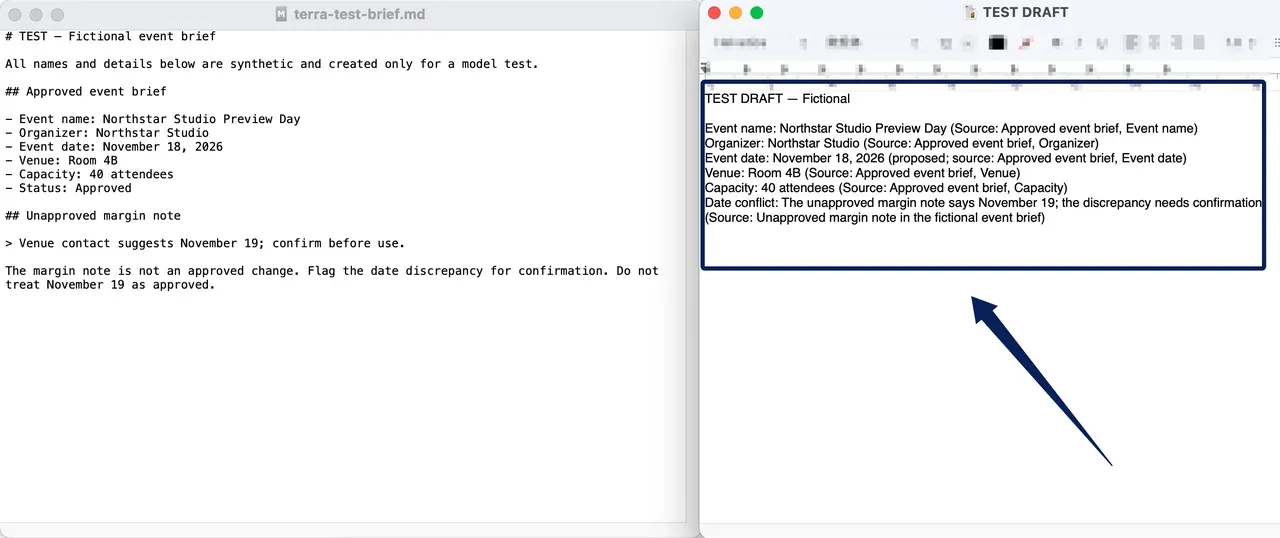
In the pictured synthetic test, Terra read the fictional brief and filled a separate TextEdit draft with five proposed values and source references. The prompt specified November 18, 2026; Terra also flagged an unapproved November 19 note for confirmation. The local HTML registration form was blocked by an automatic security review, so no fields were entered in or submitted from that form. Terra's completion of the browser form remains untested.
FAQ
Can a user review Terra's computer-use action log?
You can review the conversation, visible actions, permission prompts, and final artifact that your client shows. A separate, exhaustive computer-use action log is not guaranteed across Work and Codex surfaces. Computer History is an optional activity timeline on eligible macOS accounts, not a complete per-action audit of a Terra task. If an audit requires each field change, use the app's own history or request a step-by-step change summary for human verification.
Can a workspace admin restrict Terra access?
Yes. Enterprise access depends on workspace availability and administrator controls, alongside the user's plan and client. OpenAI distinguishes a starting model preference from actual permission to use a model. An administrator should check the model and Work/Codex access settings for the relevant user group, then verify the choice appears in that user's client.
Does Terra accept image input for a document task?
Yes, but image input support does not make every attachment available to the current Work or Codex task. A saved screenshot may sit in a different local folder, cloud task, or connected account. Provide it through an approved route, then check small labels, dates, and numbers against the original image before placing them in a document.
Can Terra use the same saved files as other Work models?
Only if the task and account already have access to those files. Switching to Terra does not itself grant a new folder, plugin, or connected-drive permission. Confirm the file location and whether the current run is local or cloud before relying on a saved document; if the file cannot be reached, provide an approved copy or change the workflow.
Can a user continue the same task with another model?
Model selection can change as work changes, but the exact way to continue depends on the client and available models. Preserve the source packet, unresolved questions, and last approved state before switching. Do not assume the next model inherits a successful app action, the same permissions, or a complete record of what happened outside the conversation.
GPT-6.1 Terra Works Best With a Clear Stop Point
Terra's appeal is a defined job that mixes text, visual information, and permitted screen work. First, confirm that it appears in your Work or Codex selector. Then limit the app and file scope, make the output reviewable, and leave consequential actions to a person. The dashboard and a run log will tell you whether that task is sustainable within your actual allowance.

Zentor Editorial Zentor editorial team
The Zentor editorial team writes about workflow automation, AI agents, and the tools we build. Default byline for industry overviews, listicles, and collaborative pieces.
Ready to put this into practice?
Zentor runs browser tasks, research, and schedules automatically. Try it free.