What Is OpenClaw? How It Works, Costs, and Who It Fits
What is OpenClaw? A plain guide to the open-source AI agent: how it works, what self-hosting really costs, the security tradeoffs, and who should skip it.
OpenClaw is a free, open-source AI agent that runs on your own computer or server and takes orders through chat apps like WhatsApp, Telegram, and Slack. So what is OpenClaw in practice? Software, not a service: you install it, connect an AI model you pay for separately, and it carries out tasks (browsing, files, messages, scheduled jobs) on hardware you control.
Key Takeaways:
- OpenClaw is MIT-licensed and run by the OpenClaw Foundation, a US non-profit. There's no paid tier and no hosted version.
- The software costs nothing. You still pay for the AI model, the machine it runs on, and your own time keeping it patched.
- It works through about 29 chat channels and dozens of model providers, from OpenAI and Anthropic to local models.
- Because it can run commands and read untrusted web pages and emails, security is your job. Microsoft's security team says to treat it as untrusted code.
- If you want the results without owning a server, a managed assistant is the other route. More on that below.
Vera here. I run a one-person practice, research and operations, the digital work that quietly piles up. I don't write code. I use ChatGPT daily, and I spend a chunk of every day on small recurring tasks I'd happily stop doing by hand. So when OpenClaw's lobster logo kept showing up in my feed, and three different people asked me in the same week whether they should be running OpenClaw, I almost did the obvious thing and spun up a server to run it myself. Then I stopped and actually looked into it, because I wanted to know if I'd been missing something.
This is what I found: what OpenClaw is, what it costs, and where the honest line sits between running your own agent and letting someone else run one for you. I'm writing it for people in my situation. Not technical, already buried in tools, and not sure whether this particular thing finally takes work off the plate or just hands you a machine to babysit.
What Is OpenClaw? The Short Answer
OpenClaw is a personal AI agent you host yourself. Its own homepage puts it as "the AI that really does things," and lists jobs like sorting your inbox, sending emails, managing a calendar and checking you in for flights. Unlike a chatbot that sits in a browser tab waiting for a question, OpenClaw runs as a background process. It keeps memory between conversations, can wake itself on a schedule, and answers you in whatever chat app you've connected.
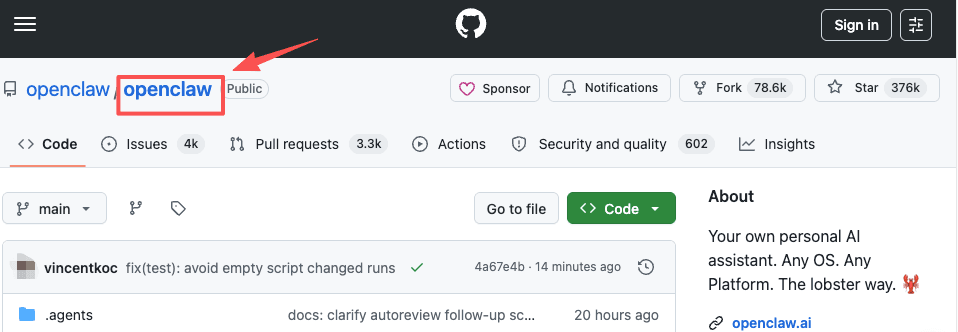
The code lives in the openclaw/openclaw repository on GitHub, which had about 393,000 stars when we checked on October 28, 2026. It's released under the MIT license. The project's site is blunt about the business model: "No subscription. No hosted tier. No token." It's stewarded by the OpenClaw Foundation, an independent 501(c)(3) whose donors include OpenAI, Amazon and Red Hat; the site adds that donors "do not own, control, or direct the project" and that "OpenClaw is not an OpenAI product."
One naming point that trips people up. OpenClaw often gets filed under "open source agent framework," but it isn't a library you build an app on top of. It's a finished agent: you install it and run it. That's why non-developers try it at all, and also why you end up responsible for a running piece of software rather than a few lines of code. That distinction matters more than it sounds, and it's the thing that decided this for me in the end.
Where OpenClaw Came From: Clawdbot, Moltbot, OpenClaw
If you searched for this earlier in 2026, you probably saw three names. Peter Steinberger, the developer who built PSPDFKit, launched the project in late 2025 as Clawdbot. In January 2026 Anthropic raised a trademark concern ("Clawd" sounds a lot like "Claude"), so it became Moltbot, and a few days later settled on OpenClaw. TechCrunch covered the rename and the chaos around it at the time. Same code through all three names; only the label changed. Our Clawdbot vs OpenClaw comparison and Clawdbot explainer go through the sequence in detail.
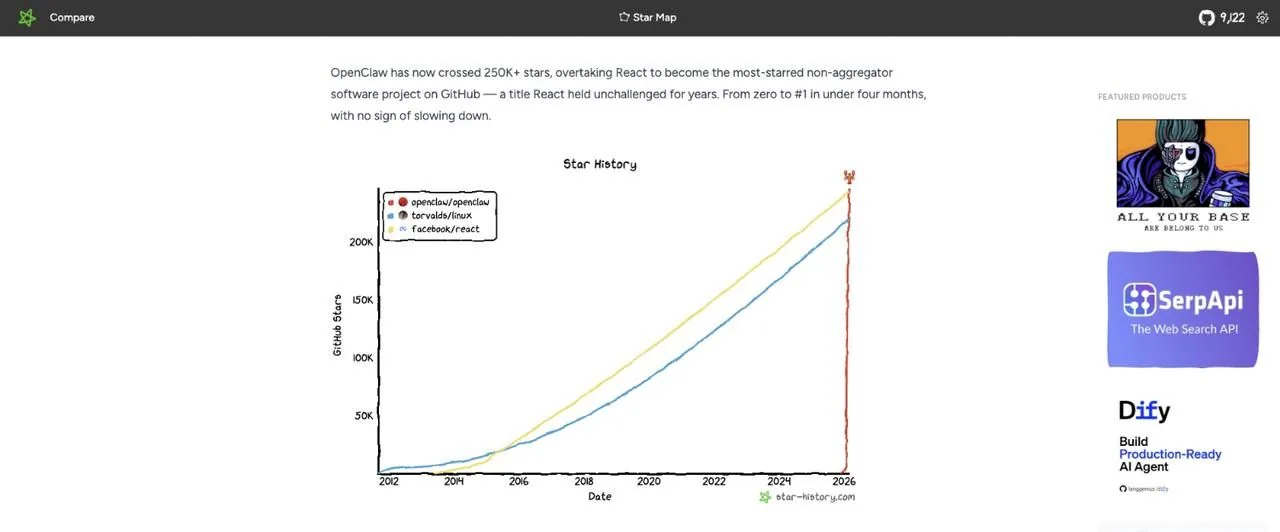
Then the star count went vertical. OpenClaw crossed 100,000 GitHub stars within weeks of the rename and, by March, passed React as the most-starred software project on GitHub, a climb you can see on the Star History chart.
In February 2026 Steinberger announced on his site that he was joining OpenAI and that "OpenClaw will move to a foundation and stay open and independent." That foundation now employs the core team and signs every release.
I'll be honest about my own reaction. The star count impressed me. It also told me nothing about whether I, specifically, should run it. Popularity on GitHub is a developer signal. I'm not a developer. I sat with that gap for a minute before I kept reading.
How OpenClaw Works
Think of it as three parts that talk to each other.
The gateway. This is the OpenClaw process itself, running on a Mac, Windows PC, Linux box or cloud server. It holds your settings, memory, credentials and the list of tools the agent may use. On a normal install it only listens on the local machine.
Chat channels. You don't open a new app to use it. You message it where you already talk. The site says you can "talk to it on WhatsApp, Telegram, Discord, Slack, Signal, iMessage, or any of its 29 channels," and there are native apps for macOS, Windows, Linux, iOS and Android that pair with your own gateway. The most common setup is an AI agent in Telegram or Slack: you text it a job, it works, it replies in the same thread. That's the feature people quote most when they tell you it's magic, and I get why. Assigning work without opening yet another tab is the whole dream.
Models and tools. OpenClaw doesn't include an AI model. You plug one in. The provider list in the docs runs from OpenAI, Anthropic, Google Gemini and xAI to DeepSeek, Kimi, OpenRouter and local runners such as Ollama and LM Studio. The model decides what to do; the tools do it. Those tools include driving a browser, reading and writing files, running shell commands, sending messages, and running jobs on a schedule.
So a typical request looks like this: you send "check these three supplier sites every morning and tell me if prices change" from your phone, the gateway passes it to the model, the model calls the browser tool on your machine, and the answer lands back in your chat at 8am. If the machine is off at 8am, nothing happens.
What It Takes to Self-Host OpenClaw
Self-hosting is the whole design, so "should I self-host OpenClaw?" really means "should I run OpenClaw?" Here's what you're signing up for.
A machine that stays on. An assistant that sleeps when your laptop sleeps isn't always-on. People use a spare Mac mini, an old laptop, or a small cloud server. The desktop apps need macOS 15 or later, Windows 10/11, or a recent 64-bit Linux.
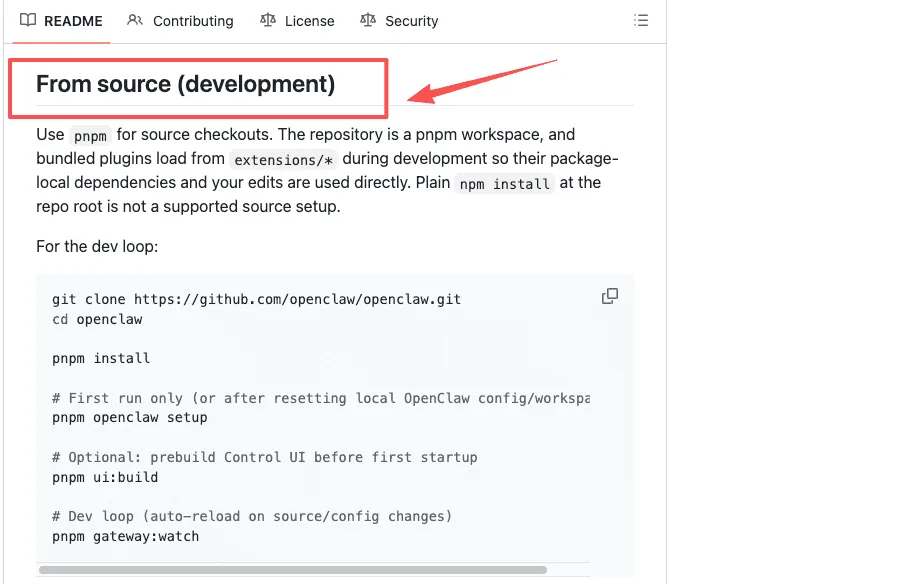
An install. The official quick start is one script (curl -fsSL https://openclaw.ai/install.sh | bash on Mac and Linux, a PowerShell equivalent on Windows), followed by openclaw onboard, which walks you through connecting a model and a chat channel. It can also install from npm, and the README covers building from source.
If you're comfortable in a terminal that's twenty minutes. If the word "terminal" makes you tense up, budget an afternoon, plus another for the security settings in the section after next. I'm in the second group, and I'd rather be straight about that than pretend it took twenty minutes.
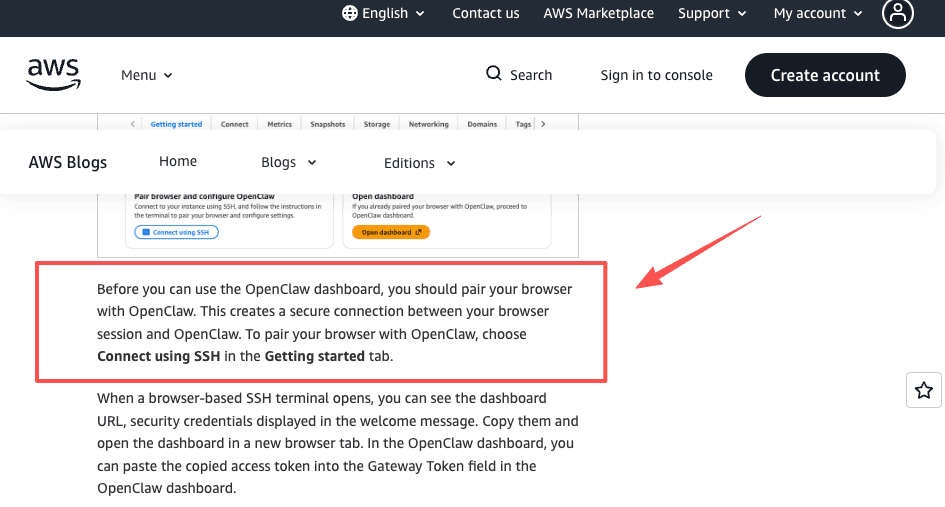
A cloud server, if you don't want hardware at home. AWS sells a pre-built option: in March 2026 it launched OpenClaw on Amazon Lightsail, an instance that comes pre-configured with Amazon Bedrock as the model provider. AWS recommends the 4 GB memory plan. You still pair your browser over SSH and paste a gateway token before you reach the dashboard, and you still own patching and security. A cloud box removes the "laptop must stay open" problem, not the maintenance.
Your own monitoring. When a scheduled task fails overnight, OpenClaw doesn't email you or retry on your behalf by default. It just doesn't happen, and you find out when the morning report is missing. If a task matters, you'll want log alerts or at least a habit of checking. This is the part no setup guide mentions, and it's the part that wears people down.
It's also the part I nearly missed. When I priced out self-hosting, I kept calculating how long setup would take. I wasn't calculating the thing that actually costs me: a server I have to keep alive, patch, and worry about, indefinitely. I've started something in Zapier twice and quit both times, not because it was hard, but because the upkeep never felt like mine to take on. A self-hosted server is more of that, not less. The patching clock doesn't pause for a busy week.
For a deeper look at the self-host versus managed split, see self-hosted vs managed autonomous agents.
What OpenClaw Costs to Run
OpenClaw itself is free. Running it isn't. There are four bills, and only one of them is fixed.
| Cost | What you pay | Notes |
|---|---|---|
| OpenClaw software | $0 | MIT license, no paid edition |
| AI model | Varies with use | API key billed per token, or a supported subscription sign-in |
| Machine | Your spare hardware, or a cloud server billed hourly | AWS Lightsail recommends the 4 GB plan |
| Your time | Setup, updates, security checks, fixing failed runs | Ongoing, never zero |
The model bill is the one that surprises people, because an agent working through a task calls the model over and over, not once.
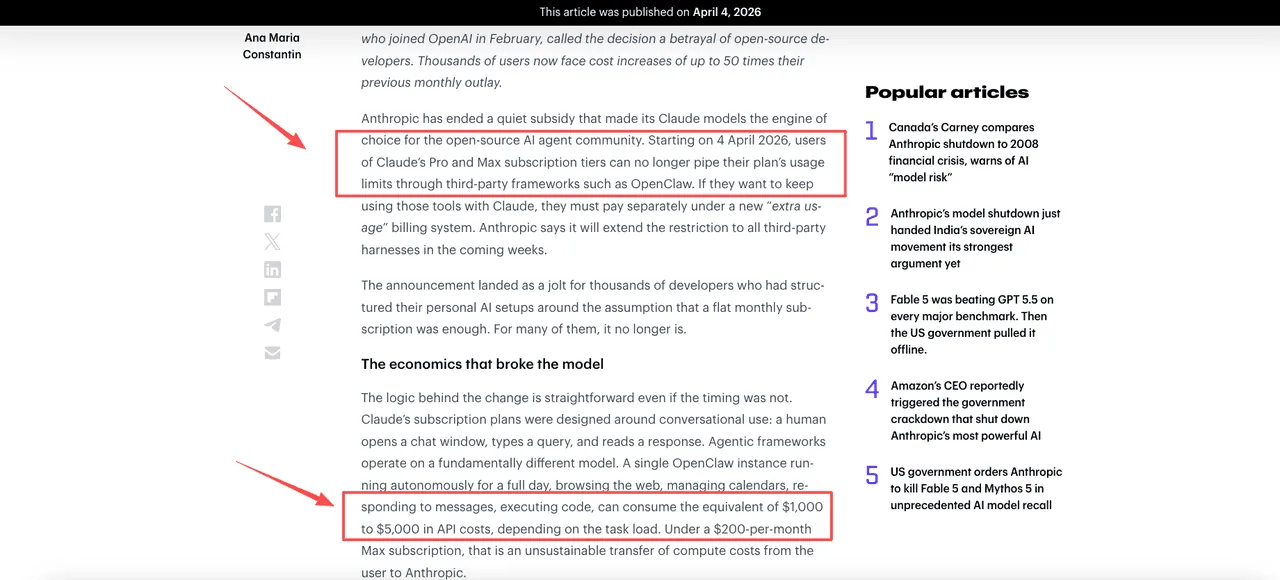
There's also a subscription wrinkle. OpenClaw's OpenAI provider accepts either an API key or a ChatGPT/Codex subscription sign-in, so a paid ChatGPT plan can cover some of your agent use. Claude is different now. On April 4, 2026, Anthropic stopped letting Claude Pro and Max subscription limits cover third-party harnesses, starting with OpenClaw; to keep using Claude you turn on separately billed "extra usage" or use an API key at standard rates, as TechRadar reported at the time. Heavy users saw their costs jump.
Cheaper models and local models exist and OpenClaw supports plenty of them. The trade is quality: a weaker model makes more mistakes on multi-step jobs, and every mistake is a retry you pay for in tokens or time. If you want to keep spend under control whatever you run, our guide to cutting AI agent costs covers the usual levers.
OpenClaw Security: Read This Before You Install
This is where my enthusiasm cooled, and where a lot of people decide. OpenClaw reads untrusted content (web pages, emails, chat messages) and it can also run commands and send messages. That combination opens the door to prompt injection: a hidden instruction inside a page or email that tells the agent to do something you never asked for, such as sending your files or API keys somewhere. Researchers have also found large numbers of OpenClaw instances exposed on the public internet.
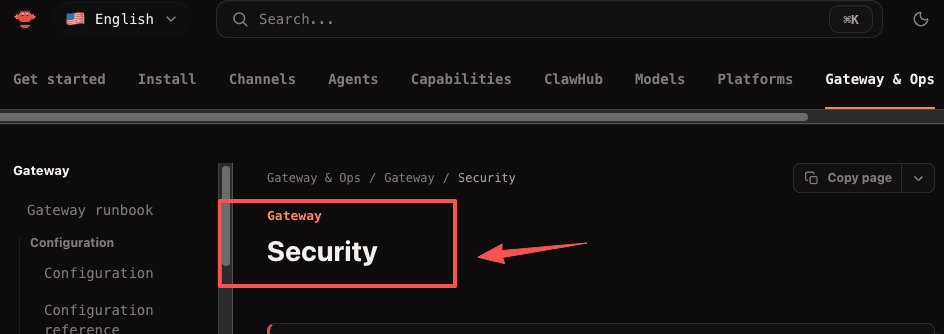
Two documents to read first:
- OpenClaw's own security guide. It says the project "ships with conservative defaults," gives you an
openclaw security auditcommand, and covers sandboxing, read-only mode and per-agent tool permissions. It also warns that agents with message access can send across conversations by default, so you may want to lock that down. - Microsoft's guide to running OpenClaw safely, whose baseline is that OpenClaw "should be treated as untrusted code execution with persistent credentials." In other words: not on your everyday work or personal machine.
If you still want to try it, a sensible starting point:
- Run it on a spare machine or a VM, never your daily laptop.
- Give it its own accounts, not the email and drive that hold your real life.
- Start with read-only tools; add shell and browser access only when you know you need them.
- Install skills and plugins only after reading what they do. Third-party add-ons are the easiest way in.
If that list reads like more than you signed up for, that isn't you being slow. It's the actual cost of an agent with hands.
OpenClaw vs ChatGPT vs a Managed Assistant
"OpenClaw vs ChatGPT" comes up constantly, and the honest answer is that they're built for different jobs. Add a third option, a managed assistant, and the choice gets clearer.
ChatGPT runs on OpenAI's servers. You open it, ask, and it answers, drafts, reasons. It now does more than chat: ChatGPT Work can take actions, and ChatGPT supports scheduled tasks. Read the fine print, though. Scheduled tasks in the desktop app that touch local files need "the computer on and the app running," and web tasks "can't work directly in a folder on your computer." ChatGPT is still at its best when you're there steering. It's where I think out loud: explain this, draft that email, weigh these two approaches. For pure "help me figure this out," I haven't found anything I'd swap it for.
OpenClaw runs on your machine and acts on its own. It reaches into your files, browser and chat apps, and it keeps going after you walk away, as long as the machine does. You get the most control and carry all of the upkeep. I looked at OpenClaw, sat with the maintenance, and decided it wasn't a job I wanted. That's a statement about me, not about the tool.
A managed assistant keeps the "does the work in the background" part and drops the "you run the server" part. Someone else runs the infrastructure; you describe the job and get the result. What I gave up by going managed is control. What I got back was not having to think about it. I send a task and close my phone.
| ChatGPT | OpenClaw | Managed assistant (e.g. Zentor) | |
|---|---|---|---|
| Setup | Sign in | Install, connect a model and a channel, lock down permissions | Sign up |
| Who runs the machine | OpenAI | You | The vendor |
| Model access | Included in your plan | Bring your own API key or supported subscription | Built in, no API key |
| Runs when your computer is off | Web tasks only | Only if you host it on a server | Yes |
| Maintenance | None | Yours: updates, uptime, security | None on your side |
| Control over data and code | Low | Full | Low to medium; you trust the vendor |
| Best for | Thinking, drafting, supervised tasks | People who want to own the stack | People who want recurring work off their plate |
I use Zentor for exactly that reason: I don't want to run a server. I also write for Zentor, so take this paragraph with that in mind. Zentor is a managed option, and it is not OpenClaw: not a fork, not a hosted version, separate code. It delivers finished work into tools you already use, such as Notion, Airtable and Slack, rather than into a chat bubble. It keeps one memory of your formats and repeat work that belongs to you and can follow you to other AI tools, it runs whether or not your laptop is open, and the models are built in, so there's no API key to manage. It costs $20 a month for 1,000 credits per billing period, with optional credit packs, and usage already incurred can consume credits even if a task stops partway. What you give up is the control OpenClaw offers: you can't read or modify the code, and your work runs on Zentor's machines, not yours.
Grok, Claude and ChatGPT's own agents line up differently; our comparison of Grok Bot, Claude Cowork and ChatGPT Work covers those.
More OpenClaw Guides on This Site
This page is the starting point. If you've decided what you want, these go deeper:
- Alternatives: OpenClaw alternatives overview, free OpenClaw alternatives, self-hosted AI agent alternatives, and the full list of claw-style agents.
- Head-to-head: NanoClaw vs OpenClaw, IronClaw vs OpenClaw, NemoClaw vs OpenClaw, PicoClaw vs OpenClaw, MyClaw vs OpenClaw.
- Specific setups: OpenClaw in Slack vs Claude Tag, running a Kimi agent without self-hosting.
- Skipping the server: what a managed OpenClaw alternative looks like.
FAQ
What is OpenClaw used for?
Recurring personal and work chores you'd rather hand off: morning summaries, inbox triage, calendar changes, price or page monitoring, research, and file tidying. You send the job from a chat app and OpenClaw does it on its own machine. People who code also use it to manage servers from their phone.
Is OpenClaw free?
The software is. It's MIT-licensed with no paid edition, no hosted tier and no token. You pay for the AI model it calls and for the machine it runs on, unless you already have a spare one.
Where is the official OpenClaw GitHub?
github.com/openclaw/openclaw. The docs live at docs.openclaw.ai and the project site at openclaw.ai. Anything else claiming to be "official OpenClaw" is a third party.
Is there an official hosted or cloud version of OpenClaw?
No. The project says plainly that it has no hosted service. You can put it on a cloud server yourself, AWS Lightsail being the packaged route, but you're still the operator. Services that run it for you are third parties, not the OpenClaw Foundation.
Can I use my ChatGPT or Claude subscription with OpenClaw?
ChatGPT, yes: the OpenAI provider supports signing in with a ChatGPT/Codex subscription as well as an API key. Claude subscriptions stopped covering third-party harnesses like OpenClaw in April 2026, so Claude use now goes through extra usage or an API key. Check each vendor's current terms before you rely on either.
Is OpenClaw safe to run?
It can be run safely, but not by default on the machine you use every day. Its own docs and Microsoft's security team both recommend isolation: a separate machine or VM, separate accounts, minimal permissions, and caution with third-party skills. Prompt injection through web pages and emails is the main documented risk.
What happens if OpenClaw crashes overnight?
The task simply doesn't run, and nothing tells you unless you've set up alerts. If the machine reboots or loses power, scheduled jobs wait until you bring it back. Monitoring becomes part of the job once you depend on it.
Is Zentor a hosted version of OpenClaw?
No. Zentor is a separate product with its own code. It's an option for people who want the "work happens in the background" result without hosting an agent themselves.
Who OpenClaw Fits, and Who Should Skip the Server
OpenClaw fits you if you want to own the whole stack: your machine, your model, your data, your rules, and you'd enjoy keeping it running. Comfortable with a terminal, have a spare computer, care where your data sits? It's one of the most capable free agents you can run, and the foundation behind it isn't going anywhere.
It's a poor fit if the job you actually want done is "stop doing this chore by hand." In that case the server is overhead, the security checklist is overhead, and the overnight failures are your problem at 7am. ChatGPT covers the thinking-and-drafting part well. For recurring work that should land in your Notion, Airtable or Slack while your laptop is closed, a managed assistant like Zentor does that without anything to install.
That's where I landed. I looked, I read the security docs, and I decided self-hosting wasn't a job I wanted to take on right now. Your situation might be different. You might want the control, or have a spare machine already sitting there doing nothing. If you do, OpenClaw is real and worth the afternoon. OpenClaw is good. I just didn't want the server.
Vera runs a one-person research and operations practice and writes about handing recurring work off, one task at a time.

Zentor Editorial Zentor editorial team
The Zentor editorial team writes about workflow automation, AI agents, and the tools we build. Default byline for industry overviews, listicles, and collaborative pieces.
Ready to put this into practice?
Zentor runs browser tasks, research, and schedules automatically. Try it free.
References the openclaw/openclaw repository on GitHub · Star History chart for openclaw/openclaw · steipete.me · OpenClaw's own security documentation · Microsoft's security team published a guide · Zentor · see what Zentor handles