DeepSeek Creator Mode: Scope a Document Workflow Plugin

DeepSeek Creator Mode document workflow planning starts with one file. Define sources, approvals, outputs, and a safe plugin test.
A DeepSeek Creator Mode document workflow starts as a brief for reading one incoming file, checking facts, and preparing a reviewable to-do list. This is a proposed plugin specification, not a shipped document process.
Key Takeaways:
- Scope one file, agreement, owner, and destination.
- Bind approval to the inputs, item text, and write target.
- Keep the synthetic demonstration away from production.
- Pause when a write's outcome cannot be established.
Suppose the request says Thursday and the agreement says Friday. Either date looks plausible in a task. Show both passages and wait.
Define One Document Handoff and Its Owner
Start when the owner receives a client document and places a synthetic or redacted copy in approved intake. This document review workflow names one agreement and destination. If the developer must search email or guess which agreement applies, the handoff is too broad.
The owner names required fields and who may settle disagreements; the developer shows where extraction stops. Zentor's document automation guide separates extraction from the next business action. Finding a date does not authorize changing one.
Keep the approved work in your workspace
Zentor keeps your working context close to the tasks you finish. Review what goes out before it leaves your workspace.
Start free trial →
Map the Source, Destination, and Permissions
Name the file type, intake, agreement version, and exact destination. "Put tasks in the workspace" is too vague to test. Each item needs a supporting page or paragraph. Keep sources untouched and drafts in a review area.
Propose read access to both sources, draft access to the review area, and write access only to the destination. Test denied access to each. These limits are requirements, not Harness defaults.
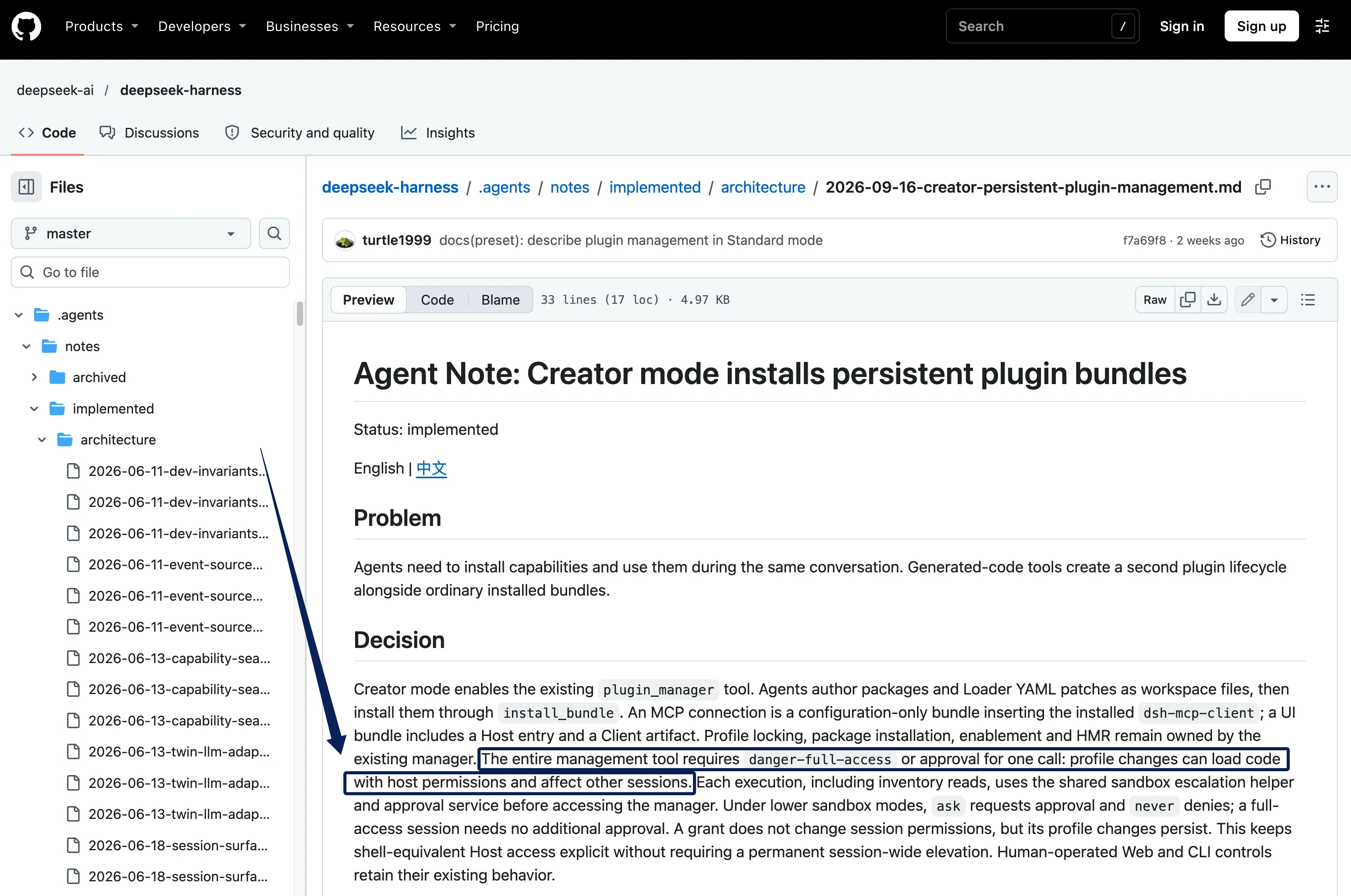
DeepSeek's Creator Mode architecture note says Plugin Manager needs full access or single-call approval under a lower sandbox policy; never denies it. That grant does not widen session permissions. Profile changes persist, can load Host-privileged code, and affect other sessions. Name the installer and profile; manager approval never approves a client task.
If the developer proposes MCP for the destination, DeepSeek's persistent plugin guide demonstrates a configuration-only bundle for a reachable Streamable HTTP server. The destination connection still needs its own test. Zentor's workspace memory can reach other AI through Zentor MCP, but that does not establish a DeepSeek-to-Zentor plugin connection.
Specify What the Plugin Should Extract and Check
Start with client reference, requested change, due date, and owner. Give each a source pointer and status: matched, missing, or conflicting. The proposed source validation plugin compares change and date with the agreement.
Show both locations for a conflict. If the owner resolves it by instruction, retain that ruling and the original disagreement; never relabel the sources as a match. A blank owner field also stops the list. For a related example of checking whether evidence supports a claim, see Zentor's citation checker. That page is a separate example; it is not evidence of this DeepSeek plugin or its agreement-comparison rules.
As checked November 5, 2026, DeepSeek's Harness page describes a public preview and plugin extensibility. It does not document the proposed end-to-end workflow for source validation, human approval, and controlled writeback.
Set Human Approval and Failure Stops
For this proposed approval and writeback specification, record each decision against the incoming file version, agreement version, any conflict ruling, exact item text, and write target. If any changes, recheck and seek fresh approval. These are developer requirements, not existing DeepSeek approval features.
DeepSeek's Web UI guide says the active permission policy may ask before an operation. That concerns tool access; each item needs a separate, named owner decision.
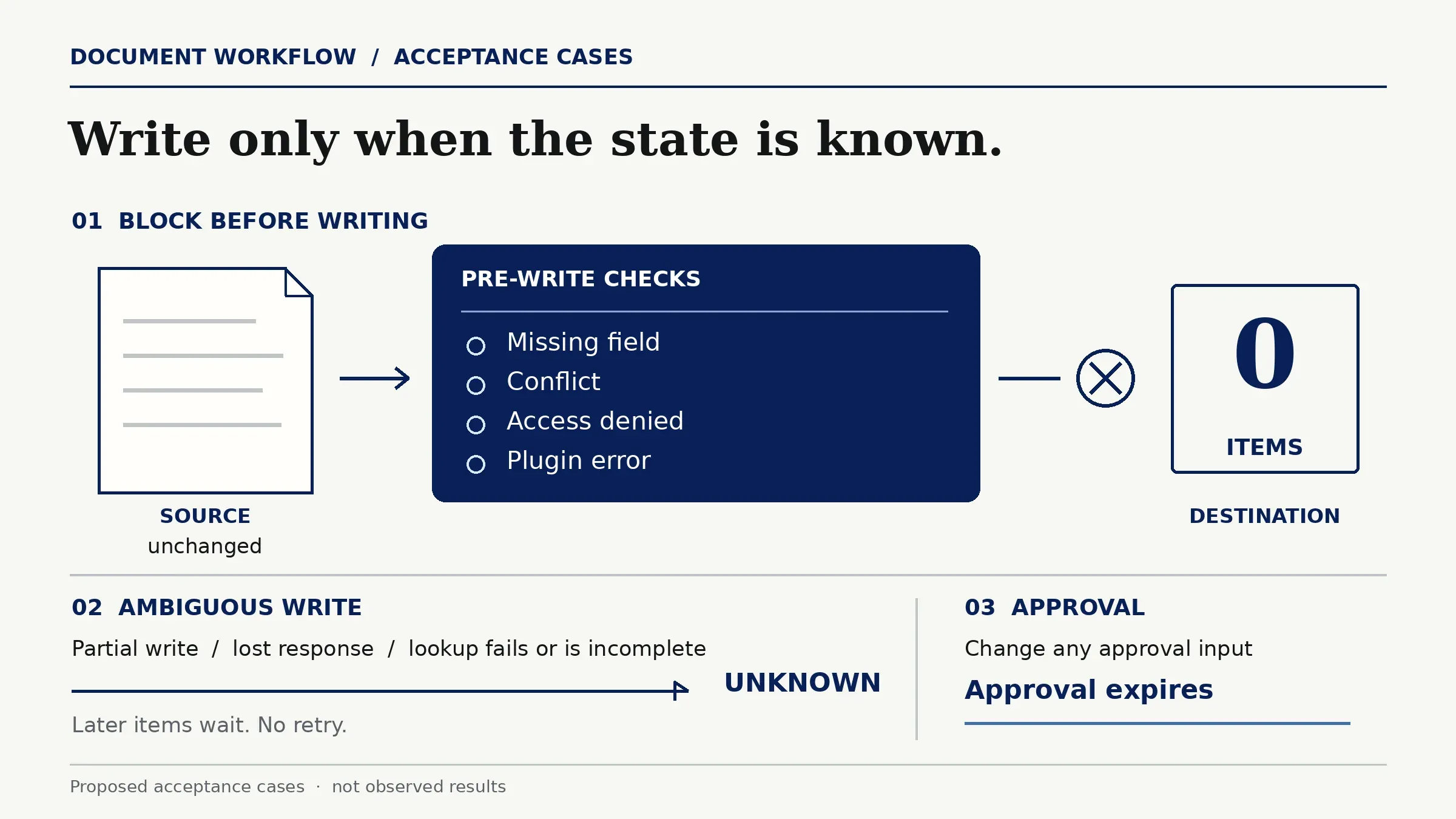
Check fields, conflicts, and access before writing; then commit approved items individually. If the second write fails, show the first as written and the second as pending. Stop there.
A lost response leaves an uncertain write. Require destination lookup/read, or a provably idempotent write with a receipt, before any retry. If lookup fails, is incomplete, or leaves status unknown, pause; never retry blindly. Use stable item IDs and reconcile changed items. Profile rollback cannot remove written business records.
Test the Plan With a Synthetic File
The proposed demonstration needs an isolated runtime, separate credentials, fictional files, and a test destination workspace with no path to production resources. A separate Harness profile alone does not prove isolation. In the normal case, approval produces a labeled test item.
Test a missing field, conflict, access denial, and plugin error before writing: zero destination items. The source must remain unchanged in every case. Then simulate a partial write, lost response, and failed or incomplete destination lookup. Later items must wait; unknown status must not trigger a retry. Change each approval input in turn to check that approval expires. These are acceptance cases, not observed results.
Hand Off a Small Plugin Brief for Review
The owner approves a small prototype brief before the developer builds a synthetic demonstration:
| Requirement | Reviewable acceptance condition |
|---|---|
| Scope | One intake file, agreement, owner, destination, and isolated test environment. |
| Evidence | Required fields, source pointers, and conflict status. |
| Approval | Record inputs, ruling, item text, and target; changes require fresh approval. |
| Writeback | Individual commits, stable IDs, and provable outcome before retry. |
| Stops | Pre-write errors write nothing; unknown or partial outcomes pause later items. |
DeepSeek's plugin packaging guide explains bundles and profiles. With a configured market, DeepSeek's plugin market guide permits installation of listed compatible older versions; it does not undo written records. After the demo, the owner decides whether formal implementation may use real files.
FAQ
Can Creator Mode show a custom review panel?
In principle, yes. DeepSeek describes UI bundles with Host and Client parts, but this is not a ready-made document review screen. The prototype should show source pointers, decisions, and blocked items together.
Can one plugin be limited to a single Harness profile?
Yes, installation can target one profile. Check its inventory before and after installation. Test runtime, credentials, file access, and destination must still be isolated separately.
Does DeepSeek publish a document plugin template?
The official plugin tutorial describes a general bundle, not a document-specific template. The developer still needs a field map and blocked-item mockup. Check for newer examples before implementation.
Can a bundle connect to an MCP server?
Yes. The official example uses a reachable Streamable HTTP server. Other transports and this document destination need separate verification.
Can an installed plugin be rolled back to an earlier version?
An older compatible listed version may be installed; replacement may need a restart. Written items need separate reconciliation. Keep the previous configuration and test restoration with synthetic records.
DeepSeek Creator Mode Document Workflow: Approve the Brief Before the Build
Approve the narrow brief first, inspect the synthetic demonstration next, and decide on real data and formal implementation last. The owner should see the original file, every approval, and the destination's actual state before that decision. Zentor can retain context and approved follow-ups in a user's workspace, but it does not turn this proposal into an installed DeepSeek plugin.

Zentor Editorial Zentor editorial team
The Zentor editorial team writes about workflow automation, AI agents, and the tools we build. Default byline for industry overviews, listicles, and collaborative pieces.
Ready to put this into practice?
Zentor runs browser tasks, research, and schedules automatically. Try it free.