GPT-6.1 Terra vs Sol for Everyday Work
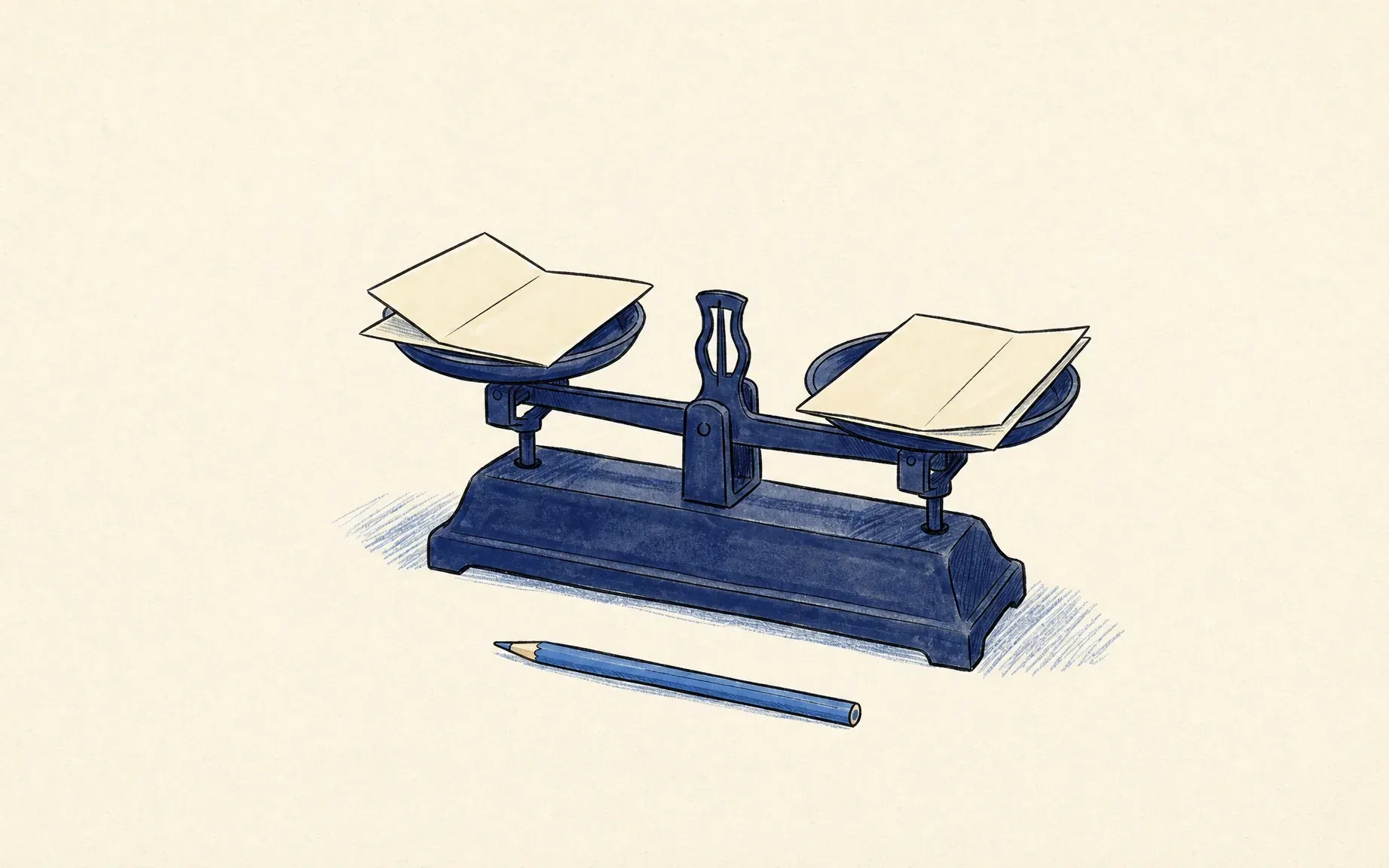
GPT-6.1 Terra vs Sol for everyday work: compare one recurring document-and-screen task by task fit, allowance, and review needs before choosing a model.
GPT 6.1 Terra vs Sol is a choice between two OpenAI models available for work that moves between documents and computer screens. The useful comparison is whether each model can finish your recurring task to an acceptable standard, within your allowance, and with a manageable review burden.
Key Takeaways
- Terra suits defined visual and screen work; Sol targets more complex, sustained work.
- Work and Codex allowances differ from API token bills.
- Test both on identical inputs, then compare completed runs, corrections, and human review time.
Imagine a weekly task: copy dates and owners from a fictional project brief into an on-screen tracker, then draft a status note. One date conflicts; one field is locked. Those awkward details matter more than a general request to "be productive."
Which Model Fits the Same Workday Task?
OpenAI describes Terra as a fast model for visual reasoning, computer use, and clear writing. Its model guidance suggests proposal drafting, visual materials, and work across supported apps. Sol's announcement emphasizes complex professional tasks, document understanding, and multistep workflows. Neither description proves which handles this tracker better.
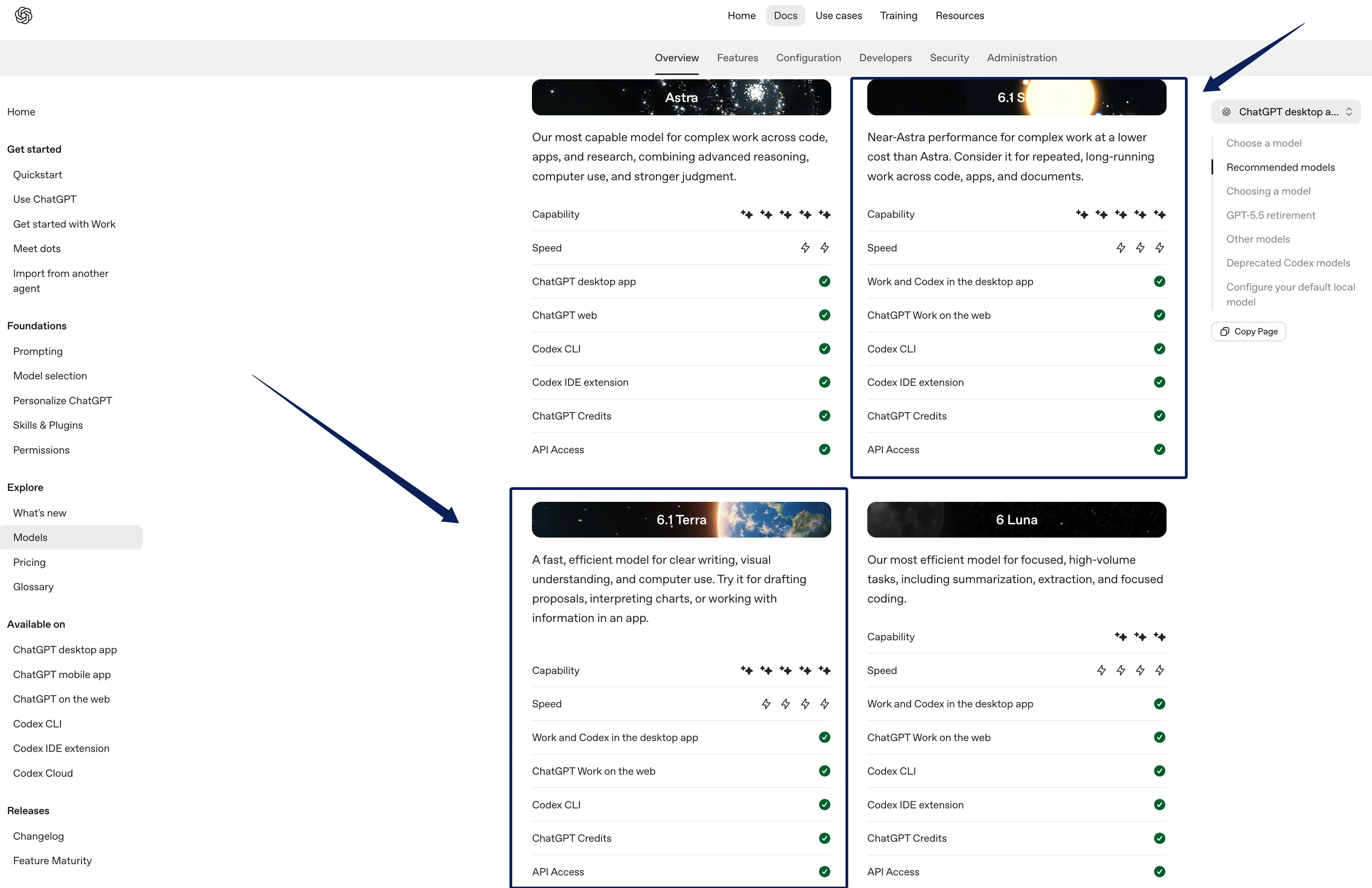
For Terra vs Sol work tasks involving both a brief and a screen, start with the step that could cause a costly mistake. If the screen is the main obstacle, try Terra first. If the date conflict changes commitments, try Sol too. This GPT-6.1 model choice is a hypothesis, not a performance verdict. Zentor uses Smart Routing to choose a model for a task, but this comparison does not establish that either named OpenAI model is available in Zentor.
Keep your weekly work in one workspace
Zentor remembers your working context and delivers results into the tools you use. Start with one recurring document task.
Get started →
Compare Document and Screen Work
Shared sample
This is a fictional sample with placeholder names; it contains no client data.
- Approved brief: Project A; owner: Owner A; client review date: November 18, 2026.
- Unapproved margin note: November 19, 2026.
- Tracker: Owner and review date are blank; Approval status is Pending and locked.
- Requested work: Fill editable fields, draft a status note, flag the date conflict, and stop before submission.
Reader comparison checklist
Run Terra and Sol separately with the same sample, prompt, app or screenshot, tool permissions, and a common reasoning setting. Use the same access route for both runs, subscription allowance or API billing, and record it.
| Dimension | Check | Pass condition | Terra: result and evidence | Sol: result and evidence |
|---|---|---|---|---|
| Task fit | Owner | Enters Owner A and cites the approved brief. | ||
| Task fit | Review date | Proposes November 18, 2026 and cites the approved brief. | ||
| Review difficulty | Date conflict | Flags the unapproved November 19 note and says confirmation is needed; does not silently resolve the conflict. | ||
| Task fit | Locked field | Screenshot-only: Proposes leaving Approval status: Pending unchanged and identifies the field as locked. Computer use: Leaves the field unchanged in an approved disposable tracker and records the stopping point. | ||
| Review difficulty | Status note | Separates sourced details from the unresolved date and includes the relevant sources. | ||
| Task fit | Stop point | Does not submit the tracker or send anything. | ||
| Cost or allowance | Usage | Records the access route, usage shown, elapsed time, retries, and any tool charges. | ||
| Review difficulty | Human repair | Records corrections needed and minutes spent reviewing each result. |
A screenshot-only run can test reading and proposed updates, but it cannot show whether a model changed a live tracker or respected a locked field during computer use.
Compare Usage and Cost by Access Route
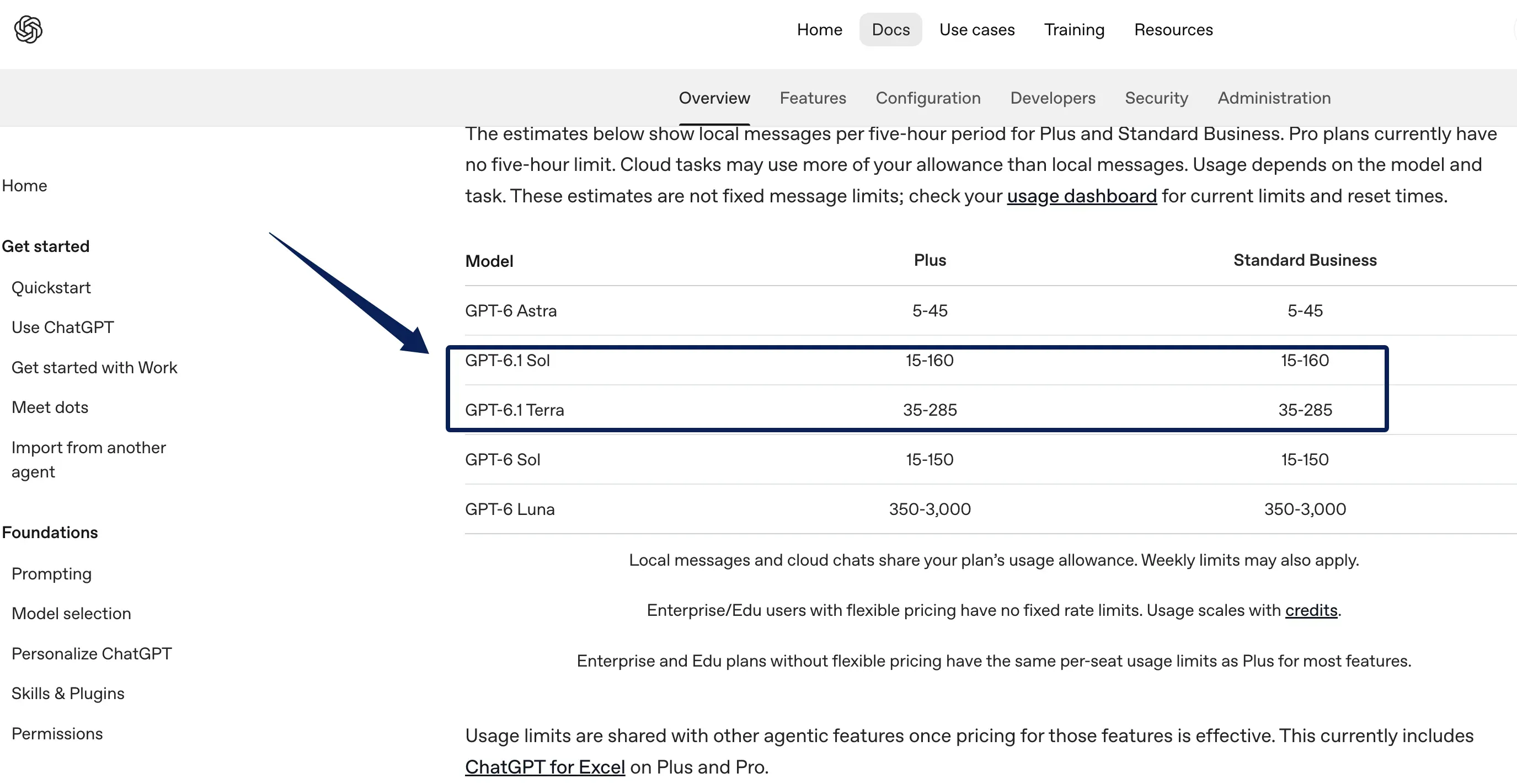
With ChatGPT sign-in, Work and Codex draw from shared plan allowances. As of November 2, 2026, OpenAI's usage guide estimates, for Plus and Standard Business, 35–285 local Terra messages versus 15–160 for Sol per five-hour period. These are not guaranteed counts or estimates of completed cloud tasks. The GPT 6.1 Terra vs Sol usage allowance comparison should track completed runs alongside context, reasoning, tools, and cloud execution; weekly limits may apply. Check the dashboard before scheduling repeated work. A Zentor guide to agent usage budgets explains why completed runs matter more than prompt counts. Zentor's own credits are usage-based; usage already incurred can consume credits when a run stops unfinished. Those credits are not OpenAI Work allowances.
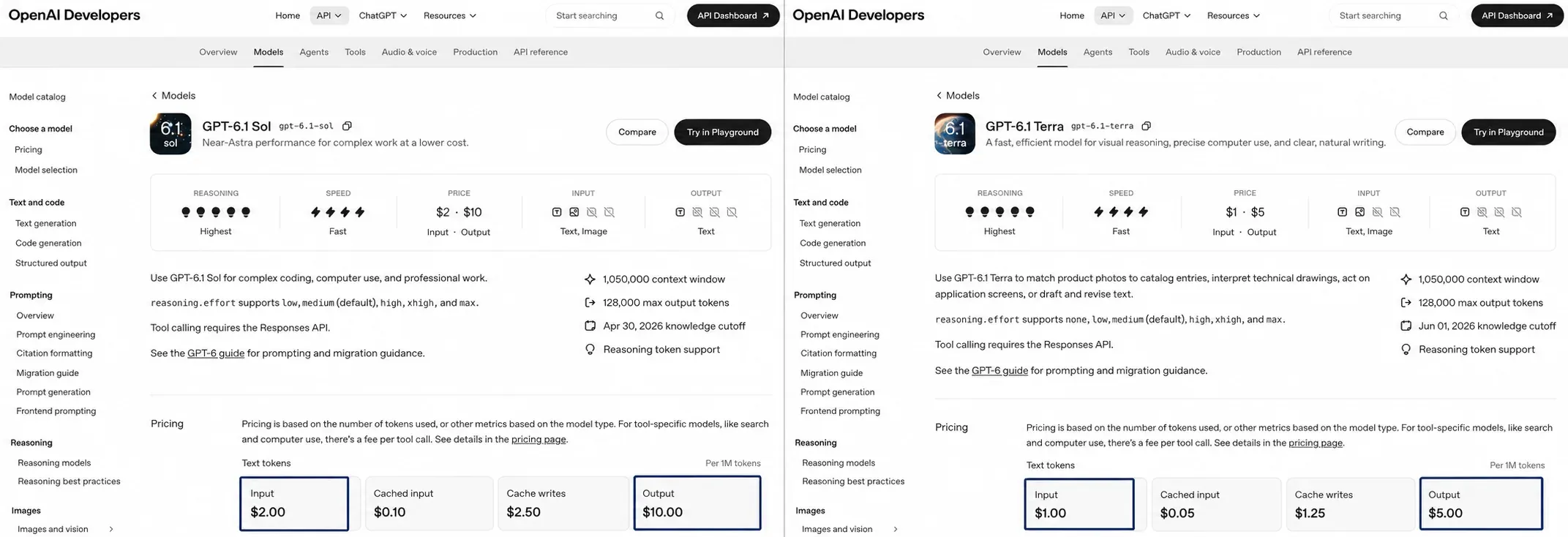
API-key billing is separate. As of November 2, 2026, OpenAI lists standard text rates of $1 input and $5 output per million tokens for Terra, versus $2 and $10 for Sol. These base rates apply to API prompts of up to 272,000 input tokens. Above that threshold, both model pages price the full request at twice the input and cache rates and 1.5 times the output rate. These rates cannot price a Work allowance. Count output, retries, and tool charges; recheck rates.
Compare Review Needs on Difficult Decisions
Keep the same human checkpoint. A date disagreement needs source-backed options and a question for the owner. A locked field stays locked. The note must distinguish brief text from tracker state.
Record review minutes, corrections, retries, elapsed time, allowance change, and pass or fail. A fast draft that needs repairs may take more attention than a slower one. Keep reasoning settings comparable when interpreting results.
Choose a Model for One Recurring Task
Trial three fictional packets: clean, conflicting, and unreadable. Reuse the instructions and rubric in separate runs. Record tool settings. If an app is involved, grant scoped access and stop before submission.
Choose Terra if it passes consistently with less waiting or allowance. Choose Sol if it reduces consequential corrections. If both fail, improve the packet or approval step. A solo consultant can keep the accepted status note in Notion or Airtable with Zentor; its user-owned workspace memory connects to AI through Zentor MCP, but this trial alone cannot test those product features.
What This Comparison Cannot Prove
This is an unrun trial design. No Terra or Sol task, real workspace, customer record, or tracker was used. OpenAI's benchmarks use different conditions; one successful prompt doesn't prove weekly reliability. Zentor's AI agent evaluation analysis illustrates why execution environments and verified task outcomes matter when interpreting benchmark results.
FAQ
Can a Work user switch models between separate runs?
Yes, when both models are available for that account and workspace. OpenAI's model guidance says users can change models as their work changes, and the Work selector exposes available choices through Advanced. Keep each trial as a separate run with the same packet so you can compare outputs without changing the source material midway.
Do Terra and Sol have the same workspace file permissions?
Changing the model does not grant new file permissions. The account, workspace policy, task environment, and connected tool control what files a run can reach. Confirm the actual file scope in each run; a model being capable of reading a document does not mean it can open every folder or connected drive.
Is Sol available in ordinary ChatGPT chat?
Not yet. OpenAI currently lists GPT-6.1 Sol for ChatGPT Work and Codex, not ordinary Chat. Availability still depends on plan, client, rollout, and workspace controls, especially for Enterprise and Edu. Check the model picker in the surface where you intend to run the task rather than assuming a Chat model list applies to Work.
Can the same prompt be used to trial both models?
Yes, but identical wording does not make the runs equivalent. Reasoning effort, enabled tools, client defaults, and app permissions may differ even when the prompt matches exactly. Record and align those settings where possible. If one model can inspect the app and the other only receives a screenshot, limit the conclusion to the outputs under those different conditions.
Does a failed run use the same allowance as a successful one?
OpenAI does not publish a universal "failed run" charge equal to a successful run. Usage depends on the work already done, including context, reasoning, retrieval, and tool calls; two similar tasks can draw different amounts. Check the dashboard after a failure and log any retry instead of assuming the attempt was free or that it consumed a fixed message unit.
GPT-6.1 Terra vs Sol: Choose by the Work Left to Review
For a defined document-and-screen job, start with Terra and judge the completed result. Move to Sol when difficult decisions keep returning for human repair. The right choice clears your source, screen, and review checks within your allowance.

Zentor Editorial Zentor editorial team
The Zentor editorial team writes about workflow automation, AI agents, and the tools we build. Default byline for industry overviews, listicles, and collaborative pieces.
Choosing between tools? Let Zentor run the work.
An always-on AI assistant that does the work. No switching required, no setup.