Pipedream Workflows Shutdown: Migration Guide

Pipedream Workflows shutdown: know the 2027 deadlines, export limits, missing credentials, and practical steps to rebuild in n8n, Zapier, or Make.
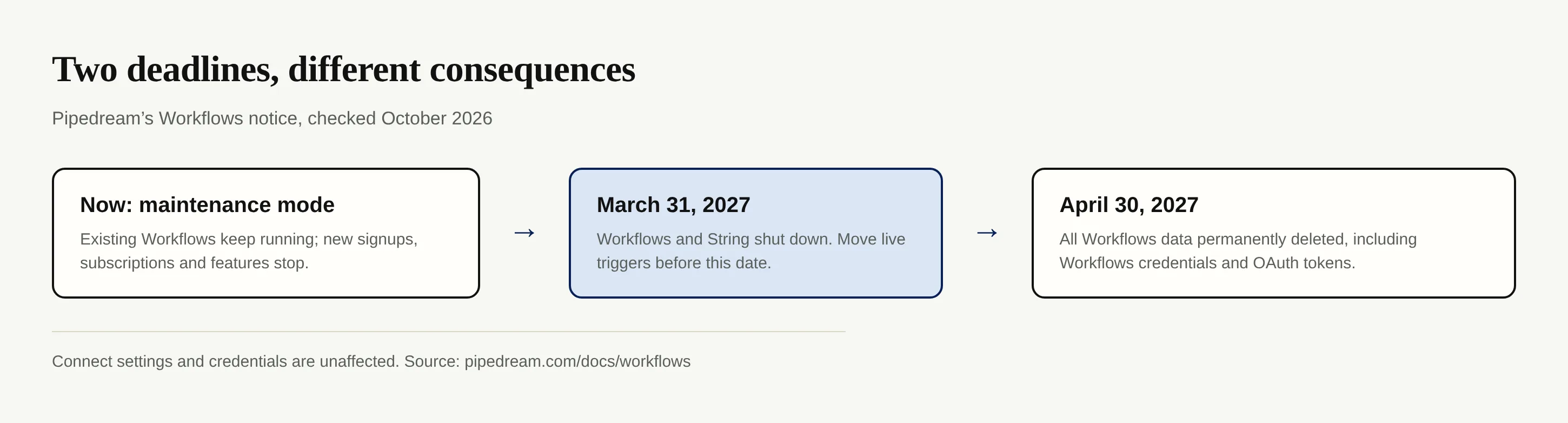
Pipedream Workflows and String will shut down on March 31, 2027; migrate the workflows you still need before that date. As of October 2026, the official Pipedream notice says existing Workflows will run through the deadline, but all Workflows data will be permanently deleted by April 30, 2027. This Pipedream Workflows shutdown is a deadline for rebuilding, not a promise that a downloaded ZIP will run elsewhere.
Key Takeaways:
- Workflows and String stop March 31, 2027; Workflows data goes by April 30. Connect is unaffected.
- Export one project at a time: the ZIP has a JSON file per exported workflow, not your secrets or run history.
- An n8n import button accepts n8n workflow JSON, not Pipedream's schema. Plan to rebuild and test.
- Move critical automations while the originals can still run beside their replacements.
What exactly is shutting down, and when?
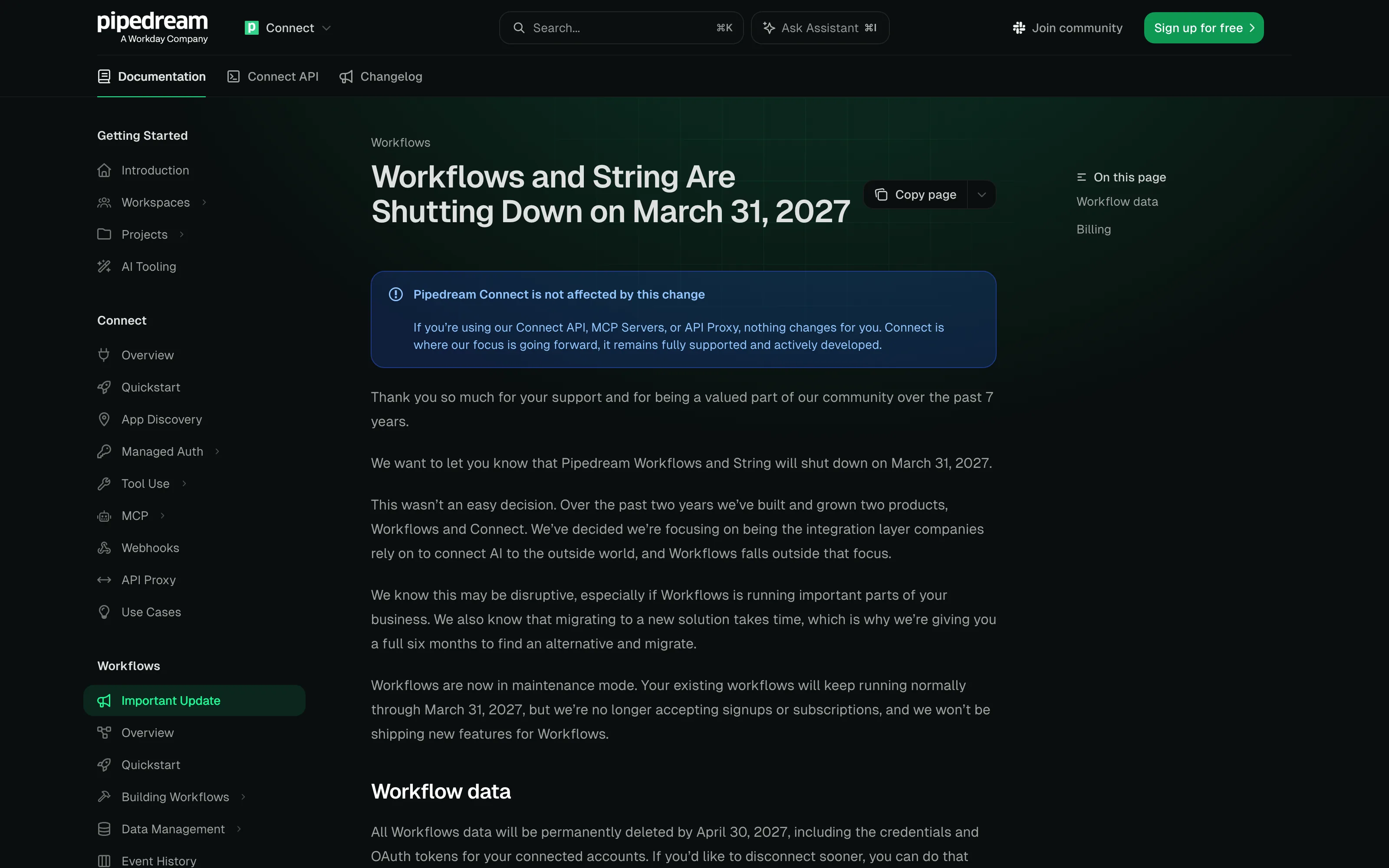
Pipedream's shutdown announcement names Workflows and String. Existing Workflows are expected to keep running normally through March 31, 2027. By April 30, 2027, Pipedream says it will permanently delete all Workflows data, including credentials and OAuth tokens for accounts connected to Workflows. The April date is a deletion deadline, not an extra month of runtime.
The notice explicitly exempts Pipedream Connect: its settings and credentials remain, while Connect API, MCP servers and API Proxy users are unaffected. If your app uses Connect for authentication but calls a Workflows-built flow to process events, inventory that flow separately. Don't infer that everything under a Connect-powered product will continue running.
Need a workflow that adjusts when the work changes?
Zentor handles changing files, browser steps and recurring work in a self-adaptive workspace. It does not import Pipedream exports.
Get early access →
Why Pipedream is making this change
Pipedream says its focus is the integration layer that connects AI to outside services; Workflows falls outside that focus. Workflows is already in maintenance mode. The company no longer accepts new Workflows signups or subscriptions and says no new Workflows features will ship, according to its own announcement. Existing subscriptions stay active until March 31, when Pipedream says it will cancel them and issue prorated refunds. Check your own account terms before budgeting for an overlapping replacement.
Treat the current version as the one you must leave.
What can you export, and what stays behind?
Pipedream's export instructions describe a project-level ZIP, not a single account-wide JSON. Each exported workflow gets a JSON file containing its latest deployed triggers, steps, code steps, non-secret configured values and control flow. A manifest.json lists every workflow in the project, including those skipped because they were never deployed or hit an export limit; read its status, warnings and truncated fields rather than counting files alone. The documented cap per export is 500 workflows or 256 MB, whichever comes first. File Store access is needed because the export lands there.
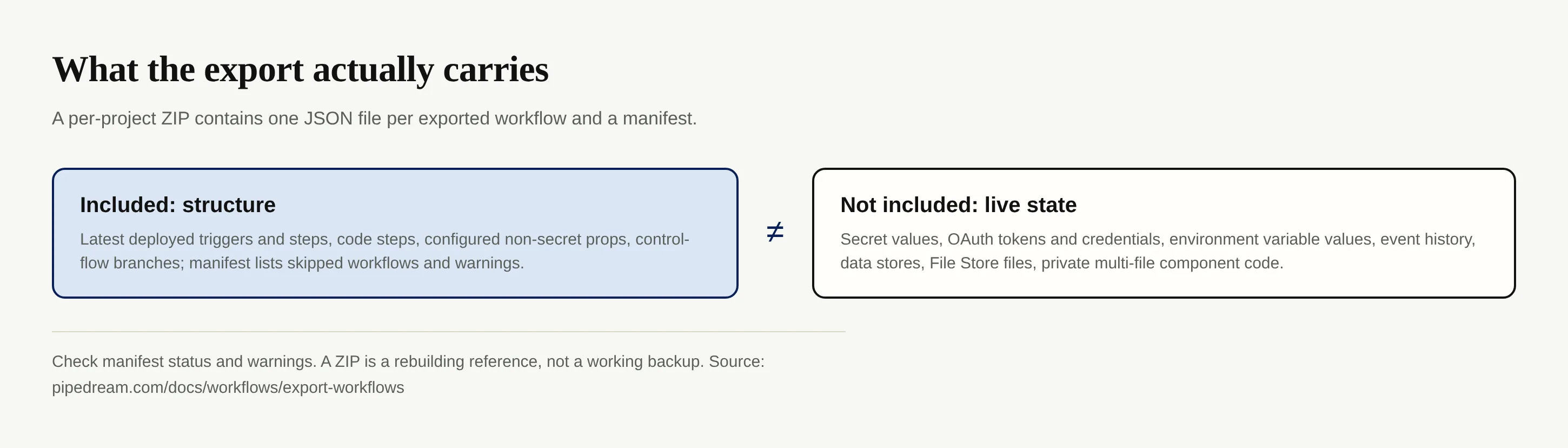
The export omits secret prop values, connected-account credentials and OAuth tokens, environment-variable values, event history, data-store records and File Store files. It also omits the code of private multi-file components, although it retains their component keys. Download needed files separately, preserve any private component source you own and prepare to reconnect accounts at the destination. authProvisionId is only an identifier inside your Pipedream workspace, not a portable token. These exclusions come from the official export page, not from a third-party migration promise.
Suppose a form submission writes into a data store, then sends a customer email. Your export can help you reconstruct the trigger and actions; it won't carry the stored records, your email account authorization or the previous delivery log. Archive needed inputs under your retention rules.
There is no one-click Pipedream-to-n8n importer
A .json extension doesn't make two products' files interchangeable. Pipedream exports its workflow structure as a reference for rebuilding. n8n's import documentation describes importing n8n workflow JSON from a file or URL, not converting Pipedream triggers and props into n8n nodes. Neither product documents a one-click Pipedream-to-n8n converter in those official pages as of October 2026. Don't upload an unreviewed export and assume the resulting flow will preserve behavior.
Map each original trigger, action, branch and retry to the destination's equivalent. Reconnect accounts with the new platform's credential store; replace missing env values and check schedules and time zones. Then test with a safe sample event before enabling the new trigger. Keep a replacement that writes customer records in test mode to avoid duplicates.
For a broader comparison before committing, see our n8n alternatives guide. The credential boundary cannot be copied.
Where should Pipedream users move: n8n, Zapier or Make?
Pick based on who will maintain the automation. These are choices for rebuilding, not converters.
| Destination | Good fit | Migration work to expect |
|---|---|---|
| n8n | You need flexible nodes and can own the setup | Translate Pipedream triggers, code and branches into n8n's schema; n8n imports its own JSON. |
| Zapier | A business owner wants familiar app triggers and actions | Rebuild and test a Zap in its editor; the official Zap guide starts with a trigger and actions. |
| Make | Your process depends on visible branches and mapped fields | Rebuild as a scenario. Make blueprints are Make's reusable format, not Pipedream imports; reconnect accounts. |
If your main job is moving fields between two apps, an agent tool needn't replace a deterministic Zap. Our Zapier alternative guide explains that split. Zentor is a different consideration when the work involves changing documents, browser research and a recurring report: its self-adaptive workspace and always-on operation suit tasks whose inputs don't always match one fixed branch. Zentor's memory connects through MCP and belongs to you; it is not a Pipedream importer or a substitute for exporting history. Zentor cannot promise equivalent connectors for every old integration.
A migration checklist before March 31, 2027
- Inventory by consequence. List projects, owners, triggers, destinations and any flow whose failure would leave a customer waiting. Include flows that run rarely; low frequency is not low importance.
- Export each project now. Follow Pipedream's steps, download the ZIP from File Store, inspect manifest skips and warnings, and repeat after material edits. Store it under your normal access controls: non-secret configuration can still be sensitive.
- Save the missing pieces separately. Record required data-store records, File Store files, needed event evidence and private component source. Don't expect the JSON to restore any of these.
- Rebuild the highest-risk path first. Configure fresh credentials at the destination, map branches and error alerts, then compare actual outputs using safe test inputs. Document who can revoke each new connection.
- Cut over deliberately. Switch production triggers only when a new run reaches the right destination without duplicate writes. Watch at least one complete cycle of each schedule, then disable the old path and confirm who owns the replacement.
Our AI automation alternatives comparison sorts tools by work type. For this Pipedream Workflows shutdown, prove replacements while originals still run.
FAQ about the Pipedream Workflows shutdown
Is Pipedream Connect also shutting down?
No. Pipedream's notice says Connect API, MCP servers and API Proxy are unaffected; Connect settings and credentials will not be deleted with Workflows data. Workflows and String are the products named for shutdown.
Will my workflows keep running until the deadline?
Pipedream says existing Workflows will keep running normally through March 31, 2027. That statement doesn't guarantee a broken individual integration will fix itself; test important flows and move them earlier.
Can I import a Pipedream export into n8n directly?
No documented one-click conversion exists in the official export and n8n import instructions. n8n can import n8n-formatted workflow JSON, while Pipedream's file documents Pipedream's own triggers and steps. Rebuild, reconnect and test.
What happens to my connected accounts?
The Workflows export excludes credentials and OAuth tokens. Pipedream says credentials attached to Workflows will be permanently deleted with Workflows data by April 30, 2027; Connect credentials are unaffected. You'll need to authorize accounts again in the replacement tool.

Zentor Editorial Zentor editorial team
The Zentor editorial team writes about workflow automation, AI agents, and the tools we build. Default byline for industry overviews, listicles, and collaborative pieces.
Ready to put this into practice?
Zentor runs browser tasks, research, and schedules automatically. Try it free.