Agent Builder Shuts Down Nov 30: Migrate

Agent Builder shutdown is set for Nov 30, 2026. Export workflows, protect evals before Oct 31, and choose a migration route that keeps work delivered.
OpenAI's Agent Builder shutdown is scheduled for November 30, 2026. To migrate from Agent Builder without losing the job it does, export your workflow now, choose a destination based on where it must run, and test the output and permissions before you switch. OpenAI's deprecation schedule also puts existing Evals in read-only mode on October 31; waiting until late November to preserve your tests leaves little room for repair.
Key Takeaways:
- Agent Builder, the Evals dashboard and API, and reusable prompt objects are scheduled to shut down on November 30, 2026; ChatKit remains available.
- Export the Agent Builder workflow through Code → Agents SDK while you can still access it. An export is not a one-click replacement.
- Use the Agents SDK for an application you can build and operate; consider ChatGPT Workspace Agents for permitted, natural-language team work. Move Evals checks to Promptfoo.
- For a small team, test the destination, approvals and write-back before changing the live workflow. Preserving a nice chat window is not the same as preserving delivery.
What shuts down on November 30, 2026
The Agent Builder guide calls it a visual canvas for multi-step workflows: nodes, typed inputs and outputs, preview runs, and a published workflow that can back a ChatKit integration. OpenAI says existing users may keep using it in the transition window, but the product is scheduled to close on November 30. That date concerns the builder and its hosted workflow path, not every agent-related OpenAI product.
Two adjacent retirements deserve their own inventory. OpenAI lists the Evals platform dashboard and API for the same November 30 shutdown, after an earlier read-only date. Its reusable prompt objects and v1/prompts API are also scheduled to shut down then. A prompt copied into a document or application is different from an API call that depends on a managed prompt object. The prompt-object migration guide tells application owners to move that content into code and replace object references with messages passed through the Responses API.
Write down what your current graph actually does before choosing a replacement: the trigger, input source, prompt text, tools, approval gate, output destination and failure notification. If you cannot identify where the final result goes, the migration plan is incomplete. Zentor's workspace-memory approach is useful as a separate consideration here: retaining reusable context across AI tools addresses a different problem from preserving OpenAI's visual graph, so don't confuse the two.
Keep the deliverable in your own tools
Zentor can work from your approved context and prepare output for connected tools. Check each connection and review step before handing it live work.
Get early access →
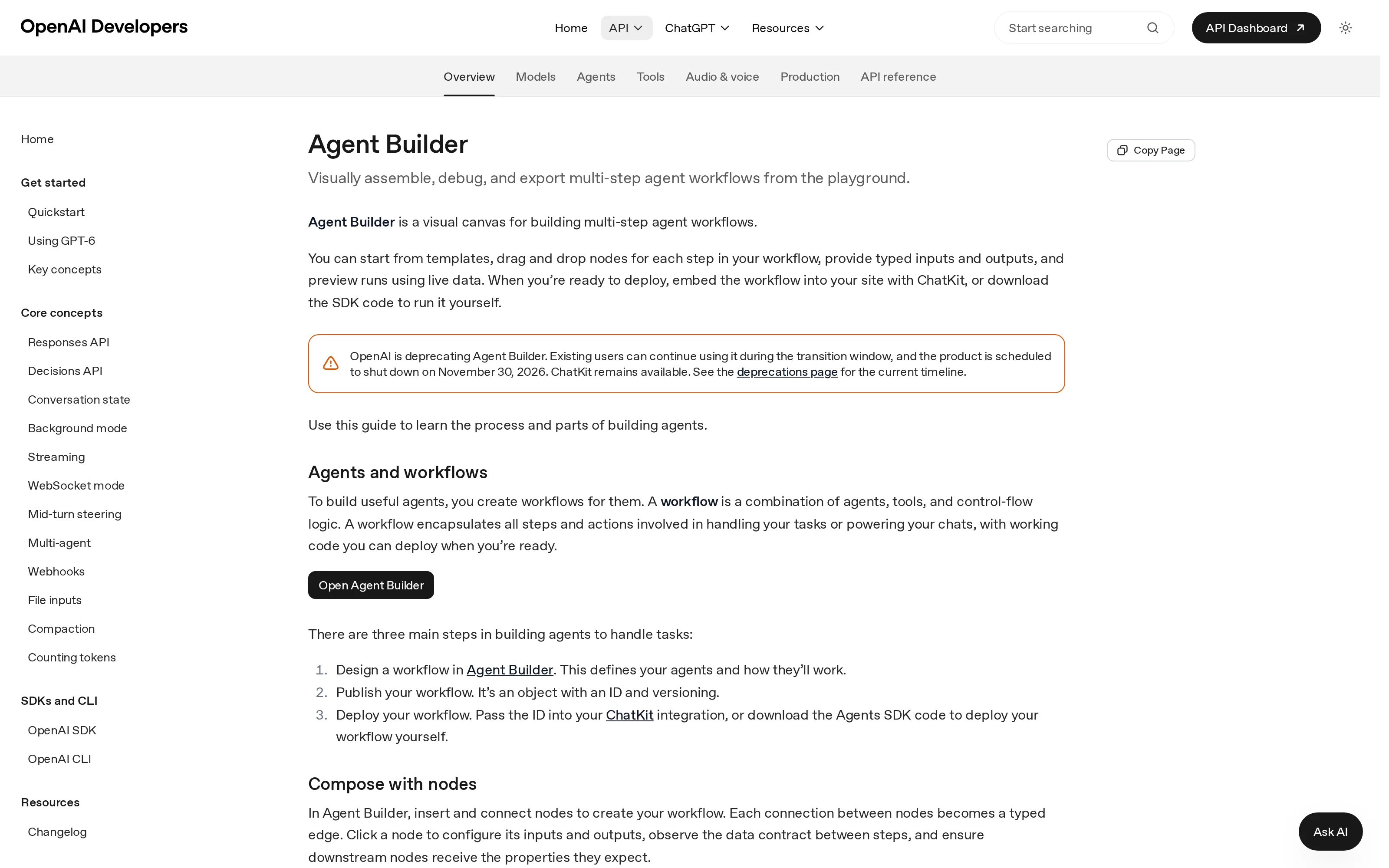
The live OpenAI Agent Builder guide shows both the shutdown notice and the ChatKit exception; captured October 24, 2026.
Agent Builder shutdown timeline: June to November
OpenAI announced the Agent Builder, Evals platform and reusable-prompt deprecations on June 3, 2026. On October 31, existing Evals become read-only. On November 30, the Builder, Evals dashboard and API, and prompt objects are scheduled to shut down. These are the dates in OpenAI's deprecations page, not a guarantee that a replacement will be ready for your account.
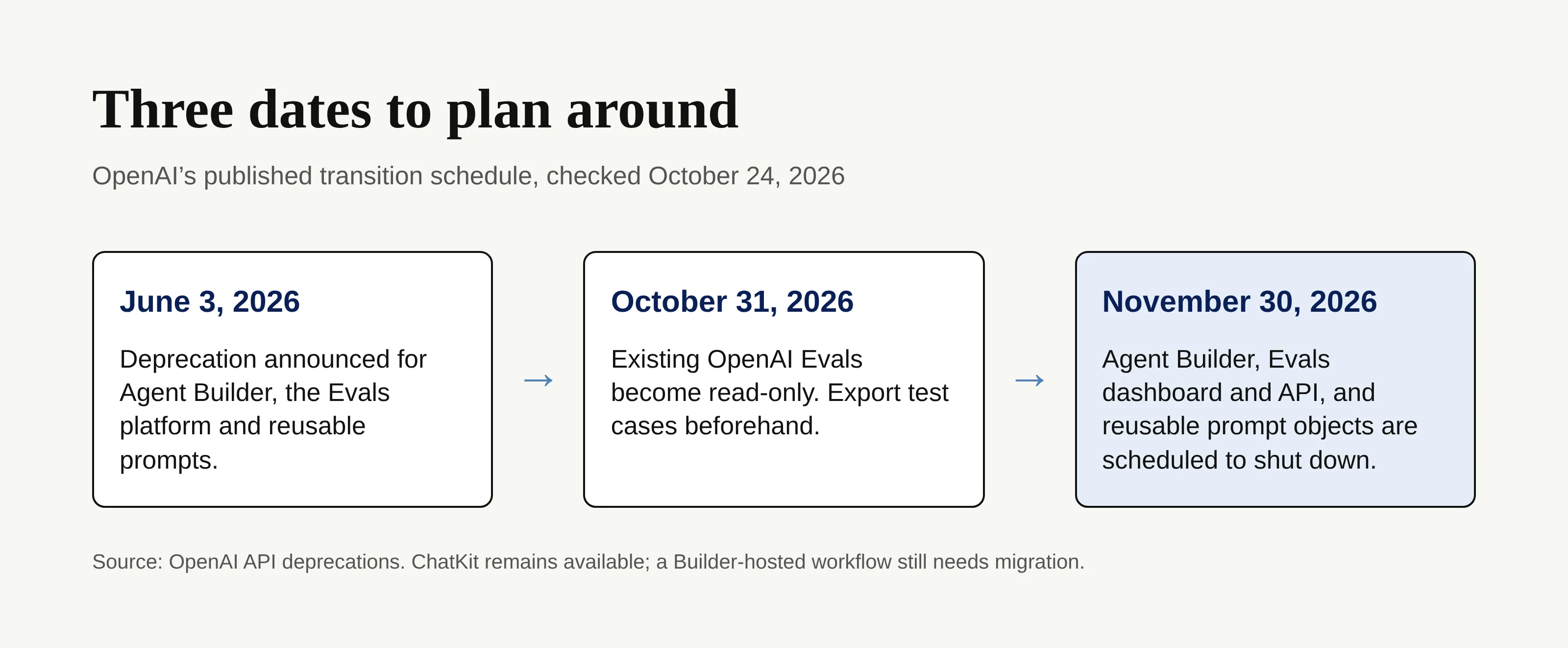
The agent builder shutdown makes that earlier date your practical starting point. Save the evaluation inputs, expected results, grader logic and recent failures while the Evals area still permits changes; test your replacement checks against cases you already understand. Preserve prompt wording and variables separately from the workflow export, and record any owners who can authorize app access. These are migration precautions, not a claim that OpenAI automatically exports every artifact.
Suppose your Friday brief reads a list of open client tasks, drafts a summary and places it in a review queue. You can keep running the old route during the transition while you test the new one with a copy of the same input. Compare the destination and the missing-task behavior, not merely the prose quality. On cutover day, know who can stop the new route if it writes to the wrong place.
What stops working, and why ChatKit staying is not enough
ChatKit's documentation distinguishes its customizable chat interface from the Agent Builder-hosted workflow behind an existing integration. It permits that hosted path during the transition window, while directing new work and migration planning toward a custom server integration. ChatKit remains available; an unchanged Builder-hosted workflow is not thereby future-proof. If your site calls a workflow ID created in Agent Builder, ask the person responsible for that integration what will serve the workflow after the builder closes.
A team that only used the canvas to prototype has a different problem from one that embedded ChatKit in a customer-facing page. The first needs to recreate working behavior. The second also needs to inspect session handling, identity, server ownership and the route from the chat surface to the new implementation. OpenAI's guide does not promise that swapping a workflow ID alone completes the move. Don't tell customers their service has migrated until representative requests reach the correct destination and errors have a human owner.
Keep the boundary between platform news and account-specific facts visible. The published documentation gives a schedule and a migration method. It does not show whether your particular workflow uses prompt IDs, custom tools, organization permissions or an Evals grader that needs manual translation. A screenshot of the builder is not an inventory of those dependencies.
Where to move: Agents SDK, Workspace Agents or Promptfoo
The official migration guide gives a precise first step: open the workflow, select Code, choose Agents SDK, then copy the TypeScript or Python export. OpenAI explicitly says this export neither converts the graph automatically nor guarantees identical behavior. Treat it as reference material for a new implementation, not a backup you can simply switch on.
| Destination | Best fit | What you still have to arrange |
|---|---|---|
| Agents SDK | A workflow that must run as application code, with explicit tools and control flow | A developer or vendor to own runtime, authentication, deployment, observability and tests |
| ChatGPT Workspace Agents | Natural-language team tasks in an eligible ChatGPT workspace | Business, Enterprise or Edu access, creator permissions, connected apps, triggers, testing and output handoff |
| Promptfoo | Replacement testing for the retiring Evals platform | Test cases, assertions, credentials and comparisons that your team validates anew |
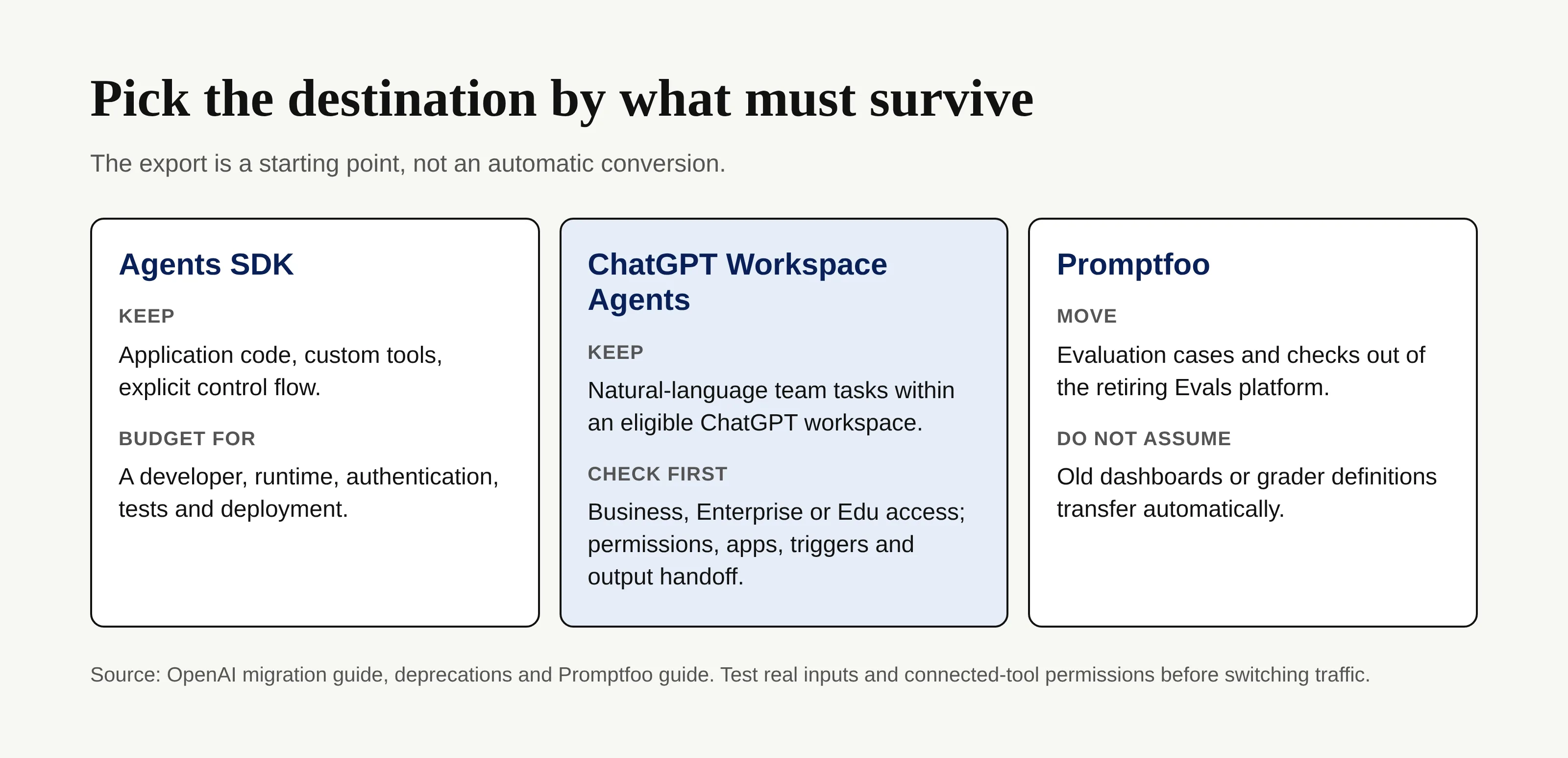
A Workspace Agent is not a free, universal import target. OpenAI says the team must have a Business, Enterprise or Edu workspace with access, plus permission to create agents. Its suggested route is to paste the SDK export into a ChatGPT conversation to help construct the agent, then inspect instructions, tools, authentication and preview results before creation. Strongly deterministic graphs may not migrate faithfully. Ask who will approve app access and who will pay for the eligible workspace before planning around it; the source does not provide an account-specific price or entitlement.
For Evals, follow the OpenAI Promptfoo introduction as a starting point for test cases and checks, not as a promise of one-click dashboard transfer. Compare the same old input and expected outcome in the new harness; a passing assertion can still miss a bad final answer. Promptfoo work may require technical help even if the old tests lived in a dashboard. If no one on your team can own that configuration, name it as a procurement requirement rather than burying it in a launch checklist.
A migration plan a non-technical team can actually run
Start with the output contract. For every existing workflow, write a plain-English card: When it starts / what it reads / what it may change / who approves / where the result lands / what counts as failure. This becomes the acceptance test for any route you purchase or rebuild. Zentor's role in that discussion is delivery to approved tools rather than keeping the finished answer trapped in a conversation; its self-adaptive workspace is not an automatic converter for Agent Builder nodes.
Try the contract on a real but low-risk job. You might be a solo service provider who expects a Monday status note in Notion, not a paragraph you must copy from a chat. Feed the old and candidate routes the same approved brief, check each source used, compare the saved note with the expected fields and stop before an external message sends. If the new tool cannot write to the destination with your current permissions, a polished preview still fails the acceptance test.
This is also where a buying decision gets less romantic. Ask for a demonstration using your destination, your review gate and your error path, with access limited to the necessary workspace. Who renews the connector? Can you inspect a failed run and rerun it without duplicating a record? Does the setup require a consultant every time the brief changes? If the answer is unknown, mark it as unknown; neither OpenAI's migration page nor a vendor's landing page supplies your particular connection state.
Read our AI workspace guide for a broader distinction among memory, sync, triggers and write-back. Zentor's memory can travel through its MCP layer to other AI rather than being locked into one AI surface, but that portability does not carry over OpenAI workflow permissions or historical eval results. Keep separate copies of the instructions and your accepted outputs until you have run the new path in parallel.
Cut over without losing the work your team depends on
Assign one person to own the old route and one to sign off on the replacement, even if both roles belong to you. Before the October 31 Evals read-only change, preserve the cases you rely on and note how each is scored. Before November 30, export every active Builder workflow, capture its prompts and variables, and map dependencies that the export does not prove: triggers, authentication, connected tools and embedded ChatKit traffic. OpenAI's prompt migration instructions apply if your API requests reference managed prompt objects; they are not a mandate to rewrite every ordinary instruction in a ChatGPT workspace.
Run the replacement in parallel on several representative inputs: routine, incomplete and permission-denied. Check that it produces a reviewable artifact in the right tool, that it cannot silently perform a high-stakes action, and that someone receives a useful failure notice. Zentor's always-on execution may keep a recurring task independent of your laptop, but your team still owns connector authorization and the decision to publish, pay, send or delete. If you need a fuller way to map work and authority flows, keep those flows separate in the sign-off sheet.
Needs verification for your account: OpenAI's pages do not use consistent names for every suggested replacement model. Do not paste a model name from an example into a production migration; have the account owner check the models available through GET /v1/models, then test the selected model with your actual task. We have not queried your account's endpoint or validated its entitlements.
FAQ: Agent Builder migration questions
Is Agent Builder discontinued?
OpenAI announced deprecation on June 3, 2026 and schedules shutdown for November 30, 2026. Existing users can continue during the transition; that is not an extension beyond the published date. ChatKit remains available, but its existing Builder-hosted integration is only a transition path.
What replaces Agent Builder?
There is no one-for-one canvas replacement promised in the migration guide. Choose the Agents SDK if someone can own deployed code; evaluate ChatGPT Workspace Agents for natural-language work in an eligible team workspace. Test triggers, tools and permissions whichever route you choose. Promptfoo addresses Evals rather than replacing the visual builder.
Do I lose my evals?
The Evals platform's existing evals become read-only on October 31, and its dashboard and API are scheduled to shut down on November 30. Preserve the tests and their expected outcomes before those dates, then rebuild and compare checks in Promptfoo. OpenAI's dates do not establish that every historical report or grader will export intact.
Choose the next home by the handoff, not the canvas
The agent builder shutdown forces a practical question: where will the next completed piece of work go? Export while the canvas is accessible, protect the tests before they become read-only, then decide who owns code, permissions and output delivery in the replacement. A route that reproduces the diagram yet leaves your Monday note stranded in chat has not preserved the workflow.

Zentor Editorial Zentor editorial team
The Zentor editorial team writes about workflow automation, AI agents, and the tools we build. Default byline for industry overviews, listicles, and collaborative pieces.
Ready to put this into practice?
Zentor runs browser tasks, research, and schedules automatically. Try it free.