Slack Reminders: Build a Follow-Up System That Works
Use Slack reminders and scheduled messages with clear ownership, escalation, and review so important follow-ups do not disappear in chat.
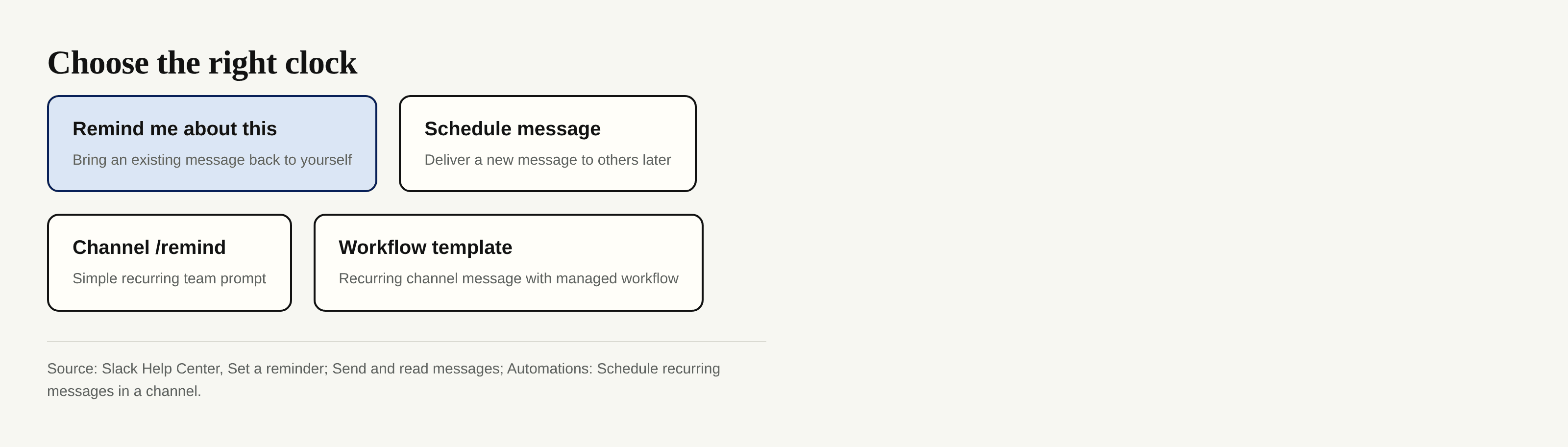
Slack reminders bring an existing obligation back to your attention; Slack scheduled messages deliver a new message to someone else later. Neither makes the work complete when the notification fires. Slack says reminders can target you or a channel, and day-only reminders default to 9 a.m. in your time zone, a detail that matters if your team spans regions.
Key Takeaways:
- Give each follow-up one owner, one next action, and a review date before setting the alert.
- Use a message reminder for your own return trip; schedule a message when the recipient needs the message later.
- Recurring channel prompts work for review rhythms, not as proof that every item was handled.
- Move multi-step or auditable work to a task record, with a link back to the conversation.
Choose Reminders or Scheduled Messages
Use slack reminders when you need to revisit something already said. Hover over the message, open its three-dot menu, choose Remind me about this, then pick a time. Slack places the reminder in Later, where you can complete it or reschedule it. A reminder on a message is personal; saving something in Later is likewise visible only to you. Slack's Later guide explains those views.
Use Slack scheduled messages when you have written a fresh note that should arrive at a better hour. Compose it in a channel, DM, or thread and use the arrow beside Send; Drafts & sent → Scheduled lets you inspect it before delivery. That is delivery scheduling, not a durable follow-up queue. Slack's message guide documents both actions.
Turn a Message Into an Owned Follow-Up
Slack task capture starts at the source message, but the reminder belongs to a person, not to the whole conversation. Decide who can close the loop, state the next visible action, and choose when that person will check it. A useful note reads: “I own the revised quote; send it after confirming shipping; review Friday.” “Follow up” alone tells your future self almost nothing.
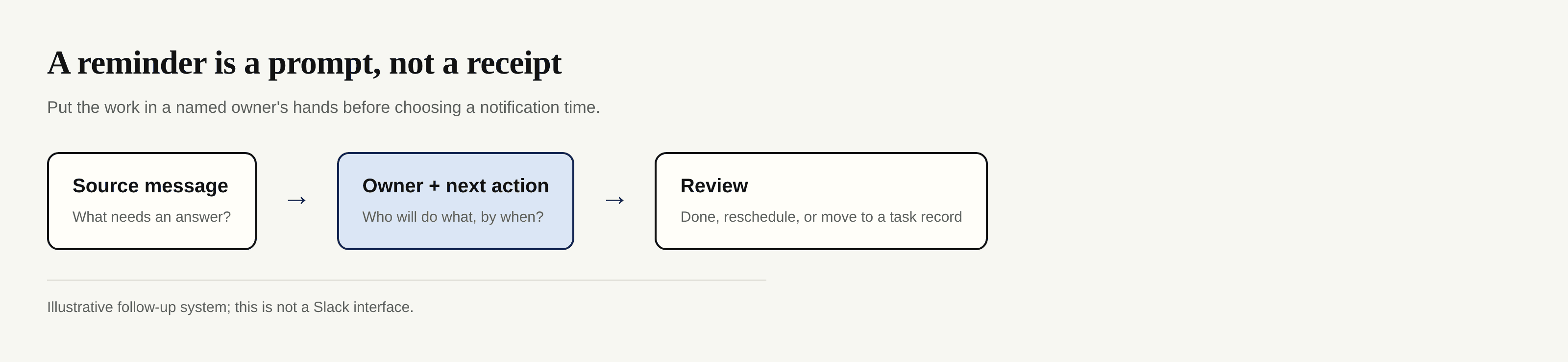
For your own work, use Remind me about this rather than retyping the request into a generic alert. When the reminder arrives, open the original conversation and reply or complete the action. The alert is a retrieval mechanism, not evidence of delivery. For a colleague's work, agree on ownership in the thread and have that person set their own reminder or enter the job in the shared task system. A private Later item cannot serve as a team queue.
If the follow-up outlives the thread or crosses tools, keep the source link in a portable record. Zentor's workspace memory can carry context across the tools and AI you use via Zentor MCP; it shouldn't be presented as a substitute for assigning the owner in Slack. Explore Zentor's approach to workspace memory if your follow-ups repeatedly lose their context between apps.
Use Recurring Reminders for Review Rhythms
Slack recurring reminders are most useful for a repeatable check, such as looking for unanswered inquiries each Monday, not for generating a new task for every inquiry. For a simple channel prompt, enter /remind #channel [what] [when]; for example, /remind #orders review unresolved delivery questions every Monday. Slack documents daily-pattern recurrence, such as every Monday, but not hourly intervals. Guests can set reminders only for themselves, while reminders are available on all plans.
For a richer recurring post, Slack's scheduled-message workflow template lets you choose frequency, channel, message, workflow managers, and editing permissions. Check your workspace's Workflow Builder access and plan before relying on it; owners and admins can restrict creation or features. Make the review prompt specific: “Check open customer questions; reply in each thread or transfer the ones requiring approval to the task board.”
Escalate Work That Stays Unfinished
Ask what blocked it: missing decision, missing file, another person's reply, or too many steps. Record that blocker where the owner can act on it. Use a task system when a request needs assignee changes, subtasks, deadlines, status history, or evidence that someone signed off. Link the Slack message in that task, then let the task record own the deadline. Zentor can preserve cross-tool context when the discussion and the working document diverge, but it does not turn a Slack notification into a verified completion event. The escalation rule is simple: an alert prompts a decision; the system of record stores the decision.
Keep Channels Useful Instead of Noisy
Team reminders should ask for one observable action at a cadence the channel actually uses. A daily reminder to “stay on top of things” creates noise; a Monday review of unresolved order questions gives someone a reason to open the channel. When the audience is one person, prefer a personal reminder over a channel-wide prompt.
For teams across time zones, name the time zone and handoff expectation in the prompt, and let the receiving owner confirm a workable local review time. Slack says reminders stay in your local time when you update your time zone setting; don't assume every teammate interprets “9 a.m.” alike.
Review and Retire Old Reminders
Set aside a short review window each week. In Later → In progress, complete work you actually finished, reschedule genuine next actions, and remove obsolete personal reminders. 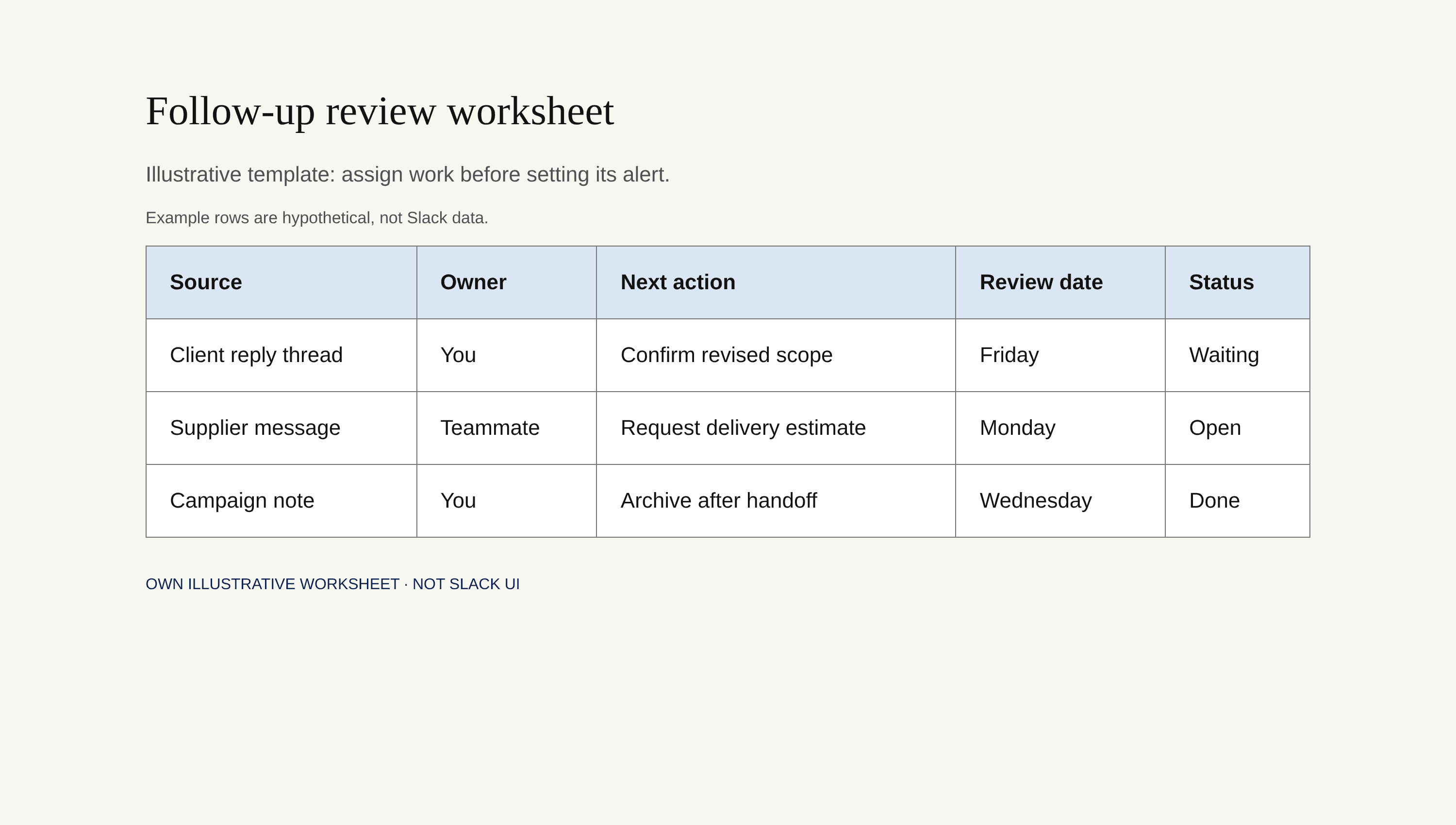
For channel reminders, run /remind list in the channel where the reminder posts. Slack shows you the reminders you can delete; channel reminders cannot be edited, so delete and recreate one whose wording or cadence has changed. That is more honest than leaving a stale prompt to fire forever. Review workflow schedules separately with their managers, because a workflow is not the same object as a /remind entry.
Frequently Asked Questions
Can Slack reminders include a link to the original message?
A reminder created with Remind me about this stays attached to that message in Later, and Slack lets you jump back to the original conversation. For a task outside Slack, copy the message link into the task record rather than assuming a text-only /remind command automatically links its source.
Who can delete a recurring reminder?
You can delete your personal reminders in Later. In the relevant channel, /remind list shows the channel reminders you can delete; Slack does not promise that every member can delete every reminder. A channel reminder cannot be edited, so an authorized person deletes and recreates it. Workflow permissions are managed separately.
How should reminders work across time zones?
Use a named owner and an explicit date, clock time, and time zone for shared handoffs. Check your Slack time-zone preference and default reminder time. Let the owner pick a local review window and acknowledge the handoff.
Can reminders be exported for audit purposes?
Do not treat personal reminders as an audit log. Slack's export guide describes message exports with plan, permission, and retention limits, not a guaranteed complete export of personal reminder state or completion history. For an auditable process, capture owner, status, decision, and source message in a task system with an approved retention policy.
What should move from Slack into a task system?
Move any commitment that needs shared status, reassignment, dependencies, approval, or a defensible completion trail. Leave a link to its source thread and close or retire the corresponding Slack reminder after the task takes over. Slack should bring you back to work; it needn't be the only place that remembers what happened.

Zentor Editorial Zentor editorial team
The Zentor editorial team writes about workflow automation, AI agents, and the tools we build. Default byline for industry overviews, listicles, and collaborative pieces.
Ready to put this into practice?
Zentor runs browser tasks, research, and schedules automatically. Try it free.