TypeSafe Computer Use: $0.0002 a Step
typesafe computer use drives macOS with OCR and a small classifier for about $0.0002 a step. How the loop works, what it costs, and where it breaks.
Frontier-model computer use works, and it bills you like it works. Every step ships a screenshot to a large model and waits several seconds for a plan, which is a reasonable price for genuine reasoning and an absurd one for deciding whether to click the button labelled "Checkout". typesafe computer use is a small Python project that takes the second case seriously: it reads the screen deterministically, hands a short list of options to a classifier, and only calls a writing model when a text field genuinely needs prose. One decision costs about two hundredths of a cent.
The repository is awlevin/typesafe-computer-use, MIT licensed, public since 16 September 2026 and sitting at 529 stars as of 20 September 2026. The command it installs is called clicker, which tells you most of what you need to know about its ambitions.
What typesafe computer use actually does
You give it a goal in plain English and it drives your Mac toward that goal. The project's own example asks it to go to TechCrunch and reach the checkout page for the cheapest tickets to the next event, a genuinely multi-step errand rather than a one-button demo.
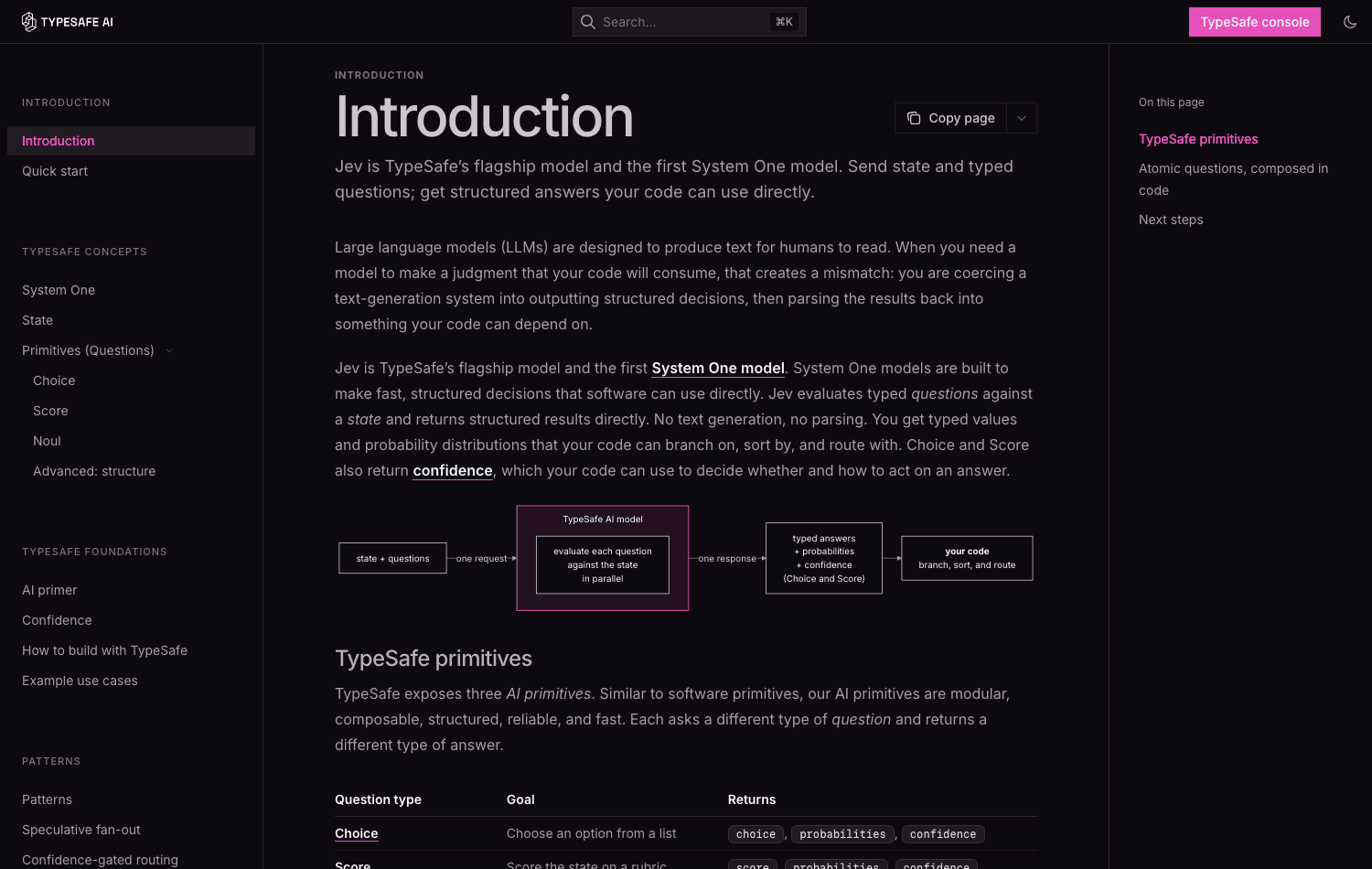
Underneath, every step assembles state from five sources: a screen capture run through Apple's Vision OCR, the accessibility tree of the frontmost process, AppleScript for the active app and browser tab URL, the system clock, and a date parser that annotates any text block containing a date with how far away it is. That bundle goes to TypeSafe as a single request carrying three questions, or four when hidden controls are available. The answers come back as typed values with probabilities attached, and code turns them into a click.
The part worth pausing on is what the model is never asked to do. It does not write a plan, it does not emit JSON, and it does not generate a sentence anybody has to parse. It picks from a list. That is the whole bet of the System One model shape that TypeSafe sells, and this project is the most legible demonstration of it I have read.
Why a screenshot to a frontier model costs 155 times more
The README publishes a comparison measured on the same screenshot and the same goal, one decision each. Input tokens are nearly identical at 4,882 against 4,785, so this is not a story about sending less context. It is a story about what you ask for back.
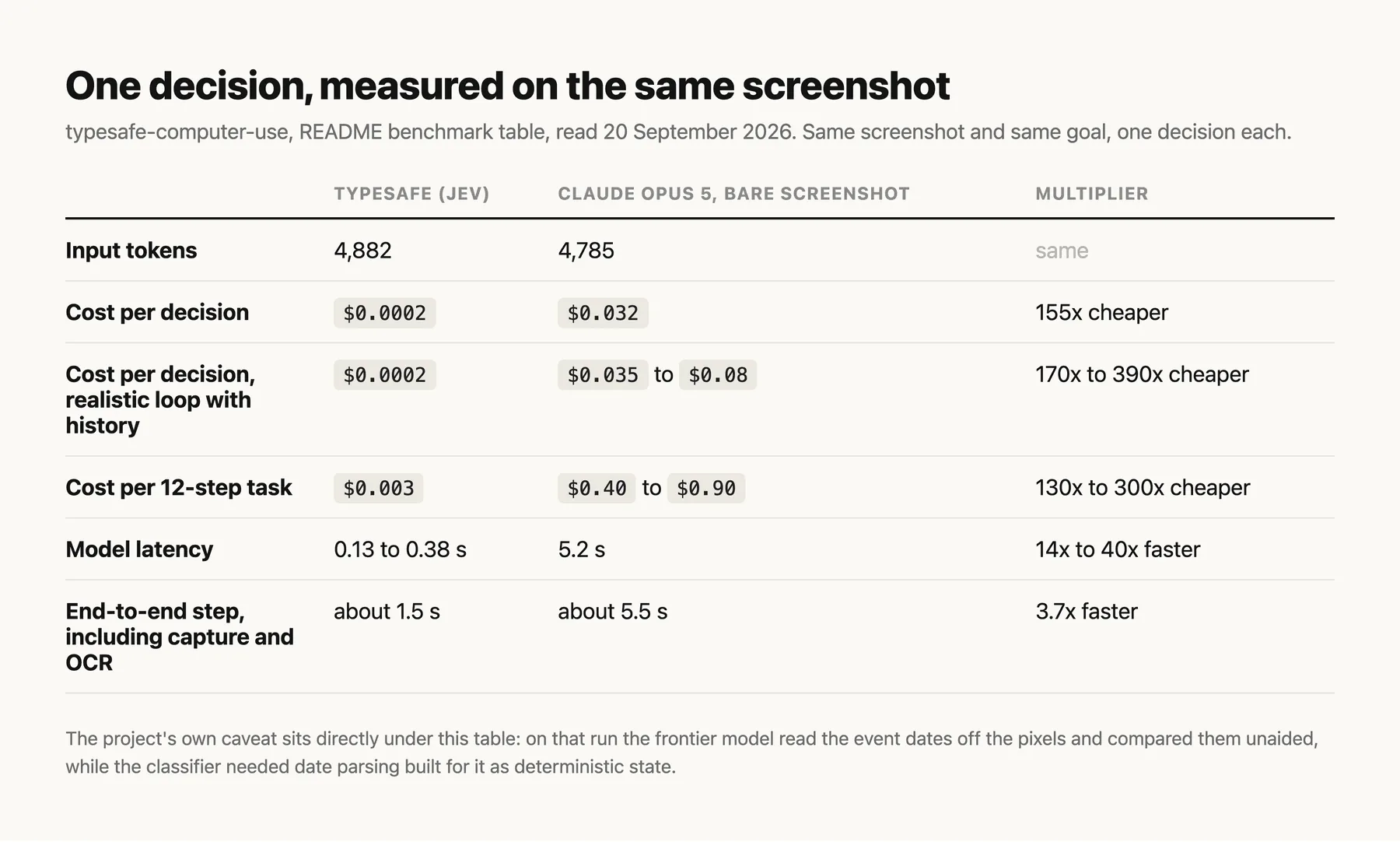
A twelve-step errand lands near a third of a cent instead of somewhere between forty cents and ninety. Run that loop a few thousand times a week and the difference stops being an accounting curiosity.
Read the caveat under the table before you get excited, because the project prints it itself and it is the honest part. On that run the frontier model read the event dates straight off the pixels and compared them without help. The classifier could not, which is why the date parser exists. Every piece of reasoning a big model does for free has to be rebuilt here as deterministic state that you write and maintain.
That rebuild cost is where a local script and a working assistant part ways. clicker finishes a run by writing a folder under runs/, and the result sits there until you go and collect it. Zentor is built the other way round: the finished thing goes back into Notion, Airtable, Slack or your inbox, where the work already lives, instead of into an artifact directory you have to remember to open. If your goal is a filled-in spreadsheet rather than a transcript proving a robot clicked correctly, that difference is the entire deliverable.
Let an assistant drive the browser and hand back the result
Zentor's browser control runs the clicks and puts the finished work back in the tool your team already uses.
See Zentor browser control →
How OCR plus a classifier replaces the plan step
Vision OCR eats roughly two thirds of a step, and it charges by how much text it reads rather than by pixel count, so the only real saving is reading less screen. Two tricks do that work.
The first is cropping. Each step reads the frontmost window with an eight-point margin plus the strip of menu bar directly above it, clamped to the display. Text sitting on the desktop or in background windows is noise to the decision, and clipping the menu strip to the window's width is what makes cropping pay on a full-height window. The cost is real: the clock and any menu extras to the right of the window go unread, and they stay reachable only through the accessibility tree.
The second is reuse. Each capture is compared against the previous one at one-eighth scale in 256-pixel tiles, and unchanged tiles keep whatever lines they produced last time. Changed tiles get clustered into blobs, each blob becomes its own rectangle, and a rectangle grows until no known line of text straddles its edge, because a crop through a line returns only the half it can see. Past sixty percent changed tiles, or on an app switch, it gives up on cleverness and reads the whole region.
Splitting one decision into three questions is the other half. The project found that every stall it hit came from two options that meant the same thing, and since confidence measures how concentrated the distribution is, overlapping options always read as doubt. Keep the action set mutually exclusive or the loop stalls on its own uncertainty.
What the accessibility tree can and cannot see
OCR cannot see an icon, so each step also walks the accessibility tree of the frontmost process for labelled, on-screen controls. Coverage turns out to be wildly uneven, and the project measured it rather than guessing.
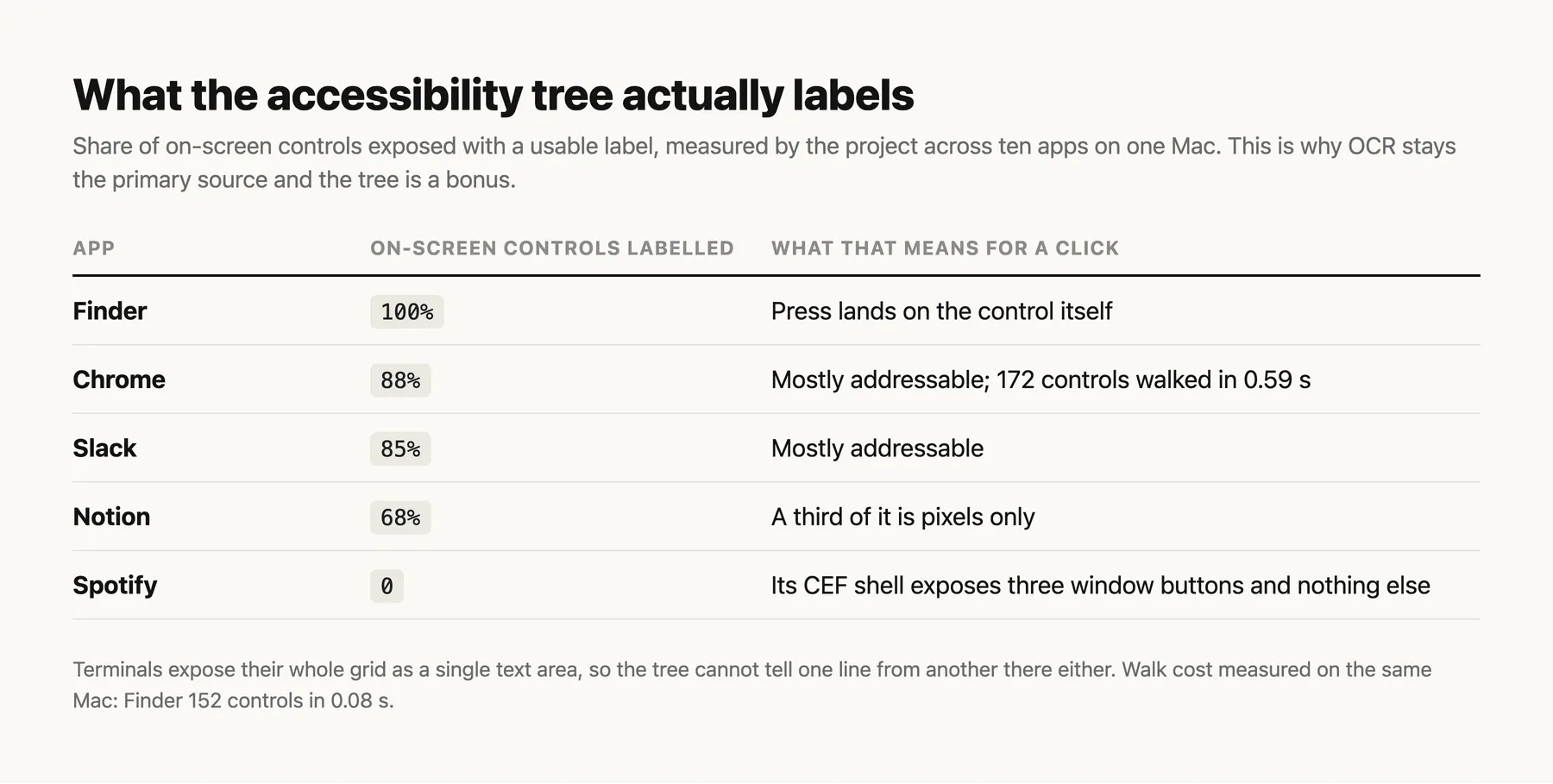
Spotify's Chromium shell hands over three window buttons and nothing else, and a terminal exposes its entire grid as one text area. So the tree is a bonus source, never a replacement, and items carry a tag saying where they came from: ocr, ax, or ax+ocr when both found the same thing. That tag matters because an accessibility item can be pressed directly through the API, landing on the actual control rather than on whatever happens to be covering it.
Frames lie, too, which is why the walk prunes hard: it skips subtrees whose real frame misses the display, because Notes cheerfully reports rows two hundred screens down; it skips nodes under four points wide, because Chromium clamps scrolled-out web nodes to slivers; and it stops at 4,000 nodes or 0.6 seconds and says so. A press does not need an element to be visible, so the walk keeps the labelled pressable nodes it pruned and offers them separately, which is how an auto-hidden Dock hands over all 37 of its items from five points below the screen edge.
Where typesafe computer use breaks, and what it refuses to do
The refusals are the encouraging part. Passwords are never typed: credential fields come back from the writer with fill: false, and the project tells you to rely on your browser's password manager or an SSO button the OCR can read. After any text is typed, a second scored question checks whether the field now holds something sensible, and under 0.5 the field is cleared. URLs proposed by the writer get rejected unless they parse as a clean https address with a hostname.
The loop stops itself on a done or none answer, on confidence below 0.4, after two consecutive no-ops, or at the step limit, which defaults to 100. You can stop it by hand with Ctrl-C, or by slamming the mouse into the top-left corner of the screen from any app, which is a better panic button than it sounds when something else is driving the mouse.
Two honest limits remain. It is macOS only, and there is no cross-platform story in the README as of September 2026. And it has no memory between runs, because state is rebuilt from the screen on every single step. Ask it for the same errand tomorrow and it re-derives everything, including the deterministic scaffolding you wrote for it. Zentor keeps what it learns across tasks and lets you export that memory and take it elsewhere, which is the difference between a script you re-run and an assistant that already knows how your invoices are laid out.
Setting it up on macOS: permissions, keys, and the stop switch
You need macOS 14 or newer, Python 3.12 or newer, and uv. A TYPESAFE_API_KEY is mandatory since every decision goes through it. An ANTHROPIC_API_KEY is optional and only used for typing free text, for writer-proposed URLs, and for reading the final answer off the last screen; the writer defaults to claude-haiku-4-5 and the answer reader to claude-sonnet-5.
Then grant your terminal Screen Recording and Accessibility in System Settings. Without the first, captures come back as wallpaper. Without the second, synthetic clicks are silently dropped, and the project does the right thing by refusing to start in act mode at all rather than flailing.
One small instruction in the README is easy to skim past and worth repeating: clear your terminal before a run, because it is on screen and its text becomes OCR input. A tool that reads the whole screen will read your own logs back to itself.
Every run writes a timestamped folder holding the raw captures, the annotated captures with items numbered, the exact payload sent for each step, every probability returned, and per-phase timings. A stalled run can be replayed offline from a saved capture without touching the screen, which is the kind of thing that separates a project someone maintains from a weekend demo. If you are comparing this against a hosted browser agent, our notes on running a browser harness on macOS and on what token consumption actually looks like cover the same ground from the other direction.
FAQ
How much does computer use cost per step?
With this project, about $0.0002 for the decision itself, measured by the author on a single screenshot and goal as of September 2026. A twelve-step task comes to roughly $0.003. The comparison figures for a frontier model on the same input run from $0.032 for one bare decision up to $0.08 in a realistic loop carrying history.
Does typesafe computer use work on Windows or Linux?
No. It is macOS 14 or newer only, and it depends on Apple-specific pieces: Vision OCR, the macOS accessibility API, and AppleScript for the frontmost app and browser tab. Nothing in the repository suggests a port is planned.
Is typesafe computer use open source?
Yes, MIT licensed, with the licence file present in the repository rather than merely implied by a badge.
Does it need an Anthropic key as well as a TypeSafe one?
Only for the parts that involve writing or reading prose. Every decision needs the TypeSafe key. Typing free text, opening a URL the writer proposes, and composing the final answer need the Anthropic key, and you can run the loop without one if your errand never types anything.
Can it log into things for me?
Not with a password. Credential fields are explicitly refused, so logins depend on your browser's saved passwords or an SSO button visible on screen. Grant it Screen Recording and Accessibility and it can drive your real, already-authenticated session, which is a different and more sensible model than handing an agent your secrets.
Where this leaves low-cost computer use
The interesting claim here is not the price. It is the argument that most steps in a computer-use loop were never reasoning problems, and that treating them as one is what made the category expensive and slow. Cutting the per-decision cost by two orders of magnitude while keeping a confidence number you can gate on is a real result, published with the measurements and the caveats side by side.
What it costs you back is the scaffolding. The frontier model's free reasoning becomes your deterministic state to write, test and maintain, and typesafe computer use is candid that this trade is the whole design. For a loop you run constantly on one Mac, that trade is probably worth it. For work that has to land somewhere a colleague can see it, and to still make sense next month, the clicking was never the hard part.

Zentor Research Public data on the AI ecosystem
Zentor Research publishes quarterly data studies on the AI tools ecosystem, drawing on public registries (npm, GitHub, Hugging Face, arXiv, Google Trends). All charts and datasets ship under CC-BY 4.0.
Ready to put this into practice?
Zentor runs browser tasks, research, and schedules automatically. Try it free.