Workflow Automation for Small Business: Start Simple

Learn how a small business can choose, map, automate, approve, and monitor one repeated workflow without creating a fragile stack.
Automate one stable, observable repeated process first: a request comes in, a known set of checks happens, and you can see whether the right person received the result. That is the safest starting point for workflow automation for small business, not a plan to make every decision automatic. If a job changes shape every time, document it before buying another tool.
Key Takeaways:
- Choose work with a clear trigger, a frequent handoff, and an outcome you can inspect.
- Keep fixed rules for fixed decisions; use AI for messy text only when someone can review its judgment.
- Define the approval, failed-run alert, and retry before switching on customer-facing actions.
- Count corrections and maintenance alongside minutes saved.
What Small-Business Workflow Automation Means
A workflow is a sequence of work, not merely an app notification. For related trade-offs, see our guide to agents versus automation tools. Automation handles selected steps or handoffs so you don't copy the same details between your inbox and a tracker. Zapier's workflow definition similarly describes connected tasks across the apps a business uses; you don't need the entire business on autopilot to benefit.
The boundary matters. An AI-drafted quote isn't an approved price. A row marked “done” isn't proof the customer received a message. Pick one outcome that can be checked in the destination system, rather than treating a successful trigger as the finish line.
For a shop, that could be flagging paid orders with incomplete delivery addresses for review. For a tutor, it could be copying form responses into a lesson-request list.
If your work crosses tools and needs continuity from one request to the next, Zentor's workspace memory is relevant: context can connect to different AI tools through Zentor MCP rather than living only inside one chat. It doesn't remove the need to define the business rule or inspect the outcome.
Get early access to Zentor if your repeated work depends on cross-tool context.
Find the Repeated Work Worth Automating
Look at last week's work, not the grandest process diagram you can imagine. Which action did you repeat while switching tabs? Where did a request wait because you had to remember to copy it somewhere else? For workflow automation for small business, the best first candidate happens often enough to matter, follows similar steps each time, and leaves a record you can compare with the original.
Suppose you sell custom cakes. You receive flavor, date, serving count, and pickup preferences by form, then move them to a booking sheet. Automate the transfer and flag missing fields. Don't automatically promise a pickup slot when calendar availability and oven capacity still require your judgment.
Before building, write down several actual recent requests and note every exception. If not, start with only the form requests and leave the rest manual.
Choose a first workflow by asking: Can I recognize the start? Is the desired finish visible? Who notices if it fails?
Map Inputs, Decisions, and Outputs
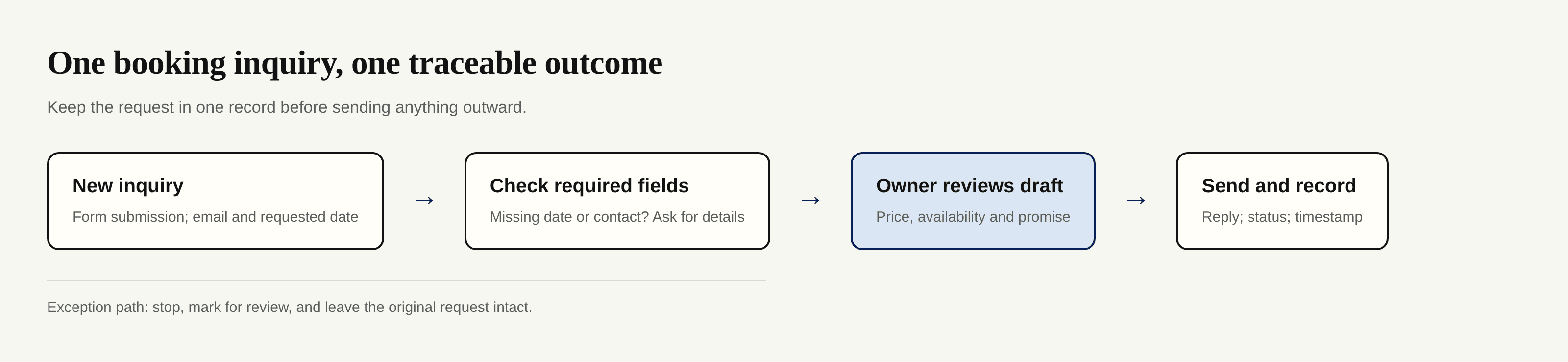
Write the map in plain language. Name the trigger, required inputs, decision points, recipient, final record, and person who handles exceptions. A booking inquiry might require contact details, requested date, and service type. A missing date should stop the promise of availability, not produce an invented one.
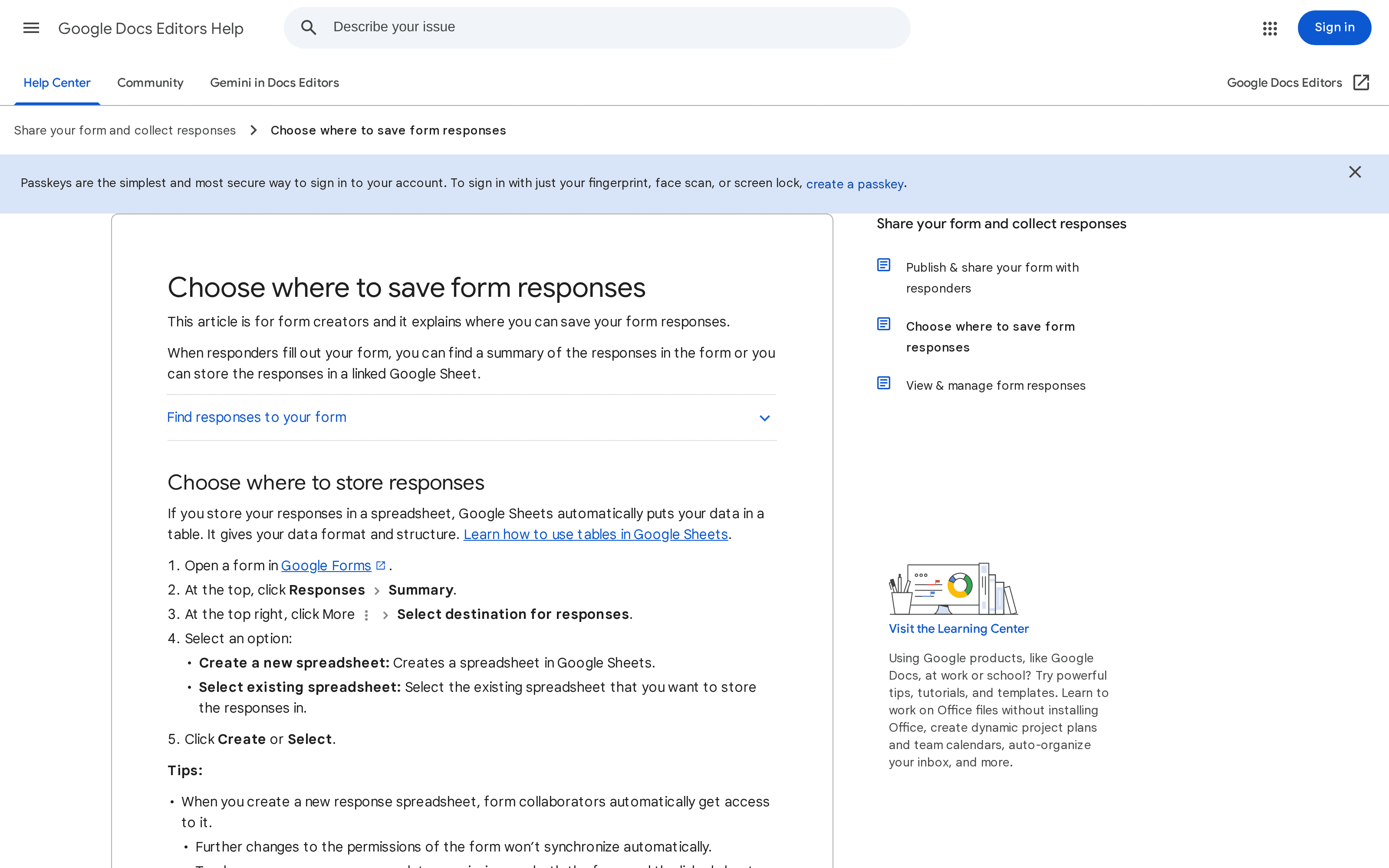
Make the source of truth explicit. If a form starts the workflow, where does its response live after submission? Google's instructions for saving form responses show how to link a form to a new or existing Sheet. They also note that later permission changes on the form don't automatically synchronize with the linked sheet, an easy detail to miss when a teammate joins or leaves.
If two inquiries from the same customer arrive, should they form two jobs or one?
Choose Rules, No-Code Tools, or AI
In workflow automation for small business, use deterministic rules when the decision can be expressed exactly: if a required field is blank, assign a review status; if an invoice is unpaid, don't mark it settled. A no-code automation tool can move data, route a notification, or create a task when the required services expose those actions. Zapier's small-business guide includes lead follow-up and team handoffs as examples.
Use AI only for inputs that don't arrive in the same shape. A customer might write “next Friday after school” instead of choosing a date; a model can suggest a classification or draft a reply, but it may misunderstand which Friday or imply you have availability. Require a person to check any quoted price, refund decision, appointment promise, or message whose error would cost trust. NIST's AI Risk Management Framework calls for defined human roles and ongoing checks rather than assuming an AI output will remain reliable after launch.
| Work to do | Start with | Keep human control over |
|---|---|---|
| Copy a complete request into a tracker | Built-in integration or no-code rule | Exceptions and duplicate records |
| Route a request missing required fields | Explicit condition | Whether an unusual request should proceed |
| Summarize an open-ended customer note | AI-assisted draft | Interpretation and outbound wording |
| Offer a custom quote | Draft plus approval | Final price and commitment |
Zentor can be useful when the same task needs remembered context and execution across connected tools, such as carrying instructions forward while preparing work that lands in Notion or Airtable. Verify the exact connector and action you need before treating any platform as a guaranteed route to a particular writeback.
Add Approval and Failure Recovery
Put the approval where the risk actually is. For a booking reply, let a tool gather details and prepare a draft; you approve the date and wording before the message goes out. For a paid-order exception, allow an automatic flag but keep the refund or replacement decision with the owner. Our document automation guide examines similar handoffs for extracted records.
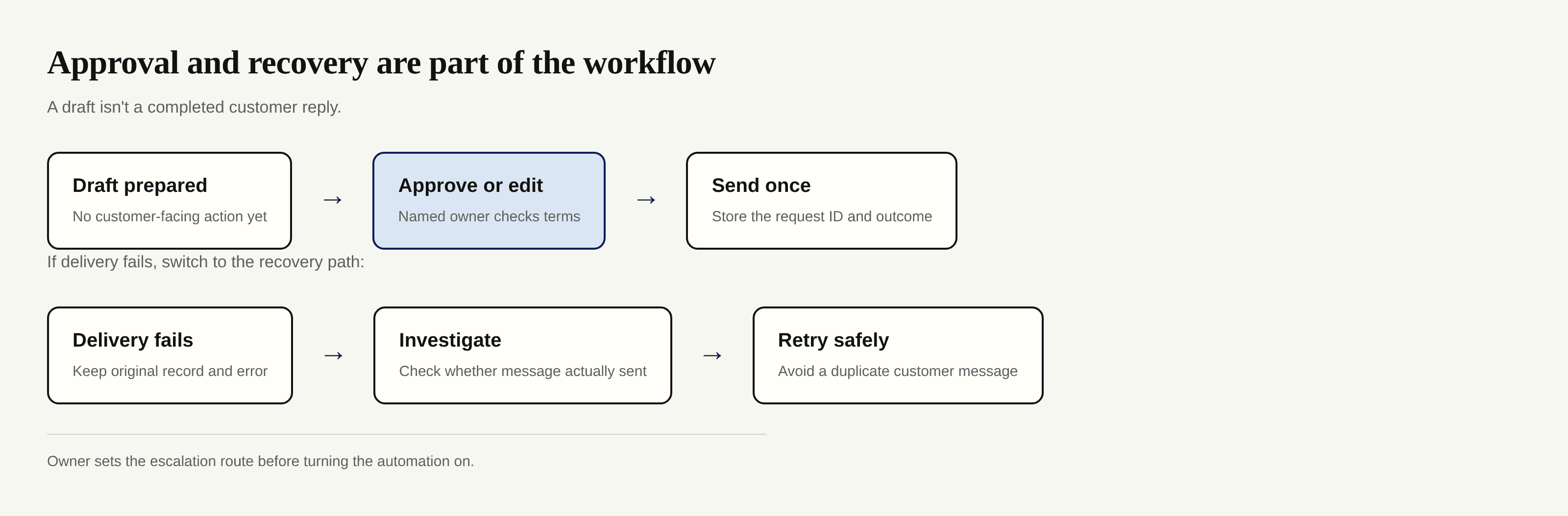
Record the original request, the attempted action, the error, and the person to notify. Before retrying an outbound message, check the destination: a timeout can occur after the recipient already got it. If you press retry without checking, you may send the same quote twice.
NIST's AI playbook on governance stresses documented oversight roles. You need the same clarity without creating a large policy manual: one named owner, one backup, and instructions for pausing the workflow. Zentor's always-on workspace can continue work when your own laptop is off, but that makes alerts and a stop procedure more important, not less.
Measure Time Saved Without Hiding Rework
Take a baseline before the new flow runs. For a small set of real inquiries, record minutes spent reading, copying, checking, replying, and correcting mistakes. After launch, measure the same boundaries. Subtract the time spent reviewing drafts, fixing mismatches, investigating failures, and maintaining the connection.
Track outcomes alongside time: requests received, requests completed correctly, requests sent to review, and requests whose final state you couldn't confirm. “Completed” should mean the intended destination reflects the action, not that an automation dashboard says it ran. If you can't reconcile the totals with the intake log, stop scaling and find the missing path.
A no-code subscription, usage-based steps, and AI task consumption can all matter as volume changes. Don't compare a single subscription fee with gross hours saved while ignoring review and setup. If you are assessing Zentor, its current pricing page is the place to check the subscription and credit terms; avoid assuming every run costs the same or that an interrupted task consumes nothing.
Review the results weekly at first.
Build the Next Workflow Only After the First Is Stable
Successful workflow automation for small business means the owner can explain what triggers the process, where its output lands, what the alert means, and how to stop or rerun it without duplicating work. Run actual cases alongside the old method until you trust the new record; then remove the redundant copy step.
Before expanding, document the workflow in the business's own workspace: purpose, connected accounts, access owner, approval owner, failure alert, and last tested exception. The FTC's small-business security guidance recommends limiting access to sensitive information and using multi-factor authentication. Those habits matter when an automation touches customer records or when the person who created it leaves.
Your next candidate should be adjacent to a proven handoff, not an attempt to tie every app together. A cake seller who can reliably capture inquiries might then automate a reminder to review pending quotes. A service owner who trusts a lead tracker might add a follow-up task, not an unsupervised discount offer. Zentor's self-learning skills and adaptive workspace may reduce repeated instruction as work grows, but still validate each new action and its destination before broadening the workflow.
Start with a process you can observe all the way through. Once you can show the correct result and recover from an incorrect one, automation becomes a practice you can maintain rather than a stack you hope will hold.
Frequently Asked Questions
How much does workflow automation cost to start?
It depends on the tools you already use and how many actions you run. Try a built-in rule first, then compare any no-code or AI subscription with the time actually saved after review, repair, and setup. Check live plan limits rather than relying on a dated comparison article.
Can a non-technical owner maintain automations?
Yes, if the trigger, conditions, owner, alerts, and pause button are documented in ordinary language. Test with sample requests after changing a form or permission. A workflow that only its creator understands isn't ready to run unattended.
Which business data needs extra protection?
Customer contact details, payment-related records, health information, identity documents, and employee records deserve particular care. Collect only what the job needs, limit who can view it, and check each connected tool's access settings. Legal obligations differ by data type and location; seek qualified advice for regulated records.
What happens to an automation when its owner leaves the business?
Without a handover, personal-account connections and approvals can fail. Keep a named backup, an inventory of connected accounts, instructions for transferring ownership, and a routine to revoke the departing person's access. Retest each handoff after changing credentials.
Can automation logs be exported for an accountant or insurer?
Some tools allow export; others expose only limited run histories, so verify that capability before relying on it. Keep your source records, approvals, timestamps, and final business documents in a system you control.

Zentor Editorial Zentor editorial team
The Zentor editorial team writes about workflow automation, AI agents, and the tools we build. Default byline for industry overviews, listicles, and collaborative pieces.
Ready to put this into practice?
Zentor runs browser tasks, research, and schedules automatically. Try it free.