Ecommerce Automation: A Workflow Blueprint

Build ecommerce automation around one order-to-follow-up chain, with clear triggers, context, approvals, outputs, retries, and exception handling.
Ecommerce automation is a set of event-driven rules that moves one order through payment, risk review, fulfillment, tracking, and customer follow-up while recording each result and routing exceptions to a person. For a small seller, the executable version starts with a paid order, carries the order ID and current context through every stage, pauses for risky or irreversible decisions, writes each outcome back to the order record, and sends failed steps to one visible queue; that control matters in a market where US retail ecommerce represented 17.1% of total retail sales in Q2 2026.
Key Takeaways:
- Build one order-to-follow-up chain before automating isolated chores.
- Give every stage six fields: trigger, source, context, approval, output, and failure handling.
- Keep one order record as the operational spine, even when work crosses several systems.
- Automate reversible updates first; keep money, fraud, address changes, and public messages behind approval rules.
- Test duplicates, missing data, timeouts, and late events before switching on a workflow.
What Ecommerce Automation Should Control
Small sellers don't need a cabinet full of disconnected recipes. They need one chain that answers a plain question: what happens after a customer pays, and how does the business know each handoff worked?
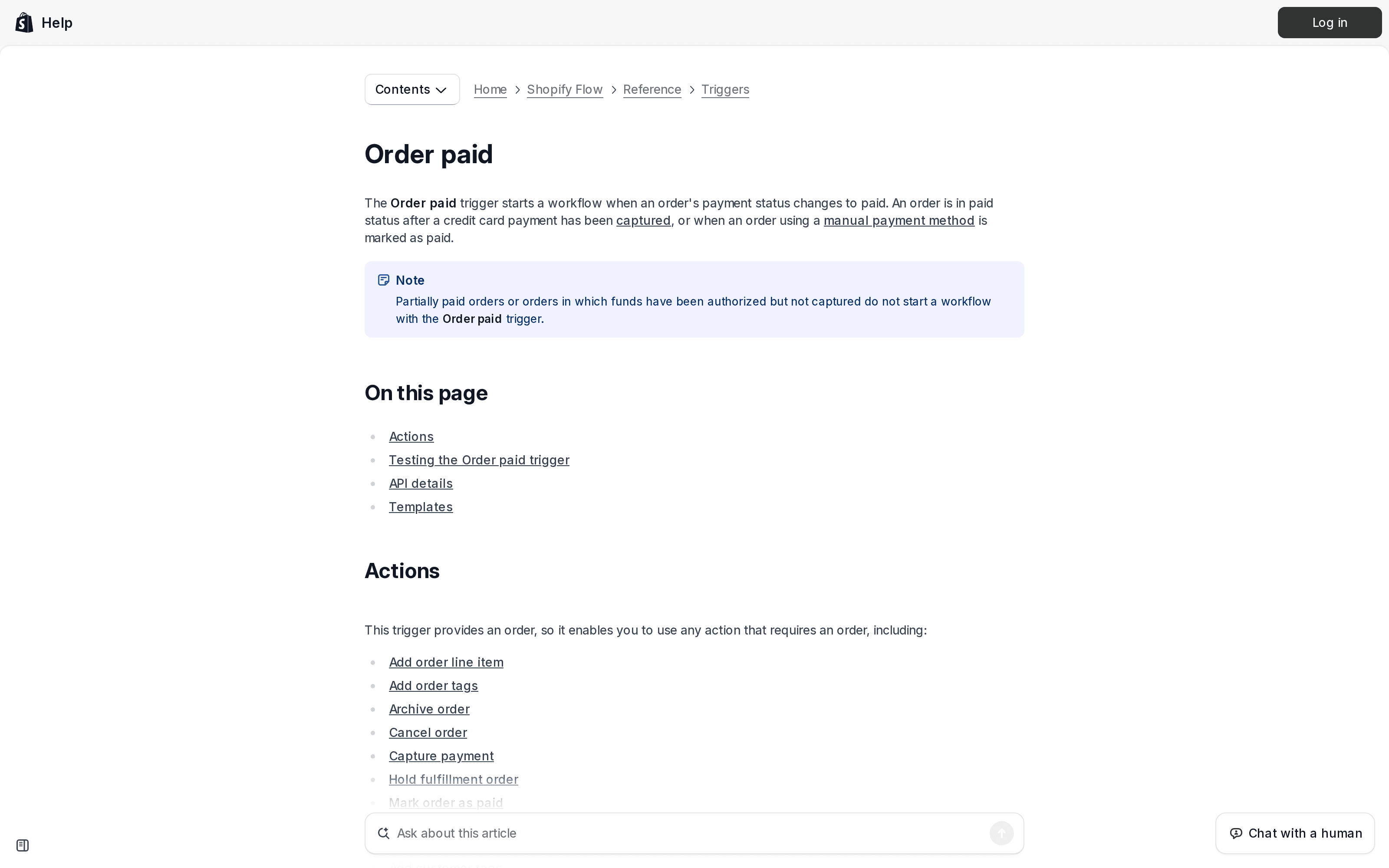
Use the order record as that chain's spine. A typical run begins when payment becomes final, checks inventory and fraud context, creates a fulfillment task, adds shipment tracking, watches delivery, and schedules a consent-safe follow-up. Shopify's documentation makes the opening boundary concrete: its Order paid trigger fires when payment status changes to paid, while an authorized but uncaptured payment doesn't qualify. “Order created” and “order paid” are therefore different business events, not interchangeable labels.
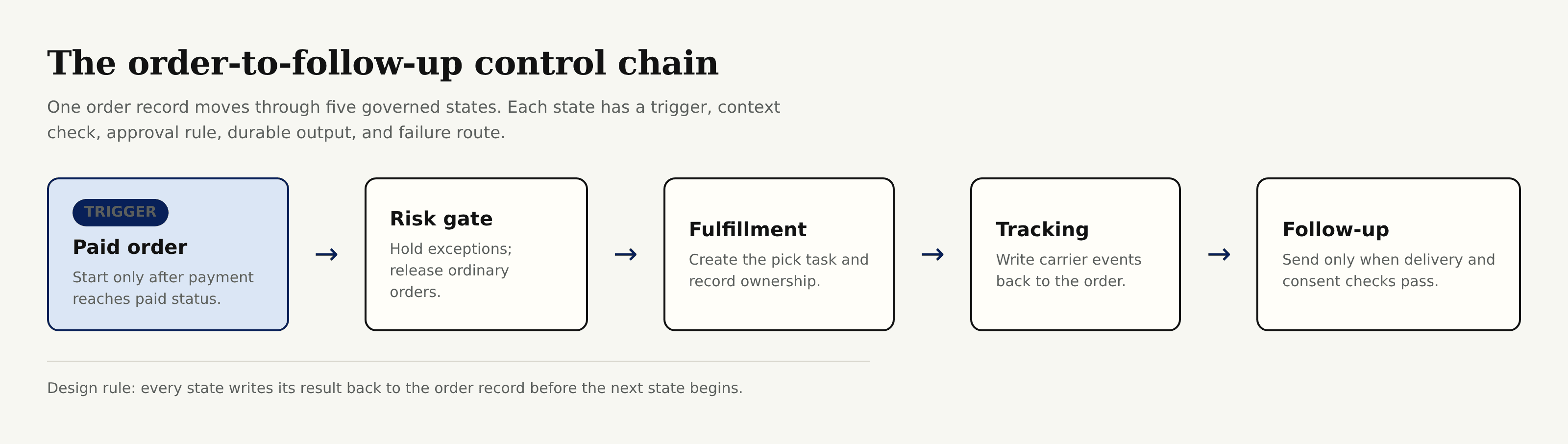
The diagram also exposes a requirement that recipe lists hide. Every arrow needs a durable write-back. If fulfillment starts but the order still says only “paid,” the tracking stage has no trustworthy state to read.
Zentor's Notion connection is relevant at this boundary as a workspace memory layer, not as a claimed store connector. That persistent context can carry your operating rules, exception history, and approved message patterns across the AI and work tools you choose, while the systems that own orders, payments, and shipments remain the sources of truth.
Get started with Zentor if you want a persistent workspace for the context around recurring operations, rather than another chat transcript that loses the thread.
Route order exceptions to a person instead of losing them
Zentor reviews order exceptions on a schedule and writes each one into Airtable or Notion, so they land in one visible queue.
See the Airtable integration →
Write a Six-Field Contract for Every Stage
Before configuring anything, write a compact contract for each stage. The same six fields prevent most brittle behavior:
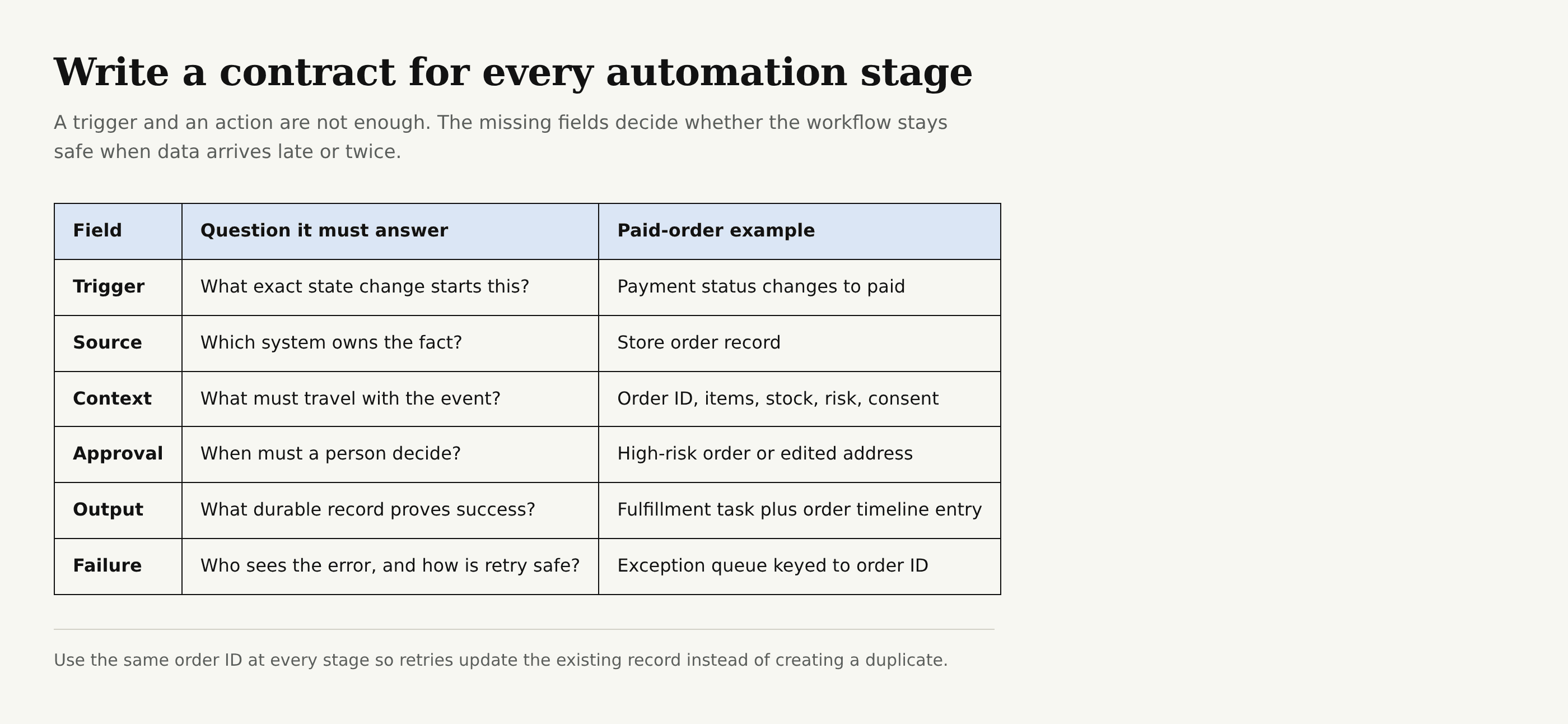
Take the opening stage. Trigger: payment status changes to paid. Source: the commerce platform's order record. Context: order ID, line items, quantities, shipping method, address, payment state, fraud state, and marketing consent. Approval: none for recording the event, but any high-risk flag or post-payment address edit sends the order to review. Output: one fulfillment task plus a timestamped order update. Failure handling: retry the write with the same order ID, then place the order in an exception queue if the destination stays unavailable.
That final field protects against duplicate work. Stripe's API guidance explains why idempotency makes retries safe: repeating a request with the same idempotency identifier should not create the same object twice. A no-code workflow still needs the same behavior. Use a unique operation label such as fulfillment:create:<order-id>, then check whether its output already exists before repeating the action.
The order ID should survive the entire chain. Don't let an email address become the identifier; customers can change it, share it, or place several orders with it.
Start With a Paid Order, Then Gate Risk
Suppose order 8472 reaches paid status. Trigger: the platform reports that exact state change. Source: the store order. Context: the order's current items, inventory allocation, delivery address, payment result, and risk recommendation. Approval: release ordinary orders automatically, but pause an order marked high risk or one whose address changed after payment. Output: either a released fulfillment task or a review item carrying the reason. Failure handling: if risk data hasn't arrived, wait and recheck; don't treat missing risk data as “low risk.”
This isn't theoretical fussiness. Shopify says fraud analysis may finish after order creation and recommends using Order risk analyzed rather than Order created for risk workflows. Its broader fraud guidance says high-risk orders can be held for manual review before fulfillment. The sequence matters: paid order received, risk result received, then release or hold.
For a solo seller, approval can be a row in a review view with two buttons: release or cancel. Don't bury it in an inbox. The reviewer needs the items, amount, shipping address, risk reason, prior order count if available, and the deadline for shipment in one place. If they cancel, the workflow records who approved it and whether stock returned to available inventory.
Turn the Released Order Into Fulfillment Work
Once order 8472 clears risk review, ecommerce automation should create work, not merely send a notification. Trigger: the order changes to released-for-fulfillment. Source: the same order record. Context: sellable items, quantities, fulfillment location, promised service, packing instructions, and any customer note. Approval: required if inventory is short, an item was substituted, or a special instruction changes cost or policy. Output: one assigned pick-and-pack task whose status writes back to the order. Failure handling: if task creation times out, query by order ID before retrying; if stock becomes unavailable, hold the order and show the shortage rather than silently skipping the item.
Inventory policy belongs in context because “zero available” can mean different things. Shopify's default behavior stops sales at zero, but sellers can deliberately enable continued selling when out of stock. Your workflow must read the store's policy, not assume every zero means cancellation.
A useful output has an owner and a state. “Warehouse notified” is weak because it can't tell the next stage whether anyone packed the parcel. task created, picking, packed, and handed to carrier give the chain observable handoffs. The assignee can be you.
Add Tracking Without Losing the Order Thread
The parcel leaves the workbench, but order 8472 isn't finished. Trigger: the fulfillment task receives a carrier and tracking number. Source: the shipping or fulfillment system that purchased the label or accepted the parcel. Context: order ID, carrier, tracking number, shipped items, ship date, destination, and promised service. Approval: required when the destination changed, the carrier doesn't match the chosen service, or only part of the order shipped. Output: tracking data written to the order plus the platform's normal shipment notification. Failure handling: reject malformed tracking data, keep the order in awaiting-tracking, and alert the task owner after the retry window expires.
Shopify documents that once tracking is added to a fulfilled order, customers can follow it through the order status page, shipment emails, and the Shop app. That makes the order record the correct write-back target. A separate spreadsheet may help you inspect exceptions, but it shouldn't become a competing tracking source.
Carrier events can arrive late or out of order. A delivered event should outrank an older in transit event received afterward. USPS describes tracking as a sequence that begins when the sender or shipping partner provides information and ends at delivery or pickup in its tracking basics. Your chain should expect gaps because the carrier controls those scans.
Send Follow-Up Only After Delivery and Consent Checks
Now order 8472 has a delivered scan. Trigger: delivery status becomes delivered, followed by your chosen waiting period. Source: the carrier event written into the order record. Context: delivered items, delivery timestamp, unresolved support cases, refund or return state, customer locale, consent state, and the message version previously used. Approval: routine transactional guidance can follow store policy, but promotional copy needs valid marketing consent and manual review when a complaint, refund, or delivery exception remains open. Output: a sent-message record linked to the order, or a documented suppression reason. Failure handling: don't switch channels automatically; retry a temporary provider error once, then suppress duplicates and create an exception.
Consent isn't an optional branch. Shopify states that its messaging product filters out customers who haven't accepted email marketing. In the United States, the FTC says commercial email must explain how to opt out and that businesses must honor an opt-out request within 10 business days. Other regions have different requirements, so get legal advice for the markets where you sell.
Persistent context earns its keep here. Zentor can retain the reason a message was suppressed, the approved tone for a product line, and the outcome of a previous exception across work sessions. That doesn't mean Zentor receives store or carrier events by default, and it doesn't replace consent records. Its value is preserving operating context and helping chosen tools act consistently, then writing the result back where your team can inspect it.
Build the Workflow Around Exceptions
Happy-path diagrams are easy; exception ownership decides whether ecommerce automation helps on a busy morning. Put every failure into one queue with the order ID, failed stage, last successful state, error text, retry count, owner, and next action.
Use order 8472 for the failure drill. Trigger: any stage misses its expected output or returns an error. Source: the workflow run log plus the last verified order state. Context: the complete six-field contract, prior attempts, and every side effect already written. Approval: a person chooses among retry, skip, refund, cancel, or correct data when the action changes money or customer expectations. Output: a recovered state or a closed exception with a reason. Failure handling: escalate after the retry limit; never loop forever.
Zentor's Airtable connection can keep those resolution patterns available when you move between an exception table, policy notes, and a drafting tool. Cross-tool execution has value only when the final decision writes back to the order and exception record. Otherwise, the next run starts ignorant of work that already happened.
Keep retries narrow. A failed tracking write shouldn't rerun payment capture or recreate fulfillment. Each stage owns its output and can be replayed independently.
Test Ecommerce Automation Before It Touches Live Orders
Run a controlled set of test orders through the chain before activation. Include an ordinary paid order, an authorized but uncaptured payment, a high-risk order, missing inventory, partial fulfillment, invalid tracking, a late carrier event, a customer without marketing consent, and a duplicated trigger. Those cases test state boundaries rather than button clicks.
For each test, compare expected and actual values for all six fields. Did the trigger fire at the right state? Did the source own the fact? Did context arrive intact? Did the approval stop the run? Did the output write back once? Did failure handling create a visible, actionable item? Shopify explicitly recommends creating a test order and capturing its payment to test the Order paid trigger.
Watch the first live runs manually. Start with one product or one fulfillment route, review the exception queue daily, and expand only after duplicate events and timeouts behave predictably. Zentor can hold the evolving runbook and lessons from those reviews so the context remains available across the tools you use, without implying that any commerce platform connection exists.
FAQ About Ecommerce Automation
What should a small ecommerce seller automate first?
Start with the paid-order chain: risk gate, fulfillment task, tracking write-back, delivery check, and consent-safe follow-up. It has a clear business object, the order, and exposes failures quickly.
Which decisions should require approval?
Require approval for high-risk orders, post-payment address edits, inventory substitutions, refunds or cancellations, disputed delivery, and promotional messages without a clear consent state. Routine, reversible status updates can usually run automatically.
Do I need one automation tool for the whole workflow?
No. Use the system that owns each fact, but keep one order ID and one visible state trail across the chain. A persistent memory layer can carry policies and prior decisions between tools; it shouldn't invent source data.
How should I measure whether the workflow works?
Track the share of paid orders that reach each state, time spent waiting per stage, duplicate outputs, manual reviews, unresolved exceptions, and follow-ups suppressed for policy or consent reasons. Investigate the break between two states rather than celebrating a total task count.
Make One Order Chain Boring and Observable
A good ecommerce automation workflow isn't the one with the most apps. It's the one where order 8472 can be traced from paid status through risk review, fulfillment, tracking, delivery, and follow-up without guessing what happened between systems.
Write the six-field contract, preserve one order ID, place human approval before irreversible actions, and make every stage produce a durable update. Then rehearse the ugly cases. Once that single chain runs quietly, you have a pattern you can extend to returns, restocking, and customer care without turning the business into a pile of unrelated automations.

Zentor Editorial Zentor editorial team
The Zentor editorial team writes about workflow automation, AI agents, and the tools we build. Default byline for industry overviews, listicles, and collaborative pieces.
Ready to put this into practice?
Zentor runs browser tasks, research, and schedules automatically. Try it free.