Extract Data from Gmail to Google Sheets
Extract data from Gmail to Google Sheets: Zentor reads matching emails, pulls the fields you name and appends clean rows to your sheet every day.
Runs on managed cloud. No scripts, no Zapier.
Search Gmail for order confirmations from the last 24 hours, extract order number, store, date, item and total, check the Orders sheet for existing order numbers, append only new rows, then schedule a daily 8:00 run.
Used 3 tools
Bash gws gmail messages list --q 'subject:(order confirmation OR "your order") newer_than:1d'
7 messages found from 5 senders.
Bash gws sheets +read --spreadsheet Orders --range 'A:A'
Orders sheet: 142 existing rows. 2 of today's order numbers already present.
Bash gws sheets +append --spreadsheet Orders --values-file new-rows.csv
Appended 5 rows to Orders (rows 143-147).
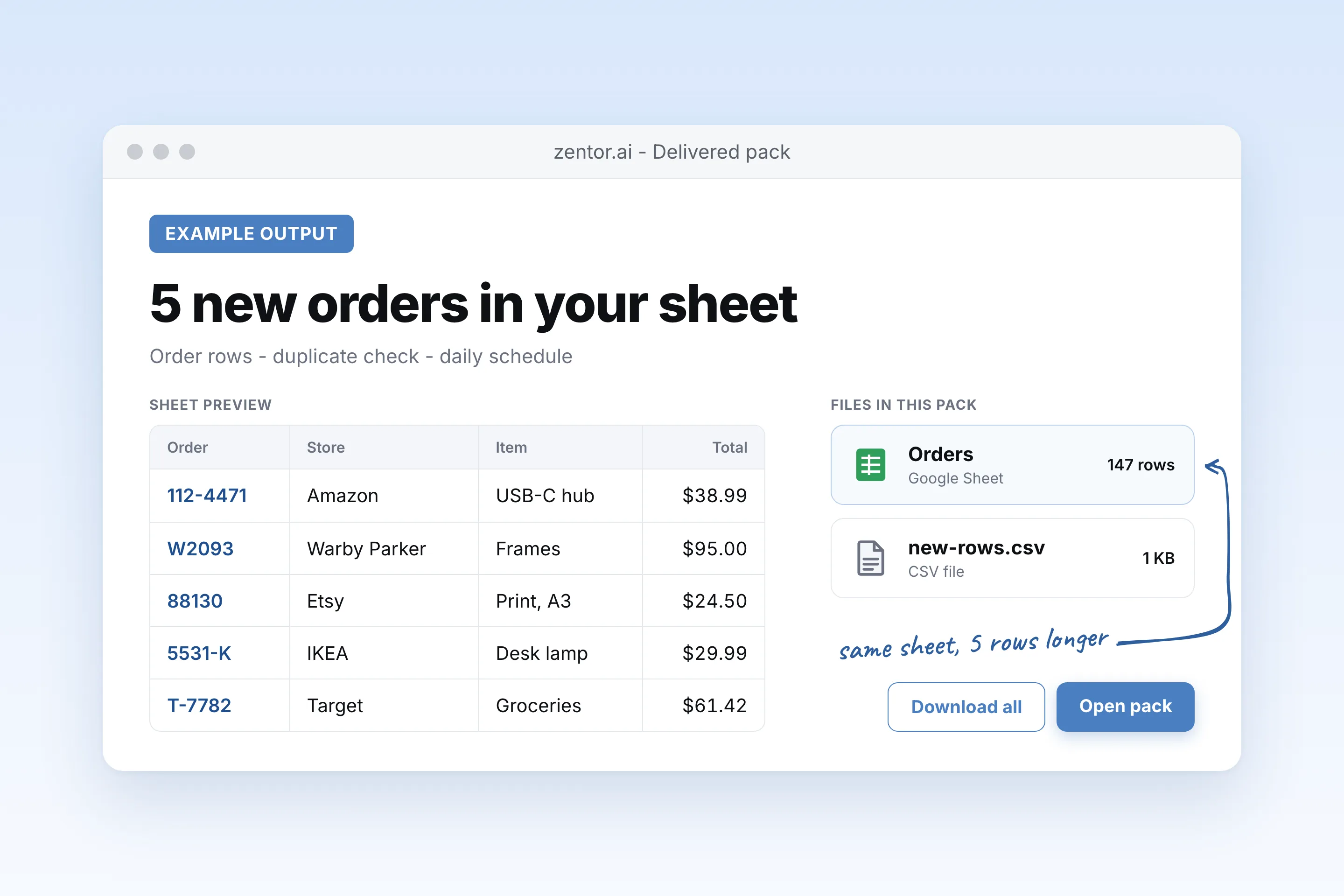
5 new orders added to your Orders sheet.
| Order | Store | Date | Item | Total |
|---|---|---|---|---|
| 112-4471 | Amazon | Oct 19 | USB-C hub | $38.99 |
| W2093 | Warby Parker | Oct 19 | Frames | $95.00 |
| 88130 | Etsy shop | Oct 19 | Print, A3 | $24.50 |
| 5531-K | IKEA | Oct 19 | Desk lamp | $29.99 |
| T-7782 | Target | Oct 19 | Groceries | $61.42 |
Skipped 2 emails that were already in the sheet. I'll run this every morning at 8:00 and only add new orders.
Update the job so it falls back to the PDF attachment when no total is found in the body.
Used 1 tools
create_schedule Gmail to Sheets sync · cron 0 8 * * * · gmail-orders-to-sheets.md
Schedule saved. Next run: tomorrow 08:00.
Done. When the body has no total, I'll open the attached PDF and read it from there. Next run is tomorrow at 8:00.
- Done. When the body has no total, I'll open the attached PDF and read it from there. Next run is tomorrow at 8:00.
Try follow-up prompts
How the extract data from gmail to google sheets works
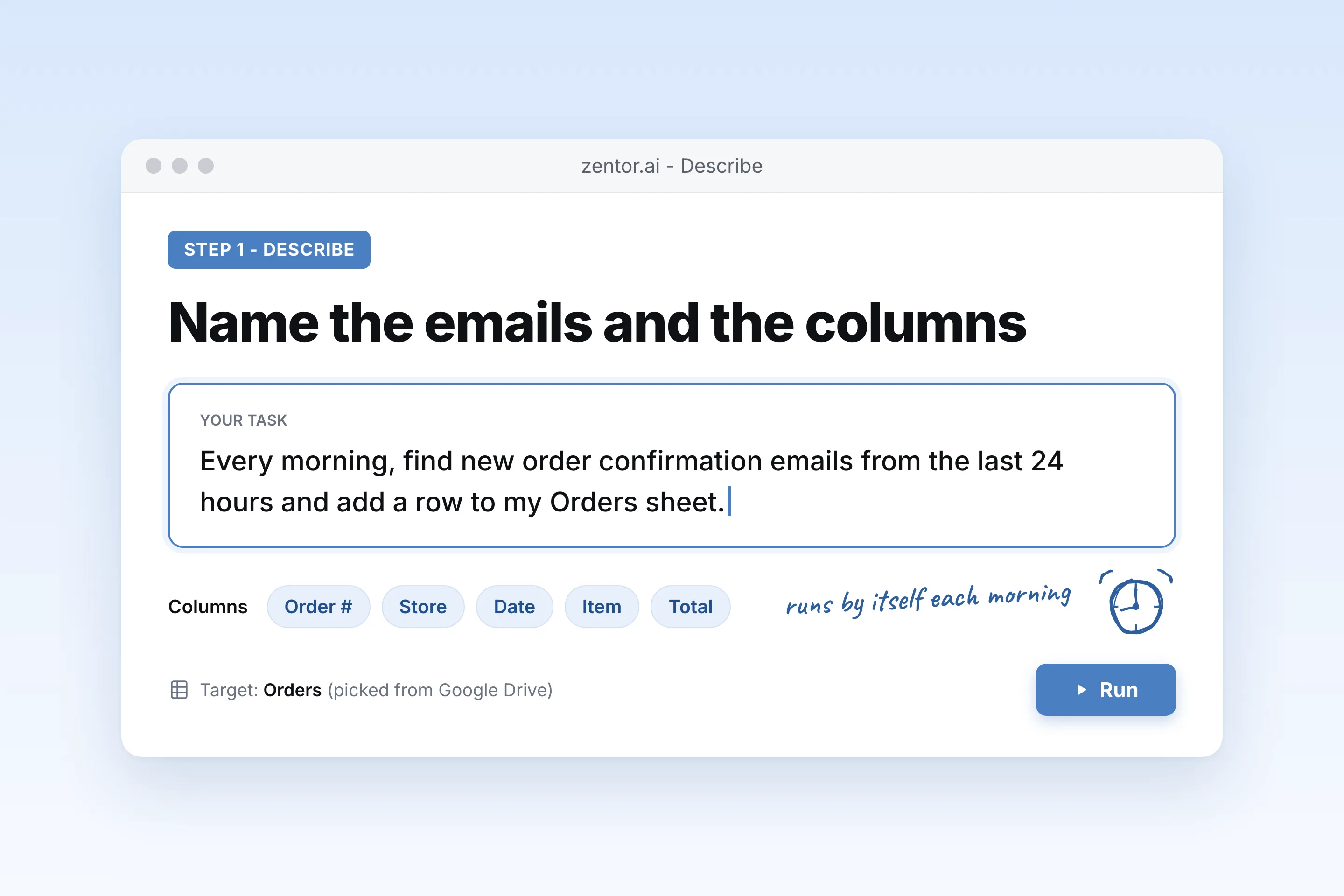
Say which emails and which fields
Describe the emails in plain English (sender, subject, label) and list the columns you want. Pick your existing sheet in the Google picker, or let Zentor create one.
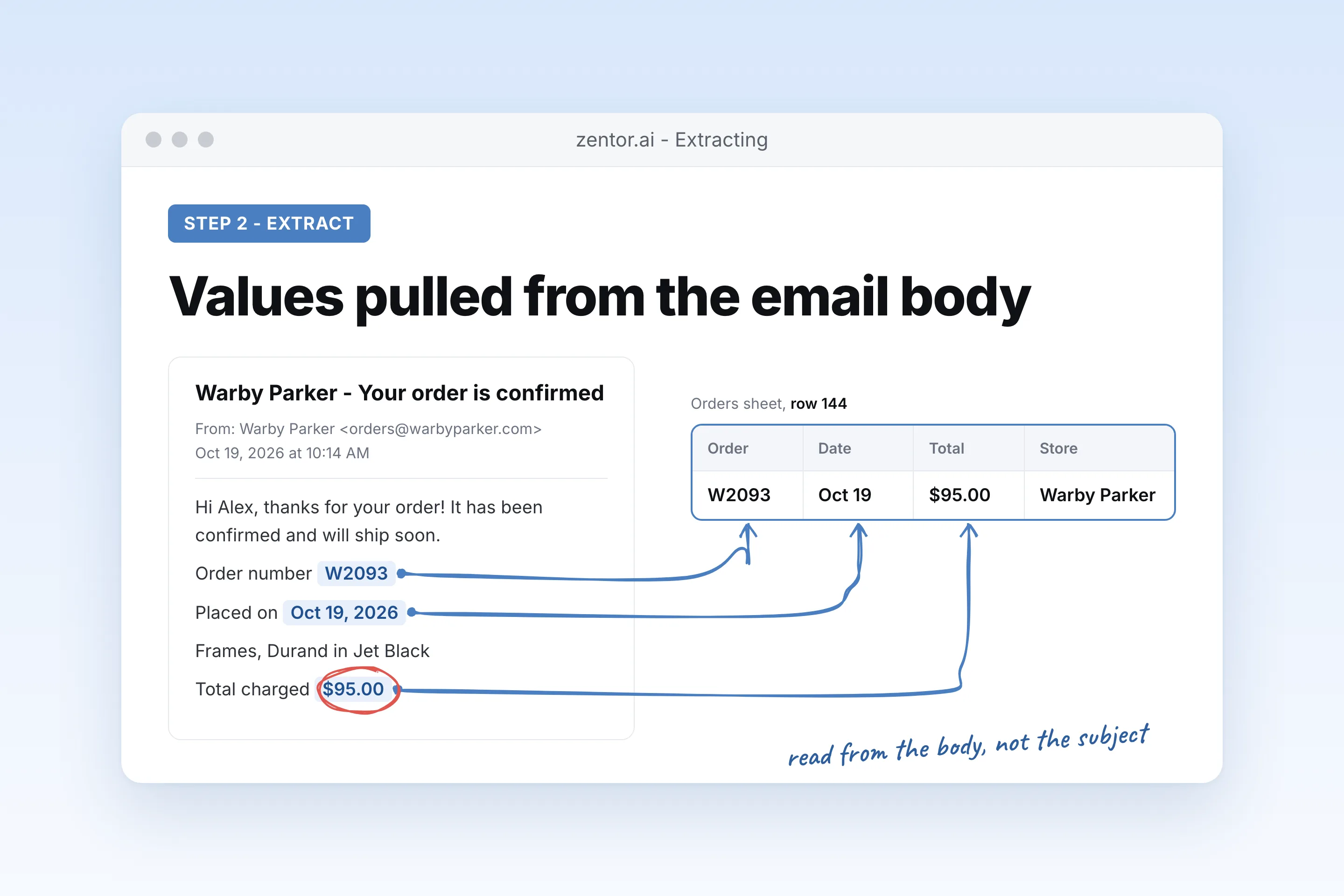
Zentor reads each email and fills the row
It searches Gmail, reads the body and attachments, and pulls the values even when every sender formats them differently.
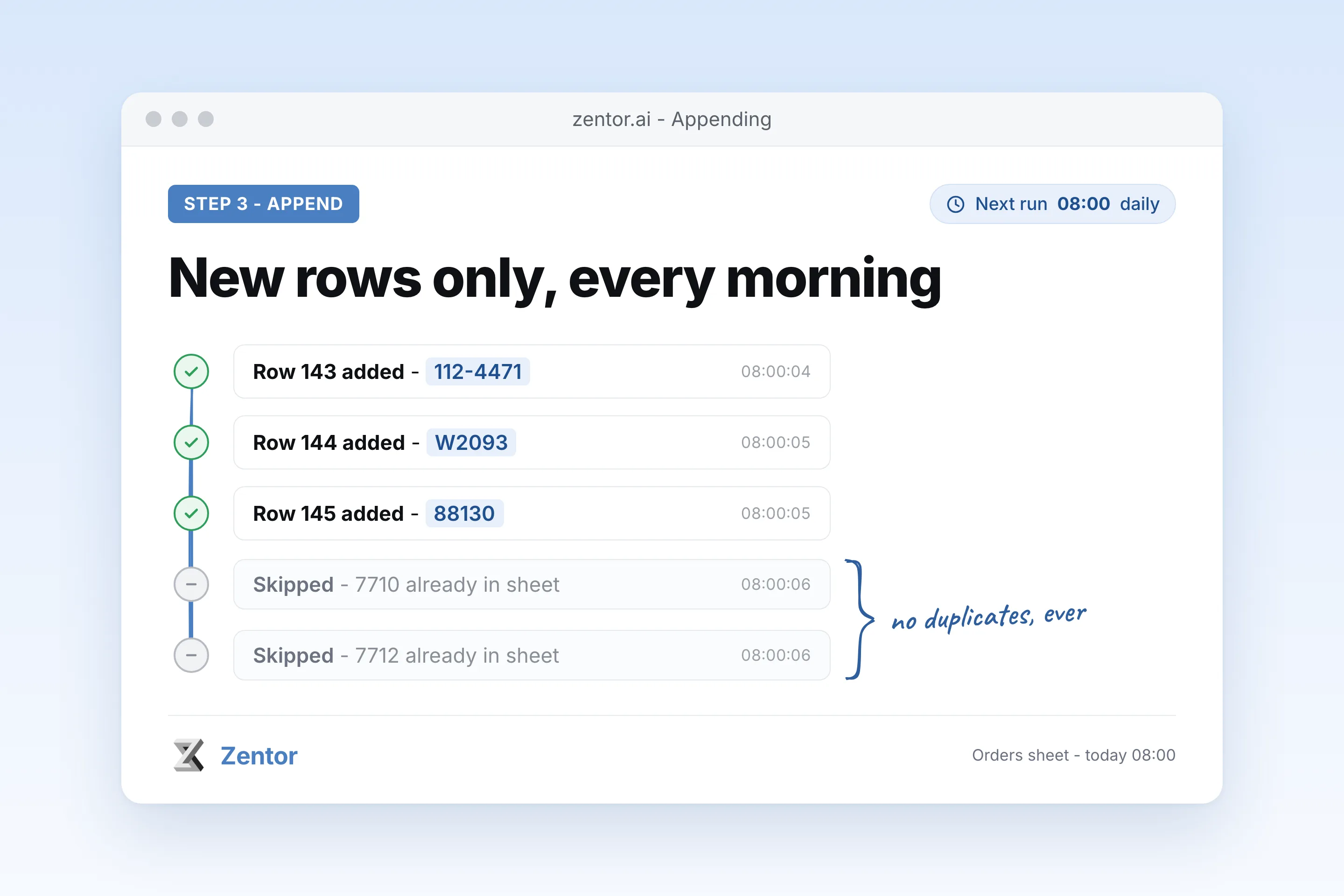
It runs on a schedule and skips duplicates
A daily or hourly run appends only new rows, using the order or invoice number as the key, and tells you what it added.
What you can pull into Sheets
What your extract data from gmail to google sheets sends you
A real example of what Zentor hands back, shown before you sign up.
extract data from gmail to google sheets: Zentor vs export add-ons
See how Zentor's AI-powered approach differs from traditional tools.
| Feature | Apps Script | Export add-on | Zentor |
|---|---|---|---|
| Setup | Write and maintain code | Install and map fields | Describe the emails and columns in plain English |
| Values inside the body | Regex per sender, breaks on layout changes | Mostly sender, subject, date, body text | Reads the email and pulls the named fields |
| PDF attachments | Extra code | Usually not parsed | Opens the attachment when the value lives there |
| Duplicates | You build the check | Depends on the tool | Checks the key column before appending |
Weighing other tools for extract data from gmail to google sheets?
Side-by-side comparisons of the tools people weigh against Zentor for this kind of work.
Why extract Gmail data with an agent instead of a script?
Apps Script and export add-ons copy fields like sender and subject. The numbers you actually need are buried inside the email body.
Reads the email, not just the header
Totals, order numbers and dates come out of the body or the PDF, even when every store lays them out differently.
Writes to the sheet you already use
Rows land in your existing columns. No new template, no CSV to import by hand.
No duplicate rows
Each run checks the key column first, so re-running a backfill or a daily sync never doubles a row.
Ways to extend your extract data from gmail to google sheets
Click one to load it into the box above, ready to run.
extract data from gmail to google sheets FAQ
How do I extract data from Gmail to Google Sheets automatically?
Connect Google in Zentor, then describe which emails to read and which columns to fill. Zentor searches Gmail, pulls the values from each email and appends a row to your sheet. Ask it to run every morning or every hour and it keeps the sheet current.
Can it write to a sheet I already have?
Yes. Pick the sheet in the Google file picker when Zentor asks, and it appends to your existing columns. Zentor only gets access to files you pick or files it creates for you, not your whole Drive.
What if every sender formats the email differently?
That is the main reason to use an agent here. Zentor reads the email the way you would and finds the order number or total wherever it sits, instead of relying on one fixed pattern per sender.
Will it add the same email twice?
No, if you name a key column such as order number or invoice number. Each run checks the sheet for that key before adding a row.
Can it read data from PDF attachments?
Yes. If the amount or invoice number is only in the attached PDF, Zentor opens the attachment and pulls it from there.
Does Zentor send or delete my emails while doing this?
Not unless you ask. For this job it only searches and reads. You can also ask it to apply a label such as Logged so you can see which emails were processed.
Integrations
Best integrations for extract data from gmail to google sheets
Who it's for
Who uses extract data from gmail to google sheets
Related email automation use cases
See also
Try Extract Data from Gmail to Google Sheets for free
No credit card required