AI Builder Credits End Nov 1: What Breaks
AI builder credits ending Nov 1, 2026: see which Power Automate actions fail, what credits survive a contract, and how to keep scheduled work running.
AI Builder credits ending on November 1, 2026 does not mean AI Builder stops working that day. Microsoft ends the capacity add-on and seeded-credit programs for future eligible purchases and renewals, while honoring credits attached to existing contracts until those contracts expire. The urgent question is whether the environment running your next invoice or document batch will have a usable balance when the AI action fires. Microsoft's end-of-credits calendar separates the November 2026 policy date from each customer's contract end date.
Key Takeaways:
- November 1, 2026 is an entitlement change, not a shutdown switch for every existing flow.
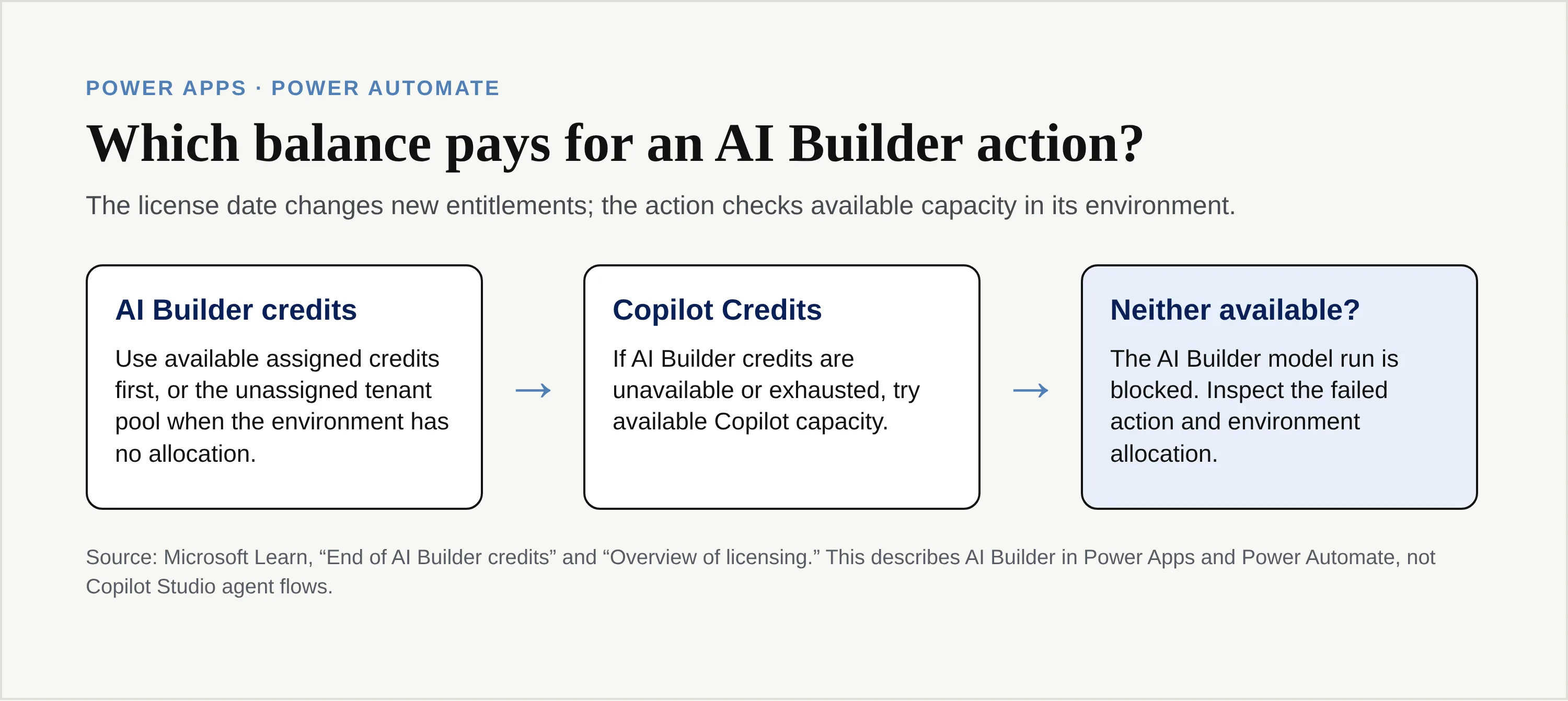
- In Power Apps and Power Automate, available AI Builder credits pay first; available Copilot Credits can take over when that balance is gone. No capacity in either currency means the AI Builder action can fail.
- Microsoft does not convert an old AI Builder balance into Copilot Credits. Check the contract, the environment allocation and current-month usage separately.
- Put an exception path around scheduled AI work so an exhausted quota doesn't masquerade as a completed invoice or a clean spreadsheet update.
What changes on November 1, 2026?
Microsoft labels November 1, 2026 the end of life for both AI Builder capacity add-ons and seeded AI Builder credits. These are related but different sources of capacity. An add-on is purchased capacity; seeded credits come with eligible Power Platform or Dynamics 365 licenses. New customers had already lost the ability to buy an AI Builder capacity add-on on November 1, 2025, while existing add-on customers could continue buying or renewing before the later cutoff. That earlier sales change explains why someone shopping for the first time may already see Copilot Credits as the route forward.
After November 1, 2026, new or renewed eligible licenses no longer bring fresh seeded AI Builder credits. An existing customer's eligible seeded credits remain available monthly through the end of the applicable contract term; active add-on credits likewise remain usable until the add-on contract expires. Microsoft's licensing overview spells out the distinction for Power Platform and Dynamics 365 renewals. The administrator, rather than the calendar alone, needs the contract end date to forecast the real capacity change.
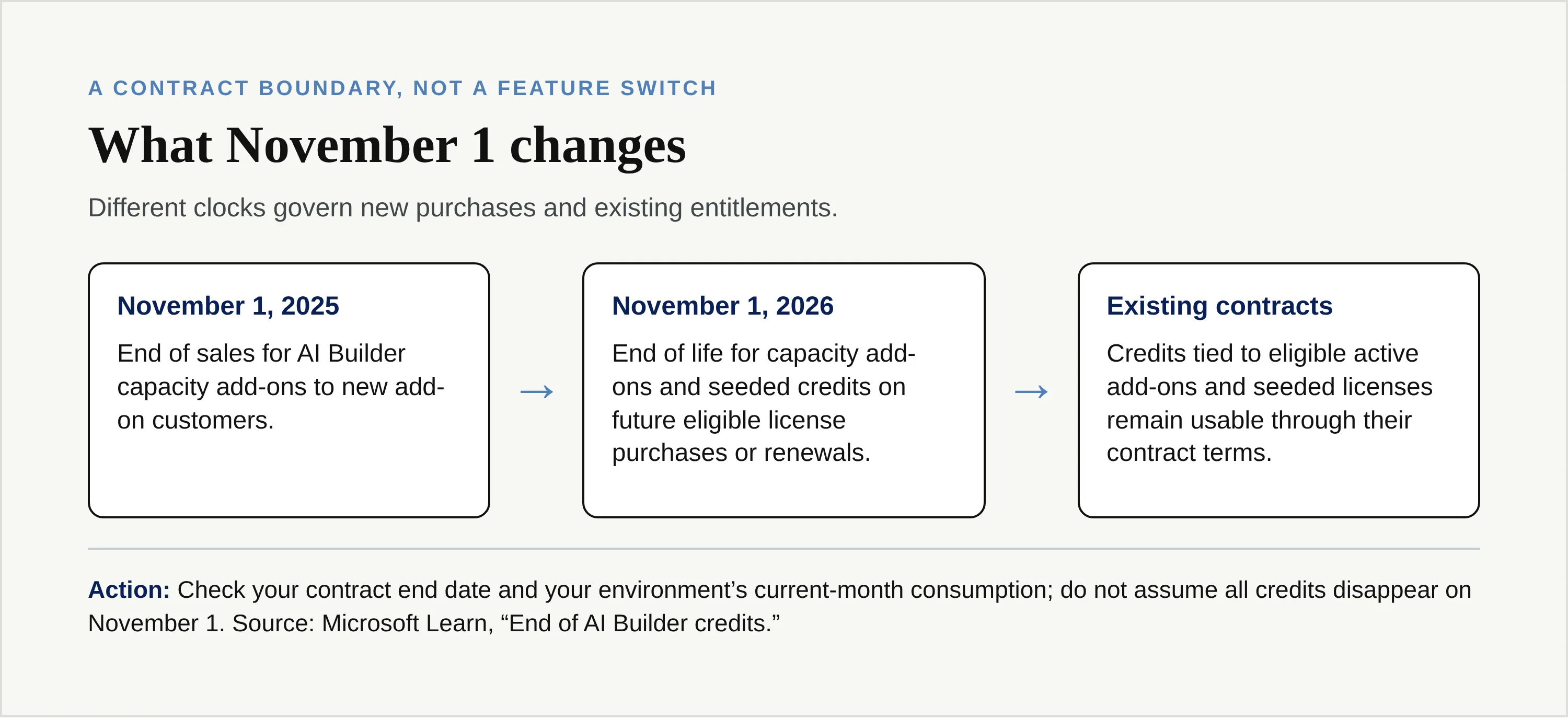
AI Builder credits ending on new licenses doesn't mean a midnight purge of previously granted credits. Nor should an owner assume a renewal made after the cutoff keeps adding the same seeded capacity. Put the purchase or renewal date, contract expiry and affected environment next to each critical flow. Those dates answer different questions.
Keep the work moving beyond one credit balance
For research and document tasks outside your governed Microsoft flows, Zentor can deliver work into the tools you already use. Keep the flow where it belongs; give portable tasks another route.
Get early access →
Does AI Builder stop working in Power Automate or Power Apps?
No. Microsoft says its AI Builder features remain supported, including after the credit transition. For AI Builder actions in Power Apps and Power Automate, the system first consumes available AI Builder credits, then tries available Copilot Credits when the first balance is unavailable or exhausted. If neither can fund the action, the model run is blocked. That is a licensing failure for the affected AI operation, not an announcement that every app or cloud flow in your tenant is disabled.
Suppose you schedule a flow to read incoming receipts and add extracted fields to a table. If an AI Builder extraction action fails, a downstream table update that depends on the extracted fields cannot be treated as successful processing. The mail may still arrive; non-AI steps may still run according to your flow's configuration. Inspect the actual run history and its failure-handling branches before saying the whole workflow succeeded or failed. Microsoft's cloud-flow error-handling guidance describes Run after settings, catch scopes and notifications for failed actions.
AI Builder credits vs Copilot Credits: will Microsoft convert them?
No. Microsoft's transition FAQ explicitly says there is no automatic conversion or migration from AI Builder credits to Copilot Studio Credits. Dual-mode licensing is a consumption order, not an exchange desk. A remaining AI Builder entitlement does not become a new Copilot entitlement when the contract ends, and the date itself doesn't grant a replacement balance.
| Question | AI Builder credits | Copilot Credits |
|---|---|---|
| Where can AI Builder use them? | In Power Apps and Power Automate when available | In those apps and flows as fallback or sole capacity; also required for Copilot Studio AI capabilities |
| If both are available in a Power Apps or classic Power Automate environment? | Consumed first | Consumed after available AI Builder credits |
| What happens to an unused balance at a monthly reset? | Does not roll into the next month | Does not roll into the next month |
| Do old entitlements turn into the other currency? | No automatic conversion | Must be separately available through the relevant licensing or billing route |
The licensing and rate table lists charges by capability and unit, rather than one universal conversion ratio. An OCR page and a generative prompt do not use the same units. As of October 24, 2026, a plan-specific Copilot Credit price or AI Builder-to-Copilot cost equivalence for your workload still needs verification against the selected contract, rate table and actual action mix. This article deliberately does not turn a sample rate into a procurement quote. The comparison worth making is your own monthly completed documents, including exceptions and retests, divided by the cost of keeping that work running.
Credits also need to reach the correct environment. Microsoft distinguishes allocated environment capacity from unallocated tenant capacity. For AI Builder, an environment with a specific allocation does not automatically draw from the unallocated tenant pool after exhausting its assigned credits. A tenant-wide balance can look healthy while one production environment is overage. The AI Builder credit-management page documents that allocation rule. Ask which environment owns the action before buying capacity because a balance in the wrong place will not fix its failed run.
Which error appears when AI Builder credits run out?
Check the failing AI Builder action, not just the top-level “flow failed” badge. Microsoft's overage documentation names EntitlementNotAvailable and QuotaExceeded among AI Builder action error codes when available AI Builder credits run out and no Copilot Credits can take over. In the flow editor, its remediation panel can say “All AI Builder credits in this environment have been consumed.” These are documented signals, not a promise that every license failure always displays the same text.
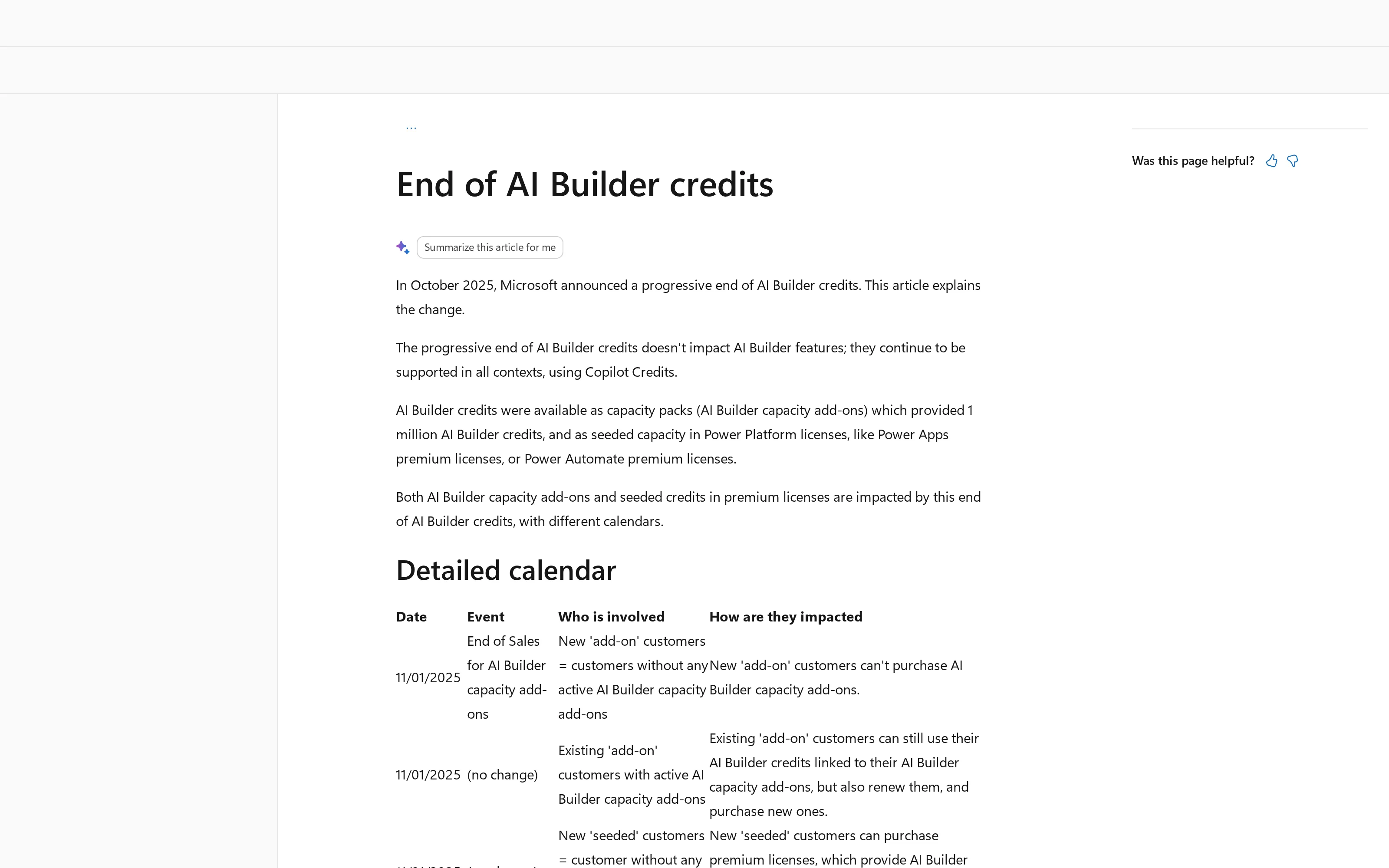
That screenshot is from Microsoft's end-of-credits calendar, rather than a tenant error dialog. You can inspect the credit-management troubleshooting instructions for the literal error codes; no private tenant UI has been reproduced here. If the action reports NoCapacity or “Credit usage exceeds allocation,” the same page tells you to inspect entitlement and allocation. A missing credit balance, an environment assignment, an expired contract and an ordinary document-processing exception are not interchangeable diagnoses.
Start with the environment's allocation and the AI Builder consumption report. The Power Platform admin center shows capacity and current-month computed use; Microsoft warns that consumption computation can lag. That lag means today's run can keep consuming against a last-known figure before the system switches to fallback or blocks later runs. Don't use the displayed remaining balance as a guarantee that tomorrow morning's batch will complete. Reconcile the report with a real test run and your flow's failed-action history.
If you need to preserve a record while capacity is fixed, use Run after or a catch scope to write the input's identifier, the failed action and the reason to an exception list, then notify the owner. Retry only after the entitlement or allocation issue has actually changed. Replaying an entire batch without checking which rows already committed can create duplicates; design the handoff around a stable document or row ID.
Which licenses included seeded AI Builder capacity?
The seeded allowance was not one flat number for every Microsoft product. The published credit-by-license table currently lists Power Apps Premium at 500 AI Builder credits per license, Power Automate Premium at 5,000, and Dynamics 365 Finance and Operations at 20,000 with a 20,000-credit tenant maximum for that item. An AI Builder capacity add-on supplies 1,000,000 credits. These are Microsoft documentation figures checked on October 24, 2026, not a substitute for your contract or a prediction of future renewal terms; other SKUs have different caps and exceptions.
| Documented example | AI Builder credits shown | Read it with this qualification |
|---|---|---|
| Power Apps Premium | 500 | Microsoft lists a tenant maximum for this seeded SKU. |
| Power Automate Premium | 5,000 | Seeded amount depends on an eligible license and its contract term. |
| Dynamics 365 Finance and Operations | 20,000 | Microsoft's table applies a separate tenant maximum. |
| AI Builder capacity add-on | 1,000,000 | Existing active add-on credits can run to contract expiry. |
The exact count in your environment can differ from multiplying seats by a headline number, especially where SKU-specific caps, dates and allocations apply. Check the admin center's entitlement and the contract record rather than inferring a remaining balance from a purchase order. Microsoft says the seeded credits attached to eligible earlier purchases and renewals remain usable on a monthly basis through the end of their contract terms. That doesn't turn unused credits into a saved-up pool: its licensing overview says unused AI Builder and Copilot Credits do not roll over to the next month.
Keep scheduled AI batches working without one quota as the only exit
A second vendor is not a silent fallback for a blocked Microsoft action. The flow's permissions, inputs, model behavior and outputs need an explicit handoff. Start by sorting work into what must remain inside a governed Power Platform workflow and what is a portable job, such as summarizing public research, preparing draft copy or reviewing non-sensitive documents under your organization's policies. Keep Dynamics updates, approval chains and regulated data inside the controls that already own them unless the responsible team approves another route.
For Microsoft-dependent tasks, the fastest fix may simply be reassigning existing capacity or making Copilot capacity available to the right environment. Have the admin check capacity before a daily batch, set an alert or exception path for failed AI actions and keep a small test input to verify the repair. Microsoft documents both AI Builder consumption reporting and Copilot capacity controls. A purchasing decision without an environment-level check can solve the wrong problem.
For portable work, write down a narrow acceptance test: what source was read, which fields must appear, where the finished item should land, and who reviews uncertain outputs. A one-person business that scans vendor documents might keep the licensed Power Automate intake for protected data while assigning non-sensitive market research and follow-up drafts elsewhere. Zentor's role in that parallel lane is to carry workspace memory between AI tools through Zentor MCP, so the instructions and context need not live only in one workflow builder. Its document automation guide makes the practical split between extraction, validation and later actions; those stages should not be mistaken for a single AI call.
Zentor can schedule a task while your laptop is closed, but don't imply that this bypasses Microsoft's licensing for an AI Builder action still running in Power Automate. Its Smart Routing chooses a model for Zentor's own task work; it does not replenish an exhausted Microsoft environment. If you want a separate record of portable research, put the deliverable into an existing Notion or Airtable workspace and keep the run source and decision there. Read more about where a fixed automation still wins in the automation comparison. A maintained parallel route buys operational choice, not permission to copy restricted data across systems.
FAQ: AI Builder credits ending in 2026
Will my Power Automate flow fail on November 1?
Not simply because the date arrives. Eligible existing credits remain available through the relevant contract term. A flow's AI Builder action can fail if the environment lacks usable AI Builder credits and Copilot Credits when it runs; check that action's run history, contract and allocation. Other steps depend on the flow's configuration.
Do I need to buy Copilot Credits immediately?
Not every customer does. Existing eligible AI Builder credits can still cover Power Apps and classic Power Automate AI Builder work until their contract entitlement ends or the available monthly capacity is exhausted. If continued AI usage needs more capacity, discuss Copilot Credits, a prepaid allocation or an applicable pay-as-you-go route with your administrator. A purchase alone does not verify that the target environment can use it.
Will unused AI Builder credits roll over or convert?
No. Monthly unused capacity does not roll over, and Microsoft does not convert AI Builder credits into Copilot Credits. Contract-term honoring means you can keep receiving the eligible monthly capacity through that term; it does not mean you can bank unused months or transfer old currency at expiry.
For anyone worried about AI Builder credits ending, the practical date is the first batch that cannot find capacity where it runs, not the headline date alone. Record the contract clock now, test the environment's fallback and make failed items visible to a person before November 1 arrives.

Zentor Editorial Zentor editorial team
The Zentor editorial team writes about workflow automation, AI agents, and the tools we build. Default byline for industry overviews, listicles, and collaborative pieces.
Ready to put this into practice?
Zentor runs browser tasks, research, and schedules automatically. Try it free.