Airtable Date Overlap: Check Every Assignment

Check Airtable date overlap with an explicit range rule, a formula for two ranges, and a repeatable method for finding conflicts across assignments.
An Airtable date overlap check should compare date ranges mathematically, then report the matching assignments. It should not ask a language model to guess whether two intervals intersect: in a documented community case, an assignment from April 7–13 fell entirely inside a March 20–June 7 assignment, yet the AI field reported no overlap. Original Airtable question.
Key Takeaways:
- Two closed date ranges overlap when each starts on or before the other ends.
- Comparing two ranges already present in one record is different from checking every assignment for the same person.
- A single-row formula does not automatically discover all other assignments that need comparison.
- Missing dates, reversed ranges, same-day boundaries, and travel days require explicit rules.
- Calculate conflicts first. Use an assistant to explain the verified results or prepare a report afterward.
Define what counts as an Airtable date overlap
Before adding a formula, decide whether your schedule uses whole dates or precise timestamps. For date-only assignments, a closed interval is often a useful starting policy: both the starting day and ending day count as occupied. Under that policy, an assignment ending on April 7 conflicts with another beginning on April 7.
For appointments, a different policy may be appropriate. A booking from 9:00 to 10:00 might not conflict with one beginning exactly at 10:00. That is a half-open interval policy, where the end is excluded. Neither policy is universally correct. The mistake is letting different parts of the workflow silently use different meanings.
Write the policy near the schedule rather than leaving it inside a prompt. Include the timezone when times are involved. If assignments are date-only, keep them date-only throughout the comparison instead of introducing midnight timestamps and then formatting them back into dates.
Also define the resource being checked. Two overlapping assignments are not a staffing conflict if they belong to different people. Conversely, two assignments with different project names can still conflict if they reserve the same person. Compare a stable person or resource identifier, not a name that may change or be shared.
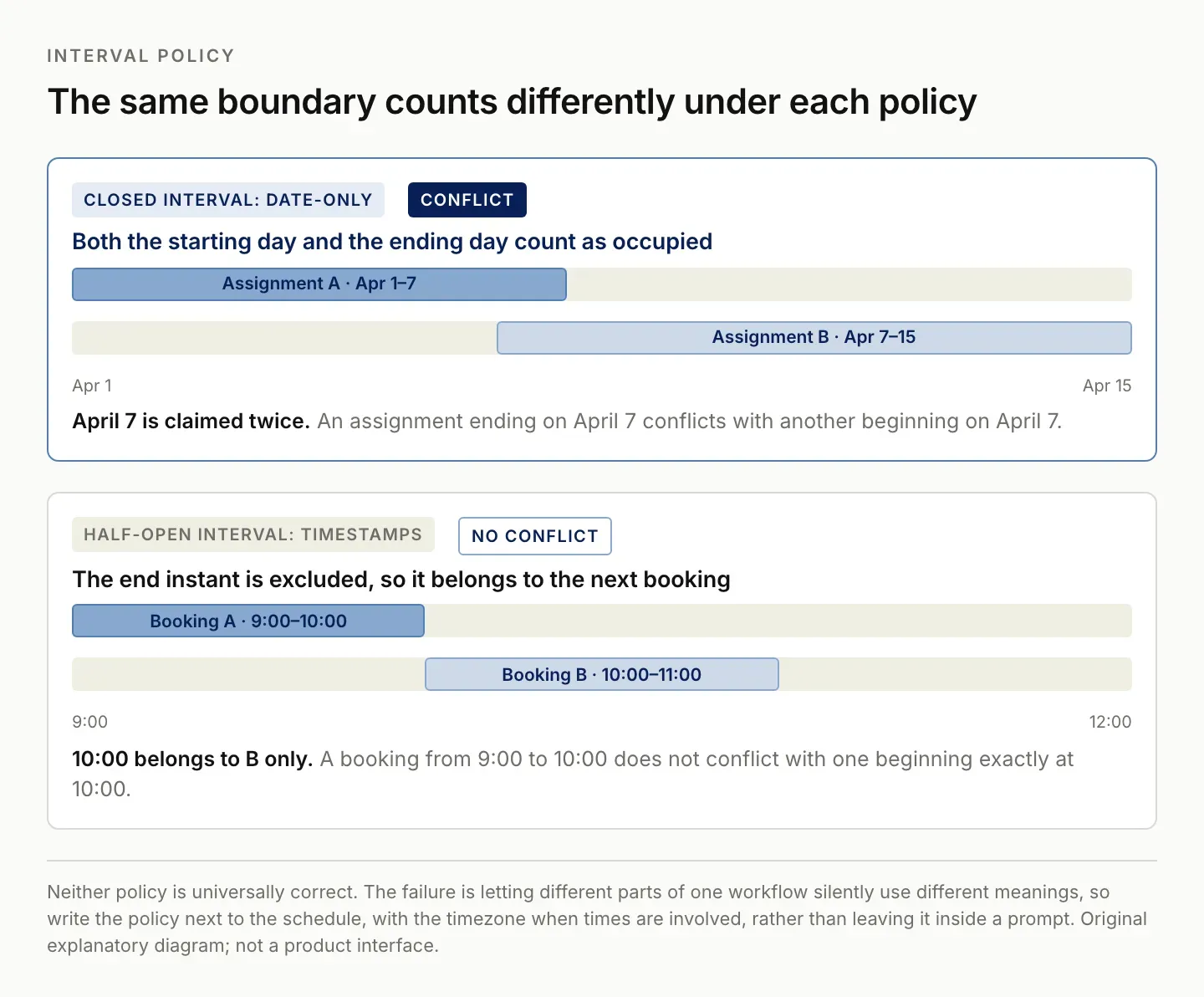
The boundary is where the two policies part company. Pick one, write it beside the schedule, and use it everywhere in the workflow.
Use the two-range overlap rule
For closed intervals, the rule is:
Start A <= End B AND Start B <= End A
This catches partial overlaps, identical ranges, one range completely inside another, and shared endpoints. Checking only whether Start A falls inside B misses cases where A begins earlier and extends across all of B. That is why a complete containment example is an essential test.
You can reason about the result directly. The overlap begins at the later of the two start dates and ends at the earlier of the two end dates. If the proposed overlap begins after it ends, there is no intersection. This also gives you useful output: the actual conflicting dates rather than just a yes/no label.
| Range A | Range B | Closed-interval result |
|---|---|---|
| March 20–June 7 | April 7–13 | April 7–13 overlap |
| April 1–10 | April 7–15 | April 7–10 overlap |
| April 1–6 | April 7–15 | No overlap |
| April 1–7 | April 7–15 | April 7 overlap |
The first row restates the dates in the linked community question. The remaining rows are explicitly constructed test cases, not customer outcomes. They are small enough to verify without trusting either an assistant or a complicated base.
Compare two ranges in an Airtable formula
When all four endpoints are already available as scalar date values in one record, you can express the rule in a formula field. For a date-only test table, use clearly named fields such as Start A, End A, Start B, and End B. Check missing values and reversed intervals before evaluating overlap.
IF(
  AND({Start A}, {End A}, {Start B}, {End B}),
  IF(
    OR({Start A} > {End A}, {Start B} > {End B}),
    "Check reversed dates",
    IF(
      AND({Start A} <= {End B}, {Start B} <= {End A}),
      "Overlap",
      "No overlap"
    )
  ),
  "Check missing dates"
)
This is a proposed formula for the stated field arrangement. The logical comparison has been tested locally; check the formula in your own Airtable base before relying on it. Field types, lookup values, and date settings can change how an apparently identical expression behaves.
Airtable's reference documents its formula functions and links to the formula playground. Use the documented field types and functions rather than assuming that a text field formatted like a date behaves identically to a date field. Airtable formula reference.
If the dates come through lookup fields, inspect whether the result contains one value or several. A list of dates is not a single interval. Converting it into a string may make a formula stop complaining while destroying the meaning of the comparison. Resolve the record relationship or perform an explicit multi-record calculation instead.
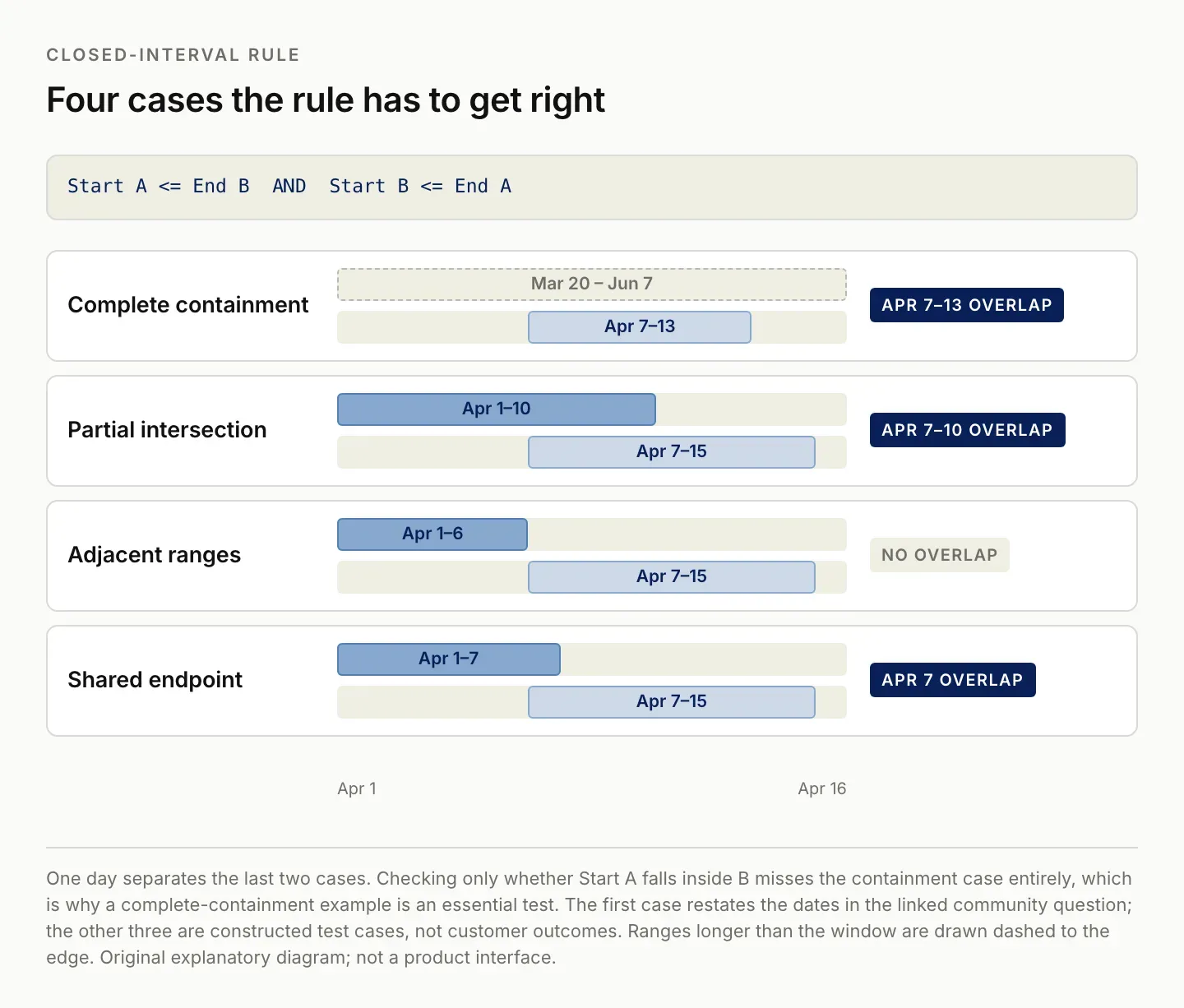
One day separates the last two cases. A test suite without the containment case will pass while the rule is still wrong.
Check all assignments for the same person
The original scheduling question is larger than a four-field formula. It asks whether any assignment for a crew member overlaps another assignment. The system must first gather the relevant records, then compare the correct pairs. A formula that works perfectly on two manually entered ranges does not complete that job.
Use a People or Crew table linked to Assignments. Each assignment needs its own identifier, a resource relationship, a start, and an end. Keep a link to the original record in every conflict result. If assignments can contain several people, treat each person's membership explicitly rather than comparing a concatenated list of names.
Airtable lookup fields require actual linked records, not merely a field definition. Confirm that the assignment is connected to the intended resource before interpreting an empty lookup as an empty schedule. Airtable lookup documentation. Zentor's Airtable integration page lists the Airtable connections currently available to an account.
For a small manually reviewed schedule, you can create explicit pairs to compare. For a larger schedule, use a deterministic calculation that groups records by resource and compares the pairs within each group. Report each pair once. Comparing A with B and later B with A should not create two different warnings for the same conflict.
For each result, include the resource identifier, both assignment identifiers, both original ranges, and the intersecting range. If a record lacks a date or has its dates reversed, place it in a separate exceptions list. Do not quietly omit it and then announce that the schedule is clear.
Run a read-only calculation before writing results
A first run should produce a conflict report without changing operational records. That gives you a chance to compare the output with a schedule you can inspect by eye. It also separates calculation errors from writeback errors.
Airtable's scripting extension provides a JavaScript editor and a results pane. Its current documentation lists paid-plan availability and explains that scripts respect the permissions of the person running them. Check access before building a workflow around that surface. Scripting extension guide.
Start with a small set of deliberate test records. Include a contained interval, a partial intersection, an adjacent pair, and a matching range assigned to a different resource. The calculation should flag only the cases your policy defines as conflicts. Retain the input and output together so another reader can repeat the check.
When you later write results back, choose where they belong. A separate Conflicts table can preserve one record per pair and its source links. A text field on each crew member can be simpler to read, but it can also become stale if you only append new findings. Define how resolved conflicts disappear or change status.
Use a stable pair identifier for repeated runs. Preserve any human review notes separately from generated calculation fields. Recomputing dates should not erase someone's explanation that an apparent clash was accepted or rescheduled.
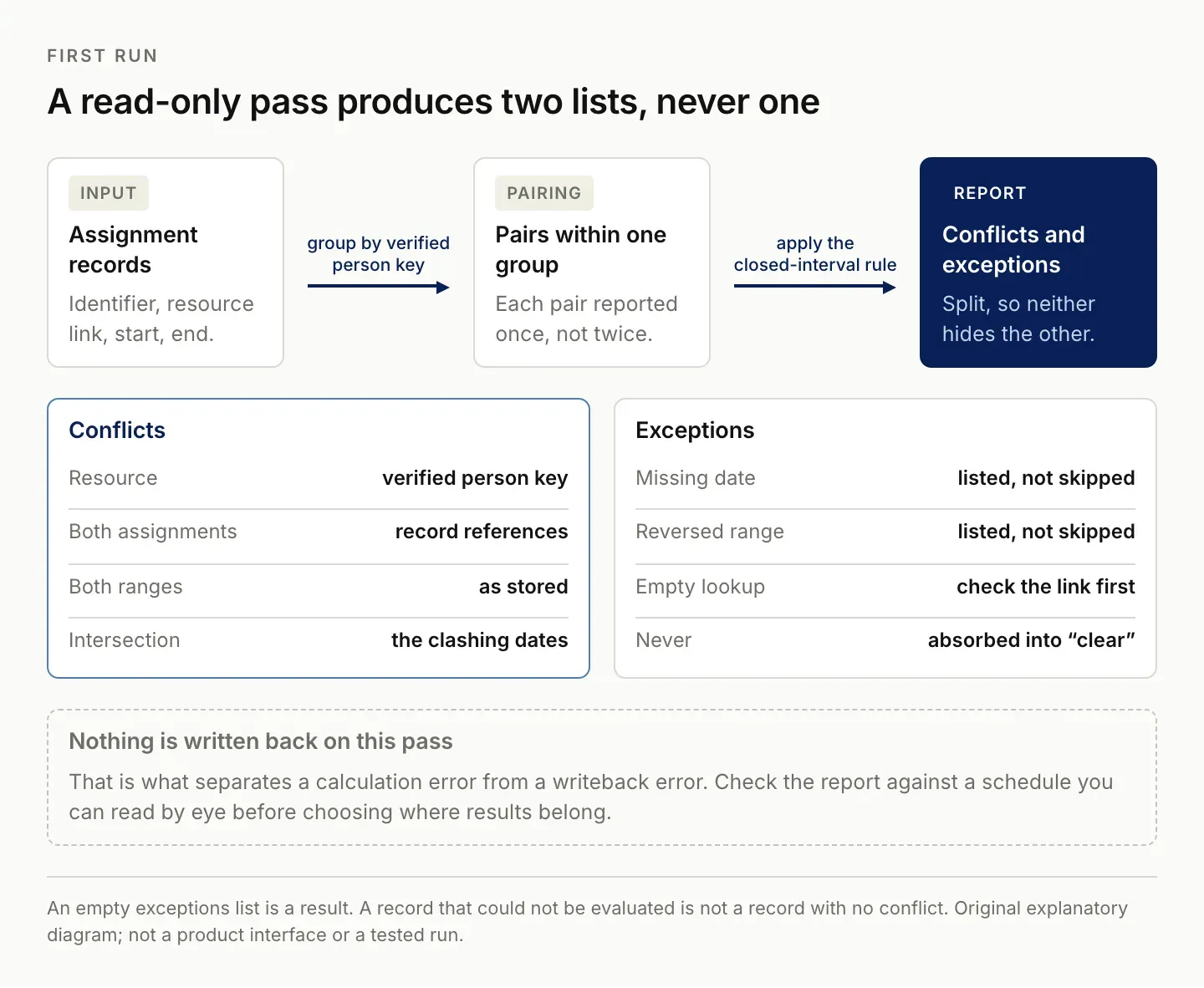
Two lists, never one. A record that could not be evaluated is not a record with no conflict.
Test missing dates, travel days, and boundaries
The local reference calculation prepared for this article passed seven checks: containment, partial intersection, disjoint ranges, included endpoints, different people, missing dates, and reversed dates. Those checks validate the stated date-only logic. They do not establish that an Airtable connector fetched every record or that a Zentor task wrote the result correctly.
A complete product test has additional layers. Confirm that all expected assignments were read, including any records outside the first page of results. Confirm that the resource links were preserved. Compare the number of examined records with the source. Then inspect the resulting conflicts and exceptions.
Travel days deserve their own policy. The original community question distinguishes travel overlap from job overlap. Do not implement that requirement by renaming every one-day clash “Travel Overlap.” A one-day intersection may still be a working-day conflict. The classification must consider which part of each assignment is travel and which part is reserved work.
Start with the simpler question of whether ranges intersect, then classify the overlap using explicitly stored categories or separate travel/work ranges. Include a test where travel and work intersect, a test where two travel periods intersect, and a test where the person is free between assignments. Ask the scheduling owner to confirm how these cases should be treated. The Airtable vs Google Sheets comparison covers when a spreadsheet is still the better fit.
A schedule may also have buffers, partial availability, or shared resources with capacity greater than one. Those require a different model from a binary same-person overlap. State the limits of the current checker rather than treating a passed test suite as proof of every scheduling rule.
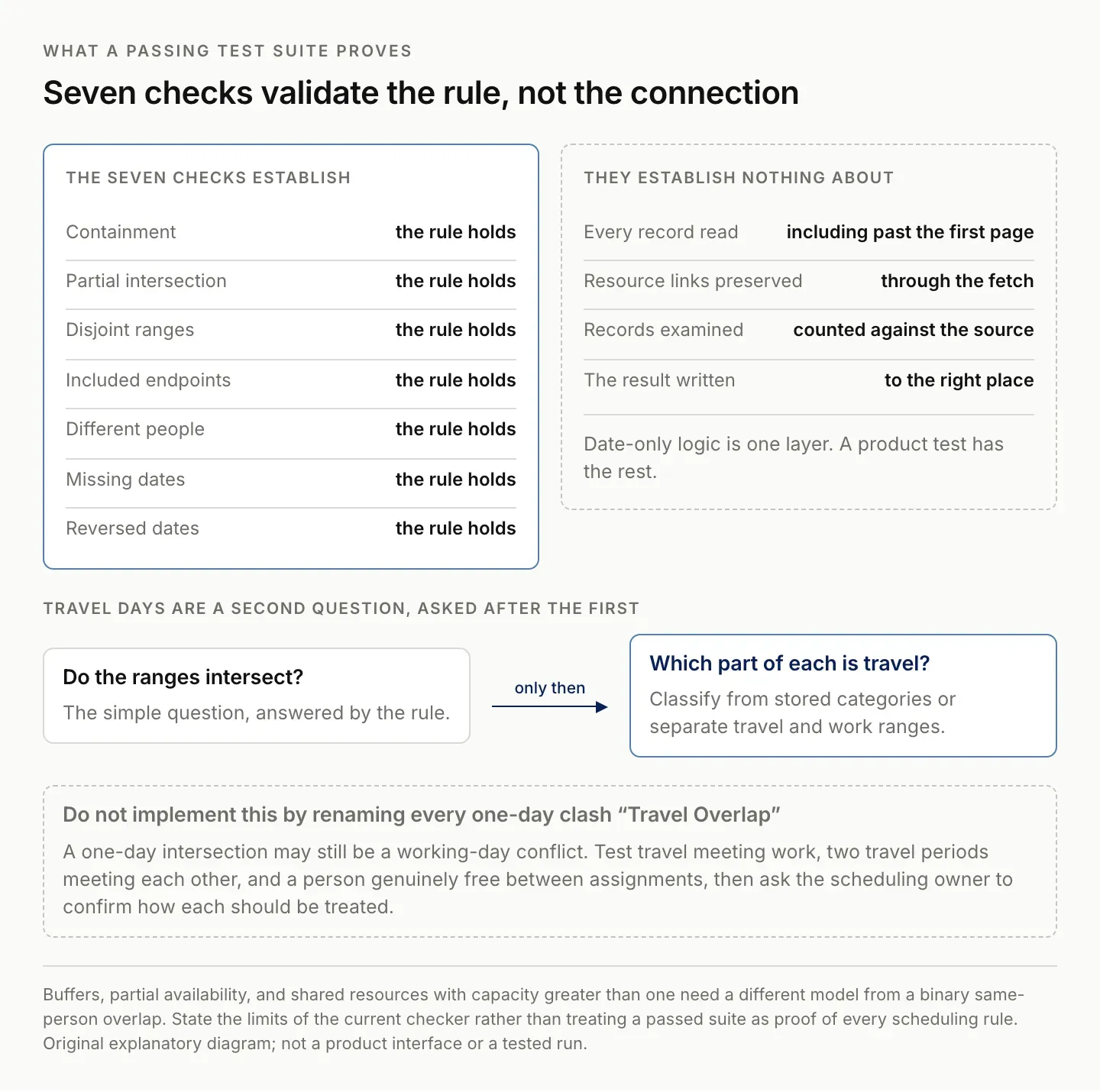
The suite validates the date rule. It says nothing about whether every record was read or the result written.
Keep conflict detection separate from rescheduling
A conflict report identifies a problem; it does not decide which commitment should move. Preserve that separation when adding automation. The appropriate next step may be to contact the project owner, verify an incorrect date, or accept a known exception rather than automatically shifting an assignment.
Airtable also documents date dependencies that can shift related tasks. That feature addresses scheduling dependencies, which is distinct from detecting all resource conflicts. Check its configuration and intended behavior before using it as an alternative to a conflict report. Airtable date dependencies.
For an assistant-supported workflow, give the assistant the verified conflict rows and ask it to explain the impact or prepare a review note. Keep the calculated dates intact. If the explanation introduces another date, resource, or commitment, compare it with the evidence before sharing it.
For a Zentor evaluation, keep the calculation rule explicit: “Use the selected assignment records, group by the verified person key, and report intersecting date-only ranges with both record references. Treat missing or reversed dates as exceptions. Do not reschedule work.” Ask for the actual compared records and returned pairs so you can reconcile the result with the reference cases.
Zentor is in early access. The local checks in this article validate the stated rule, not an Airtable connection or Zentor execution. Confirm the available workflow and inspect a real result before relying on recurring conflict checks. Explore Zentor with a small set whose expected answer you already know.
The useful recurring workflow is a consistent check that leaves understandable evidence. It should tell you which records conflict, which could not be evaluated, what policy was used, and when the source was examined. A confident paragraph saying “no issues found” is not an adequate substitute for those details.
FAQ: Airtable overlapping dates and assignments
Can one Airtable formula check every other record automatically?
Not merely by comparing four fields in the current record. First establish which other assignments should be compared, using explicit relationships or a multi-record calculation.
Does one range entirely inside another count as overlap?
Yes, under the closed-interval policy in this guide. The intersecting dates are the start and end of the contained range.
Should a shared end and start date count as a conflict?
For inclusive date-only assignments, yes. For timestamp bookings that exclude the end instant, not necessarily. Choose and document the policy before testing.
Can an AI-generated report replace the calculation?
Use a deterministic rule to establish the result. An assistant can explain that result or prepare follow-up work, but the report should retain the assignment identifiers and calculated evidence.

Zentor Editorial Zentor editorial team
The Zentor editorial team writes about workflow automation, AI agents, and the tools we build. Default byline for industry overviews, listicles, and collaborative pieces.
Stop doing this manually.
Zentor runs on its own cloud computer - research, monitoring, reports, browser tasks. No setup. No self-hosting.