Notion Assignment Tracker: One Useful Table
Set up a Notion assignment tracker with real deadlines, source links, weekly views, reminders, and clear next steps for individual and group work.
A Notion assignment tracker needs a reliable deadline, a clear next action, and a view of unfinished work before it needs a decorative dashboard. Notion's own school guide and student starter pack include assignment organization, so you can begin with a native template or build one small database around the way you actually study. Notion school guide, student starter pack.
Key Takeaways:
- Keep the official deadline separate from the date you plan to start or review the work.
- Use one assignment record across your list, calendar, and course views.
- Store the assignment brief and submission evidence with the record, especially for group work.
- Add assistance for a concrete recurring burden, such as reconciling changed deadlines, rather than automating an overcomplicated dashboard.
The fields below are repeated as a worksheet you can fill in on this page, then copy into a new Notion database.
Choose the minimum information you will maintain
Start with your current assignments rather than designing the entire semester in advance. For each assignment, identify what you must submit, where the instructions live, when it is due, and the next useful action. If your tracker cannot answer those questions, extra widgets will not make it dependable.
Create one Assignments database. Use the title for the actual deliverable, a Course field for grouping, a Deadline date, a Status, a Next action, and a Source link. Add a Review date if you need to distinguish the official deadline from your own planning date.
Keep the initial status options simple: Not started, In progress, Ready to submit, and Submitted. Use a separate result or feedback note if you want to track grading later. Submitted should mean you have actually completed the submission process, not merely finished writing the document.
Do not require a progress percentage unless you have a useful way to calculate it. A paper described as 80 percent complete can still be missing its central argument. A next action such as “Check the evidence for the second section” is often more helpful for deciding what to do next.
Use the page body for detailed notes, the brief, and links to working files. Keep the fields you need for daily review visible in the database. This makes capture small enough to repeat while preserving the context needed to resume work later.
| Assignment | Course | Source | Deadline | Status | Next action | Owner |
|---|---|---|---|---|---|---|
| Literature review draft | ENG 201 | Canvas assignment page | Mar 14, 23:59 | In progress | Find two more sources | Me |
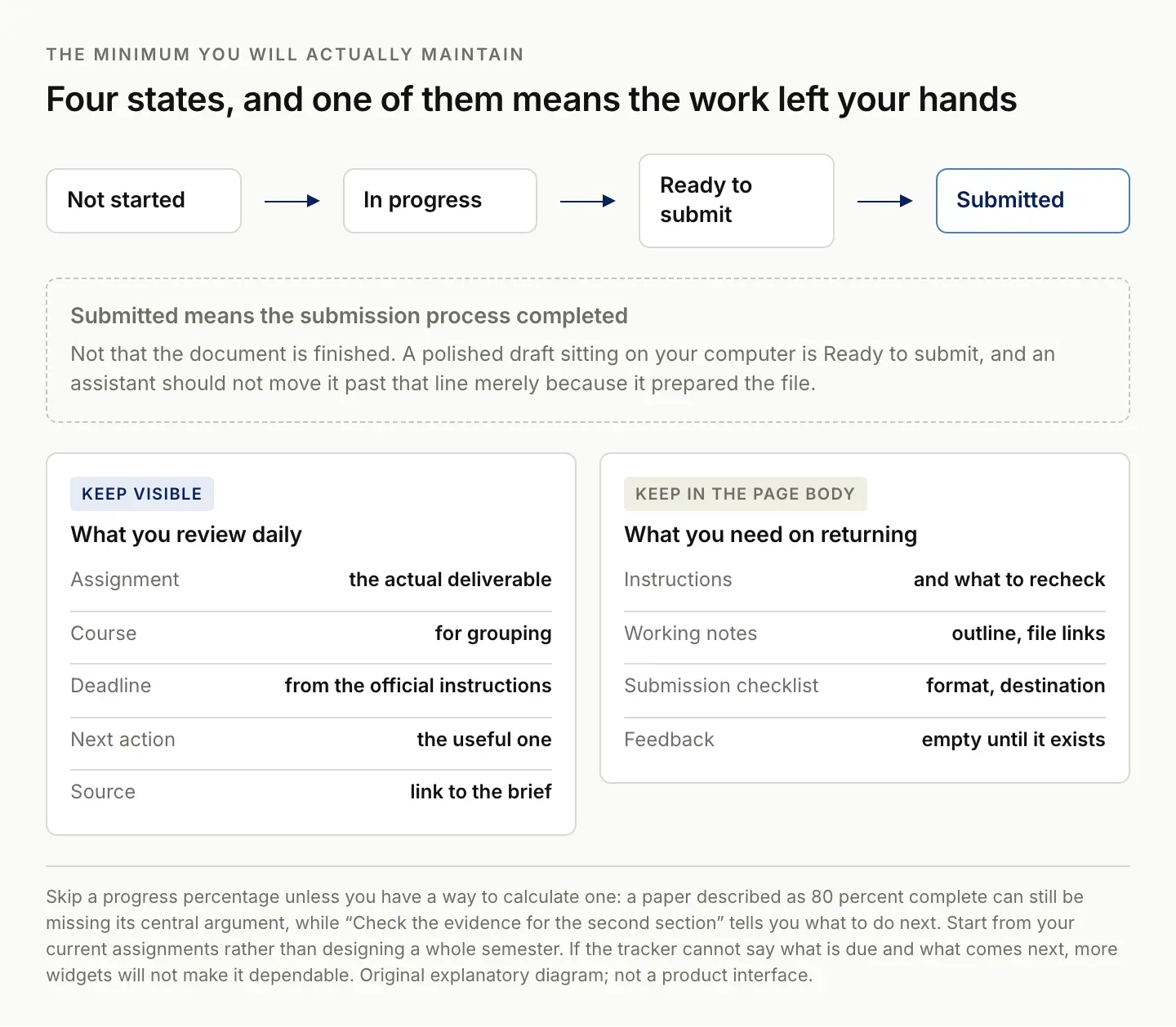
Submitted means the submission process completed, not that the document is finished.
Preserve the actual deadline and source
Copy the deadline from the authoritative assignment instructions and include a time when one is specified. If the course platform uses a particular timezone, preserve that context. Do not resolve a deadline from a vague class note when the official assignment page gives a precise value.
Keep a link to the brief and note when you checked it. Course instructions can change, and a saved reminder is only as accurate as its source. If the instructor changes a deadline, update the record and retain a short note about the change rather than silently replacing the date.
Use a separate Review date or planned work date for your own schedule. The deadline tells you when the work is due; the review date tells you when you intend to make a decision or take a step. Mixing them can make an assignment look overdue even when only your personal plan has slipped.
For a group assignment, record internal handoff dates separately from the final submission deadline. A draft due to the group is not the same as the deadline in the course platform. Both may matter, but they belong to different commitments.
If the source is unclear, label the deadline as needing confirmation and set a next action to resolve it. A guessed date can feel reassuring in a calendar while creating a more serious problem later. The tracker should expose uncertainty early enough for you to act.
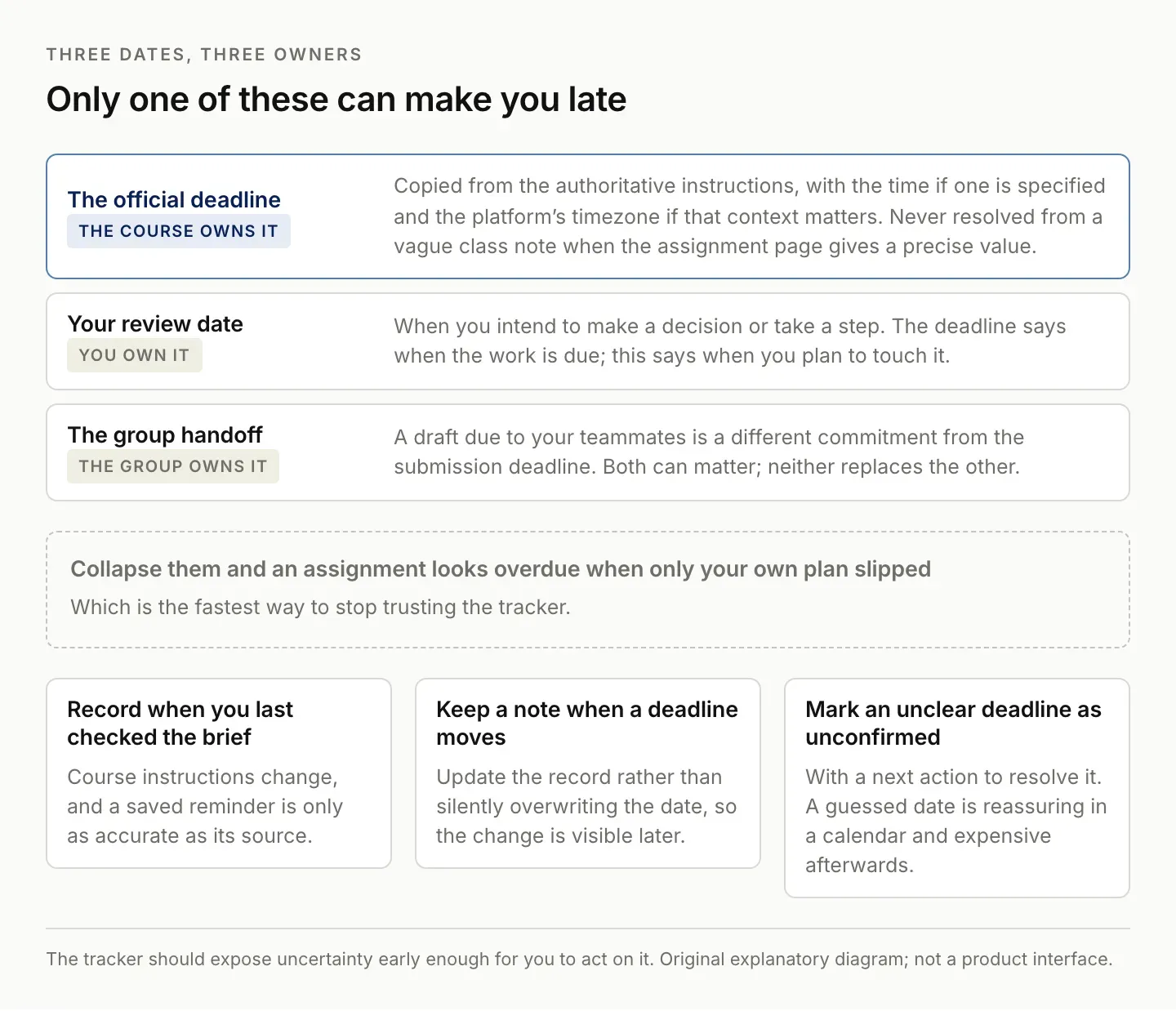
Collapse them and an assignment looks overdue when only your own plan slipped.
Build views for this week and missing information
Use a This week view for unfinished assignments due in the relevant period, an All active view for the full workload, and a Missing details view for records without a deadline or next action. Keep these as views of the same database so updates remain consistent.
Sort the weekly list by deadline, but consider the amount of preparation needed when choosing what to work on. The nearest deadline is not always the best next task if another assignment requires a long lead time or group coordination. The view informs the decision; it does not make it for you.
A course-specific view can help when you prepare for a class or review feedback. If you use a Courses database, relate the assignment to the course deliberately. If you only need a short course label, a select field may be enough. Add relationships when they answer a recurring question rather than because a template contains them.
Keep completed work out of the daily view while preserving the submission record. A Submitted archive can help you find the file or confirmation later. Avoid deleting the evidence simply to make the dashboard look clean.
Test the views with clearly labeled sample records: one due soon, one submitted, and one missing a deadline. Confirm each appears where you expect. A view that looks correct with only one clean record has not yet shown whether it handles the states you will actually encounter. Zentor's Notion integration page lists the Notion connections currently available to an account.
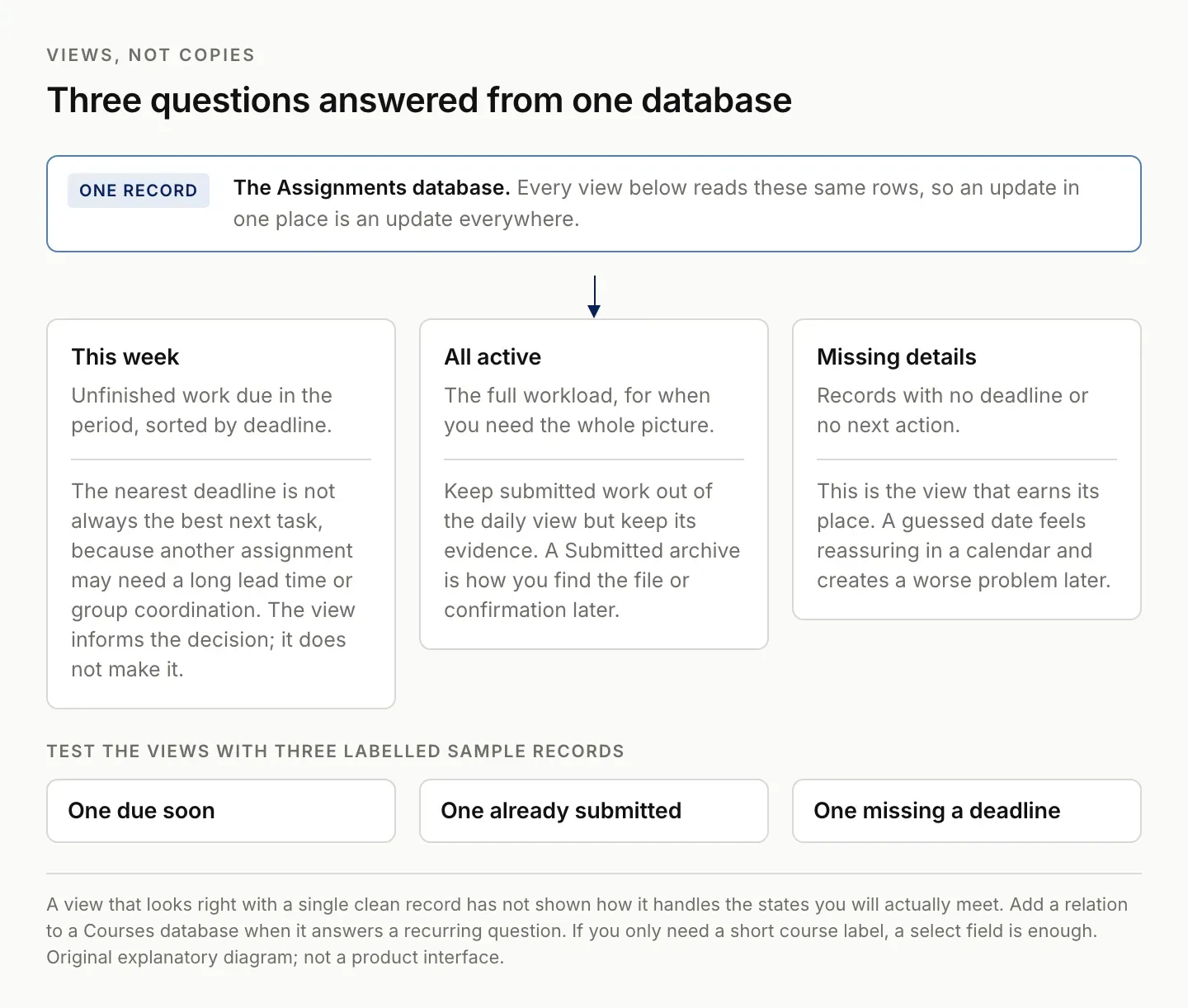
A view that looks right with one clean record has not shown how it handles the states you will meet.
Use templates to reduce repeated setup
Create a short assignment-page template with headings for Instructions, Working notes, Submission checklist, and Feedback. Notion's database templates can provide reusable page structure. Keep the template brief enough that you are willing to use it for a small assignment as well as a large one. Notion database templates.
Under Instructions, retain the source and any requirements you need to check repeatedly. Under Working notes, keep your outline or links to the actual files. Under Submission checklist, record the format and destination required by the course. Feedback can remain empty until there is something useful to review.
Do not copy the entire course syllabus into every assignment. Link to shared material and keep assignment-specific requirements in the record. This reduces the number of places you must update if a general instruction changes.
When evaluating a student dashboard template, try adding and updating a real assignment before customizing its appearance. Check whether you understand the fields and whether the important work is visible. If you cannot explain how a formula or relation affects the deadline view, inspect it before depending on it.
Remove components you do not use. Habit tracking, mood logs, and decorative calendars can be valuable for some people, but they do not automatically improve assignment tracking. Keep them separate if they make the core capture and review process harder to maintain.
Add reminders without confusing planning and completion
Set a reminder when you need a notification to start, review, or submit the work. Notion supports reminders associated with dates. Check the reminder configuration itself rather than assuming every visible date will generate the notification you expect. Notion reminder guidance.
Use the reminder as a prompt to inspect the current record. The instructions may have changed, the group may have updated a draft, or you may already have completed the step. A reminder should bring you back to the evidence instead of triggering an automatic conclusion about the assignment's state.
If you use Notion Calendar, understand the distinction between viewing database dates and maintaining external calendar events. Review the supported integration behavior for your setup and test a representative assignment. Notion Calendar and Notion.
After submitting, record the actual submitted file or confirmation reference. Keep Ready to submit and Submitted distinct. A finished draft that remains on your computer is not a completed submission, and an assistant should not mark it submitted merely because it prepared the file.
During a short review, check upcoming deadlines, unresolved details, and group dependencies. Update the next action while the context is fresh. You do not need to redesign the dashboard each week; you need it to reflect the work you actually have.
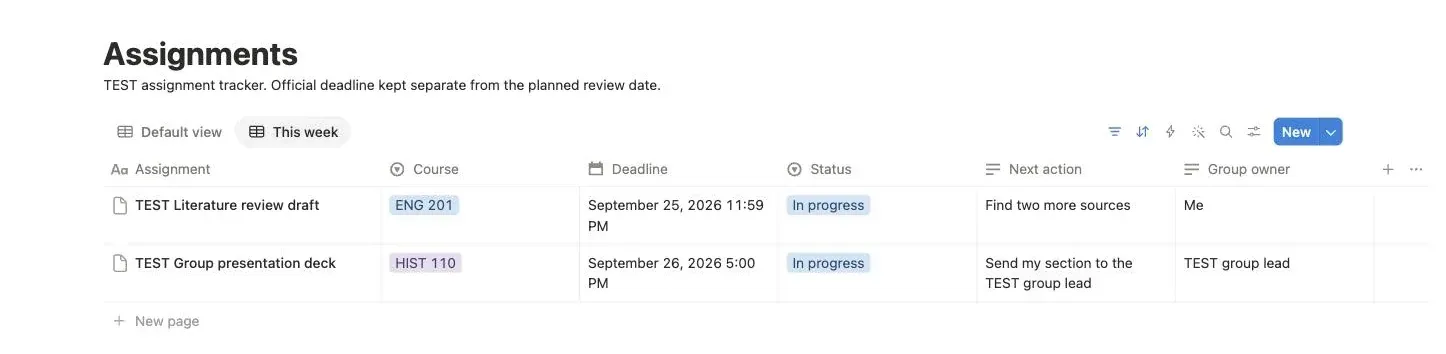
Deadlines carry their actual time. The submitted assignment and the one with no confirmed deadline do not appear here.
Make group assignments easier to coordinate
For group work, identify the shared deliverable and the agreed responsibilities. Keep a link to the current working document and make the next handoff explicit. “Everyone works on the presentation” is not enough to tell you whether a missing section has an owner. Zentor's attendance tracker shows the same maintenance problem in a spreadsheet.
Separate individual preparation from group approval. One person can finish a section while the group still needs to review it. Use labels or notes that preserve this distinction so the overall assignment is not marked Ready to submit prematurely.
Keep meeting decisions with their source or date. If the group changes the structure, record the current agreement and update the affected actions. Otherwise, different members can continue working from different versions of the plan without realizing it.
Check sharing access for the working files and the tracker. Notion's sharing guide explains how access is configured; a teammate needs the appropriate access to the actual material, not merely a link pasted into a message. Notion sharing guidance.
Before the final handoff, inspect the deliverable against the assignment instructions. Confirm format, required sections, and submission responsibility. The tracker can help coordinate those checks, but it cannot establish academic compliance or submission success without the relevant evidence.
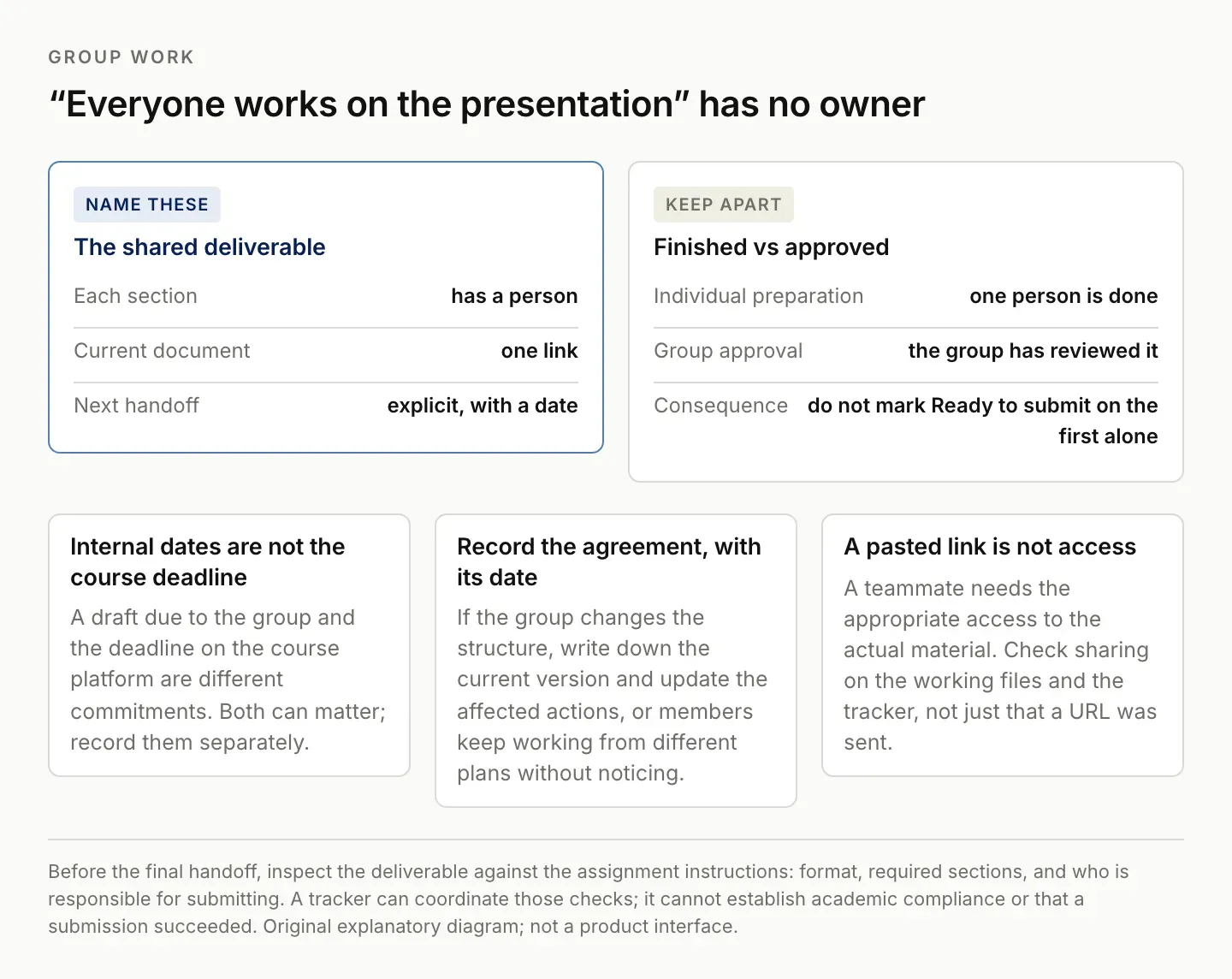
"Everyone works on the presentation" cannot tell you whether a missing section has an owner.
Where Zentor fits for heavy student workflows
Zentor's intended student use cases include work such as coordinating group assignments and maintaining a job-search workspace. For assignment tracking, the useful task would connect selected instructions, meeting notes, and working documents to a current action list, with the result returned to the workspace you use.
A concrete evaluation brief could be: “Compare these selected assignment instructions and group notes with this tracker. Propose changed deadlines and next actions with source references. Leave unclear ownership for review, and do not submit or send anything.” That defines a bounded maintenance task.
Zentor is in early access. This guide does not claim access to your learning platform, automatic deadline synchronization, or a demonstrated submission workflow. Confirm the available connections and inspect the proposed changes before relying on them. Explore Zentor with one recurring coordination problem.
If a simple Notion table and a regular review already work, keep them. The reason to evaluate additional assistance is a repeated burden you can identify, such as reconstructing group decisions across several tools. A larger dashboard by itself does not solve that burden.
FAQ: Notion assignment tracker setup and deadlines
What should a Notion assignment tracker include?
Start with the assignment, course, official deadline, status, next action, and source. Add other fields only when they support a decision you regularly make.
Do I need a separate database for every course?
Usually one assignment database with course-specific views is simpler to maintain. Use a separate structure only when the work genuinely requires it.
Should I include habit tracking?
Only if it helps you and remains easy to maintain. It is separate from knowing what you must submit and when.
Can AI mark an assignment complete?
Only an observed result should establish completion. A draft, a finished file, and a successful submission are different states that the workflow should preserve.

Zentor Editorial Zentor editorial team
The Zentor editorial team writes about workflow automation, AI agents, and the tools we build. Default byline for industry overviews, listicles, and collaborative pieces.
Stop doing this manually.
Zentor runs on its own cloud computer - research, monitoring, reports, browser tasks. No setup. No self-hosting.