Ecommerce Inventory Tracking Without Spreadsheet Drift

Build an ecommerce inventory tracking workflow with one source of truth, exception checks, and reliable updates across sales channels.
Ecommerce inventory tracking stays reliable only when one ledger owns sellable quantity and every channel reports changes back to it. Exception reconciliation then catches missing, late, duplicated, or rejected updates before they spread. Shopify’s official guidance makes the same operational point: webhook consumers should run a scheduled job to retrieve data they may have missed (Shopify).
Key Takeaways:
- Choose one authoritative stock ledger; treat marketplaces as sales surfaces, not competing masters.
- Record every sale, cancellation, return, damage report, count, and adjustment as a dated event.
- Deduplicate incoming events, pace outbound writes, and verify channel quantities after each update.
- Work exceptions before sending the next questionable count to the rest of your channels.
Why Ecommerce Inventory Records Drift
Inventory drifts when two systems can change the same number without sharing the same history. A marketplace reserves the last unit, someone marks a warehouse unit damaged, then a spreadsheet edit restores yesterday’s count. Each action looks plausible alone.
Transport adds another crack. Shopify webhooks can repeat after a retry; Shopify recommends using the delivery ID to skip duplicates. Its HTTPS endpoint also has five seconds to respond, so slow processing belongs in a queue (Shopify webhook delivery). Etsy’s current webhooks cover paid, canceled, shipped, and delivered orders, but the payload gives a resource URL that must be read for updated data (Etsy webhooks). Neither mechanism turns a channel into your master ledger.
Picture the final blue mug selling on your store while a marketplace order for that SKU enters payment review. Fast automation can send two deductions as easily as slow automation. The missing control is one atomic reservation decision, followed by an exception for whichever order arrived second.
Define ownership before automating movement. It anchors ecommerce inventory tracking across every channel.
Get early access to Zentor to prepare recurring exception reviews in an always-on workspace while keeping stock authority in the inventory system you select.
Choose the Source of Truth
The source of truth must explain why quantity changed, not merely show the latest total. It may be an inventory app or structured database. A spreadsheet can work at very low volume only if edits pass through a controlled form or event table; free-form cells recreate the drift.
Keep one record per SKU and location. Separate on-hand units, reservations, damaged or quarantined units, sellable quantity, and any channel safety buffer. Add a version and last-updated time so an older message can’t overwrite a newer count. Product variants need stable internal IDs, while marketplace listing IDs and fulfillment SKUs belong in a mapping table.
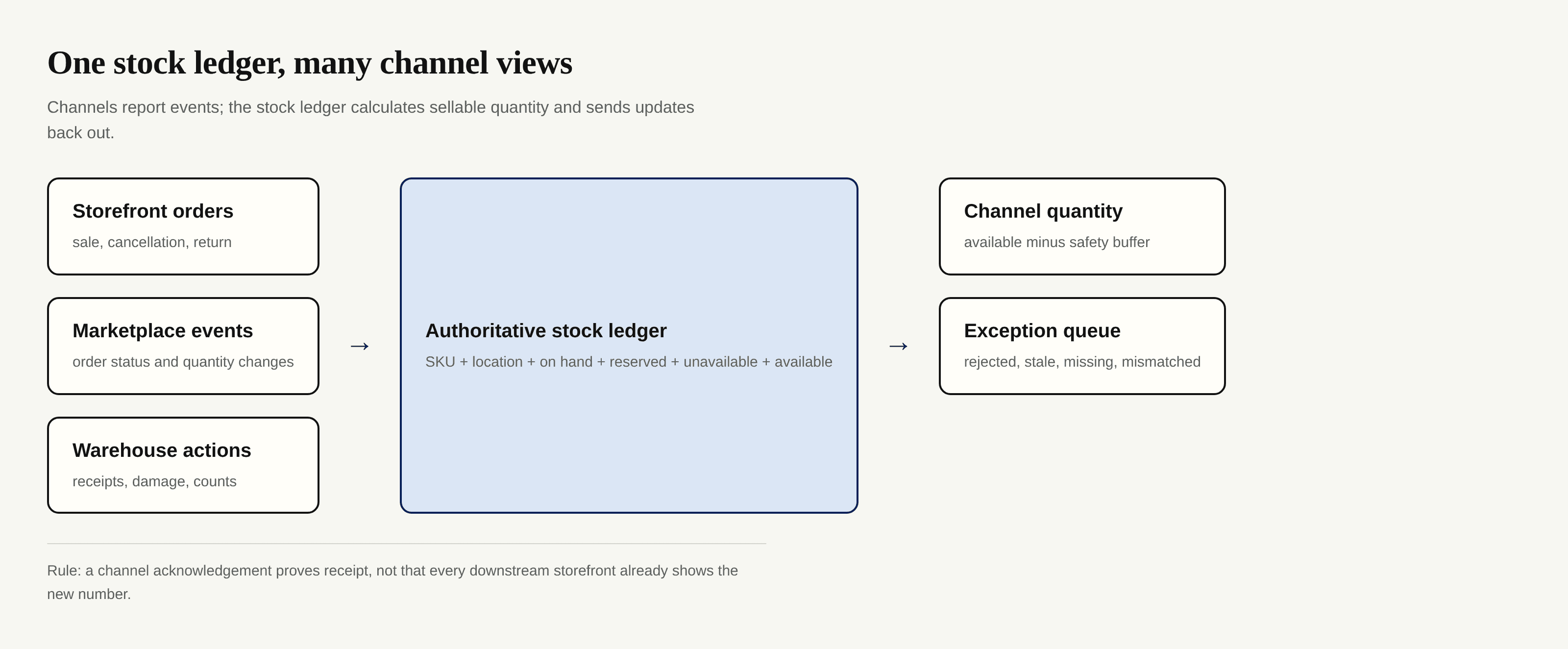
Shopify’s absolute inventory mutation says callers should use it only when acting as the source of truth. Its compare-and-set check rejects an update when the stored quantity no longer matches the expected prior value; Shopify warns that bypassing this check can produce inaccurate quantities during concurrent requests (Shopify inventory mutation). Even without an API, the principle holds: writes need an expected version.
Zentor can retain SKU conventions and approved exception rules as portable workspace memory. The Airtable integration can work with an authorized base; the Notion integration can use operating notes. Zentor isn’t a ready-made marketplace connector; channel reads and writes still need your inventory platform or a separately configured integration.
Capture Every Stock-Changing Event
A total alone can’t support inventory reconciliation. Keep an append-only event log with IDs, source, SKU, location, quantity delta, event and receipt times, versions, status, and reason. Ecommerce inventory tracking becomes auditable when that history exposes delayed events.
Sales and Cancellations
Choose the order state that reserves stock for each channel, such as paid or confirmed, and document it. Don’t subtract once on order receipt and again on shipment. A cancellation releases the matching reservation only when that reservation exists.
Amazon’s Notifications API lets applications receive events instead of polling, through Amazon EventBridge or SQS (Amazon Notifications API). Save the source event ID before applying a delta. Retries must produce the same result as the first delivery.
Returns and Damaged Stock
“Returned” describes movement, not condition. Put the unit in inspection first; after inspection, record a second event moving it to available, damaged, or quarantine. That stops a stained shirt returning to sale because its refund closed.
Keep warehouse damage distinct from customer returns. The reason tells you whether to inspect handling, packaging, or the product.
Manual Adjustments
Every adjustment needs before, delta, after, reason, operator, and evidence. Useful reasons include cycle count, breakage, short shipment, sample, and transfer. “Correction” conceals the cause.
Never rewrite history to balance a count. Add a correcting event. Zentor can remember how you classify recurring cases and draft a review into Notion or Airtable, but the ledger still authorizes the stock change.
Reconcile Exceptions Before They Spread
Use two paths. Events update the ledger; scheduled checks prove that channels match it. Save each write’s ID, requested quantity, response, attempts, and next check time, then read the channel again.
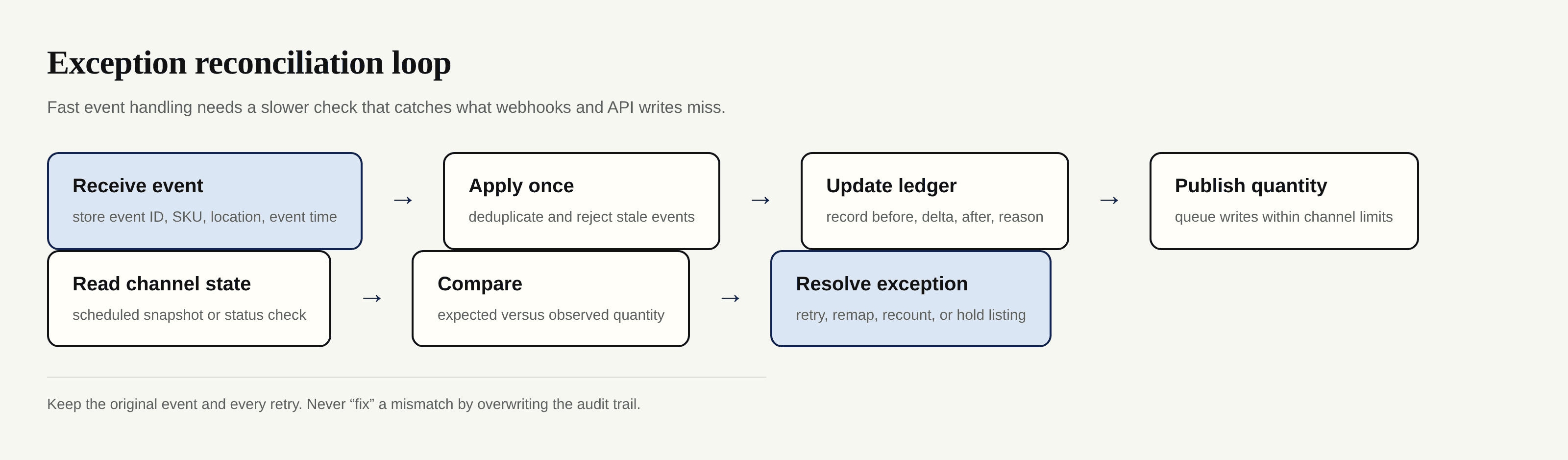
Separate rejected writes, accepted but unverified writes, stale events, unknown SKU mappings, observed mismatches, and negative availability. A stale event stays in history without changing stock; an unknown SKU stops propagation until someone repairs the mapping.
Rate limiting affects accuracy because throttled updates create stale channel views. Shopify’s GraphQL Admin API uses calculated query cost; its standard limit is 100 points per second (Shopify API limits). Etsy evaluates both per-second and sliding daily quotas, returning 429 and retry-after when an application exceeds either limit (Etsy rate limits). Queue outbound writes, honor response headers, and retry with the same idempotency key where the platform supports one.
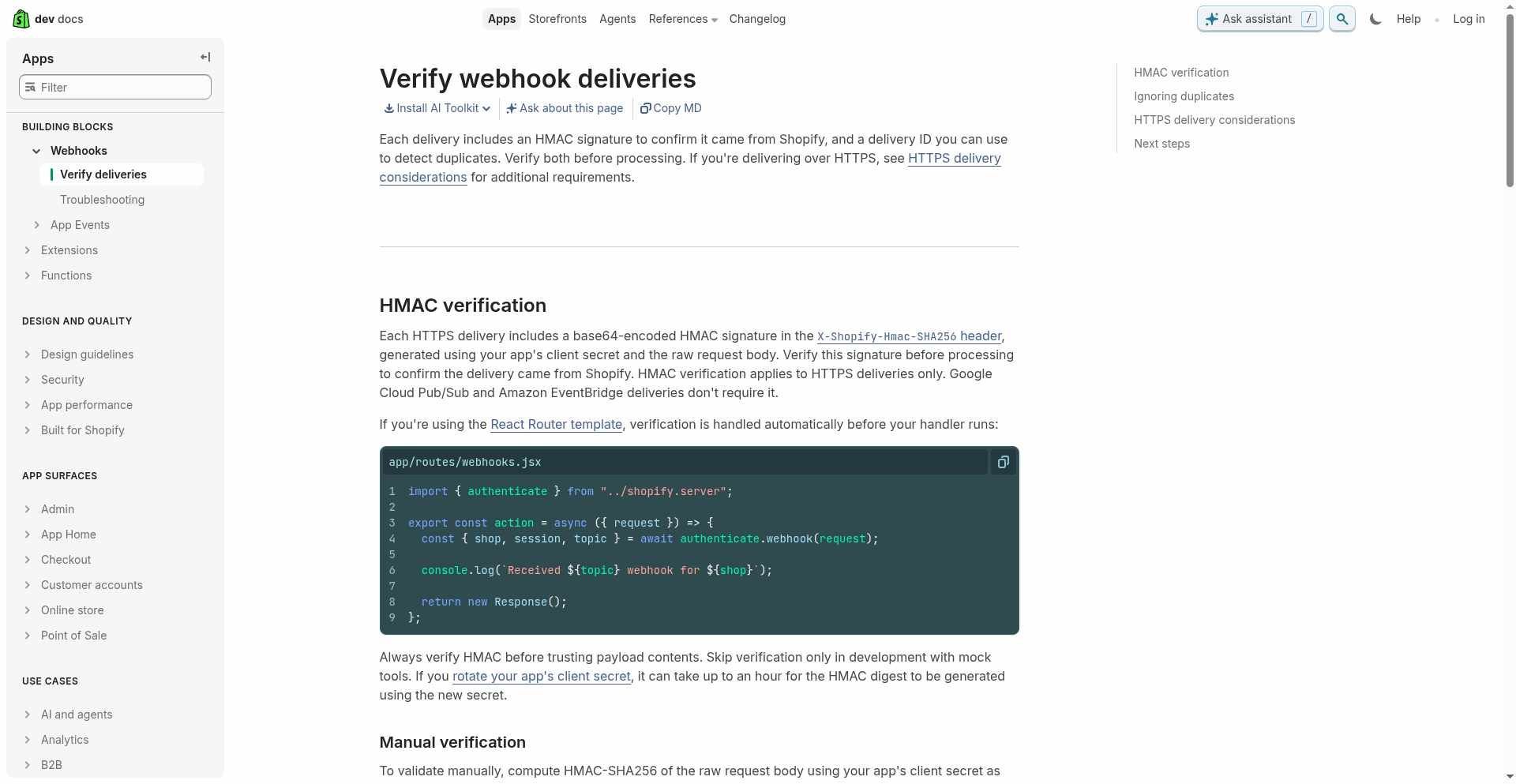
The screenshot shows two controls diagrams omit: verify the sender and detect duplicate deliveries. A scheduled Zentor task can turn unresolved records into a morning brief, but it shouldn’t close one until the ledger and observed channel quantity agree.
Build Useful Low-Stock Alerts
A fixed “below five” alert ignores whether five units last five months or five minutes. Start with:
reorder point = expected demand during lead time + safety stock
Calculate it by variant and fulfillment location. A medium shirt in one warehouse can face a stockout even if the product family looks healthy elsewhere. Alert on available units, not physical on-hand units, because reservations already have a claim.
A useful alert includes SKU, location, availability, reservations, sales pace, lead time, inbound stock, estimated stockout date, and action. Suppress repeats until a meaningful input changes. Otherwise low-stock alerts turn into inbox wallpaper.
For multichannel inventory, a safety buffer can reduce last-unit collisions when propagation lags. The buffer is a selling policy, not the true count.
Test the Workflow With Real Edge Cases
Run tests with hidden listings or a sandbox, then compare the event log, ledger, API response, and visible quantity. Happy-path sales prove almost nothing.
Test two channels trying to reserve the final unit; a cancellation delivered twice; a return that fails inspection; an old webhook arriving after a cycle count; a 429 followed by a successful retry; a bundle consuming multiple components; an unmapped size variant; and a receiver outage followed by reconciliation. Each delta must apply once.
Latency needs its own test. Ecommerce inventory tracking should record submitted, accepted, observed, and reconciled times. “Accepted” proves that a platform received a request, while “observed” tells you what the channel now reports. If your software vendor can’t state its polling intervals, webhook coverage, retry policy, API rate-limit handling, and last-success timestamp, don’t promise real-time updates.
Zentor’s workspace memory can keep these edge-case procedures with the exception review, so the next investigation starts from your prior decision rather than a blank chat. The stock system stays authoritative.
Frequently Asked Questions
How should bundles be tracked?
Treat a bundle as a sales SKU with a bill of materials. Its availability equals the scarcest component after dividing each component’s available units by the amount required. A bundle sale should create all component deductions together.
Should product variants have separate inventory?
Yes. Every buyable size, color, pack, or material combination needs its own internal variant ID and SKU. The parent groups product variants for display but shouldn’t hold sellable units.
How do I track inventory across multiple marketplaces?
Map each listing to the same internal SKU and location, reserve orders in the authoritative ledger, then publish available quantity through each marketplace’s supported integration. Store the last requested and last observed count for every channel.
How often should I perform cycle counts?
Count fast-selling, high-value, or frequently mismatched SKUs more often than stable stock. Set cadence by risk and prior variance, then trigger an extra count whenever reconciliation can’t explain a difference.
What happens when two channels sell the last unit?
An atomic reservation or version check in the source of truth decides the winner. The second order becomes an exception for cancellation, substitution, or customer contact; the channels never decide independently.

Zentor Editorial Zentor editorial team
The Zentor editorial team writes about workflow automation, AI agents, and the tools we build. Default byline for industry overviews, listicles, and collaborative pieces.
Ready to put this into practice?
Zentor runs browser tasks, research, and schedules automatically. Try it free.