5 Ecommerce Reporting Tools for Weekly Reviews

Ecommerce reporting tools support different store reviews. Compare five options by data source, metrics, setup, limits, and the decisions they support.
Ecommerce reporting tools turn store, website, and marketing data into weekly decisions. Shopify records sales; other tools measure behavior, display data, move it, or assign marketing credit.
Key Takeaways:
- Start with this week's decision, then choose the data source that can support it.
- Do not treat a dashboard, a connector, and an attribution model as interchangeable purchases.
- Record metric definitions and the weekly cutoff.
- Check each source's refresh lag before treating Monday's dashboard as final.
Two details deserve a note: Google renamed Looker Studio, and Shopify's session methodology can change. Neither changes an order, but either can make a familiar weekly chart look different. Keep those notes beside the numbers before buying another dashboard to reconcile them.
Which Reporting Job Does Your Store Need Done?
Name the decision before opening a vendor tab. Refunded product sales belong in the order system; checkout abandonment needs website events; channel credit needs an attribution rule.
For a small store, a weekly store report should cover orders, net sales, refunds, traffic, checkout progression, ad spend, and one exception needing action. Record each metric's source, time zone, and definition. Zentor's broader AI tools for ecommerce guide covers other store jobs; this comparison stays with reporting.
Keep the context behind your weekly review
Zentor keeps workspace memory available across AI tools through MCP. Your store and analytics systems remain the sources for the numbers.
Get early access →
How Were These Five Tools Selected?
These five ecommerce reporting tools cover the store ledger, behavior, dashboards, data transfer, and attribution. The numbering is not a ranking. This October 27, 2026 comparison uses vendor information, not trial scores for uptime, accuracy, or usability.
Compare Data Sources, Metrics, Setup, and Limits
For Monday's review, a refund should trace to an order; checkout abandonment needs complete events. That is why the comparison includes refresh time and setup work, not just what each dashboard displays. Count tagging, permissions, report ownership, and repairs as part of the cost. Zentor's workspace memory can carry your metric definitions across AI tools through MCP, but it cannot validate the underlying order ledger.
Ask each candidate: "If Monday's refund changes last week's net sales, can I trace the adjustment to an order?" If not, fix the definition before buying.
Five Tools at a Glance
| Tool | Main data source | Metric definitions | Refresh to verify | Setup burden | Cost to verify |
|---|---|---|---|---|---|
| Shopify Analytics | Shopify orders and store activity | Store sales, reversals, traffic | Check report freshness and cutoff | Low for an existing store | Check reporting scope in your Shopify plan |
| Google Analytics 4 | Implemented web or app events | Sessions, shopping events, purchases | Reports may change for 24-48 hours | Tagging and validation | Check setup work and edition-specific terms |
| Data Studio (formerly Looker Studio) | Connected sources | Whatever the source and report author define | Connector freshness varies | Report design and maintenance | Check connector charges and edition |
| Supermetrics | Connected store and marketing accounts | Source fields, then your transformations | Depends on subscription and destination | Connections, mapping, scheduled pulls | Destination, sources, accounts, users |
| Triple Whale | Connected commerce and marketing data | Sales and selected attribution model | Check each source and plan | Pixel, channel, and model setup | Compare free and paid plan scope |
Most stores will not need all five.
1. Shopify Analytics for Store Orders and Sales
Start with Shopify when it owns the orders. Its sales reports separate gross sales, discounts, reversals, net sales, and total sales. Shopify reporting gives product and channel sales without an export first. Check when a report last updated; a weekly cutoff still matters.
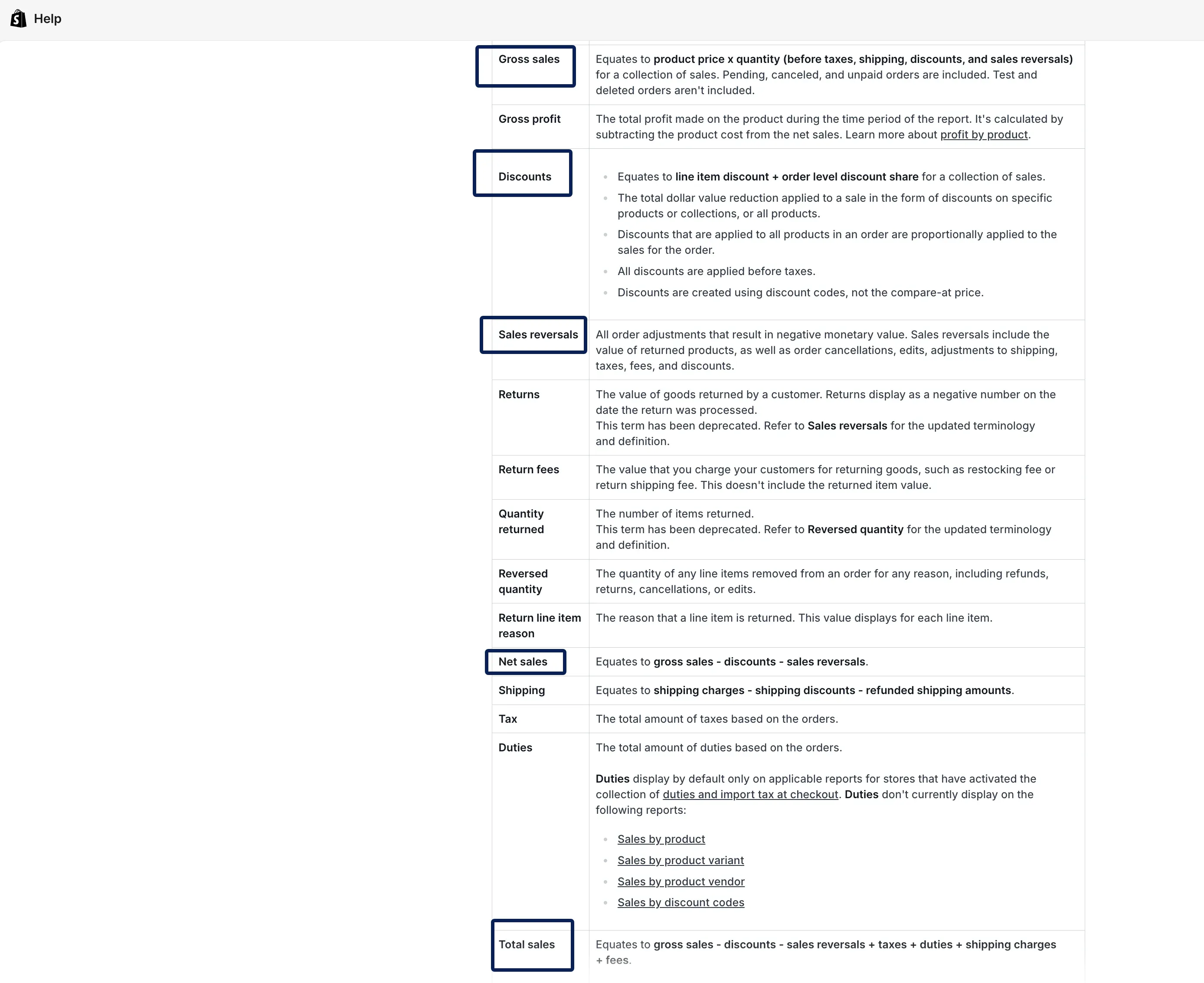
Shopify cannot account for every ad impression or off-platform sale. Choose net or total sales deliberately, and explain returns processed this week even when their purchases were older. Its sales reports can also include pending, unpaid, and canceled orders, while test orders are excluded. If your meeting is about collected cash rather than demand, an unfiltered sales chart is the wrong endpoint.
2. Google Analytics 4 for Shopping Behavior
GA4 helps explain product views, carts, checkout starts, and purchases. These are ecommerce events requiring the right parameters. Refund tracking is separate; if it is missing, reported revenue can look healthier than adjusted store sales. Reports can still change for 24-48 hours. Do not sign off Sunday's numbers on Monday morning without noting that lag.
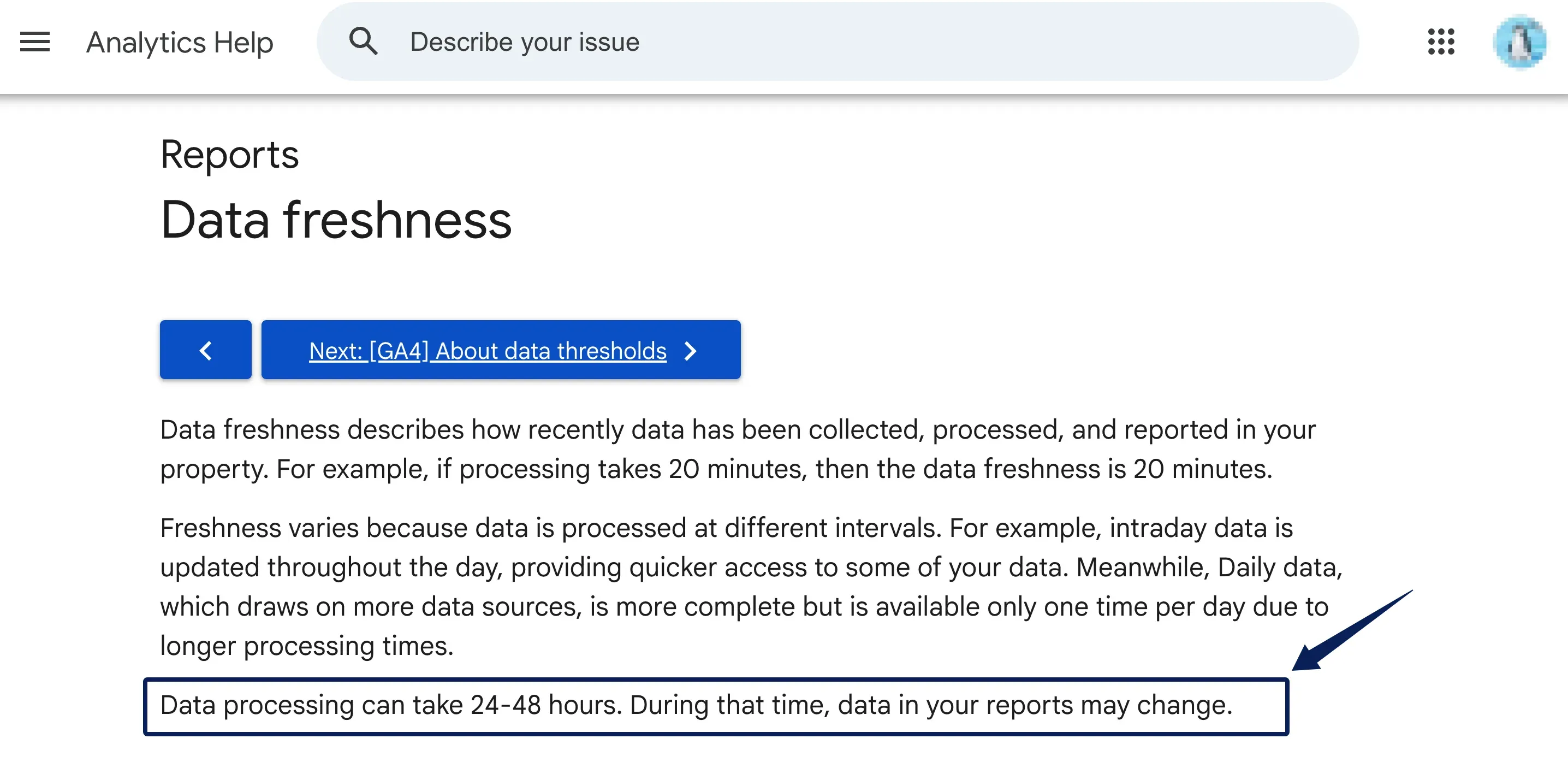
Before treating a conversion-rate fall as real, check event coverage, consent, traffic tagging, and the comparison period. Among ecommerce analytics tools, GA4 answers behavior questions; its implementation quality matters more than its interface.
3. Data Studio for a Custom Weekly Dashboard
Google renamed Looker Studio to Data Studio in April 2026. It can show store sales, GA4 behavior, and campaign spend on one labeled weekly page.
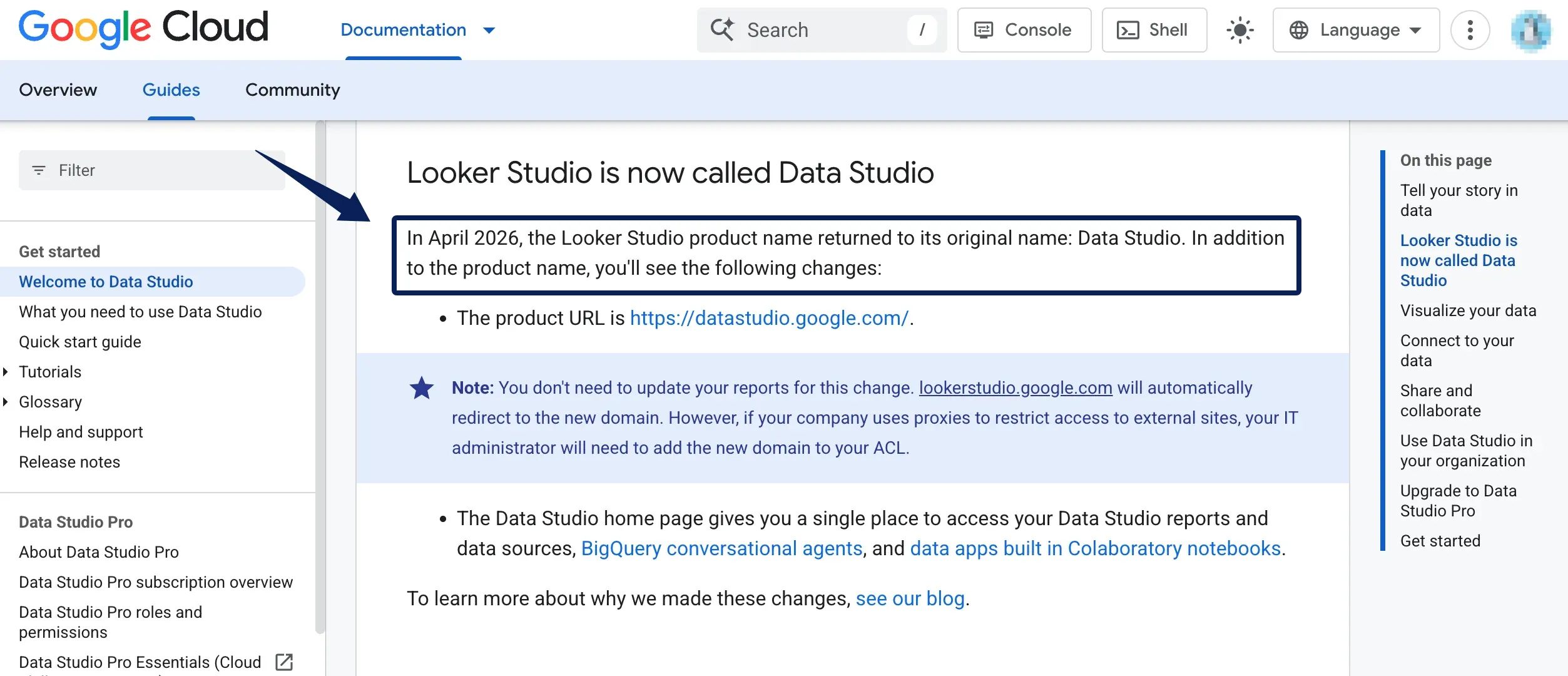
It does not reconcile sources automatically. Like other ecommerce dashboard tools, it needs an owner for joins, formulas, access, and refresh rules; partner connectors can cost extra. Check broken charts and changed fields before each meeting. A refreshed dashboard can still draw on a source whose data has not finished processing. Display the source's own update time beside the chart, not just the time someone opened the report.
4. Supermetrics for Moving Data Into Reports
Supermetrics moves data; it does not decide what performance means. Its Shopify connector brings order and product data to reporting destinations alongside supported marketing sources. Sales reporting tools can present only what reaches them; this one fits an existing report held back by manual exports.
Adjacent Shopify and ad-platform columns are not the same event. Define the mapping. Check the destination, connected sources, accounts, users, and refresh frequency in a current Supermetrics quote; terms can vary by package. Compare the current quote with export labor.
5. Triple Whale for Paid-Channel Attribution
Triple Whale fits a store making consequential paid-channel decisions. Its platform offers attribution reporting; the current plan page lists multi-touch attribution in a paid tier. Different models can credit one order differently without changing the order.
Before shifting spend, check model, window, and connected sources. Keep store orders as the sales baseline. Compare the current plan scope and quote before buying.
How to Choose Ecommerce Reporting Tools for Your Weekly Review
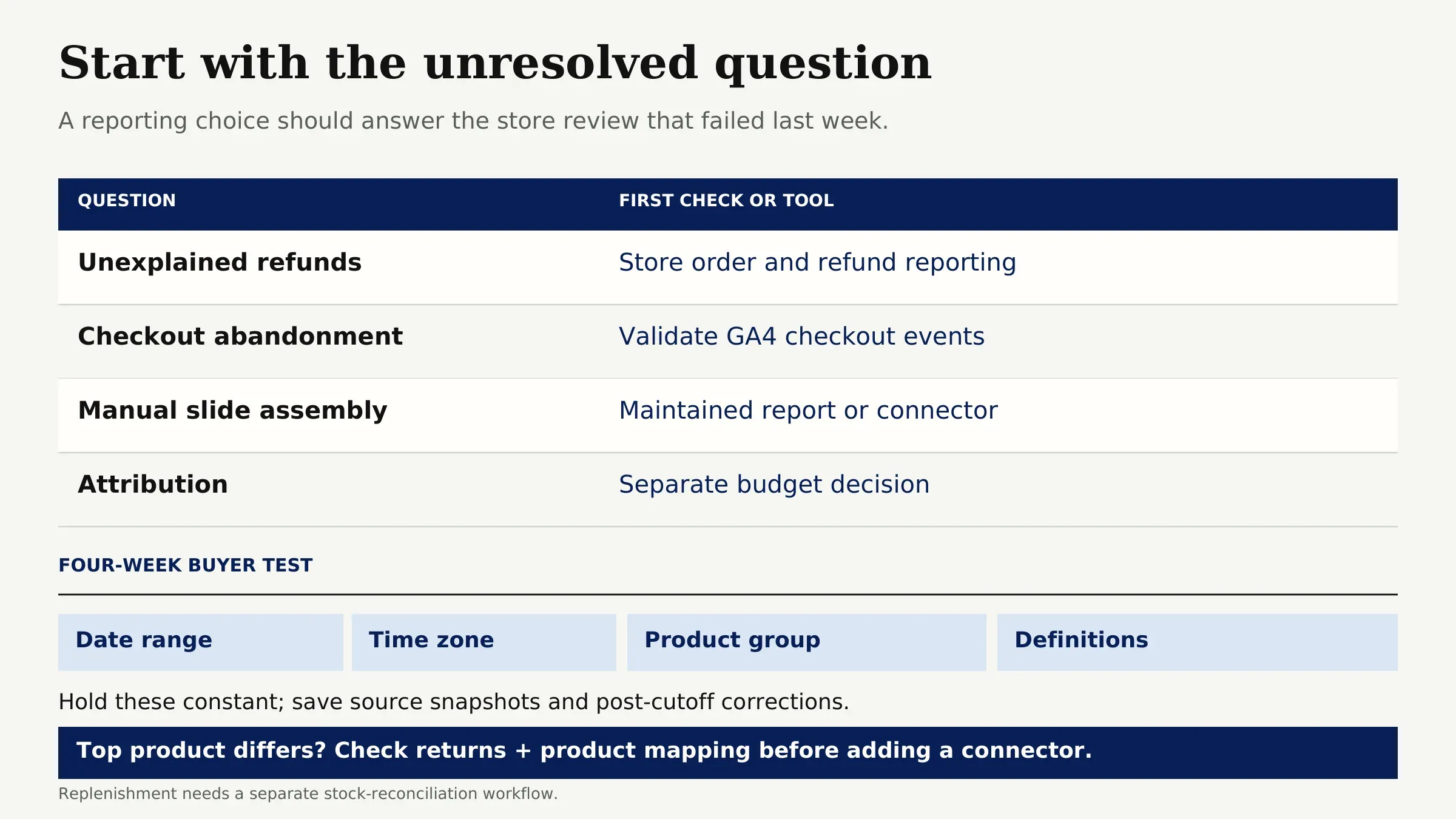
Start with last week's unresolved question. Unexplained refunds call for better store reporting. Checkout abandonment calls for validated GA4 events. Manual slide assembly may justify a maintained Data Studio report or a connector. Attribution is a separate budget decision.
For a proposed four-week buyer test, hold the date range, time zone, product group, and definitions steady. Save source snapshots and post-cutoff corrections. This is not a five-account trial. If the top product in a new report disagrees with the store's order-level view, inspect returns and product mapping before adding another connector. If the decision is replenishment, the separate ecommerce inventory tracking workflow addresses stock reconciliation that sales charts cannot. Zentor's self-adaptive workspace can help keep the follow-up task in context, but it does not turn these five reporting tools into substitutes for the stock record.
Where Will Your Numbers Disagree?
Start with arithmetic. Illustrative figures: $10,000 gross minus $500 discounts and $300 reversals leaves $9,200 net. Total sales differ again when shipping, tax, duties, and fees enter. A chart labeled only "revenue" hides its formula.
Traffic can disagree even when sales match. If Shopify changes its session methodology, a conversion-rate shift around that change may reflect measurement, not customers. Check the store's current session definition before comparing periods. GA4 uses its own tracking and consent path.
Attribution assigns credit; it does not settle orders. For a discrepancy, start with a few order IDs, then check their purchase and refund events, time zones, and channel labels. This tells you whether the gap is missing data, timing, or a genuine difference in definition. Decide which metric governs the decision. Do not average incompatible figures.
FAQ
Can a seller export reports when switching tools?
Often, yes, but formats differ. Check which reports your Shopify plan lets you export and in which formats. Save the raw report, filters, date range, currency, definitions, and dashboard formulas before switching. A PDF preserves appearance, not the transaction logic needed to rebuild the report. Test an import with a single completed week before retiring the old view.
How should a new tool handle missing historical data?
Label the earliest trustworthy date per source. Blank weeks are not zero sales. Keep old exports, check whether the connector backfills needed fields, and mark tracking breaks. If product IDs or currency conversion changed, preserve the original mapping too. When history is incomplete, compare only the shorter reliable period and put that start date in the report title.
Who should define gross and net revenue?
The finance or operations owner should approve definitions; the reporting owner records them. Discounts and reversals change net sales. Name any different accounting basis separately. Keep one worked order example beside the metric dictionary so a new analyst can check the formula. Revisit it when returns, taxes, currencies, or channels change.
How often should a weekly report refresh?
Refresh before the meeting and record each source's last update. A completed-week cutoff matters more than minute-by-minute animation. Ad and behavioral data may settle later than orders. Carry late changes into the next review rather than silently replacing an approved snapshot.
What happens when a connector loses access?
Treat affected numbers as unavailable, not zero. Record the failed source, last successful refresh, and person who can reconnect it. Label the previous snapshot stale. After reconnection, check row counts and known orders before distribution; a green icon does not prove completeness.
Choose Ecommerce Reporting Tools by the Weekly Decision
Use Shopify for store sales, GA4 for behavior, Data Studio for presentation, Supermetrics for data transfer, and Triple Whale for attribution. Pay for another layer only when four weekly reviews reveal a decision you still cannot make from existing records. Next Monday, every number should still have an explanation.

Zentor Editorial Zentor editorial team
The Zentor editorial team writes about workflow automation, AI agents, and the tools we build. Default byline for industry overviews, listicles, and collaborative pieces.
Choosing between tools? Let Zentor run the work.
Always-on AI assistant on its own cloud computer. No switching required, no setup.