Best AI Tools for Weekly Status Reports in 2027
Compare the best AI tools for weekly status reports built from real project updates, with checks for missing context and client-ready output.
The best AI tools for weekly status reports turn project records into a draft that you can compare with client commitments. Your choice depends on where the decisions, tasks, and approvals live.
Key Takeaways:
- Notion AI works well when most of your project information is in notes and pages. ClickUp Brain is a fit if you track work through tasks, while Asana AI works best if you already use Asana for project updates.
- Compare each status report with the previous week's update. Just because a task is marked done does not mean the client has reviewed or approved the work.
- Keep links to the information in your draft and check the wording yourself before sending it.
Imagine a Friday update covering two tasks, a deliverable that the client has asked you to revise, and a proposed deadline change. Looking at the task list could leave the revisions and date decision out of the report. We will use this week throughout the comparison.
Method: Official product documentation was checked on October 14, 2026, for AI report generation, source access, permissions, plan availability, and review controls. The reporting accuracy of these tools was not independently tested. '2027' refers to the selection cycle, not product testing.
What must a client-ready weekly status report contain?
A client-ready status report covers changes, deliverables awaiting review, blockers, decisions, and next steps. Separate work finished internally from work sent, and work sent from work approved. A task board's Done column cannot make those distinctions for you.
In a redesign, a homepage file uploaded on Wednesday may still need Thursday's client revisions. Call it 'revision in progress,' not 'complete.' For a moved pricing-page deadline, name the date and whether the client approved it. Avoid percentages you cannot calculate.
The weekly client report template keeps completed work, decisions, risks, and next steps distinct. Compare it with the week's commitments. Weekly progress report software cannot infer an approval that nobody recorded.
Keep the source trail with the weekly draft
Zentor keeps workspace memory available across AI tools through MCP. Check each client commitment before you send the report.
Get early access →
How do we compare source coverage and review steps?
The comparison packet contains the week's sent update, current tasks, a meeting note, and the deliverable link. A generic AI weekly report generator can summarize text, but it will miss a changed promise outside its source set.
| Check | Notion AI | ClickUp Brain | Asana AI |
|---|---|---|---|
| Strongest starting source | Notes, pages, databases | Tasks and workspace activity | Project tasks and prior status updates |
| Draft route | Ask Notion Agent or configure a Custom Agent | Generate a project update for a location and period | Draft a project status update with Smart Status |
| Human checkpoint | Inspect the report page before sharing | Check the generated update against the task list | Edit the draft before posting |
| Main blind spot to test | Important context outside granted pages or connectors | Client acceptance missing from task activity | A project status that outruns the evidence |
For each candidate, check source coverage, missing facts, conflict handling, draft correction, client approval, and the sent copy's destination. Speed matters less if the draft cannot be traced back to a source. For a freelancer, the best AI tools for weekly status reports should expose approvals that were never recorded.
Client status report tools must produce a message the client can understand and receive. Project update AI tools may stop at a summary. In this illustrative packet, a draft fails if it omits the pending deadline decision, treats a revision request as acceptance, or omits links to completed items. Those errors are more useful than deciding which prose sounds nicest.
If the notes and approvals sit in different tools, Zentor's user-owned workspace memory can carry the source context through MCP to the AI you choose. That is a way to organize the comparison, not a claim that Zentor currently integrates with Notion, ClickUp, or Asana or automatically sends client reports.
Notion AI: reports from workspace notes
If the client's brief, meeting notes and previous updates already live in Notion, you can draft the status report alongside them. Notion Agent handles an on-demand request. On a Business or Enterprise plan, a Custom Agent can use selected pages and databases and run on a weekly trigger, subject to resource access; its Activity tab records runs.
Keep the agreed deadline easy to find. An old date in the brief and a new proposal in a meeting note give the status report two records to work from.
Notion's source fit and limits
Give it current project pages, a prior report, and a dated note that changes a deadline. Ask it to flag the conflict, then check the source yourself. Notion AI can cite connected apps when it uses them in an answer, although connection, permission, and indexing affect what appears.
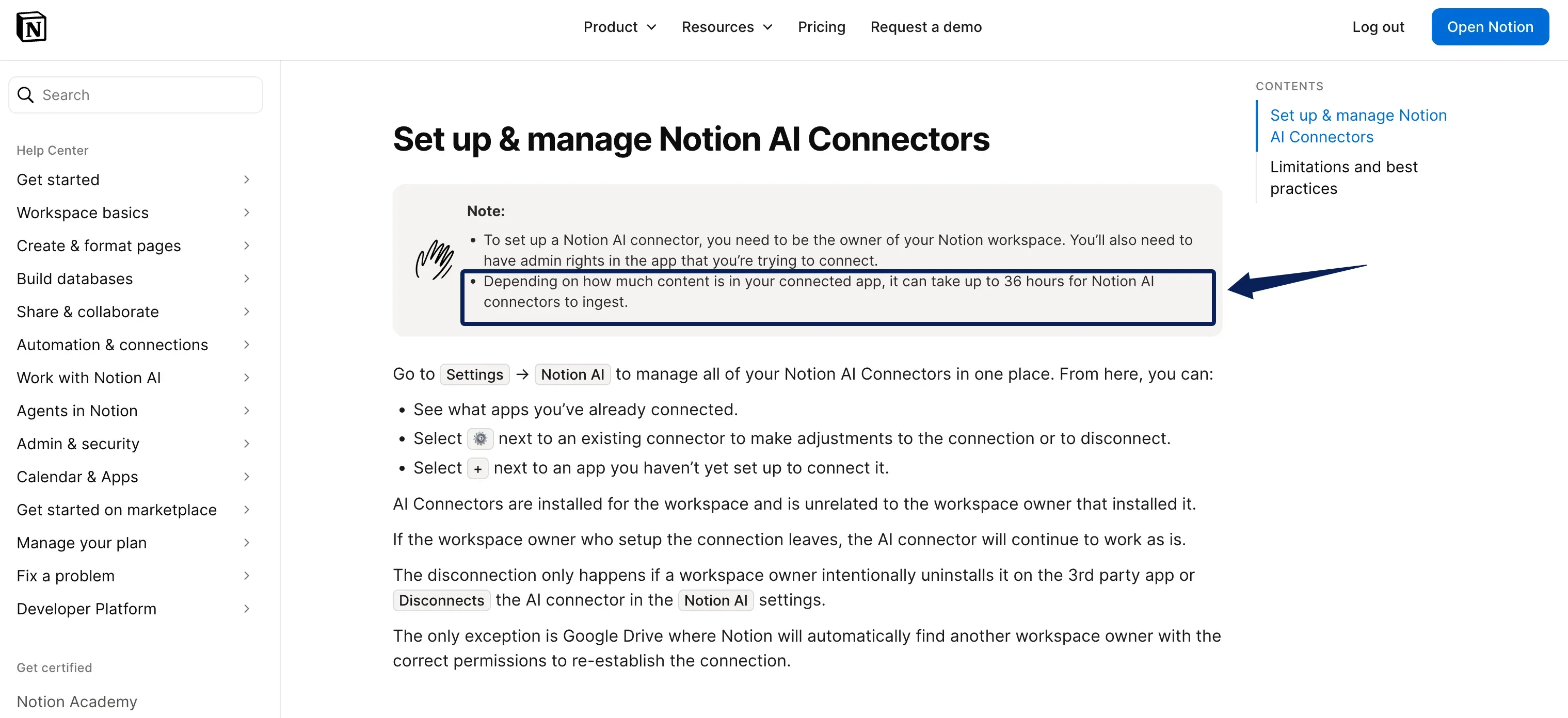
Initial Notion AI connector ingestion can take up to 36 hours, depending on content volume. New content may take up to three hours to appear in search results, and larger volumes may take longer. If Thursday's decision changes Friday's status report, check the note before sending rather than assuming the connector has already indexed it.
Custom Agents require a Notion Business or Enterprise plan and consume shared workspace credits when they run. Check your workspace's access, credit balance, and any agent limit. A copied note saying 'approved' still needs the underlying client decision.
ClickUp Brain: reports from task activity
ClickUp Brain's project update tool lets you choose a Space, Folder, Subfolder, or List and a reporting period.
The gap is anything left elsewhere. If the client approved a file by email and nobody recorded the decision on the task, the task history alone cannot prove that approval.
ClickUp's source fit and limits
Check for tasks in the client draft and milestones that are described as accepted without proof. Select the relevant location, then compare the text with task records and approved files. Do not assume redaction.
Brain AI packaging varies by workspace. Some see add-ons; others see newer plans with AI included. Check your account's feature access, limits, and price; measure editing time before judging cost per report.
Asana AI: reports from project updates
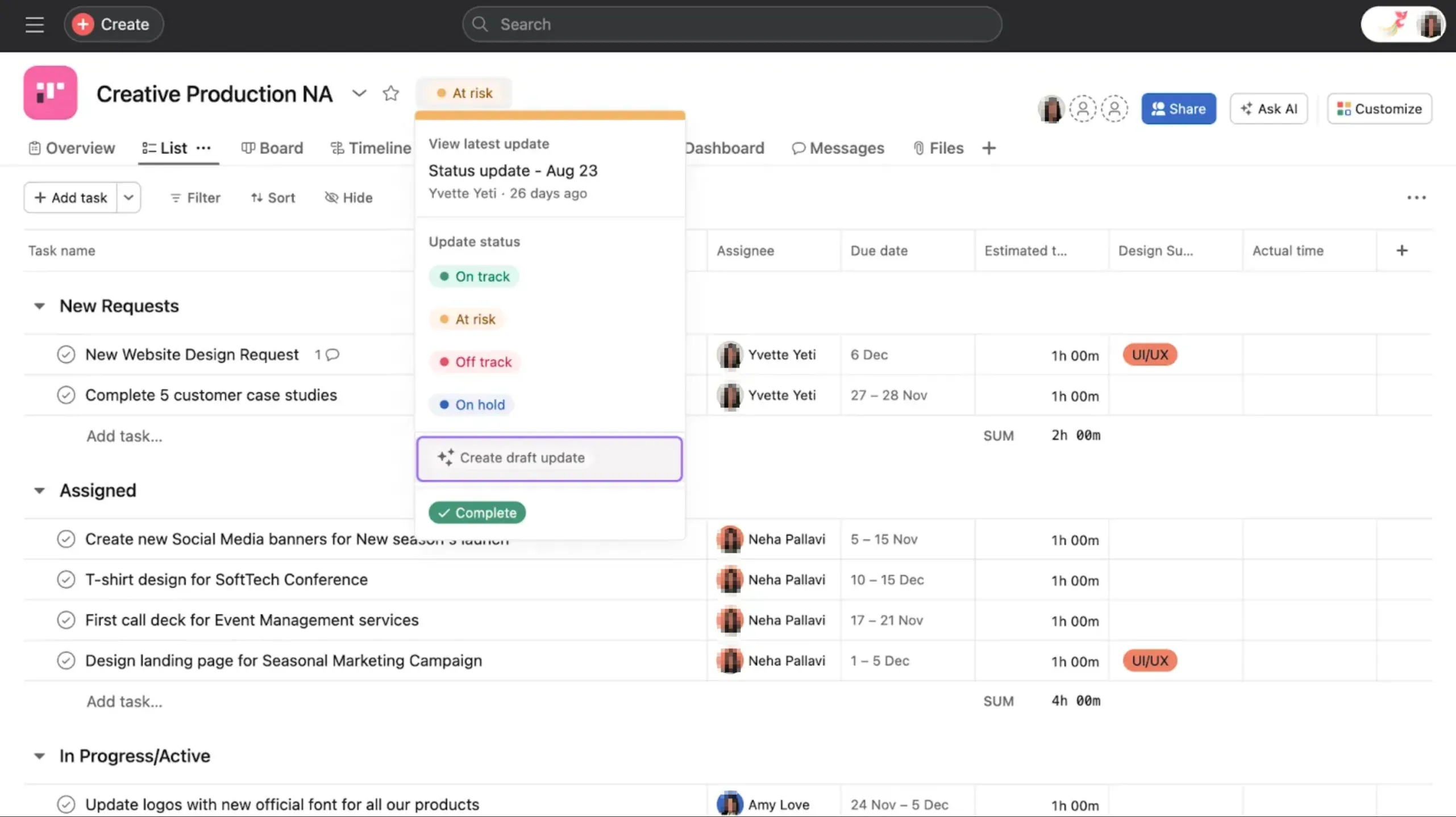
Asana AI follows a clear status publishing path. With Smart Status you pick a project status and a date range, guide the draft, edit it, and then post it. The structure of an update can help shape the next one.
When you choose 'on track,' check the draft against agreed deliverables and explain what decision the client still needs to make. The project-health label does not prove that a deliverable has been accepted.
The sentence that is most likely to turn into a client promise is the next delivery date. Asana lets you edit a Smart Status draft before posting it. Use that pause to compare the date with what the client approved, especially when a task deadline and a meeting note disagree.
Asana's source fit and limits
The status update flow can include task references and milestones. Check who will receive the post and whether they can open linked work. A post notifies project members in Asana Inbox, and email depends on notification settings; neither guarantees delivery to a client outside the project.
Verify approval, feedback, and changed dates before posting. Project Smart Status is listed for Asana Starter and higher; portfolio Smart Status is documented for Advanced, Enterprise, and Enterprise+. Check the latter only if you report across projects.
How do you check a draft against this week's commitments?
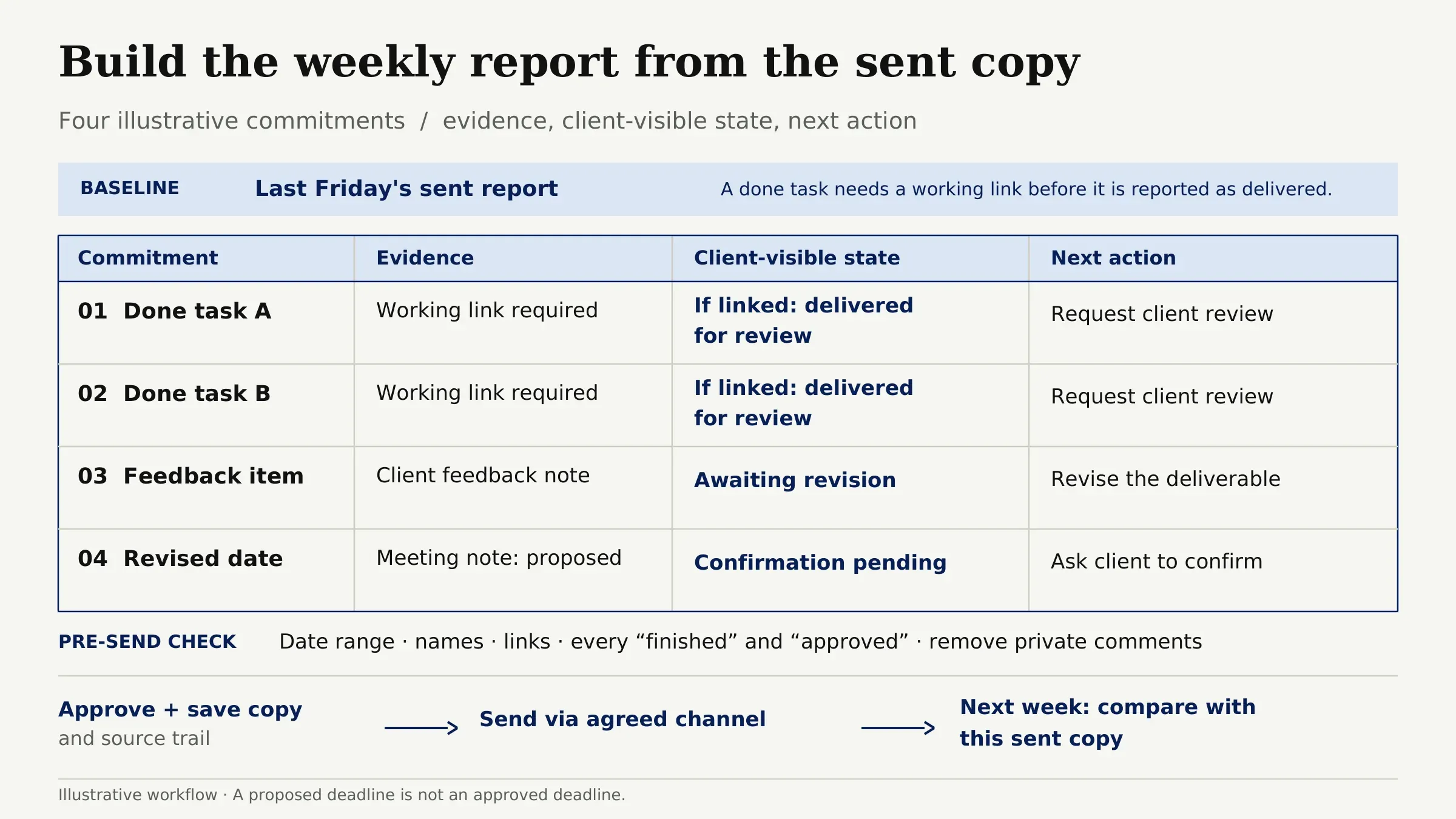
Start with last Friday's sent report. For each of the four commitments in this illustrative example, record evidence, client-visible state, and next action. The two done tasks become 'delivered for review' only with working links. The feedback item remains 'awaiting revision.' If the new date was proposed rather than approved, ask the client to confirm it.
Check the date range, names, links, and every use of 'finished' or 'approved.' Remove private comments. Save the approved copy and source trail before sending through the agreed channel. Next week, compare with the sent copy, not an unsent draft.
For repeat work, Zentor's self-learning skills can help retain the way you review reports across weeks; they cannot decide whether the client accepted a deliverable. Keep approval checks with the person responsible for the report.
If the report creates a follow-up, assign it an owner and due date, then keep it with the client record. Zentor's Notion CRM follow-up example shows one way to track that handoff. Carry the source links into the draft so the week's report can be checked against what was actually promised.
FAQ
Can a Notion reporting agent be copied for another client?
Yes, if you can access the original Custom Agent and create agents in the workspace. A duplicate starts private and copies its instructions, model, and only Notion resources and triggers you can access; connected tools, run history, and credit limits do not carry over. Replace client sources and review triggers and permissions before publishing. Notion documents agent duplication here.
Can ClickUp Brain save an update as a document instead of a task?
Yes. After generating a project update, Create Doc saves the response in a Doc; Create task and Copy are separate options. Check its sharing settings before giving a client access.
Does an Asana status report change when its tasks are edited later?
No. Published status updates freeze displayed project and task data at posting time, including task names, dates, and assignees. The linked underlying task may still change. Explain any change that affects a client commitment in a correction or the next report.
How should a correction to a sent report be handled?
Send a correction through the original delivery channel. Identify the statement, provide the corrected fact, and explain whether the next delivery date changes. Keep both dated versions so the following report uses the corrected commitment.
What should be archived when a client project ends?
Keep the reports actually sent, dated corrections, approval messages, and final deliverable references. Preserve readable evidence for important changes. A report linked only to deleted tasks or inaccessible files will be difficult to explain later.
Choose the Best AI Tool for Your Weekly Status Reports by Source
For the trial, give the tool last Friday's sent report and this week's project records. Notice where you still have to fetch an email and correct a date. Explain an open revision. If preparing the sources and repairing the draft takes longer than your Friday update, it isn't saving you writing time yet.

Zentor Editorial Zentor editorial team
The Zentor editorial team writes about workflow automation, AI agents, and the tools we build. Default byline for industry overviews, listicles, and collaborative pieces.
Choosing between tools? Let Zentor run the work.
Always-on AI assistant on its own cloud computer. No switching required, no setup.