Ecommerce Marketing Automation: Start With One Flow

Ecommerce marketing automation works best when one customer event leads to a reviewed message. Map consent, order data, exclusions, approval, and results.
Ecommerce marketing automation uses a customer event to prepare and send a marketing message under rules a store has approved. A useful first ecommerce marketing automation flow connects one purchase to one eligible, reviewed follow-up, then records whether the message was sent or stopped.
Key Takeaways:
- Pick one post-purchase campaign and one channel.
- Check the order and marketing preferences again at send time.
- Review the copy, product, timing, and exceptions.
- Record both sends and suppressions to prevent duplicates.
Consider fictional order P-214: a shopper buys a cast-iron pan from a small store. The shop proposes one post-purchase email after verified delivery, with a care tip and a matching lid. This is an illustrative workflow, not a store test or measured result.
Choose One Marketing Moment to Automate
P-214 calls for one email after the delivery check. Recommending a lid makes it promotional despite the care tip. Keep receipts and shipping updates in their service paths. The FTC's guide to commercial and transactional email explains that a mixed message's primary purpose depends partly on its subject line and content order. A product pitch inside a receipt is not automatically transactional.
Write the store marketing workflow in one line: verified delivery or an approved timing fallback, consent check, copy review, one email, outcome recorded. Welcome, abandoned-cart, and SMS campaigns need separate rules. For the wider order-to-follow-up chain, see the ecommerce automation blueprint; this article keeps the promotional email separate from the order's operational updates.
Keep the reviewed workflow beside your work
Use Zentor to keep your approved message rules and exception notes in the workspace where you plan the campaign. Your store and email service still own eligibility and sending.
Get started →
Define the Customer Event and Data Source
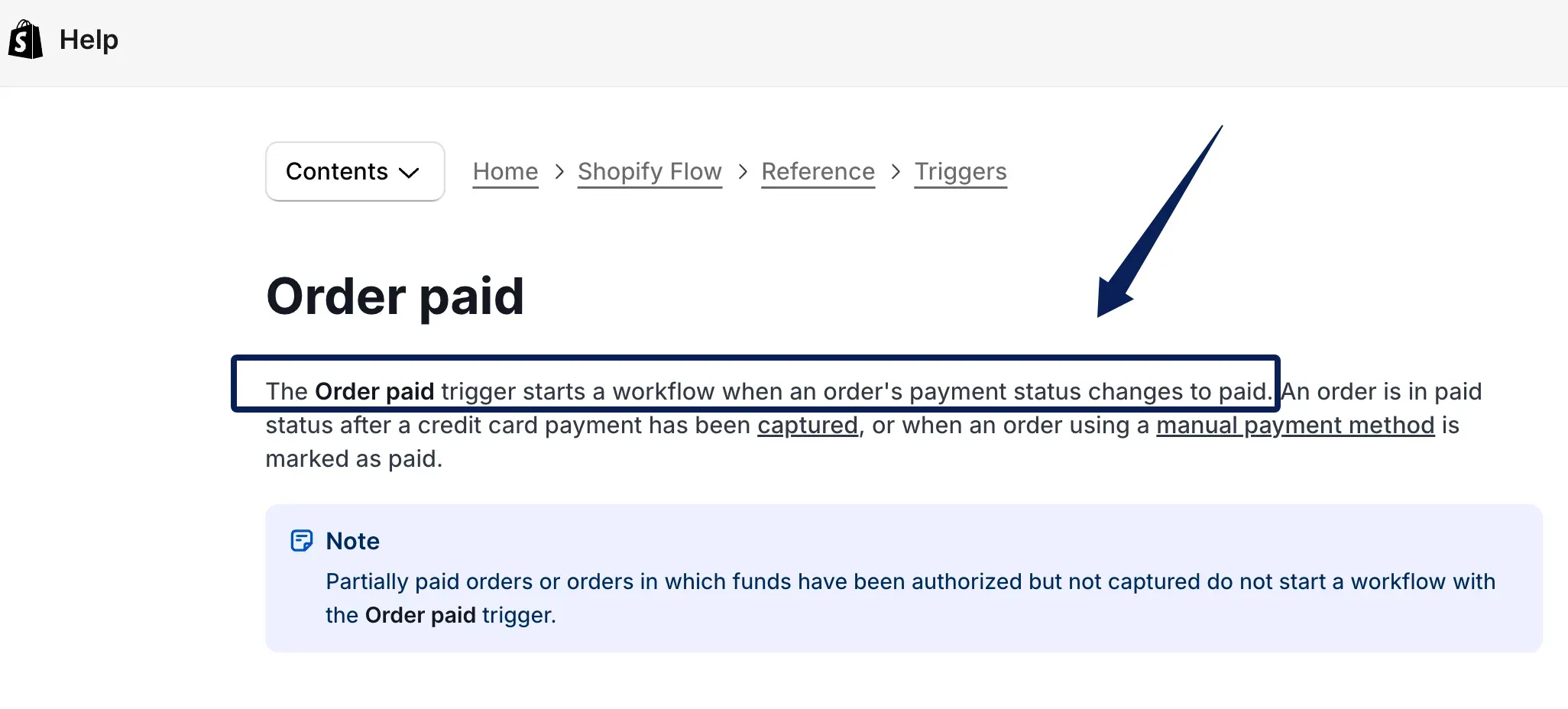
Verified delivery is the default timing anchor for a care tip. If there is no reliable delivery signal, pause. The shop can instead explicitly approve and configure a delay after fulfillment, with a fresh order check and copy that does not claim the parcel arrived. Shopify's Order paid trigger fires when payment status becomes paid; an authorized but uncaptured card payment does not qualify. That is one platform's event model, not proof of delivery.
Key P-214 by store order ID. Read the buyer email, item and variant, fulfillment, cancellation, and return states. The store owns those facts; the marketing system holds the draft and send history. Record the source and time of any delivery event. A customer event trigger wakes the flow, but the current order decides whether it proceeds. Ecommerce marketing automation should stop before drafting if that source is stale. Zentor can keep the seller's approved operating notes in workspace memory; it is not presented as a store order connector or the source of these live states.
Check Consent, Audience, and Product Status
Require active email marketing consent, an eligible buyer, and no open refund, return, or relevant complaint. Hold ambiguous records for a person. Purchase alone does not establish this flow's permission. Shopify's subscriber guidance tells Shopify Messaging users to send promotions only to customers who agreed and says it filters out non-subscribers. Check the actual sender's rules and each market served.
The lid must be active, available, and compatible with the pan variant. Otherwise, suppress the offer. Exclude wholesale orders, gifts, and buyers seeking help from this first audience; handle them under separate rules later.
Draft One Post-Purchase Message Flow
Use five states: candidate, eligible, awaiting approval, sent, suppressed. Verified delivery, or the approved fulfillment-delay branch, creates P-214's candidate. Current order and preference checks gate the draft. "Care for your new pan, plus a matching lid" is an honest subject only when delivery is verified; fallback copy must not imply arrival. Give one care step and link to the compatible lid's real product page without invented scarcity.
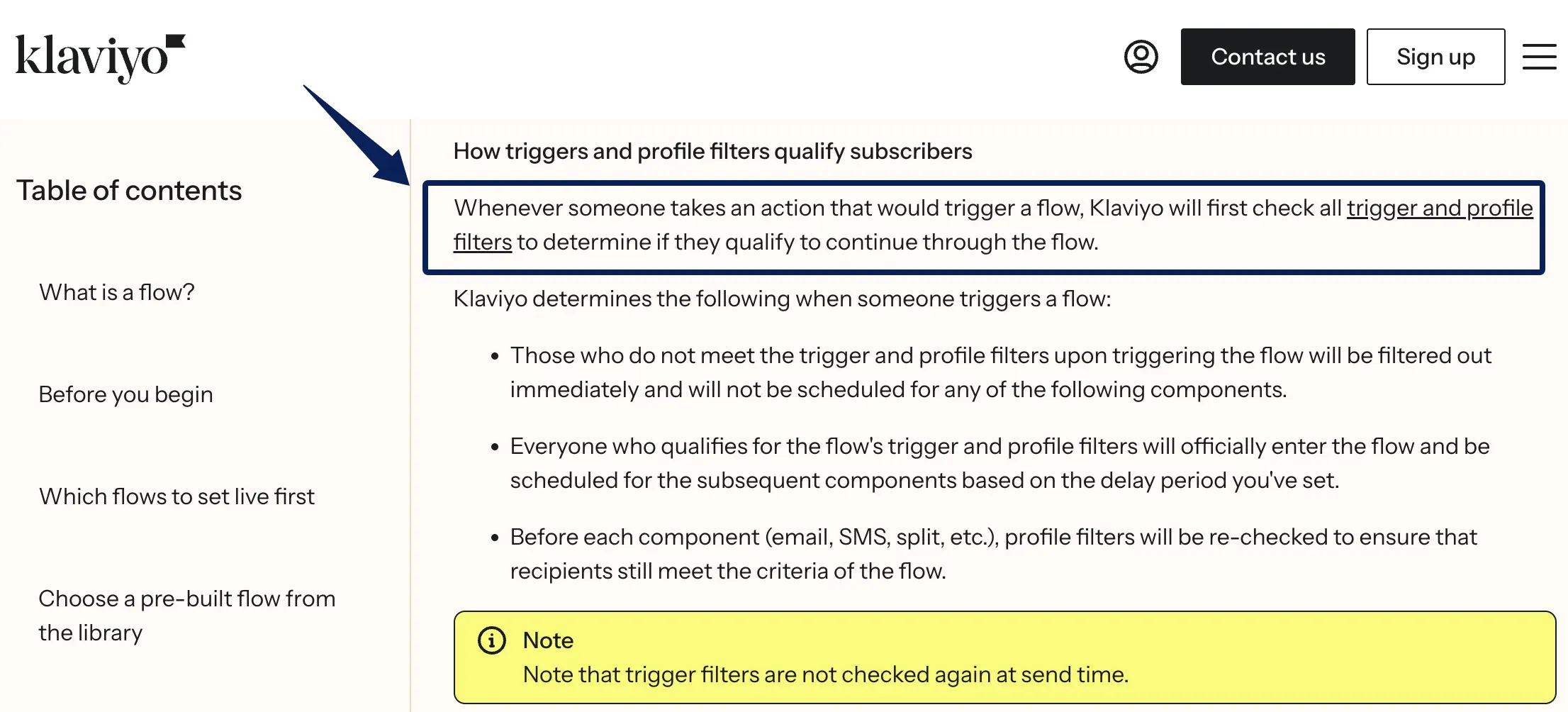
Set a delay under the shop's policy, then recheck the order and email preference before sending. Klaviyo's flow documentation says profile filters run before flow components and again when a message is scheduled to send; trigger filters are not rechecked at send time. Configure checks for current order and opt-out states that the chosen systems can actually read. A cancellation or unsubscribe during the wait stops P-214.
Approve Copy and Timing Before Sending
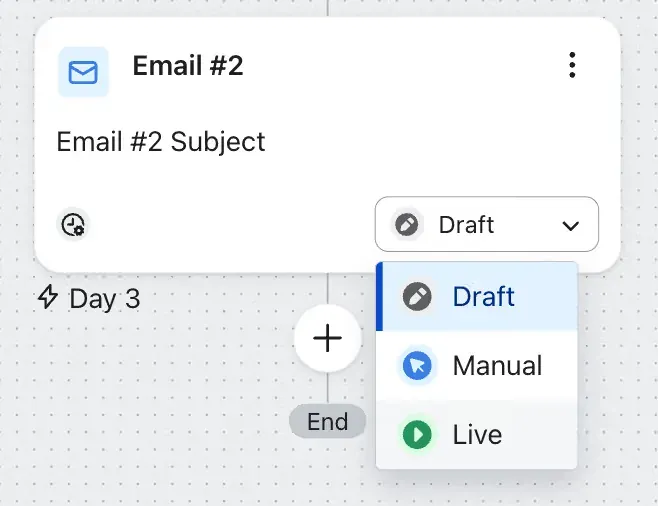
For campaign review, put P-214, the purchased pan, lid page and stock, email preference, copy, scheduled time, and current order and support state in one view. Use the review interface the shop's tools support; a card is only an example. Approve the template and eligibility rules before activation, then review early sends and ambiguous cases individually. Klaviyo's draft, manual, and live states are one implementation, not universal approval labels.
For US commercial email, use this short check against the FTC's CAN-SPAM guide: accurate sender and subject, advertisement identification, a valid postal address, and a clear opt-out method that works for at least 30 days after sending. The FTC says to honor opt-outs within 10 business days; this workflow stops queued marketing immediately when it sees one. Requiring an active subscription here is a stricter workflow and platform rule, not a claim that CAN-SPAM universally requires prior opt-in. Other markets may require more. This is not legal advice. Send through the configured email service to the current buyer address; a failed email must not silently become an SMS.
Zentor can retain an approved copy pattern and review notes in Notion or Airtable context when the seller connects that workspace. Approval of an individual marketing send must still happen in the actual sending workflow; keeping a note in Zentor is not permission to dispatch an email.
Record the Outcome in the Customer Context
Write P-214's message version, channel, scheduled and actual time, provider ID if available, reviewer, and sent or a suppression reason. The queue is not sent. After a timeout, check the provider record before retrying. Show this outcome in the customer context, so support can see what happened.
Count candidates, approvals, sends, suppressions by reason, and failures. Label any attributed clicks or orders as the sending system's report, not proof of causation. If exclusions dominate, inspect the data and rules before expanding. A seller who tracks those results in Airtable can ask Zentor to summarize the recorded outcomes there; it does not invent a delivery event or replace the email provider's send log.
Test Refunds, Returns, and Duplicate Events
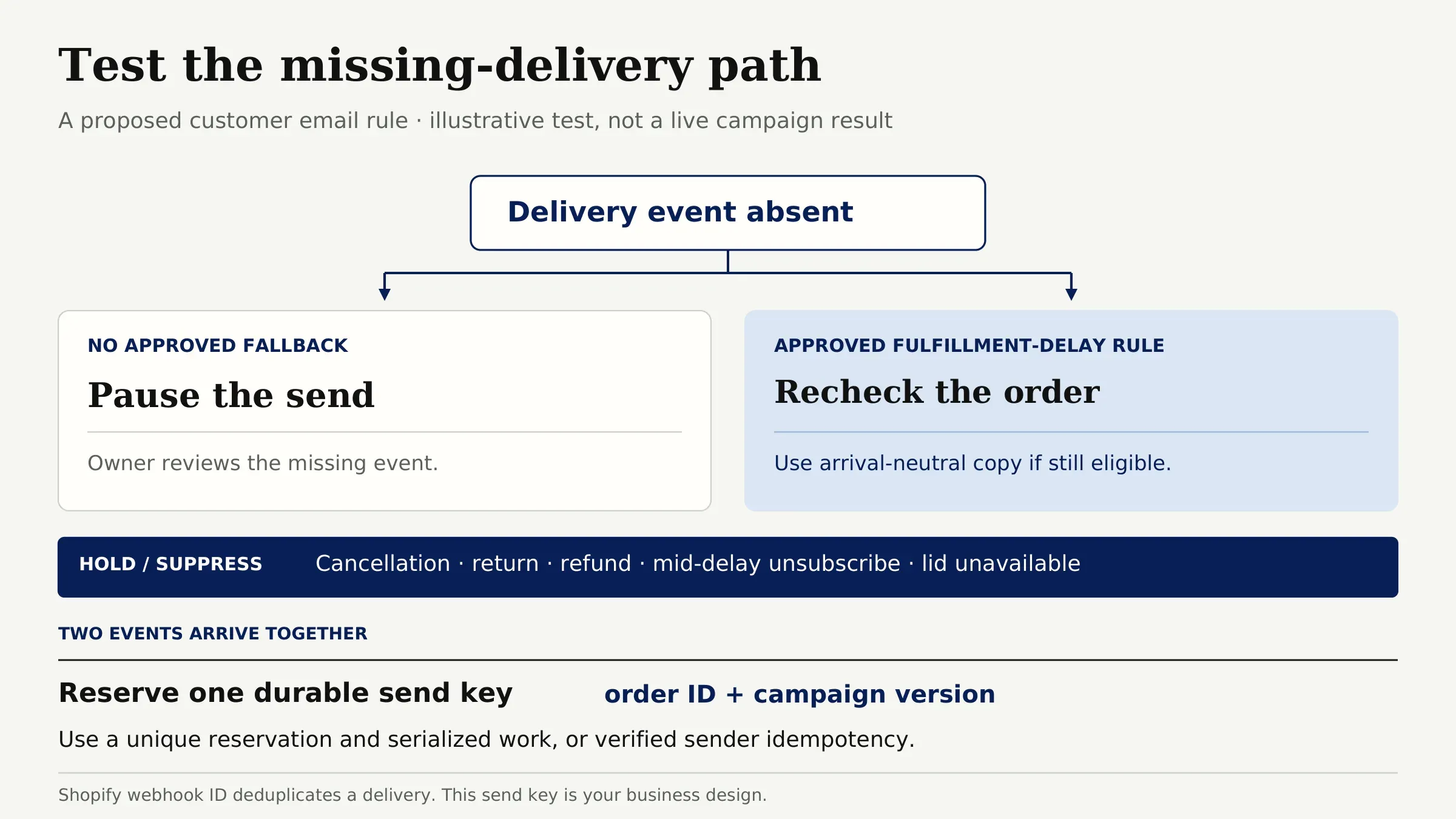
Before activation, test absent delivery in two branches: without an approved fallback, it pauses; with an explicitly approved fulfillment-delay rule, it can proceed only after a fresh order check and arrival-neutral copy. Cancellation, return, refund, mid-delay unsubscribe, and unavailable lid should hold or suppress. Shopify's webhook guidance says a retried delivery can share its X-Shopify-Webhook-Id, which helps deduplicate that delivery. Also test two events arriving together: reserve an order-ID-plus-campaign-version send key uniquely in durable storage, serialize work for that key, or use verified sender idempotency support. Looking up an earlier send alone leaves a race between two workers. This is a proposed business key, not a Shopify-native campaign feature.
Test a provider timeout too. A lost acknowledgement can make a blind retry duplicate the email. In ecommerce marketing automation, an unknown send result is a hold, not permission to retry. Check the provider's send record first; route an unresolved result to a person rather than resending. If a refund arrives after sending, record that sequence for support. The separate ecommerce fulfillment automation guide covers the physical order handoff.
FAQ
Can a shopper opt out of email while keeping another channel?
Yes, if the shop's preference system supports separate channel choices. An email opt-out must stop this email flow even when a shopper still accepts another channel. Do not infer SMS permission from an email subscription or from a purchase. The other channel needs its own applicable consent and sending rules, and this first flow should remain email only.
Should wholesale buyers receive the same post-purchase message?
Usually not in the first version. A wholesale buyer may have different pricing, a purchasing contact who never uses the product, or a separate account relationship. Exclude wholesale orders until the shop has checked the recipient, offer, and permission for that audience. If a wholesale follow-up is useful, give it separate copy and approval rules.
What if an order is cancelled after a campaign is queued?
Recheck the order immediately before sending and suppress the queued campaign when it is cancelled. Record the cancellation as the reason, and make sure a later duplicate event cannot recreate the same send. If the provider has already sent the email, record that sequence and route any customer replies to support; the system cannot retract a delivered message.
When should a conversation stop an automated reminder?
Pause the reminder when the buyer is discussing a delivery problem, return, refund, product defect, or a request to stop marketing. A generic "contacted support" flag may be too broad, so define the conversation states that block this particular offer. Give the reviewer the latest issue and owner. Resume only after resolution and a fresh eligibility check.
What if an order is a gift and the recipient is not the buyer?
Exclude identified gift orders from this first flow, including any email to the buyer. The buyer's marketing preference does not transfer to the recipient, whose delivery details are not permission for a promotion. A later, separate buyer flow could consider a buyer who independently qualifies, with copy that does not assume personal use. Contacting a gift recipient would need its own permission path.
Make the First Post-Purchase Flow Easy to Stop
P-214 is ready only when verified delivery or an approved timing fallback, email permission, product status, copy approval, and open order issues all pass. Keep those checks together and the sent or suppressed result beside the order. Expand to another campaign only after this path behaves predictably in test records and early live monitoring.

Zentor Editorial Zentor editorial team
The Zentor editorial team writes about workflow automation, AI agents, and the tools we build. Default byline for industry overviews, listicles, and collaborative pieces.
Ready to put this into practice?
Zentor runs browser tasks, research, and schedules automatically. Try it free.