Do Zapier AI Steps Count as Tasks in 2026?
Do Zapier AI steps count as tasks? See the 2026 tier formula, Code and MCP rules, December SDK changes, and a shop-friendly way to check overages.
Do Zapier AI steps count as tasks? Yes, and successful Code by Zapier actions do too. For AI steps, the count can be 1, 3, or 5 tasks before any tool calls: Zapier multiplies both the step and each successful tool call by the selected model tier, according to its model-tier pricing guide. If you run a small shop and an order Zap fires every sale, that difference accumulates inside the same account task allowance as your ordinary actions.
Key Takeaways:
- An AI by Zapier step costs its model multiplier times one plus its successful tool calls; a new paid-plan step defaults to Premium, at 5×.
- A successful Code action starts at one task and can use more after its plan's standard runtime; SDK calls inside it start adding tasks on December 1, 2026.
- In Classic Zaps, triggers and polling, Filter, Paths, Formatter, Delay, Looping, Tables, and Forms don't use tasks. A successful Next Gen Zap will have a one-task minimum when its billing starts.
- Check current Usage insights and your pay-per-task setting before your cycle resets; a setting that stops overages also holds new runs when you exhaust the allowance.
What counts as a Zapier task in 2026?
A Zap's trigger can check for a new order without spending a task. In a Classic Zap, successful actions after the trigger usually cost one task each, while AI by Zapier, Code by Zapier and MCP have their own rates. Zapier's task-usage rules say successful actions count and polling for trigger events does not. AI, Code, MCP and SDK share the account's task allocation, but their rates differ.
Suppose an order Zap classifies a request with AI and creates a record. Count the AI tier and tool calls, then the separate successful record action. One order isn't necessarily one task.
Zentor is a different choice for the portion of a solo seller's work that doesn't fit a fixed trigger-and-action chain: you can delegate a product-listing research task in plain language and have its result land in Notion. It uses credits that vary by task, not Zapier tasks; the two meters aren't interchangeable.
Keep the work where your shop keeps it
Delegate a task to Zentor and keep its result in your workspace. Usage is metered in credits, so check the plan before you start.
Get started →
How many tasks does an AI by Zapier step use?
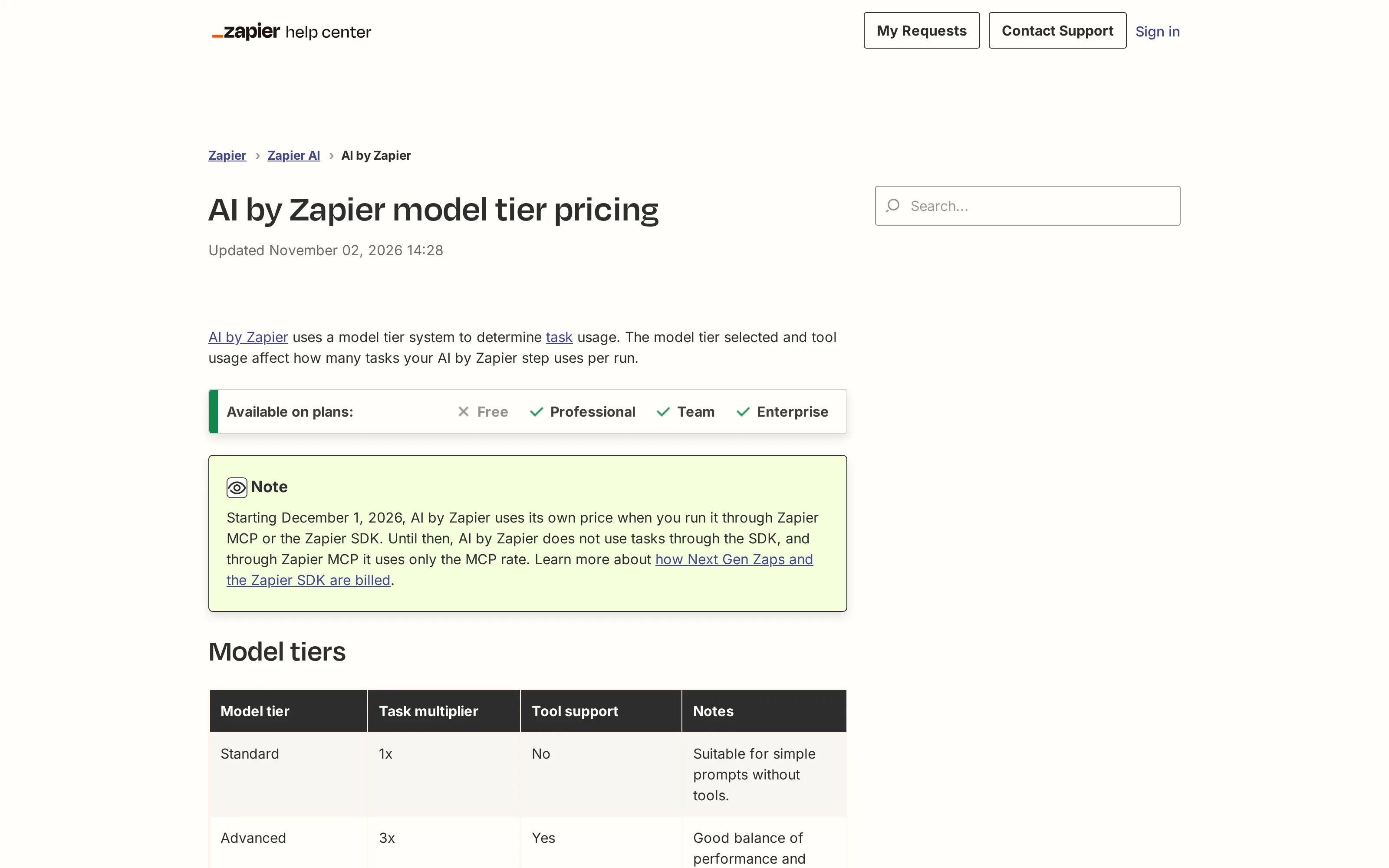
Zapier's formula is tasks per run = model multiplier × (1 + successful tool calls). Standard is 1×, Advanced is 3×, and Premium is 5×. Standard has no tool support. New AI steps on paid plans default to Premium, which is why leaving the model selector untouched matters. The official tier table and worked examples also distinguish legacy steps created before June 15, 2026; those do not automatically adopt the new model selector.
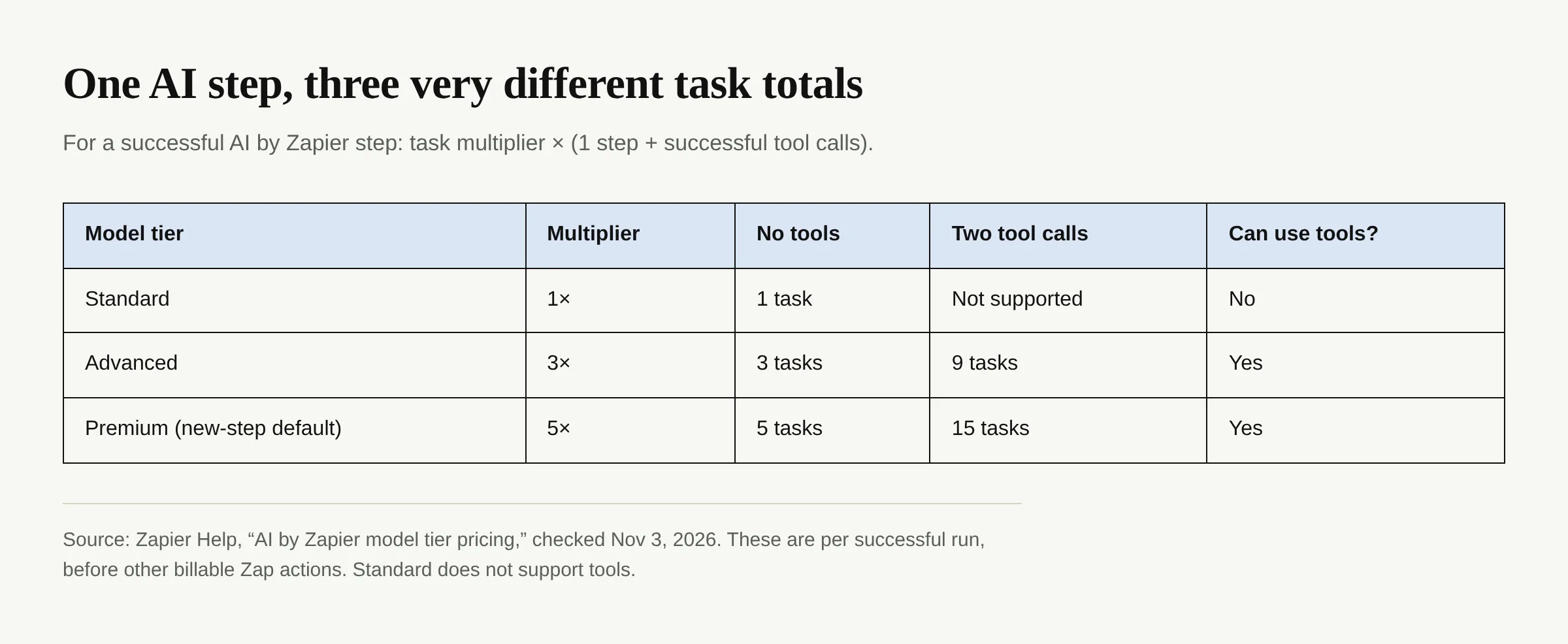
At Premium, a step with two successful tool calls uses 5 + 10 = 15 tasks before any subsequent Zap actions. The same two-call pattern at Advanced uses 3 + 6 = 9 tasks. Those figures come from the published formula, not a claim that every run makes exactly two calls. If your AI step simply labels an incoming order without looking anything up or changing another app, test whether a Standard model can do the job; it costs one task for that step and cannot use tools. If the step needs tools, compare Advanced with Premium on your actual outputs rather than claiming a no-tool tier will handle them.
An AI tool call means successful use of an app action or knowledge source. Count it inside the AI formula; count later successful Zap actions separately.
Does Code by Zapier add more than one task?
A successful Code action uses one task for initialization within its standard runtime. Zapier's Code billing guide says extra time costs one more task per additional 30-second block, with partial blocks rounded up; on Professional and Team, the standard runtime is 30 seconds. It gives a 35-second Professional example totaling two tasks and a 90-second example totaling three. Free-plan extended runtime isn't available. Code triggers and Code actions that fail before completing do not count under that guide.
In the Zap editor, identify Code steps and check their typical runtime. Formatter can replace a simple formatting action without a Code base task in Classic Zaps, if it produces the same result.
The run pattern matters more than the number of Zaps switched on.
What changes for MCP, SDK and Next Gen Zaps on December 1?
As of November 3, 2026, the scheduled change has not started. Zapier's Next Gen and SDK billing notice puts its start at December 1, 2026, 12 p.m. ET (17:00 UTC). Today a successful Zapier MCP tool call uses two tasks; from that date, calls to free By Zapier apps such as Tables and Forms are scheduled to use no tasks, while AI by Zapier calls through MCP use AI's own tier price instead of the flat MCP rate.
The SDK change is not a retroactive charge on every Classic Zap. Beginning at that same time, an SDK action, fetch call or inbox-lease trigger outside a Next Gen Zap uses one task. SDK calls inside a Classic Code step add one task each on top of that Code step's base task. A successful Next Gen Zap will consume at least one task even if its filter stops the run before a paid action; if actions already use three tasks, the minimum does not add a fourth. Classic Zaps don't have that one-task floor. Hosted Zap triggers remain free, but the separately billed SDK inbox lease outside a hosted Zap is not the same thing.
Ordinary Classic Zaps largely keep their current rates; flag any Classic Code step with SDK calls for a new estimate.
Which steps still use zero tasks?
For Classic Zaps, Zapier lists triggers, polling checks, Filter, Paths, Formatter, Delay, Looping, Tables and Forms as non-task steps. Tests inside the Zap editor are also not billed as tasks, though an action test can still perform an action in its connected app. A failed or halted action does not add a successful-action task. These rules apply to the Classic Zap task table; don't extend its zero-task promise to a successful Next Gen run, which has the coming one-task minimum.
A Filter before an AI step can prevent that step from running when an order doesn't need special treatment. For example, if you only need AI to draft replies to unusual product questions, a condition that excludes routine orders can cut the number of billable AI executions. The Filter doesn't itself incur a task, but any prior successful action still does. Moving a date-format change into Formatter also avoids paying for a separate ordinary action where Formatter can produce the same output. Your estimate should track what actually executes, not count every box visible in the editor.
Free Tables and Forms steps don't erase other paid actions or the coming Next Gen minimum.
How to avoid a surprise pay-per-task bill
First, visit Billing and usage → Usage insights to read the current cycle's total and daily graph; Zapier's Usage insights guide says its graph covers the current billing period and shows plan-included and pay-per-task usage separately. The historical CSV covers completed billing periods, not this live one, and does not break usage down by Zap. Use your Zap history for the detail available on Classic runs. For outside-the-platform SDK activity, Zapier currently shows an account total, not a per-script breakdown.
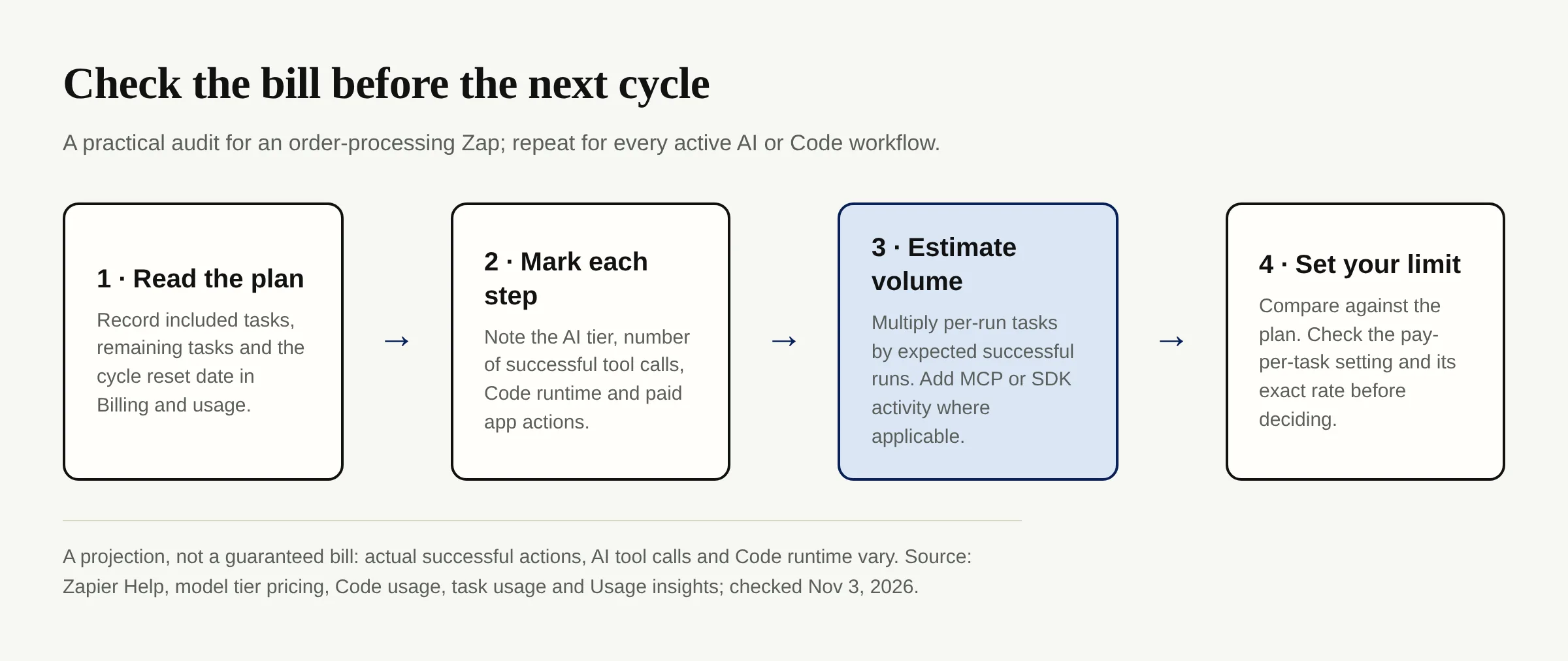
List active order, inventory and message Zaps with AI or Code. Record model tier, tool calls, paid actions and Code runtime; multiply estimated per-run tasks by expected successful runs from your history. Compare with remaining tasks this cycle. Variable tool calls make this an estimate, not an invoice.
Finally, inspect the actual pay-per-task setting and rate in Billing settings. Zapier's overage guide says the rate depends on plan and billing cycle. On eligible paid accounts, leaving pay-per-task on lets runs continue beyond the included allowance at that rate; switching it off holds new runs when the limit is reached. Previously accrued overage is still payable. For a shop, pausing order workflows may be worse than a controlled overage, so make that trade deliberately before a busy sales week.
For work that doesn't fit a fixed trigger, Zentor can turn scattered product notes into a draft delivered to Notion or Airtable. Its workspace memory belongs to you and reaches other AI through Zentor MCP. Zentor meters usage in credits, not Zapier tasks; compare measured work rather than claiming fixed savings per order.
FAQ: Zapier AI steps and task billing
Do Zapier AI steps count as tasks even without tools?
Yes. AI by Zapier's step itself costs one task at Standard, three at Advanced or five at Premium for a successful run. Successful AI tool calls add that same tier multiplier for each call. New paid-plan steps default to Premium.
Does polling for new orders count as a Zapier task?
No. Polling and hosted triggers don't use tasks under Zapier's Classic rules; the successful actions that follow can. An SDK inbox-lease trigger outside a hosted Zap is a separate case scheduled to use one task starting December 1, 2026.
Will turning off pay-per-task prevent every extra charge?
It stops new pay-per-task usage immediately, but Zapier says it still invoices usage already accrued. When your included task allowance runs out, new runs are held until the cycle resets or you take another qualifying action such as upgrading.
Is a filtered order always free?
A Classic Zap can stop at a Filter before any paid action without spending a task. A successful Next Gen Zap will have a one-task minimum starting December 1, even if a filter stops it; do not apply the Classic answer to both systems.

Zentor Editorial Zentor editorial team
The Zentor editorial team writes about workflow automation, AI agents, and the tools we build. Default byline for industry overviews, listicles, and collaborative pieces.
Ready to put this into practice?
Zentor runs browser tasks, research, and schedules automatically. Try it free.