Motion Alternatives for 2027: Task Scheduling Options

Compare Motion alternatives for task scheduling, replanning, and daily control before moving your work to a new planner in 2027.
Motion alternatives are task planners that place work around calendar commitments. For a freelancer already using Motion, the question is whether another planner keeps deadlines visible when a client meeting moves or an urgent request arrives. Among AI task scheduling alternatives, the best replacement is not necessarily the one with the most features. It is the one whose decisions you can understand and correct.
Key Takeaways:
- Reclaim.ai is worth considering when protecting time across calendars is the main problem.
- Sunsama gives you more deliberate control over each day's workload.
- SkedPal lets you define when different kinds of work may be scheduled.
- Test one disrupted workweek before moving your backlog or canceling Motion.
When I compare planners, I start with the Tuesday that goes wrong, not a pristine Monday calendar. A client call moves into a writing block; then an urgent revision arrives. Which task slips, and can I still tell the client what ships Friday? I checked current vendor information on October 11, 2026, and mapped that situation below. This is a proposed test, not a hands-on trial of three paid accounts or a claim about their 2027 performance.
When is it worth leaving Motion for a task planner?
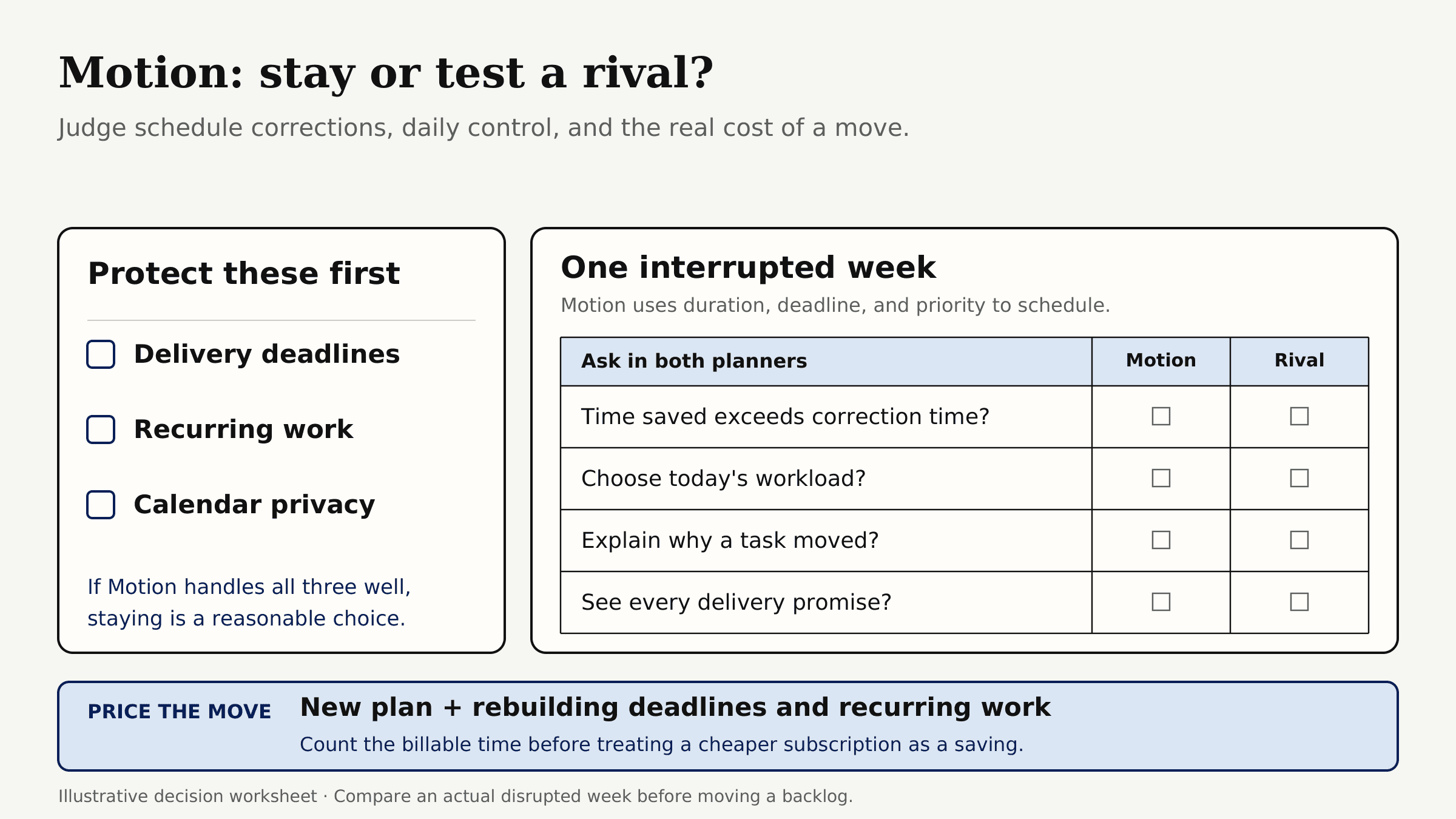
Consider leaving when correcting Motion's schedule takes more time than it saves, or its price no longer fits your work. A cheaper subscription is little consolation if rebuilding deadlines and recurring tasks costs a billable afternoon.
Motion uses task duration, deadline, and priority in its automatic scheduling. That helps when your commitments are accurate. It may feel less helpful if you want to choose today's workload yourself or understand why a task moved. The test is whether a rival handles interruptions without hiding a missed promise.
Before comparing apps like Motion for scheduling, list what you cannot lose: delivery deadlines, recurring work, and calendar privacy. If Motion handles all three well, staying is a reasonable choice.
When the calendar isn’t the problem
If client decisions and previous work keep getting lost between tools, compare Zentor’s workspace memory. It does not schedule your tasks onto a calendar.
Get early access →
What should a Motion replacement preserve?
Use the same scenario for every candidate: a two-hour report due Friday, a 45-minute meeting-preparation block, and one hour of recurring administration. On Tuesday, the meeting shifts into preparation time and a 90-minute revision arrives. These are illustrative inputs, not measured time savings. A planner passes if displaced work stays visible, Friday remains feasible, and private commitments stay private.
| Decision point | What to inspect |
|---|---|
| Placement | Which tasks become calendar blocks, and which remain on a list? |
| Conflict | Does a moved meeting produce a usable plan or leave work unscheduled? |
| Control | Can you protect delivery dates and decline after-hours work? |
| Boundary | Which calendar receives blocks, and what can a client see? |
| Migration | What must be rebuilt, including recurrence, notes, and priorities? |
A calendar task planner must distinguish a due date from a work block. Moving time reserved for a task does not move the client's deadline. Keep contractual dates in your source records until the new planner proves it can protect them.
Reclaim.ai - calendar-first time protection
Reclaim is a strong first trial when calendar congestion is the problem. In Reclaim 2.0, Tasks do not automatically become separate calendar events: Focus Time protects work blocks, and Reclaim recommends relevant tasks within them. Its connected calendars can inform availability across multiple schedules; Calendar Sync separately copies busy time between calendars. If Reclaim only reads a personal calendar, someone booking through your work calendar may still see that time as open.
In the sample week, I would enter the revision as a Task, check whether the report appears among at-risk recommendations, and inspect the Focus Time left before Friday. Then I would make a test booking. If a personal appointment reveals its title to the booking viewer, the setup fails however tidy the calendar looks.
Reclaim's task planning fit and limits
Reclaim's free Lite tier lists a one-week scheduling range and limited integrations. Starter currently displays $10 per seat per month with annual billing. The scheduling range alone does not establish which task features your account includes. Check the tier and product version you receive before testing a deadline more than a week away.
Favor Reclaim when availability protection is the recurring pain and another task system can remain authoritative. The client brief, approval notes, and delivery status still need a home outside the calendar.
Sunsama - guided daily planning
Sunsama suits someone who wants to decide what today's workload should be before it becomes calendar time. While checking its current behavior, I nearly put it in the manual-only category. That would have been wrong: it can auto-schedule selected tasks around visible calendar events and configured working hours. Its daily-planning approach still asks you to choose what belongs in the day.
For this week, I would rather move report preparation myself than accept a conflict-free writing block at an hour when I work poorly. That is my planning preference, not a claim about Sunsama's tested output. A freelancer who wants the planner to make most decisions automatically might make the opposite choice.
Sunsama's planning fit and limits
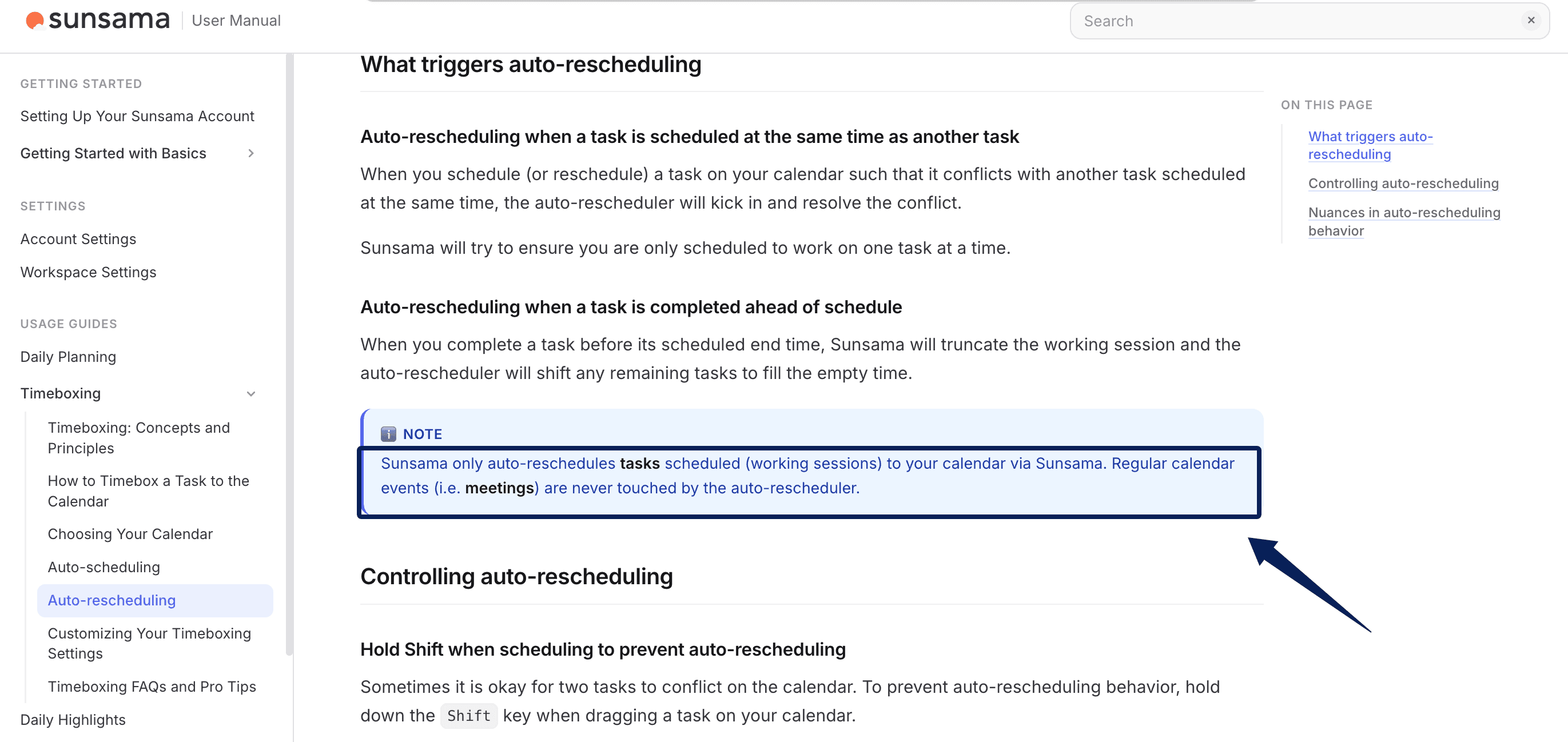
The important boundary is that Sunsama's auto-rescheduling moves Sunsama work sessions, not ordinary meetings. It resolves task-on-task scheduling conflicts or shifts tasks when a work session finishes early; do not assume a moved client meeting alone will trigger a complete replan. If displaced work cannot fit, a task can become unscheduled while remaining on the task list. The calendar may look clear even though the obligation still exists. After a client-driven change, inspect both places.
Sunsama offers a 14-day trial followed by a paid plan. As of October 11, 2026, Sunsama's official pricing page showed $17 per month billed yearly or $22 billed monthly on its main card, while its FAQ still listed $20 and $25, respectively. Because the same official page conflicts, check the checkout total before using a price in a 2027 budget. Sunsama may feel too hands-on if you do not want a morning review. For someone who distrusts silent reshuffling, that involvement is part of the appeal.
SkedPal - rule-based time blocking
SkedPal is for people willing to invest in scheduling rules. Its Time Maps express when different kinds of work may be scheduled, such as client delivery during office hours and personal administration at another time. That gives it an answer to the shifted meeting: look for room within an acceptable work window, rather than treating every empty hour as equally usable.
The setup cost is real. For a Motion competitor for freelancers, I would begin with only two Time Maps, one for client work and one for personal work, before inserting the urgent revision. More detailed rules can wait until that simple schedule makes sense.
SkedPal's planning fit and limits
In SkedPal, the due date is a reference, while the plan controls scheduling. Adding a due date to a task with no plan creates a matching plan once; later edits to the due date and plan do not update each other. For a Friday client deadline, check that the plan still ends by Friday and that the resulting work blocks fit after any edit. That is a different mental model from Motion's.
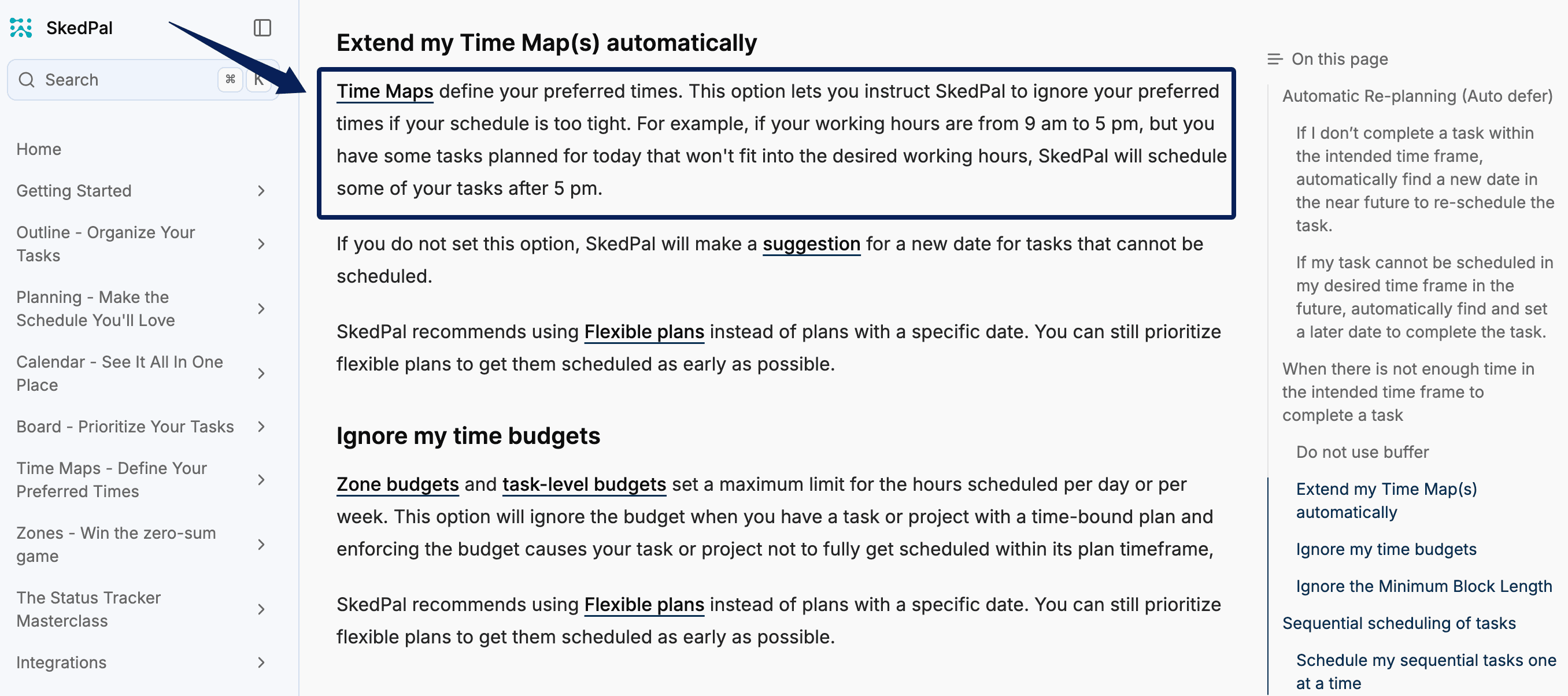
SkedPal can extend a Time Map beyond preferred hours if that advanced option is enabled. Inspect it before trusting the planner to protect your evenings. Its Core tier currently starts at $9.95 per month with annual billing, with a 21-day planning window and one external calendar account; Pro extends those limits. Choose based on the calendars you actually use, not the lowest headline price.
How do you move one workweek without losing deadlines?
Do not migrate the entire backlog first. Pick one deliverable, one recurring task, and one meeting. Put their titles, estimates, deadlines, recurrence rules, and source links in a handoff sheet. Keep Motion as the reference during the pilot, and check whether the two planners create duplicate blocks on the same calendar. A synced Motion calendar event is not necessarily an editable task in the new planner: Motion says its task sync to external calendars is one-way.
Run the same interruption in each candidate. Move the meeting, add the 90-minute revision, and inspect Friday's remaining work time. Count manual edits, tasks that lost their calendar slots, and any private event details exposed in a booking view. Those observations tell you more than a claim that one app schedules faster.
Reconcile the new planner against the handoff sheet each evening for three workdays. A lost checkbox is irritating; a client commitment moved outside available hours is costly. Rebuild a repeating task only after checking one instance and its next occurrence. Do that before canceling Motion.
When Tuesday's meeting moves, I need more than a new work block: which brief did the client approve? Keep that answer in a project record. If losing that history across tools is the recurring problem, Zentor is a separate context option, not a calendar scheduler. The broader comparison of calendar, inbox, and client handoffs helps with that different decision.
FAQ
Can Reclaim schedule tasks on two separate calendars?
Not as automatic, separate blocks for every Task in Reclaim 2.0. Tasks are recommended within protected work time. You can connect multiple calendars and choose a calendar when logging Task work, then review proposed work blocks in Preview Mode. If you need each client task blocked on a specific calendar, test that workflow before migrating. Reclaim 1.0 documents a different task-block scheduling workflow, so confirm which version your account uses.
Does Sunsama bring recurring tasks across during a move from Motion?
Do not assume so. Sunsama supports recurring tasks, but that does not establish a direct import of Motion's series, rules, or history. Recreate one item and check its next two dates before retiring the original.
What happens if SkedPal cannot fit a task inside its plan?
SkedPal can suggest a new date when work will not fit. If auto-defer is enabled, it may move the plan automatically; another setting may extend work beyond preferred Time Map hours. For a client deadline, review those settings and compare any new plan with the original due date.
What happens to Motion task history when a subscription ends?
Motion's terms say subscription access continues to the end of the paid term. Its privacy policy says it retains personal information while the account exists and for up to one year after account deletion, absent an earlier deletion request; that is not a guarantee of task-history access or a full task export after cancellation. Preserve important task records, deadlines, links, and completion evidence before canceling. Check any export option in your account or ask Motion support what task data it can provide.
Which option can show a client only free and busy time?
That depends on the destination calendar and its sharing settings. Reclaim's Calendar Sync can create privacy-controlled copies of busy events. Sunsama lets you choose where timeboxed tasks appear and how visible they are; SkedPal syncs blocks to a connected calendar. Open the client-facing view from a second account and confirm it shows availability without exposing task titles or personal details.
Which Motion Alternative Should Carry Your Next Workweek?
Choose Reclaim for cross-calendar availability, Sunsama for daily control, or SkedPal for explicit scheduling rules. None earns the migration from its feature list alone. Disturb one workweek on purpose, then keep the tool that still makes Friday's promise visible after Tuesday changes.

Zentor Editorial Zentor editorial team
The Zentor editorial team writes about workflow automation, AI agents, and the tools we build. Default byline for industry overviews, listicles, and collaborative pieces.
Choosing between tools? Let Zentor run the work.
Always-on AI assistant on its own cloud computer. No switching required, no setup.