Best AI Assistants With Memory for 2027
Best AI assistants with memory for 2027: compare ChatGPT, Claude, and Gemini by what they retain, user controls, and fit for recurring work.
An AI assistant with long-term memory carries selected information into later conversations. The best AI assistants with memory for 2027 are not necessarily those that retain the most. For client work, the useful question is whether the right detail survives, stays correct, and remains under your control.
Key takeaways:
- ChatGPT is a practical starting point for recurring conversations, provided you check which memory controls your account actually has.
- Claude documents separate project memories and editable topics; project knowledge files are a different layer.
- Gemini can draw on earlier chats for personal accounts with the required settings, while work and school accounts have a different boundary.
For this comparison, I reviewed current OpenAI, Anthropic, and Google memory controls on October 8, 2026. I did not run matched tasks in three accounts, so these picks judge documented scope and user controls, not recall accuracy. A saved preference, project file, or earlier chat can reach a new answer through different paths. Each needs a different correction when a client changes the brief.
Quick Picks for Different Memory Needs
For an AI assistant that remembers working preferences across chats, shortlist ChatGPT. For distinct client projects, shortlist Claude. For research in a personal Google account, consider Gemini. None is an automatic winner for a team account or a sole record of approved prices and deadlines.
| Assistant | What may carry forward | Where to inspect or correct it | Boundary to check |
|---|---|---|---|
| ChatGPT | Saved memory and eligible past-chat context | Memory controls; Sources may identify contributing context | Available settings vary by plan and workspace |
| Claude | Project memory topics; separate knowledge files | View, edit, or delete memory topics | Project limits and organization controls |
| Gemini | Eligible past chats; specific facts where available | Correct in chat; delete contributing chats | Personal account, Keep Activity, and feature rollout |
These are fit judgments, not performance scores. A large context window is not proof of cross-session recall. If you need memory that moves between assistants, Zentor describes user-owned memory accessible through its MCP connection; it is not a fourth ranked candidate here, and this comparison did not test its account availability or write-back.
Keep workspace context with you
If work spans assistants, review Zentor’s workspace-memory approach and confirm the tools you need are available to your account.
Get early access →
What Counts as Memory in an AI Assistant?
Memory lets selected information influence a later conversation without being pasted again; it is not a complete archive. A context window holds material during one task. Chat history is a record you can reopen or search. Project knowledge supplies files and instructions to related chats. Persistent AI assistant memory carries selected details forward.
Imagine a consultant whose client moved report approval from the founder in April to the operations lead in May. A polished note addressed to the founder is still wrong. Test whether the new instruction replaces the old one and whether you can remove the source retaining it. This is an illustration, not an observed result.
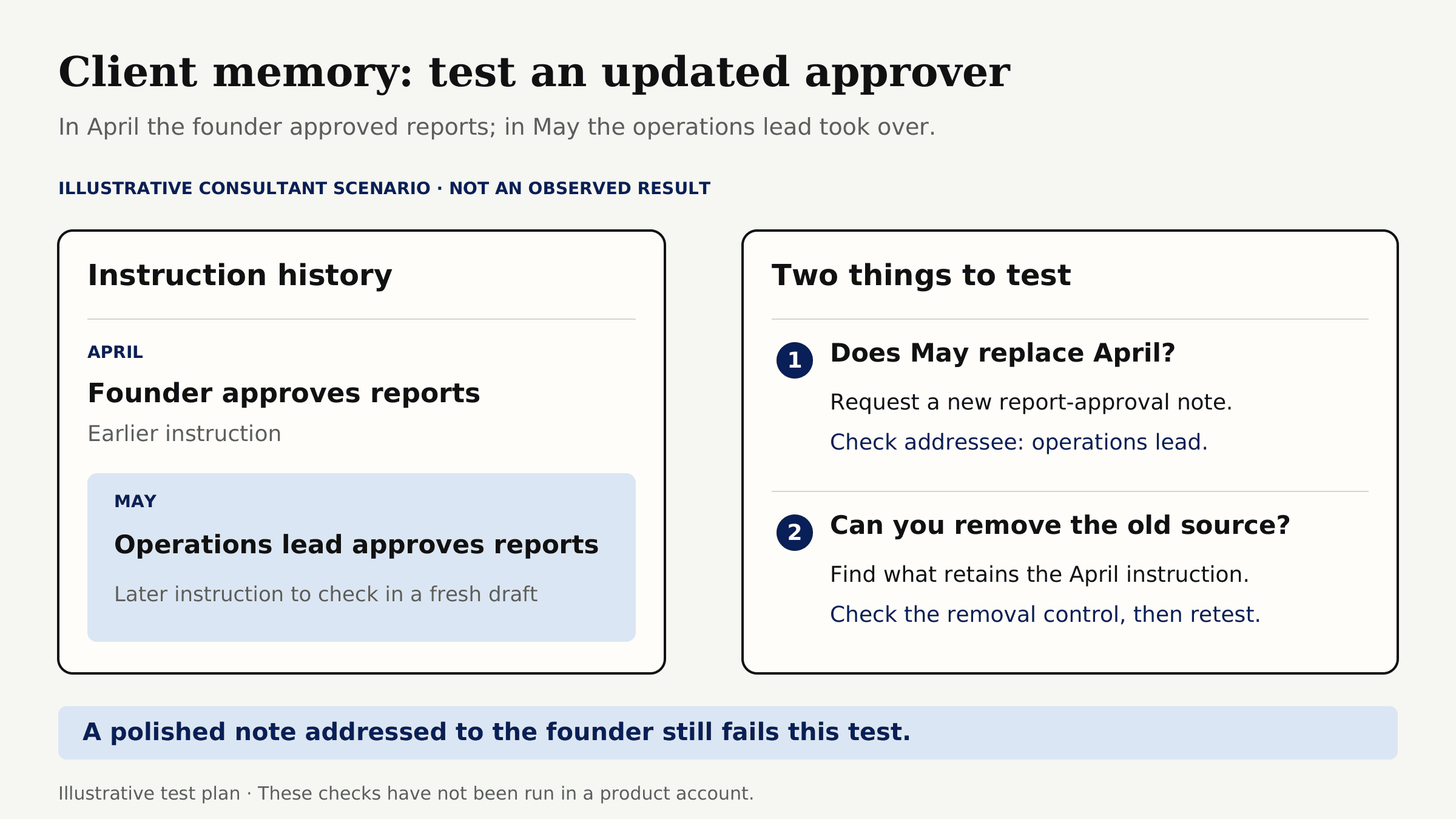
Keep approved scope, prices, and dates in the project record. Memory helps continuity; it is not the source of truth.
The question I would put to a vendor is not "Can it remember my tone?" but "Can I see and remove the old client detail before it reaches another task?" Remembering a harmless preference is easy to demonstrate. Correcting a changed reviewer, separating two clients, and proving that a deleted fact stays out of the next draft are the more useful checks.
How We Compared the Best AI Assistants With Memory for Recurring Work
I compared the same four documented controls for each assistant: cross-chat scope, inspect-and-delete options, account boundary, and source traceability. The five-fact exercise below is a reader test, not a measured recall score.
To test your own shortlist, give each assistant five fictional facts: client, deliverable, tone, reviewer, and due day. In a new chat, request a handoff without repeating them. Change the reviewer and due day; in a third chat, check whether the corrections survive. Record errors and where you can inspect or delete the facts. Match account type and settings. This is a proposed trial, not one I performed.
Five facts across three chats are not a benchmark. Zentor's editable-memory correction test found a fix that worked in one thread but failed later. It illustrates the method, not ChatGPT, Claude, or Gemini. Keep client data out of the trial.
ChatGPT - Conversation Continuity
What Can It Carry Into the Next Task?
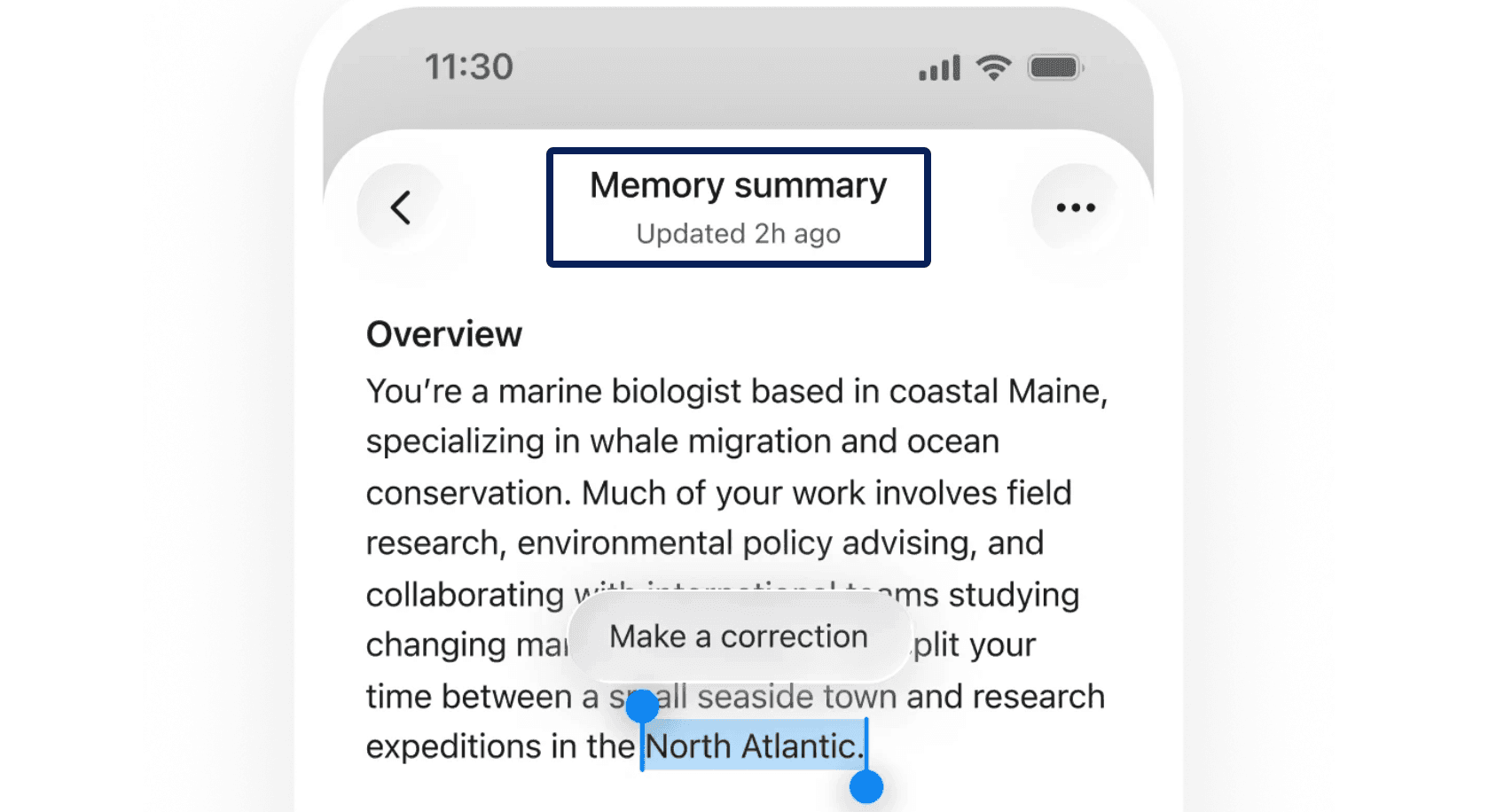
ChatGPT can use saved memories and, where enabled, relevant past chats. Controls vary by plan, region, platform, and workspace. You can inspect, correct, or remove remembered information. Sources may identify a past chat, saved memory, file, or connected content, though they do not explain every factor behind an answer.
A seller might save "lead with material and fit, then mention care" for weekly descriptions. A campaign discount belongs in the current catalog. ChatGPT projects group related chats, files, and instructions, but that does not make every detail durable memory.
Where Does Its Memory Stop?
ChatGPT does not retain every fact. Referenced chat details can change; saved memories have separate controls. Deleting a chat may leave its saved memory, so sensitive context may require deleting both.
If one account holds multiple clients, test whether facts leak across conversations. Check project-only memory availability rather than assuming isolation. For a quote, use the current client file and inspect the supporting line.
Claude - Project Context
What Can It Carry Into the Next Task?
Claude stores memory as editable topics. Each project has separate memory and a summary, useful when a consultant handles different client styles. A correction to Client A's tone should not become Client B's rule.
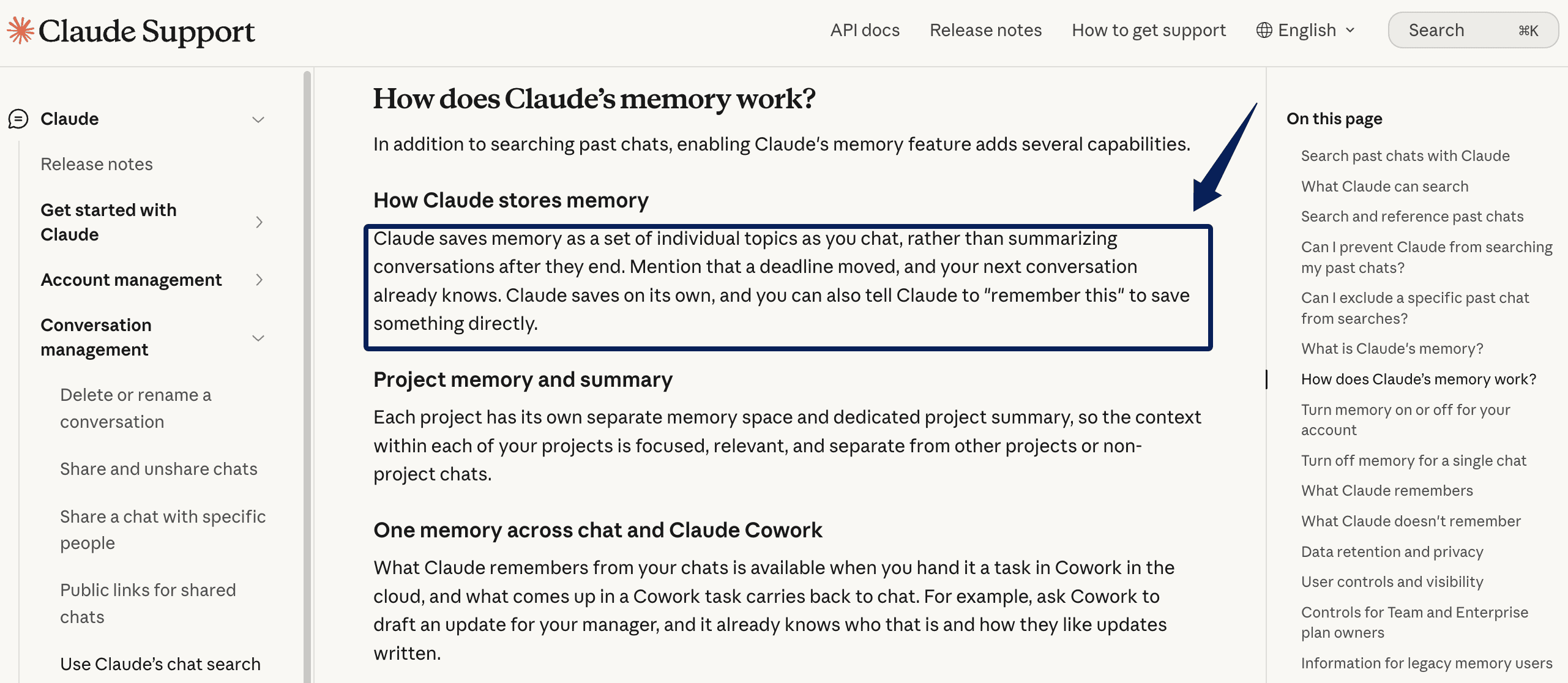
Claude projects hold knowledge files and instructions. Put a monthly report's approved format and sources there; inspect memory topics for inferred preferences. This separates explicit project material from remembered context.
Where Does Its Memory Stop?
Project membership is not a transcript of every chat. Files, chats, and memory topics reach later answers differently. Paid plans can search past chats; memory also exists on Free. As of October 8, free accounts can create up to five projects. Team and Enterprise owners may gate access.
Per-chat memory controls can exclude one-off work from normal recall, though organizational retention may still apply. After a scope change, inspect topics and remove old instructions. Keep the approved statement of work elsewhere.
Gemini - Personal Context
What Can It Carry Into the Next Task?
Gemini can personalize later conversations from past chats when an eligible user enables Memory and Keep Activity. A creator might revisit research across several days. Instructions for Gemini let eligible personal-account users save preferences, facts, and response rules for later chats. These instructions differ from past-chat memory. Google says its personalization features are not available to everyone; check whether the control appears in your account.
Past-chat recall is not an approved customer record. For current stock or client feedback, reopen the source.
Where Does Its Memory Stop?
Google's past-chat memory requires a personal account, age 18 or over, and Keep Activity on. Work, school, and supervised accounts are excluded. Gems and Live chats do not use it in the same way. Check this before designing work around a managed login.
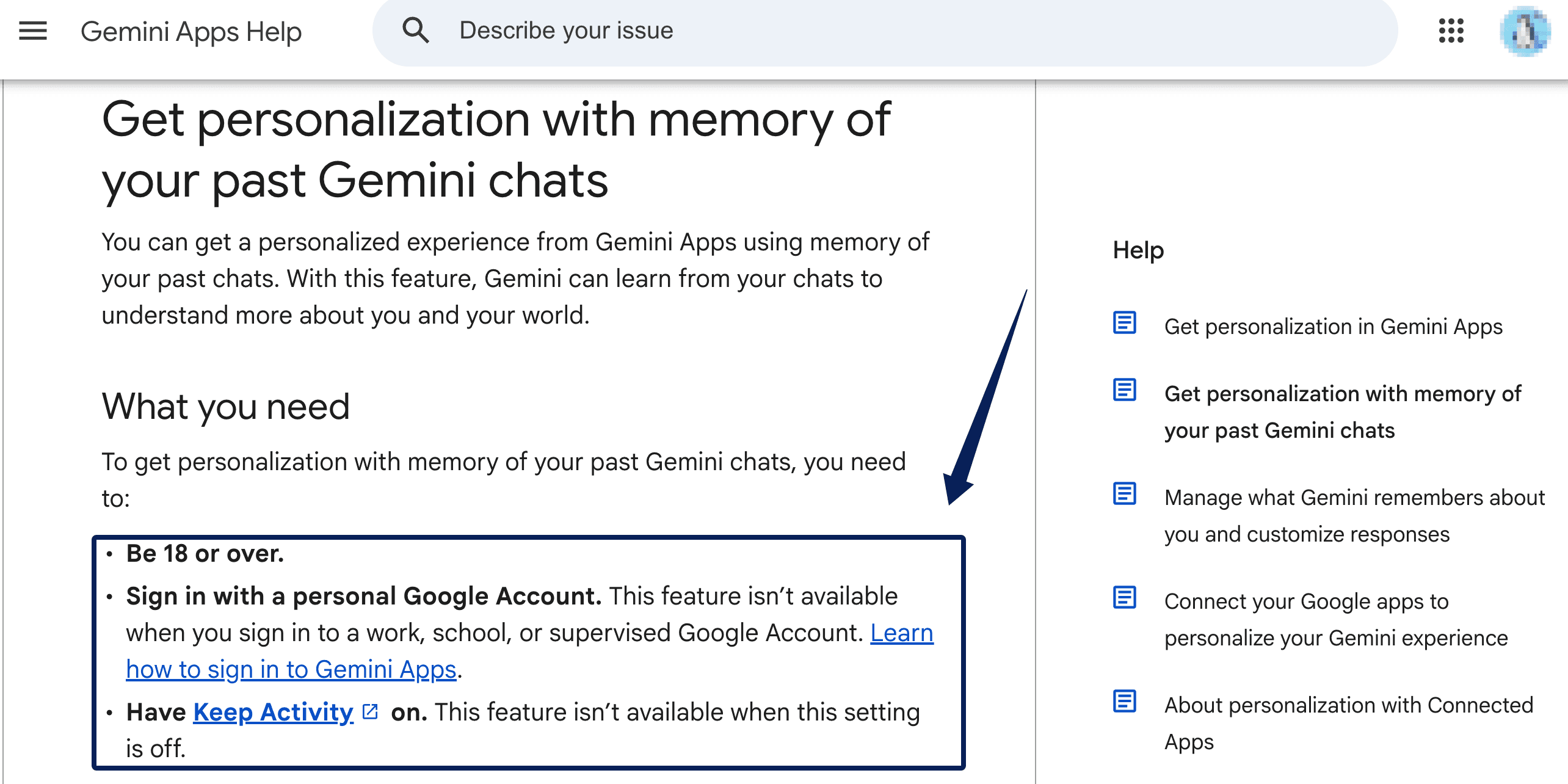
Correct Gemini in chat. To remove past-chat information, you may need to delete every chat containing it; disconnecting an app is separate. Check this deletion path before adding confidential work.
Which Memory Setup Fits Your Work?
An editor repeating tone rules across unrelated drafts can start with ChatGPT, provided client-specific exceptions stay in the live brief. A consultant serving several clients should test Claude's project memory and separate knowledge files. A seller planning from a personal Google account can try Gemini; a managed work login changes the answer before any prompt is written.
A changed deadline in a project file is a live-source problem, not a memory problem. Zentor's AI workspace guide separates memory from source updates and automation. That matters when recurring work must use current records.
Choose the smallest memory scope that saves repetition. I would rather retype a deadline than send a fluent update with last month's date.
FAQ
Does ChatGPT Use Saved Memory in Temporary Chats?
Check your account before relying on recall. OpenAI’s Memory help describes a personalized Temporary Chat option that can use existing memory, but its Temporary Chat FAQ says Temporary Chat does not access memories for personalization. The pages conflict; neither says temporary chats create or update memories. Verify the available option before sharing client details.
Can Claude Import a Memory File From Another Assistant?
Yes. Claude's experimental import flow asks you to paste exported memory text into a box; it does not document uploading an arbitrary memory file. Imports are available on Free, Pro, Max, and Team on web and desktop. Because some items may not be retained, review the resulting memory topics after import.
Can Gemini Show Which Earlier Chat Informed a Response?
Not reliably as a citation to one specific chat. When Gemini uses past chats, a "Previous chats" label can appear under Sources and related content. Google warns that the label can occasionally be wrong. The feature requires a personal account and the relevant settings. For a disputed client fact, open the original record yourself.
Can ChatGPT Export Saved Memories for a Client Record?
No dedicated, client-ready memory ledger is promised. Eligible personal accounts can request an account-data export, but you should inspect the downloaded files before assuming they contain an exhaustive saved-memory list. Self-service export differs in managed workspaces. For a client record, transfer reviewed facts with dates and original sources; do not treat a memory summary as an audit log.
What Happens to Claude Memory When a Paid Plan Ends?
Claude's current memory feature also exists on Free, so a paid subscription ending is not, by itself, proof that every memory disappears. That is not a guarantee about your particular account or workspace. Before downgrading, review and export what matters, check whether you are staying in the same account, and verify which project and search features remain available afterward.
Choose the Memory You Can Correct
Among the best AI assistants with memory, choose one that remembers the right low-risk context, shows you how to fix it, and does not hide where a client-critical fact came from. For 2027 planning, start with account eligibility and memory scope, then run the same small correction test in ChatGPT, Claude, and Gemini. Keep the approved brief outside the assistant. Memory should reduce repetition, not quietly become your only record of the work.

Zentor Editorial Zentor editorial team
The Zentor editorial team writes about workflow automation, AI agents, and the tools we build. Default byline for industry overviews, listicles, and collaborative pieces.
Choosing between tools? Let Zentor run the work.
Always-on AI assistant on its own cloud computer. No switching required, no setup.