CRM for Freelancers: What to Track and Automate
Choose a CRM for freelance work by the client context, follow-ups, proposals, projects, and reporting it must keep connected.
CRM for Freelancers: What to Track and Automate
A CRM for freelancers remembers who a client is, what you promised, and what happens next, from inquiry through repeat work. The right setup keeps late proposals, active projects, and former clients' next opportunities from disappearing into separate inbox threads.
Key takeaways:
- Preserve relationship context, not just names and email addresses.
- Test proposal-to-project handoff before buying automation.
- Compare the tier you need, then export a sample. Data may not travel cleanly.
I traced a fictional designer's client from inquiry to repeat work and checked public product and pricing information on October 6, 2026. This is not a test with real client data. What mattered was finding the approved scope and promised check-in six weeks later, not merely closing the first deal.
What a Freelancer CRM Must Help You Remember
The easiest contact to lose is often the client who said, "Let's revisit this next month," while you were finishing another job. A useful freelance CRM preserves that conversation, the last decision, and the next action.
Can you open one record and see the inquiry, proposal link, accepted scope, current project, and latest follow-up? Even a solo consultant CRM must handle one person generating multiple proposals and projects. Links between records matter more than a large contact limit.
Follow-up dates need a reason: "Ask whether the budget was approved" beats "Check in." Proposal tracking should distinguish a draft from a sent offer, and an accepted offer from a project ready to begin.
This also changes how you read a dashboard. Three proposals worth $5,000 are not $5,000 of booked work. If one is only a draft and another has gone quiet, the useful number is the count of decisions you must chase, not an impressive-looking pipeline total.
Choose the Minimum Records and Workflow
Imagine Maya, a designer, receiving a website inquiry from a former client. This is illustrative, not a customer result. She needs a contact, an opportunity, and, if the offer is accepted, a project. Duplicating the conversation across all three creates drift.
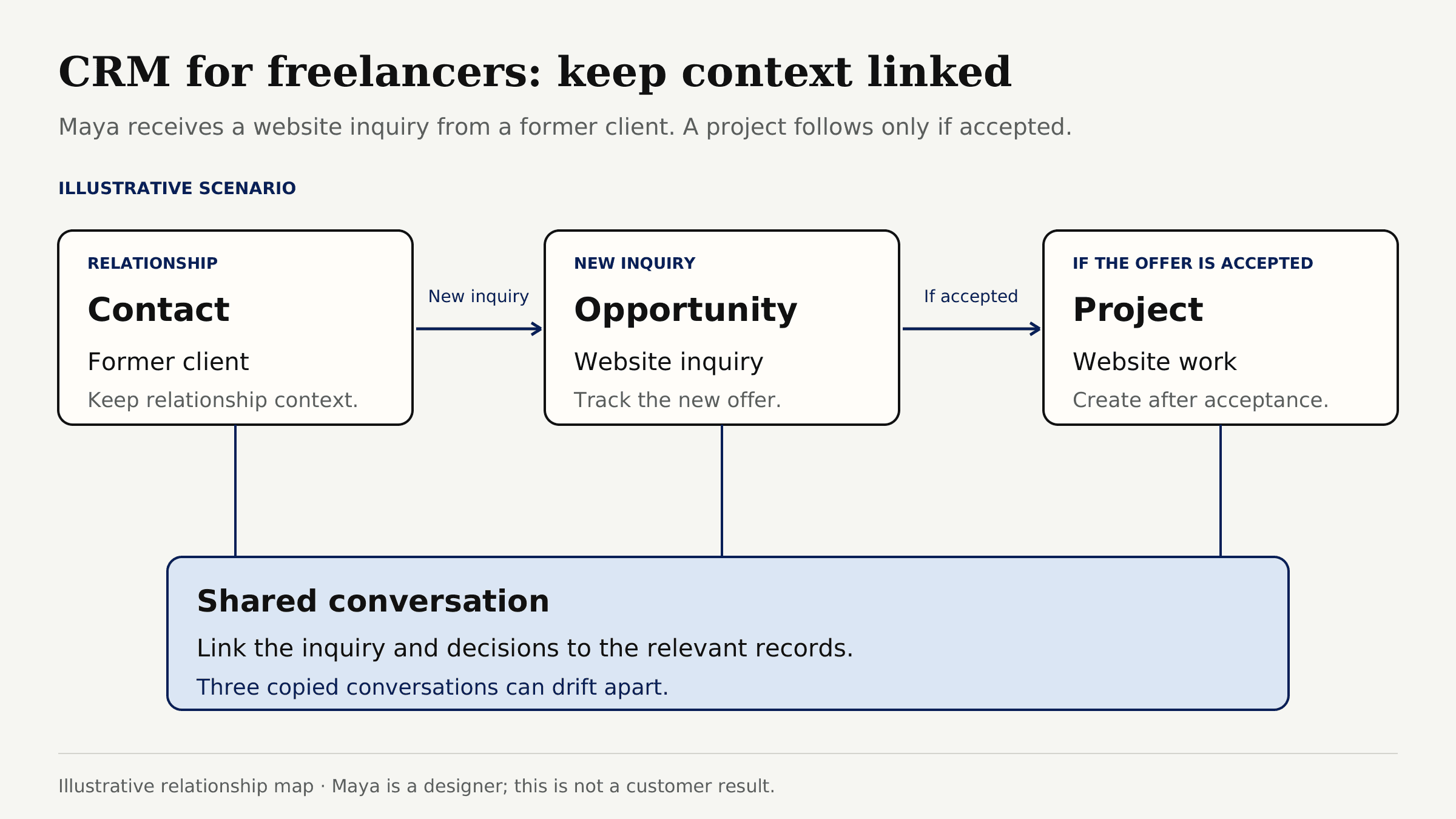
Minimum contact fields: name, organization, channel, relationship status, last interaction, next follow-up. An opportunity needs service, quote, stage, proposal link, decision date, and open question. A project needs approved scope, kickoff condition, milestone, approver, and file links. Keep invoices in the billing system; record only their reference here.
The route is inquiry, proposal, decision, project, and later follow-up. Preserve a declined prospect's reason and return date. For accepted work, carry only confirmed commitments into the project. Zentor's client onboarding workflow takes that handoff further: kickoff needs confirmed scope, inputs, owners, and access.
Maya's former client might ask for a homepage redesign while an old maintenance retainer is still active. One contact, two separate engagements: otherwise a new proposal can accidentally inherit the retainer's price or approval date. This is why a single "client status" column is rarely enough.
Compare Spreadsheet, Flexible Database, and Dedicated CRM
A spreadsheet is easy to inspect and leave, but you maintain links and reminders. A flexible database connects records, but you design the system. A dedicated CRM adds sales structure; a freelancer platform may also manage proposals, invoices, and client access.
| Starting point | Best fit | What to check before buying |
|---|---|---|
| Spreadsheet, such as Google Sheets | A small, stable contact list and manual weekly review | Who updates the sheet, how duplicate people are handled, and whether due dates surface without another tool |
| Flexible database, such as Notion | Custom links between contacts, opportunities, and projects | Time spent maintaining views, guest access, and what survives export |
| Dedicated CRM, such as HubSpot | A growing follow-up pipeline with contact and deal records | Which workflow, reporting, and user features require a paid plan |
| Freelancer business platform, such as Dubsado or Bonsai | Proposals, client-facing steps, and delivery in one paid system | Which plan actually includes portal, automation, and proposal features |
These are different products, not interchangeable features. Notion's free plan includes databases for individuals; a template still needs your process. HubSpot offers a free CRM, but check the tier of any automation or reporting you expect.
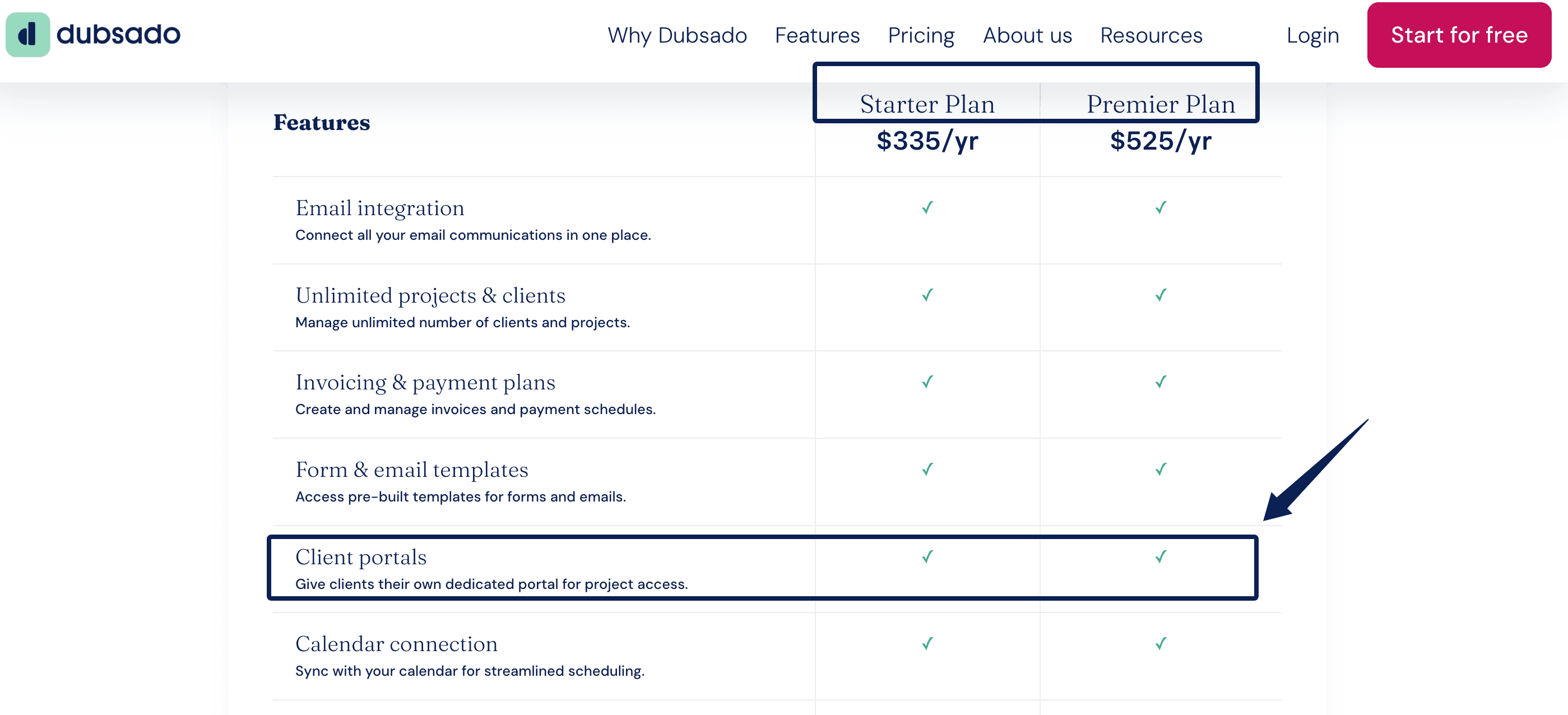
As of October 6, 2026, Dubsado lists portals in Starter and Premier, at $335 and $525 per year respectively, but automated workflows and public proposals in Premier. Bonsai lists CRM in Basic, a portal in Essentials, and a deals pipeline in Premium. Its monthly-billed prices for those tiers are $15, $25, and $39 per user. The cheapest tier may miss your actual handoff.
Evaluate Follow-Up and Project Handoffs
A follow-up pipeline should show who needs a reply, what you await, and what you promised to send. In each candidate, create a proposal, mark it sent, change the decision date, and check whether the context remains visible.
Now accept Maya's proposal. Can the project inherit her two promised revisions without a template silently changing them to three? If assets are missing, status should read "waiting for client files," not "in progress." After delivery, set the agreed return date.
I would automate reminders, not messages that assume budget approval. Keep that judgment human. For recurring delivery, Zentor's weekly client report template carries decisions, blockers, and next steps beyond the CRM record.
The handoff should survive a change of mind too. If the client revises the scope after receiving the proposal, keep the sent version and record the replacement. Overwriting the old link makes a later disagreement impossible to untangle. A CRM can show that a new version exists; it should not silently decide which terms the client accepted.
Check Cost, Portability, and Data Control
Monthly price is only one cost. Count setup and cleanup time. A $0 workspace needing 30 minutes of repair weekly consumes about two hours in four weeks. That is planning math, not a measured saving. An all-in-one platform is equally wasteful if you need only contacts and reminders.
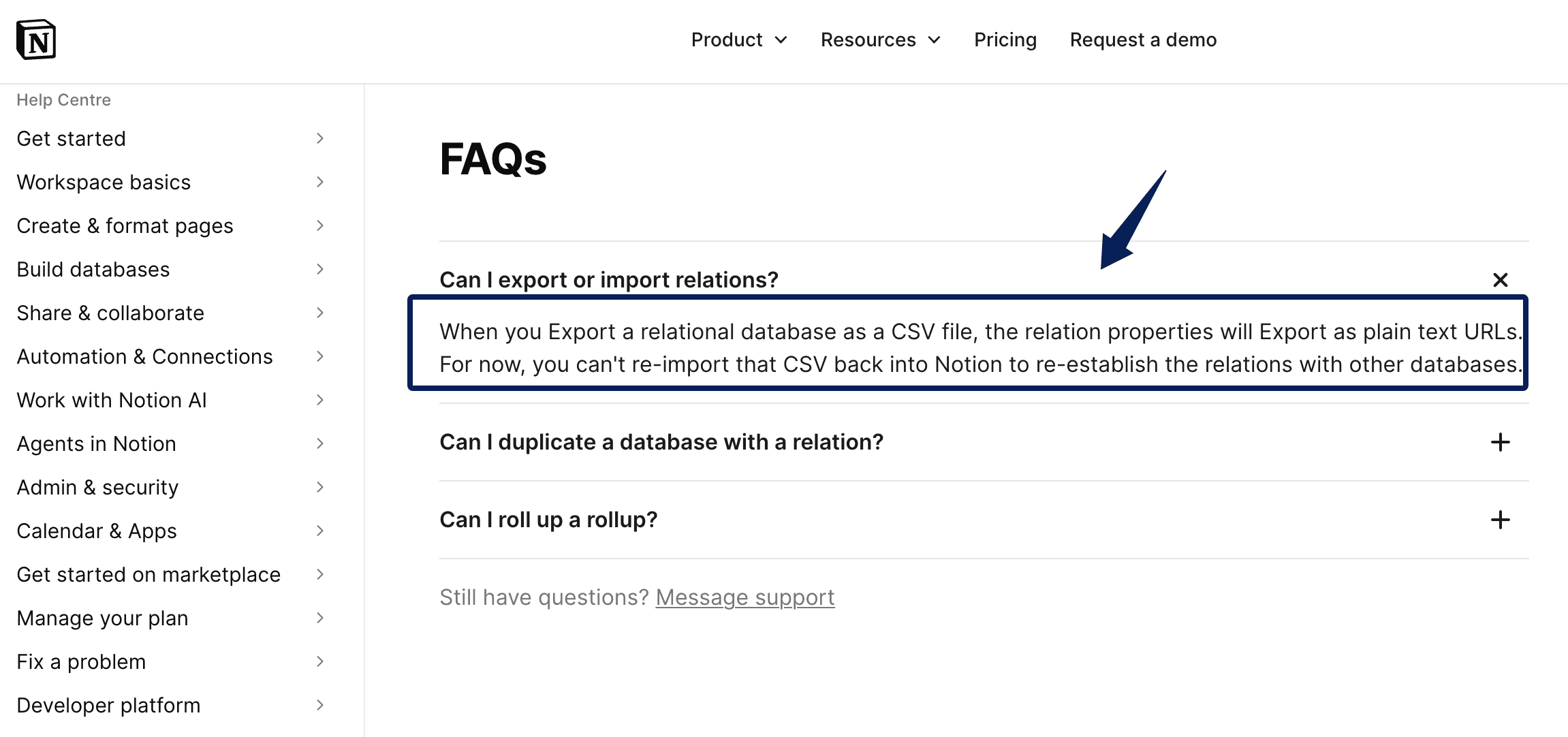
Export a sample during the trial. Notion relation fields become plain-text URLs in CSV, not restorable links. Dubsado's project CSV reflects the current filtered view, which can omit records. Test whether an exported contact can still be matched to its projects and the notes that explain a decision. This matters most when you leave a tool under pressure, not when you have a quiet afternoon to tidy data.
Keep signed agreements and sensitive files in their authoritative systems. The client management system should link to them. Before inviting a contractor, check whether access can be limited and revoked.
Build a Shortlist and Run a Real Client Test
Shortlist one option per model. Use a consenting, low-sensitivity client or fictional record. Enter the same inquiry, proposal, accepted scope, blocked project, and future follow-up. Return the next day without notes. Can you recover the context quickly?
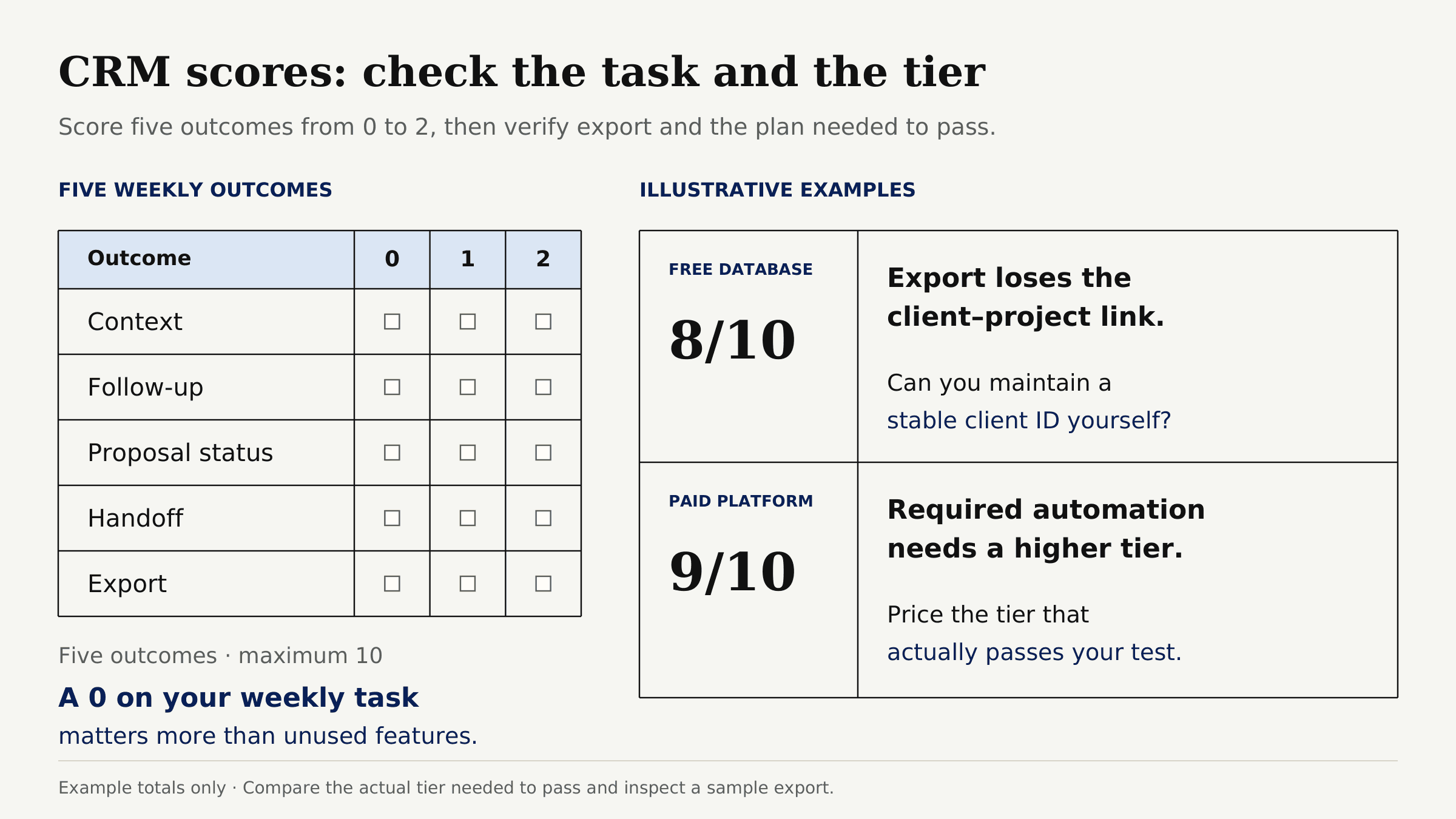
Score five outcomes from 0 to 2: context, follow-up, proposal status, handoff, and export. A 0 on your weekly task matters more than a polished feature you never use. Compare the actual tier needed to pass.
For example, if a free database scores 8 but loses the relationship between client and project on export, ask whether you can maintain a stable client ID yourself. If a paid platform scores 9 yet requires a higher tier for the one automation you need, price that tier, not its landing-page minimum.
I would break the sample too: move the decision date, add a second project, and mark a file missing. If those changes vanish from view, imagine three deadlines arriving together.
FAQ
Does a freelancer need sales forecasting?
Usually not initially. Open proposals, estimated values, and decision dates may be enough. Forecasting matters when a longer sales cycle complicates capacity planning.
Can one CRM separate prospects from active clients?
Yes. Give the person a relationship status and each opportunity its own stage. A returning client can have active work and a new proposal simultaneously.
How should retainers be tracked?
Keep one client record and separate dated engagements with scope, renewal date, and next review. Link invoices from the billing tool; a paid invoice does not approve next month's scope.
What data should not be stored in a CRM?
Avoid passwords, payment card details, identity scans, and unrelated private material. The FTC recommends keeping sensitive information only for a legitimate business need. Link to approved secure storage instead.
Which freelancer CRMs include a client portal without a second subscription?
Dubsado includes portals in both listed plans; Bonsai includes one from Essentials upward. Neither requires a second portal product at those tiers. Before inviting a client, preview the client-facing view. A portal feature does not mean every document or message belongs there.
CRM for freelancers should keep the next promise visible
Follow one relationship from inquiry to repeat work. Notice where you still search your inbox, rewrite scope, or remember a date yourself. The strongest choice removes those gaps without making every client conversation feel like data entry.

Zentor Editorial Zentor editorial team
The Zentor editorial team writes about workflow automation, AI agents, and the tools we build. Default byline for industry overviews, listicles, and collaborative pieces.
Choosing between tools? Let Zentor run the work.
Always-on AI assistant on its own cloud computer. No switching required, no setup.