What Is Cindy? The Open-Source AI Agent That Works Out of the Box

What is the Cindy AI agent? Learn how its local open-source client, Claude Code and Codex harnesses, model routes, privacy and paid service differ.
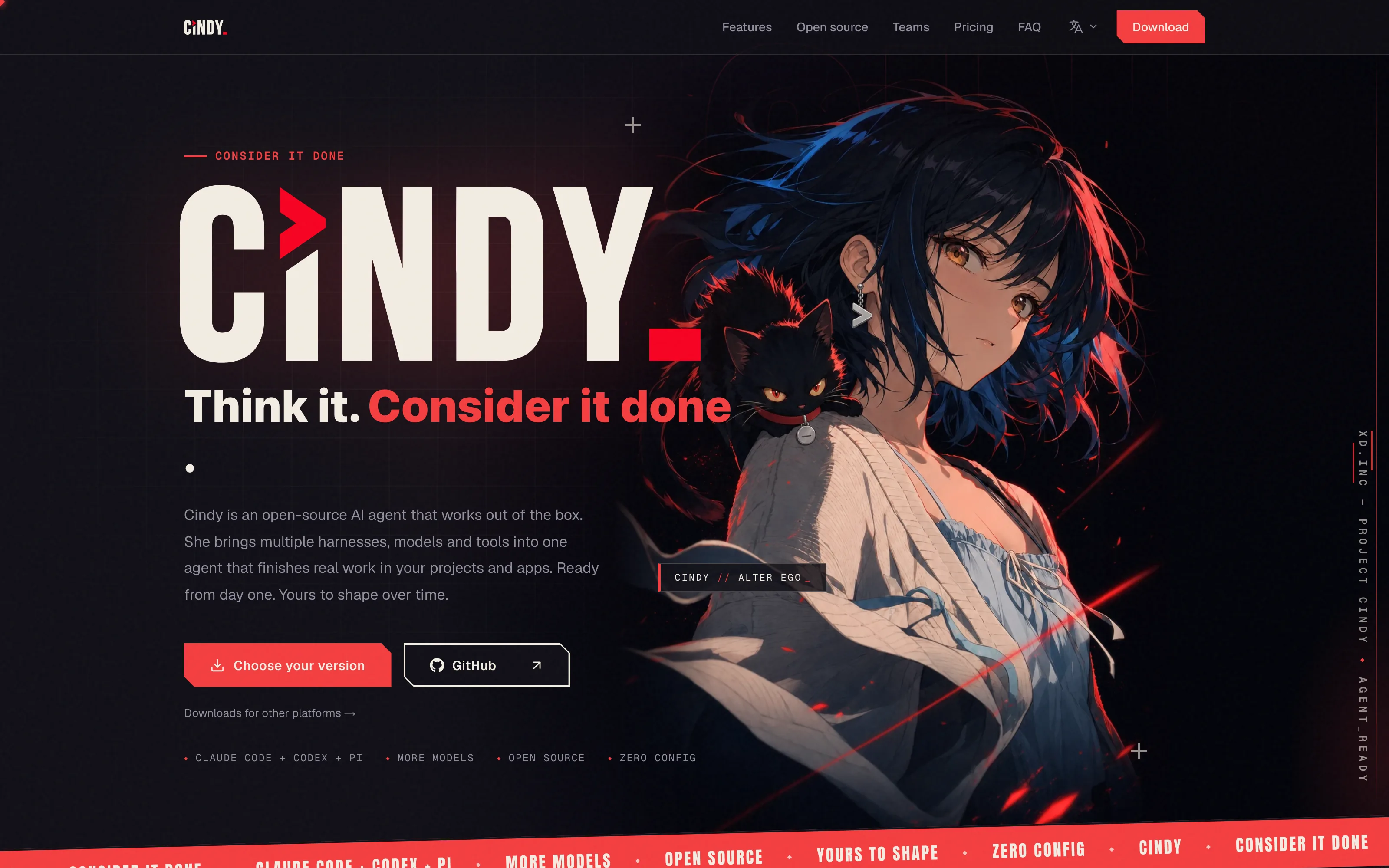
The Cindy AI agent is an open-source client whose desktop app runs on your computer and connects its tools to your files and signed-in apps; “out of the box” describes the supplied client and defaults, not free model usage or unrestricted access. The makecindy/cindy repository had 4,244 GitHub stars when checked on October 25, 2026; that live count has already moved beyond older October 24 snapshots.
Mateo· built by the Zentor team
Need help with the work outside your project folders?
Mateo checks your inbox and calendar, finds the trial, the refund and the form you forgot, and handles them. Works in any browser, anywhere.
Ask Mateo →
Free in early access
Key Takeaways:
- The Cindy AI agent bundles a local client, tools and several model routes; the client source is Apache-2.0, but Cindy's backend service is outside that repository.
- You can use an existing Coding Plan, your own provider key, a local model or Cindy's metered managed service. Each route has a different bill and privacy boundary.
- Claude Code and Codex are supported harnesses, which means agent runtimes rather than interchangeable model names. The current homepage also lists Pi.
- Before granting access to logged-in apps, decide which files and actions the agent needs, then test with a reversible task.
What is Cindy, and what works out of the box?
The English README describes desktop and mobile clients in a pnpm monorepo. Its code includes a desktop app and a mobile app, while the backend service lives elsewhere. That distinction matters more than the adjective “open”: you can inspect or change the client without acquiring the service's server code.
For a student sorting course notes, “ready” means access to permitted files and a working model route, not permission for every app action. The official Cindy homepage says the client ships with tools and defaults and can connect managed models, existing plans, provider keys or local models. Check the route you selected before assuming the app works offline.
How does this local AI agent use your files and apps?
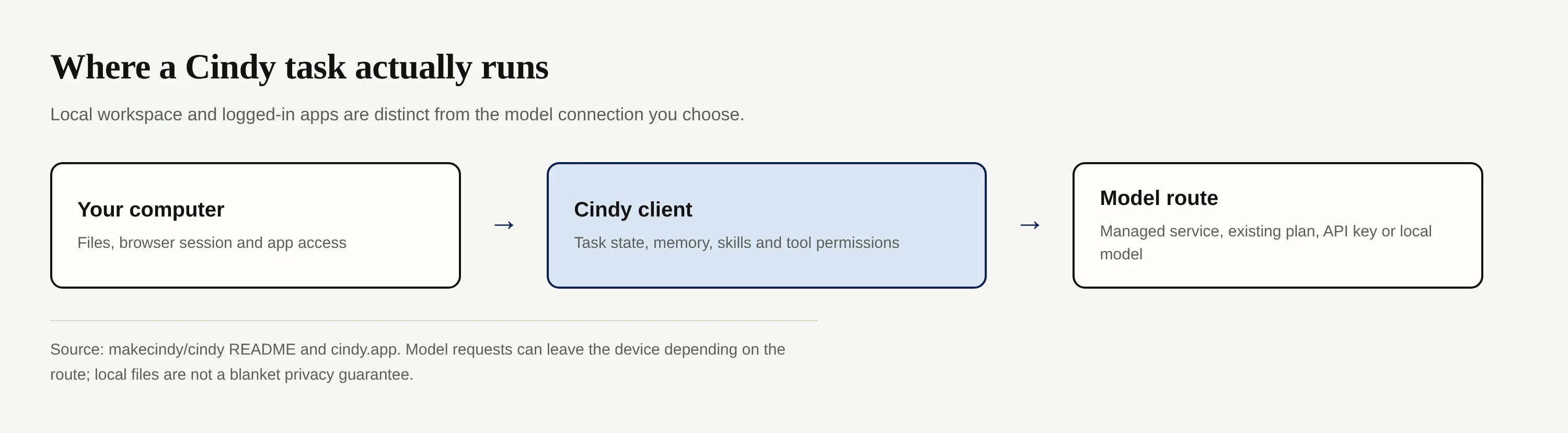
Cindy runs the client on your machine and can work with your existing files and logged-in apps, according to its README. The same document says the “Skip Sign-In” mode runs local agents without a Cindy account, but server-backed features are unavailable. Local client, local model and no network traffic are three different claims. A provider-backed model still requires a connection; Cindy's homepage privacy FAQ says inference requests use the gateway you configure and workspace files are not stored in its cloud by default.
Try a small job first: ask Cindy to find a receipt in a test folder and draft a response without sending it. Review which file it opened, which model route handled the request and whether the draft reached an app you didn't intend. A local AI agent's browser control makes permissions consequential; a signed-in tab is not a substitute for consent to click.
Zentor addresses another part of that problem: its workspace memory can connect to different AI tools through Zentor MCP. That is a memory portability proposition, not a claim that Cindy integrates with Zentor. For the difference between saved context and a transcript, see agent memory versus chat history.
Which harnesses and models can the Cindy AI agent use?
A harness organizes agent actions; a model supplies intelligence. Cindy's README names Claude Code and Codex as its first supported harnesses and says you can switch model and harness during a task while keeping workspace, memory, skills and tools continuous. Its current homepage additionally lists Pi. That homepage is a newer, broader product claim than the README's “first” list; neither source guarantees identical behavior in every release or on every device.
If one run begins in Claude Code and switches to Codex, treat continuity as a feature to test, not a promise that two agents reason alike. Check the output and authorization boundary after the switch. Zentor's Smart Routing picks a model for the task on its own workspace; Cindy's harness-switching pitch concerns control of the runtime. They solve different frictions, and there is no announced connection between them.
Open-source client versus paid Cindy service: what is free?
The repository LICENSE grants Apache License 2.0 rights over the covered client code. The README expressly excludes the backend from this repository and warns that separately identified model weights, trademarks and other materials have their own terms. Open source does not turn third-party inference into a gift.
As the Cindy homepage states, the software is free when you connect your own key or authorize a Coding Plan you already have; a provider may still charge you or impose plan limits. A local model consumes your own compute. Cindy's optional managed service instead deducts actual model usage from credit. Plan prices can change.
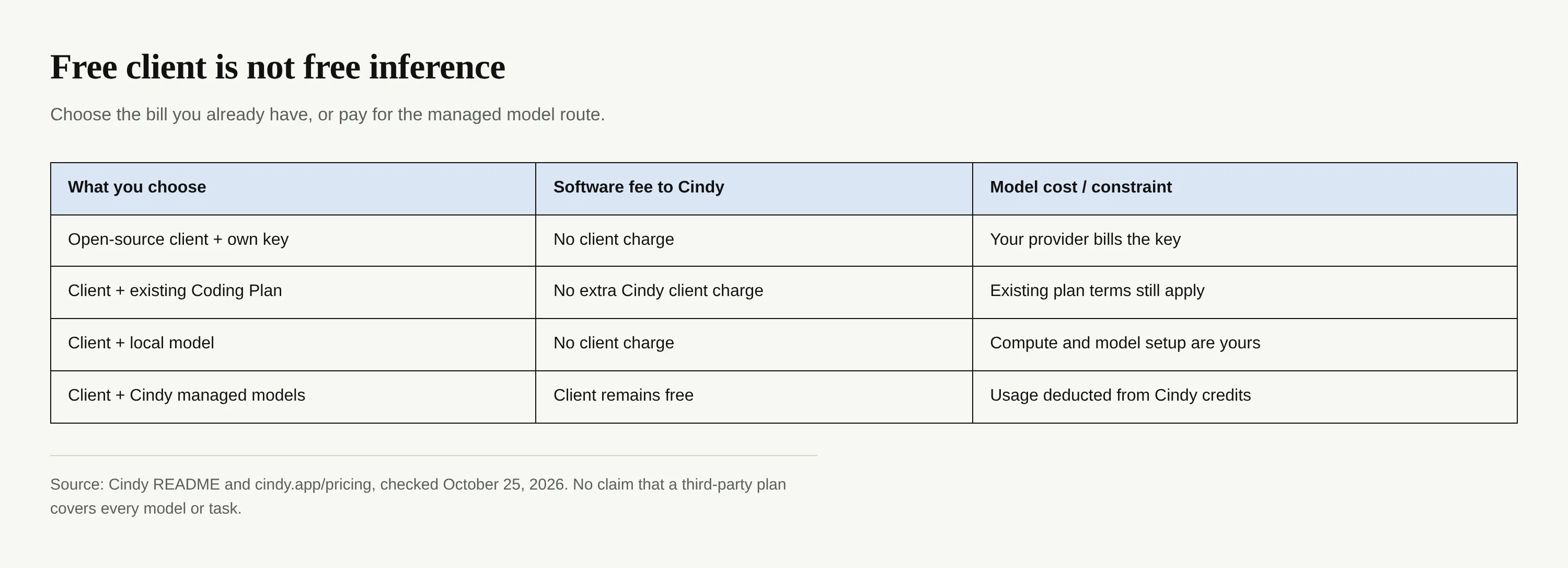
If your one-person shop already pays for a Coding Plan, ask whether its terms cover the work you want before adding another plan. If you don't have one, check both model choice and expected usage on the managed route; a zero-dollar client download isn't a zero-dollar workflow. Zentor has a different commercial setup and is not a free model route inside Cindy.
Where does Cindy fit in the 2026 personal-agent wave?
The Chinese README gives the project a Chinese-language entry point alongside English documentation. That makes it a bilingual product, not proof of adoption in any particular region. GitGenius reported 842 stars gained over 30 days in its October 24, 2026 snapshot; because GitHub records the repository as created on July 22, 2026, lifetime average star growth would understate that recent window. Stars indicate attention, not completed customer tasks.
Cindy's bet is local access plus choice of runtime and model. Zentor's always-on workspace serves a different need when you want persistent work to continue without your laptop awake. If the work is not a project at all, but the forgotten refund buried in your inbox, Mateo, built by the Zentor team, focuses on finding and handling that life admin instead. None of these distinctions makes Cindy a Zentor integration.
For goals, tools, task state and permissions, read AI agent architecture.
Keep useful work context with you
Zentor keeps workspace memory you can use across AI tools through Zentor MCP. Cindy is not a listed integration; compare the jobs each product handles.
Get early access →
FAQ
Is Cindy free?
The Cindy AI agent client is free under Apache-2.0. You still need model capacity: your existing plan, your provider key, local compute or billed usage through Cindy's managed service. Read the official homepage for current service terms.
Is Cindy safe to run locally?
Running a client locally reduces one kind of dependency; it does not certify every browser action, permission or external model request. Start with limited files and a task whose output you can review before any send or purchase.
Does Cindy need an API key?
Not necessarily. The README describes a managed service, authorized Coding Plans, your own API keys and local models. “Skip Sign-In” removes the Cindy-account requirement for local agents, not the need for a usable model route.
Who makes Cindy?
The public project is maintained under the makecindy GitHub organization. Its contributors are public; the product name does not establish a legal owner.

Zentor Editorial Zentor editorial team
The Zentor editorial team writes about workflow automation, AI agents, and the tools we build. Default byline for industry overviews, listicles, and collaborative pieces.
Ready to put this into practice?
Zentor runs browser tasks, research, and schedules automatically. Try it free.