AgentVerse-OS: A Self-Hosted Cloud for Agents

AgentVerse-OS puts a browser desktop, isolated agent workspaces and a 944-app store on one Ubuntu box, reachable only over Tailscale. A look at v0.2.0.
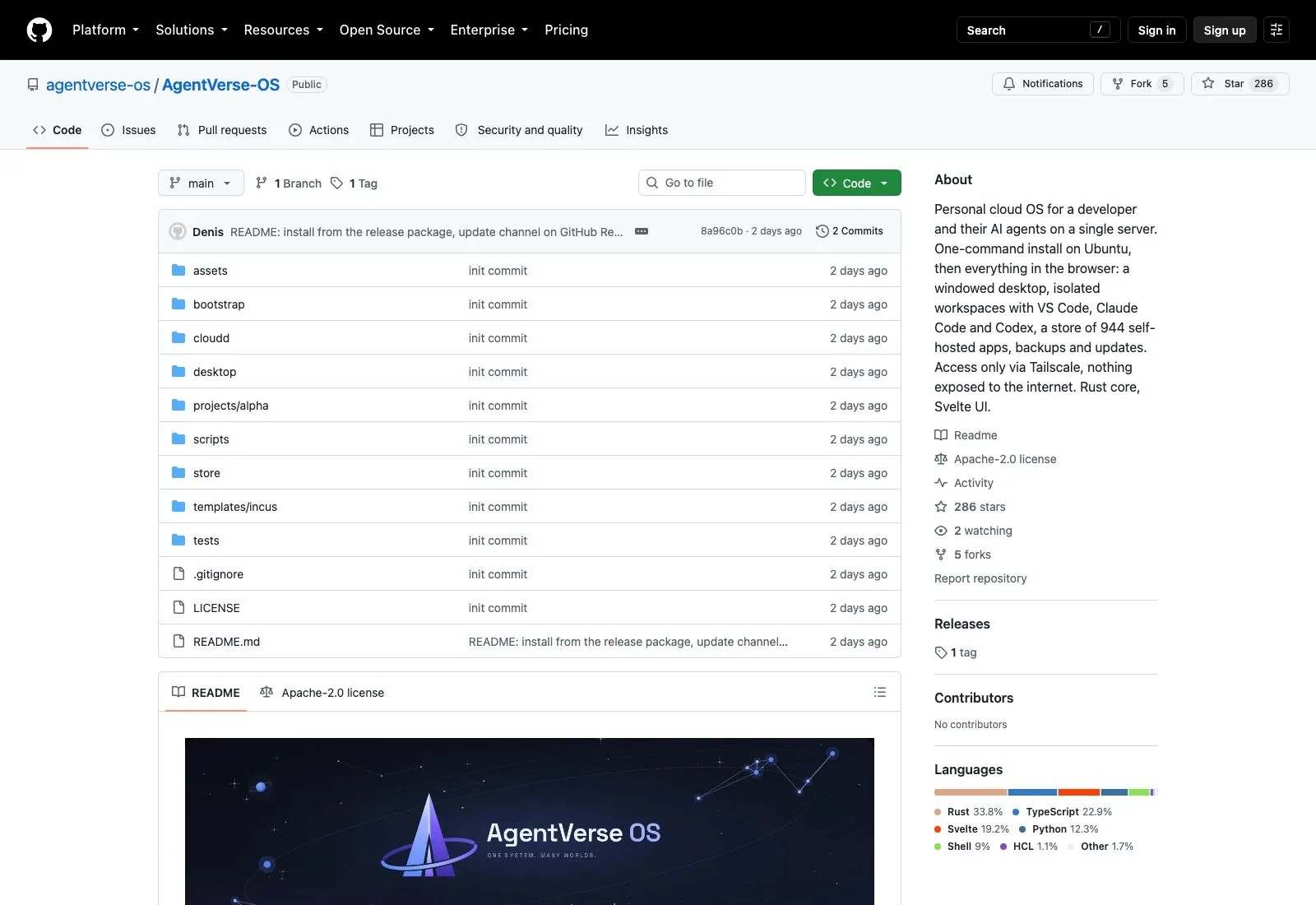
AgentVerse-OS is one Ubuntu machine that turns into your own cloud desktop, reached entirely through a browser tab. It landed on GitHub on 12 September 2026 and picked up 286 stars in three days, which is quick for a repository whose whole history is two commits. The pitch is narrow enough to be worth reading twice: install it on a clean server, open a URL on your tailnet, and you get a windowed desktop with isolated workspaces, VS Code, Claude Code and Codex signed in with your own subscriptions, and a store carrying 944 self-hosted apps.
That is a lot of claims for a v0.2.0 tag. Most of them hold up when you read the repository instead of the headline, and the ones that do not are flagged by the author himself.
What AgentVerse-OS is, and what it isn't
It is not an agent framework. Nothing here asks you to write a chain, register a tool or define a role. AgentVerse-OS sits a layer below all of that: it is the machine your agents run on, plus the plumbing that keeps each one in its own box.
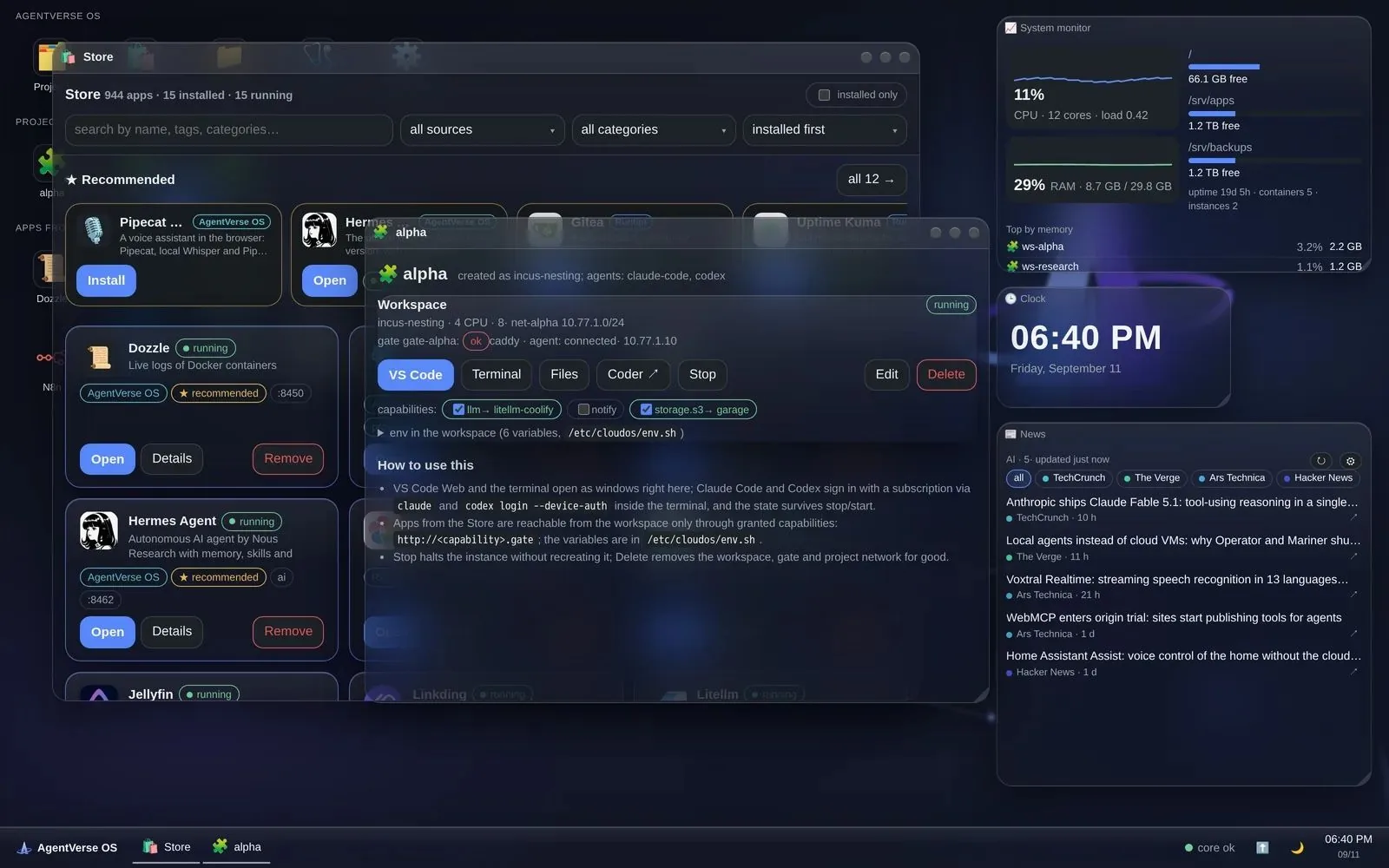
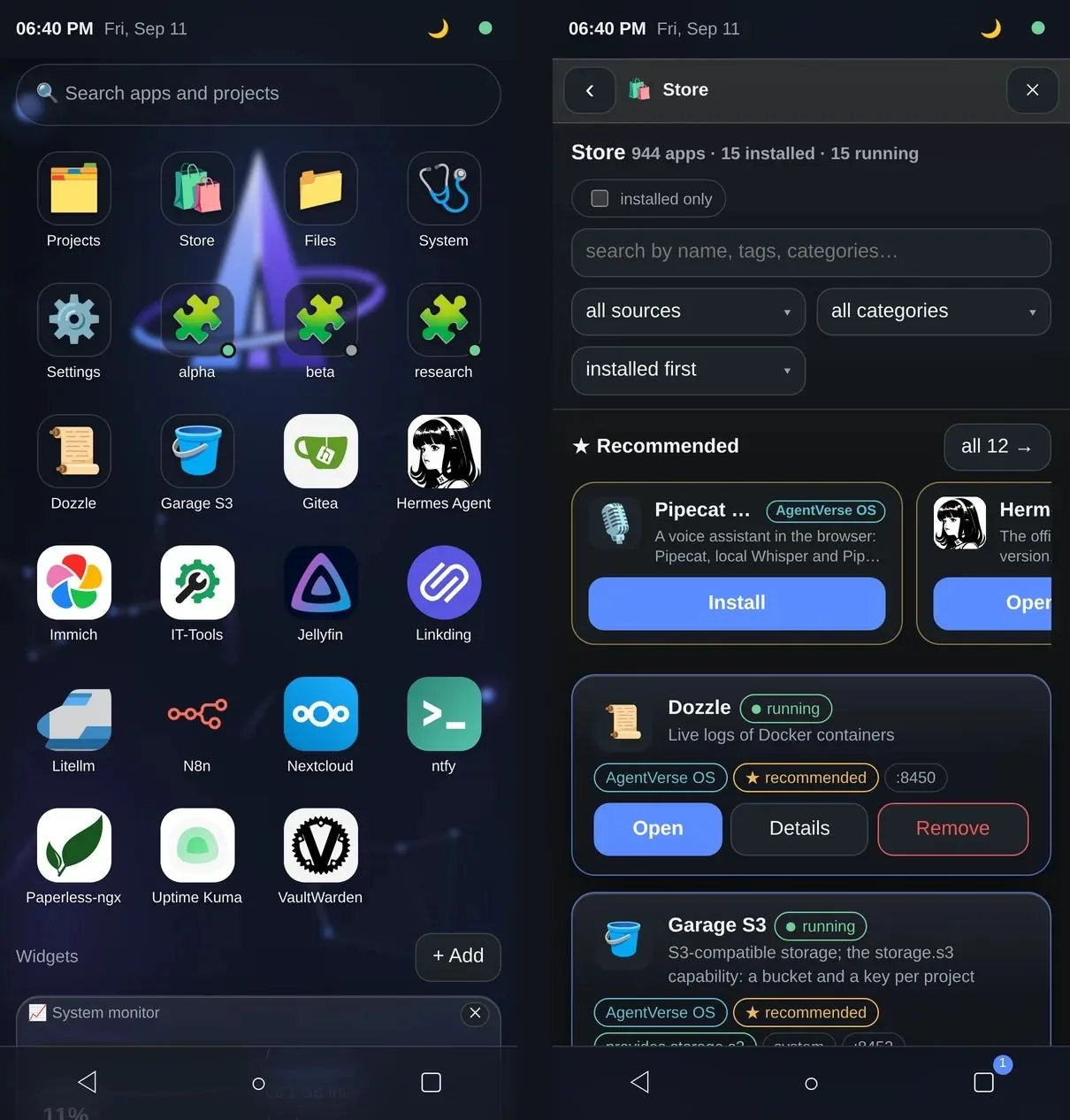
It is also not a remote VS Code. That comparison comes up quickly because browser-based VS Code is the most visible part, but the code editor is one window on a desktop that also has a taskbar, a start menu, a file manager over your app data, a password store, seven theme presets, widgets for system load and weather, and a screensaver. The Svelte 5 front end is a PWA, so on a phone it drops the desktop metaphor and gives you a home screen with full-screen windows instead.
The useful way to think about AgentVerse-OS is as a personal server with opinions. Coder runs the workspaces, Incus isolates them, Komodo deploys the app stacks, Caddy holds the front door, and Tailscale supplies both the network and the TLS certificates. The author's own summary of the core is seven entities, namely project, workspace, gate, app, capability, grant and route, with four contracts between them. Everything else is third-party software that already had a following.
Your agent finishes the job. Where does the result go?
A self-hosted desktop keeps the output on the server that produced it. Zentor works the other way round: it runs the task and hands the finished thing back into Notion, Airtable, Canva, Slack or your inbox, where the rest of the work already lives.
Try Zentor free for 3 days →
One command, and then the browser
Installation is a tarball and a shell script. You download the release package, untar it, and run bootstrap/install.sh with the disk you want handed to ZFS. The script walks through host checks, ZFS, Docker and Incus, Tailscale, Coder, Komodo, the edge proxy, the core, the catalog and a starter template, then prints a summary with addresses.
The Tailscale step is the one that actually needs you. The installer shows a link and a QR code to authorize the node, waits for you to confirm, then checks MagicDNS and HTTPS certificates before moving on. When it finishes you open https://<node>.<tailnet>.ts.net/ and a first-run wizard does the rest in the browser.
Hardware expectations are modest but not trivial: Ubuntu 22.04 or newer, 8 GB of RAM at minimum, and preferably a separate disk for ZFS. The author notes testing on 26.04. Updates arrive through an Updates window or sudo agentverse-update, and the package carries automatic rollback if the new version fails to come up.
Workspaces are containers, not folders
Every project on AgentVerse-OS gets its own network, its own gate and its own Incus container with Docker inside it. In that container you get VS Code in the browser, a terminal, and the coding agents. Claude Code and Codex authenticate against your existing subscriptions from inside the workspace rather than through some central key store.
Stopping a project keeps the instance around; deleting it removes the workspace, the gate and the project network together. Resources get changed from the project card rather than a config file you have to find.
This is the part that will feel familiar if you have read about agent sandboxes before. The isolation model is conventional and that is a compliment, because the interesting decisions are elsewhere.
Capabilities instead of addresses
Here is the design choice worth stealing even if you never install this thing. A project does not get told where the S3 bucket lives. It asks for storage.s3, or llm, or notify, and the core wires the project's gate to whichever provider currently answers that name, then drops the environment variables into the workspace at /etc/cloudos/env.sh.
Swap Garage for a different S3 implementation and the project does not change. The workspace reaches its dependencies through http://<capability>.gate and never learns a real address. For a single-operator server this is more ceremony than strictly necessary, and it is also the reason the thing will still be maintainable in six months. The alternative, hardcoding a hostname into six projects and grepping for it a year later, is how most homelabs quietly ossify.
What the capability system does not carry is memory. Each workspace is sealed, which is exactly what you want for a build that might go wrong, and exactly what you do not want when the research you did in one workspace is the context you need in the next. Zentor takes the opposite position on that specific trade: the memory it accumulates belongs to you, travels across tasks, and can be exported and pointed at a different AI entirely.
The store is three catalogs wearing one coat
The 944 number holds up, and the composition is more interesting than the total. The repository lists 938 app manifests imported from Runtipi, Coolify and Umbrel, plus six written by hand. Each entry carries a source badge so you can see which catalog it came from.
Installation is guided, login credentials appear in the app card rather than in a log you have to grep, and the system repairs data-directory permissions on its own, which is the kind of unglamorous fix that only gets written after someone lost an evening to it. Apps can be linked to each other, with n8n reaching LiteLLM given as the worked example. Snapshots and rollback work per app.
Two assistants ship in the catalog already: Pipecat Voice, which does speech recognition and synthesis locally in the browser, and Hermes Agent with a web panel. If you have been following the Hermes Agent desktop builds, seeing it packaged as a one-click store entry on somebody else's OS is a decent measure of how far that project has spread.
Tailscale only, and nothing on the public internet
Nothing in AgentVerse-OS is exposed to the open internet. Access runs over Tailscale with real certificates issued through tailscaled, so there is no root CA to install on your laptop, your tablet or your phone, and no port forwarding to get wrong at two in the morning.
Backups are scheduled ZFS snapshots plus a restic repository taken from a snapshot, and a single app can be rolled back in two clicks. They are off by default, which is defensible for an alpha and worth turning on before you put anything you care about in a workspace.
The tailnet requirement is also the quiet limit on the cross-device promise. Picking up on a phone works because the phone is on your tailnet; hand the same thread to a colleague, or open it on a locked-down machine that will never join, and the continuity stops. Zentor reaches the same devices through the tools those devices already have signed in, which is a weaker guarantee about the network and a stronger one about who can pick the work up.
What alpha means here, specifically
The README does not oversell this, and neither should anyone writing about it. The project is in alpha, it lives on a single test box, it works as a personal server for one person, and there are no user accounts or permissions yet.
Read that last part slowly if you were imagining a small team sharing one server. There is no multi-user story. Two commits and five forks on 15 September 2026, with the contributors panel empty, means every judgement call in this codebase belongs to one person and has not yet met anyone else's edge cases.
That is not a reason to skip it. It is a reason to run it on hardware you can wipe, on a tailnet you already trust, with backups switched on. The gap between a clever single-operator server and something a team leans on is mostly the boring work of accounts, quotas and recovery, and self-hosting always costs more in attention than the hardware invoice suggests. Running AgentVerse-OS means you are the operator: the updates, the ZFS pool and the 3 a.m. restore are yours. Zentor exists for people who want the agent work done without acquiring a server to babysit.
Who should actually install AgentVerse-OS
You want a spare machine, comfort with Ubuntu and ZFS, an existing Tailscale account, and genuine interest in the problem rather than a deadline. Under those conditions AgentVerse-OS is one of the more coherent self-hosted agent environments to appear this year, and the capability indirection alone is worth an afternoon of reading.
If you need something a team can share, if you have no server to spare, or if the work you care about ends in a document rather than a repository, this is not it yet. The finished artifact on a self-hosted desktop still has to be moved by hand to wherever your colleagues will read it, which is the specific chore Zentor removes by delivering into the tool the work already lives in.
AgentVerse-OS FAQ
Is AgentVerse-OS free and open source?
Yes. The repository is Apache-2.0 licensed, and the release package is a download rather than a paid tier. The costs are your server, your disks and your time.
Do I need Tailscale to use AgentVerse-OS?
Yes, in the current version. Tailscale provides both the network path and the TLS certificates, and the first-run wizard checks MagicDNS and certificate issuance before continuing. There is no documented way to expose it publicly instead, which is a deliberate choice rather than a missing feature.
Can I run Claude Code and Codex on it?
Yes. Both live inside the project workspace alongside VS Code and a terminal, and they log in with your own subscriptions from inside that container. The state survives stopping and starting the workspace.
What are the system requirements?
A clean Ubuntu 22.04 or newer machine, 8 GB of RAM or more, preferably a separate disk for ZFS, and a Tailscale account. The author reports testing on Ubuntu 26.04.
Is AgentVerse-OS ready for production?
No, and it does not claim to be. Version 0.2.0 is alpha, runs on one test box, and has no user accounts or permissions. Treat it as something to explore on disposable hardware.
All details here reflect the repository as of September 2026 at v0.2.0, with star and fork counts checked on 15 September 2026. An alpha this young moves fast, so check the release notes before you trust any specific number.

Zentor Editorial Zentor editorial team
The Zentor editorial team writes about workflow automation, AI agents, and the tools we build. Default byline for industry overviews, listicles, and collaborative pieces.
Ready to put this into practice?
Zentor runs browser tasks, research, and schedules automatically. Try it free.
References AgentVerse-OS on GitHub · AgentVerse-OS releases · Tailscale · Coder · Incus