Airtable Free Plan Limits: Every Wall Explained
Airtable free plan limits: 1,000 records per base, 100 automation runs, 1,000 API calls and 500 AI credits. What happens at each wall and the cheapest fix.
Airtable's Free plan limits are 1,000 records per base, 1 GB of attachments per base, 5 editors and 1 workspace, 100 automation runs and 1,000 API calls per workspace a month, 2 weeks of revision history, and 500 AI credits per editor. When you hit the record or attachment cap your data stays, but you cannot add more until you upgrade; automation runs and API calls simply stop at the cap until the month resets.
Those numbers come from Airtable's plan comparison table and its plans overview, both checked October 21, 2026. The upgrade path is the Team plan at $20 per seat a month billed annually, or $24 billed monthly, which raises the record cap fiftyfold to 50,000 per base.
Key Takeaways:
- The record cap is per base, not per table: every table's rows count toward the same 1,000.
- Hitting the record or attachment limit does not delete anything. Airtable says you keep using the base but cannot add records or attachments until you upgrade.
- Automations stop at 100 runs per workspace a month, and every trigger counts as a run whether or not the actions do anything useful.
- API calls get a one-time 30-day grace period on Free. After that, calls over 1,000 a month are blocked until the 1st.
- Free has no synced tables, no extensions, and no way to buy extra AI credits.
Disclosure: This guide is written by the Zentor team. Every Airtable number below was read on Airtable's own pricing page and support center on October 21, 2026. We have not load-tested the limits ourselves.
Airtable Free Plan Limits at a Glance
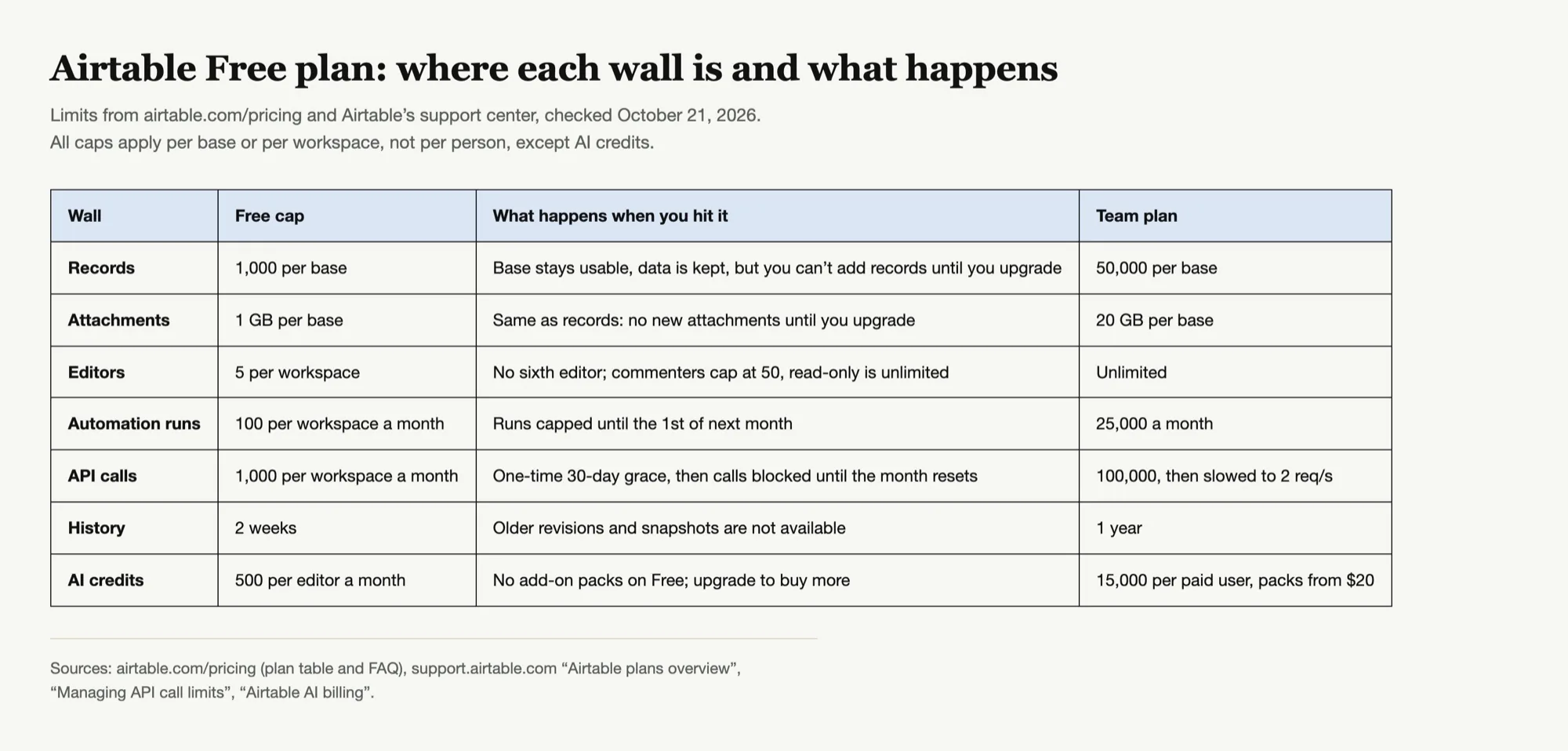
The table is worth reading by its unit column. Records, attachments and automation counts are per base. Editors, automation runs and API calls are per workspace, and Free gives you exactly one workspace. AI credits are the only allowance counted per person, at 500 for each editor, pooled across the workspace according to Airtable's AI billing article.
That distinction decides which walls you can route around. A per-base limit can sometimes be dodged by splitting work into more bases, since Free allows unlimited bases. A per-workspace limit cannot, because there is no second workspace to move into.
Clean up a base before it hits the 1,000 record wall
Zentor connects to Airtable through Airtable’s official MCP server, finds stale and duplicate records, and drafts the cleanup for you to approve.
Try Zentor →
The 1,000 Record Limit Per Base
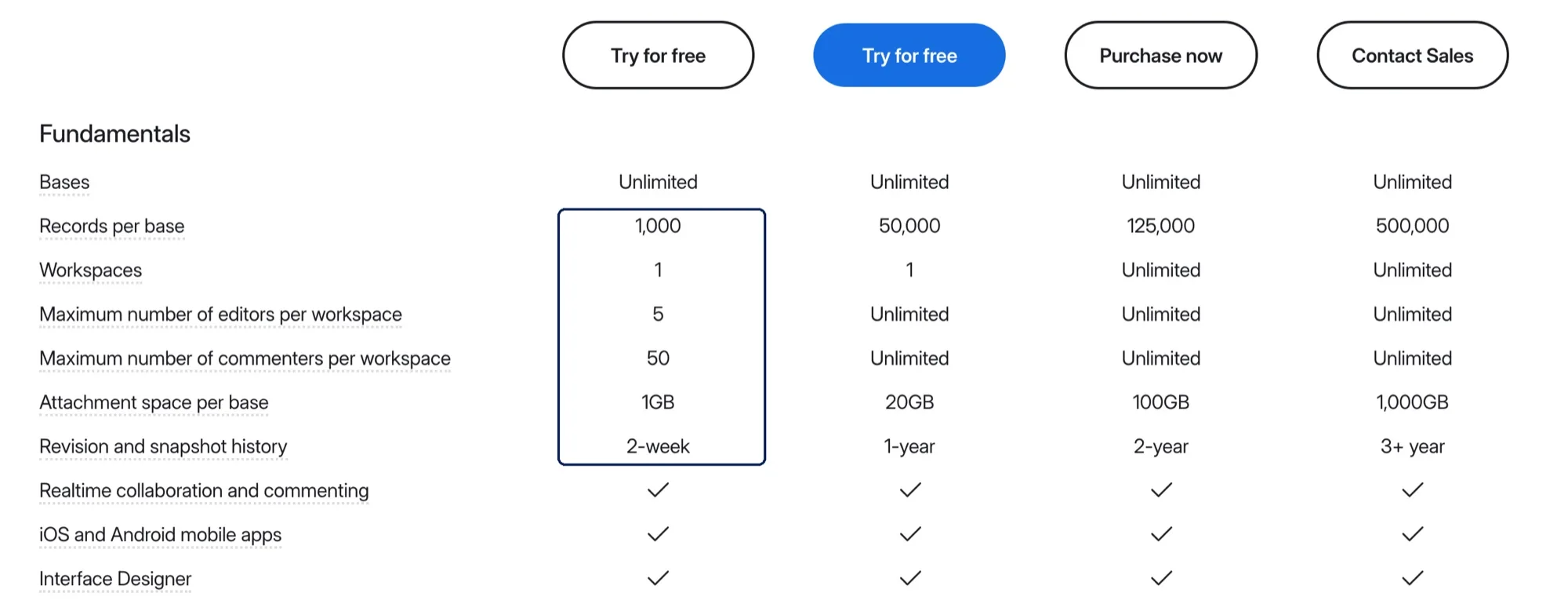
The Airtable record limit on Free is 1,000 per base, and the plans overview spells out the trap: records in every table count toward that one number. A base with a 600-row Contacts table and a 450-row Deals table is already over.
Airtable's pricing FAQ describes what happens next: "you'll still be able to use your bases and we will never remove your data. We'll notify you of the overage and you will not be able to add more records or attachments until you upgrade to a new plan." Forms that write into the base stop producing new rows at that point, which is usually how people find out.
Picture a lead form that has been quietly filling a base since spring. Nothing breaks on the day you cross 1,000. New submissions just stop landing, and the first sign is a prospect asking why nobody replied.
Cheapest fixes, in order:
- Archive closed records. Export old rows to CSV, then delete them from the base. History you rarely open does not need to live in Airtable.
- Split by time or function. Free allows unlimited bases, so a "2025 archive" base and a "2026 active" base each get their own 1,000. The cost is that Free cannot sync tables across bases, so lookups between them stop working.
- Upgrade. Team raises the cap to 50,000 per base.
Attachments, Editors and Workspaces on Free
Attachments are capped at 1 GB per base and behave like records at the limit: nothing is removed, nothing new can be added. If your base stores PDFs, contracts or product photos, keeping the files in a drive and storing the share link in a URL field moves the weight out of Airtable entirely.
Editors are capped at 5 per workspace. Airtable's plans overview also caps commenters at 50 and leaves read-only collaborators unlimited. Before paying for Team just to add a sixth person, check whether that person needs to edit. Someone who only reviews or approves can usually be a commenter.
Workspaces are capped at 1. Team is also limited to 1 workspace; unlimited workspaces start on Business at $45 per seat a month billed annually.
Airtable Automation Limits on the Free Plan
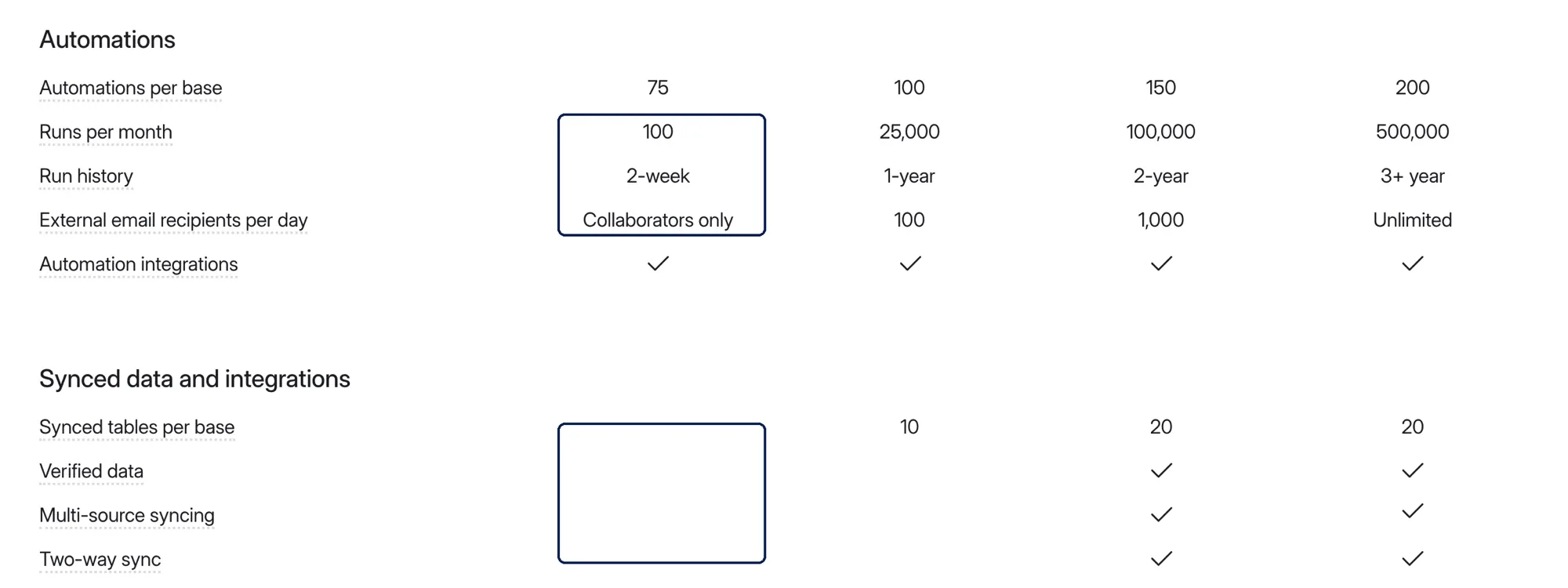
Free gives you 75 automations per base but only 100 runs per workspace a month, with 2 weeks of run history. The plans overview is explicit that "Airtable counts a run each time an automation's trigger is invoked," so a trigger that fires on every record update can spend the month's allowance in an afternoon. Email actions on Free can only reach collaborators, not external recipients.
When the workspace reaches 100 runs, automations stop until the allowance resets on the 1st of the next month, or until you upgrade. Team raises the cap to 25,000 runs.
We covered run counting, the triggers that waste runs, and how to stretch the allowance in detail in Airtable automation limits, so we will not repeat it here. The short version for Free: switch "when record updated" triggers to "when record matches conditions," and batch scheduled automations instead of running them per record.
API Calls, Sync and MCP on Free
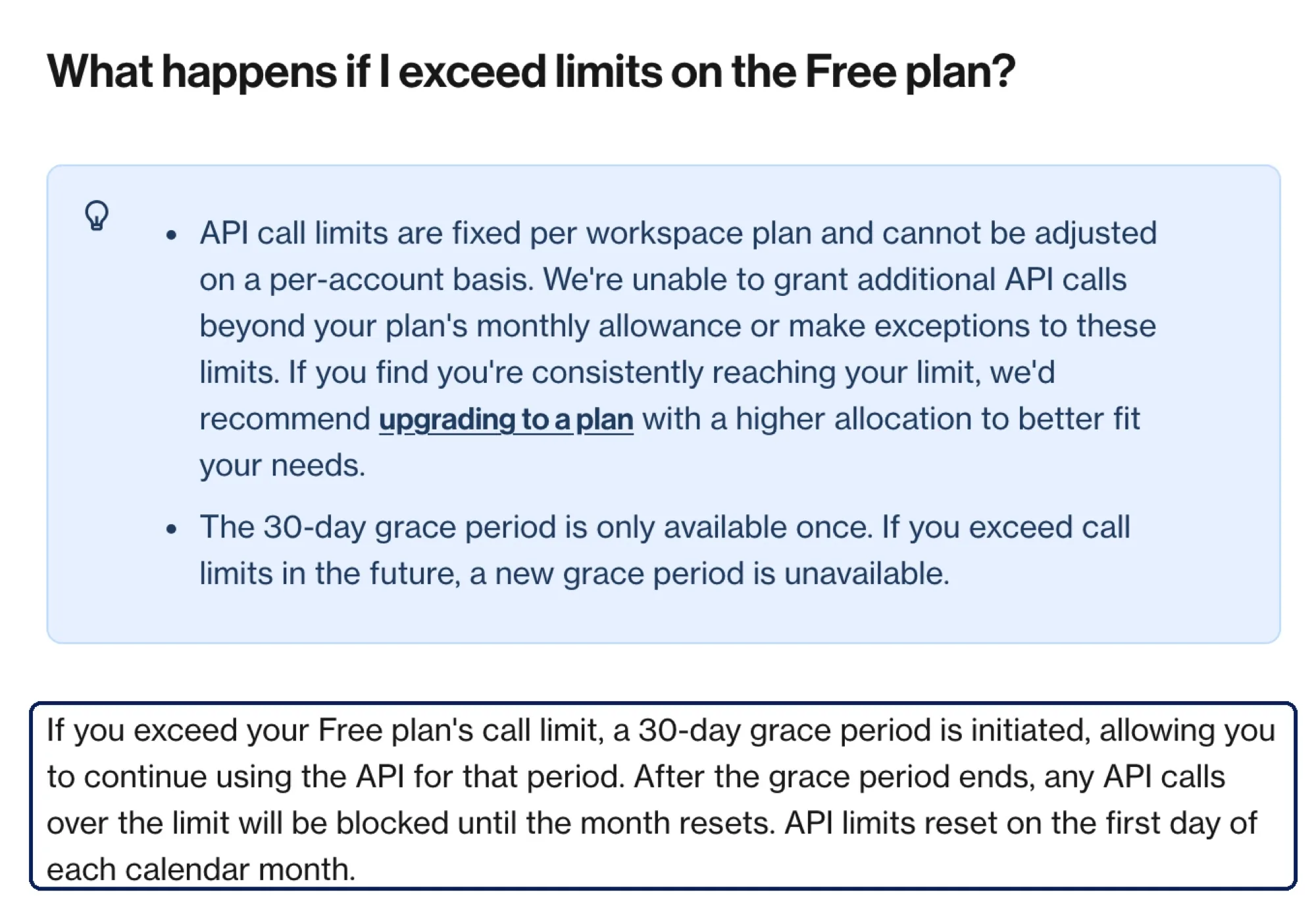
The Free plan includes 1,000 API calls per workspace a month, according to Airtable's API call limits article. Going over starts a 30-day grace period during which calls keep working. After that, calls over the limit are blocked until the month resets, and the grace period is available only once. On Team, the cap is 100,000 calls, and overage slows calls to 2 requests per second instead of blocking them. Every plan is also rate-limited to 5 requests per second per base.
Two practical consequences. Third-party tools that poll your base every few minutes can burn 1,000 calls in a few days, and Airtable notes that metadata calls count toward the same cap. And Free has no synced tables: the plan table shows sync starting at 10 synced tables per base on Team.
Airtable's MCP server, which lets AI assistants read and write your bases, is available on all plans including Free. Airtable says there are no additional charges for MCP usage but existing API rate limits remain, and records created through MCP count against your base's record limit. It does not say whether MCP calls count toward Free's 1,000 monthly API calls, so watch usage if you connect one.
AI Credits and Revision History on Free
Free includes 500 AI credits per editor a month, pooled across the workspace. That pays for Airtable's Omni assistant and field agents. Unlike Team, Free cannot buy credit packs; the AI billing article says Free customers must upgrade to Team to purchase more. Our Airtable AI credits guide breaks down what each action costs.
Revision and snapshot history on Free covers 2 weeks. If someone bulk-edits a field by mistake and you notice three weeks later, the earlier version is gone. Team keeps 1 year. On Free, a monthly CSV export of important tables is a cheap substitute for longer history.
Airtable Free vs Team: When Upgrading Is the Cheapest Fix
| Wall | Free workaround | Does Team fix it? |
|---|---|---|
| 1,000 records per base | Archive to CSV, split into bases | Yes, 50,000 per base |
| 1 GB attachments per base | Store files elsewhere, keep links | Yes, 20 GB per base |
| 5 editors | Make reviewers commenters | Yes, unlimited editors |
| 100 automation runs | Narrow triggers, batch runs | Yes, 25,000 runs |
| 1,000 API calls | Poll less often | Yes, 100,000 calls |
| No sync, no extensions | None | Yes |
| 500 AI credits, no packs | Ration Omni use | Yes, 15,000 per user plus packs |
Source: Airtable plan comparison table and support center, checked October 21, 2026.
Team bills every editor in the workspace, so a five-person team on Free that upgrades pays $100 a month on annual billing, or $120 on monthly. If only one wall is hurting, the workaround in the middle column is usually cheaper. If two or more are hurting at once, especially records plus automations, the workarounds start costing more time than the seats cost money.
There is a third option for the record and history walls: keep the base lean by doing the housekeeping outside it. Zentor's Airtable integration connects through Airtable's official MCP server using Airtable's own OAuth screen, so it can find duplicate or closed records, summarize what would be archived, and write the cleanup back after you approve it. It does not lift any Airtable limit, and records it creates count toward the cap like any others. Zentor is also not free: it costs $20 a month for 1,000 credits, with a 3-day trial.
FAQ
How many records can you have on Airtable's Free plan?
1,000 records per base. Records in every table of the base count toward that same total, and you can create unlimited bases.
What happens when an Airtable base hits the record limit?
Airtable keeps your data and the base stays usable, but you cannot add new records or attachments until you upgrade. Forms writing into the base stop adding rows.
How many automation runs does Airtable Free include?
100 runs per workspace a month, reset on the 1st. Each time a trigger fires counts as a run.
Can I buy more AI credits on Airtable Free?
No. Airtable's AI billing article says Free customers must upgrade to Team before they can buy credit packs.
Does Airtable Free include sync or extensions?
No. Synced tables start on Team at 10 per base, and extensions are a Team feature.
How much does Airtable Team cost?
$20 per seat a month billed annually, or $24 billed monthly, for each user with edit access, according to Airtable's pricing page on October 21, 2026.
Plan Around Airtable Free Plan Limits Before You Hit Them
The Free plan is generous on bases and stingy on everything that runs inside them. The two walls people hit first are the 1,000 record cap and the 100 automation runs, and both are counted in ways that surprise people: records across every table, runs on every trigger.
Check your base's record count and the workspace's automation usage now, while you still have room. If one wall is close, the workarounds above will buy time. If two are close at once, the Team plan is usually cheaper than the hours you would spend working around it.

Zentor Editorial Zentor editorial team
The Zentor editorial team writes about workflow automation, AI agents, and the tools we build. Default byline for industry overviews, listicles, and collaborative pieces.
Ready to put this into practice?
Zentor runs browser tasks, research, and schedules automatically. Try it free.
References https://support.airtable.com/articles/2277136852-airtable-plans-overview · https://support.airtable.com/articles/7735693959-managing-api-call-limits-in-airtable · https://support.airtable.com/articles/3378106230-airtable-ai-billing · https://support.airtable.com/articles/9897799762-using-the-airtable-mcp-server · https://airtable.com/pricing