Notion Free Plan Limits: What Stops You First

Notion free plan limits explained: the 1,000-block cap for 2+ owners, 5 MB uploads, 7-day history, 10 guests and an AI trial, plus the cheapest fix for each.
The Notion Free plan limits are generous for one person and tight for a team: unlimited blocks if you are the only workspace owner, but a lifetime cap of 1,000 blocks once a second owner joins, 5 MB per uploaded file, 7 days of page history, 10 guests, and only a trial of Notion AI. Most people hit one of those walls within a few weeks of inviting a collaborator, and the cheapest fix depends on which wall it is.
Notion's pricing page puts Plus at $10 per member per month and Business at $20, and its block usage guide spells out the rule that catches most small teams: once a Free workspace with two or more owners has created 1,000 blocks, it has to upgrade to keep creating content. All figures below were checked against Notion's own pages on October 21, 2026.
Key Takeaways:
- A Free workspace with one owner has unlimited blocks. Add a second owner and the workspace gets 1,000 blocks in total, and deleting content does not give any back.
- On Free, every uploaded file must be under 5 MB, page history goes back 7 days, and you can invite up to 10 external guests.
- Free and Plus both get only a trial of Notion AI. When the complimentary responses run out, Notion asks for Business or Enterprise, not Plus.
- Collaborating through guests instead of extra owners keeps a Free workspace's blocks unlimited, up to the 10-guest cap.
- Plus at $10 per member per month removes the block, upload and guest limits, but it does not add ongoing Notion AI.
Disclosure: This guide is written by the Zentor team, and Zentor is one of the outside tools it mentions. Every Notion limit below comes from Notion's own pricing and help pages, linked inline and checked on October 21, 2026.
Every Notion Free Plan Limit in One Table
Here is what the Free plan caps, next to Plus, as Notion lists them.
| Limit | Free | Plus |
|---|---|---|
| Price | $0 | $10 per member/month |
| Pages and blocks | Unlimited for one owner, 1,000 blocks for 2+ owners | Unlimited |
| File uploads | Up to 5 MB per file | Unlimited |
| Page history | 7 days | 30 days |
| External guests | 10 | Unlimited |
| Charts | 1 | Unlimited |
| Notion AI | Trial | Trial |
| Custom Agents | Require Notion credits | Require Notion credits |
| Automations | Buttons only | Database automations |
Sources: Notion pricing and Notion Help Center pages on block usage, files and media and version history.

The table makes Free look close to Plus. The difference is that three of these limits only bite once you start working with other people, which is exactly the moment most workspaces stop being personal.
Need AI on your Notion pages without moving to Business?
Zentor connects to Notion through its hosted MCP server, works on the pages you point it at, and writes the result back.
Try Zentor →
The Notion Free Plan Block Limit Only Applies to Teams
The block limit is the one most people misunderstand, because the pricing page says "Unlimited for individuals" and stops there. The help page has the full rule.
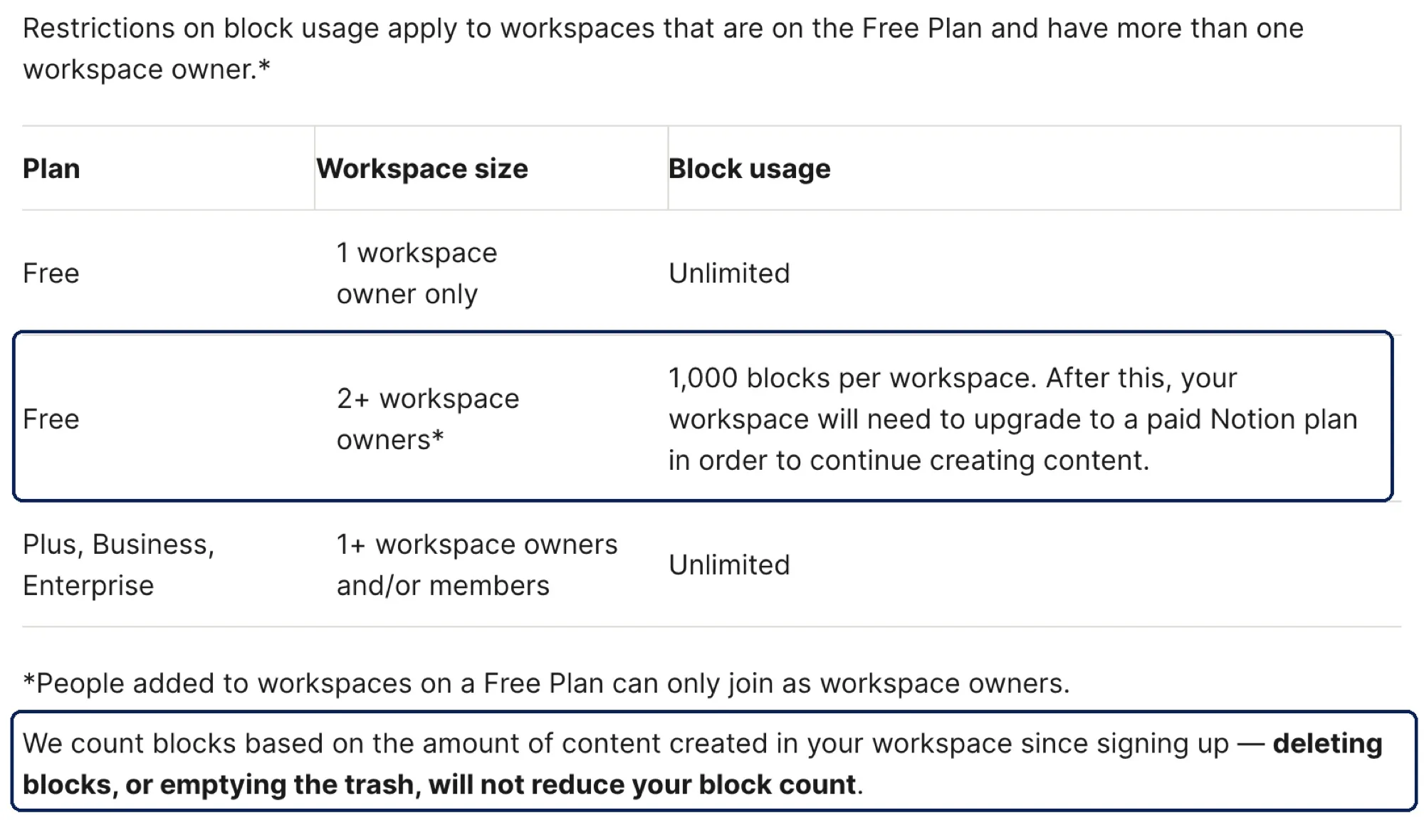
Three details matter:
- The trigger is a second workspace owner. On Free, everyone you add to the workspace joins as an owner, so inviting one teammate as a member is enough.
- The 1,000 is a lifetime count. Notion counts every block created since signup. Deleting pages or emptying the trash does not lower it.
- Hitting it stops new content, not old content. You can still read and edit what exists, but creating more requires a paid plan.
A block is any piece of content: a line of text, a to-do, a table row, an image. A meeting note with a heading, eight bullets and a short table can be 20 blocks on its own, so two people taking notes together can reach 1,000 in a few weeks.
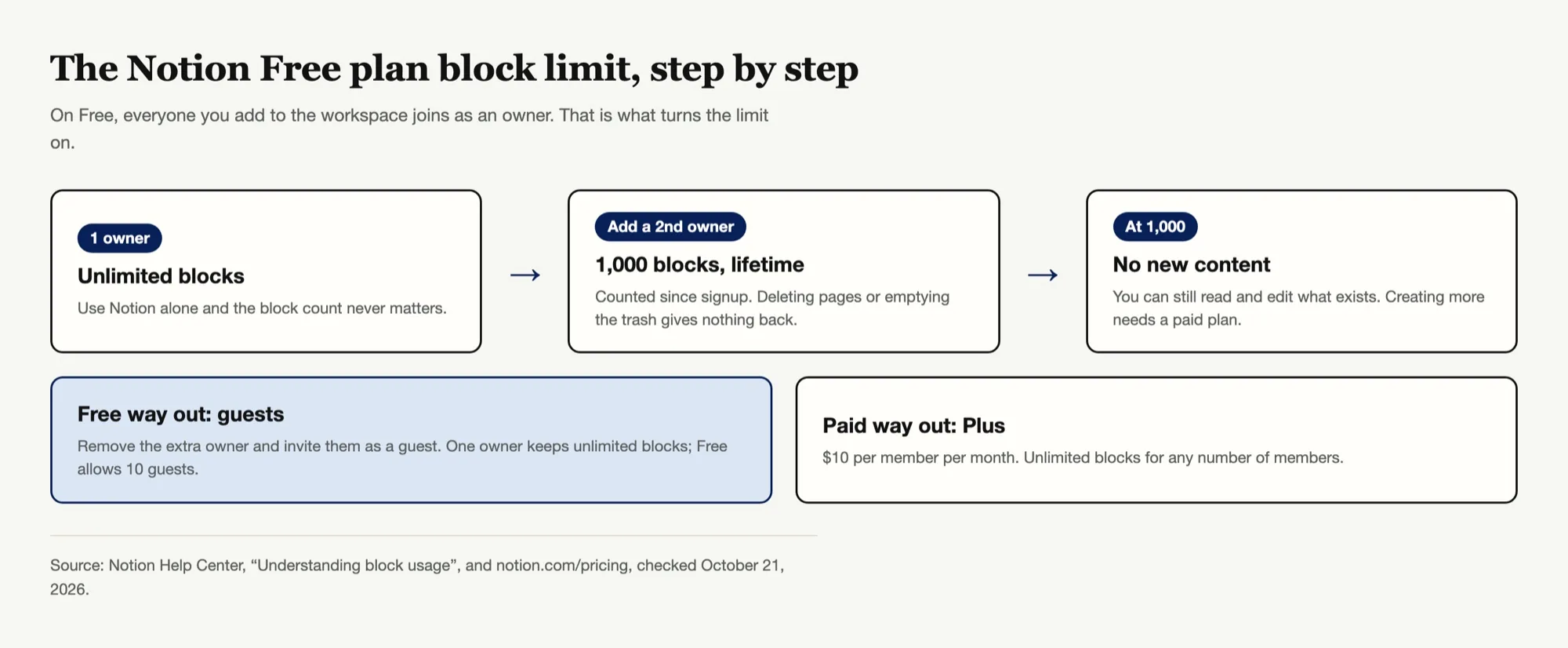
Cheapest fix: if you only need to share some pages, remove the extra owner and invite that person as a guest instead. Notion's guide confirms that a workspace with one member keeps unlimited blocks, and a Free workspace can have up to 10 guests. If you need more than that, or real shared teamspaces, Plus is the honest answer.
The 5 MB File Upload Limit on Notion Free
On Free, every file you upload has to be under 5 MB, per Notion's files and media help page. That covers most screenshots and short PDFs and almost no video, slide deck exports or high-resolution design files.
The paid side is less tidy than the pricing page suggests. The pricing table says Plus has "Unlimited" uploads and the same help page's FAQ mentions a 5 GB ceiling per file, while a note higher up on that page still says PDFs must be under 20 MB and images under 5 MB. If large PDFs are the reason you would upgrade, test one on a trial before paying.
Cheapest fix: keep big files where they already live (Google Drive, Dropbox, Figma) and embed or link them in Notion. Embeds do not count against the upload cap, and you keep version control in the tool built for it.
Notion Free Plan Page History Is 7 Days
Version history on Free goes back 7 days. Plus gives 30, Business 90, and Enterprise any number of days, according to Notion's delete and restore guide. Notion records a version every 10 minutes while you edit and again about two minutes after you stop.
You only notice this limit when something goes wrong: a teammate rewrites a spec, or a database template overwrites a page, and the version you want is from two weeks ago. Trash is separate. Deleted pages stay in Trash for 30 days by default on every plan, so a deleted page is easier to recover than an overwritten one.
Cheapest fix: before a big rewrite, duplicate the page. It costs a few blocks, which only matters if you are a multi-owner Free workspace, and it gives you a restore point that never expires.
Notion AI on the Free Plan Is a Trial, and Plus Is Too
This is the limit that surprises Plus subscribers. Both the Free and Plus cards on the pricing page list the same AI line.
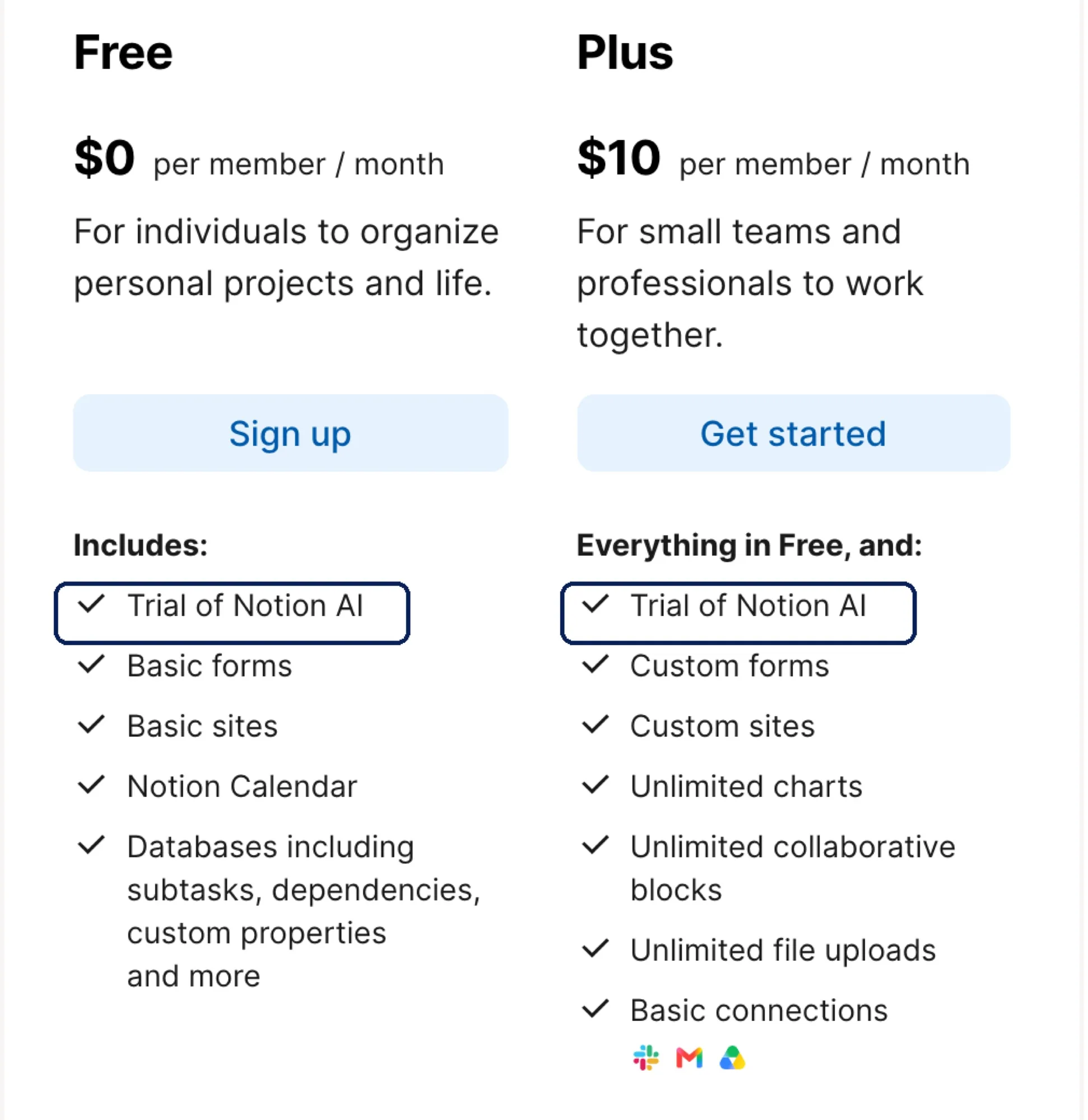
Notion's help page on complimentary AI responses says what happens when that trial runs out.
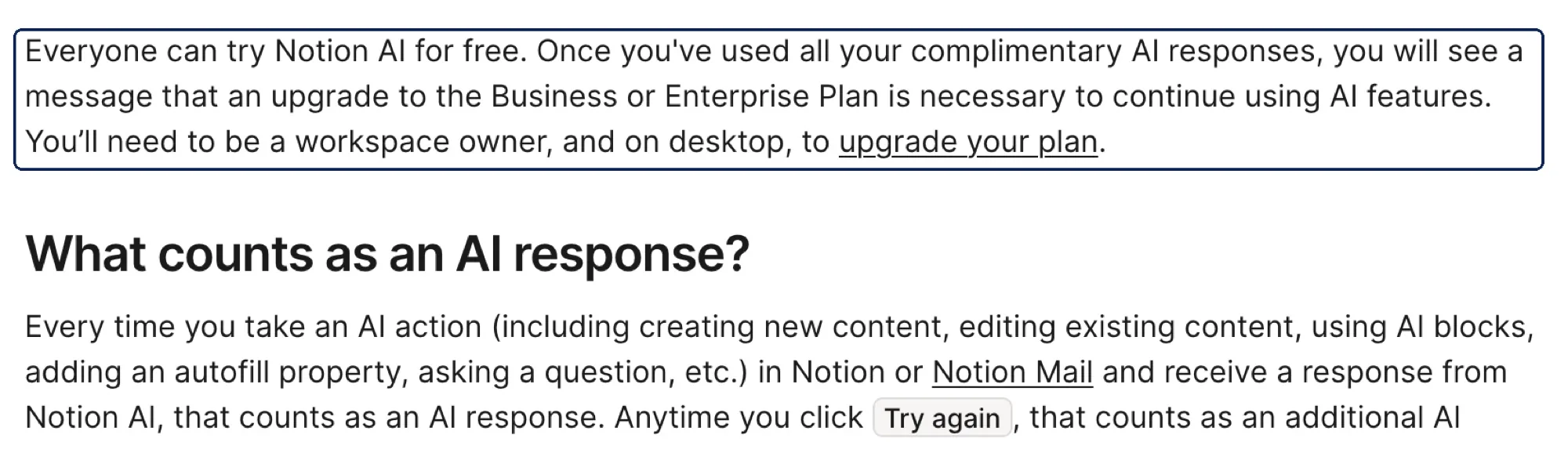
So upgrading from Free to Plus does not buy you ongoing Notion AI. Every AI action counts as a response, including each click on "Try again," and the help page does not publish how many complimentary responses you get. Ongoing AI starts at Business, $20 per member per month, which on Business and Enterprise is now metered in monthly credits. Our guide to Notion AI credits covers how that allowance works.
Custom Agents sit outside both plans. The pricing page lists them as "Free to try, then $10 per 1,000 monthly Notion credits" and marks them as requiring Notion credits on Free and Plus alike.
Cheapest fix: if what you want is AI that drafts, summarizes or restructures your Notion pages, you do not have to move the whole team to Business. An outside assistant connected to your workspace can do that work and write the result back, billed on its own meter. That is the gap the next section covers.
Guests, Charts and Automations on Notion Free
The remaining limits are smaller but worth knowing before you build a workflow around them.
- 10 external guests. Guests are the workaround for the block limit, so they are also the next wall. A client project with a dozen stakeholders will not fit.
- 1 chart. Free includes a single chart view. Plus makes charts unlimited.
- Automations are buttons only. Database automations, such as "when status changes, notify someone," need Plus.
- Basic forms and one notion.site domain. Custom forms and more sites come with Plus.
None of these block you from working. They are the reason a Free workspace that runs a small team's projects, like the setup in our Notion project management guide, starts to feel manual.
Which Notion Free Wall You Will Hit First
How you use Notion decides which limit arrives first.
| If you mostly... | First wall | Cheapest fix |
|---|---|---|
| Use Notion alone | Notion AI trial running out | Outside AI tool on your pages, or Business |
| Share a workspace with one teammate | 1,000-block limit | Make them a guest, or Plus |
| Store PDFs, decks and media | 5 MB upload cap | Link from Drive or Dropbox, or Plus |
| Work with many clients | 10-guest cap | Plus |
| Rewrite shared docs often | 7-day page history | Duplicate before big edits, or Plus |
If two or more rows describe you, Plus at $10 per member is usually cheaper than the time spent on workarounds. If the only row that fits is the first one, Plus will not help at all, because it carries the same AI trial.
Using AI on Notion Pages Without Upgrading to Business
The AI wall is the one where the official path costs the most: going from Free to Business is $20 per member per month, and for a solo user or a small team that mainly wants summaries and drafts, that is a lot to pay for one feature.
Zentor's Notion integration is one way around it. You connect Notion through its hosted MCP server, point Zentor at a page or database, and it does the drafting, summarizing or restructuring and writes the result back into Notion. Notion's MCP documentation does not list a plan requirement for connecting, and restricting which apps members can connect is an Enterprise control. Two honest limits:
- It is not free. Zentor is $20 a month for 1,000 credits, with a 3-day trial. You are choosing a different meter, not avoiding one.
- It does not lift Notion's own caps. Writing results into a multi-owner Free workspace still adds blocks, and files still upload under the 5 MB rule.
Where it fits best is work that crosses tools, since Zentor keeps one workspace memory across Notion, Slack, Gmail and Google Drive. If you use Notion as a personal knowledge base, the setup in our Notion second brain guide pairs well with an assistant that can read across it.
FAQ
What are the Notion free plan limits?
One workspace owner gets unlimited blocks. With two or more owners, the workspace gets 1,000 blocks in total. Files must be under 5 MB, page history covers 7 days, you can invite 10 guests, you get 1 chart, and Notion AI is a trial.
Is the Notion free plan block limit really unlimited for one person?
Yes. Notion's help page says Free workspaces with only one owner have unlimited blocks. The 1,000-block limit applies only when a Free workspace has more than one owner.
Does deleting pages reset the Notion free plan block limit?
No. Notion counts all blocks created since signup, and deleting blocks or emptying the trash does not reduce the count.
What is the Notion free plan file upload limit?
Each uploaded file must be under 5 MB on the Free plan. Linking or embedding files stored elsewhere avoids the cap.
Does Notion Plus include Notion AI?
No. Plus lists the same "Trial of Notion AI" as Free. After the complimentary responses, Notion asks for Business or Enterprise to keep using AI.
Notion free vs Plus: is the upgrade worth it?
It is worth it if you collaborate with other owners, upload large files, need more than 10 guests or want database automations. It is not worth it if AI is the only thing you need, because Plus does not include ongoing Notion AI.
Pick the Notion Free Plan Limit That Actually Affects You
Most Notion Free plan limits are invisible to a solo user and sudden for a team. The block limit is the one to watch: it is triggered by adding a second owner, counts every block ever created, and cannot be undone by cleaning up. Guests are the free way to collaborate, until you need more than ten.
Check two things this week. In Settings, look at how many owners your workspace has and how close you are to 1,000 blocks. Then decide what you actually want from Notion AI, because neither Free nor Plus gives you more than a trial, and the right answer may be Business, an outside assistant on your pages, or simply no AI at all.

Zentor Editorial Zentor editorial team
The Zentor editorial team writes about workflow automation, AI agents, and the tools we build. Default byline for industry overviews, listicles, and collaborative pieces.
Ready to put this into practice?
Zentor runs browser tasks, research, and schedules automatically. Try it free.
References https://www.notion.com/pricing · https://www.notion.com/help/understanding-block-usage · https://www.notion.com/help/images-files-and-media · https://www.notion.com/help/duplicate-delete-and-restore-content · https://www.notion.com/help/complimentary-ai-responses · https://developers.notion.com/docs/mcp