Airtable Slack Reconnect: Find the Failure

Troubleshoot an Airtable Slack reconnect problem using run history, connected-account mapping, destination checks, and a review of pending notifications.
For an Airtable Slack reconnect problem, first identify the failed action and its exact error before replacing the integration. An August 2026 community post reports recurring reconnect requests, but it does not establish a universal token-expiry cause or prove that another automation service will prevent the same problem. Original reconnect report.
Key Takeaways:
- Separate authentication failures from missing channels, invalid recipients, trigger problems, and usage limits.
- Record which connected account each affected automation uses before changing it.
- Reconnect one controlled workflow, inspect a real test result, and then check the other affected automations.
- Keep critical work visible in a delivery queue so a broken notification does not make the underlying obligation disappear.
Find the first failed step in run history
Open an affected automation and inspect its run history. Find a recent failure and identify whether the trigger ran, whether earlier actions succeeded, and which action first failed. Preserve the error text and timestamp. Airtable's troubleshooting documentation describes run-history inspection as part of diagnosing automation behavior. Airtable automation troubleshooting.
If no run exists for the work item, investigate the trigger before reconnecting Slack. The record may not have met the trigger conditions, or the expected change may have occurred before the automation was enabled. A connection repair cannot fix a workflow that never reached the sending action.
If the Slack action failed, read the error rather than relying on a general “automation failed” notification. An authentication problem requires a different response from a destination problem. A missing recipient field requires a different response again. Keep those categories separate in your incident notes.
Check one successful run from before the failure if it is available. Compare the account, destination, and relevant record values. This does not prove which change caused the incident, but it narrows the investigation. Avoid changing several unrelated settings at once, because you then lose the ability to tell which change mattered.
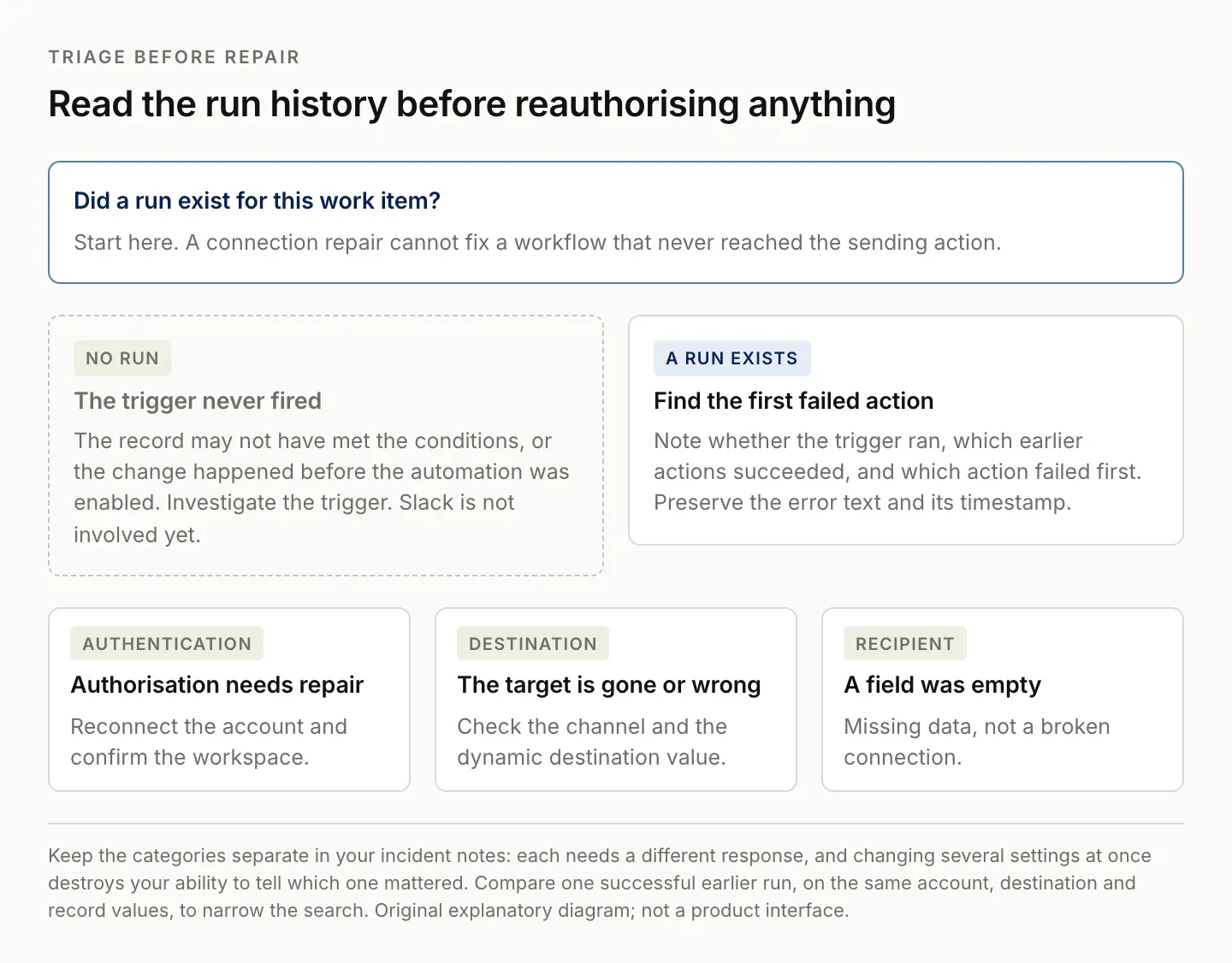
If no run exists, the trigger is the problem and reconnecting Slack repairs nothing.
Map affected automations to connected accounts
Make a small inventory of affected workflows: automation name, purpose, connected account, destination, last successful run, and first known failure. This can be a temporary checklist rather than another permanent system. Its purpose is to reveal whether several failures share the same connection.
Airtable provides an account-management area for connected services. Review the relevant account there and compare it with the account selected in each automation. Managing integrated accounts.
Do not assume that two actions displaying Slack use the same underlying account or workspace. A person may have access to several Slack workspaces, and an older automation may have been configured differently from a newer one. Verify the destination identity before reconnecting anything.
Keep an owner for the integration itself. This is the person or approved operational role responsible for reviewing access changes and repairing the connection. It need not be the same person who receives every notification. Without that ownership, a failure can circulate among users who all assume someone else maintains the automation.
Do not share a person's credentials as a shortcut to continuity. Use the account and app-management approach approved for your workspace. If a staffing or access change coincides with the failures, investigate the supported connection behavior with the relevant administrators rather than guessing at an undocumented cause.
Reconnect a controlled workflow and inspect delivery
When the error and connection status indicate that authorization needs repair, follow the reconnect flow for the relevant account. Confirm that you authorize the intended Slack workspace. Then return to a single affected automation and verify the selected account and destination.
Airtable's Slack action guide covers the native action setup and connection troubleshooting. Use its current instructions for the account flow; do not rely on an old screenshot whose labels may differ from your interface. Airtable Slack action guide.
Use a test record and a destination where you are authorized to send test messages. Keep the content clearly identifiable as a test. Inspect the actual Slack result, including the channel, record link, and recipient if the workflow contains a mention. A successful action log and a correctly delivered message are related but distinct checks.
After one controlled test succeeds, inspect the other affected automations. Confirm their account selections and test representative cases. Do not assume that fixing one action repaired every workflow, and do not rebuild every automation unless the evidence shows that it is necessary.
Record the repair time and what changed. If the connection fails again later, that history lets you compare the incidents. A sequence of “reconnected again” notes without the error or account details is much less useful for finding a recurring cause.
Check app access and destination changes separately
If reconnecting does not resolve the problem, inspect the destination and app access. Confirm that the target channel still exists and that the configured integration can act in the required context. Review any relevant workspace app-management changes with someone who has the appropriate access. Zentor's Slack integration page lists what a connected Slack account currently exposes.
Slack's app-management controls allow workspace administrators to review app requests and permissions. These controls are part of the environment in which an integration operates; another automation provider does not automatically bypass them. Slack app requests and permissions.
Distinguish a broken mention from a broken connection. If the message arrives but the person appears as plain text, inspect the stored member ID and formatting. Reauthorizing the account will not discover a missing identity mapping in your Airtable data.
Likewise, a correct fixed destination does not establish that a dynamic destination field is valid for every record. Test a record with the actual destination value that failed. A blank field, stale identifier, or mapping to a different workspace can make a dynamic workflow fail even while a simple test message succeeds.
If the error remains unexplained, prepare a concise support case with the run timestamp, action type, error, and the controlled tests you performed. Include only the necessary context. This gives support a reproducible starting point instead of a broad claim that all notifications are unreliable.
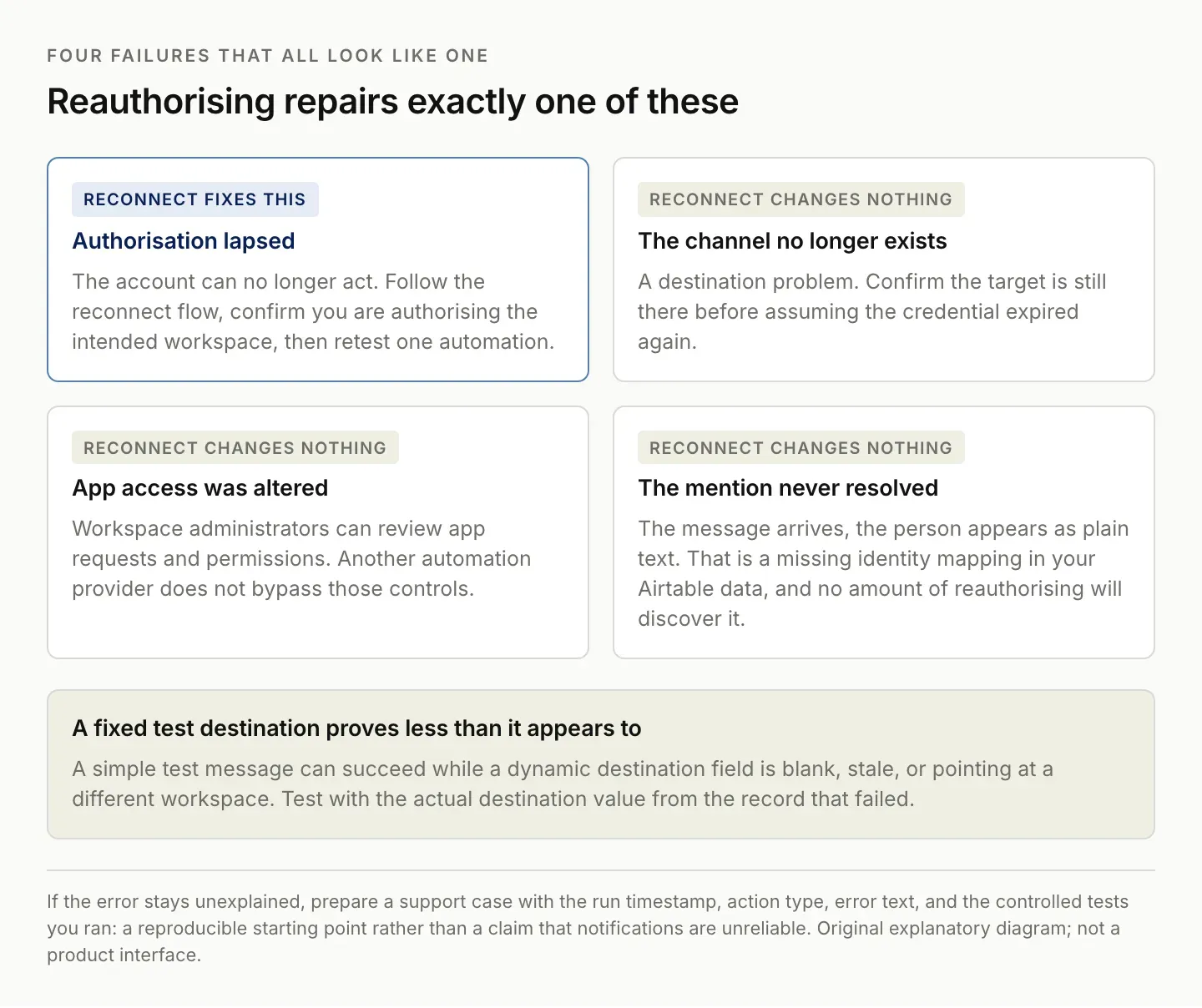
Reauthorising repairs exactly one of these. The other three survive it untouched.
Keep pending notifications visible during an outage
The underlying work should remain visible even when Slack delivery fails. For a deadline or approval notification, keep a record of the item awaiting attention, its intended recipient, and its delivery state. A notification is a delivery channel for the work; it should not be the only place the obligation exists.
Use clear states such as Pending, Confirmed delivered, Failed, and Needs review. Define when each state changes. Do not mark an item delivered before the sending action has succeeded and you have the appropriate evidence for your workflow.
Handle uncertain outcomes carefully. A timeout can leave you unsure whether the destination accepted the message. Blindly retrying every uncertain attempt can create duplicates. Inspect the destination or available delivery evidence before deciding whether to resend.
For critical workflows, choose an approved fallback process in advance. That might be a manual review of the pending queue or a separate authorized channel. The fallback should not create an uncontrolled burst of duplicate alerts, and it should not depend on the same failed connection without acknowledging that dependency.
After repair, reconcile the backlog. Identify which items still need attention, which were handled manually, and which are no longer relevant. Restoring the connection does not automatically resolve the work that accumulated while it was unavailable.
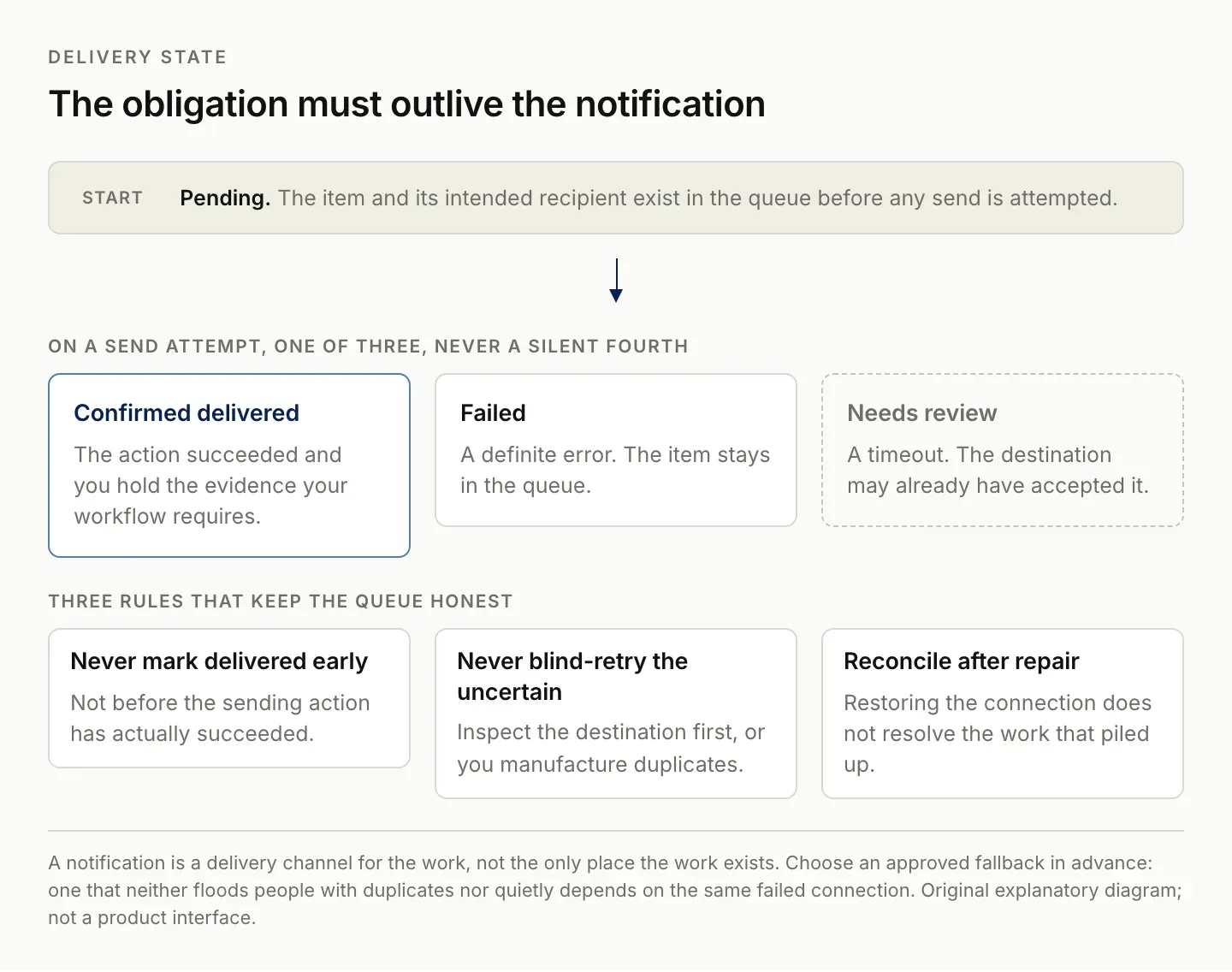
A timeout is its own state. Collapsing it into either success or failure is how duplicates get manufactured.
Compare another service using the same failure cases
Make, Zapier, or another integration service may offer workflow features that fit your needs, but do not treat a product change as proof that authentication problems disappear. Evaluate the specific connection, error visibility, retry behavior, and maintenance process.
Use the same acceptance cases for every option: a valid record, a missing destination, an unavailable account, an uncertain send result, and a repeated trigger. Decide the expected outcome for each. A service that makes exceptions easier to review may be valuable even if it cannot prevent every external failure. Zentor's Airtable integration page lists the Airtable connections currently available to an account.
Include operating effort in the comparison. Someone must understand how to reconnect the service, inspect failed runs, and reconcile the queue. If a new layer makes the happy path easier but failures harder to diagnose, that tradeoff should be visible before you adopt it.
Review the native workflow's own run history and management features before adding another tool. Airtable documents how to inspect and manage automation runs, which may already provide the evidence needed for a small setup. Managing Airtable automations.
Keep the decision tied to a demonstrated gap. Better exception handling, clearer ownership, or a required multi-step workflow are concrete reasons to consider another service. A promise of permanent reliability without evidence is not.
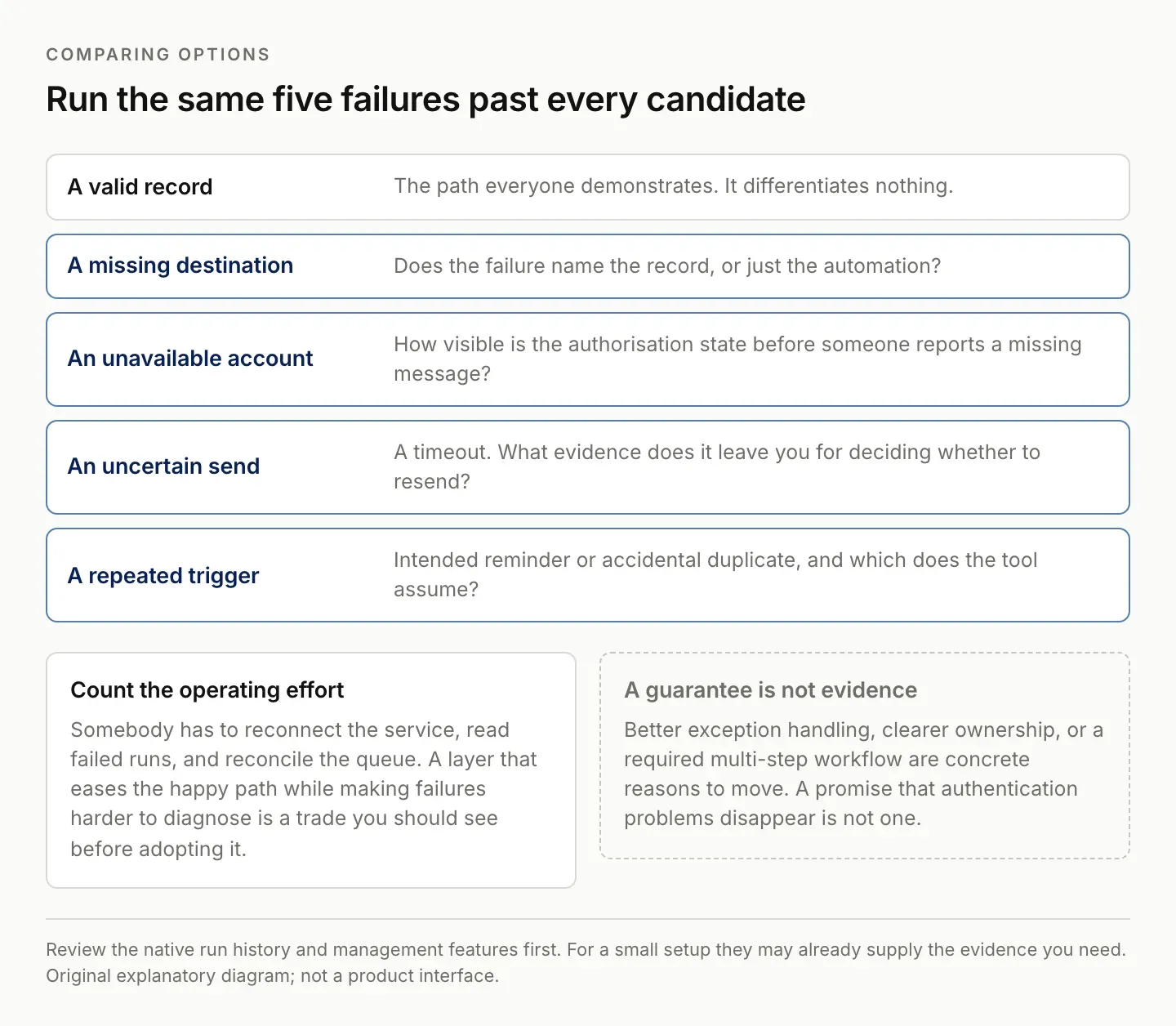
The happy path differentiates nothing. The other four are where the tools actually differ.
Evaluate Zentor as a maintenance assistant
Zentor's intended role is to help maintain recurring work across existing tools. For this problem, the useful task would be preparing a clear queue of unresolved notifications, collecting the relevant evidence, and helping you reconcile what still needs attention after a connection failure.
A bounded evaluation brief could say: “Review this approved failure log and pending-work table. Group the affected items by connection and destination, identify missing information, and prepare a repair checklist. Do not send or resend messages.” That produces a reviewable artifact without pretending the assistant can repair an external authorization condition on its own.
Zentor is in early access. This guide does not claim that it prevents Slack disconnections, repairs OAuth automatically, or provides a tested monitoring workflow in your account. Confirm the available connections and inspect the result of one real task. Explore Zentor with a defined maintenance problem.
The standard is practical: fewer unresolved obligations, clearer failure evidence, and a repair process you can repeat. A reassuring completion message is not enough if the destination still lacks the notification or the backlog remains unreviewed.
FAQ: Airtable Slack reconnect and failed notifications
Why does Airtable keep asking me to reconnect Slack?
The exact cause depends on the failed action and account state. Preserve the error and inspect the relevant connection. A community report of recurrence does not establish one universal expiry schedule.
Should I reconnect every automation separately?
First identify which account each action uses. Repair and test one controlled workflow, then inspect the others. Do not assume that every failure has the same cause.
Will another automation provider fix it permanently?
There is no basis for that guarantee. Test connection handling, retries, and exception visibility using the same failure cases before changing the workflow.
What should happen to missed notifications?
Keep the underlying items in a pending queue, then reconcile them after repair. Avoid blindly resending items that may already have been delivered or handled manually.

Zentor Editorial Zentor editorial team
The Zentor editorial team writes about workflow automation, AI agents, and the tools we build. Default byline for industry overviews, listicles, and collaborative pieces.
Ready to put this into practice?
Zentor runs browser tasks, research, and schedules automatically. Try it free.