Asana AI Teammates: 30+ Agents in Your Workflow

Asana AI Teammates add 30+ prebuilt agents to shared workflows. See integrations, Dash, pricing limits and when lean teams should require human review.
Asana AI Teammates are prebuilt agents that work inside shared projects rather than in a separate chat tab. Asana's Q3 2026 release describes 30+ role- and industry-focused Teammates, new app connections, and a way to automate work across projects. That makes the announcement worth a look if your small team already uses Asana; it doesn't make every task safe to delegate unattended.
Key Takeaways:
- The release pairs 30+ prebuilt agents with shared Asana project context.
- New connections include Google Drive, Gmail, Slack, Microsoft Teams, and HubSpot.
- Some edits can happen without a separate approval; permissions and action-specific gates matter.
- Paid-plan inclusion is not unlimited usage. Check your team's AI-request allowance before scaling.
What Asana shipped with 30+ AI Teammates
Asana groups its prebuilt Teammates by job and industry, from campaign coordination and work intake to manufacturing and professional services. Its AI Teammates catalog shows concrete prompts: a Campaign Coordinator checks whether channel workstreams are ready for launch; a Work Intake Specialist triages new requests. Those examples describe potential assignments, not independent proof of accuracy or time saved.
The useful distinction isn't the agent count. It's that the role has a place in a project where your team can see the task, its owner, and the output. If you have a one-person service business with a contractor helping on client deliveries, a shared request queue is a more plausible starting point than a company-wide agent rollout.
Your work doesn't all live in one project board
Zentor keeps workspace memory available to the AI you choose through Zentor MCP. Start with a task that needs context you want to keep.
Get early access →
How an AI Teammate enters an existing workflow
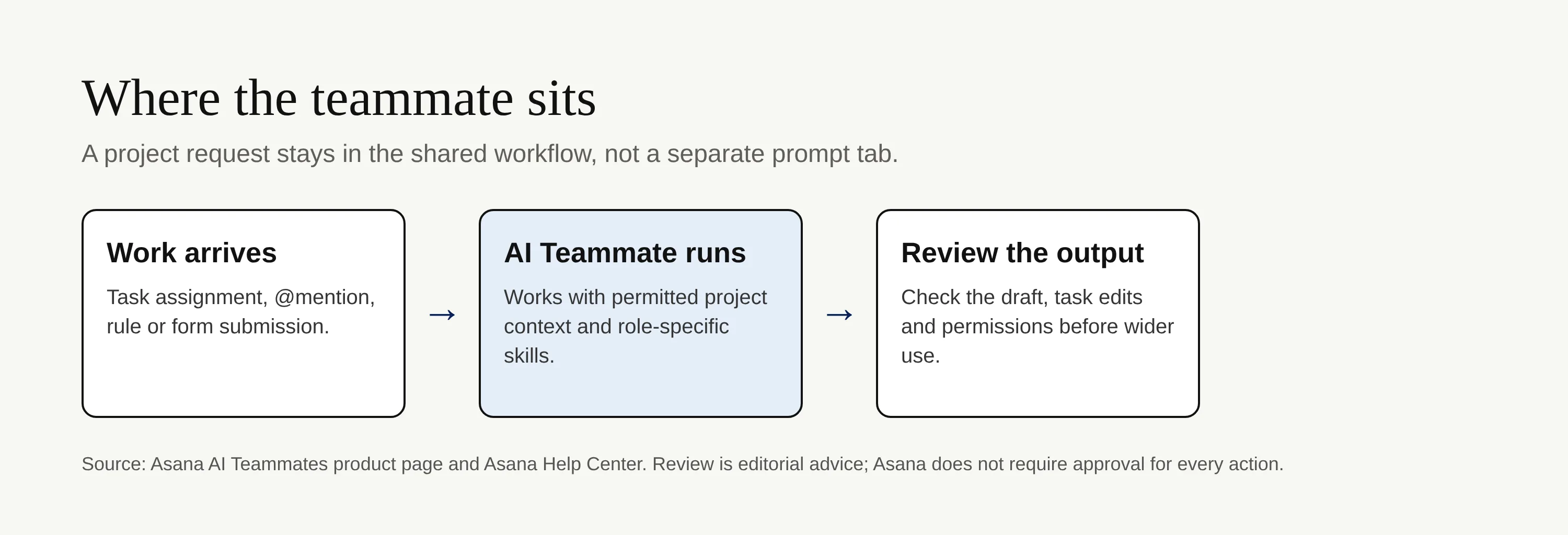
You can assign a task to a Teammate or invoke one with an @mention. The Asana Help Center also lists rule, form-submission, and recurring-task triggers. It says an agent can create tasks, change descriptions, add comments, and mark tasks complete when access allows. A shared project record makes the handoff visible, but visibility alone isn't a quality check.
Suppose an intake form requests a client update. You could let a Teammate draft the task and collect status from the project, then have the human account owner verify dates and wording before anything goes to the client. That last step is your process choice, not a guarantee that Asana imposes approval on every draft.
Connected apps bring context, and new boundaries
The release post names Google Drive, OneDrive, Gmail, Google Calendar, Outlook Mail and Calendar, Slack, Microsoft Teams, Canva, and HubSpot as new AI Teammate integrations. Connection availability is not permission to give every agent access to every client folder. Test with a limited project and only the apps that task actually needs.
Zentor addresses a different portability question: its workspace memory can reach different AI tools via Zentor MCP and belongs to the user. That matters when your context must outlast a single project's agent configuration; it does not mean Zentor has Asana's listed integrations or reproduces its project permissions.
Vertical automation builder and Asana Dash
Asana says its vertical automation builder spans tasks, projects, and portfolios. It also describes Asana Dash as an AI chief of staff that surfaces blockers, recommends a next action, and can bring in a Teammate. Think of Dash as a view across the work, not a substitute for deciding which client issue deserves attention first.
For a lean team, ask a narrower question: can the existing intake rule route requests to the right person without anyone rewriting the same project status by hand? If it can, start there. A complicated portfolio automation adds little if your underlying task owners or dates are unreliable. Zentor's self-adaptive workspace is a separate way to adjust to changing tasks; don't treat it as an Asana automation builder.
Where humans still have to review AI work
Asana's access-control guide says Teammates cannot elevate their own permissions. It also distinguishes actions: removing collaborators or project members always needs approval; deleting a task created by someone else needs approval. By contrast, Asana's capability table lists routine task creation, editing, and completion as available actions. No, approval is not required for every action.
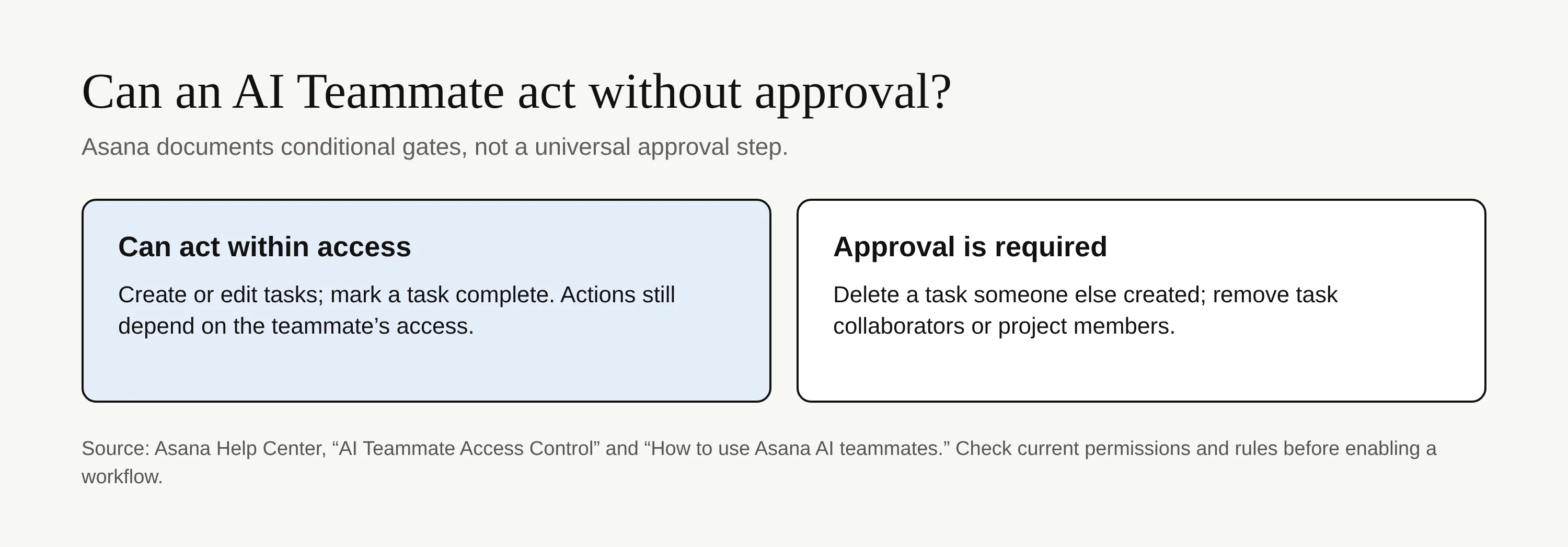
Keep human review for client-facing copy, financial commitments, and sensitive changes even where a product gate doesn't require it. Check what the agent could read, what it changed, and who now has access. For Zentor, the same principle applies to any AI using portable workspace memory: persistent context should help you review a decision, not silently turn a draft into a promise.
Embedded AI agents versus standalone automation
| Choice | Where the work starts | Better first test | Watch for |
|---|---|---|---|
| Asana AI Teammate | Existing Asana project or task | Triage a shared request queue | Agent permissions and request usage |
| Standalone agent | A task spanning tools outside the project | Prepare an artifact for review | Context transfer and output checks |
| Rule-based automation | A known trigger and fixed action | Route a form to an owner | Exceptions the rule cannot interpret |
This is a decision guide, not a benchmark. Asana wins on shared project context if your work already lives there. A standalone agent can be a better fit when your job starts in files or research rather than Asana. Our self-host versus managed agent guide asks a different question: who keeps the agent running? Some old product descriptions in that article may predate Zentor's current positioning, so use it for the operating-model distinction, not as a current Zentor spec. Check Zentor's pricing page for its current terms instead of assuming either system offers unlimited runs.
FAQ: Asana AI Teammates, costs, and approval
What are Asana AI Teammates?
They are role-focused AI agents that work with tasks and shared context in Asana projects. The release announces more than 30 prebuilt options; you can also define a role and grant project access in the product documentation.
Do Asana AI Teammates cost extra?
The current Asana pricing comparison lists AI Teammates and Dash on paid plans, not the free Personal plan, with included AI requests and additional usage options. Inclusion doesn't mean unlimited work. Ask your admin to confirm the allowance and any purchase terms in your account before enabling a busy workflow.
Can they act without approval?
Yes, for some actions within their access. The Help Center's action table lists task edits and completion, while its permissions guide specifies approval for some deletions and access changes. Set your own review checkpoint wherever a mistake would reach a customer.

Zentor Research Public data on the AI ecosystem
Zentor Research publishes quarterly data studies on the AI tools ecosystem, drawing on public registries (npm, GitHub, Hugging Face, arXiv, Google Trends). All charts and datasets ship under CC-BY 4.0.
Turn insights into action.
Zentor automates the recurring work your analysis points to. No engineering required.