Best HoneyBook Alternatives for 2027
HoneyBook alternatives for 2027: compare Dubsado, Bonsai, and Moxie by client intake, delivery, billing, and switching costs.
HoneyBook alternatives are client-management tools that can take a freelancer from a new inquiry through a signed agreement and payment. The useful comparison is whether a replacement covers your actual client work, including the handoff after the sale, at a price and setup cost you can accept.
Key Takeaways:
- Choose Dubsado when configurable intake, proposals, and automated follow-up matter enough to justify setup time.
- Choose Bonsai when project work, tracked time, and billing need to sit together; check the plan before assuming client-facing delivery is included.
- Choose Moxie when a solo operator wants a broad starting toolkit, then check whether the portal and automation require Pro.
- Keep HoneyBook when your current workflow works and the cost of rebuilding it exceeds a specific gain.
Suppose you run a solo design business handling a nonprofit's brand refresh: inquiry, proposal, contract, deposit, design files, final invoice, and a repeat request six months later. This hypothetical workflow gives each option the same job; it is not a customer story or product test. Feature and price checks reflect public vendor information checked November 11, 2026, not a forecast of 2027 offerings.
Quick Verdict by Reason to Switch
| If your reason is... | Start with... | Check before moving |
|---|---|---|
| Intake and follow-up need more tailoring | Dubsado | Whether the proposal and automation steps you need require Premier, plus the time to build forms and Flows |
| Work and billing should share one record | Bonsai | Whether Essentials covers the sale and Premium is needed for client-facing project tasks |
| You want a solo business workspace | Moxie | Whether Starter is enough or Pro's client portal and automation are central to delivery |
| The current system already handles the job | HoneyBook | What a new tool would solve after migration, training, and payment changes |
These HoneyBook alternatives are starting points, not a universal ranking of HoneyBook competitors. Among alternatives to HoneyBook, a low subscription price cannot compensate for an approval step that sends every project back to email.
Keep the follow-up after the client handoff
Zentor can draft recurring follow-ups from your Gmail and workspace context, with your approval before anything goes out. It does not replace your client contracts or payment system.
Start free trial →
What Must a HoneyBook Replacement Cover?
Map one project before comparing features. You need to capture scope, send a proposal and contract, collect a deposit, share work, record approval, send the final bill, and find the project when the client returns. A tool can cover the sale while leaving proofing or file delivery elsewhere.
"Client portal" may mean access to invoices, documents, or tasks; it does not establish versioned creative approval. You could keep a separate proofing tool. The CRM for freelancers guide helps define your shared client record. For a content approval workflow, record the approver, exact file version, decision, and final deliverable for later retrieval.
Before comparing HoneyBook alternatives, map your required records. A HoneyBook replacement for freelancers should match the work they actually sell. List the steps that must stay together, those you can split, and the records you must recover. Then compare plans.
How We Compared Client Workflows
We compared public plan inclusions and migration guidance against that workflow; we did not test paid accounts. Prices are U.S. dollar list prices checked November 11, 2026. Taxes, transaction fees, promotions, eligibility, and later changes may alter checkout prices.
We compared HoneyBook alternatives by handoffs: what the client can see, which plan contains automation, and what old records can move. Where public documentation is silent, check the account or support team before moving live work.
1. Dubsado — Custom Client Workflows
Dubsado fits when you want to tailor intake, booking, and follow-up around repeatable project rules. You must define those rules before automation helps.
What Does It Cover From Inquiry to Payment?
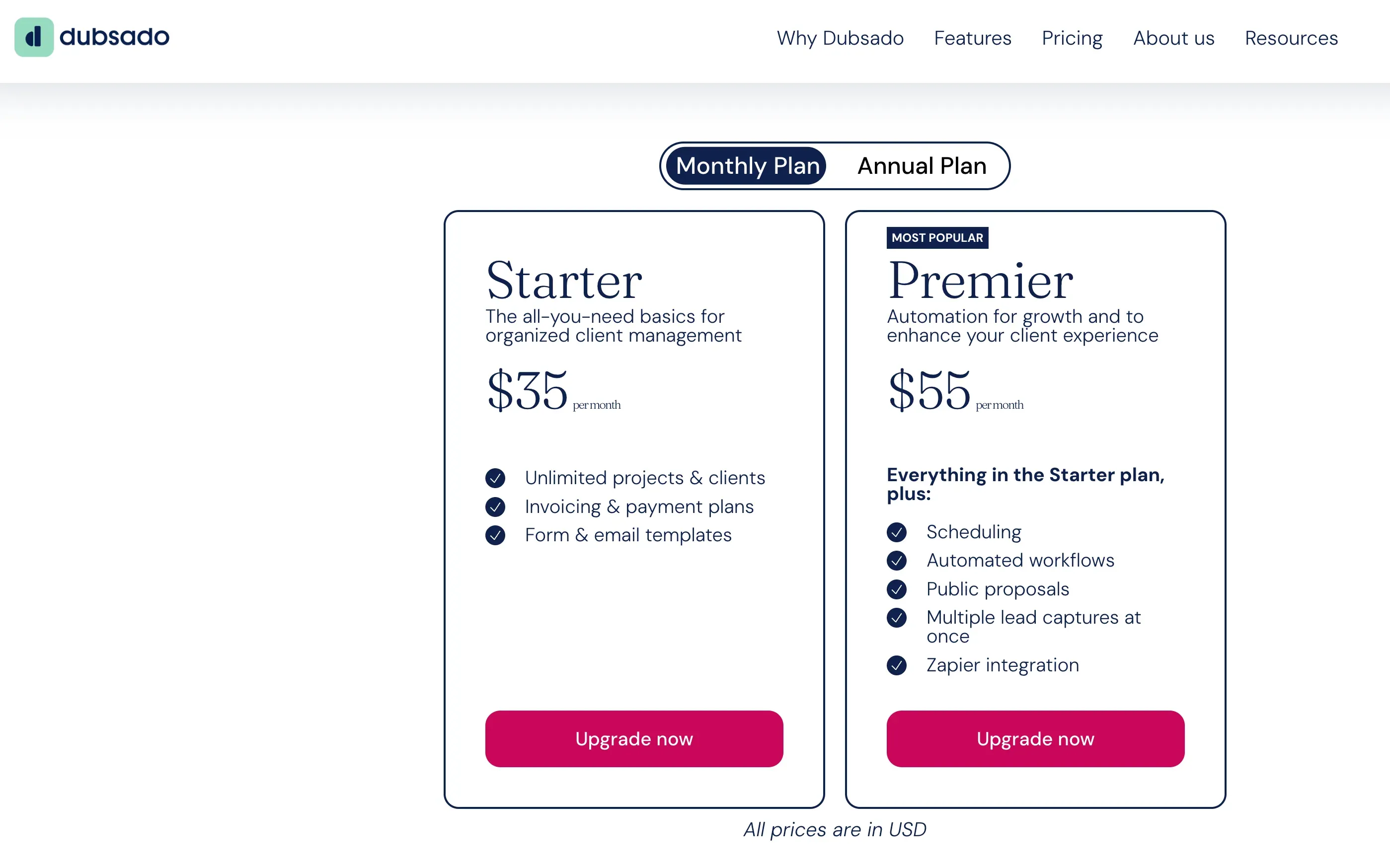
The Dubsado product overview and its plan comparison place projects, invoices, payment plans, forms, email templates, and a client portal in Starter. Premier adds public proposals, scheduling, automated workflows, and multiple lead forms. The current page lists Starter at $335 per year and Premier at $525 per year. If you want the public proposal and automated sequence in our example, Premier is the relevant comparison, even though Starter covers several individual steps.
You can collect scope, send the agreement and deposit request, and use the portal for project materials and payments. You still need a place for comments on a particular design version and final approval.
Where Does It Ask More of the User?
You must build forms, templates, payment schedules, and Flow triggers. Test reminder timing with a sample project before using it with clients.
Dubsado's migration guide documents contact import, template rebuilding, and retaining past contracts and forms as PDFs, not a complete live-project transfer. Archive old records and check retrieval. If you rarely repeat a sequence, Premier's setup may buy little.
2. Bonsai — Freelance Work and Billing
Bonsai suits you if tracked hours, tasks, and invoices should sit near the sold project. Its cheapest plan does not cover the whole client journey.
What Does It Cover From Inquiry to Payment?
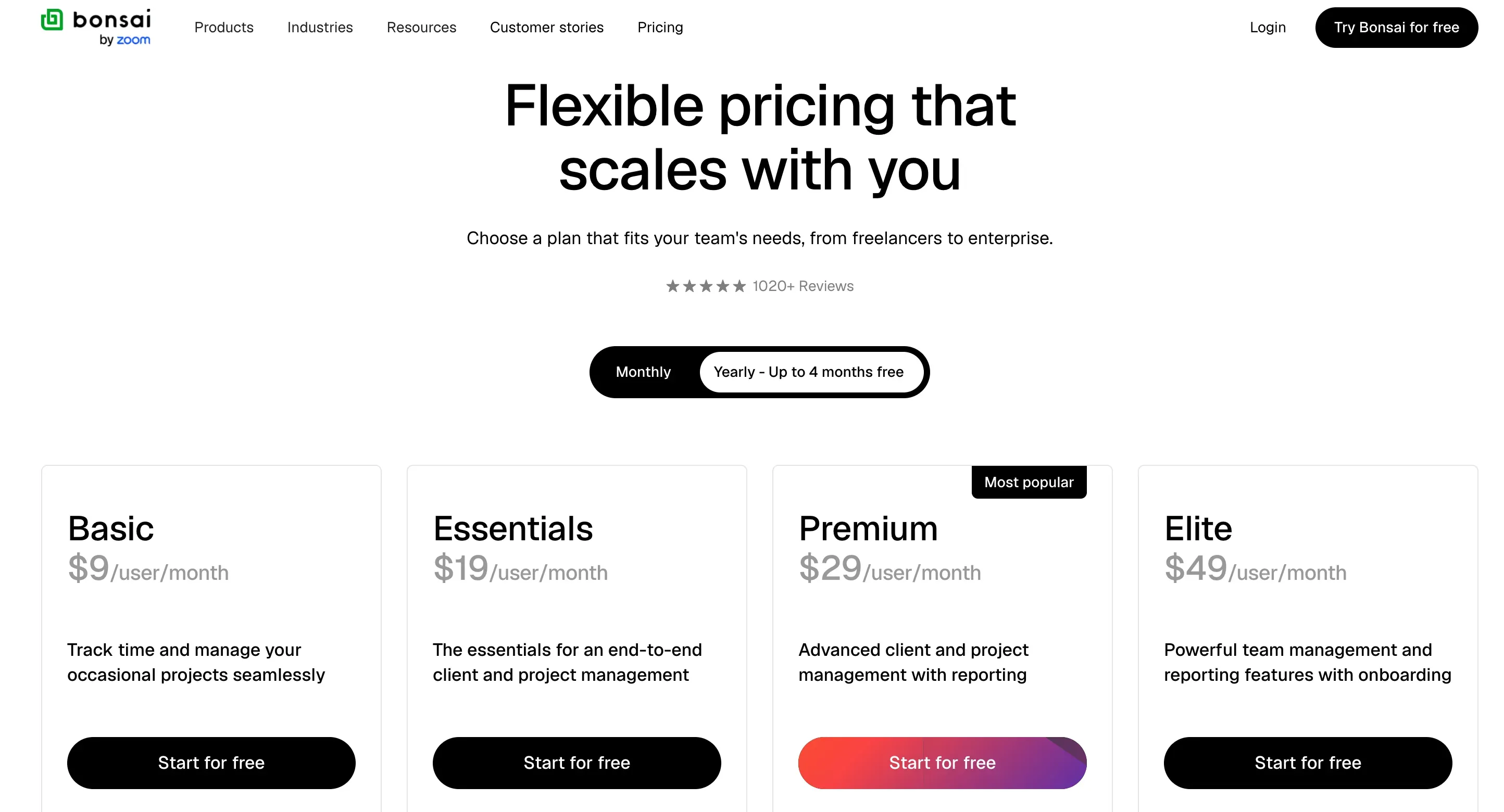
The Bonsai product overview and its public plan list put Basic at $9 per user per month with annual billing, or $15 monthly. Basic includes time, tasks, and CRM, but proposals, contracts, invoices, payment, scheduling, and client portal sit in Essentials, listed at $19 per user per month annually or $25 monthly. Premium, at $29 per user per month annually or $39 monthly, adds client tasks and messaging, among other features. For a signed project and deposit, compare Essentials first; for client participation in project tasks, examine Premium. Rates checked November 11, 2026.
You could keep work and billing in one project record. Time tracking may inform your next estimate, even on a fixed fee.
Where Does It Ask More of the User?
"Project management" does not establish design proofing. You must decide where files, versions, and approvals live. Premium's client tasks and messaging may help, but visual feedback may need another tool.
Bonsai documents CSV imports for companies, paid invoices, time entries, and expenses. That does not promise to reproduce signed files or conversation history. Check representative attachments before switching, and remember that adding a collaborator changes per-user cost.
3. Moxie — Solo Client Operations
Moxie brings intake, contracts, invoices, scheduling, and projects into a solo-business workspace. Your plan choice turns on whether you need a branded portal and automation.
What Does It Cover From Inquiry to Payment?
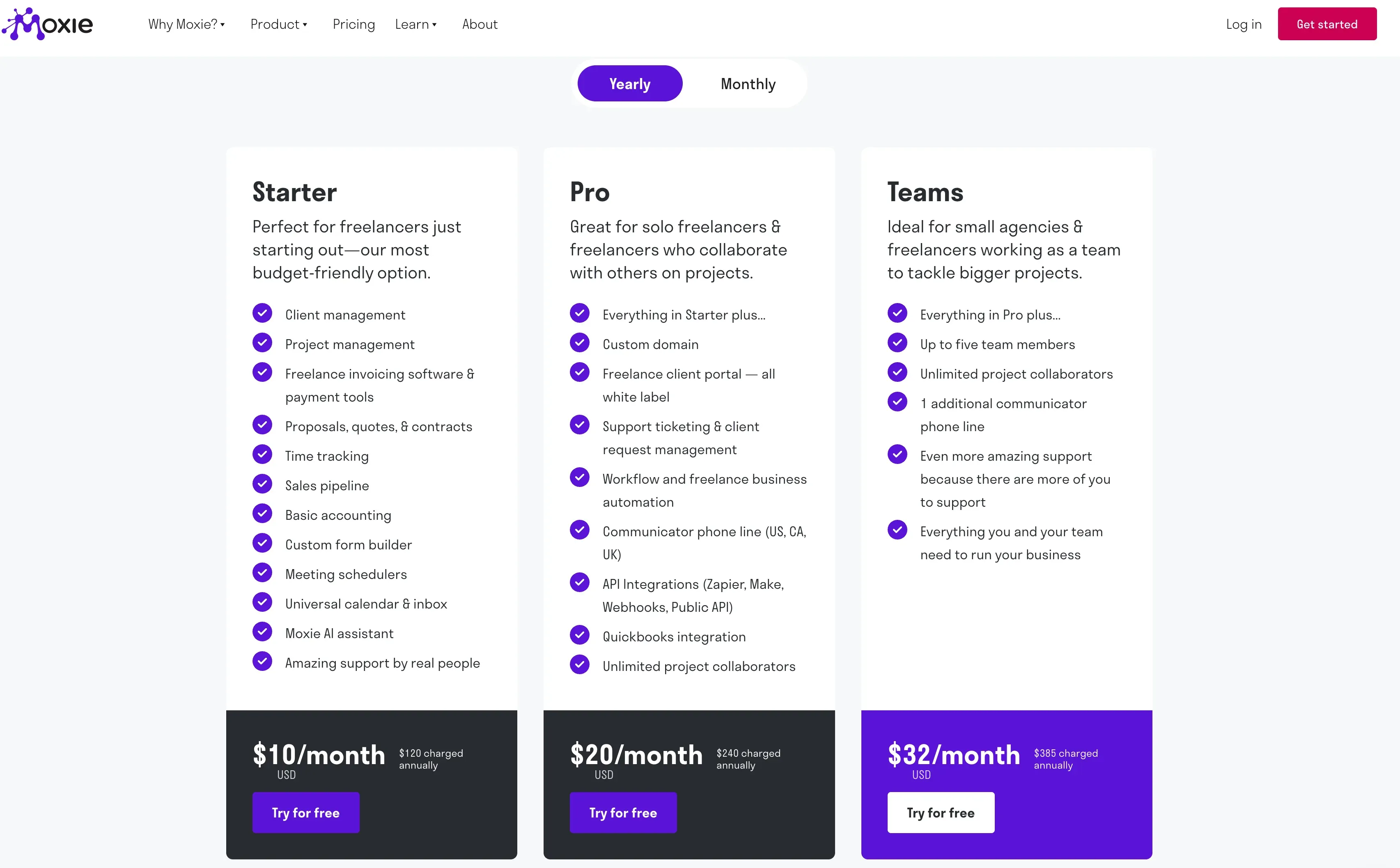
The Moxie product overview and plan details list Starter at $10 per month with annual billing or $12 monthly. Its published feature set includes proposals, contracts, invoices, forms, scheduling, client and project management, and a pipeline. Pro is listed at $20 per month annually or $25 monthly, adding a white-label portal, automation, custom domain, integrations, and unlimited project collaborators. You could begin with a lead form and move to agreement and billing on Starter; if you want the portal to be part of how the nonprofit sees the project, Pro is the fairer plan to assess. Rates checked November 11, 2026.
Moxie's portal controls distinguish contact login, client-level features, and shared records. Check the nonprofit's project view with sample contacts; portal access does not establish creative approval.
Where Does It Ask More of the User?
Starter's price can hide a need for Pro or a separate proofing service. You also need to map HoneyBook clients, contacts, invoices, and files into Moxie's structure; public features do not establish full-history import.
Verify reviewer permissions, multiple brands, and payment currency in the actual account before moving active clients.
Compare the Full Cost of Switching
Among these HoneyBook alternatives, the annual subscription baseline for one operator is $525 for Dubsado Premier, $228 per user for Bonsai Essentials or $348 for Premium, and $120 for Moxie Starter or $240 for Pro, based on vendor annual plan pages checked November 11, 2026. Compare those amounts with your actual HoneyBook plan, not its cheapest tier. Paying month to month changes the first-year subscription cost. None of these figures includes payment processing, taxes, a separate proofing tool, extra users, or the time spent rebuilding a workflow.
Migration can add a known charge as well as work. Moxie lists an optional $149 migration service for paid-plan customers, using exported CSV data; confirm the records and files it can handle before adding it to your budget. Dubsado's migration guidance calls for contact import, PDF copies of past documents, and invoice reconstruction where balances must remain trackable. Bonsai documents CSV imports for selected record types, including paid invoices. These routes do not, by themselves, establish that signed files, messages, design approvals, or an invoice with a remaining balance will transfer intact.
Pilot one completed project, one new inquiry, and one active project with a paid deposit and unpaid balance. Decide which system will collect the remaining payment so the client does not receive two requests. Record the time needed to rebuild templates and retrieve the agreement and final design decision. These are suggested checks, not tests performed for this article; confirm processing fees, import limits, and any extra seat or second-brand charges for your account before estimating total switching cost.
When Should You Keep HoneyBook?
Keep HoneyBook instead of switching among HoneyBook alternatives if only one stage needs repair. A separate design-review space could improve delivery without moving agreements or changing where clients pay.
The HoneyBook plan overview checked November 11, 2026 still shows invoices, proposals, contracts, and up to two live lead forms on Starter; Essentials adds scheduling and automation, and Premium includes multiple companies. Compare any alternative against the HoneyBook plan you actually use, including whether you need to manage a second brand. The public price display has changed since the vendor's November 10 screenshot, so check your own account and live checkout rather than treating that image as a current rate card.
Leave when the workflow gain repays migration. Otherwise, fix the stage causing friction. If your separate problem is remembering prior client context and drafting recurring follow-ups across Gmail and your working records, Zentor can help with that after the handoff; it is not a substitute for HoneyBook's proposals, contracts, or payments.
FAQ
Can Dubsado Use a Custom Email Domain for Client Messages?
Yes, a connected Google Workspace address on your own domain can send client messages through Dubsado when the account and domain are configured correctly. That is separate from giving Dubsado forms or portals a custom URL. Check the connected mailbox, SPF and DKIM setup, and the workspace's one-connected-email limit before promising clients that every message will arrive from a particular address.
Can Bonsai Export Itemized Time Entries for a Client?
Bonsai offers a separate Time Tracked CSV export and a client-filtered Activity Report CSV. Neither public description guarantees an itemized statement with the date, task description, duration, and billable status your client may require. Inspect both exports before using either as a contractual timesheet.
Can Moxie Give Two Client Contacts Access to One Project?
Yes. Moxie can grant portal login to two contacts independently, but they share that client's feature settings. Project visibility is set on the record, not separately for each contact. Check the actual views before relying on different access for an approver and billing contact.
Can These Alternatives Run Two Business Brands Under One Account?
It depends. Dubsado supports separate workspaces under one login; its pricing page lists $10 monthly per extra brand as of November 11, 2026. Bonsai limits an account to owning one company, though a person can join others. Moxie's Brand Kits can vary visual identity but do not establish full business separation. HoneyBook places multiple companies on Premium.
Can a Client Pay in a Different Currency From the Business Account?
Sometimes, but invoice currency, card conversion, and settlement currency differ. In Dubsado's documented example, a U.S. merchant invoices in USD, a French client pays after EUR conversion, and the merchant receives USD. For Bonsai and Moxie, availability and fees depend on the payment method, provider, account, and region. Confirm the merchant country, invoice currency, client checkout, and payout route before sending a cross-border bill.
Choose a HoneyBook Alternative for Your Client Workflow
Pick from these HoneyBook alternatives by the step you repeat most often. Dubsado gives you room to shape intake and follow-up; Bonsai connects the work record to billing; Moxie offers a broad solo setup with a low entry price. Each can still leave delivery approval or historical migration work outside the subscription. Make one project map, identify the plan that covers it, and trial the records and client access before moving active work. If that exercise reveals no clear gain, HoneyBook remains a sensible choice.

Zentor Editorial Zentor editorial team
The Zentor editorial team writes about workflow automation, AI agents, and the tools we build. Default byline for industry overviews, listicles, and collaborative pieces.
Choosing between tools? Let Zentor run the work.
An always-on AI assistant that does the work. No switching required, no setup.