Claude Fable 5.2 Usage Limit: Why It Hits Fast

Hit the Claude Fable 5.2 usage limit in minutes? Why high effort, usage credits, and launch-week demand burn Pro allowances fast, and how to stretch them.
If Claude Fable 5.2 answered "usage limit reached" minutes into a session, your account is not broken. The Fable 5.2 usage limit catches subscribers off guard because the model burns allowances faster than anything else in the picker: it defaults to high effort, draws on a separate Fable allowance on some plans, and on Pro it runs on metered usage credits once launch week ends.
Fable 5.2 launched November 9, 2026 as Anthropic's strongest model at $8/$40 per million API tokens (the announcement). The limits are the same ones that governed earlier Fable models; what changed is how fast a deep-thinking run spends them.
Key Takeaways:
- "Usage limit reached" on Fable 5.2 is usually real metering, not a bug: high effort burns fast
- Max and Ultra plans have a separate weekly Fable limit; verified Ultra has no five-hour window
- Pro and standard seats meter Fable through usage credits after the launch week ends
- Launch-week resets give back spent Fable usage; Pro's 50% included week runs through Nov 16
- Dropping effort or switching tasks to Opus 5.5 stretches any allowance furthest
Why Fable 5.2 drains the limit so fast
Two mechanics compound. The first is effort: Fable 5.2 defaults to high, and adaptive thinking is always on, so every prompt gets a deep reasoning pass whether it needs one or not. Thinking, tool calls, and the visible answer all count against the same meter.
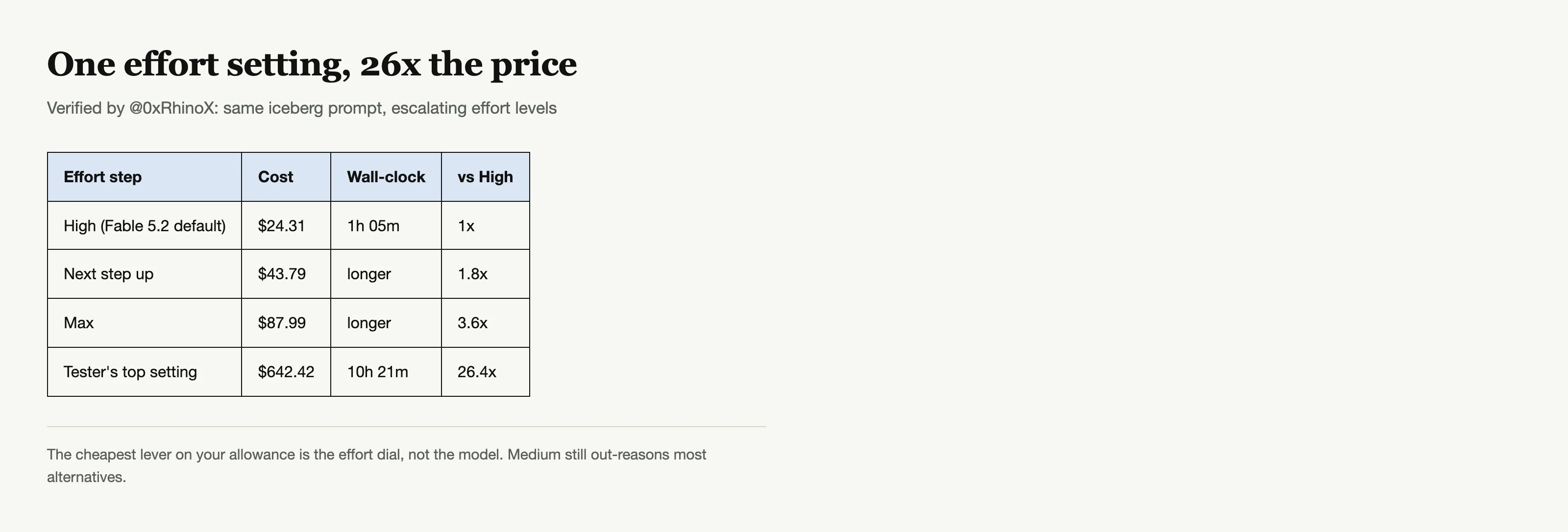
The second is spend shape. Community tests put a single ambitious run anywhere from a few dollars to three figures: one iceberg render prompt cost $24.31 at High and $642.42 at the top setting on identical input, a 26x spread on effort alone (post). Pro subscribers reported single prompts consuming double-digit percentages of weekly usage.
What the limits actually are on each plan
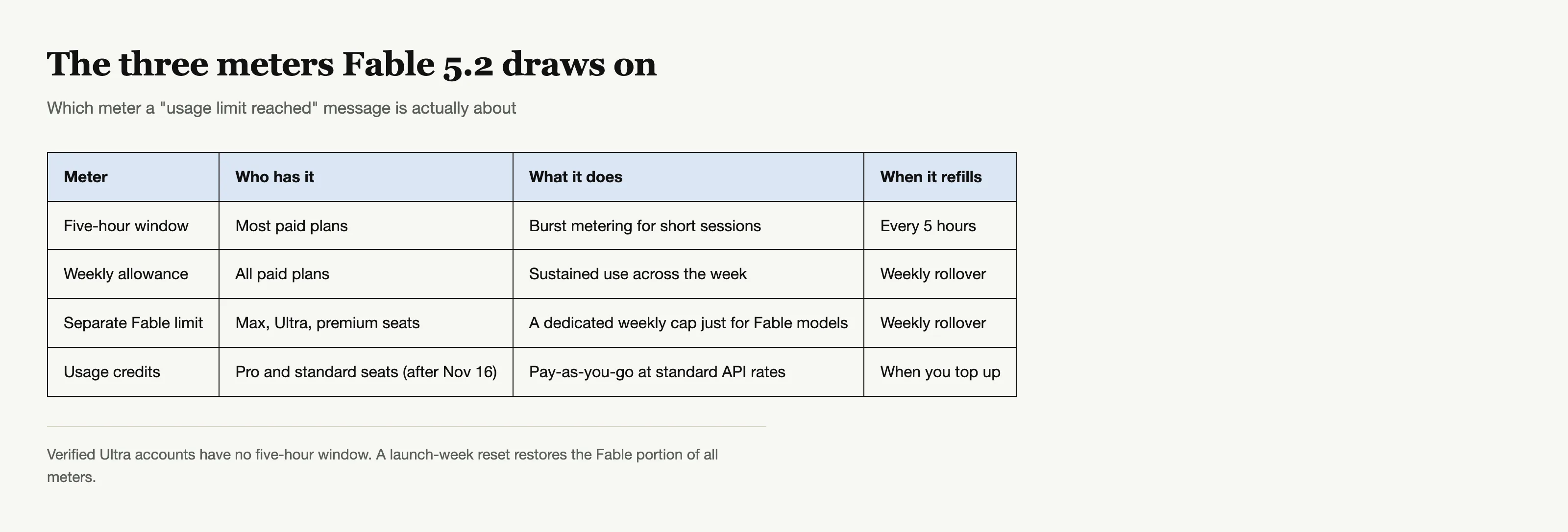
Anthropic meters paid plans in two nested windows: a rolling five-hour allowance for short bursts and a weekly allowance for sustained use. Max and Ultra plans also carry a separate weekly limit just for Fable models, distinct from the general pool, and verified Ultra accounts skip the five-hour window entirely (usage credits guide).
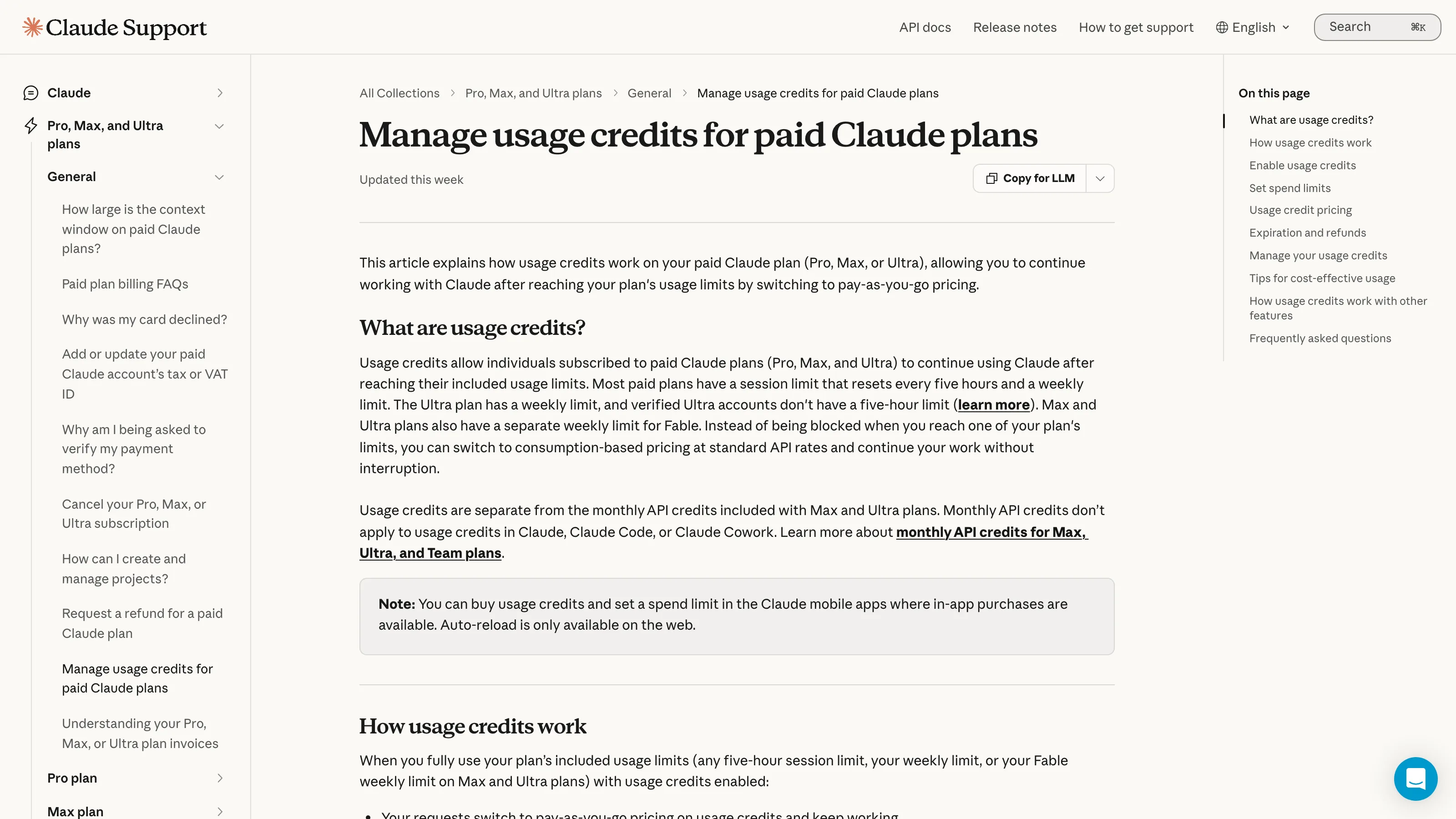
On Pro and standard seats, Fable does not draw on the bundled allowance at all after the launch offer ends: it runs on pay-as-you-go usage credits, so the limit that matters is your credit balance and spend cap, not the plan clock. That is why a Pro account can show 0% on the weekly meter and still get refused.
The usage-credits gotcha behind most instant-refusal reports
This is the one that reads like a bug but is not. If usage credits are not enabled in Settings > Usage, Fable 5.2 still shows in the picker and still fails the moment you send, which looks identical to hitting a real cap. The fix is a thirty-second settings check, not a plan upgrade. Max, Ultra, and premium seats skip this entirely because Fable is bundled.
Fable 5.2 without the surprise bill
Zentor meters every model in plan credits and lets Auto spend the top tier only on the turns that need it.
Try Zentor →
Launch week resets: the safety net, explained
Anthropic's launch offers soften the first week considerably (launch offers):
- Pro and standard Team seats get all Fable models included in plan allowances up to 50% of weekly limits through November 16, 2026, plus one Fable reset.
- Max, Ultra, and premium seats get one to three resets by subscription age (under six months one, six to twelve months two, over a year three).
- A reset restores the Fable portion of your weekly usage and, if your account has one, refills the five-hour window entirely, including usage spent on other models.
Resets are used manually from Settings > Usage and do not raise the underlying caps; they give back what you already spent. The Pro-week reset expires November 16; tenure-based resets last until March 8, 2027.
The effort dial: the one setting that actually stretches a limit
Every other tip on the internet is secondary to this: Fable 5.2's effort level decides how many thinking tokens a task emits, and thinking tokens are what drain the allowance. The default is high; dropping to medium on routine work cuts the spend dramatically, and max is a luxury for tasks where correctness outweighs cost (effort docs).
A useful habit from the community tests: run the same short task once on Opus 5.5 at its medium default and once on Fable 5.2 at high, and compare the draw. If the gap is not earning its keep on your workload, your effort is better spent elsewhere. Anthropic's own guidance says the same thing in fewer words: Opus 5.5 is the daily driver, Fable the ceiling.
How to stretch a Fable 5.2 allowance
- Lower effort before lowering the model; medium still out-reasons most alternatives.
- Keep a stable system prompt and tool list so prompt caching works; cache reads are 40x cheaper than fresh input.
- Batch non-urgent API work through the Batch API for a flat 50% off.
- Or run it where metering is simpler: Zentor bills Fable in plan credits, so the five-hour vs weekly-window confusion never applies.
- Route by task: draft on Opus 5.5, escalate only when a task is genuinely open-ended.
- On Zentor, let Auto do the routing: it spends the Ultra tier only on turns that justify it, so Fable-level cost lands where it earns (the integration page).
When to switch down to Opus 5.5
Opus 5.5 defaults to medium effort and costs $4/$20, half of Fable's list price. Anthropic calls it the recommended daily driver, and same-prompt tests repeatedly show it within striking distance on well-specified tasks at 2-4x less cost. The honest rule: if you cannot name what Fable's extra ceiling buys for this prompt, Opus 5.5 is the answer (the full comparison).
Reading your own burn rate
The cheapest diagnostic is a controlled prompt: run the same short task once on Opus 5.5 at its medium default and once on Fable 5.2 at high, and compare the usage draw in Settings > Usage. Community tests suggest the gap lands between 2x and 4x on comparable work, occasionally worse when Fable decides the task deserves subagents. Anthropic's prompting notes for Fable 5.2 mention the model spawning subagents to review its own work at xhigh and max effort, a cost pattern earlier models did not show.
If your meter drops faster than that ratio, the culprit is usually the effort level or a retry loop: a failed run that resends thinking blocks still consumes input on every attempt.
A realistic budget for trying Fable 5.2
If you are on Pro or a standard seat, treat the launch window like a tasting menu, not a production switch. Pick one genuinely hard task that earlier models failed at, run it at the default high effort before touching max, and watch the credit draw afterward. Community reports put a single ambitious run anywhere from a few dollars to three figures, and the iceberg test shows the top end is unbounded if effort climbs.
For most solo users that means one or two Fable runs a day alongside Opus 5.5 for everything else. On a team, the admin should decide who gets Fable access at all: a standard seat with credits enabled can generate a real bill in an afternoon, and organization settings can gate the model rather than trusting everyone to self-regulate.
The launch-week pattern, not your imagination
The volume of "usage limit reached" posts in the first 48 hours was high enough to become a meme, but every verified case traces to the same mechanics: Pro users without credits enabled, defaults at high effort, or long agent runs billed at 5.2 rates. Nobody has posted evidence of Anthropic quietly shrinking allowances; the limits are the same ones, the model just spends them harder.
If the limit hits mid-task
When a long Fable run dies against the cap, you do not lose the work: the conversation and whatever artifacts it produced remain. The recovery moves, in order of cost, are using a launch-week reset if you have one, waiting for the five-hour or weekly window to roll, switching to Opus 5.5 for the remaining steps, or topping up usage credits if your plan meters Fable that way. On Zentor the same situation reads differently because Auto reroutes the continuation to whatever tier is available rather than hard-stopping on a single model's allowance.
What "unlimited" actually means on each plan
No plan offers unlimited Fable. Bundled seats (Max, Ultra, premium) get a generous but finite weekly Fable window; metered seats (Pro, standard Team) get whatever credits you fund. The confusing part is that Anthropic also sells "unlimited" credit settings, which only remove the spend cap on the meter, not the cost itself. Verified Ultra accounts are the closest thing to headroom: no five-hour window at all, just the weekly Fable limit.
The practical question for heavy users is therefore not "how do I get more Fable" but "which limit am I actually hitting," because the fix differs per meter: enable credits for Pro, wait out the window for bundled seats, or restructure the task so Fable only sees the turns that need it.
The five-hour window vs the weekly one, quickly
New subscribers mix these up constantly. The five-hour window is the burst meter that refills every five hours; the weekly allowance is the sustained meter for the whole week. Fable draws on both, and on Pro it draws on credits instead of either once the launch offer ends. When you hit a wall, checking which meter actually emptied is the fastest way to predict when you can work again: a five-hour refill is hours away, a weekly reset is days, and a Fable reset is instant if you have one banked.
What the community actually hit
Launch-week limit posts cluster on a small set of patterns once you strip the frustration: Pro users without credits enabled, Pro users during the free week who did not know the 50% cap was a clock, Max users who hit the separate weekly Fable limit without noticing it existed, and agent runs that spawned subagents on an unmonitored loop. Every verified case maps onto a meter that was visible in Settings > Usage beforehand; none trace to Anthropic shrinking allowances below the documented numbers.
A note on "usage limit reached" vs "Fable limit reached"
The two strings are not interchangeable. A generic usage-limit message means the plan meter emptied; a Fable-specific one names the separate Fable allowance on Max, Ultra, and premium seats or a zero credit balance on Pro. The string you saw tells you which meter to check first, and Settings > Usage shows the same breakdown the message was drawn from.
FAQ
Why did I hit the Fable 5.2 usage limit in minutes?
Most likely a high-effort run burning fast, or usage credits being off on a Pro or standard seat. High-effort Fable prompts can spend tens of dollars and hours of compute on one task.
What is the Fable 5.2 usage limit on Pro?
After launch week, Fable on Pro runs on usage credits, a separate pay-as-you-go meter with its own monthly spend cap. The bundled weekly allowance does not cover Fable.
Do Max plans get a separate Fable limit?
Yes. Max and Ultra plans carry a distinct weekly Fable limit alongside the general pool, and verified Ultra accounts have no five-hour window.
Does Anthropic give free Fable usage for launch?
Through November 16, 2026, Pro and standard Team seats get Fable included up to 50% of weekly limits plus one reset. Max, Ultra, and premium seats get one to three resets by subscription age.
How do I reduce Fable 5.2 usage?
Drop effort from high to medium, batch API calls, keep prompts cache-stable, and route routine work to Opus 5.5.

Zentor Editorial Zentor editorial team
The Zentor editorial team writes about workflow automation, AI agents, and the tools we build. Default byline for industry overviews, listicles, and collaborative pieces.
Ready to put this into practice?
Zentor runs browser tasks, research, and schedules automatically. Try it free.
References Introducing Claude Fable 5.2 and Mythos 5.2 · Fable models on your plan · Effort parameter docs · Effort cost test by @0xRhinoX · 17506494 · 12429409-usage-credits