Airtable vs Monday: Client Handoffs (2026)
Airtable vs Monday for client status: compare record structure, handoff ownership, client access, reporting, and the work each team must maintain.
Airtable vs monday.com for client projects is a choice between maintaining connected status records and maintaining a shared board where work changes hands. Both can show owners and dates. The useful question is what your team must keep accurate when a client asks, "What changed since Friday?"
Key Takeaways:
- Choose Airtable when the same client, project, deliverable, and decision records must remain linked across several views and reports.
- Choose monday.com when people need to move visible work through stages, see the next owner, and collaborate on a board.
- Price the access pattern. A form response, a read-only view, a commenting client, and an editing guest are different requirements.
- Neither platform turns a status label into proof that a client approved a deliverable. Keep that evidence and its date.
The example throughout is hypothetical: a four-person studio is delivering a website refresh. A designer hands a draft to a lead; the client chooses an image before the developer finishes the page. No account or workflow here was tested.
Which Client Status Job Are You Choosing a Tool For?
The studio needs the next owner and due date. The client needs to know what was delivered, what awaits their decision, and whether the date moved. A manager later needs the original promise. One green "On track" label cannot answer all three.
Before choosing a client status platform, name the project owner, next action and owner, target date, client decision, and supporting evidence. Separate "delivered" from "accepted." Zentor's weekly client report template shows those states, blockers, and changed commitments in a client update. The tool cannot decide what the client meant by approval.
Judge three handoffs: designer to lead, lead to client, and client decision to developer. For client handoff software, does the studio need an active-work board or a record that survives the project? If you run client services on your own, Zentor can draw context from Airtable and draft a recurring status update; you still check the claims and approve anything that goes out.
Keep the client update tied to your work
Zentor drafts recurring reports using your Airtable context. Review the result before it goes to a client.
Start free trial →
Compare a Record-Centered and a Board-Centered Setup
In Airtable, the studio could keep Clients, Projects, Deliverables, and Decisions as separate tables. The project links to one client; the draft links to the project; the image decision links to the deliverable. Airtable's linked-record, lookup, and rollup fields support this model. This is an editorial example, not a built base.
That structure helps when one client has several projects. Someone must maintain the links and field meanings; a missing link can leave a report blank. Zentor's Airtable project management setup guide covers projects, tasks, views, and archiving; its Airtable CRM guide covers client records before delivery. Here, ask whether linked records earn their upkeep.
In monday.com, the studio could use one project board with an item per deliverable and columns for status, owner, date, and client decision. Groups might separate design, review, and build. For another client or portfolio board, monday.com's Connect Boards and Mirror columns can show linked information. Mirrored values remain subject to source-board access.
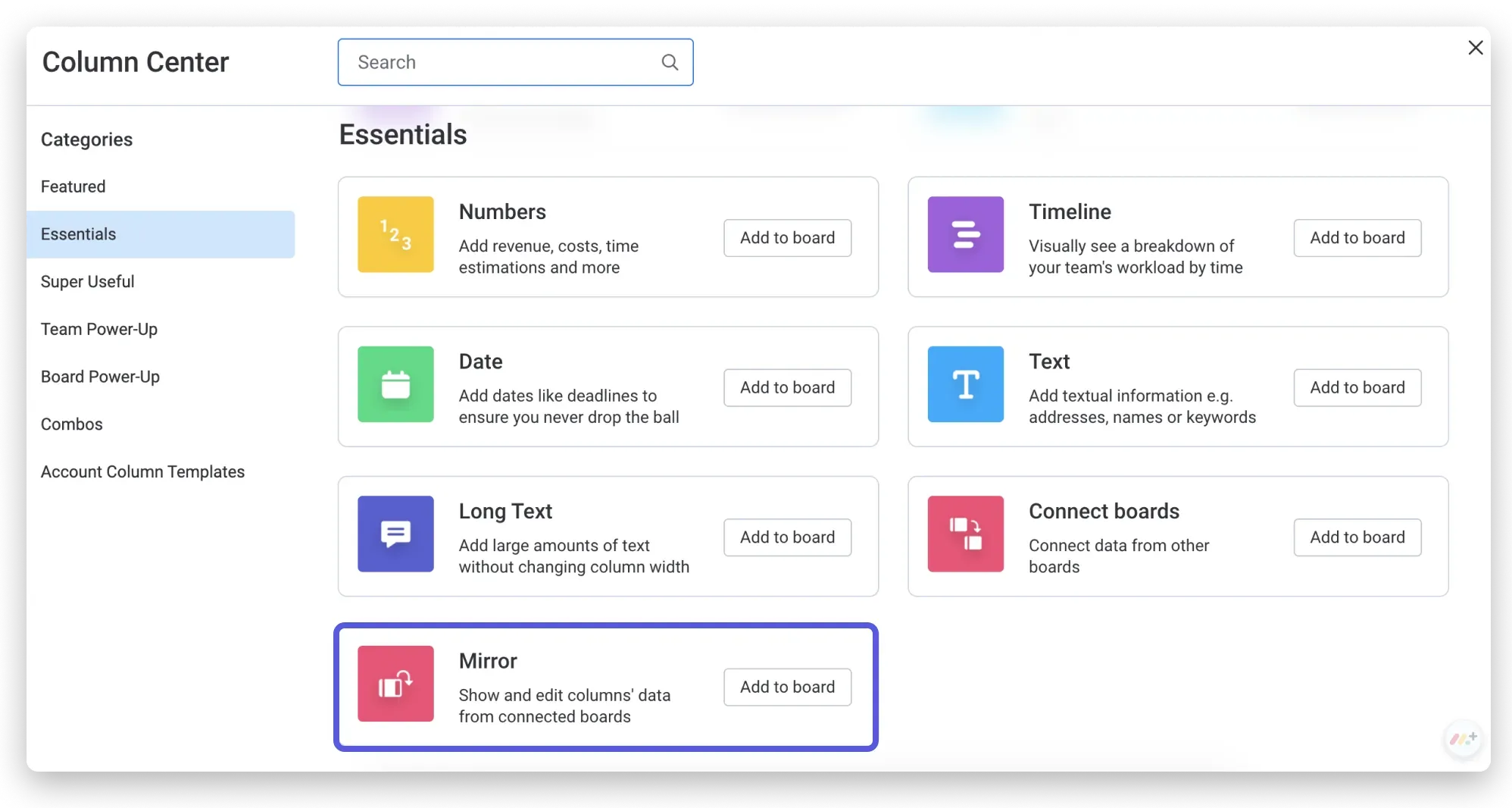
The Airtable vs Monday project data vs boards choice determines the upkeep. Airtable needs careful record links and definitions. monday.com needs consistent status labels and board design, especially with one board per client. These are maintenance judgments, not measured time savings.
Track Ownership, Deadlines, and Handoffs
The designer marks "Homepage draft delivered for internal review," attaches the link, and assigns a review date. The lead requests the client's image choice. The developer waits. If the due date moves, record who changed it and which promise it replaces.
In Airtable, handoffs could update the Deliverable record while a related Decision record preserves the choice. A "waiting on client" view would isolate the lead's queue. The extra structure pays off when the decision feeds later reports.
On a monday.com board, status and owner columns expose the next move. Yet "Done" could mean the designer finished, the lead sent the draft, or the client accepted it. Use distinct labels. An eligible-plan notification can prompt a check; it cannot declare client acceptance.
For either tool, keep one accountable owner per transition. A "looks good" comment needs a named version, approver, and scope before it counts as approval.
Share the Right Status With Clients
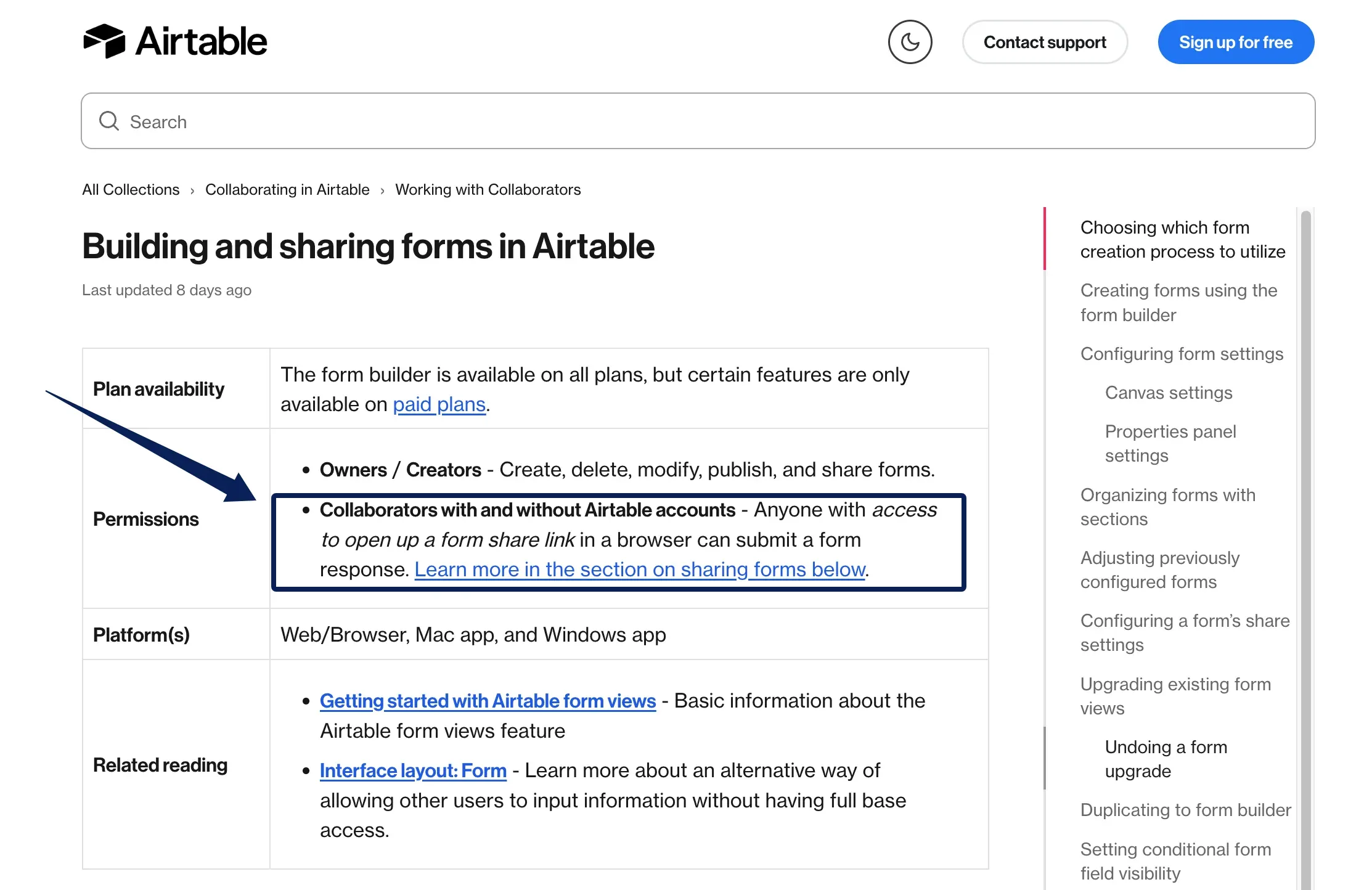
For Airtable vs Monday, a useful client access comparison separates submitting a choice, reading a summary, and editing a task. Airtable's standalone forms accept submissions without an account when shared to anyone on the web and create new records. A form does not provide safe editing of an existing project record; check its sharing settings.
Airtable offers read-only shared views. A public Interface link exposes one supported, published page in read-only mode; it requires a paid plan, Creator access, and permission to share publicly. Invited Interface collaborators must sign in, and their access can affect billing. A public page may still send chart values or conditionally hidden fields to the viewer's browser. Preview alone cannot prove separation between clients; test with a representative client identity. The Portals add-on is another, separately priced route.
monday.com's WorkForms also accept responses from people without accounts when shared publicly and create board items. For ongoing collaboration, shareable boards and guests give invited outsiders board access; guests see only boards to which they are invited. Do not assume a dashboard or mirrored column reveals data from a board the guest cannot access.
For one image choice, a form may suffice. Frequent comments on deliverables may justify a scoped guest or portal experience.
Compare Reporting and Change History
Airtable can derive a project view from deliverables and decisions. Its rollup fields aggregate linked values, but the count is only as sound as the links and status definitions.
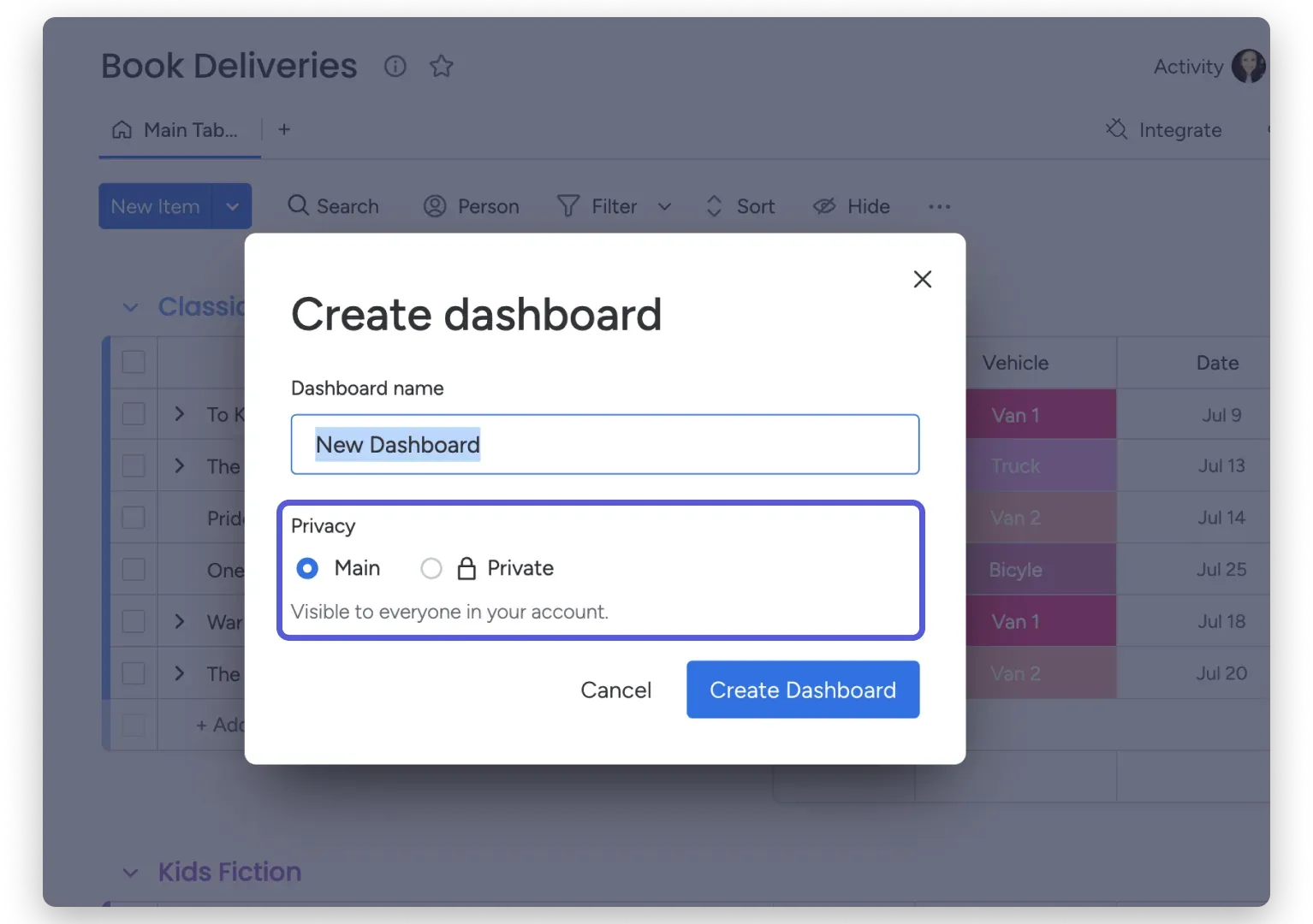
monday.com's dashboards draw from connected boards and columns. As of November 7, 2026, Standard connects up to five boards per dashboard; Pro allows 20 and Enterprise 50. If boards use different labels for "Client review," a combined chart may hide the mismatch. Agree on labels before portfolio reporting.
Before archiving a source board, check its dependent reports. monday.com's Mirror Column guidance says archiving a connected board removes its linked connections from the mirror.
For disputed changes, Airtable's record revision history spans two weeks on Free, one year on Team, two years on Business, and three years on Enterprise Scale. monday.com's board Activity Log spans one week on Basic, six months on Standard, one year on Pro, and up to five years on Enterprise; it excludes item Updates. The separate Item Activity Log records a selected item's updates, changes, and times. These published retention limits were checked November 7, 2026. Keep sent reports and approved artifacts separately.
Price the Needed Seats and Access
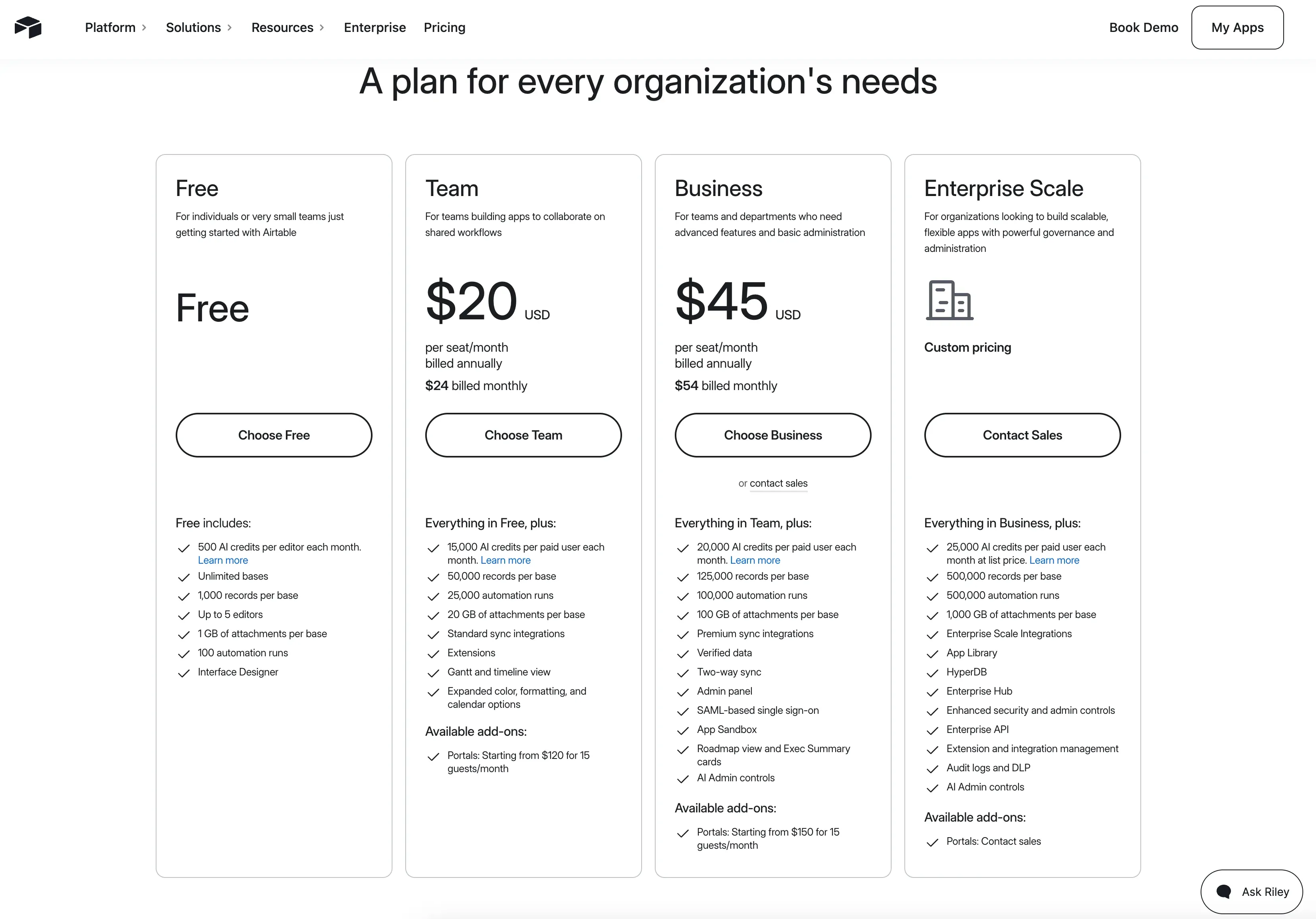
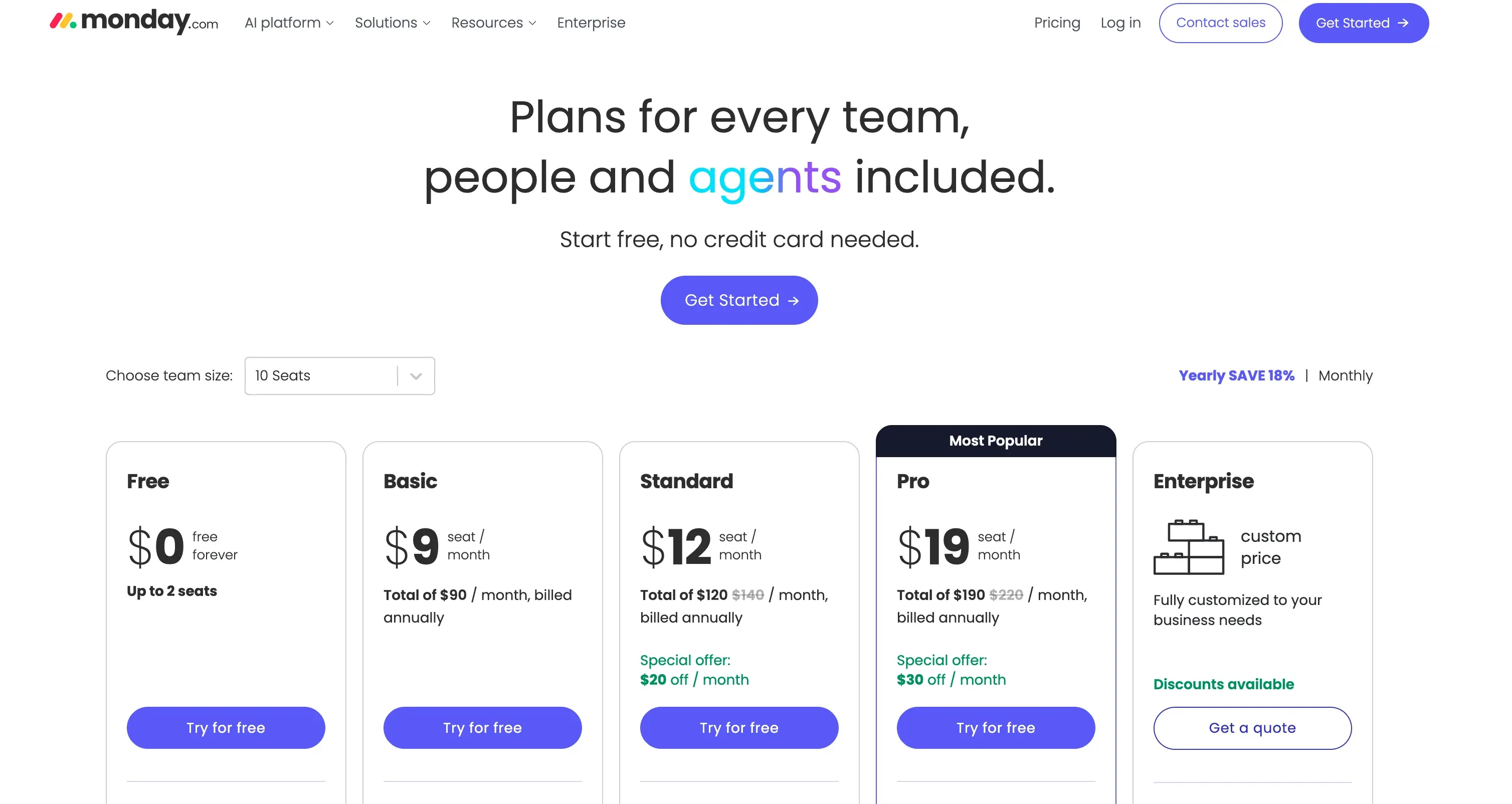
As of November 7, 2026, published US annual-billing list prices give a starting point, not a quote. Airtable lists Team at $20 and Business at $45 per user per month. monday.com lists Basic at $9, Standard at $12, and Pro at $19 per seat per month on its official pricing page. Its paid plans start at three seats and use seat buckets, so a four-person studio should price five seats. Confirm the checkout total and terms.
Access changes the Airtable vs Monday comparison. Airtable's collaborator billing guidance says Team Commenters are billable, while self-serve Business Commenters, read-only collaborators, and form submitters are not. Sales-led Business terms may differ. As of November 7, 2026, the Portals add-on starts at $120 a month for 15 seats on Team, additional to the subscription.
On monday.com, guest access starts at Standard. As of November 7, 2026, its guest-pricing rules count every four Standard guests as a billed seat; the fourth guest triggers the first group. Pro and Enterprise allow unlimited guests under this model.
As arithmetic using those November 7, 2026 list rates, five monday.com Standard seats at $12 equal $60 a month on annual billing; four Airtable Team editors at $20 equal $80. Guest groups, commenters, or portals can change the total. These are planning figures, not checkout quotes or equivalent configurations.
Choose One Tool for a Small Client Team
Pick Airtable if the studio must reuse client, project, deliverable, and decision records across jobs, with someone to maintain the links and client access. Pick monday.com if the main problem is seeing the stage, owner, and next handoff on a shared board. Examine Standard for invited client collaboration only if each needed dashboard can fit its five-board limit.
Before committing to Airtable vs Monday, put the same hypothetical handoff on paper for each tool: draft delivered, lead review, client image decision, developer restart, weekly status, and archive. Mark who enters each fact, who may see it, and what evidence proves acceptance. If a field has no owner or a board exposes another client's work, the setup fails regardless of feature count. This is a design exercise, not a claim that either product has been hands-on tested here.
FAQ
Can clients submit updates without a paid editor seat?
Yes, through an intake route. As a workflow design, require a project ID or deliverable reference on each submission, then have the project owner match it to the correct work and confirm the next step. This routing has not been tested in either product; commenting on existing work has separate access rules.
What if a project spans several client accounts?
Assign each project one durable ID and state which client owns the contract, which parties can view the work, and who approves each deliverable. Airtable can link the project to multiple client records if the model needs that relationship. In monday.com, decide whether one controlled board or linked boards gives each client the right boundary; test access before inviting anyone.
How should completed projects be archived for later reports?
Keep final status, completion date, owner, approved deliverable link, and decision record. Filter closed work out of active views first. Archiving a monday.com source board may interrupt connected mirrors or dashboards, so check dependent reports before archiving; do not assume how restoration will behave. Save the sent client update separately.
Can a monday.com board import preserve links between Airtable records?
Do not assume so. monday.com's CSV or Excel importer maps columns into board items; it is not a documented one-step migration of Airtable linked-record relationships into Connect Boards connections. Export a small sample, map stable IDs, rebuild the needed board links, and verify the result before moving active client work.
When would a team keep both systems?
Keep both only when Airtable is a maintained system of record and monday.com is a distinct execution board that the team actually uses. Name the owner of each field and the direction of updates. Without that agreement, two status fields create a new reconciliation job at every client handoff.
Make the Friday Client Update the Airtable vs Monday Test
At the end of the hypothetical week, the lead should be able to say that the draft was delivered, the image choice is still pending, the developer's next step depends on it, and the client has not yet approved the page. Once the evidence is in Airtable, Zentor can draft the recurring report from that context, but the service owner must confirm the client-facing account before sending. If linked records make that account easier to preserve across projects, Airtable has the stronger case. If a board makes the owner and next move clearer to the people doing the work, monday.com has the stronger case. Choose the setup whose status can be explained from its evidence without rebuilding the story in a meeting.

Zentor Editorial Zentor editorial team
The Zentor editorial team writes about workflow automation, AI agents, and the tools we build. Default byline for industry overviews, listicles, and collaborative pieces.
Choosing between tools? Let Zentor run the work.
An always-on AI assistant that does the work. No switching required, no setup.