Best Client Follow-Up Tools for 2027

Compare the best client follow up tools for proposals, approvals, and project check-ins, with practical control over reminders and replies.
Client follow-up tools remind you when a decision is outstanding and preserve the context needed for the next message. The best client follow up tools depend on what goes missing: an unanswered email, an approval, or a stalled client stage. Boomerang, Streak, and HubSpot address different gaps. This 2027 planning guide uses product documentation checked on October 14, 2026; recheck plans, mailbox permissions and reply rules before publishing or buying.
Key Takeaways:
- Boomerang suits reply reminders tied to one thread.
- Streak adds engagement records inside Gmail.
- HubSpot keeps follow-ups on contact and deal records.
- Test reply and rejection behavior before automating sends.
I compared published product behavior against a familiar Friday problem: a proposal sent Monday, an approval buried in another thread, and a status update promised by phone. Only the first can be rescued by resurfacing an email. This is an illustrative comparison, not a hands-on test of three paid accounts or a measured time-saving claim.
Which follow-up gap needs a tool?
Name the missed handoff. A proposal needs a decision date and the version the client received. An approval needs an approver and an item to approve. A project check-in needs a promised date and current progress. "Follow up" alone is too vague.
If everything is in one thread, an inbox reminder may suffice. Two live proposals for one client need separate records. That broader freelance CRM decision concerns relationship and project context; the Notion CRM setup tutorial explains how to build those records. Here the question is when to contact someone next, not how to build a CRM or collect an overdue invoice. An invoice reminder asks for payment, not a proposal decision. Zentor describes user-owned workspace memory accessible through Zentor MCP to compatible AI, but that memory is not a substitute for a signed approval in your project record.
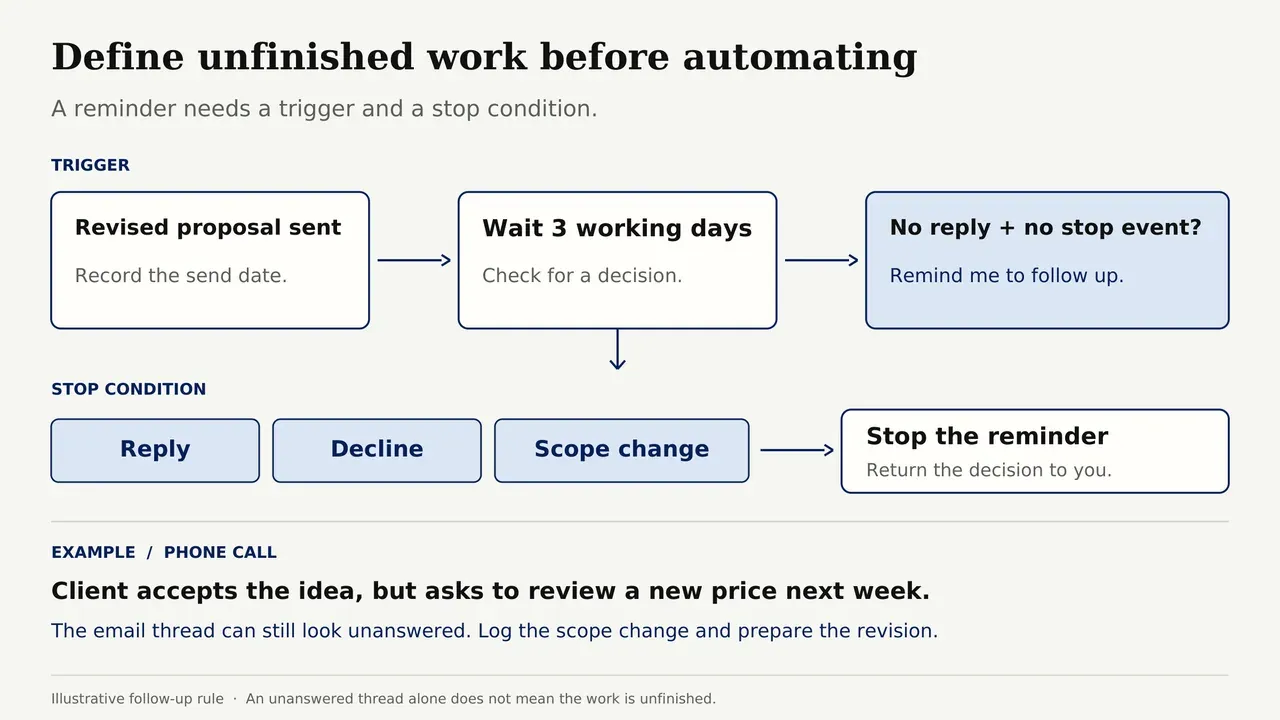
Before trying software, write the trigger: "Remind me three working days after sending the revised proposal if there is no reply." Then the stop condition: a reply, decline, or scope change returns the decision to you.
That second rule catches the awkward cases. Say a client accepts the idea during a call but asks to review a new price next week. The email thread still looks unanswered. A reply-only trigger might prompt another "Have you had a chance to look?" message, exactly when you should be preparing the revision. The tool has not failed technically; it has followed the wrong definition of unfinished work.
Keep the right client context at hand
Zentor keeps your workspace memory available to compatible AI through Zentor MCP. Keep decisions and send permissions in your follow-up tool.
Get early access →
How should a freelancer compare reminders and conversation context?
Compare each tool by trigger, context source, human approval, reply handling, and where the outcome is recorded. A client communication tracker should show what was promised, not merely that an email was opened. The best client follow up tools show the stop condition alongside the next action.
| Question | Boomerang | Streak | HubSpot CRM |
|---|---|---|---|
| Main trigger | A chosen email and reminder date | A box task, stage, or email follow-up | A CRM task or, on eligible plans, a sequence |
| Context | The email thread | Thread plus pipeline box, notes, and files | Contact/deal record, activities, and attachments |
| Human control | Review the returned thread; conditional sends require care | Review tasks manually; sequences can send later | Manual task review; sequences are separate paid functionality |
| Reply handling | "If no reply" can suppress a reminder or conditional send | Mail-merge follow-ups normally pause on reply | Tasks need human review; sequences can unenroll on reply |
| Outcome record | Returned email thread; log off-thread decisions yourself | Update the relevant pipeline box and task | Log the decision on the contact or deal and close pending tasks |
| Best fit | One conversation | Gmail-based client pipeline | Multi-stage relationship record |
A reminder to you permits review. A scheduled message to the client can speak for you after circumstances change. Keep approval and scope-change follow-ups manual until cancellation behavior is proven.
"Free" means different things in client follow up software. As checked against official plan documentation on October 14, 2026, Boomerang Basic lists 10 message credits per month, Streak's free mail merge allows up to 50 emails per day, and HubSpot's free CRM lists up to two users. Those are three different units, not three equivalent allowances. The tier that contains the specific follow-up behavior you need is the one to compare.
Boomerang - inbox-based reply reminders
Boomerang suits a specific email. Its response-tracking reminder can return a message if the recipient has not replied, leaving you to write the next note.
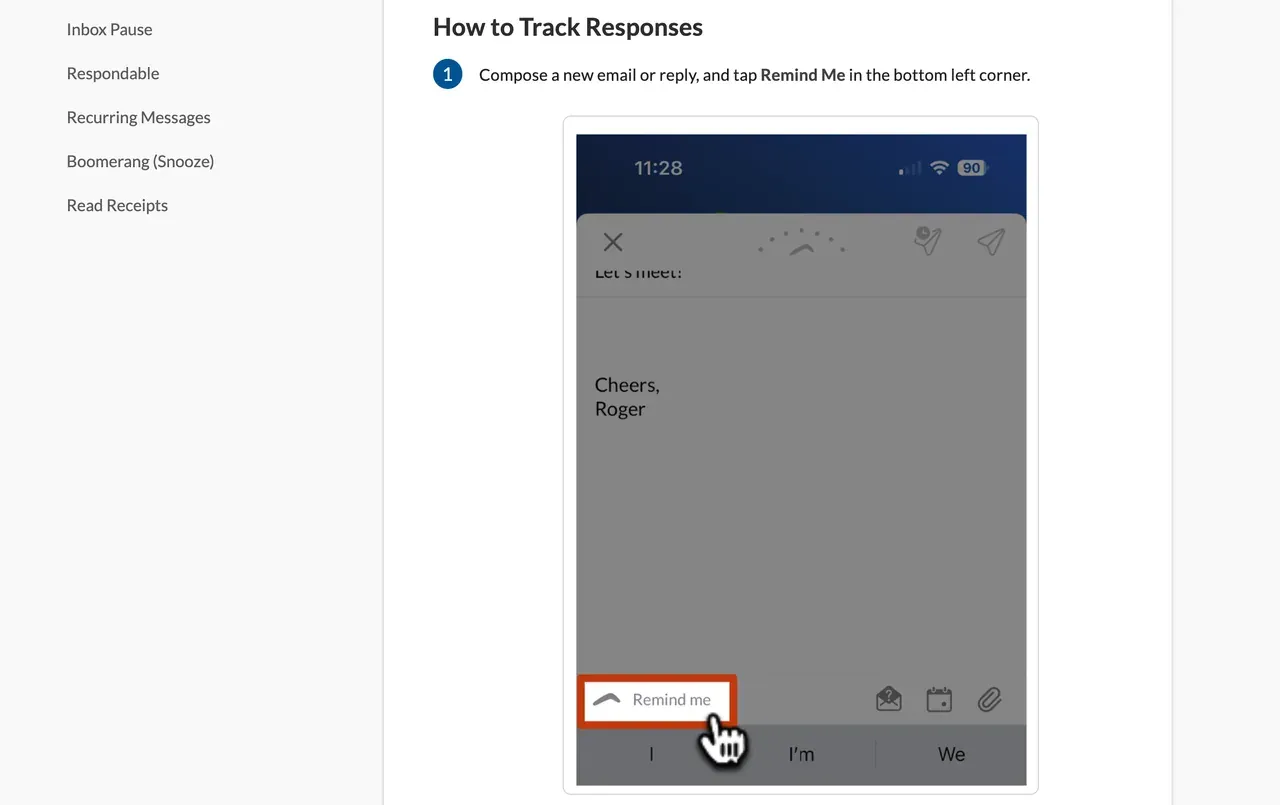
Its "If No Reply" scheduled send is different: it cancels on a detected reply, but the message was written before any later phone call or scope change. For bespoke work, trial the reminder first.
Boomerang's fit and limits after a proposal
Use it when one thread holds the current proposal and one person owns the response. Confirm the attachment is still the approved version. Boomerang does not create a separate project approval trail.
Basic has a limited monthly message allowance, and personal Gmail and Google Workspace accounts have different plan eligibility. Confirm your tier. Then reply to a test thread before its reminder date to verify the stop condition.
Streak - follow-ups inside a contact pipeline
Streak fits when Gmail is your desk but a thread no longer tells the whole story. A pipeline box holds emails, notes, files, tasks, and custom data. An initial proposal and a renewal for the same client can remain separate.
I would use one box per engagement, with the proposal version, decision owner, stage, and next action visible. Streak's follow-up tasks have due dates and quick actions; the alert prompts record review, not a generic chase email.
Streak's fit and limits across clients
Streak's mail-merge reply-pause setting is enabled by default, but settings can change it. Out-of-office behavior also depends on configuration. Do not put bespoke proposal negotiations into a sequence without testing the stop rule.
Streak requires box upkeep. A misfiled thread can leave the pipeline looking complete while a decision is buried. Its current free offer covers email tools, including mail merge limited to 50 emails per day. The pipeline-and-task workflow described here belongs to its paid CRM plans; Pro includes private and shared pipelines, while Pro+ adds automations. Compare the CRM tier you need, rather than assuming the free sending allowance includes these records.
I would keep proposal follow up reminders as manual tasks on active boxes before creating any automatic sequence. Mark "awaiting legal approval" differently from "no reply"; the client may be working even when your inbox is quiet. When the project starts, the next action should change from asking for a signature to confirming the kickoff owner. A sequence cannot infer that business change from silence alone.
HubSpot CRM - tracked client stages
HubSpot fits when the work needs a contact, opportunity, and post-proposal history. Its CRM tasks attach to individual records with due dates and reminders. Log the proposal, create a decision-check task, and note any revision request.
A task reminder still needs a person to act. HubSpot sequences require Sales Hub or Service Hub Professional or Enterprise, an assigned Sales or Service seat, and the relevant sequence permissions. They can schedule emails and unenroll contacts on reply when that trigger is enabled. Ordinary CRM task reminders do not send those emails automatically.
HubSpot's fit and limits for solo work
HubSpot earns its place when decisions must survive the proposal-to-project handoff. Attach the accepted proposal to its deal, not only the contact. Record declines and close pending tasks; check sequence unenrollment separately.
For five active clients, this may be too much upkeep. Free CRM records and reminders are useful; advanced automation costs more. If your pain is context scattered across tools rather than the next email date, Zentor's workspace memory can travel to compatible AI through Zentor MCP. It neither replaces these tools nor implies a verified integration with them.
That distinction matters for a solo operator. A useful freelancer client follow up app should not force you to reconstruct accepted terms every time you open a task. But more context creates another obligation: remove obsolete versions, restrict access to client material, and make the accepted offer obvious. A neat CRM timeline can still point to the wrong PDF.
How can you run a one-week follow-up pilot?
Try three proposals, two approvals, and two project check-ins. These seven items are a pilot design, not test results. Testing the best client follow up tools means checking changes of plan as well as inbox replies. Keep the original list as your control. Record each owner, proposal version, next date, and completion condition. Review permissions before importing client data.
Test the awkward cases: an early reply, a decline, a new price in another thread, and a phone approval that leaves email "unanswered." Inspect the task or sequence queue after each. At week's end, count correct next actions, false reminders, and missing proposal versions. These are your results, not universal productivity claims.
Use a simple threshold before buying. If even one of the seven items would have sent an outdated or unnecessary message, leave automatic sends off and retest. If the reminder appears but takes five minutes to recover the right proposal, the alert is not doing enough. Record which step took that time rather than declaring the whole product slow. A short, repeatable comparison is more useful than a claimed percentage of time saved from someone else's business. Zentor's always-on workspace can keep context available without your computer running, but the selected follow-up tool still owns the reminder and its stop rule.
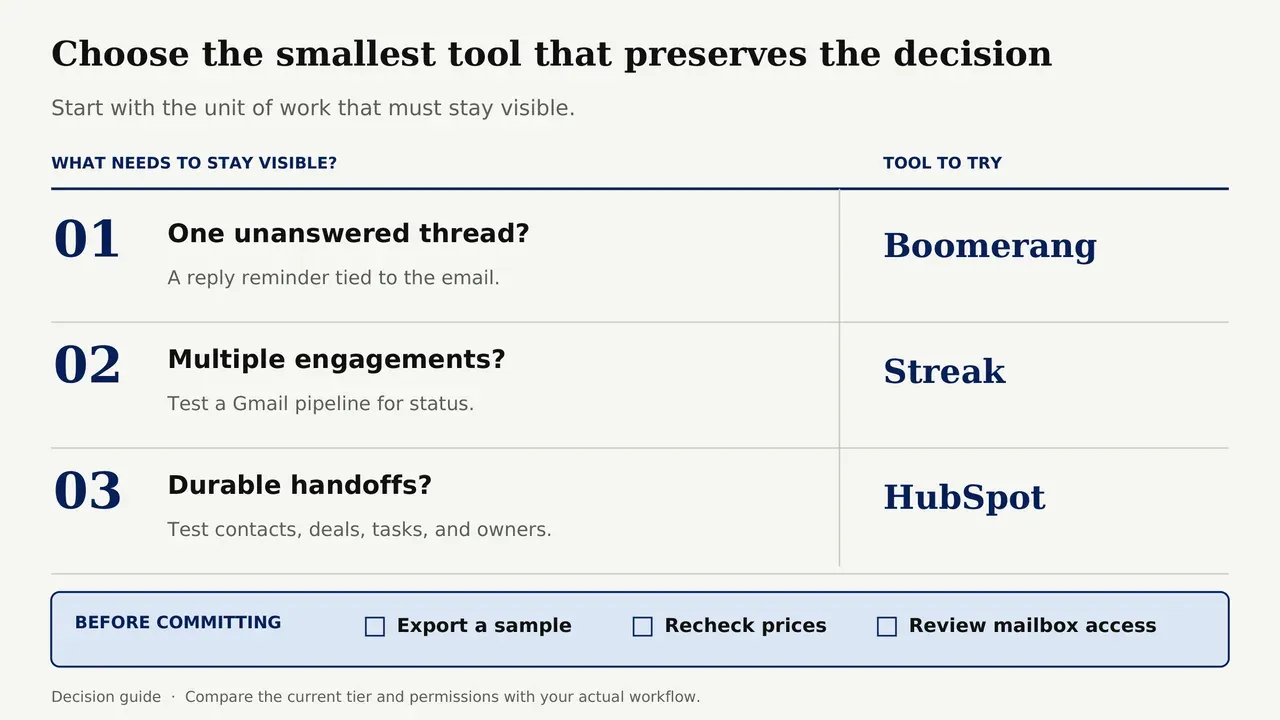
Choose the smallest tool that preserves the decision. Thread enough? Boomerang. Multiple engagements? Test Streak. Durable handoffs? Test HubSpot. Export a sample and recheck prices and mailbox permissions before committing.
FAQ
Can Boomerang show a proposal reminder on a phone without its browser extension?
Yes, through Boomerang's mobile app on an eligible plan. Test your account and notifications; do not assume reminders appear identically in the standard Gmail app.
Can I see Streak follow-up tasks in Google Calendar?
Yes. Streak tasks with a due date sync to Google Calendar, and changing the due date in Streak updates the calendar event. Clicking the event opens its linked box. Check the task's assignee and notification settings separately; seeing an event does not establish who will act on it.
Can a HubSpot sequence send from a shared team inbox?
No. Sequence emails require a connected individual work email address. A team address connected to HubSpot's conversations inbox cannot send sequence emails. Confirm the sending identity before choosing sequences for follow-ups normally handled through a shared client address.
Will editing a HubSpot template update emails already queued?
No. Changes made in the sequence editor apply to future enrollments, rather than automatically updating active contacts. For an existing enrollment, edit that contact's scheduled email directly or unenroll and enroll them again at the appropriate step, following HubSpot's documented procedure; the sequence-summary Re-enroll shortcut does not apply the edited sequence. After a scope or price change, inspect the queued message as well as the saved template.
What happens to scheduled reminders if a connected mailbox is removed?
Do not assume reminders or scheduled sends will continue after disconnection. Before removing the mailbox, save a separate list of pending items, including their dates and thread links. Cancel client-facing sends you no longer want and check their status in the tool. After reconnecting, verify a test reminder before relying on the remaining queue.
Choose the Client Follow-Up Tool That Preserves the Next Decision
A good follow-up system does not contact clients more often. It helps you act with the right proposal and project facts in view. Start with a reminder, add a pipeline when engagements blur together, and adopt a CRM when handoffs justify it. A reply, decline, or changed scope should stop the old plan and return the decision to you.

Zentor Editorial Zentor editorial team
The Zentor editorial team writes about workflow automation, AI agents, and the tools we build. Default byline for industry overviews, listicles, and collaborative pieces.
Choosing between tools? Let Zentor run the work.
Always-on AI assistant on its own cloud computer. No switching required, no setup.