GLM 5.4 Reasoning Effort: Why It Feels Slow and How to Fix It

GLM-5.4 defaults to max thinking and off now means low. The effort mapping, the marathon numbers, and when to drop to high or use GLM-5.3-Flash.
GLM 5.4 reasoning effort is the first thing to check if the model feels slow, because the default is max, thinking can no longer be switched off, and the gap between levels is measured in tens of minutes per task. Most of the "GLM-5.4 is unusable" reports in launch week are max doing exactly what max is designed to do.
Key Takeaways:
- GLM-5.4 defaults to
maxeffort;thinking.typedisabled no longer errors, it maps tolow - Z.ai itself warns about marathon thinking loops and suggests GLM-5.3-Flash for simple tasks
- KingBench 4 ran 431 minutes on 5.4 versus 109 on Gemini 4 Neon, with 1.04M reasoning tokens
- On the Coding Plan, effort is a quota decision: reasoning tokens are output, and output is billed at 16x
highis the community sweet spot; reservemaxfor hard, unattended runs
The official admission came fast. In a post telling people how to code with GLM-5.4, Z.ai engineer @ZixuanLi_ wrote: "it loves going into a long 'thunderous thinking' mode. That extra reflection really pays off when you're debugging, digging into a big codebase, or writing full test suites. But it is overkill for quick one-liners. Use GLM-5.3-Flash for simpler stuff, and save 5.4 for the hard problems." That is the vendor telling you the default effort is too high for most prompts.
There is also an architectural reason it leans long. GLM-5.4 is a Loop Transformer: it re-runs 28 of its base layers for a second pass on every token, and part of its reasoning happens inside that loop rather than as explicit chain of thought. Z.ai's model card says plainly that some reasoning shifted "from explicit output tokens into the implicit depth of the loop". So the model was built to deliberate more, and the effort dial sits on top of that.
What each level maps to
Z.ai's model-switching guide now publishes the full GLM 5.4 reasoning effort mapping, and it is worth keeping open while you configure anything:
| You send | Runs as | Note |
|---|---|---|
thinking.type unset, true, enabled, adaptive |
max | the default |
thinking.type false, disabled, none, off |
low | still thinks, lightly |
reasoning_effort minimal, light, low |
low | auto-converted |
reasoning_effort medium, high |
high | auto-converted |
reasoning_effort xhigh, max, ultra |
max | auto-converted |
| any unknown string | max | falls back to the default |
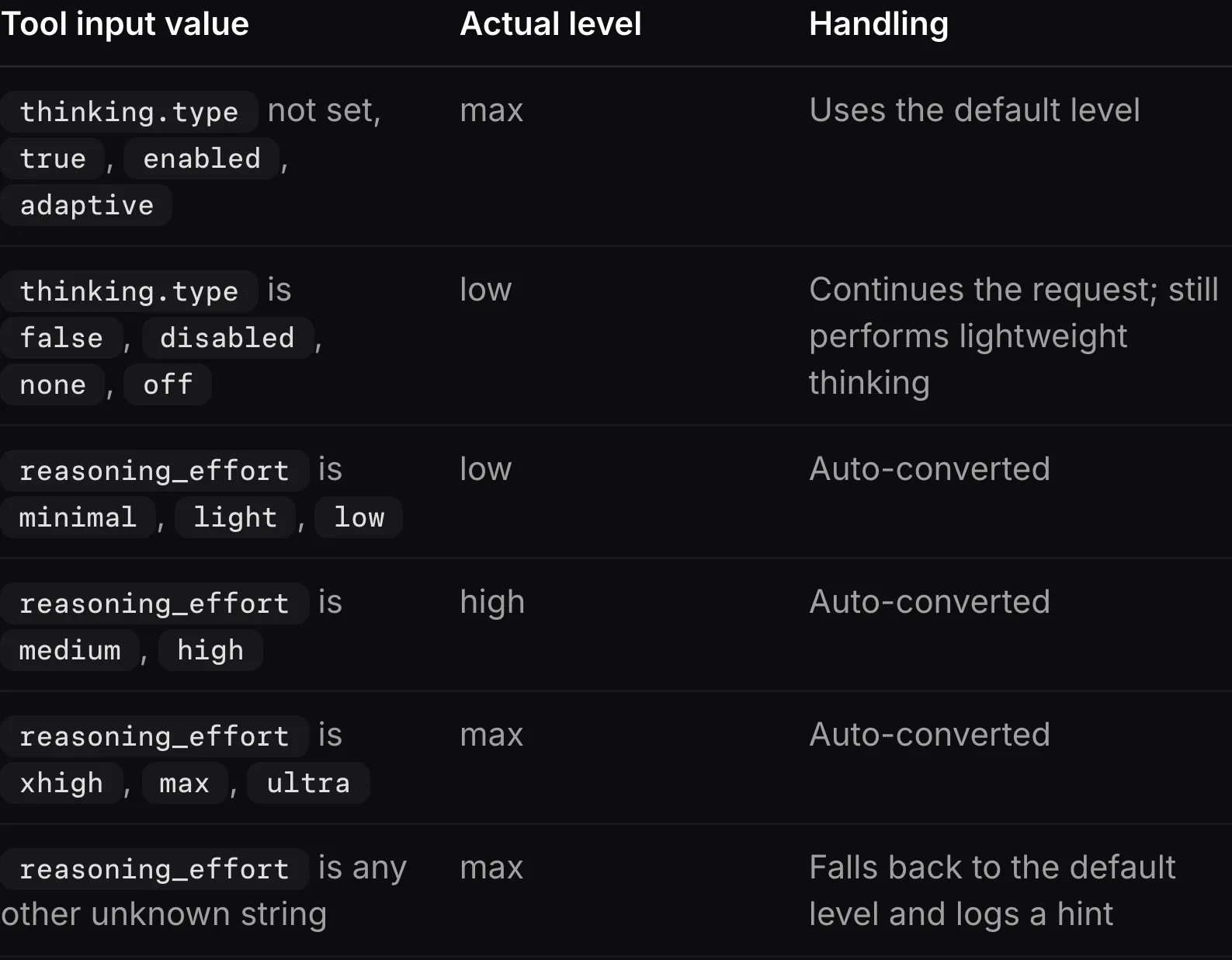
Two rows deserve a second look. The disable row: on GLM-5.3, sending thinking.type: disabled failed the request, which is why our GLM-5.3 reasoning_effort guide told you to flip it before migrating. On 5.4 the same value runs as low, silently. Loud failure became silent downgrade, which is friendlier for uptime and sneakier for anyone who meant "off". And the unknown-string row: a typo does not warn you, it bills you at max.
Priority order is explicit effort over thinking toggle over the default max. In Claude Code the control is /effort; in Codex it is reasoning.effort.
How slow is slow, in numbers
The most careful launch-week measurement is @aicodeking's KingBench 4 run, six tasks with every request logged. GLM-5.4 at max effort took 431 minutes against Gemini 4 Neon's 109. The per-step latency was not the problem, 22.9 seconds versus Neon's 26.7; the count was: 1,128 model turns against 244.
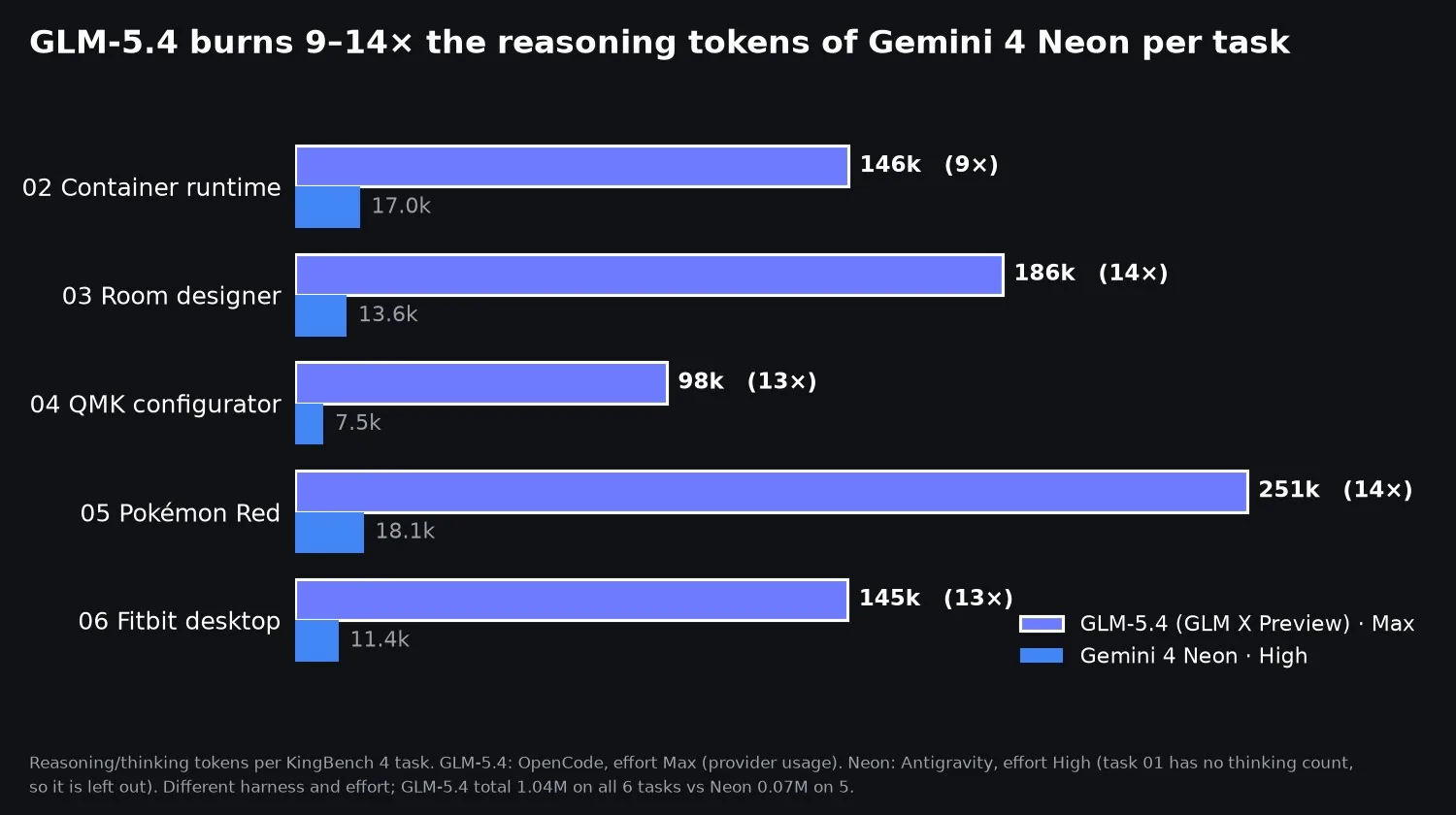
His totals run to roughly 1.04M reasoning tokens for the suite. Other measured cases landed in the same direction: @ZCODER9000's six recorded Claude Code jobs saw 10 to 28 minutes of thinking before first output, and @qwjcool's ASCII-art pelican build took over six hours where the same prompt took Neon 25 minutes. If your GLM 5.4 reasoning effort is set to max and you are watching a spinner, this is why.
What the effort chart says about quality
Speed alone would not matter if max always won, but it does not. The same KingBench data shows a micro-benchmark where low and medium passed all checks while high and max overthought the task into timeouts.
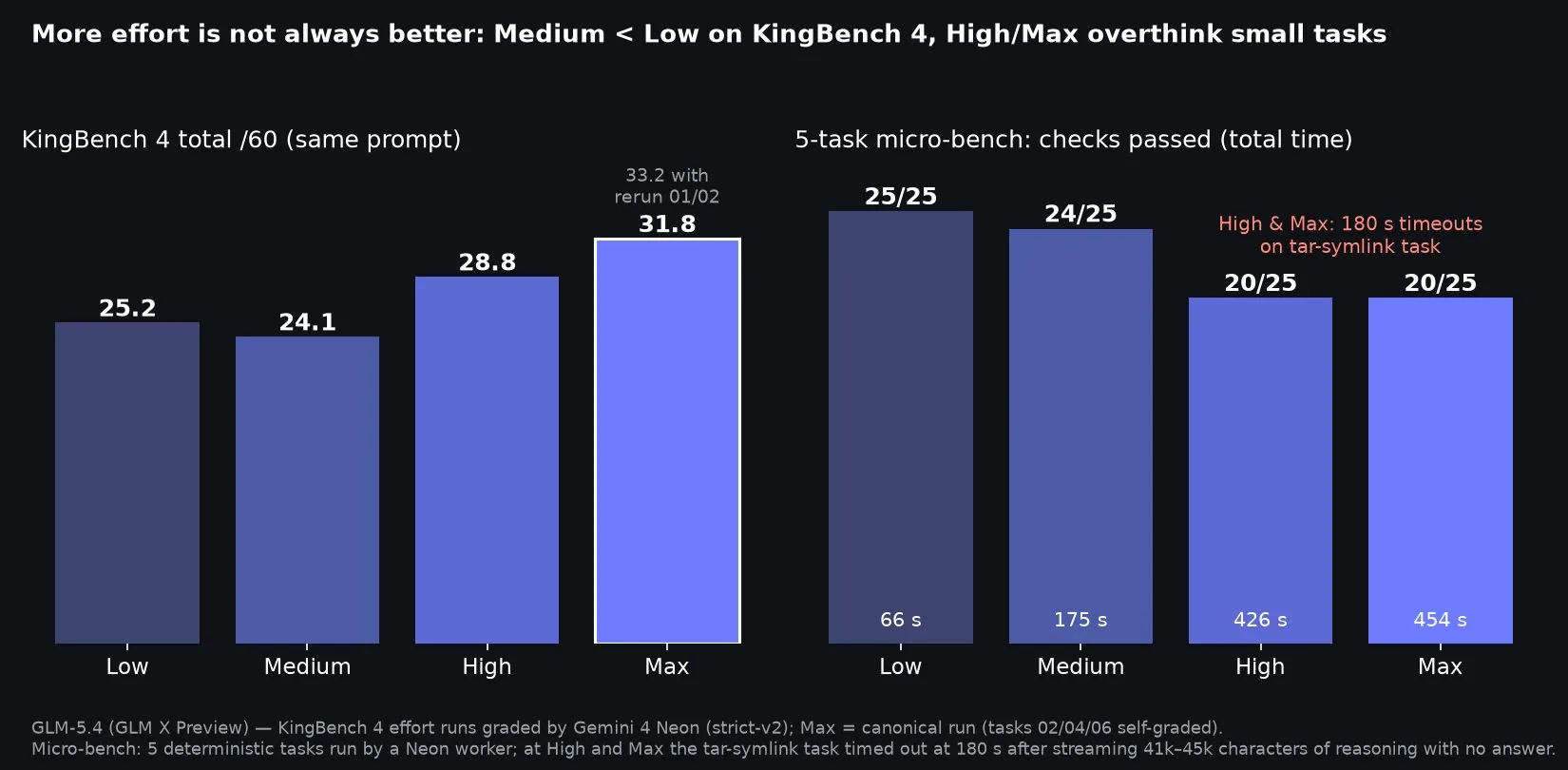
The honest summary from that data: max earns its score on genuinely hard work, and it actively hurts on small turns. @aicodeking's own conclusion was that high is the sweet spot, and Z.ai's recommendation to drop simple work to GLM-5.3-Flash amounts to the same advice from the other direction. GLM 5.4 reasoning effort is a per-turn decision, not a set-and-forget.
There is a budget dimension too. On the GLM Coding Plan, thinking is generated output tokens, and GLM-5.4's output multiplier is 16. @ZCODER9000's report includes the predictable receipt: a Lite plan ran out on max. The credit mechanics are in our rate-limits piece; the short version is that max effort is also the fastest way to spend weekly quota.
The failure mode behind the marathon complaints
The pattern in the complaints is consistent: it is not that GLM-5.4 stalls, it is that it keeps deciding to think more. @feixing_felix's two-day account is representative: projects routinely running 30, 50, even 60 minutes of thinking. @Dav338876 measured 9 to 14 times the consumption of a fast rival on the same task. And @ZCODER9000's Claude Code log shows the other half of the story, a model that looked at its own screenshot, wrote "the camels look like horses", and fixed them. The marathon is partly the point.
The version that actually wastes money is the quiet one: max effort applied to a trivial turn. Z.ai's own caveat, echoed in its evals note, is that the long thinking "really pays off" on debugging, big codebases and test suites but is "overkill for quick one-liners". If your effort level stays at the default, every trivial turn pays the overkill price.
What the docs do not tell you
For all the detail in the mapping table, Z.ai published no quality or token figure for any GLM-5.4 effort level, nothing like the 34.5% / 31.4% Code Bench numbers that made the GLM-5.3 tradeoff calculable. There is also no medium: the gap between low and high is the whole middle of the range, which makes the dial a coarser control than it looks. Everything the community knows about the cost curve comes from runs like the KingBench suite, so if your workload sits between "light thinking" and "thunderous", expect to measure it yourself.
Slow thinking is easier to wait for on someone else's computer.
Zentor runs GLM-5.4 as a hosted AI computer: start the task, close the lid, come back to the finished work. No Coding Plan, no API key.
Try Zentor →
For interactive coding, start at high. Move to max for the jobs where being wrong is expensive: unfamiliar codebases, security-sensitive changes, anything you will not re-check by hand. Drop to low for formatting, renaming, one-line questions, or hand them to GLM-5.3-Flash, which is still served on the same plan and costs half the output multiplier. Whatever you pick, watch the first reply: if the thinking trace alone runs to thousands of tokens on a trivial request, the effort setting is too high for the job.
For anything long and unattended, schedule it: point the model at the full task and walk away. Its own demos are built around jobs measured in hours, and the users having the worst launch week are the ones asking it to be a fast model.
Two session habits help as much as the dial. First, thinking is preserved across turns by default on 5.4, so a session that starts spiralling keeps its spiral; a fresh conversation resets it. Second, batch the heavy runs into off-peak hours if you are on the Coding Plan, since peak is 14:00 to 18:00 UTC+8 on weekdays and off-peak charges half the credits. The Claude Code setup guide covers where /effort and the timeout settings live. And if you are on GLM-5.4 through the Zentor integration, the same rule applies: describe the hard task, let it think, and do not spend a max run on a one-liner.
FAQ
How do I change GLM 5.4 reasoning effort?
In Claude Code, type /effort in a session and pick low, high or max. Via API parameters, reasoning_effort accepts strings that auto-convert: minimal/light/low to low, medium/high to high, xhigh/max/ultra to max.
Can I turn GLM-5.4 thinking off completely?
No. thinking.type set to false, disabled, none or off runs as low, which still performs light reasoning. GLM-5.3 used to reject the disabled flag entirely; 5.4 quietly maps it to the lightest level.
Why is GLM-5.4 so much slower than GLM-5.3?
It thinks longer by design. The Loop Transformer architecture plus max-by-default effort means many more reasoning steps per task; measured runs show 1,128 turns where a fast model uses 244. Speed per step is comparable, the step count is not.
Does high effort use more Coding Plan quota?
Yes. Reasoning tokens bill as output, and 5.4's output multiplier is 16 credits per token unit, though off-peak hours (outside 14:00 to 18:00 UTC+8 weekdays) charge half. A max run is the most expensive way to spend quota on the plan.
Is GLM-5.4 worth the wait?
On hard tasks, the community data says yes: it topped the open-model table on KingBench 4 and found bugs other models missed. On quick turns, no. The skill is matching effort to the task, and the broader launch-week verdict covers when that tradeoff pays.
Effort mappings were read off Z.ai's latest-model guide on 24 November 2026; community numbers are the posters' own measurements, linked above. Z.ai has published no official latency or token figures per level.

Zentor Editorial Zentor editorial team
The Zentor editorial team writes about workflow automation, AI agents, and the tools we build. Default byline for industry overviews, listicles, and collaborative pieces.
Ready to put this into practice?
Zentor runs browser tasks, research, and schedules automatically. Try it free.