GLM 5.4 in Claude Code: Setup and the Defaults That Trip You

Set up GLM 5.4 Claude Code on the Coding Plan: the glm-5.4[1m] model string, three env slots that default to Flash, the catalog warning, and timeouts.
A GLM 5.4 Claude Code setup comes down to three things in your settings.json: the model string glm-5.4[1m], all three ANTHROPIC_DEFAULT_*_MODEL slots pointed at it, and a generous API_TIMEOUT_MS because this model can think for ten minutes before it answers. Get those right and /status will confirm you are actually on the flagship.
Key Takeaways:
- In Claude Code the model string is
glm-5.4[1m]; everywhere else it is plainglm-5.4 - The
[1m]suffix plusCLAUDE_CODE_AUTO_COMPACT_WINDOW=1000000is what unlocks the 1M context - Z.ai's two docs pages disagree on the Haiku slot, and the stated default maps everything to GLM-5.3-Flash, so set all three variables explicitly
- GLM-5.4 can spend 10 to 28 minutes thinking on hard turns; a short
API_TIMEOUT_MSwill cut real work off mid-run - Verify with
/statusand pick thinking intensity with/effort, which defaults tomax
GLM-5.4 went live on the GLM Coding Plan on 23 November 2026, and Z.ai's own engineer @ZixuanLi_ posted the one-line setup: "In Claude Code: set the model to glm-5.4[1m]. In other tools: set the model to glm-5.4." That is the entire model-name story. Everything below is about making the configuration around it actually stick.
This guide assumes a working GLM Coding Plan setup for Claude Code already, the one from our GLM-5.3 in Claude Code walkthrough: an active subscription, a Z.ai API key, Node 18+, and the base URL https://api.z.ai/api/anthropic. If that setup was never done, do it first, because a broken base URL fails before any model name matters.
The settings.json change that switches you to GLM-5.4
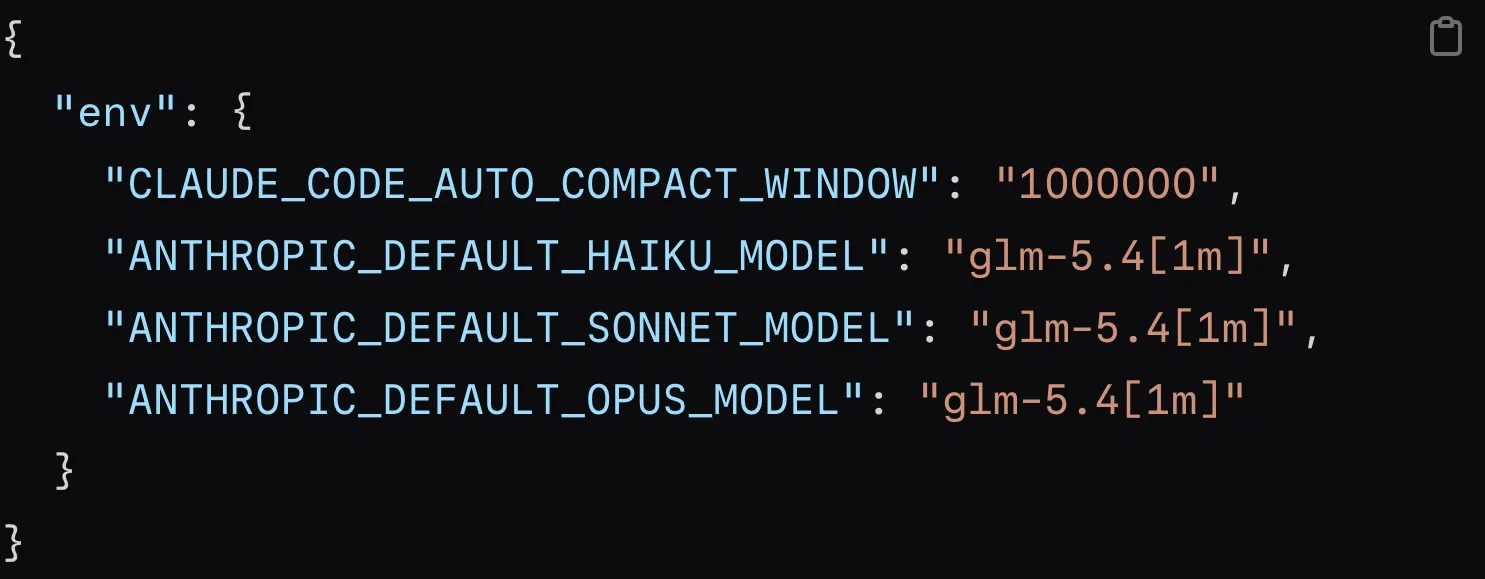
Z.ai's model-switching guide is a guide for existing plan users, not an onboarding page. Open ~/.claude/settings.json (or %USERPROFILE%\.claude\settings.json on Windows) and add or update the env block:
{
  "env": {
    "CLAUDE_CODE_AUTO_COMPACT_WINDOW": "1000000",
    "ANTHROPIC_DEFAULT_HAIKU_MODEL": "glm-5.4[1m]",
    "ANTHROPIC_DEFAULT_SONNET_MODEL": "glm-5.4[1m]",
    "ANTHROPIC_DEFAULT_OPUS_MODEL": "glm-5.4[1m]"
  }
}
Two warnings on that edit. First, merge it into your existing env block rather than replacing the whole file, or you will silently drop your ANTHROPIC_BASE_URL and ANTHROPIC_AUTH_TOKEN and Claude Code will try to reach Anthropic. Second, the guide itself warns that the settings file must be the one the Claude Code installation you actually launch reads; Git Bash and WSL users have been bitten by a second settings.json.
If Claude Code then reports that the glm-5.4[1m] model does not exist, the fix is not a different model string. The docs say to upgrade Claude Code to the latest version and try again; the bracket syntax needs a recent build.
The default is still not the flagship
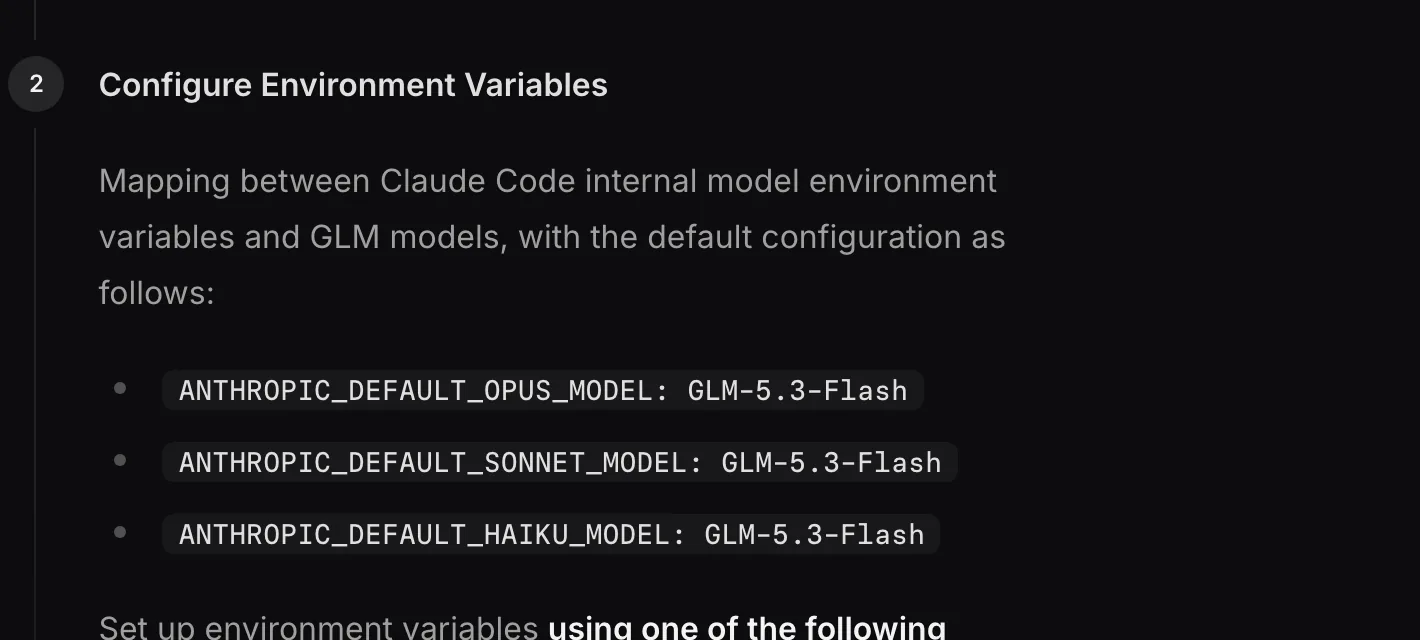
Here is the GLM 5.4 Claude Code trap that mirrors the GLM-5.3 launch exactly. The Claude Code integration page still documents the default env mapping as GLM-5.3-Flash across all three slots. And the two pages disagree with each other: the switching guide maps Haiku to glm-5.4[1m], while the integration page's manual config maps Haiku to glm-5.3-flash[1m] and only Sonnet and Opus to glm-5.4[1m].
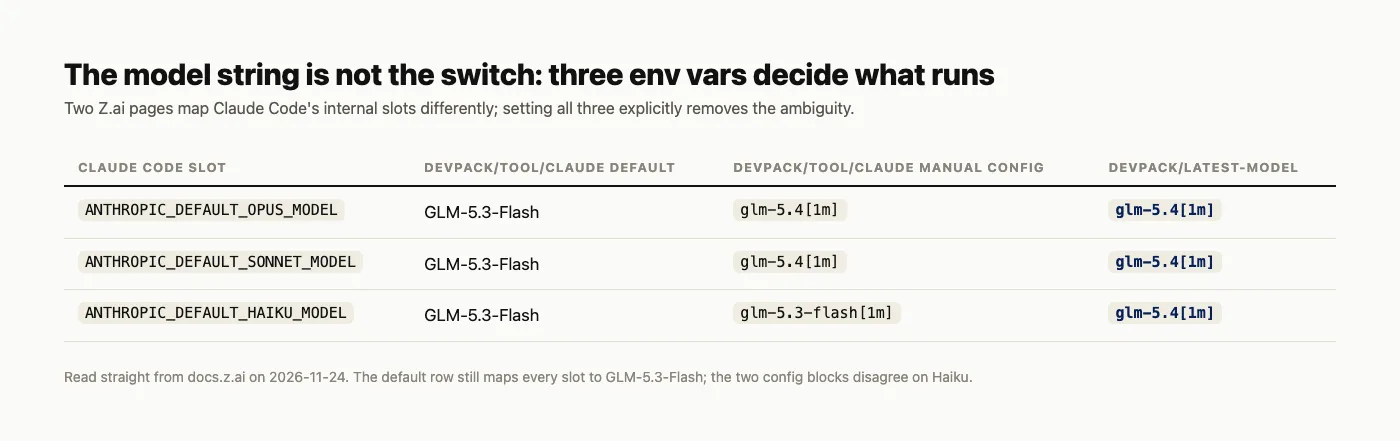
Practical reading: if you only swap in a model flag somewhere and leave the env slots alone, your Opus and Sonnet calls keep running on Flash. Setting all three ANTHROPIC_DEFAULT_*_MODEL variables yourself removes the ambiguity entirely. If you want to save credits, keeping Haiku on glm-5.3-flash[1m] is a legitimate choice Z.ai documents, and Z.ai's engineer suggested the same split: "Use GLM-5.3-Flash for simpler stuff, and save 5.4 for the hard problems."
The version of this confusion that actually fills search results is Claude Code's model-catalog warning when you point it at a string it does not know: the client warns the model "isn't described by this version's model catalog ... until then auto-compact keeps this session within 200k tokens ... append [1m] to the model name for 1m, or set claude_code_max_context_tokens to its real window". In plain terms, if you set glm-5.4 without the suffix you silently run at 200K context instead of the million you configured. The fixes are the ones the warning names: use glm-5.4[1m], or set CLAUDE_CODE_MAX_CONTEXT_TOKENS=1000000, which is also in Z.ai's own manual configuration.
Give it time: the timeout setting nobody mentions
GLM-5.4's known quirk is what Z.ai itself calls marathon thinking. In a separate heads-up post the next day, Z.ai's engineer warned it "loves going into a long 'thunderous thinking' mode". Community measurements put the pause before first output at 10 to 28 minutes on hard prompts (@ZCODER9000 ran six recorded jobs in Claude Code).
That matters to your config because the plan's own sample configurations ship API_TIMEOUT_MS values around 3000000 milliseconds. If your setup carried over an older, shorter timeout, a GLM 5.4 Claude Code session will look like it is hanging and then error out, when in fact the model was still thinking. Set the timeout generously, and if a job genuinely does not need deep reasoning, switch effort down inside the session with /effort instead of cutting the timeout. The whole effort story, including why "off" now maps to low, is covered in our GLM 5.4 reasoning effort guide.
Thinking is forced on for GLM-5.4; thinking.type set to disabled no longer errors the way it did on GLM-5.3, it silently runs as low effort. Same migration, different failure mode.
One quieter change sits underneath: starting with GLM-5.4, preserved thinking is on by default on every endpoint. The model keeps its previous turns' reasoning in context instead of re-deriving it, which helps long sessions stay coherent and improves cache hit rates, but it also means stale context accumulates. If a session starts reasoning in circles, the fix is a fresh conversation, not a lower effort.
What the switch costs you in quota
GLM-5.4 is cheaper per token on the plan than GLM-5.3, not more expensive. Z.ai's credits table gives it a 4.6 input / 1.1 cached / 16 output multiplier against GLM-5.3's 6.9 / 1.7 / 24, and weekly-quota plans got a 1.5x allowance bump for 5.4 at launch. The reason people still hit walls is not the multiplier, it is the effort setting: max turns easy requests into long reasoning runs that burn quota at the full output rate, and @ZCODER9000's Lite plan ran out on Max during a six-job test. The mechanics are in our Coding Plan rate-limits piece, now refreshed for 5.4.
One thing that did not change: the plan still only serves the models Z.ai lists, and calls outside supported tools or on the wrong base URL bill as 1113 Insufficient Balance against your account balance, not against quota.
Other tools need the shorter string
Everything above is the Claude Code story because that is where the bracket suffix and env mapping live. In every other supported tool the string is just glm-5.4: Cline and the OpenAI-compatible family point at https://api.z.ai/api/coding/paas/v4, Codex at https://api.z.ai/api/v1, Goose shares Claude Code's Anthropic endpoint. Z.ai's switching guide shows the Cline route explicitly: provider OpenAI Compatible, custom model glm-5.4, images enabled because 5.4 is multimodal, context window set to 1000000. That last checkbox is worth a pause: GLM-5.3 was text-only, so tools you configured for 5.3 may have image support turned off out of habit.
If you would rather skip the per-tool configuration entirely, GLM-5.4 is also available in Zentor with no API key and no Coding Plan; the GLM-5.4 integration page has the details.
Verify before you trust it
Run claude, then /status. Two lines settle the setup: Settings source should show your ~/.claude/settings.json, and Model should show glm-5.4 or glm-5.4[1m]. If the model line still reads Flash, the env block did not land, almost always because the file you edited is not the file the launched binary reads.
No settings.json, no terminal, no model strings.
GLM-5.4 is available in Zentor, the hosted AI computer. Pick the model, describe the task, and it keeps running after your laptop lid closes. No API key or Coding Plan required.
Try Zentor →
The 60-second checklist
- Confirm the base URL is
https://api.z.ai/api/anthropicand aglm-5.3orglm-5.3-flashcall already works. - Merge the three
ANTHROPIC_DEFAULT_*_MODELvariables plusCLAUDE_CODE_AUTO_COMPACT_WINDOWintosettings.json. - Keep
API_TIMEOUT_MSat 3000000 or higher so marathon thinking is not cut short. - Upgrade Claude Code if
glm-5.4[1m]is rejected. - Run
claude,/statusto verify,/effortto pick thinking intensity. Default ismax, the expensive one.
FAQ
What is the GLM 5.4 Claude Code model name?
glm-5.4[1m]. The bracketed suffix combined with CLAUDE_CODE_AUTO_COMPACT_WINDOW=1000000 enables the 1M token context. In other tools the plain string glm-5.4 is correct.
Why does Claude Code say glm-5.4[1m] does not exist?
The bracket syntax needs a recent Claude Code build. Z.ai's switching guide says to upgrade Claude Code and retry rather than changing the model string.
Do I need all three ANTHROPIC_DEFAULT model variables?
You need them if you want certainty. The documented default maps every slot to GLM-5.3-Flash, and Z.ai's two pages disagree on the Haiku slot, so any slot you leave unset may not run GLM-5.4. Keeping Haiku on glm-5.3-flash[1m] deliberately is fine and cheaper.
Can I turn off GLM-5.4 thinking in Claude Code?
Not off, only down. /effort sets the level (low, high, max, default max), and setting thinking.type to disabled runs as low, still with light thinking. On GLM-5.3 the same field produced a failed request.
Is GLM-5.4 slower than GLM-5.3 in Claude Code?
On thinking-heavy tasks, noticeably. Z.ai acknowledges long marathon thinking loops, and recorded community sessions show 10 to 28 minutes of thinking before first output on hard jobs. Easy turns on max effort are where most of that time is wasted.
Setup steps, env mappings, the effort table and endpoint addresses were read off Z.ai's latest-model guide and Claude Code integration page on 24 November 2026, the day after the GLM-5.4 Coding Plan rollout. The two pages' disagreement on the Haiku slot was present on that date; check the live docs before copying values.

Zentor Editorial Zentor editorial team
The Zentor editorial team writes about workflow automation, AI agents, and the tools we build. Default byline for industry overviews, listicles, and collaborative pieces.
Stop doing this manually.
Zentor handles research, monitoring, reports, and browser tasks for you. No setup. No self-hosting.