4 Ecommerce Product Management Software Options

Compare four ecommerce product management software options by catalog scope, review controls, channel needs, and when a dedicated PIM is worth it.
Ecommerce product management software organizes the attributes, descriptions, images, and versions a merchant uses to publish products. The right system depends on where product information changes, who must approve it, and how many storefronts or channels need a different version.
Key Takeaways
- Shopify fits a manageable catalog centered on one store.
- Airtable fits a team willing to build a review step before updating the live product record.
- Plytix fits repeated product-data work across channels; price the required modules.
- Akeneo fits more complex families, locales, and governance; check the package needed for approval workflows.
A revised material claim can arrive in a supplier file after the product is already live. The store page, marketplace feed, and image caption may then carry different wording. This article follows that correction through four kinds of catalog systems.
What Product Data Problem Are You Solving?
Start by separating product content from neighboring work. A catalog holds product identities, variants, attributes, descriptions, images, and channel-ready copy. Inventory tracking answers how much stock is available and where. Reporting explains what sold. These systems can exchange data, but one should not be assumed to perform the other's job. An ecommerce inventory tracking guide covers the stock side of this boundary.
Ask where errors begin. Are staff copying a supplier change into several storefronts? Does the store need an approval step before a claim goes live? Are images scattered across drives? Does each marketplace require a different title or attribute mapping? A single storefront with a small catalog may be easiest to maintain in its native admin. Multiple channel versions and repeated reviews are stronger reasons to consider a product information management (PIM) system.
Before shopping, identify the SKU, variant attributes, claim sources, approved copy, image rights, reviewer, and destinations. Compare tools against that record.
Keep the work around your catalog in one place
Zentor remembers how you handle recurring work and can draft follow-ups for your review. Keep your catalog approvals in the system you choose.
Start free trial →
How the Four Options Were Screened
These four options separate catalog work from selling to different degrees. Shopify is a storefront admin; Airtable is a configurable database; Plytix and Akeneo are dedicated PIMs with different governance depth. Their subscriptions also use different billing units.
Screen each option against one changed SKU: where is the master value edited, who approves it, how does it reach the actual channels, and what can be exported later? Public documentation establishes capabilities, not an account's connector or approval configuration.
Compare list prices by billing unit and include setup, field mapping, and connector work. The current US dollar figures and quote boundaries appear with each option below; they are starting points, not comparable total costs.
1. Shopify Product Admin for One Storefront
Use case: A merchant primarily sells through one Shopify store and updates a manageable number of products. The store's product admin keeps the sellable record close to the page the customer sees. Staff can edit titles, descriptions, variants, media, and publication status in the same environment.
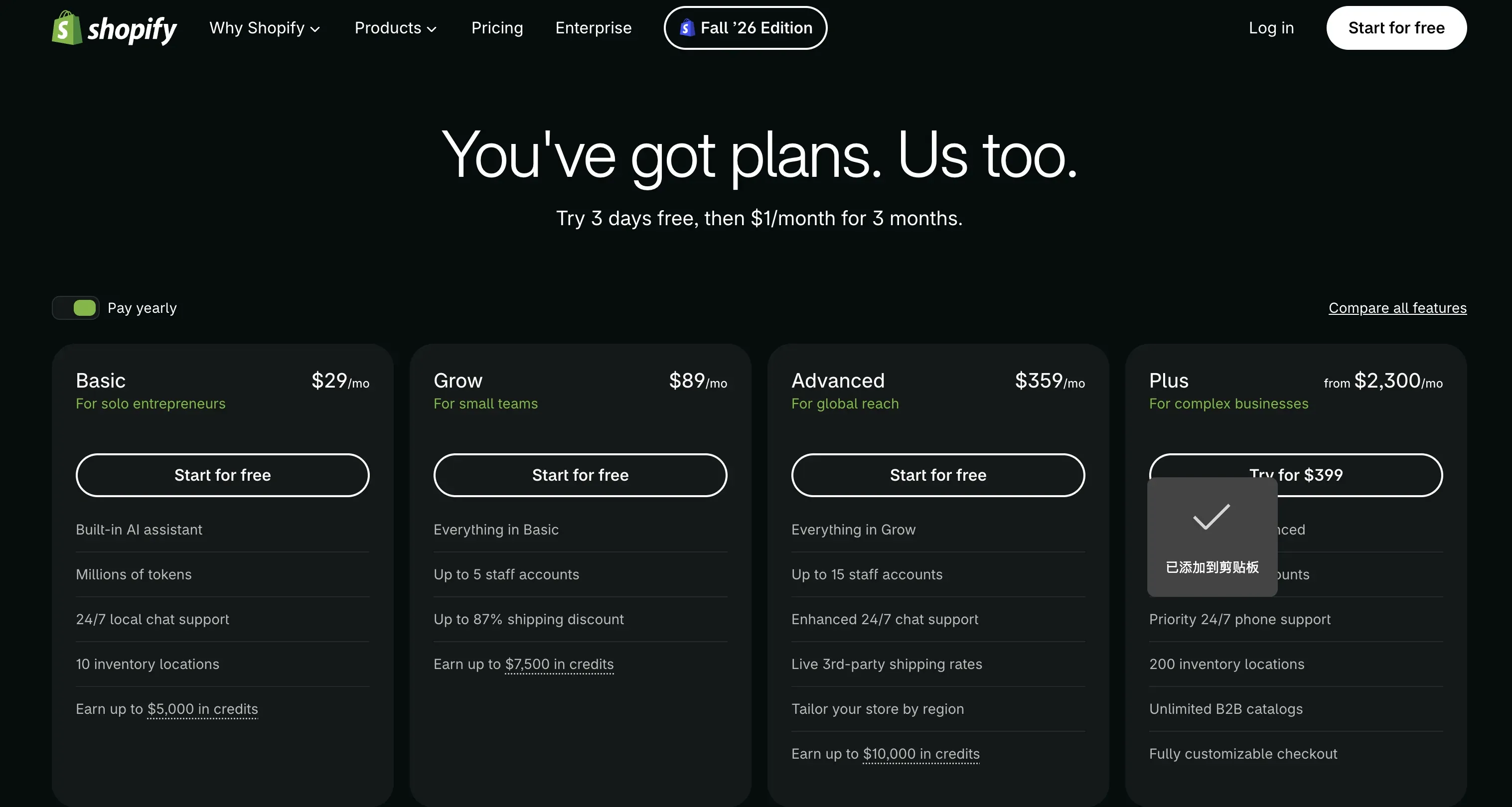
As of November 11, 2026, Shopify’s US pricing page lists Basic at $39 per month on monthly billing, or $29 per month when billed annually. That is a storefront subscription; check current promotions and any channel app costs separately.
Data flow: An authorized staff member checks the supplier change, then edits the affected product or variant. Keep evidence and approval outside the live field when review is needed; take care before overwriting approved copy on an established listing.
Before switching platforms, export a sample with variants, images, and custom fields. Compare it with the live listing before treating the file as a complete archive.
Limitation and fit: Shopify works as a one-store source, but it does not automatically govern every marketplace version. Add a controlled catalog layer when channel copy begins to drift.
2. Airtable for a Flexible Catalog Workspace
Use case: A small team needs a workspace for supplier data, copy, images, and review status before publication. Airtable's linked records can connect products, variants, assets, and change requests without a full PIM.
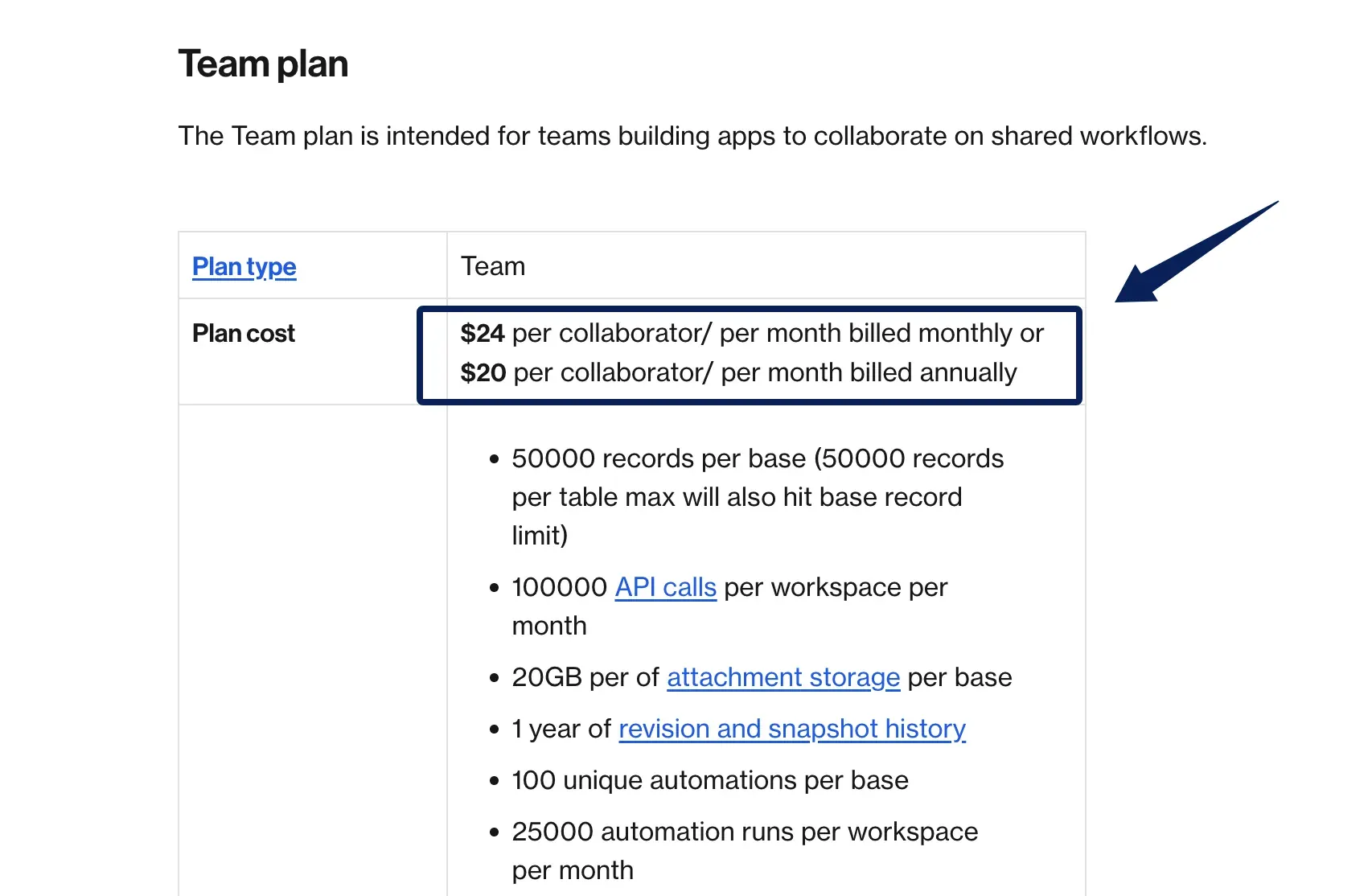
As of November 11, 2026, Airtable Team lists $24 per billable collaborator per month on monthly billing, or $20 with annual billing. Owners, creators, editors, and commenters can be billable, so count the people who need access before comparing it with a store subscription.
Data flow: Put the candidate value in a separate change-request record or staging table linked to the SKU. A reviewer checks and approves it before anyone updates the master product record. A view alone displays the same underlying records; it is not a draft copy. Test edit permissions in the account before publishing.
Airtable's grid-view CSV export works table by table, not as one complete base file. Attachment fields export a filename and URL that can expire within hours. Download original assets separately.
Limitation and fit: Airtable is neither a storefront nor a ready-made feed engine. The team must configure permissions and publishing. It fits a merchant willing to design a modest process before buying a PIM.
3. Plytix for a Dedicated Product Data Hub
Use case: Product attributes and images are repeatedly reused across channels, and the team wants a dedicated PIM and digital asset management workspace. Plytix can hold a richer master catalog than a spreadsheet-like staging table and prepare channel-specific outputs.
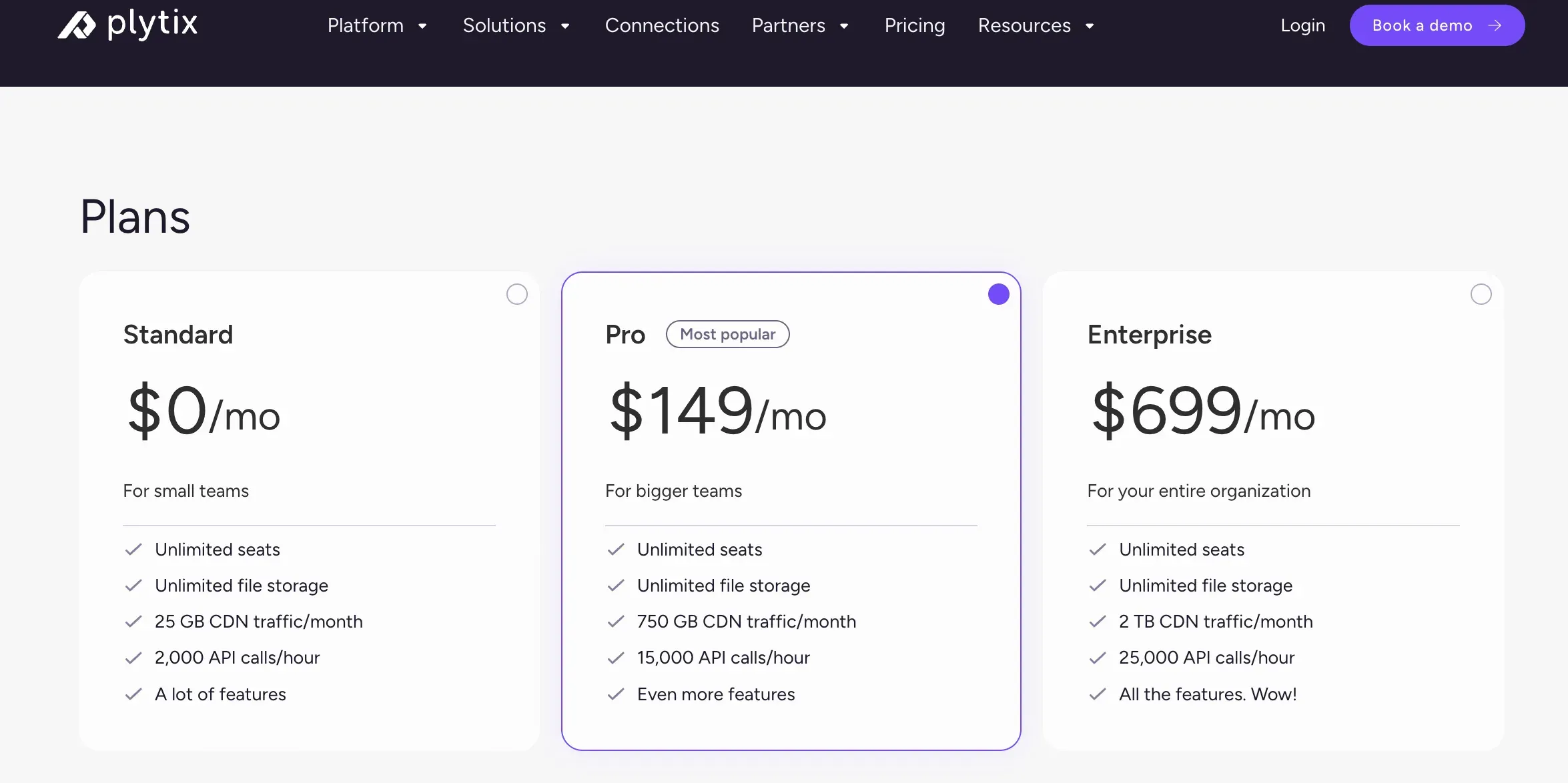
Plytix prices plans by SKU count with separately selected modules, including feed or store connections. Use its live calculator or obtain a quote for the required configuration.
Data flow: Import products and assets, map supplier attributes, review the changed value, and update each channel output. Compare the resulting listing with the approved value, especially after a channel rejects a field.
The plan comparison lists CSV and XLSX export. Ask for a sample with the required attributes and assets, and check whether the needed channel feed, connection, change history, and permissions are included. A PIM record alone does not correct every live listing.
Limitation and fit: Taxonomy design, imports, mapping, and ownership take work. Evaluate Plytix when repeated channel updates cost more effort than maintaining that structure.
4. Akeneo for a More Complex Catalog
Use case: A larger catalog needs product families, multiple locales or channels, structured enrichment, and clearer governance over who changes what. Akeneo is relevant when many product records share attribute rules but have different completeness requirements by destination.
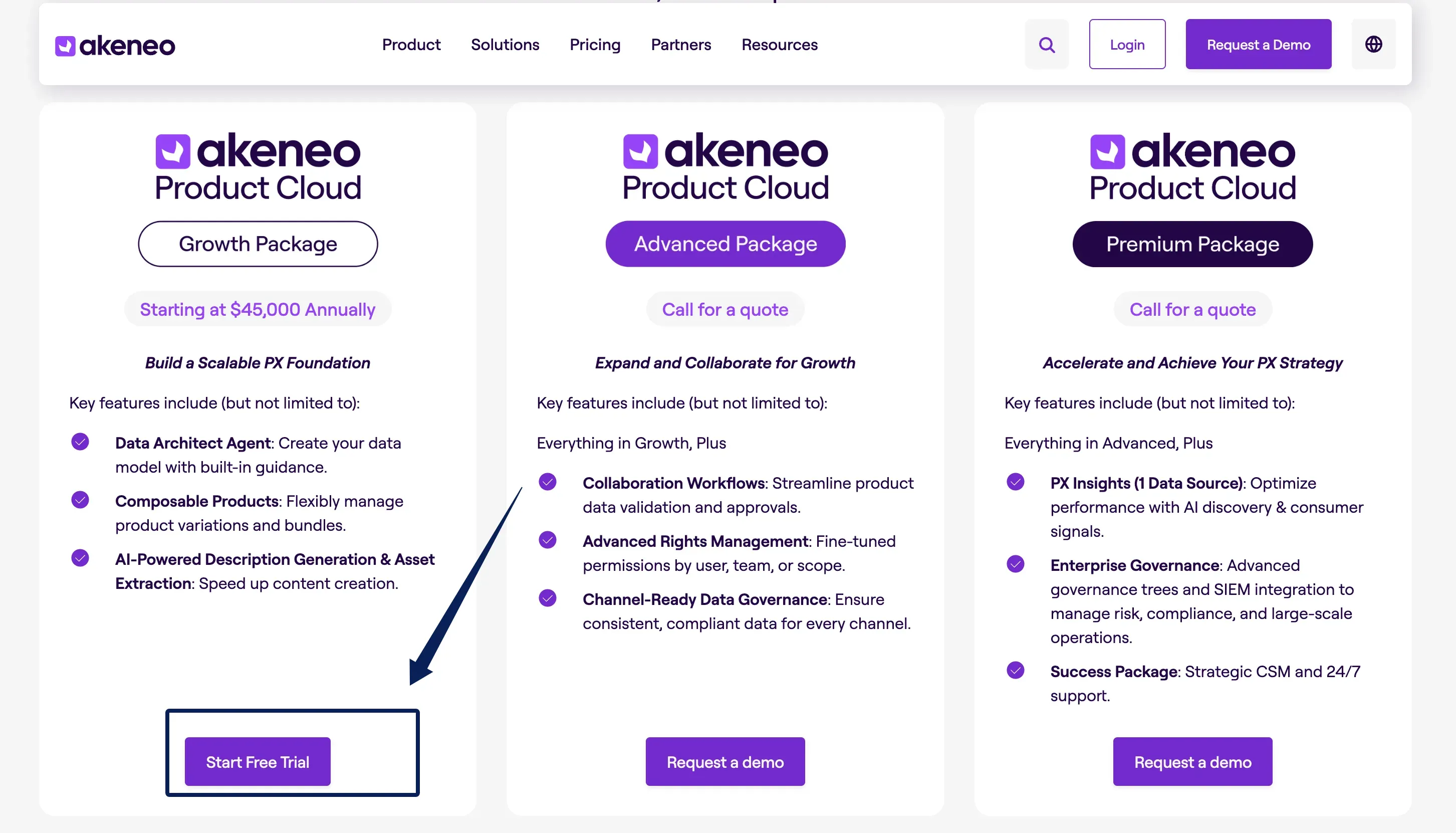
Akeneo's package comparison lists Growth, Advanced, and Premium. Confirm the package, connectors, and rollout costs with Akeneo.
Data flow: Define product models and required attributes, import updates, enrich products, review, then export approved values. Completeness signals filled fields; it does not establish claim accuracy, image rights, or approval.
The same comparison places collaboration workflows and advanced rights management in Advanced, with Premium inheriting them. It lists product import and export, but the team should verify the structure and format it needs before treating an export as migration-ready.
Limitation and fit: Modeling and rollout take work. Akeneo is easier to justify when product families, locales, and channel rules outgrow a lighter workspace.
Compare Source of Truth, Review, and Distribution
| Option and best fit | Published price basis | Review and distribution | Migration check |
|---|---|---|---|
| Shopify: one-store catalog | Basic: $39/month on monthly billing, or $29/month billed yearly | Edit the live store record; other channels need setup. | Test variants, images, and custom fields. |
| Airtable: custom review workspace | Team: $24 per billable collaborator/month, or $20 billed yearly | Build staging and approval; configure publishing separately. | Export each table and save original assets. |
| Plytix: repeated channel updates | Price varies by SKU count and selected modules. | Check the required permissions, feed, and connection. | Test CSV/XLSX and asset transfer. |
| Akeneo: complex families and locales | Check current package terms and obtain a quote for the required configuration. | Collaboration workflows are listed in Advanced; configure outputs. | Test product structure and export format. |
AI writing tools can draft descriptions, but a draft is only one field in this workflow. The AI tools for ecommerce guide is useful for that content task; it does not replace a catalog's source, approval, and distribution rules. Keep a human check for product claims and channel policies regardless of where the copy was generated.
Choose the Smallest System That Fits the Catalog
Use the storefront admin while one store is the practical master. Add a review workspace for supplier changes, or a PIM when channel, family, and locale rules make a single listing an unreliable master.
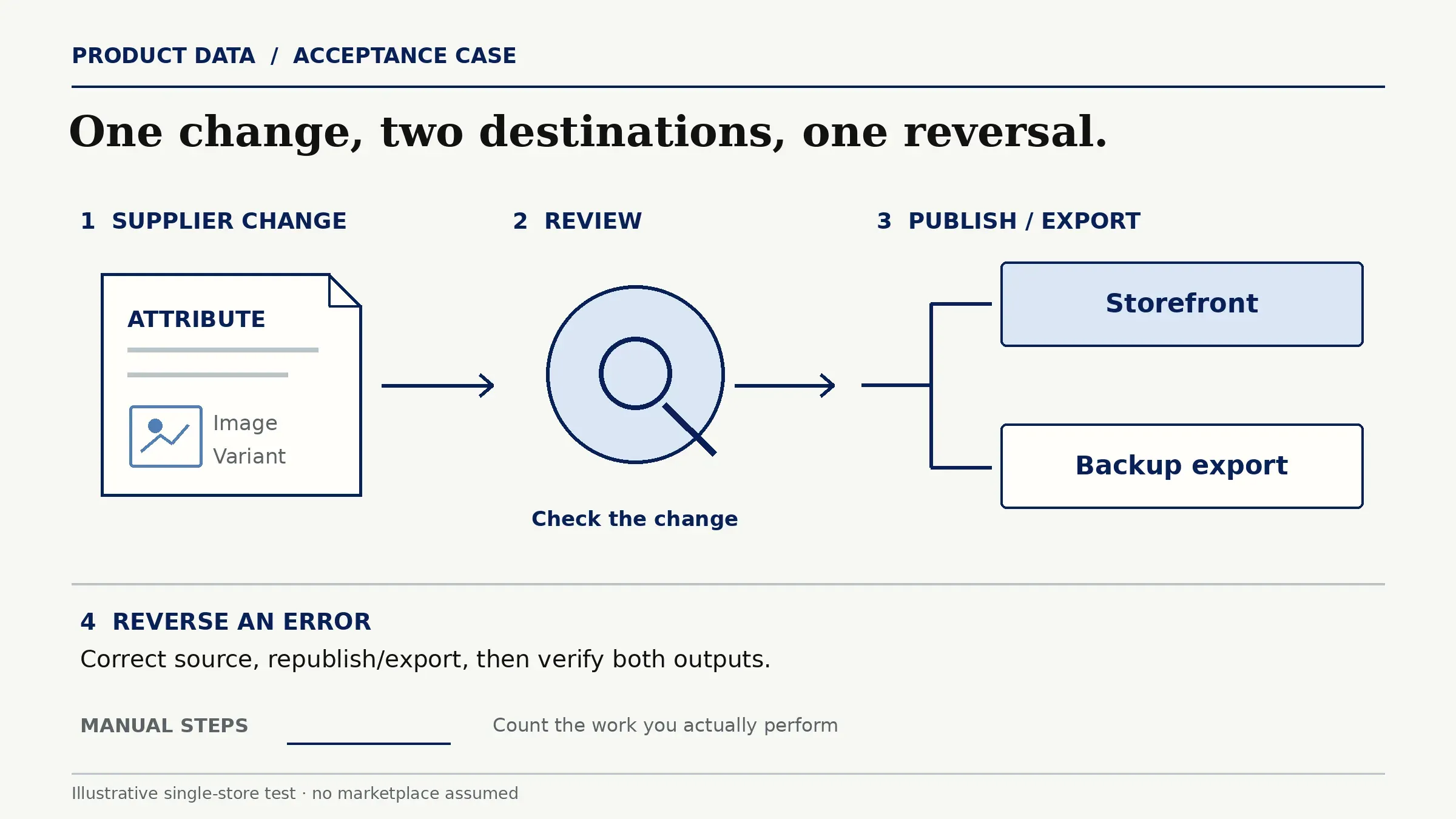
Run an acceptance case: change a supplier attribute, review it, publish or export it to the destinations the merchant actually uses, then reverse an error. A single-store test can use a backup export as its second destination; it need not invent a marketplace. Include an image and variant, and count manual steps.
FAQ
Where should product photos live when attributes are in a PIM?
Keep the original files in a governed asset library or another durable repository, with a stable link from the product record. A PIM may include digital asset management, but check storage limits, rights metadata, and export behavior. A CSV containing temporary image URLs is not a backup of the original photos.
Can a marketplace override a master product description?
It depends on the marketplace and connector's fields and sync priority. If the channel supports an override, keep it related to the approved master claim and assign an owner. Test which field wins after the next sync; do not assume every connector preserves a channel-specific description.
Who should approve a supplier's attribute change?
Assign a reviewer who can validate the claim against a reliable supplier record and the merchant's product policy. Marketing may review wording; merchandising or compliance may need to review the underlying fact. Record the source, reviewer, and decision so the publisher does not confuse receipt of data with approval.
How should discontinued SKUs remain traceable?
Retain the stable SKU, status, and relevant change history in the catalog rather than deleting every record. Remove or hide the sellable listing as the channel requires, but preserve enough information to answer returns, support, and historical reporting questions. Confirm what each tool's export retains before archiving in bulk.
Can a store export its catalog when switching platforms?
Usually, but an export is only useful if the next system can rebuild the catalog from it. Test variants, images, custom fields, and channel copy in a sample. Save original assets separately and document mappings before moving the whole catalog.
Pick a Catalog System That Survives the Next Supplier Change
The decision turns on where the approved product fact lives and how safely it reaches each selling channel. Shopify, Airtable, Plytix, and Akeneo each suit a different amount of structure. Start with the smallest system that handles the real correction path, then add a dedicated PIM when repeated handoffs and channel rules justify it.

Zentor Editorial Zentor editorial team
The Zentor editorial team writes about workflow automation, AI agents, and the tools we build. Default byline for industry overviews, listicles, and collaborative pieces.
Choosing between tools? Let Zentor run the work.
An always-on AI assistant that does the work. No switching required, no setup.